Healthcare organizations operate in a fast-paced environment. Hospitals manage surgeries daily. Clinics handle appointments continuously. Administrators coordinate staff schedules. Moreover, medical teams plan health campaigns, audits, and compliance checks regularly.
However, many healthcare facilities still rely on manual diaries or scattered spreadsheets. As a result, they miss appointments. They face scheduling conflicts. They struggle to manage events efficiently.
So, how can you manage annual schedules, monthly appointments, daily events, and healthcare activities in one organized system?
The answer is simple.
You need a Healthcare Planning Calendar in Excel.
In this detailed guide, you will learn:
What a Healthcare Planning Calendar in Excel is
Why hospitals and clinics need it
Detailed explanation of all 5 worksheets
Key features of the calendar system
Advantages of Healthcare Planning Calendar in Excel
Best Practices for using this calendar
Frequently Asked Questions with Answers
Let us explore everything step by step.
Click to Purchases Healthcare Planning Calendar in Excel
What Is a Healthcare Planning Calendar in Excel?
A Healthcare Planning Calendar in Excel is a ready-to-use scheduling and event management system designed specifically for healthcare organizations.
It allows you to:
Plan annual schedules
Track monthly appointments
Manage daily events
Add, update, and delete healthcare events
Customize calendar views
Highlight important dates
Instead of managing multiple tools, you can use one Excel-based system to control all planning activities.
Moreover, Excel provides flexibility and automation. Therefore, healthcare administrators can easily adapt this template to their operational needs.
Why Do Healthcare Organizations Need a Planning Calendar?
Healthcare management involves constant coordination. Doctors, nurses, technicians, and administrative staff must align their schedules.
If you do not manage planning properly, you may face:
Missed patient appointments
Overlapping staff schedules
Compliance deadline delays
Unorganized event management
Communication gaps
Additionally, hospitals must handle audits, vaccination drives, health camps, and training sessions.
Therefore, a structured calendar improves coordination, efficiency, and accountability.
Click to Purchases Healthcare Planning Calendar in Excel
What Are the Key Features of the Healthcare Planning Calendar in Excel?
This ready-to-use template includes 5 worksheets:
Home Sheet
Annual View Sheet
Monthly View Sheet
Daily View Sheet
Events Sheet
Now, let us understand each sheet in detail.
1️⃣ Home Sheet – Central Navigation Hub
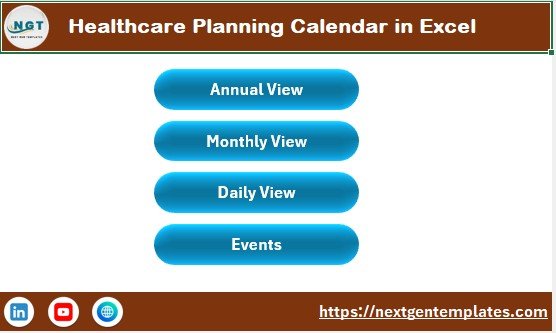
The Home sheet works as an index page.
Here, you will find four navigation buttons:
Annual View
Monthly View
Daily View
Events
These buttons allow you to move quickly between different views.
Therefore, you can access the required section instantly without scrolling through sheets.
2️⃣ Annual View Sheet – 12-Month Calendar Overview
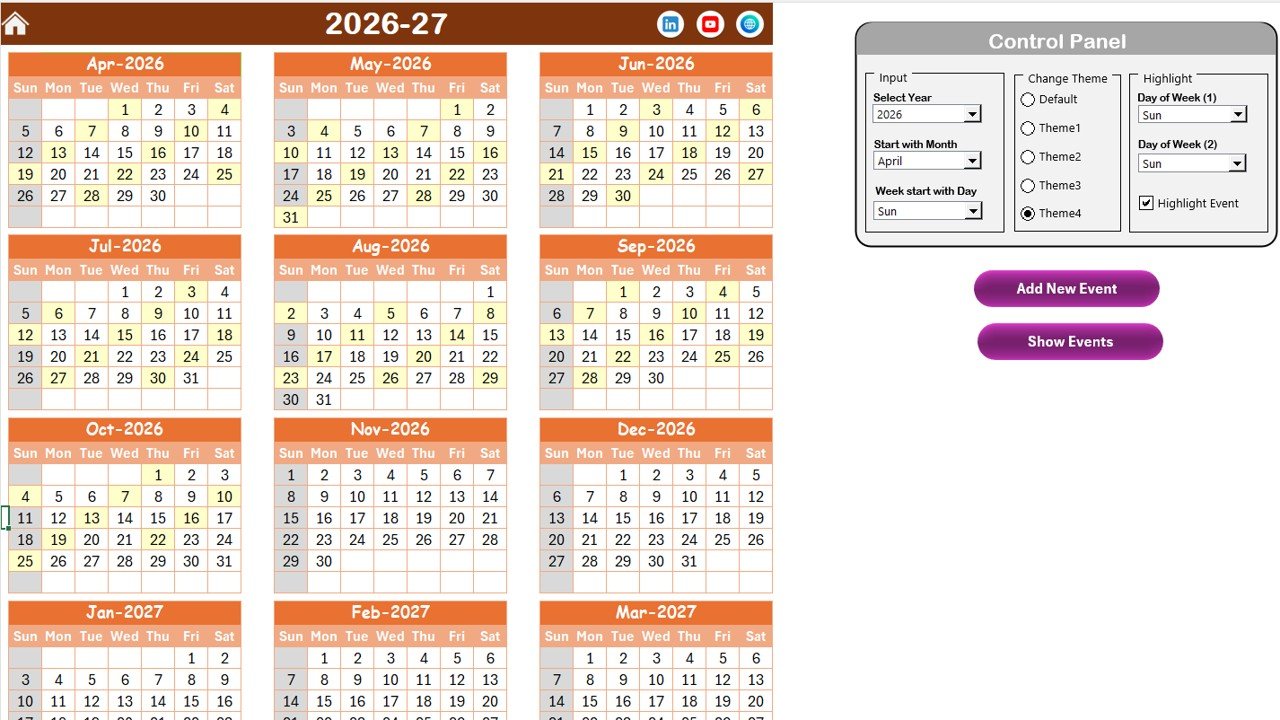
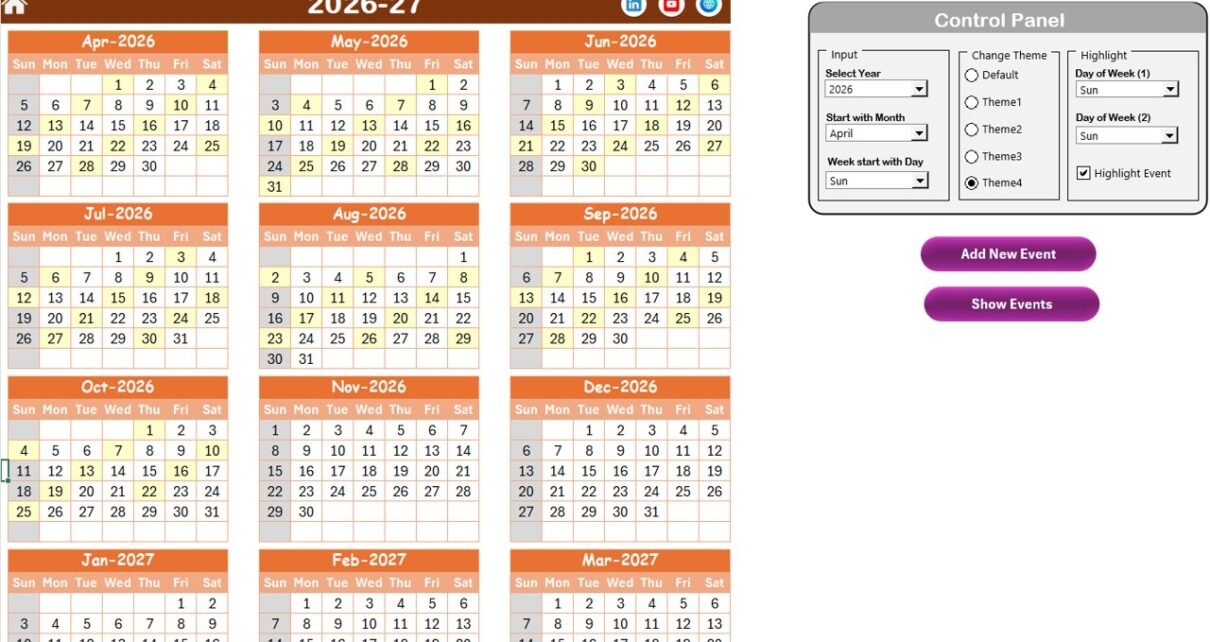
The Annual View sheet displays all 12 months in one place. This layout helps you see the entire year at a glance.
Control Panel Features
The Annual View includes a powerful control panel with three groups:
🔹 Input Group
In this section, you can:
Select the Year
Change the Starting Month
Adjust the Starting Day of the Week
Once you update these settings, the calendar adjusts automatically.
Therefore, you can customize the calendar based on fiscal year or operational preferences.
🔹 Change Theme Group
You can select from 5 color themes.
This feature allows you to:
Customize the workbook design
Match hospital branding
Improve visual appearance
As a result, the calendar becomes more professional and visually appealing.
🔹 Highlight Group
You can:
Highlight two selected weekdays (for example, Saturday and Sunday)
Enable event highlighting
If you check the “Highlight Event” option, the calendar highlights event dates in yellow.
Therefore, important activities stand out clearly.
Buttons in Annual View
✔ Add New Event Button
Select a date and click this button. It opens the Add New Event form. After entering details and clicking Submit, the event appears on the calendar.
✔ Show Event Button
Select a date and click this button to view all events scheduled for that day.
Thus, you can manage yearly planning efficiently.
Click to Purchases Healthcare Planning Calendar in Excel
3️⃣ Monthly View Sheet – Focused Monthly Planning
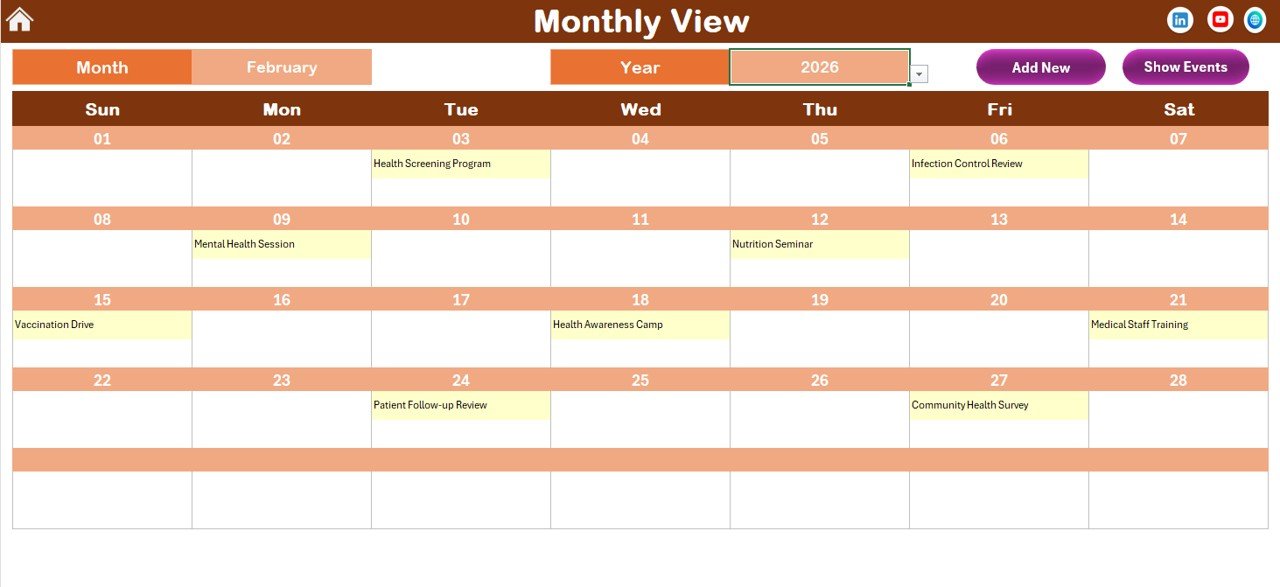
The Monthly View sheet shows one selected month at a time.
You can:
Choose Month
Choose Year
The calendar updates automatically based on your selection.
If a date contains one event, it displays directly. However, if multiple events exist, it shows “more than 1…” to indicate additional activities.
Buttons Available
Add New Event
Show Event
Therefore, monthly planning becomes organized and easy to manage.
4️⃣ Daily View Sheet – Detailed Event List
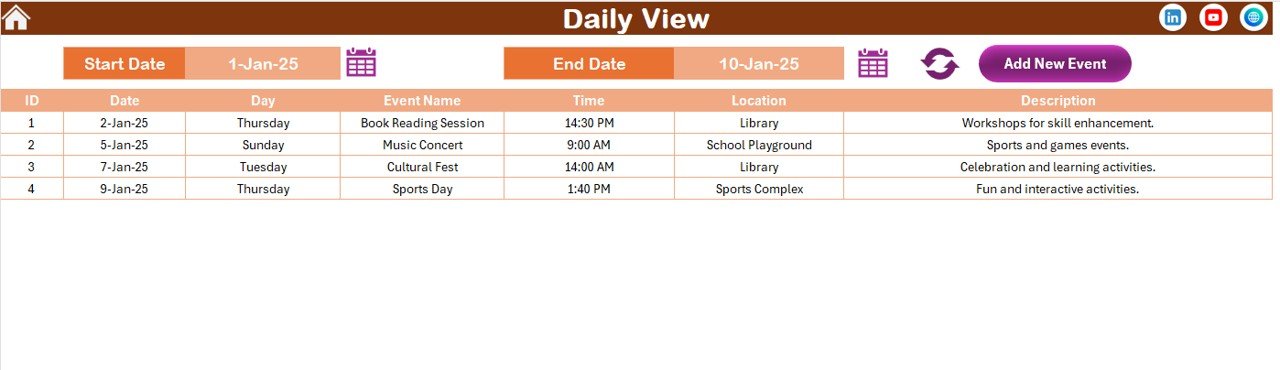
The Daily View sheet provides a detailed list of events within a selected date range.
At the top, you can:
Select Start Date
Select End Date
Click Refresh
The sheet then displays all events within that range.
Additionally, the Add New Event button allows quick event entry.
Therefore, administrators can monitor daily operations clearly.
Click to Purchases Healthcare Planning Calendar in Excel
5️⃣ Events Sheet – Event Database
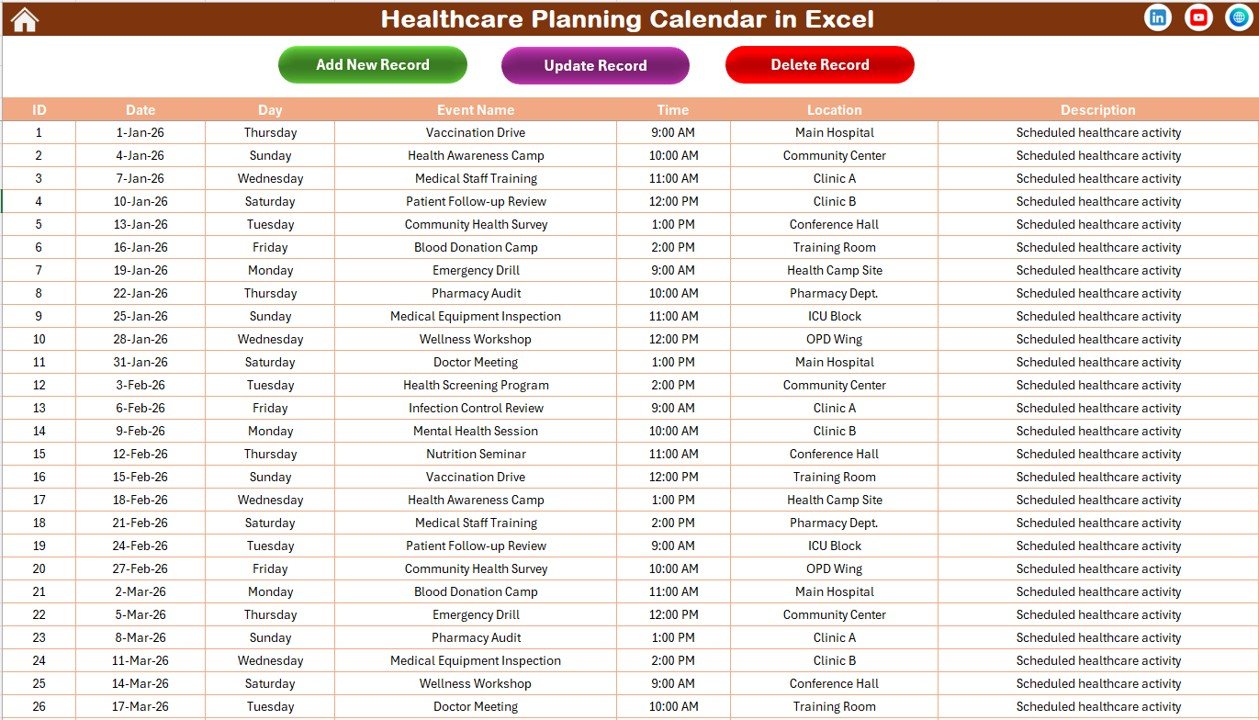
The Events sheet acts as the central database.
It stores the following information:
ID (Auto-generated)
Date
Day
Event Name
Time
Location
Description
This structured database ensures organized event storage.
Buttons in Events Sheet
✔ Add New Record
Opens the event form to add new events.
✔ Update Existing Record
Select an ID and update event details easily.
✔ Delete Record
Select an ID and remove the event instantly.
Thus, full event lifecycle management becomes simple and efficient.
What Are the Common Use Cases of Healthcare Planning Calendar?
Healthcare facilities can use this template for:
Doctor appointments
Surgery schedules
Staff shift planning
Vaccination campaigns
Health camps
Compliance audits
Training sessions
Equipment maintenance schedules
Therefore, the template serves multiple healthcare management needs.
Click to Purchases Healthcare Planning Calendar in Excel
Advantages of Healthcare Planning Calendar in Excel
Using this structured Excel calendar provides many benefits.
1️⃣ Centralized Scheduling
You manage annual, monthly, and daily schedules in one file.
2️⃣ Customizable Calendar Settings
You can adjust year, month, week start day, and themes easily.
3️⃣ Easy Event Management
You can add, update, and delete events with simple buttons.
4️⃣ Clear Visual Layout
Highlighted events improve visibility and reduce confusion.
5️⃣ Improved Administrative Efficiency
Staff can coordinate better and avoid scheduling conflicts.
6️⃣ Cost-Effective Solution
Excel provides a budget-friendly alternative to complex software systems.
Click to Purchases Healthcare Planning Calendar in Excel
Best Practices for the Healthcare Planning Calendar
To maximize effectiveness, follow these best practices.
✔ Update Events Regularly
Enter new appointments and schedules immediately.
✔ Use Clear Event Names
Avoid vague titles. Use detailed event descriptions.
✔ Review Annual Plan Quarterly
Adjust plans based on operational changes.
✔ Highlight Critical Dates
Use highlight settings for audits, inspections, and major events.
✔ Backup Data Regularly
Maintain a copy of the calendar to avoid data loss.
✔ Assign Responsibility
Ensure someone monitors and updates the calendar consistently.
How Does This Calendar Improve Healthcare Operations?
When you use a structured planning calendar:
You reduce scheduling errors
You improve patient management
You increase staff coordination
You prevent missed deadlines
You improve operational transparency
Consequently, healthcare operations become smoother and more organized.
Conclusion
Healthcare planning requires precision and structure. Without a proper calendar system, confusion increases quickly.
The Healthcare Planning Calendar in Excel offers:
Annual, monthly, and daily views
Event highlighting
Custom themes
Add, update, delete event functionality
Centralized database management
Instead of using scattered notes and multiple tools, you can rely on one powerful Excel calendar.
If you want better control over healthcare scheduling and event planning, this ready-to-use template provides a practical and efficient solution.
Click to Purchases Healthcare Planning Calendar in Excel
Frequently Asked Questions with Answers
1. What is a Healthcare Planning Calendar in Excel?
It is an Excel-based scheduling system designed to manage healthcare events, appointments, and annual planning activities.
2. Can small clinics use this template?
Yes. Small clinics and large hospitals can both use this calendar effectively.
3. Does it allow event updates?
Yes. You can add, update, and delete events easily using built-in buttons.
4. Can I customize the calendar design?
Yes. You can select from five color themes and adjust calendar settings.
5. Do I need advanced Excel skills?
No. Basic Excel knowledge is enough to use this template efficiently.
Click to Purchases Healthcare Planning Calendar in Excel
Visit our YouTube channel to learn step-by-step video tutorials


