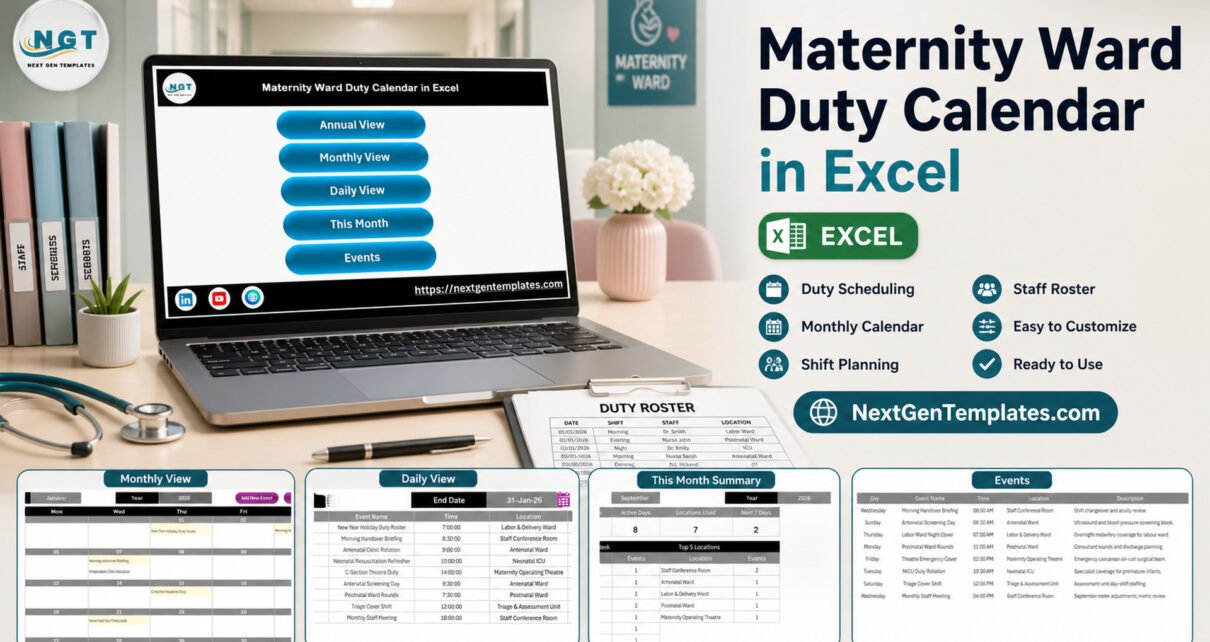
Maternity Ward Duty Calendar in Excel is a reusable administrative scheduling workbook with five connected planning views and one editable events register. Instead of maintaining separate annual, monthly, and date-range lists, a coordinator enters an operational event once and reviews it in the appropriate calendar view. The template includes 12 monthly calendars, month and year selection, a current-month summary, and a macro-enabled entry form. It supports scheduling work only; it does not monitor patients, recommend care, calculate safe staffing, or replace an approved hospital workforce or EHR platform.

Key Features of Maternity Ward Duty Calendar in Excel
The workbook is organized around practical date-based coordination. Its navigation screen links to Annual View, Monthly View, Daily View, This Month, and Events. The annual sheet shows all 12 months. The monthly sheet places event names on their dates. Daily View filters detailed records between a start and end date. This Month reports event count, active days, locations used, upcoming items, weekday distribution, and frequently used locations.
- One editable event source with date, time, location, name, and description
- Annual, monthly, and date-range views
- Current-month operational summary
- Add, update, and delete record controls
- Macro-enabled form for guided entry
- Sample administrative events that can be replaced
Workbook Sheets and Views Explained
Home and Annual View
The Home screen keeps navigation simple. Annual View presents a January-to-December calendar for the selected year, making it useful for mapping training days, recurring briefings, planned ward meetings, and other non-clinical operational dates.

Monthly View
Choose a month and year, then review event labels inside the calendar grid. Buttons allow a user to open the entry process or review events associated with a selected date.

Daily View
Daily View is a date-range report rather than a clinical dashboard. Each row displays ID, date, day, event name, time, location, and description. A coordinator can use it to prepare a briefing list or check operational appointments scheduled between two dates.

This Month Summary
The monthly summary counts scheduled events and active days, lists location usage, highlights the next seven days, and displays the current month’s detailed items. These are descriptive schedule counts only; they are not measures of clinical quality, workload, acuity, or staffing adequacy.

Events Register and Entry Form
The Events sheet is the workbook’s source table. Users can add, update, or delete records, while the VBA form provides a guided route for new entries. Keep descriptions administrative and do not enter patient identifiers, diagnoses, clinical notes, or other sensitive information.


Excel Calendar vs. Google Sheets vs. Paid Workforce SaaS – Feature Comparison
| Feature | Excel template | Google Sheets alternative | Paid workforce SaaS |
|---|---|---|---|
| Commercial model | One-time download | One-time template | Usually subscription |
| Offline access | Yes | Limited | Varies |
| Real-time collaboration | No | Yes | Usually |
| Custom event fields | Editable | Editable | Vendor-dependent |
| Formal rostering controls | Not included | Not included | Often included |
| Patient or EHR integration | Not included | Not included | Vendor-dependent |
The Excel option fits a small administrative workflow where local control and familiar spreadsheets matter. The Google Sheets edition may suit shared editing. A hospital needing credential checks, leave rules, automated coverage validation, audit controls, or EHR integration should evaluate an approved specialist system.
Who Should Use This Template
Maternity ward coordinators can maintain briefing and duty-event dates. Nursing education teams can plan refresher sessions. Administrative managers can build a monthly view of meetings, planned coverage notes, and operational events. Small clinics can use it as an internal planning aid when their approved processes permit local spreadsheets.
It is not intended for medical advice, clinical triage, patient monitoring, workload scoring, payroll, credentialing, mandatory nurse-to-patient ratio calculations, or regulatory compliance reporting.
Real-World Use Cases
Monthly handover planning
A coordinator records scheduled handover briefings with dates, times, and meeting locations, then circulates the Monthly View after internal approval.
Training calendar
An education lead lists neonatal resuscitation refreshers, orientation meetings, and review sessions without storing participant medical or patient information.
Operational event review
A ward administrator filters Daily View for the coming week and confirms each item against the official hospital roster or scheduling platform.
Advantages of This Excel Calendar
The main advantage is clarity: users enter structured event details and can review the same schedule at annual, monthly, current-month, and date-range levels. Excel keeps the file locally accessible, and the included form reduces repetitive navigation. The one-time price may suit teams that do not need a full workforce application.
The different views also answer different administrative questions. Annual View supports long-range orientation; Monthly View helps with a working calendar; Daily View produces a detailed list for a selected period; and This Month gives a compact operational summary. Users do not have to maintain four disconnected schedules, which reduces the chance that one view is updated while another is forgotten.
Opportunities for Improvement
The workbook does not provide simultaneous multi-user editing, automated conflict checking, approval workflows, credential validation, leave management, payroll integration, patient-system integration, notifications, or compliance controls. Those are deliberate boundaries. A future customized edition could add organization-specific fields, but any such change should be reviewed by the hospital’s IT, information-governance, and workforce owners.
Best Practices
- Store the workbook in an approved location and restrict access according to organizational policy.
- Avoid patient identifiers and unnecessary personal information.
- Use consistent event names, times, and locations.
- Confirm entries against the official roster before sharing.
- Keep a protected master copy before editing sample data.
- Enable macros only after confirming the file came from the trusted download.
- Follow Microsoft’s guidance for enabling or disabling macros in Microsoft 365 files.
Use a consistent naming convention
Choose stable names for routine events, such as “Morning Handover Briefing” or “Monthly Staff Meeting,” instead of changing the wording each month. Consistent labels make the monthly summary and date-range list easier to scan. Use the Location field for operational areas or meeting rooms, and reserve Description for short coordination notes rather than clinical information.
Build a review rhythm
At the start of each week, filter Daily View for the next seven days and compare the results with the official duty roster. At month-end, archive an approved copy before adding future events. This creates a simple working history, although it is not a substitute for the audit trail of a dedicated workforce platform.
Protect the working copy
Keep the original download unchanged and work from a named copy. If several coordinators need input, appoint one owner to consolidate changes or use an approved shared platform. Desktop Excel files can be overwritten when multiple people exchange copies by email, so version naming and controlled storage remain important.
Explore Relevant Templates
For a dedicated nursing schedule, read about the Nurse Duty Roster Calendar in Excel. For another healthcare administration workflow, see the Patient Discharge Planning Calendar in Excel. You can also compare the Ambulance Duty Calendar and broader Excel calendar collection.
Frequently Asked Questions
Is this a patient-care or clinical scheduling system?
No. It is an administrative calendar and does not provide clinical decision support or patient monitoring.
Does the template guarantee safe staffing or legal compliance?
No. Your authorized managers must approve duties under applicable policies and regulations.
Can I enter employee or patient information?
Use only the minimum operational information permitted by your organization. Do not enter patient identifiers or sensitive clinical details.
Do macros have to be enabled?
Yes, the entry form and automation require Excel for Windows desktop with macros enabled. Review the file’s trust and security settings first.
Can I edit the event categories and descriptions?
Yes. The supplied records are examples and can be replaced with your approved terminology.
Is a manual included?
Yes. The download package contains the .xlsm workbook and Excel Calendar User Manual PDF.
Where can I get the template?
View the Excel calendar product page on NextGenTemplates.
About the Author
Built by PK – Microsoft Certified Professional with 15+ years of Excel, Google Sheets, and Power BI experience. Founder of NextGenTemplates, reaching 300K+ subscribers across YouTube channels. Every template is hand-built and tested before release.
Conclusion
This calendar brings annual, monthly, daily, and current-month planning into one editable workbook. Use it to organize administrative events, then validate every duty or coverage item through your hospital’s official approval process. Visit NextGenTemplates to review the screenshots and download details. For more Excel walkthroughs, follow PK: An Excel Expert on YouTube.
Start with the included sample records, test the filters, and replace each example before operational use.