The pet care industry continues to grow rapidly. Pet owners now expect high-quality grooming, boarding, daycare, training, and veterinary services. Therefore, pet care businesses must track performance consistently and professionally.
However, many pet service providers still rely on scattered spreadsheets. As a result, they struggle to monitor bookings, revenue, customer satisfaction, occupancy rates, and staff productivity in one place.
So, how can you track everything clearly and make smarter decisions?
The answer is simple.
You need a Pet Care Services KPI Dashboard in Power BI.
This ready-to-use Power BI dashboard transforms your Excel data into interactive reports. Moreover, it helps you compare MTD and YTD performance, monitor targets, and analyze trends instantly. Consequently, you gain full control over your pet care business.
In this detailed guide, you will learn:
What a Pet Care Services KPI Dashboard in Power BI is
Why pet businesses need KPI tracking
Detailed explanation of all 3 dashboard pages
Excel data structure requirements
Important KPIs for pet care services
Advantages of Pet Care Services KPI Dashboard in Power BI
Best Practices for implementation
Frequently Asked Questions
Let us explore everything step by step.
Click to Purchases Pet Care Services KPI Dashboard in Power BI
📊 What Is a Pet Care Services KPI Dashboard in Power BI?
A Pet Care Services KPI Dashboard in Power BI is an interactive business intelligence report that tracks key performance indicators (KPIs) for pet-related services.
Instead of manually reviewing Excel sheets, you can:
Select a month
Filter by KPI group
View target vs actual performance
Compare current year vs previous year
Analyze trends visually
Because Power BI offers dynamic filtering and drill-through features, you can explore performance in detail within seconds.
🐶 Why Do Pet Care Businesses Need KPI Tracking?
Pet care businesses manage multiple services daily. For example:
Grooming appointments
Boarding occupancy
Vet consultations
Training sessions
Retail product sales
If you do not track KPIs properly, you lose visibility. Therefore, you cannot identify growth areas or operational problems.
KPI tracking helps you:
Improve revenue management
Optimize service capacity
Increase customer retention
Monitor staff efficiency
Compare performance month-over-month
Moreover, when you measure performance regularly, you make faster and more confident decisions.
Click to Purchases Pet Care Services KPI Dashboard in Power BI
📁 What Are the 3 Pages in the Pet Care Services KPI Dashboard in Power BI?
This ready-to-use Power BI file contains 3 powerful pages:
1️⃣ Summary Page
2️⃣ KPI Trend Page
3️⃣ KPI Definition Page (Drill-Through)
Let us understand each page in detail.
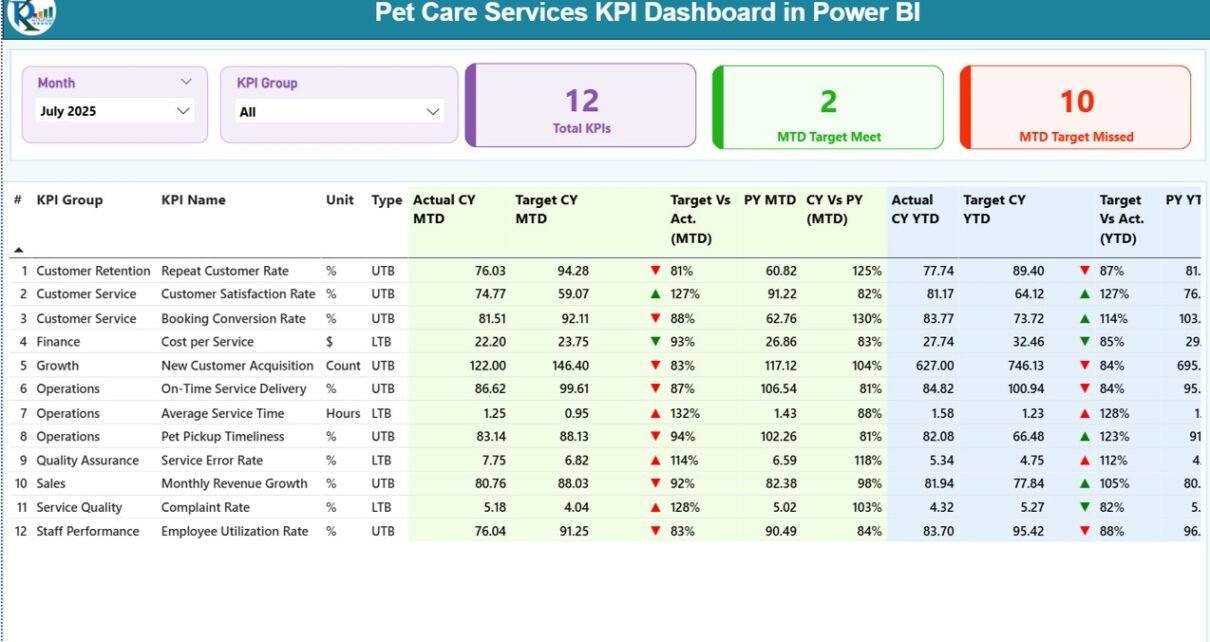
1️⃣ Summary Page – Complete KPI Overview
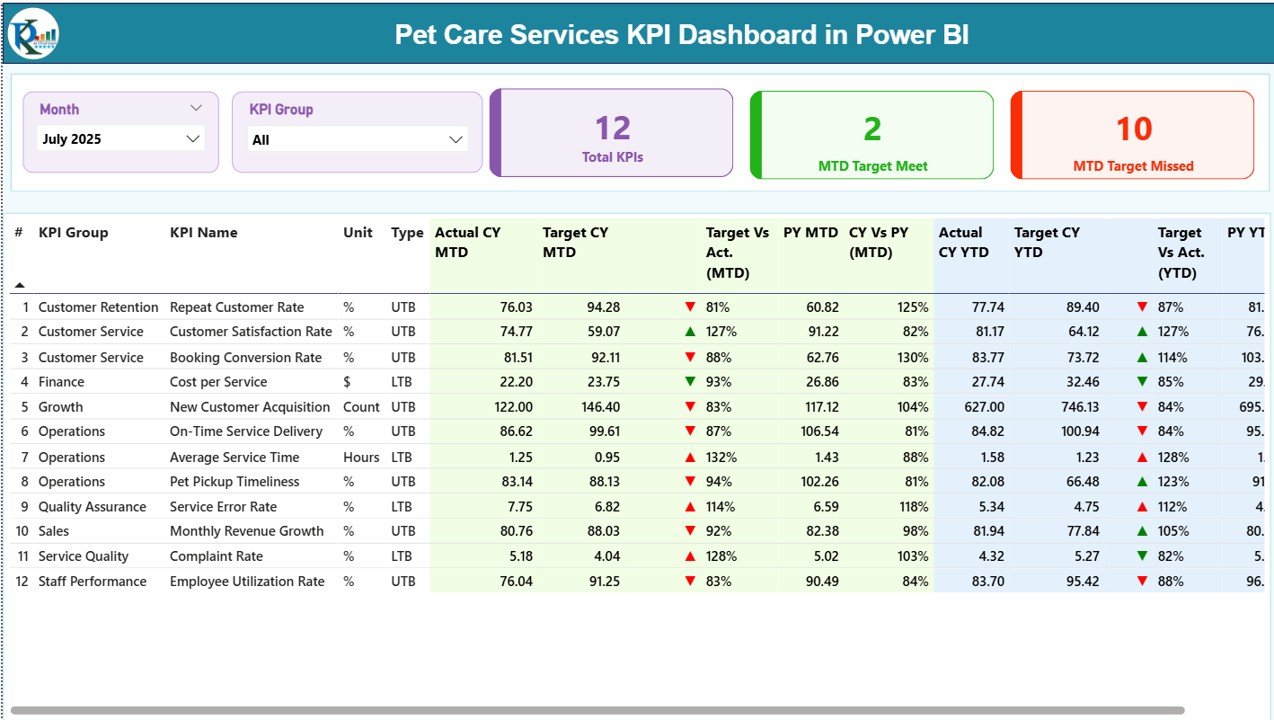
The Summary Page works as the main performance screen.
At the top of the dashboard, you will find:
Month slicer
KPI Group slicer
Therefore, you can filter data instantly.
Key KPI Cards
On this page, you will also see 3 KPI cards:
Total KPIs Count
MTD Target Meet Count
MTD Target Missed Count
Because of these cards, you quickly understand overall performance status.
Detailed KPI Table
Below the cards, the dashboard displays a structured KPI table with the following columns:
KPI Number
KPI Group
KPI Name
Unit
Type (LTB or UTB)
Actual CY MTD
Target CY MTD
MTD Icon (▲ or ▼ with color indicators)
Target Vs Actual (MTD %)
PY MTD
CY Vs PY (MTD %)
Actual CY YTD
Target CY YTD
YTD Icon (▲ or ▼)
Target Vs Actual (YTD %)
PY YTD
CY Vs PY (YTD %)
How Are Calculations Done?
Target vs Actual (MTD) = Actual MTD / Target MTD
CY vs PY (MTD) = Current Year MTD / Previous Year MTD
Target vs Actual (YTD) = Actual YTD / Target YTD
CY vs PY (YTD) = Current Year YTD / Previous Year YTD
Because of percentage calculations and visual icons, you can instantly detect performance gaps.
Click to Purchases Pet Care Services KPI Dashboard in Power BI
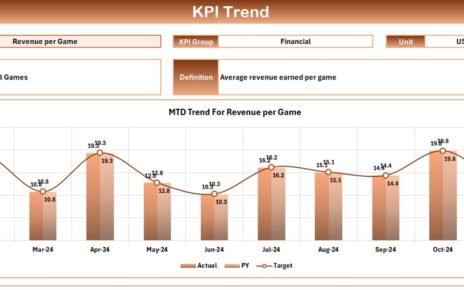
2️⃣ KPI Trend Page – Visual Performance Analysis
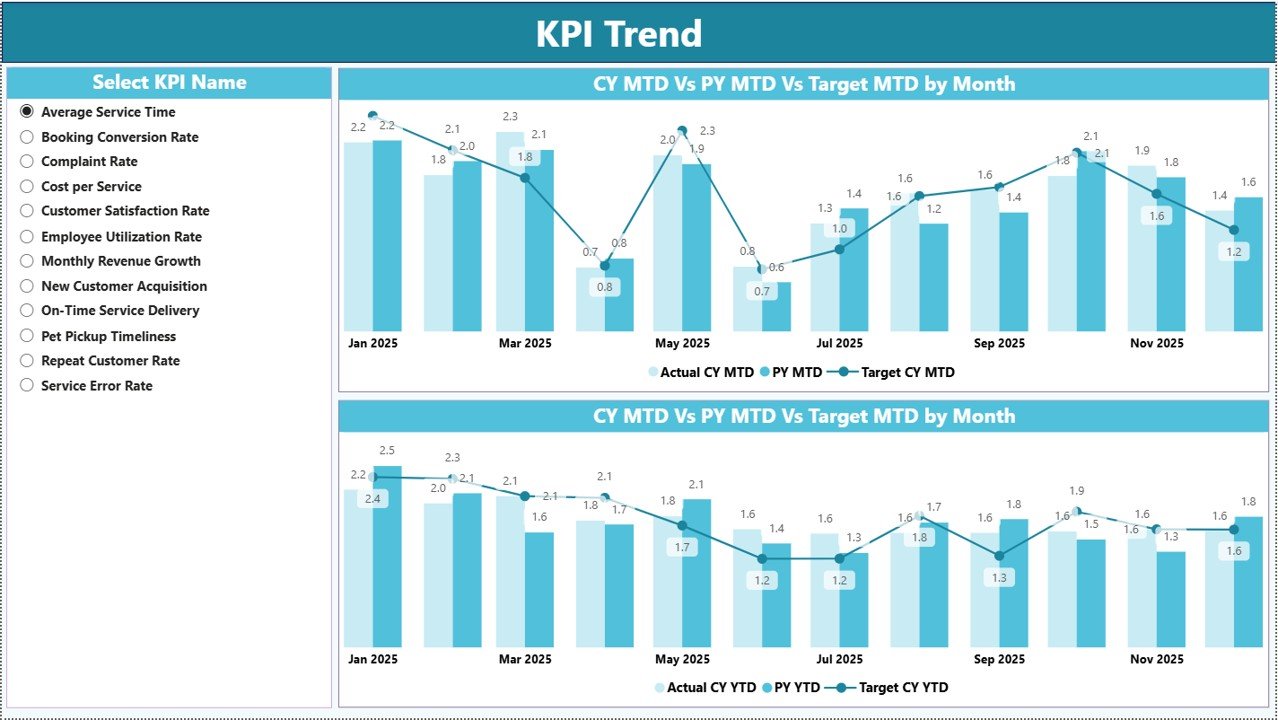
The KPI Trend Page allows deeper analysis.
On the left side, you can select the KPI name using a slicer.
Once selected, the page displays:
MTD Combo Chart (Actual, Target, Previous Year)
YTD Combo Chart (Actual, Target, Previous Year)
Therefore, you can analyze:
Growth trends
Seasonal performance
Target achievement patterns
Because the charts update dynamically, you can explore different KPIs without navigating away.
3️⃣ KPI Definition Page – Drill-Through Details
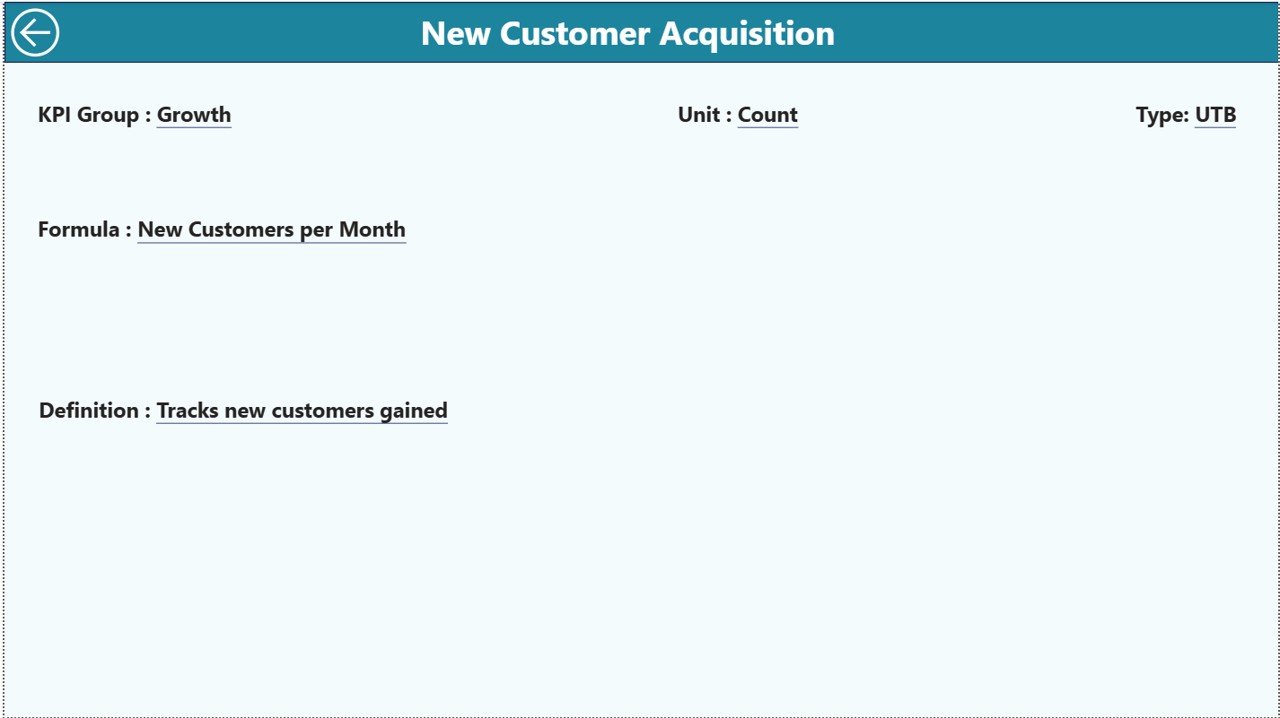
The KPI Definition Page remains hidden. However, you can access it using the drill-through feature from the Summary Page.
This page displays:
KPI Number
KPI Group
KPI Name
Unit
Formula
Definition
Type (LTB or UTB)
Therefore, whenever you need clarity about a KPI calculation, you can check its definition instantly.
To return to the Summary Page, simply click the back button at the top-left corner.
Click to Purchases Pet Care Services KPI Dashboard in Power BI
📊 What Excel Data Structure Supports This Dashboard?
The dashboard uses an Excel file as its data source. You must maintain three worksheets.
1️⃣ Input_Actual Sheet
In this sheet, you enter:
KPI Name
Month (first date of month)
MTD numbers
YTD numbers
Because you use structured data entry, Power BI updates automatically after refresh.
2️⃣ Input_Target Sheet
Here, you enter:
KPI Name
Month
MTD target
YTD target
As a result, the dashboard calculates Target vs Actual percentages accurately.
3️⃣ KPI Definition Sheet
This sheet stores:
KPI Number
KPI Group
KPI Name
Unit
Formula
Definition
Type (LTB or UTB)
Therefore, the dashboard maintains clarity and consistency.
Click to Purchases Pet Care Services KPI Dashboard in Power BI
🐕 What Are Important KPIs for Pet Care Services?
A pet care business must track financial, operational, and customer metrics.
Financial KPIs
Total Revenue
Revenue per Service
Average Transaction Value
Profit Margin
Cost per Service
Operational KPIs
Appointment Utilization Rate
Boarding Occupancy Rate
Service Completion Time
Staff Productivity Rate
Customer KPIs
Customer Retention Rate
Repeat Booking Rate
Customer Satisfaction Score
Net Promoter Score
Marketing KPIs
Lead Conversion Rate
Cost per Acquisition
Online Booking Percentage
When you track these KPIs consistently, you create a strong growth foundation.
⭐ Advantages of Pet Care Services KPI Dashboard in Power BI
The Pet Care Services KPI Dashboard in Power BI provides several advantages.
✅ 1. Real-Time Interactive Reporting
You can filter by month and KPI group instantly.
✅ 2. Clear Target Monitoring
You compare Actual vs Target easily.
✅ 3. Year-over-Year Comparison
You analyze performance against previous year data.
✅ 4. Visual Trend Analysis
Combo charts highlight growth patterns clearly.
✅ 5. Drill-Through Clarity
You can view KPI definitions in one click.
✅ 6. Professional Business Intelligence
Power BI offers a modern and interactive reporting experience.
Click to Purchases Pet Care Services KPI Dashboard in Power BI
🛠️ Best Practices for the Pet Care Services KPI Dashboard in Power BI
To maximize dashboard value, follow these best practices.
✔️ 1. Update Excel Data Monthly
Enter accurate MTD and YTD numbers regularly.
✔️ 2. Use Consistent Month Formatting
Always use the first date of the month.
✔️ 3. Define KPIs Clearly
Maintain proper KPI definitions in the Definition sheet.
✔️ 4. Review Dashboard Monthly
Analyze trends and take corrective action immediately.
✔️ 5. Focus on Missed Targets
Investigate KPIs showing red indicators.
✔️ 6. Train Your Team
Ensure managers understand KPI calculations and interpretation.
📈 How Can This Dashboard Help You Grow Faster?
This dashboard helps you:
Increase revenue visibility
Improve operational efficiency
Monitor staff performance
Identify seasonal trends
Plan marketing strategies
Make data-driven pricing decisions
Because you rely on real data, you reduce guesswork and improve results.
🏁 Conclusion
The pet care industry demands professional management. Therefore, you must adopt structured performance tracking systems.
The Pet Care Services KPI Dashboard in Power BI offers:
Interactive reporting
MTD and YTD tracking
Target monitoring
Year-over-year comparison
Drill-through KPI definitions
Moreover, it transforms simple Excel data into powerful business intelligence.
If you want to scale your grooming salon, veterinary clinic, boarding center, or pet daycare facility, this dashboard provides the perfect foundation.
Start tracking. Start analyzing. Start growing. 🐾📊
Click to Purchases Pet Care Services KPI Dashboard in Power BI
❓ Frequently Asked Questions (FAQs)
1. What type of pet businesses can use this dashboard?
Pet grooming salons, boarding centers, veterinary clinics, pet daycare providers, and training institutes can use it.
2. Do I need advanced Power BI knowledge?
No. You only need basic Power BI skills to refresh data and use slicers.
3. Can I customize KPIs?
Yes. You can modify KPI definitions and add new KPIs in the Excel file.
4. How often should I update the data?
You should update it monthly for accurate tracking.
5. Does this dashboard support multi-location tracking?
Yes. You can add location columns in the Excel file and extend filters in Power BI.
6. Can I share this dashboard with my team?
Yes. You can publish it to Power BI Service and share access securely.
Click to Purchases Pet Care Services KPI Dashboard in Power BI
Visit our YouTube channel to learn step-by-step video tutorials