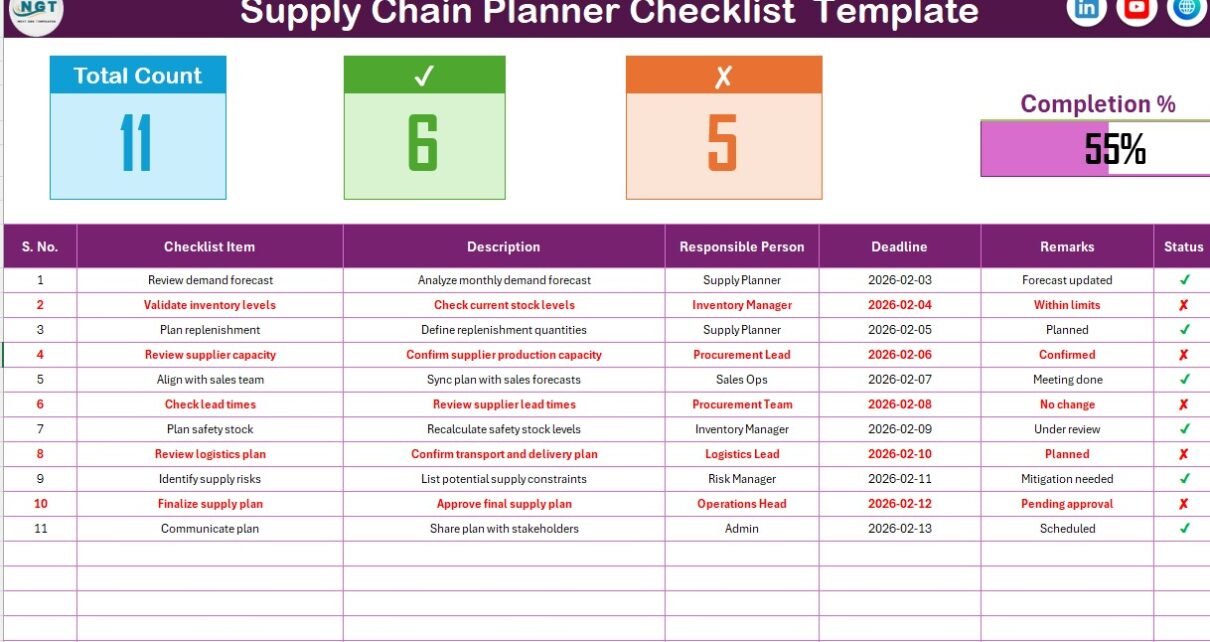
Managing supply chain activities without a clear checklist often creates confusion, missed deadlines, and operational delays. Therefore, organizations now rely on structured tools to maintain accuracy and accountability. A Supply Chain Planner Checklist in Excel offers a simple yet powerful solution to organize, track, and control every critical supply chain task in one place.
Because Excel remains familiar and flexible, businesses of all sizes prefer checklist-based planning over complex software. Moreover, a well-designed checklist improves visibility, enhances coordination, and reduces planning errors significantly.
In this detailed guide, you will learn everything about the Supply Chain Planner Checklist in Excel, including how it works, its structure, key features, advantages, best practices, and frequently asked questions.
Click to Purchases Supply Chain Planner Checklist in Excel
What Is a Supply Chain Planner Checklist in Excel?
A Supply Chain Planner Checklist in Excel is a structured, ready-to-use checklist template designed to help supply chain planners track daily, weekly, and monthly planning activities efficiently.
Instead of managing tasks through emails, notebooks, or scattered files, planners record all checklist items in a single Excel worksheet. As a result, teams gain clarity, consistency, and accountability across procurement, inventory, logistics, and demand planning processes.
Moreover, Excel allows planners to:
-
Track task completion visually
-
Assign responsibilities clearly
-
Monitor deadlines easily
-
Measure planning progress instantly
Therefore, this checklist acts as a centralized control system for supply chain planning.
Why Do Supply Chain Planners Need a Checklist?
Supply chain planning involves multiple moving parts. Without a checklist, even experienced planners may overlook small but critical tasks. Consequently, delays, stock issues, and cost overruns occur.
A Supply Chain Planner Checklist in Excel helps because it:
-
Reduces human error
-
Improves task visibility
-
Enhances team accountability
-
Supports timely decision-making
Additionally, since Excel works offline, planners can use it anytime without dependency on internet or software licenses.
Click to Purchases Supply Chain Planner Checklist in Excel
How Does a Supply Chain Planner Checklist in Excel Work?
The checklist works as a task-driven planning tracker. Planners update task statuses daily, while Excel automatically reflects progress and completion metrics.
Here is how it typically works:
-
First, planners list all supply chain planning activities.
-
Next, they assign responsible persons and deadlines.
-
Then, they update task status as ✔ (completed) or ✘ (pending).
-
Finally, Excel calculates total progress automatically.
As a result, planners always know what is completed and what needs attention.
What Are the Key Worksheets in a Supply Chain Planner Checklist Template?
This Supply Chain Planner Checklist in Excel includes two well-structured worksheets designed for simplicity and efficiency.
Click to Purchases Supply Chain Planner Checklist in Excel
What Is the “Supply Chain Planner Checklist” Sheet?
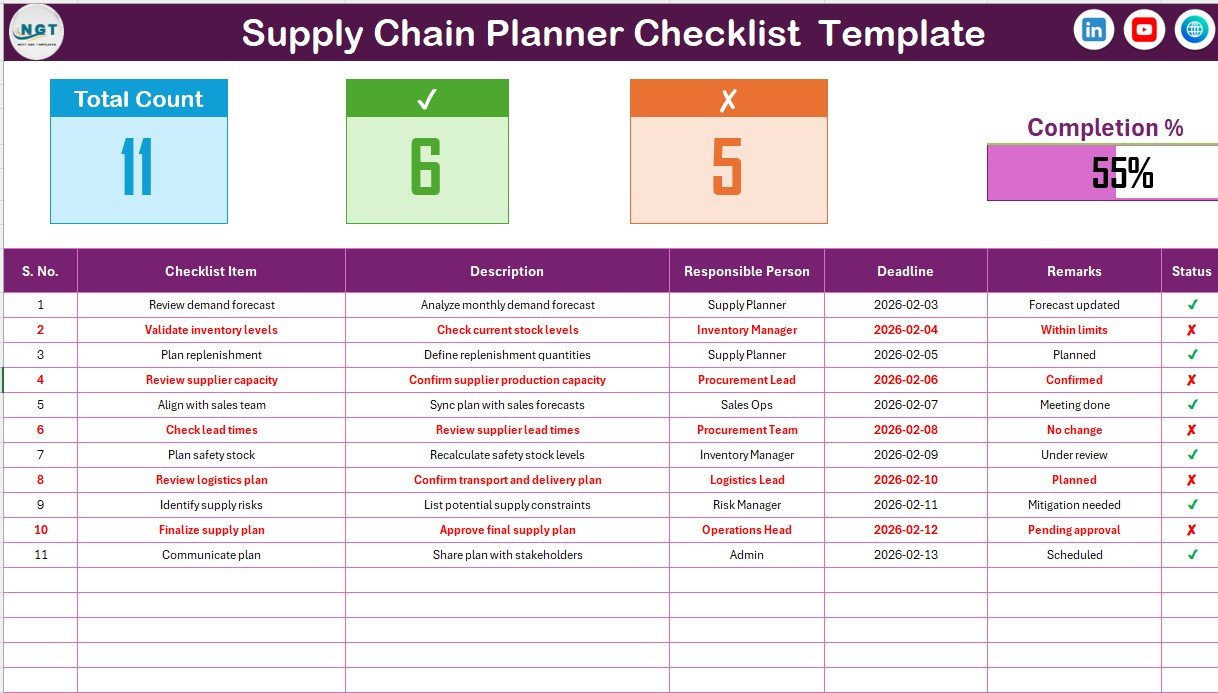
The Supply Chain Planner Checklist sheet acts as the main working area where planners capture and track all checklist activities.
Top Section: Checklist Summary Information
At the top of the sheet, you can see a quick summary of checklist performance. This section provides instant visibility into planning status.
It includes:
-
Total Count – Total number of checklist items
-
Checked Count – Number of completed tasks
-
Crossed Count – Number of pending tasks
-
Progress Bar – Visual indicator of completion percentage
Because of this summary, planners immediately understand progress without scanning the full table.
What Is the Checklist Table and How Is It Used?
The checklist table forms the core of the template. Planners update task information directly in this table.
Checklist Table Columns Explained
The checklist table includes the following columns:
-
Serial No. – Sequential numbering of checklist items
-
Checklist Item – Short title of the planning activity
-
Description – Brief explanation of the task
-
Responsible Person – Person accountable for completion
-
Deadline – Due date for the task
-
Remarks – Additional notes or comments
-
Status – Task completion indicator (✔ or ✘)
Because each column serves a specific purpose, planners avoid confusion and maintain consistency.
Click to Purchases Supply Chain Planner Checklist in Excel
How Does the Status Column Improve Planning Control?
The Status column plays a critical role in the checklist.
-
✔ indicates task completion
-
✘ indicates pending or incomplete task
As soon as planners update the status, the summary metrics and progress bar update automatically. Therefore, planning reviews become faster and more accurate.
What Is the “List” Sheet and Why Is It Important?
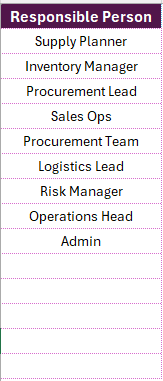
The List sheet stores a unique list of Responsible Persons. This list supports dropdown selection in the main checklist table.
Benefits of Using the List Sheet
-
Ensures consistent naming
-
Avoids spelling errors
-
Enables clean dropdown selection
-
Improves data accuracy
Because of this structure, planners maintain standardized data across the checklist.
How Does a Supply Chain Planner Checklist Improve Efficiency?
A Supply Chain Planner Checklist in Excel simplifies planning by turning complex processes into manageable tasks.
It improves efficiency because:
-
Tasks remain clearly defined
-
Responsibilities remain transparent
-
Deadlines stay visible
-
Progress tracking becomes automatic
Moreover, planners spend less time tracking and more time optimizing supply chain decisions.
Who Can Use a Supply Chain Planner Checklist in Excel?
This checklist suits a wide range of professionals, including:
-
Supply Chain Planners
-
Demand Planners
-
Procurement Teams
-
Inventory Managers
-
Operations Managers
-
Logistics Coordinators
Because Excel remains universal, teams across industries can use it easily.
Click to Purchases Supply Chain Planner Checklist in Excel
Advantages of Supply Chain Planner Checklist in Excel
Using a Supply Chain Planner Checklist in Excel offers several practical advantages for planning teams.
1. Improves Task Visibility
Planners view all tasks in one place. Therefore, nothing slips through the cracks.
2. Enhances Accountability
Each task includes a responsible person. As a result, ownership becomes clear.
3. Saves Time and Effort
Automated counts and progress bars reduce manual tracking work significantly.
4. Reduces Planning Errors
Structured checklists minimize missed steps and oversight.
5. Supports Better Decision-Making
Real-time status updates allow planners to prioritize urgent tasks quickly.
6. Easy to Customize
Excel allows easy modification based on business needs.
7. No Additional Software Cost
Since Excel already exists in most organizations, no extra investment is required.
How Can You Customize a Supply Chain Planner Checklist in Excel?
Customization makes the checklist even more powerful.
You can:
-
Add new checklist items
-
Modify deadlines easily
-
Change responsible persons using dropdowns
-
Add conditional formatting for overdue tasks
-
Insert additional columns if required
Therefore, the checklist grows with your planning needs.
How Does This Checklist Support Daily, Weekly, and Monthly Planning?
Supply chain planners often manage tasks at different frequencies. This checklist supports all planning horizons.
-
Daily tasks: Inventory checks, order confirmations
-
Weekly tasks: Demand review, supplier follow-ups
-
Monthly tasks: Forecast alignment, capacity planning
Because of its flexible structure, planners use the same checklist across timelines.
Click to Purchases Supply Chain Planner Checklist in Excel
What Are the Best Practices for Using a Supply Chain Planner Checklist in Excel?
To get maximum value, follow these best practices carefully.
1. Update Status Daily
Always update ✔ or ✘ daily. This habit keeps progress accurate.
2. Keep Checklist Items Short
Use concise checklist items and descriptions for clarity.
3. Assign Clear Ownership
Always assign one responsible person per task.
4. Review Deadlines Regularly
Check deadlines weekly to avoid delays.
5. Use Remarks Wisely
Add remarks only when necessary to avoid clutter.
6. Protect Formula Cells
Lock summary formulas to prevent accidental changes.
7. Archive Old Checklists
Save completed checklists monthly for reference and audits.
Click to Purchases Supply Chain Planner Checklist in Excel
How Does a Progress Bar Help in Supply Chain Planning?
The progress bar provides instant visual feedback.
-
It shows completion percentage clearly
-
It motivates planners to close pending tasks
-
It helps managers review status quickly
Because visuals communicate faster than numbers, progress bars add real value.
Can This Checklist Support Team Collaboration?
Yes, the checklist supports collaboration effectively.
Teams can:
-
Share the file on a shared drive
-
Update tasks simultaneously (with version control)
-
Review progress during meetings
As a result, coordination improves across departments.
How Is This Checklist Different from Regular To-Do Lists?
Unlike basic to-do lists, this checklist:
-
Includes responsible persons
-
Tracks deadlines
-
Shows progress automatically
-
Supports structured planning
Therefore, it works as a professional planning tool rather than a simple task list.
When Should Organizations Use a Supply Chain Planner Checklist?
Organizations should use this checklist when:
-
Planning processes lack structure
-
Task tracking becomes manual
-
Missed deadlines affect operations
-
Supply chain complexity increases
Thus, the checklist acts as a preventive control mechanism.
Conclusion: Why Should You Use a Supply Chain Planner Checklist in Excel?
A Supply Chain Planner Checklist in Excel transforms supply chain planning into a structured, visible, and manageable process. Instead of relying on memory or scattered notes, planners gain a centralized system that improves accountability and efficiency.
Moreover, because Excel remains flexible and user-friendly, teams adopt the checklist quickly without training challenges. When used consistently and correctly, this checklist becomes an essential planning companion for supply chain professionals.
Click to Purchases Supply Chain Planner Checklist in Excel
Frequently Asked Questions About Supply Chain Planner Checklist in Excel
What Is the Main Purpose of a Supply Chain Planner Checklist in Excel?
The main purpose is to organize, track, and monitor supply chain planning tasks efficiently in one structured file.
Can Beginners Use This Checklist Easily?
Yes, the checklist uses simple Excel features, so even beginners can use it comfortably.
Does the Checklist Require Macros or VBA?
No, the checklist works using standard Excel formulas and dropdowns only.
Can I Add More Checklist Items Later?
Yes, you can easily add or modify checklist items as planning needs change.
How Does the Checklist Track Progress Automatically?
Excel formulas calculate total, checked, and crossed counts based on task status.
Is This Checklist Suitable for Small Businesses?
Yes, small businesses benefit greatly because it offers structure without high cost.
Can This Checklist Be Used Offline?
Yes, Excel works offline, so planners can use the checklist anytime.
How Often Should Planners Review the Checklist?
Planners should review it daily or weekly depending on planning frequency.
Click to Purchases Supply Chain Planner Checklist in Excel
Visit our YouTube channel to learn step-by-step video tutorials