Managing smart city contracts without structured performance tracking creates delays, cost overruns, compliance risks, and weak accountability. However, modern smart city programs involve multiple vendors, long-term contracts, public funding, strict SLAs, and continuous monitoring requirements. Therefore, city administrators and project leaders must rely on data-driven tools instead of manual reporting.
That is exactly why a Smart Cities Contract KPI Dashboard in Power BI plays a critical role in modern urban governance.
In this in-depth and SEO-friendly article, you will learn what a Smart Cities Contract KPI Dashboard in Power BI is, how it works, its page structure, KPI logic, Excel data design, advantages, best practices, and frequently asked questions. By the end, you will clearly understand how this dashboard transforms complex contract data into actionable insights for smart city success.
Click to buy Smart Cities Contract KPI Dashboard in Power BI
What Is a Smart Cities Contract KPI Dashboard in Power BI?
A Smart Cities Contract KPI Dashboard in Power BI is a ready-to-use analytical reporting solution designed to track, analyze, and monitor key performance indicators related to smart city contracts.
Instead of managing scattered Excel sheets and static reports, this dashboard consolidates all contract KPIs into a single interactive Power BI report. As a result, decision-makers gain real-time visibility into performance, risks, and compliance.
Moreover, because smart city contracts span multiple years and vendors, this dashboard ensures continuous performance tracking across Month-to-Date (MTD) and Year-to-Date (YTD) periods.
Why Do Smart City Contracts Need KPI Dashboards?
Smart city contracts involve infrastructure, technology, public services, and digital platforms. Therefore, performance gaps can quickly escalate into governance issues. Because of that, KPI dashboards become essential.
Key reasons include:
- Multiple vendors and contractors operate simultaneously
- Public funds demand transparency and accountability
- SLAs and milestones require continuous tracking
- Delays impact citizens directly
- Manual reporting increases errors and delays
However, when you use a Smart Cities Contract KPI Dashboard in Power BI, you gain clarity, control, and confidence.
How Does a Smart Cities Contract KPI Dashboard in Power BI Work?
This dashboard works by combining Excel-based input data with Power BI visual analytics. Because the data structure stays simple, teams can update KPIs without technical complexity.
The workflow looks like this:
- Enter actual KPI values in Excel
- Enter target KPI values in Excel
- Define KPIs, formulas, and units
- Refresh the Power BI dashboard
- Analyze performance instantly
As a result, the dashboard always reflects the latest contract performance.
Key Pages in the Smart Cities Contract KPI Dashboard in Power BI
This dashboard contains three powerful pages, each designed for a specific analytical purpose.
Summary Page: How Does the Main Dashboard Help Decision-Makers?
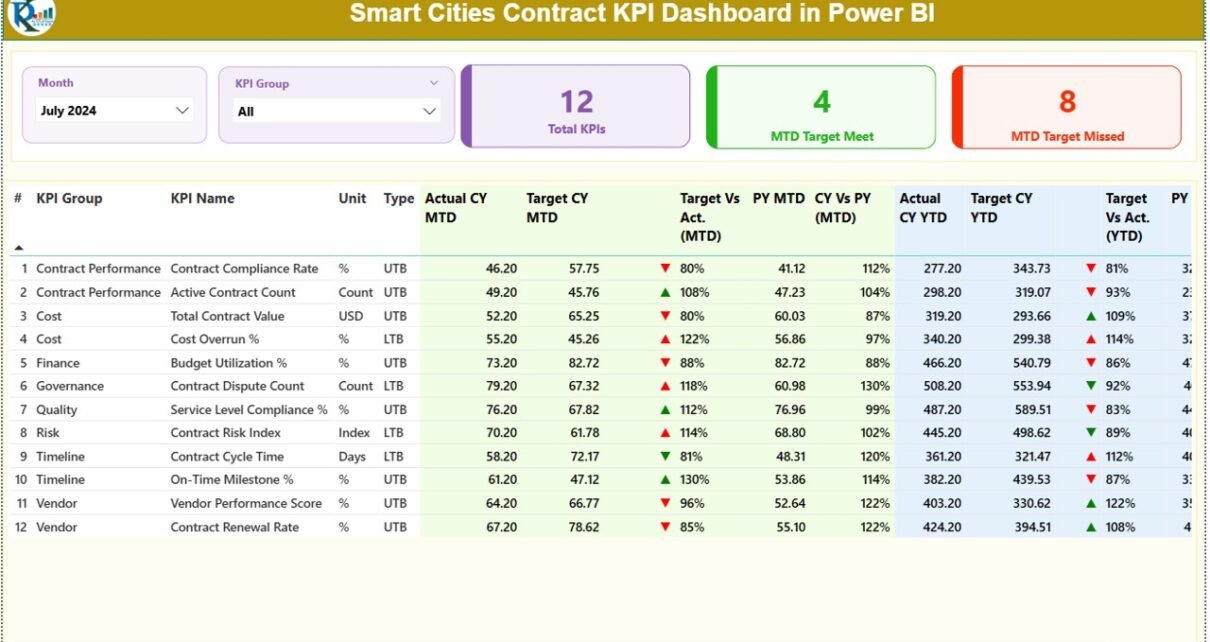
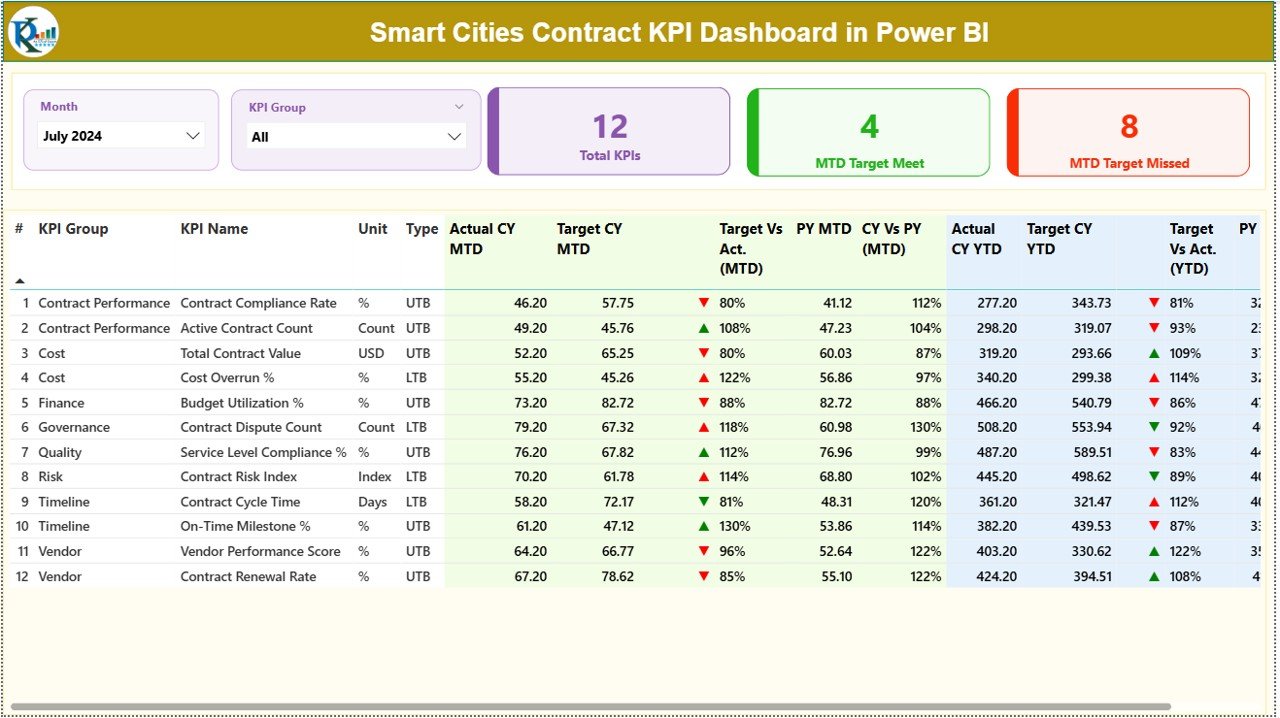
The Summary Page acts as the central control panel of the dashboard. It provides a high-level overview of all smart city contract KPIs.
Top-Level Slicers
- Month slicer for time-based analysis
- KPI Group slicer for category-wise insights
Because of these slicers, users can instantly focus on specific contracts or KPI groups.
KPI Cards at the Top
The dashboard shows three key cards:
- Total KPIs Count
- MTD Target Met Count
- MTD Target Missed Count
These cards immediately highlight performance health.
Detailed KPI Table: What Metrics Does It Show?
The detailed KPI table provides deep insights into each contract KPI.
Core Identification Fields
- KPI Number – Unique sequence number
- KPI Group – Category of KPI
- KPI Name – Name of the KPI
- Unit – Measurement unit
- Type – LTB (Lower the Better) or UTB (Upper the Better)
MTD Performance Metrics
- Actual CY MTD – Current year MTD actual value
- Target CY MTD – Current year MTD target
- MTD Icon – ▲ or ▼ with green/red indicators
- Target vs Actual (MTD) – Actual ÷ Target (%)
- PY MTD – Previous year MTD value
- CY vs PY (MTD) – Current ÷ Previous (%)
Because these metrics appear together, users quickly spot trends and deviations.
YTD Performance Metrics
- Actual CY YTD – Current year YTD actual
- Target CY YTD – Current year YTD target
- YTD Icon – ▲ or ▼ with color indicators
- Target vs Actual (YTD) – Actual ÷ Target (%)
- PY YTD – Previous year YTD value
- CY vs PY (YTD) – Current ÷ Previous (%)
Therefore, both short-term and long-term performance remain visible.
Click to buy Smart Cities Contract KPI Dashboard in Power BI
KPI Trend Page: How Can You Analyze Performance Over Time?
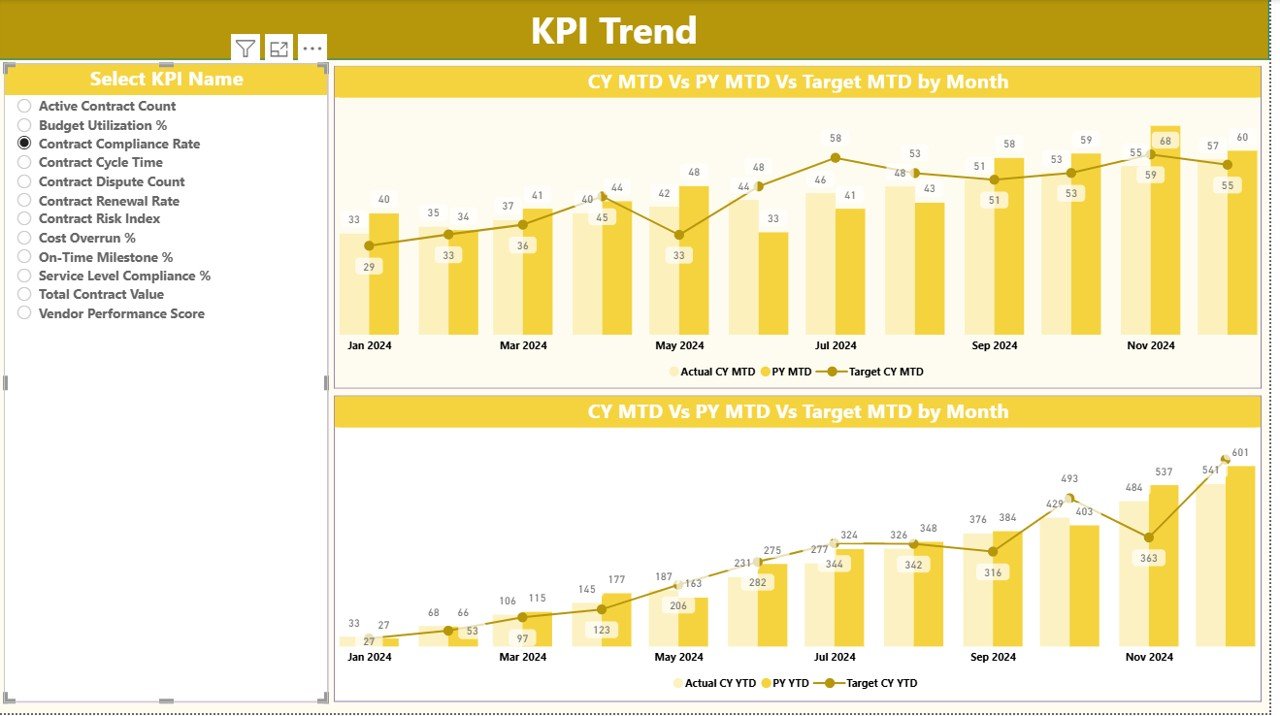
The KPI Trend Page focuses on time-based analysis.
Key Features
- Two combo charts for MTD and YTD
- Actual values for Current Year and Previous Year
- Target values displayed for comparison
- KPI selection slicer on the left
Because combo charts combine bars and lines, trends become easier to interpret.
Click to buy Smart Cities Contract KPI Dashboard in Power BI
KPI Definition Page: Why Is Documentation Important?
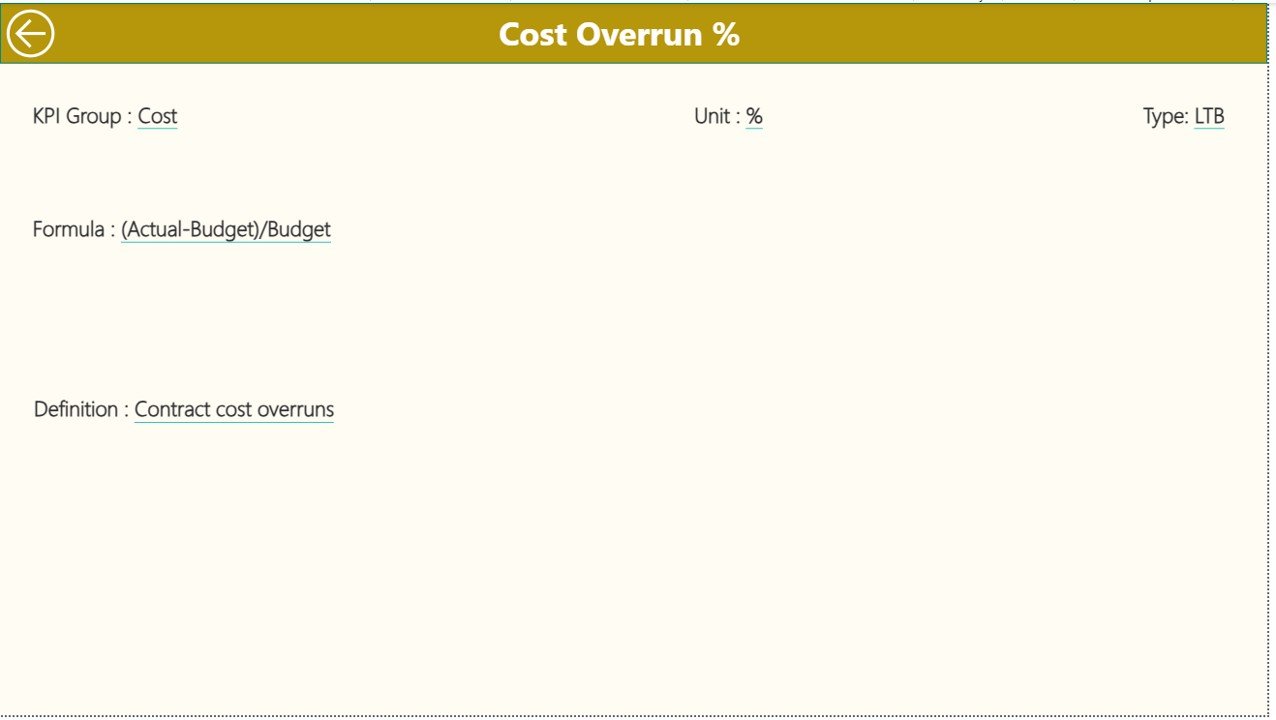
The KPI Definition Page acts as a hidden drill-through page. It provides detailed documentation for each KPI.
Information Available
- KPI formula
- KPI definition
- Measurement logic
- KPI type (LTB or UTB)
Users can drill through from the Summary Page and return using the back button. Therefore, governance teams maintain clarity and consistency.
Excel Data Design: How Should You Prepare the Data?
The dashboard uses an Excel file as its data source. This design keeps data entry simple and scalable.
Input_Actual Sheet
Fill in:
- KPI Name
- Month (first date of the month)
- MTD actual value
- YTD actual value
Input_Target Sheet
Fill in:
- KPI Name
- Month (first date of the month)
- MTD target value
- YTD target value
KPI Definition Sheet
Fill in:
- KPI Number
- KPI Group
- KPI Name
- Unit
- Formula
- Definition
- Type (LTB or UTB)
Because this structure stays standardized, Power BI calculations remain accurate.
What Types of KPIs Can You Track?
A Smart Cities Contract KPI Dashboard in Power BI can track multiple KPI categories, such as:
- Contract compliance KPIs
- Vendor performance KPIs
- Financial utilization KPIs
- SLA adherence KPIs
- Timeline and milestone KPIs
- Service quality KPIs
As a result, the dashboard adapts to different smart city programs.
Advantages of Smart Cities Contract KPI Dashboard in Power BI
Centralized Performance Monitoring
- All contract KPIs appear in one dashboard
- No need for multiple reports
Improved Transparency
- Clear target vs actual tracking
- Easy public accountability
Faster Decision-Making
- Real-time insights
- Early issue detection
Trend-Based Analysis
- MTD and YTD comparisons
- Year-over-year benchmarking
Standardized KPI Logic
- Consistent formulas
- Reduced reporting errors
Opportunities for Improvement in Smart Cities KPI Dashboards
Although the dashboard delivers strong insights, continuous improvement always helps.
Possible Enhancements
- Add vendor-wise drill-downs
- Integrate GIS-based visuals
- Include alert-based notifications
- Automate data refresh schedules
- Add contract risk scoring
Therefore, organizations can evolve the dashboard over time.
Best Practices for the Smart Cities Contract KPI Dashboard in Power BI
Define KPIs Clearly
Always document definitions and formulas before implementation.
Maintain Clean Excel Data
Use consistent naming and date formats.
Review Targets Regularly
Update targets based on contract changes.
Use LTB and UTB Correctly
Select KPI type carefully to avoid misleading icons.
Train Stakeholders
Ensure users understand slicers and visuals.
Who Can Use This Dashboard?
This dashboard suits:
- Smart city mission offices
- Municipal corporations
- Urban development authorities
- Project management units
- Contract governance teams
- Policy and audit departments
Conclusion: Why This Dashboard Is Essential for Smart Cities
A Smart Cities Contract KPI Dashboard in Power BI transforms raw contract data into structured intelligence. Instead of reactive management, cities gain proactive control.
Because the dashboard delivers transparency, accountability, and performance clarity, it supports smarter decisions and better citizen outcomes. Therefore, every smart city initiative should adopt KPI-driven monitoring.
Frequently Asked Questions (FAQs)
What is a Smart Cities Contract KPI Dashboard in Power BI?
It is an interactive Power BI report that tracks contract performance using predefined KPIs.
Do I need technical skills to use this dashboard?
No. You only need to update Excel data and refresh Power BI.
Can I customize KPIs?
Yes. You can modify KPI definitions, groups, and targets.
How often should data be updated?
You can update data monthly or as required by contracts.
Does this dashboard support YTD analysis?
Yes. It supports both MTD and YTD analysis.
Can it track multiple vendors?
Yes. You can extend the data model to include vendor dimensions.
Visit our YouTube channel to learn step-by-step video tutorials
Watch the step-by-step video tutorial:
Click to buy Smart Cities Contract KPI Dashboard in Power BI