Customer feedback plays a vital role in improving products, services, and overall customer experience. However, collecting meaningful feedback requires proper preparation. When teams skip planning or rely on unstructured notes, surveys fail, responses drop, and insights remain unclear. As a result, businesses miss valuable improvement opportunities.
That is exactly where a Customer Feedback Preparation Guide Checklist in Excel becomes an essential tool.
This ready-to-use Excel checklist helps teams plan, track, and manage every step of customer feedback preparation in a structured way. Instead of guessing what to do next, teams follow a clear checklist with responsibilities, deadlines, and progress tracking.
In this detailed and SEO-friendly guide, you will learn what a Customer Feedback Preparation Guide Checklist in Excel is, how it works, why it is important, and how each worksheet supports effective feedback preparation. Moreover, you will explore its advantages, best practices, and frequently asked questions. By the end of this article, you will clearly understand how this Excel checklist simplifies feedback preparation and improves outcomes.
Click to Purchases Customer Feedback Preparation Guide Checklist in Excel
What Is a Customer Feedback Preparation Guide Checklist in Excel?
A Customer Feedback Preparation Guide Checklist in Excel is a structured checklist template designed to help organizations prepare for customer feedback activities.
Instead of managing feedback preparation through emails or informal task lists, this Excel-based checklist centralizes all preparation steps in one place. As a result, teams stay aligned, organized, and accountable.
This checklist typically helps with:
-
Planning customer feedback activities
-
Assigning responsibilities
-
Tracking preparation progress
-
Managing deadlines
-
Ensuring nothing gets missed
Because it is built in Excel, it remains simple, flexible, and easy to use.
Why Is Customer Feedback Preparation Important?
Customer feedback initiatives require careful planning. Therefore, skipping preparation often leads to poor response rates and unreliable data.
A structured preparation checklist helps organizations:
-
Define clear feedback objectives
-
Prepare questions and communication in advance
-
Assign clear ownership to tasks
-
Track readiness before launching feedback
-
Improve feedback quality and consistency
Moreover, preparation ensures teams collect actionable insights instead of random opinions.
Introduction to Customer Feedback Preparation Guide Checklist in Excel (Ready-to-Use Template)
The Customer Feedback Preparation Guide Checklist in Excel is a professionally designed and ready-to-use template created to simplify feedback preparation.
This template allows you to:
-
Capture all checklist items in one table
-
Track checked and crossed items easily
-
Monitor preparation progress using a progress bar
-
Assign responsible persons and deadlines
-
Maintain clean and consistent checklist data
Since everything works inside Excel, users do not need any additional tools or advanced skills.
Click to Purchases Customer Feedback Preparation Guide Checklist in Excel
Key Features of Customer Feedback Preparation Guide Checklist in Excel
Below are the key features that make this checklist practical and effective.
✅ Structured Feedback Preparation Checklist
Plan every feedback-related task step by step.
📊 Progress Tracking Dashboard
View total items, completed items, pending items, and completion percentage.
✔️ Simple Status Updates
Mark tasks as ✔ (completed) or ✘ (not completed).
👥 Responsibility Assignment
Assign each checklist item to a responsible person.
📅 Deadline Management
Track deadlines clearly to avoid delays.
Worksheets Included in Customer Feedback Preparation Guide Checklist in Excel
This Excel template contains two well-organized worksheets, each serving a specific purpose.
1. Customer Feedback Preparation Guide Checklist Sheet – Main Checklist
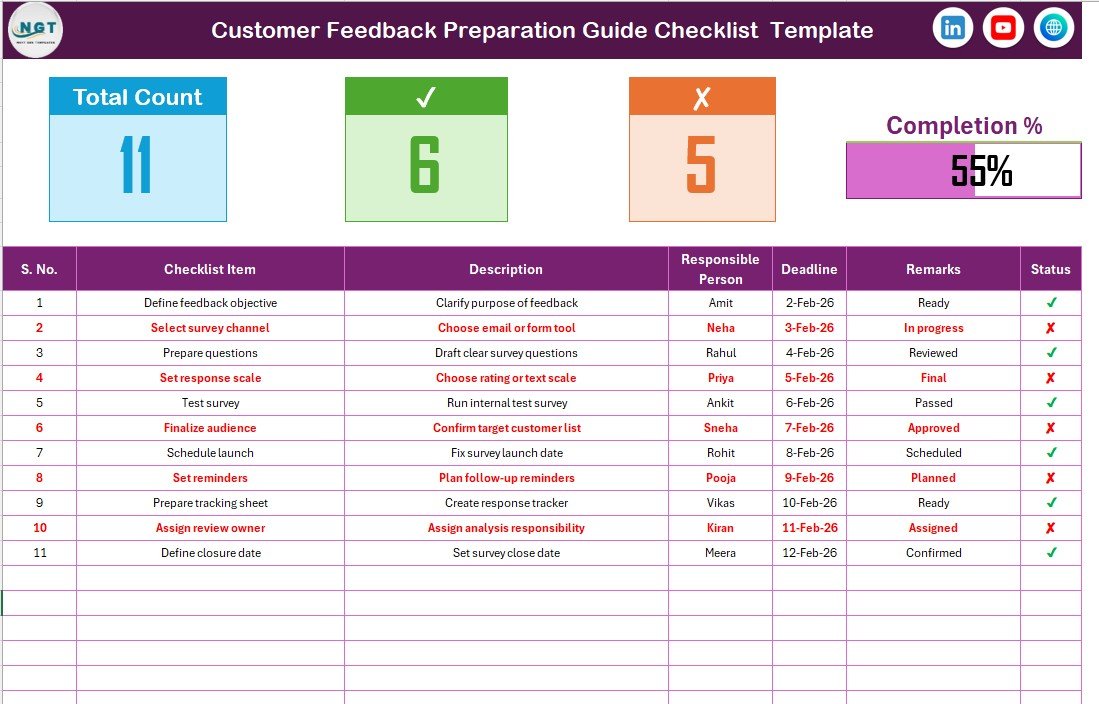
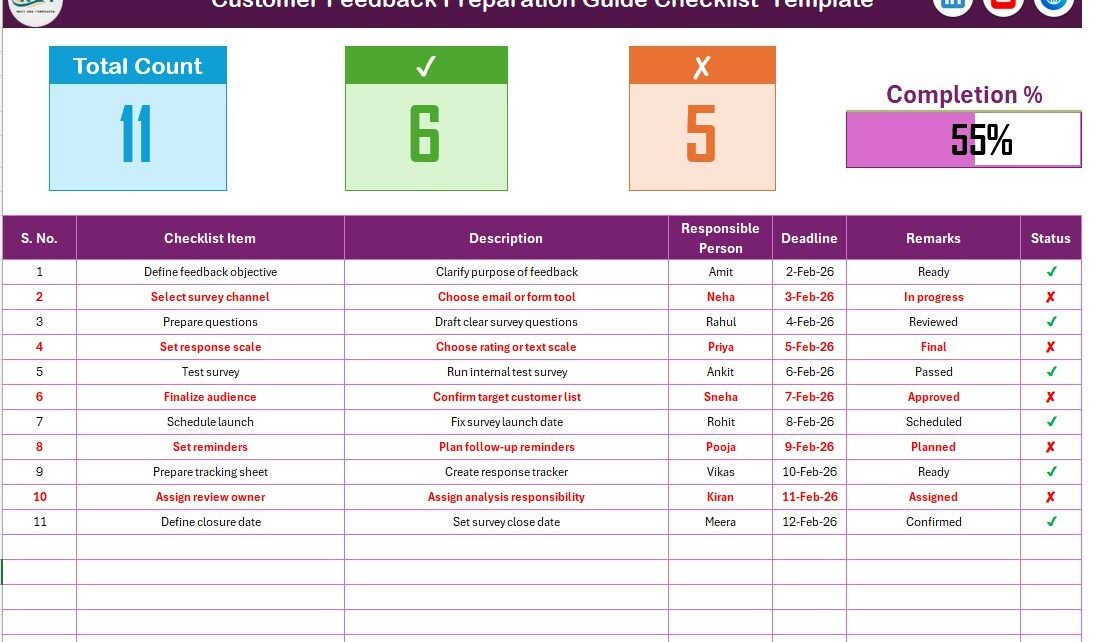
The Customer Feedback Preparation Guide Checklist Sheet is the main working area of the template.
Top Section – Checklist Overview
At the top of the sheet, you can view a summary of checklist progress, including:
-
Total checklist count
-
Checked (completed) count
-
Crossed (pending) count
-
Progress bar showing completion percentage
This section gives an instant snapshot of readiness.
Checklist Table – Core Planning Area
The checklist table is where you manage all feedback preparation tasks.
Columns Included in Checklist Table
-
Serial No. – Sequence number of checklist items
-
Checklist Item – Task or activity to complete
-
Description – Short explanation of the task
-
Responsible Person – Owner of the task
-
Deadline – Due date for completion
-
Remarks – Additional notes or comments
-
Status – ✔ for completed or ✘ for pending
By updating the Status column, the dashboard and progress bar update automatically.
Click to Purchases Customer Feedback Preparation Guide Checklist in Excel
2. List Sheet – Dropdown Support Sheet
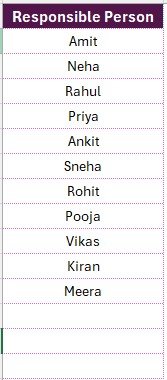
The List Sheet stores a unique list of responsible persons.
Purpose of List Sheet
-
Create dropdown values for the Responsible Person column
-
Ensure consistent naming
-
Avoid data entry errors
This sheet improves data accuracy and usability.
How Does This Checklist Improve Feedback Preparation?
By combining structured tasks with visual progress tracking, this checklist improves preparation significantly.
-
Teams stay clear on what to do next
-
Responsibilities remain well-defined
-
Deadlines stay visible
-
Preparation gaps get identified early
Therefore, feedback initiatives launch smoothly and successfully.
Advantages of Customer Feedback Preparation Guide Checklist in Excel
Using this checklist offers multiple benefits.
✅ Better Organization
All preparation tasks stay in one place.
✅ Improved Accountability
Clear ownership for every task.
✅ Time-Saving Preparation
No need to create checklists from scratch.
✅ Visual Progress Tracking
Instant visibility into readiness level.
✅ Excel-Based Simplicity
Easy to use and customize.
Click to Purchases Customer Feedback Preparation Guide Checklist in Excel
Best Practices for Customer Feedback Preparation Guide Checklist in Excel
Follow these best practices to get maximum value from the checklist.
📌 Define Clear Checklist Items
Keep checklist items specific and actionable.
📌 Update Status Regularly
Mark tasks as ✔ or ✘ as work progresses.
📌 Assign One Owner per Task
Avoid confusion by assigning a single responsible person.
📌 Review Progress Before Launch
Ensure all critical items are completed.
📌 Keep Descriptions Short
Maintain clarity and readability.
Who Can Use This Checklist?
This checklist is suitable for:
-
Customer experience teams
-
Quality assurance teams
-
Marketing teams
-
Product managers
-
Service managers
Anyone involved in customer feedback initiatives can use this template.
Use Cases for Customer Feedback Preparation Guide Checklist
This checklist supports various feedback activities, such as:
-
Customer satisfaction surveys
-
Product feedback collection
-
Service quality reviews
-
Net promoter score preparation
-
Post-project feedback initiatives
As a result, teams prepare feedback programs with confidence.
Conclusion
The Customer Feedback Preparation Guide Checklist in Excel is a simple yet powerful tool for organizing and managing feedback preparation activities.
Instead of relying on informal task lists, this ready-to-use Excel template provides structure, clarity, and progress visibility. With checklist tracking, responsibility assignment, and a visual progress bar, teams stay organized and prepared.
If your goal is to improve feedback quality and execution, this Excel checklist is the right solution.
Click to Purchases Customer Feedback Preparation Guide Checklist in Excel
Frequently Asked Questions (FAQs)
❓ What is a Customer Feedback Preparation Guide Checklist in Excel?
It is an Excel-based checklist used to plan and track customer feedback preparation tasks.
❓ Do I need advanced Excel skills to use this checklist?
No, basic Excel knowledge is enough.
❓ Can I customize checklist items?
Yes, you can add, edit, or remove checklist items easily.
❓ How does the progress bar work?
The progress bar updates automatically based on ✔ and ✘ status values.
❓ Can I assign multiple responsible persons?
The template supports one responsible person per task for clarity.
Click to Purchases Customer Feedback Preparation Guide Checklist in Excel
Visit our YouTube channel to learn step-by-step video tutorials