Managing supply chain operations has become more complex than ever. Because businesses now deal with multiple vendors, tight delivery timelines, rising costs, and global disruptions, even small gaps can cause serious delays and losses. Therefore, organizations need a simple yet powerful way to monitor daily supply chain activities.
That is exactly where a Supply Chain Monitoring Checklist in Excel becomes extremely valuable.
Instead of tracking tasks through emails, notebooks, or scattered spreadsheets, teams can use one structured Excel checklist to monitor progress, assign responsibility, and ensure nothing gets missed. As a result, supply chain teams gain visibility, control, and consistency across operations.
In this detailed guide, you will learn what a Supply Chain Monitoring Checklist in Excel is, why it is important, how it works, its structure, worksheets, features, advantages, best practices, and frequently asked questions. By the end of this article, you will clearly understand how this ready-to-use Excel template improves supply chain monitoring and execution.
Click to Purchases Supply Chain Monitoring Checklist in Excel
What Is a Supply Chain Monitoring Checklist in Excel?
A Supply Chain Monitoring Checklist in Excel is a structured and interactive Excel template designed to track, monitor, and control supply chain activities using checklist items.
Instead of relying on memory or manual follow-ups, supply chain teams record each task in a checklist format. Then, they update the task status using simple symbols such as ✔ (Completed) or ✘ (Not Completed). Because Excel supports formulas, drop-downs, and progress tracking, the checklist becomes both visual and actionable.
Moreover, this checklist acts as a central control sheet for procurement, logistics, inventory, warehousing, and distribution activities.
Why Do Businesses Need a Supply Chain Monitoring Checklist?
Supply chain operations involve multiple stakeholders, deadlines, and dependencies. Therefore, without a monitoring system, teams often face confusion, delays, and accountability issues.
Here is why businesses strongly need a Supply Chain Monitoring Checklist in Excel:
-
Because manual tracking increases the risk of missed tasks
-
Because email-based follow-ups create confusion
-
Because teams need real-time visibility of task status
-
Because managers must track accountability clearly
-
Because supply chain delays directly impact customer satisfaction
As a result, a structured Excel checklist helps organizations stay proactive instead of reactive.
Click to Purchases Supply Chain Monitoring Checklist in Excel
How Does a Supply Chain Monitoring Checklist in Excel Work?
The working logic of a Supply Chain Monitoring Checklist in Excel remains very simple and user-friendly.
First, the user enters checklist items related to supply chain tasks.
Next, the user assigns responsibility and deadlines.
Then, the user updates the status using ✔ or ✘.
Finally, Excel automatically calculates totals and progress percentages.
Because everything updates dynamically, managers can instantly see how many tasks are completed and how many still need attention.
What Are the Worksheets in a Supply Chain Monitoring Checklist Template?
This ready-to-use Supply Chain Monitoring Checklist in Excel contains two structured worksheets. Each worksheet plays a specific role in monitoring operations efficiently.
1. Supply Chain Monitoring Checklist Sheet Tab (Main Sheet)
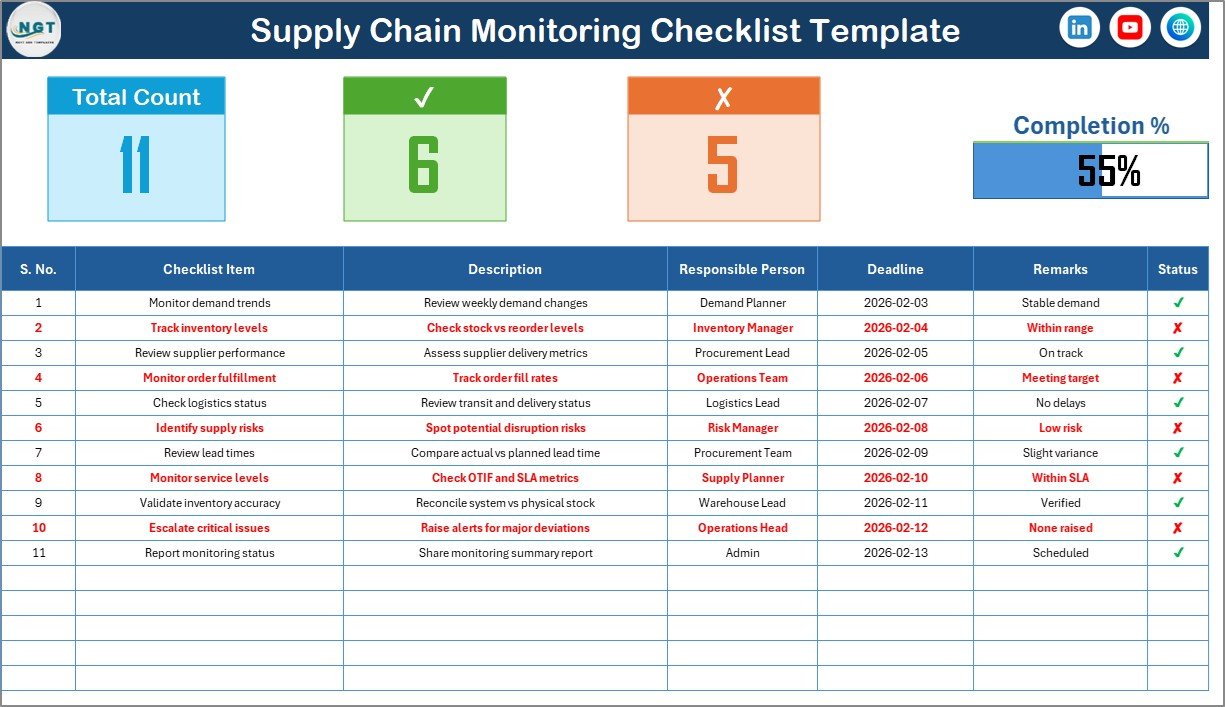
This is the primary worksheet where users capture, update, and monitor all checklist activities.
What Is Included in the Top Section of the Checklist Sheet?
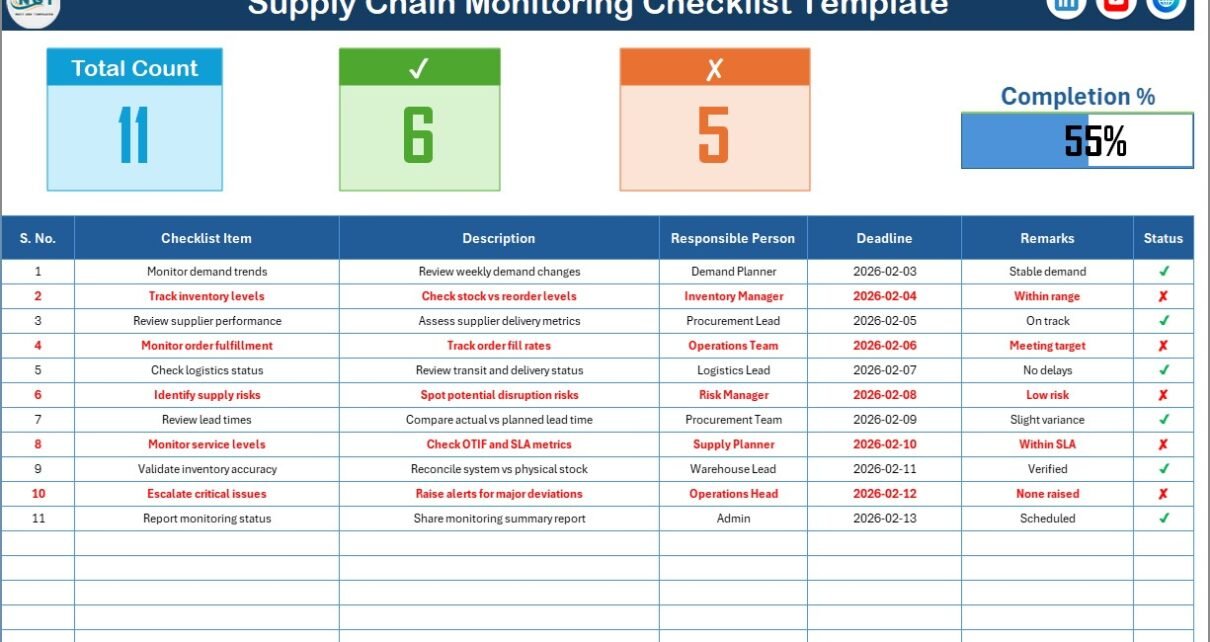
The top section provides a quick performance summary. Therefore, managers can understand progress at a glance.
The top section includes:
-
Total Count – Total number of checklist items
-
Checked Count – Number of completed tasks (✔)
-
Crossed Count – Number of pending or missed tasks (✘)
-
Progress Bar – Visual progress indicator based on checked percentage
Because of this visual summary, managers do not need to scan the entire table to understand progress.
What Is the Checklist Table Structure?
The checklist table forms the core of the template. Here, users enter task-level information and update status regularly.
The checklist table includes the following columns:
-
Serial No. – Sequential number of the checklist item
-
Checklist Item – Short name of the supply chain task
-
Description – Brief explanation of the task
-
Responsible Person – Person accountable for the task
-
Deadline – Due date for completion
-
Remarks – Additional notes or comments
-
Status – ✔ for completed or ✘ for pending
Because the table uses simple columns, users can update it without any training.
Click to Purchases Supply Chain Monitoring Checklist in Excel
How Do Users Update the Checklist Status?
Users only need to enter:
-
✔ for completed tasks
-
✘ for incomplete or pending tasks
Once users update the status, Excel automatically updates:
-
Checked count
-
Crossed count
-
Completion percentage
-
Progress bar
As a result, tracking becomes effortless and error-free.
2. List Sheet Tab (Supporting Sheet)
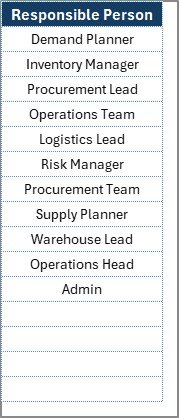
The List sheet tab supports data validation and consistency.
What Is the Purpose of the List Sheet?
This sheet captures the unique list of Responsible Persons. Then, Excel uses this list to create a drop-down menu in the main checklist table.
Because of this approach:
-
Users avoid typing errors
-
Names remain consistent
-
Reports remain clean and professional
Moreover, managers can easily update responsible persons from one place.
Click to Purchases Supply Chain Monitoring Checklist in Excel
How Does the Supply Chain Monitoring Checklist Improve Visibility?
Visibility plays a critical role in supply chain performance. Fortunately, this Excel checklist improves visibility in multiple ways.
-
It shows task-level progress clearly
-
It highlights pending tasks instantly
-
It tracks responsibility for every activity
-
It displays progress visually using a progress bar
Because of this transparency, managers can act early instead of reacting late.
What Types of Supply Chain Activities Can You Track?
You can track a wide range of supply chain activities using this checklist. For example:
-
Purchase order approvals
-
Supplier confirmations
-
Inventory replenishment checks
-
Shipment dispatch status
-
Delivery confirmations
-
Warehouse stock audits
-
Documentation verification
-
Compliance checks
Therefore, this checklist adapts easily to different supply chain environments.
Click to Purchases Supply Chain Monitoring Checklist in Excel
Advantages of Supply Chain Monitoring Checklist in Excel
Using a Supply Chain Monitoring Checklist in Excel offers several practical advantages for organizations of all sizes.
1. Improves Task Accountability
Each checklist item clearly shows the responsible person. As a result, accountability becomes transparent and measurable.
2. Reduces Missed Deadlines
Because users track deadlines visibly, teams focus more on timely completion. Consequently, delays reduce significantly.
3. Provides Real-Time Progress Tracking
The progress bar and counts update instantly. Therefore, managers always know the current status.
4. Easy to Use and Maintain
Excel requires no special training. So, anyone can update the checklist confidently.
5. Enhances Operational Discipline
Because teams follow a structured checklist, operations become more consistent and controlled.
6. Supports Better Decision-Making
Clear visibility helps managers prioritize critical tasks and allocate resources effectively.
Best Practices for the Supply Chain Monitoring Checklist in Excel
To get the best results, you should follow these proven best practices.
1. Update the Checklist Daily
Daily updates ensure accuracy. Therefore, teams should update status regularly.
2. Keep Checklist Items Short and Clear
Short checklist items improve clarity and speed of updates.
3. Assign Clear Ownership
Always assign one responsible person per task. This avoids confusion.
4. Review Pending Tasks in Daily Meetings
Daily reviews help resolve issues early.
5. Use Remarks for Exceptions
Use the remarks column to record delays, issues, or dependencies.
6. Maintain the Responsible Person List
Keep the list sheet updated to avoid incorrect assignments.
How Can Managers Use This Checklist for Reporting?
Managers can easily use this checklist for reporting purposes.
-
Review completion percentage
-
Identify bottlenecks
-
Track overdue tasks
-
Monitor team performance
Because data stays structured, managers can also convert it into dashboards later.
Who Should Use a Supply Chain Monitoring Checklist in Excel?
This checklist suits a wide range of users, including:
-
Supply chain managers
-
Procurement teams
-
Logistics coordinators
-
Warehouse supervisors
-
Operations managers
-
Small and medium businesses
Therefore, any organization dealing with supply chain tasks can benefit.
Can This Checklist Be Customized?
Yes, you can easily customize the checklist.
You can:
-
Add more columns
-
Modify checklist items
-
Change responsible persons
-
Extend for monthly or weekly tracking
Because Excel is flexible, customization remains simple.
Conclusion: Why Should You Use a Supply Chain Monitoring Checklist in Excel?
A Supply Chain Monitoring Checklist in Excel offers a simple yet powerful way to control supply chain activities. Instead of managing tasks manually, teams gain structure, visibility, and accountability.
Because the template includes progress tracking, responsibility assignment, and visual indicators, it transforms routine monitoring into an efficient management process. As a result, organizations reduce delays, improve execution, and strengthen overall supply chain performance.
If you want a reliable, easy-to-use, and professional monitoring tool, this Excel checklist is the right solution.
Click to Purchases Supply Chain Monitoring Checklist in Excel
Frequently Asked Questions (FAQs)
What is a Supply Chain Monitoring Checklist in Excel?
It is a structured Excel template used to track and monitor supply chain tasks using checklist items and status indicators.
Who can use this checklist?
Supply chain managers, procurement teams, logistics coordinators, and operations teams can use it effectively.
How do I mark tasks as completed?
You simply enter ✔ in the Status column to mark tasks as completed.
Can I track progress automatically?
Yes, Excel automatically calculates checked count, crossed count, and completion percentage.
Is this checklist suitable for small businesses?
Yes, small businesses can use it easily because it requires no advanced Excel skills.
Can I customize this checklist?
Yes, you can modify columns, checklist items, and responsible persons as needed.
Does this checklist require Excel macros?
No, it works without macros and uses simple Excel formulas.
How often should I update the checklist?
You should update it daily for best results.
Click to Purchases Supply Chain Monitoring Checklist in Excel
Visit our YouTube channel to learn step-by-step video tutorials