Supply chains move fast. Documents move even faster. Contracts update. Invoices change. Compliance rules evolve. Shipping papers expire. Therefore, businesses must control documentation carefully.
However, many companies still store documents in scattered folders, emails, or shared drives. As a result, teams waste time searching for files. Audits become stressful. Compliance risks increase.
So, how can you track supplier contracts, shipping documents, compliance records, purchase orders, and audit files in one structured system?
The answer is simple.
You need a Supply Chain Documentation Checklist in Excel.
In this complete guide, you will learn:
-
What a Supply Chain Documentation Checklist in Excel is
-
Why businesses need it
-
Full worksheet structure explanation
-
Key features and how it works
-
Advantages of Supply Chain Documentation Checklist in Excel
-
Best Practices for the Supply Chain Documentation Checklist
-
Frequently Asked Questions with answers
Let’s dive in.
Click to Purchases Supply Chain Documentation Checklist in Excel
What Is a Supply Chain Documentation Checklist in Excel?
A Supply Chain Documentation Checklist in Excel is a ready-to-use, structured Excel template designed to help businesses monitor and manage all critical supply chain documents in one place.
Instead of guessing which documents exist, you follow a defined checklist. As a result, you ensure documentation remains complete, updated, and audit-ready.
This template allows you to:
-
Track required documents
-
Assign responsibility
-
Set deadlines
-
Monitor completion status
-
Measure documentation progress
-
Reduce compliance risks
Moreover, since the system runs in Excel, you can use it immediately without expensive software.
Why Do Businesses Need a Supply Chain Documentation Checklist?
Supply chain documentation plays a critical role in operations. Contracts define terms. Invoices track payments. Shipping documents validate movement. Compliance records protect the business.
Without a structured checklist:
-
Teams forget renewal dates
-
Documents expire unnoticed
-
Compliance gaps increase
-
Audits create panic
-
Responsibilities remain unclear
On the other hand, when you use a documentation checklist:
-
You follow a structured review process
-
You assign clear ownership
-
You track document status
-
You monitor deadlines
-
You maintain audit readiness
Therefore, a Supply Chain Documentation Checklist in Excel gives clarity and control.
What Is Included in the Supply Chain Documentation Checklist Template?
This ready-to-use template includes 2 structured worksheets.
Click to Purchases Supply Chain Documentation Checklist in Excel
1️⃣ Supply Chain Documentation Checklist Sheet (Main Sheet)
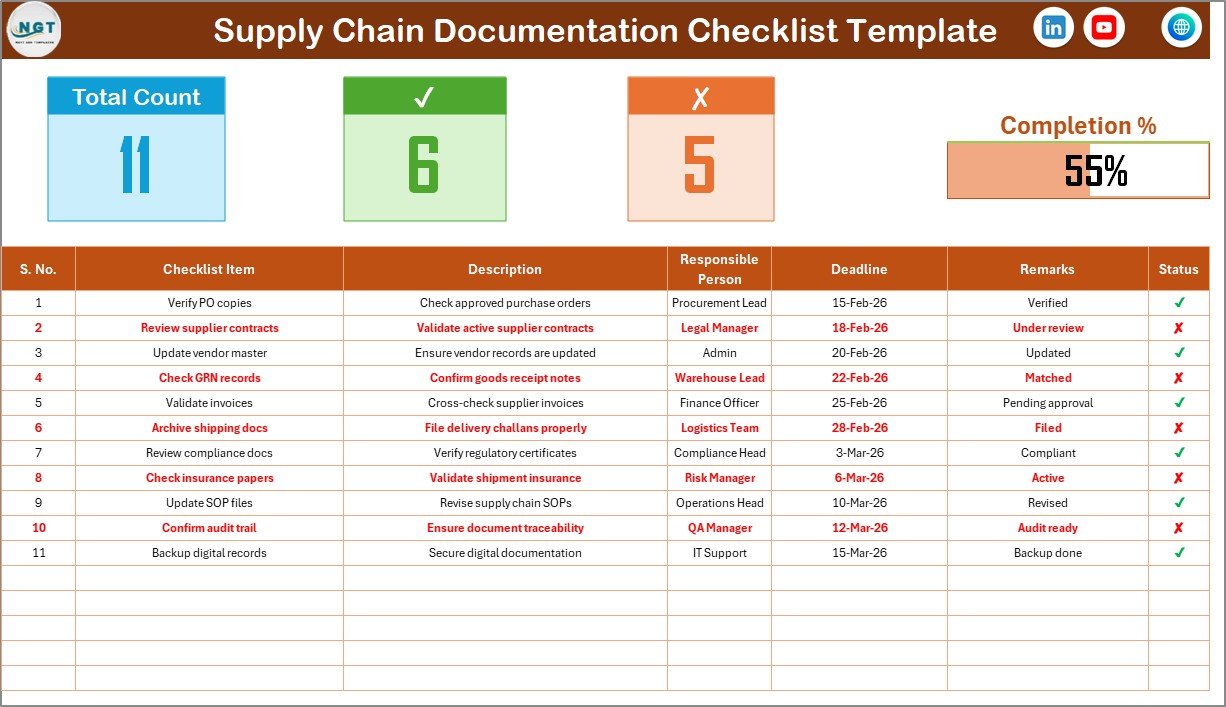
This sheet acts as the working and monitoring center of the system.
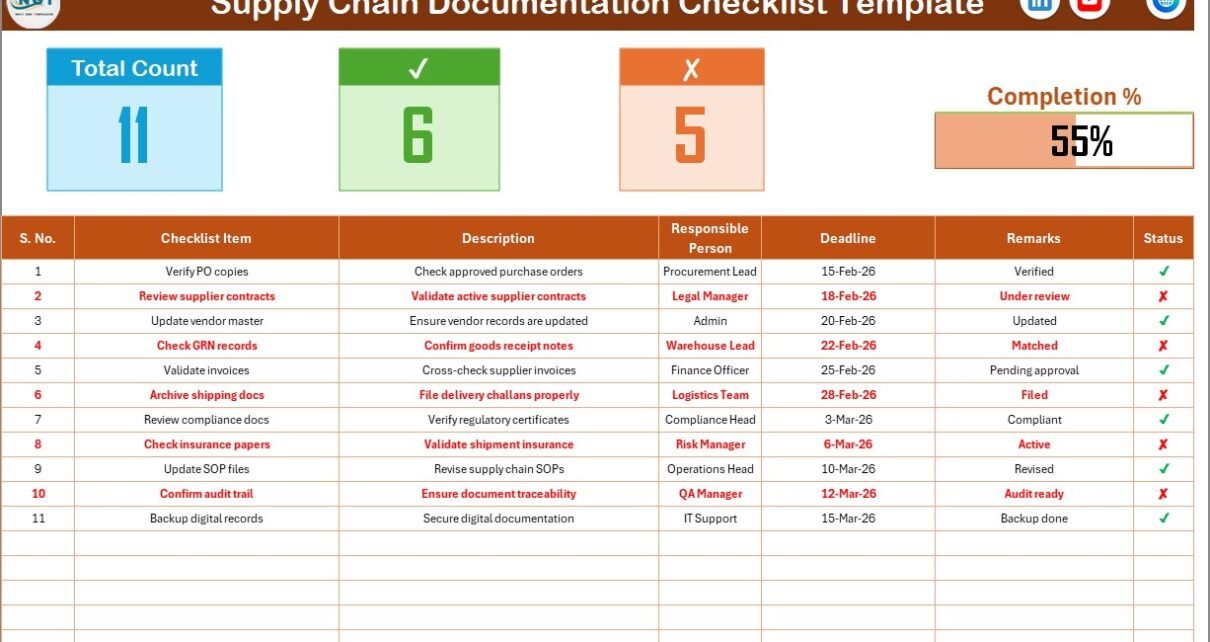
🔹 Top Section – Documentation Summary Dashboard
At the top of the sheet, you get instant progress visibility.
It includes:
-
Total Count – Total number of documentation items
-
Checked Count (✔) – Completed or verified documents
-
Crossed Count (✘) – Missing or pending documents
-
Progress Bar – Visual representation of documentation completion percentage
As soon as you update the status column, the summary updates automatically. Therefore, you can instantly see documentation health.
Instead of manually reviewing rows, you rely on automatic calculations.
Click to Purchases Supply Chain Documentation Checklist in Excel
🔹 Checklist Table Structure
This is the main working table.
You update document status here by selecting:
-
✔ for completed or verified
-
✘ for missing or pending
The table includes the following columns:
| Column Name | Purpose |
|---|---|
| Serial No. | Unique row identifier |
| Checklist Item | Document name or requirement |
| Description | Short explanation of the document |
| Responsible Person | Assigned document owner |
| Deadline | Submission or renewal date |
| Remarks | Observations or notes |
| Status | ✔ or ✘ |
Because the structure remains simple, teams can update it easily.
2️⃣ List Sheet Tab
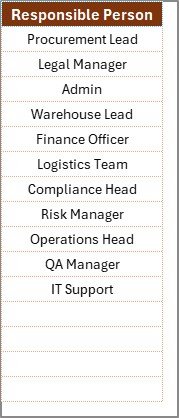
This sheet supports drop-down functionality.
In this sheet:
-
You maintain a unique list of Responsible Persons
-
The main sheet uses this list for data validation
-
You avoid spelling errors
-
You ensure consistent entries
As a result, the checklist stays clean and standardized.
What Documents Should You Track in a Supply Chain Documentation Checklist?
A strong checklist should cover all critical document categories.
Supplier Documents
-
Supplier contracts
-
Non-disclosure agreements
-
Supplier compliance certificates
-
Insurance certificates
-
Vendor registration documents
Procurement Documents
-
Purchase orders
-
Quotations
-
Approval forms
-
Cost comparison sheets
-
Budget approvals
Logistics Documents
-
Bill of lading
-
Shipping invoices
-
Delivery challans
-
Packing lists
-
Customs clearance documents
Inventory & Warehouse Documents
-
Stock reconciliation reports
-
Inventory audit records
-
Warehouse safety certificates
-
Storage compliance documents
Compliance & Regulatory Documents
-
Tax registration certificates
-
Import/export licenses
-
Environmental compliance documents
-
Audit reports
-
Quality assurance certifications
Because documentation touches every supply chain area, this checklist ensures nothing gets ignored.
Click to Purchases Supply Chain Documentation Checklist in Excel
How Does the Supply Chain Documentation Checklist Work?
The system follows a clear and simple process.
Step 1: List Required Documents
Add all mandatory documents in the Checklist Item column.
Step 2: Assign Responsible Person
Select the document owner from the drop-down list.
Step 3: Set Deadline
Enter renewal date, submission deadline, or review date.
Step 4: Update Status
Mark ✔ when verified. Mark ✘ when pending or missing.
Step 5: Monitor Progress
Review the top section progress bar to track documentation health.
Because Excel calculates automatically, you save time and reduce manual tracking.
Click to Purchases Supply Chain Documentation Checklist in Excel
Advantages of Supply Chain Documentation Checklist in Excel
Now let’s explore the major benefits.
1️⃣ Improves Audit Readiness
When you maintain structured documentation, audits become easier. Instead of scrambling for papers, you stay prepared.
2️⃣ Reduces Compliance Risk
Since you track deadlines and status clearly, you avoid expired certificates and missing documents.
3️⃣ Increases Accountability
When you assign names to documents, ownership becomes clear. Therefore, tasks do not remain unattended.
4️⃣ Saves Time
Instead of searching across folders, you review one structured sheet.
5️⃣ Enhances Transparency
The progress bar shows documentation completion percentage instantly. Management can monitor documentation health easily.
6️⃣ Easy to Customize
Because it runs in Excel, you can:
-
Add document categories
-
Insert priority levels
-
Add department columns
-
Expand responsible person list
7️⃣ Cost Effective Solution
You avoid investing in expensive document management software. Excel already exists in most businesses.
Who Should Use the Supply Chain Documentation Checklist?
This template benefits multiple roles:
-
Supply Chain Managers
-
Procurement Officers
-
Compliance Managers
-
Warehouse Supervisors
-
Logistics Coordinators
-
Operations Managers
-
Business Owners
Even small businesses benefit because the structure remains simple and scalable.
Click to Purchases Supply Chain Documentation Checklist in Excel
Best Practices for the Supply Chain Documentation Checklist
To maximize effectiveness, follow these best practices.
1️⃣ Review Documentation Monthly
Do not wait for audits. Instead, review documentation regularly.
2️⃣ Update Status Immediately
When you receive a document, mark it ✔ instantly. This habit keeps the checklist accurate.
3️⃣ Use Clear Naming Standards
Maintain consistent document names to avoid confusion.
4️⃣ Track Expiry Dates Carefully
Set deadlines for renewal before expiration.
5️⃣ Analyze Missing Patterns
If multiple items remain pending, identify root causes.
6️⃣ Share Progress Reports
Present documentation completion percentage during management meetings.
7️⃣ Maintain Backup Copies
Although the checklist tracks documents, always maintain digital backups in secure folders.
Common Mistakes to Avoid
Even with a checklist, some errors reduce effectiveness.
Avoid these:
-
Leaving responsible person blank
-
Ignoring renewal deadlines
-
Failing to update remarks
-
Adding too many unnecessary items
-
Skipping regular reviews
If you avoid these mistakes, your documentation process becomes reliable.
Click to Purchases Supply Chain Documentation Checklist in Excel
How Does This Checklist Improve Supply Chain Efficiency?
When documentation stays organized:
-
Procurement moves faster
-
Shipments clear smoothly
-
Compliance risks decrease
-
Vendor disputes reduce
-
Audit stress disappears
Therefore, structured documentation strengthens the entire supply chain.
How Can You Customize This Template Further?
You can expand the template easily.
For example:
-
Add priority column (High, Medium, Low)
-
Add document category filter
-
Create monthly documentation dashboard
-
Insert conditional formatting for approaching deadlines
-
Add document storage location column
Because Excel offers flexibility, the system can grow with your operations.
Conclusion
Supply chain documentation supports every transaction, shipment, and contract. However, without structure, documentation becomes chaotic.
A Supply Chain Documentation Checklist in Excel gives you control, visibility, and accountability.
Instead of reacting to audit pressure, you stay prepared.
Instead of searching for files, you track them.
Instead of managing confusion, you manage clarity.
If you want organized, compliant, and audit-ready supply chain documentation, this checklist offers a simple yet powerful solution.
Frequently Asked Questions (FAQs)
1️⃣ What is a Supply Chain Documentation Checklist in Excel?
It is a structured Excel template that helps businesses track and manage required supply chain documents with status monitoring.
2️⃣ Can I customize the checklist?
Yes. You can add new columns, document types, or responsible persons as needed.
3️⃣ How often should I review documentation?
Most businesses review documentation monthly or quarterly. However, high-risk industries may review more frequently.
4️⃣ Does the template calculate progress automatically?
Yes. When you update the status column, the top summary updates automatically.
5️⃣ Is this checklist suitable for small businesses?
Absolutely. In fact, small businesses benefit greatly because it provides structure without high cost.
6️⃣ Can this checklist support audit preparation?
Yes. Since it tracks document availability and status, it improves audit readiness significantly.
Click to Purchases Supply Chain Documentation Checklist in Excel
Visit our YouTube channel to learn step-by-step video tutorials