Retail businesses operate every single day. Stores open early. Shifts rotate frequently. Staff availability changes. Moreover, seasonal sales increase workload. Therefore, retail managers must plan staff duties carefully.
However, many retail stores still use manual planning methods. As a result, shift conflicts happen. Managers miss important events. Staff scheduling becomes confusing.
So, how can you manage retail staff shifts, events, and daily schedules in one professional system?
The answer is simple.
You need a Retail Staff Duty Calendar in Excel.
In this complete guide, you will learn:
-
What Retail Staff Duty Calendar in Excel is
-
Why retail stores need structured duty planning
-
Detailed explanation of all 5 worksheets
-
How to manage events and shifts efficiently
-
Advantages of Retail Staff Duty Calendar in Excel
-
Best Practices for Retail Staff Duty Calendar
-
Frequently Asked Questions with Answers
Let’s explore everything step by step.
Click to Purchases Retail Staff Duty Calendar in Excel
What Is Retail Staff Duty Calendar in Excel?
Retail Staff Duty Calendar in Excel is a ready-to-use scheduling and event management template designed for retail stores, supermarkets, showrooms, and chain outlets.
It helps you:
-
Plan annual staff duties
-
Manage monthly shift schedules
-
Track daily events
-
Store event records securely
-
Highlight important dates
-
Customize calendar themes
Because the template works in Excel, managers can use it without advanced software. Moreover, it provides automation features that simplify planning.
Therefore, this calendar becomes a powerful retail workforce management tool.
Why Do Retail Businesses Need a Duty Calendar?
Retail operations require careful planning. Staff must cover peak hours. Sales events need extra manpower. Store audits require scheduling. Without proper planning:
-
Employees overlap shifts
-
Managers forget special events
-
Staff shortages occur
-
Overtime costs increase
However, when you use a structured Retail Staff Duty Calendar:
-
You improve coordination
-
You avoid scheduling conflicts
-
You increase productivity
-
You reduce stress
Therefore, planning becomes organized and efficient.
Click to Purchases Retail Staff Duty Calendar in Excel
Key Features of Retail Staff Duty Calendar in Excel
This template contains 5 well-structured worksheets. Each worksheet serves a specific purpose.
Let’s explore each sheet in detail.
1️⃣ Home Sheet – Navigation Hub
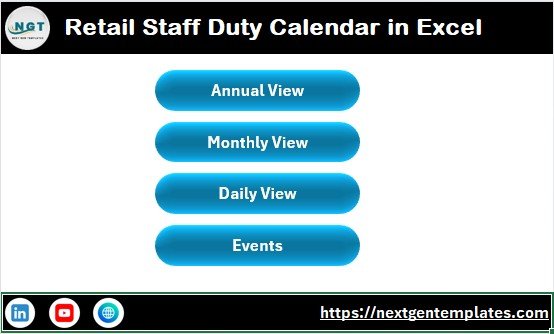
The Home sheet acts as the index page.
Here, you will find 4 navigation buttons:
-
Annual View
-
Monthly View
-
Daily View
-
Events
Because of these buttons, users can move between sheets quickly.
Therefore, navigation becomes simple and professional.
2️⃣ Annual View Sheet – 12 Months Overview
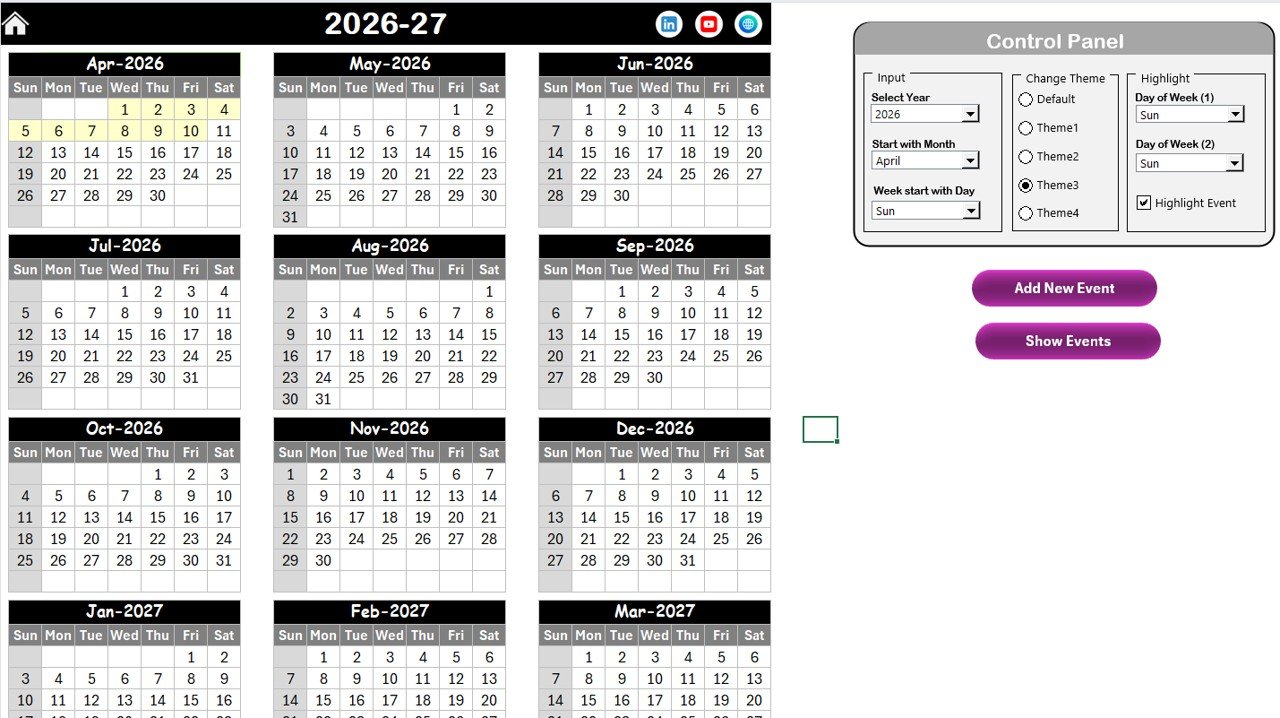
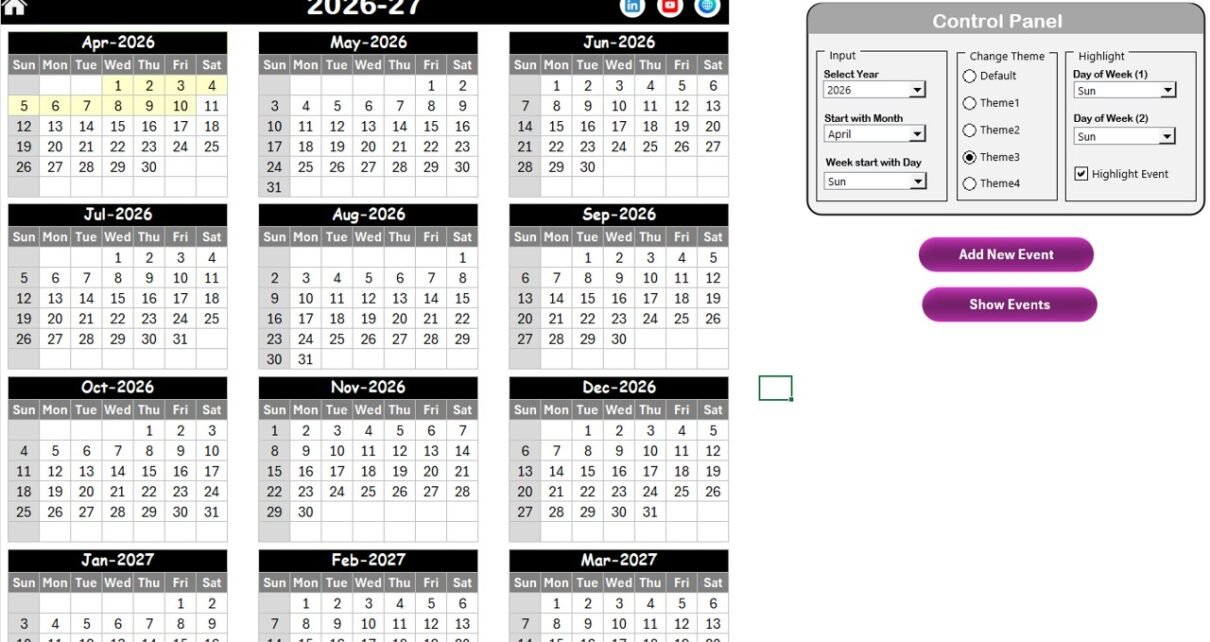
The Annual View sheet displays all 12 months in one screen.
This view helps managers plan yearly duties, sales events, store audits, and holidays.
Control Panel Section
The Annual View includes a powerful control panel divided into 3 groups.
🔹 Input Group
In this section, you can:
-
Select the Year
-
Change Starting Month
-
Change Starting Day of Week
When you modify these inputs, the calendar updates automatically.
Therefore, you can plan future years without redesigning the sheet.
🔹 Change Theme Group
The template provides 5 different color themes.
You can select your preferred theme, and it will apply across the workbook.
Because of this feature, you can match the calendar with your brand style.
🔹 Highlight Group
You can:
-
Select Day of Week (1)
-
Select Day of Week (2)
For example, choose Saturday and Sunday to highlight weekends in grey color.
Moreover, you can enable the “Highlight Event” checkbox to mark event dates in yellow.
Therefore, important dates become visible instantly.
Add New Event Button
Select a date and click “Add New Event.”
A form will open. Fill:
-
Event Name
-
Time
-
Location
-
Description
Then click Submit. The event automatically appears on the calendar.
Show Event Button
Select a date and click “Show Event” to see all events for that day.
This feature helps managers review upcoming activities quickly.
Click to Purchases Retail Staff Duty Calendar in Excel
3️⃣ Monthly View Sheet – Detailed Monthly Planning
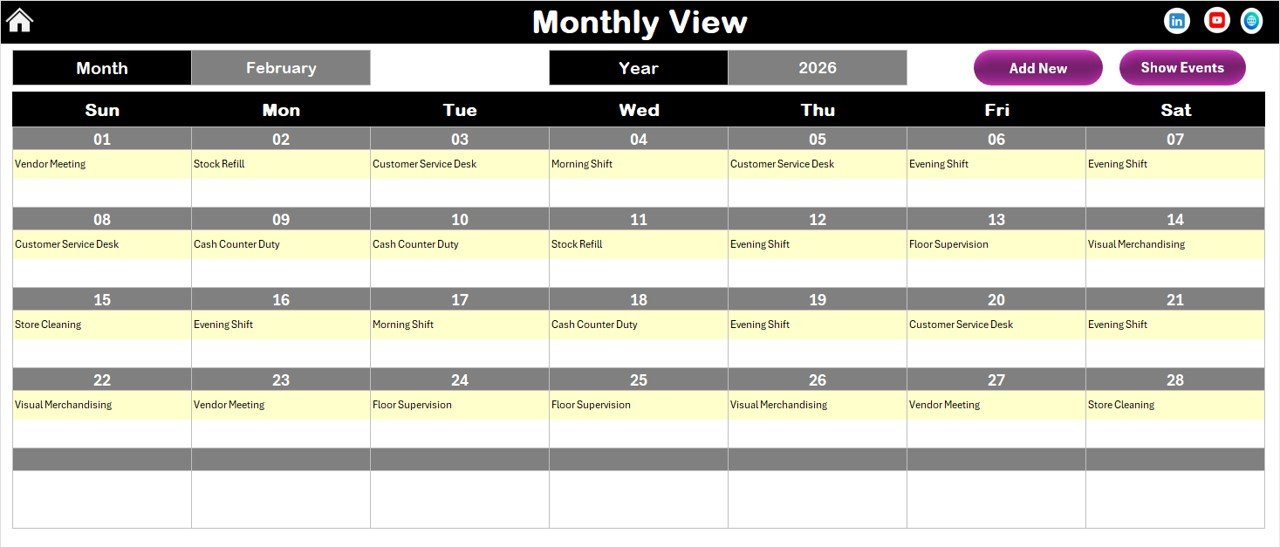
The Monthly View sheet shows one month at a time.
At the top, you can select:
-
Month
-
Year
The calendar updates automatically.
If a date contains one event, it shows the event name.
If multiple events exist, it shows “More than 1…”
Therefore, users can identify busy days immediately.
Monthly Buttons
The sheet includes:
-
Add New Event
-
Show Event
Both buttons function similarly to the Annual View sheet.
As a result, users can add or review events without switching sheets.
4️⃣ Daily View Sheet – Detailed Event Listing
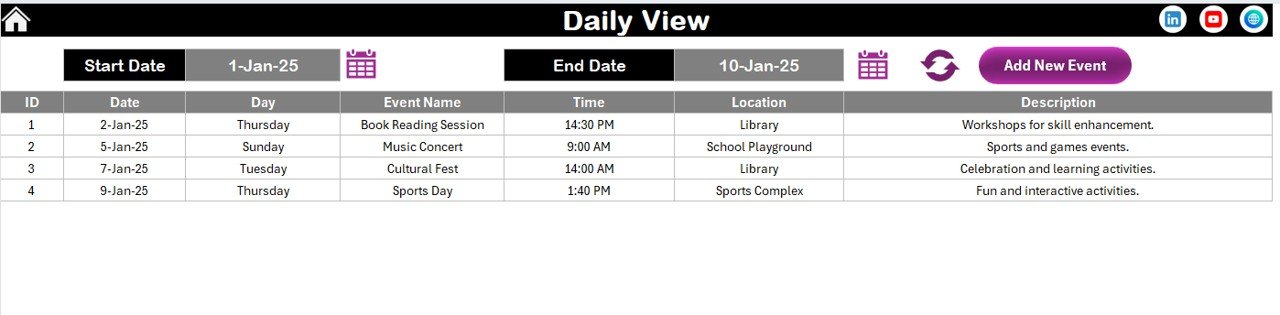
The Daily View sheet displays events within a selected date range.
At the top, you can select:
-
Start Date
-
End Date
Use the calendar icon to pick dates easily.
Click Refresh to update results.
The sheet then displays detailed event information for that period.
Therefore, managers can review weekly or monthly schedules instantly.
Add New Event Button (Daily View)
You can add new events directly from this sheet.
Click the button, fill the form, and submit.
The event saves automatically in the database.
Click to Purchases Retail Staff Duty Calendar in Excel
5️⃣ Events Sheet – Database Sheet
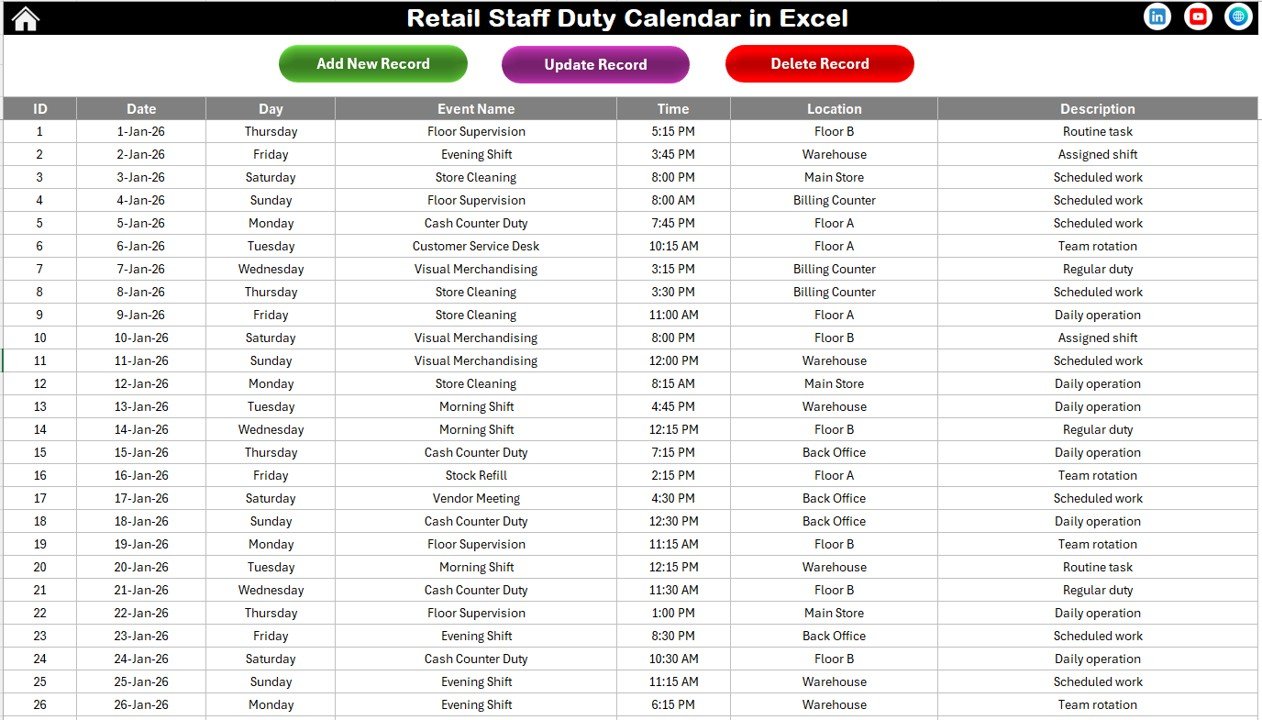
The Events sheet stores all event data.
This sheet works as the backend database.
It includes the following columns:
-
ID (Auto-generated)
-
Date
-
Day
-
Event Name
-
Time
-
Location
-
Description
Because the ID generates automatically, you avoid duplication.
Database Control Buttons
At the top of the Events sheet, you will find 3 buttons.
Add New Record
Opens event form and allows you to add new entry.
Update Existing Record
Select the ID you want to edit. Click Update.
The form opens with prefilled data. Modify and submit.
Delete Record
Select ID and click Delete to remove the record permanently.
Therefore, you maintain clean and updated data.
How Does This Calendar Improve Retail Staff Planning?
This calendar centralizes scheduling.
Instead of using:
-
Paper notes
-
Multiple Excel files
-
Email reminders
You manage everything in one structured workbook.
Because of automation and visual formatting:
-
Planning becomes faster
-
Conflicts reduce
-
Managers stay organized
Advantages of Retail Staff Duty Calendar in Excel
Let’s explore the major benefits.
1️⃣ Centralized Scheduling
All events and duties remain in one place.
2️⃣ Annual and Monthly Planning
You can view yearly and monthly schedules easily.
3️⃣ Event Management System
Built-in form simplifies event entry.
4️⃣ Customizable Themes
You can apply color themes according to brand.
5️⃣ Highlight Important Days
You can mark weekends or specific days.
6️⃣ Automated Database
Auto-generated ID maintains record integrity.
7️⃣ Easy Navigation
Buttons allow quick movement between sheets.
8️⃣ Professional Presentation
The layout looks clean and organized.
Click to Purchases Retail Staff Duty Calendar in Excel
Best Practices for Retail Staff Duty Calendar in Excel
To maximize performance, follow these practices.
1️⃣ Update Events Immediately
Add events as soon as they are planned.
2️⃣ Review Monthly View Weekly
Check busy days in advance.
3️⃣ Keep Database Clean
Delete outdated events regularly.
4️⃣ Standardize Event Naming
Use consistent naming format.
5️⃣ Backup File Monthly
Save backup copies to avoid data loss.
6️⃣ Train Staff
Ensure managers understand how to use the form.
7️⃣ Use Highlight Feature Wisely
Mark weekends and holidays clearly.
Who Can Use Retail Staff Duty Calendar?
This template suits:
-
Retail store managers
-
Supermarket supervisors
-
Franchise owners
-
HR managers
-
Operations teams
-
Retail chain administrators
Therefore, both small and large retail businesses can benefit.
Conclusion
Retail scheduling requires precision and structure. However, manual planning often creates confusion.
The Retail Staff Duty Calendar in Excel offers:
-
Annual planning view
-
Monthly detailed calendar
-
Daily event tracking
-
Auto-generated event database
-
Add, update, delete record options
-
Custom themes and highlights
Because it combines automation and simplicity, it helps retail managers plan duties effectively.
If you want a professional and easy-to-use scheduling system, this Excel calendar provides the perfect solution.
Click to Purchases Retail Staff Duty Calendar in Excel
Frequently Asked Questions (FAQs)
1️⃣ What is Retail Staff Duty Calendar in Excel?
It is a ready-to-use Excel template that helps retail businesses manage staff duties and events.
2️⃣ Can I change the calendar year?
Yes. You can change the year from the control panel in Annual View.
3️⃣ Can I highlight weekends?
Yes. You can select two days in the Highlight group to mark them.
4️⃣ How do I add a new event?
Select a date and click Add New Event. Fill the form and submit.
5️⃣ Can I update event details?
Yes. Select the ID in Events sheet and click Update Existing Record.
6️⃣ Does the template generate ID automatically?
Yes. It generates ID automatically for each event.
7️⃣ Is this template suitable for multi-store chains?
Yes. Retail chains can customize and use it across branches.
Click to Purchases Retail Staff Duty Calendar in Excel
Visit our YouTube channel to learn step-by-step video tutorials