Vendor performance directly impacts your business success. A weak vendor can delay production. Poor quality materials can increase complaints. Late deliveries can affect customer satisfaction. Vendor Evaluation To-Do List Checklist in Excel Therefore, businesses must evaluate vendors carefully and regularly.
Vendor Evaluation To-Do List Checklist in Excel However, many companies still rely on emails, manual notes, or scattered spreadsheets to track vendor evaluation tasks. As a result, they miss deadlines. They overlook compliance checks. They struggle to monitor progress.
So, how can you track vendor assessment tasks, assign responsibilities, monitor deadlines, and measure completion status in one organized system?
The answer is simple.
You need a Vendor Evaluation To-Do List Checklist in Excel.
In this complete guide, you will learn:
-
What a Vendor Evaluation To-Do List Checklist in Excel is
-
Why businesses need it
-
Detailed explanation of both worksheets
-
Key checklist components
-
Advantages of Vendor Evaluation To-Do List Checklist in Excel
-
Best Practices for Vendor Evaluation Checklist
-
Frequently Asked Questions with Answers
Let us explore everything step by step.
Click to Purchases Vendor Evaluation To-Do List Checklist in Excel
What Is a Vendor Evaluation To-Do List Checklist in Excel?
A Vendor Evaluation To-Do List Checklist in Excel is a ready-to-use task management template designed to track and manage vendor assessment activities.
It helps you:
-
Assign vendor evaluation tasks
-
Track completion status
-
Monitor deadlines
-
Measure progress percentage
-
Maintain accountability
Instead of using multiple tools, you can manage vendor evaluation in one structured Excel file.
Moreover, Excel provides flexibility. Therefore, you can customize the checklist according to your industry, vendor type, or procurement policy.
Why Is Vendor Evaluation Important for Businesses?
Vendor selection and monitoring influence cost, quality, and delivery performance. If you choose the wrong vendor, your entire supply chain may suffer.
Therefore, you must evaluate vendors based on:
-
Quality standards
-
Delivery timelines
-
Pricing structure
-
Compliance certifications
-
Financial stability
-
Service responsiveness
Additionally, regular vendor evaluation reduces business risks. It improves negotiation power. It strengthens supplier relationships.
A structured checklist ensures that your team does not skip critical evaluation steps.
Click to Purchases Vendor Evaluation To-Do List Checklist in Excel
What Are the Key Features of the Vendor Evaluation To-Do List Checklist in Excel?
This ready-to-use template includes 2 worksheets:
-
Vendor Evaluation To-Do List Checklist Sheet
-
List Sheet
Now, let us understand each sheet in detail.
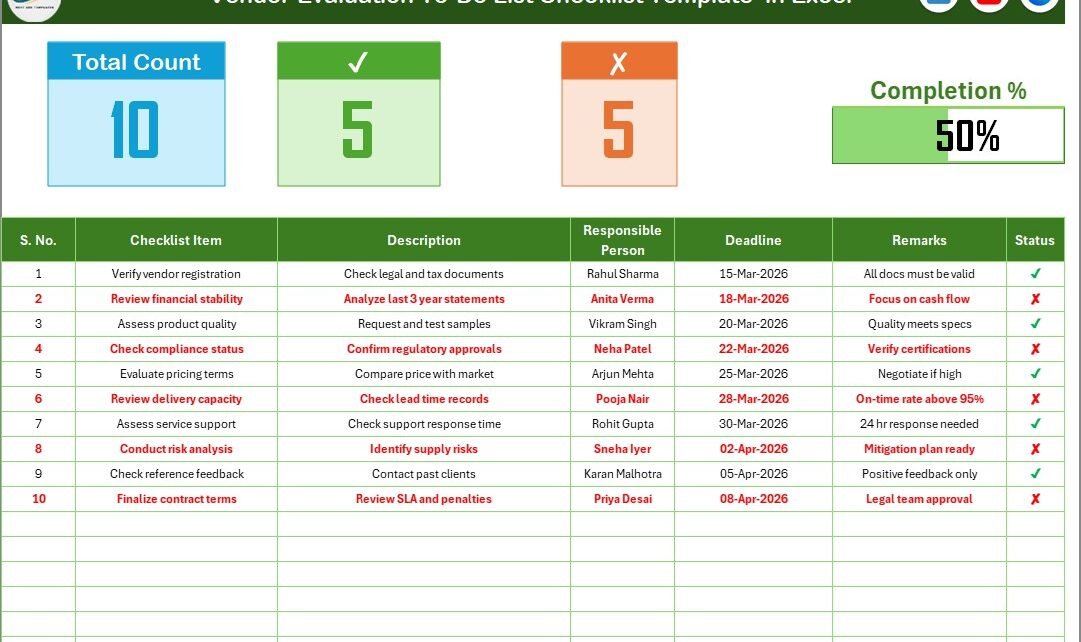
1️⃣ Vendor Evaluation To-Do List Checklist Sheet – Main Tracking Interface
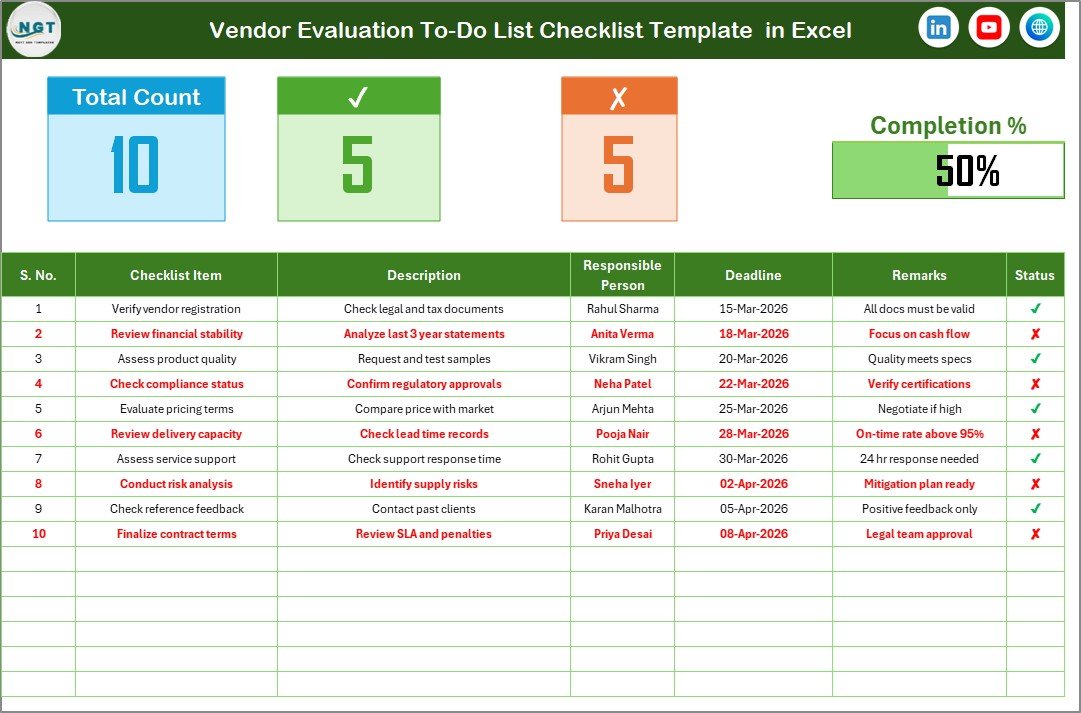
This sheet acts as the central dashboard where you capture all checklist information.
🔹 Top Section Overview
At the top of the sheet, you can see summary information such as:
-
Total Task Count
-
Checked Count (✔)
-
Crossed Count (✘)
-
Progress Bar Showing Completion Percentage
As soon as you update task status, the progress bar updates automatically. Therefore, you can monitor evaluation progress instantly.
🔹 Checklist Table Structure
The checklist table includes the following columns:
-
Serial No.
-
Checklist Item
-
Description
-
Responsible Person
-
Deadline
-
Remarks
-
Status
Let us understand each column.
✔ Serial No.
Maintains structured numbering for easy reference.
✔ Checklist Item
Defines the evaluation activity, such as:
-
Verify quality certification
-
Review delivery performance
-
Check compliance documents
-
Evaluate pricing terms
✔ Description
Provides detailed explanation of the evaluation task.
✔ Responsible Person
Assigns accountability to a specific team member.
✔ Deadline
Ensures timely completion of vendor review tasks.
✔ Remarks
Captures observations, comments, or follow-up notes.
✔ Status
You update the status as:
-
✔ (Completed)
-
✘ (Not Completed)
Once you update the status, the dashboard summary changes automatically.
Therefore, the sheet acts as both a checklist and a progress tracker.
Click to Purchases Vendor Evaluation To-Do List Checklist in Excel
2️⃣ List Sheet – Responsible Person Management
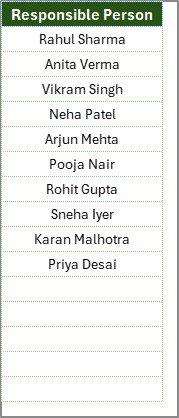
The second worksheet captures the unique list of Responsible Persons.
This sheet helps you:
-
Maintain standardized names
-
Create a drop-down list in the main table
-
Avoid duplicate entries
-
Improve data accuracy
When you add a new team member, you simply update the List sheet. The dropdown updates automatically.
As a result, you maintain consistency across records.
What Should You Include in a Vendor Evaluation Checklist?
A strong vendor evaluation checklist should cover multiple areas.
🔹 Quality Evaluation
-
ISO Certification Verification
-
Product Quality Audit
-
Defect Rate Review
-
Quality Control Process Check
🔹 Delivery Performance
-
On-Time Delivery Rate
-
Lead Time Accuracy
-
Shipment Tracking Accuracy
-
Delay Frequency
🔹 Cost & Pricing Review
-
Price Competitiveness
-
Discount Structure
-
Payment Terms
-
Cost Stability
🔹 Compliance & Legal Check
-
Regulatory Compliance
-
Insurance Documents
-
Contract Validity
-
Ethical Standards
🔹 Service & Communication
-
Response Time
-
Issue Resolution Time
-
Account Manager Support
-
Customer Service Quality
By including these areas, you ensure a comprehensive vendor evaluation process.
Click to Purchases Vendor Evaluation To-Do List Checklist in Excel
Advantages of Vendor Evaluation To-Do List Checklist in Excel
Using a structured Excel checklist offers multiple benefits.
1️⃣ Improved Accountability
When you assign tasks clearly, team members take ownership.
2️⃣ Better Deadline Management
You can monitor upcoming deadlines easily.
3️⃣ Increased Transparency
The progress bar shows overall evaluation completion instantly.
4️⃣ Reduced Vendor Risk
Regular monitoring helps detect potential issues early.
5️⃣ Easy Customization
You can add new checklist items based on vendor category.
6️⃣ Cost-Effective Solution
Excel provides a budget-friendly alternative to expensive software tools.
Best Practices for the Vendor Evaluation To-Do List Checklist
To maximize efficiency, follow these best practices.
✔ Define Evaluation Criteria Clearly
Create measurable checklist items instead of vague tasks.
✔ Assign Clear Responsibility
Avoid assigning tasks to multiple people without clarity.
✔ Set Realistic Deadlines
Ensure deadlines align with procurement schedules.
✔ Review Checklist Monthly or Quarterly
Conduct vendor evaluation regularly to maintain performance.
✔ Document Observations Properly
Use the Remarks column to capture meaningful insights.
✔ Analyze Completion Trends
If tasks remain incomplete frequently, review your process.
How Does This Checklist Improve Vendor Management?
When you track vendor evaluation systematically:
-
You improve supplier performance
-
You reduce operational risks
-
You enhance quality control
-
You strengthen compliance
-
You build long-term supplier partnerships
Consequently, your supply chain becomes more stable and reliable.
Conclusion
Vendor evaluation requires structure and discipline. Without a proper checklist, businesses may overlook critical review steps.
The Vendor Evaluation To-Do List Checklist in Excel provides:
-
Task assignment tracking
-
Progress monitoring
-
Deadline management
-
Centralized checklist control
-
Drop-down automation for responsible persons
Instead of managing evaluation tasks manually, you can use one organized Excel template.
If you want better control over vendor performance and procurement efficiency, start using this structured checklist today.
Click to Purchases Vendor Evaluation To-Do List Checklist in Excel
Frequently Asked Questions with Answers
1. What is a Vendor Evaluation To-Do List Checklist?
It is an Excel-based checklist template that helps track vendor evaluation tasks and monitor completion status.
2. Can small businesses use this template?
Yes. Small and large businesses can use it easily for vendor management.
3. Does it include progress tracking?
Yes. The template shows total count, checked count, crossed count, and progress percentage.
4. Can I customize checklist items?
Yes. You can add, edit, or remove checklist items according to your needs.
5. Do I need advanced Excel skills?
No. Basic Excel knowledge is enough to operate the checklist efficiently.
Click to Purchases Vendor Evaluation To-Do List Checklist in Excel
Visit our YouTube channel to learn step-by-step video tutorials