Inventory management plays a critical role in every organization. Businesses must maintain accurate records, verify stock availability, and ensure compliance with audit requirements. However, many companies still manage inventory audits using scattered documents, manual tracking, and unstructured notes. As a result, audits become time-consuming, error-prone, and stressful.
Therefore, organizations increasingly adopt structured checklist systems that simplify audit preparation and tracking. One practical solution is the Inventory Audit Documentation Checklist in Excel — a ready-to-use template designed to organize audit documentation efficiently and monitor checklist completion in real time.
In this comprehensive guide, you will learn everything about the Inventory Audit Documentation Checklist in Excel, including its structure, features, advantages, implementation process, best practices, and frequently asked questions.
Click to Purchases Inventory Audit Documentation Checklist in Excel
What Is an Inventory Audit Documentation Checklist in Excel?
An Inventory Audit Documentation Checklist in Excel is a structured tracking tool that helps organizations manage inventory audit activities using a predefined checklist format.
Instead of tracking audit tasks manually, teams can record, monitor, and update documentation requirements in a centralized Excel file. Consequently, audit preparation becomes organized, transparent, and easy to manage.
Moreover, Excel automation features such as dropdown lists, progress tracking, and status indicators improve accuracy and efficiency.
Why Do Businesses Need an Inventory Audit Checklist?
Inventory audits ensure that physical stock matches recorded inventory data. Without proper documentation control, companies face risks such as:
-
Stock discrepancies
-
Compliance issues
-
Financial inaccuracies
-
Audit delays
-
Missing documentation
However, a structured checklist eliminates confusion because it clearly defines responsibilities and deadlines.
Key Objectives of an Inventory Audit Checklist
-
Track required audit documents
-
Assign responsibilities
-
Monitor completion status
-
Improve audit readiness
-
Reduce manual follow-ups
Therefore, organizations complete audits faster and with greater confidence.
Click to Purchases Inventory Audit Documentation Checklist in Excel
Key Features of the Inventory Audit Documentation Checklist Template
This ready-to-use template contains two structured worksheets, each serving a specific purpose.
1️⃣ Inventory Audit Documentation Checklist Sheet (Main Sheet)
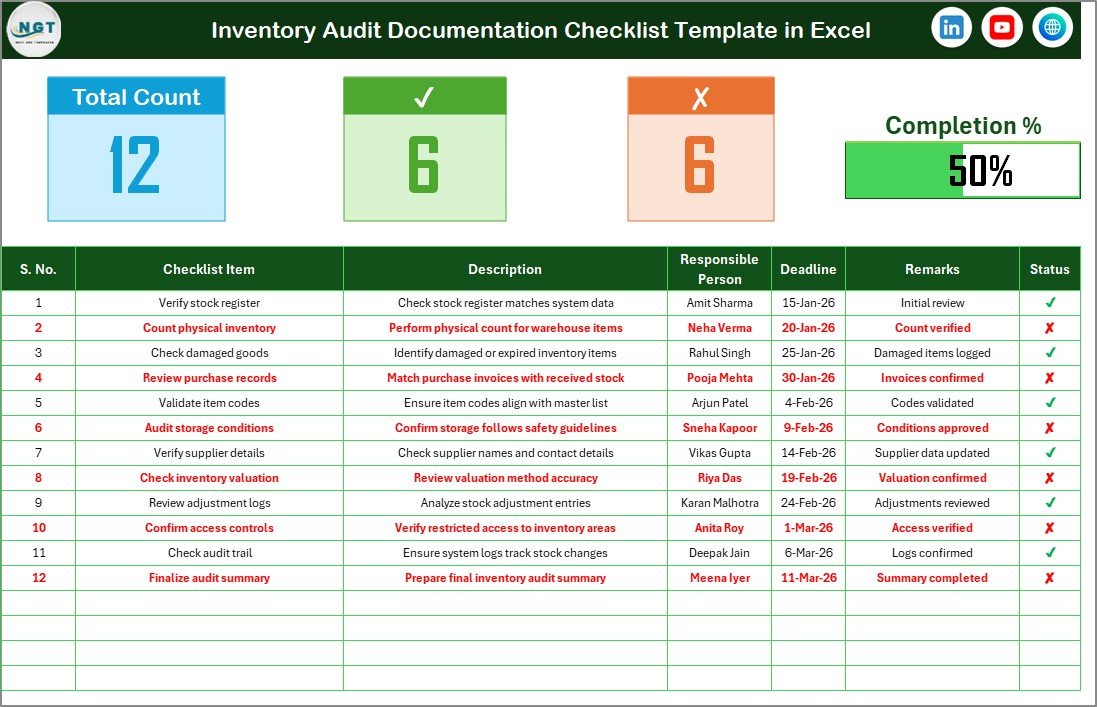
The Checklist Sheet serves as the primary working area where users manage audit activities.
Top Section – Audit Summary Dashboard
At the top of the sheet, users can instantly view audit progress.
Summary Metrics Include:
-
Total Count – Total checklist items
-
Checked Count – Completed tasks
-
Crossed Count – Pending or incomplete tasks
-
Progress Bar – Visual representation of completion percentage
Because this section updates automatically, managers quickly understand audit status.
Checklist Table – Core Tracking Area
The checklist table allows users to capture and manage all audit documentation details.
Users simply update the Status column using:
-
✔ (Completed)
-
✘ (Pending)
As soon as the status changes, progress indicators update automatically.
Columns Included in the Checklist Table
-
Serial No. – Unique sequence number
-
Checklist Item – Audit task name
-
Description – Detailed explanation of requirement
-
Responsible Person – Assigned team member
-
Deadline – Completion date
-
Remarks – Additional notes or observations
-
Status – Task completion indicator
Because every task appears in one structured table, audit coordination becomes simple and efficient.
Click to Purchases Inventory Audit Documentation Checklist in Excel
2️⃣ List Sheet – Dropdown Management

The List Sheet supports data validation functionality.
This sheet stores a unique list of Responsible Persons, which creates a dropdown menu in the main checklist table.
Benefits of the List Sheet
-
Prevents spelling inconsistencies
-
Standardizes employee names
-
Improves data accuracy
-
Simplifies assignment selection
Therefore, users maintain clean and reliable data.
How Does the Checklist Improve Inventory Audit Management?
A structured checklist transforms audit workflows.
Better Organization
All audit tasks remain centralized.
Clear Accountability
Each task has an assigned responsible person.
Real-Time Progress Monitoring
Managers track completion instantly.
Reduced Errors
Standardized entries prevent mistakes.
Faster Audit Completion
Teams know exactly what to complete and when.
As a result, audit preparation becomes predictable and stress-free.
Click to Purchases Inventory Audit Documentation Checklist in Excel
Advantages of Inventory Audit Documentation Checklist in Excel
✅ Easy to Use
Excel familiarity allows quick adoption without training.
✅ Centralized Audit Tracking
All documentation appears in one file.
✅ Visual Progress Monitoring
Progress bars provide instant visibility.
✅ Improved Accountability
Responsibilities remain clearly assigned.
✅ Flexible Customization
Organizations modify checklist items easily.
✅ Cost-Effective Solution
No expensive software required.
How to Use the Inventory Audit Documentation Checklist?
Follow these simple steps for implementation.
Step 1: Define Audit Requirements
List all documents required for inventory audits.
Step 2: Populate Checklist Items
Enter tasks into the checklist table.
Step 3: Add Responsible Persons
Update names in the List sheet.
Step 4: Assign Responsibilities
Select responsible persons using dropdown menus.
Step 5: Set Deadlines
Define realistic completion dates.
Step 6: Update Status Regularly
Mark ✔ or ✘ as tasks progress.
Following these steps ensures smooth audit execution.
Click to Purchases Inventory Audit Documentation Checklist in Excel
Best Practices for the Inventory Audit Documentation Checklist
✔ Keep Checklist Clear and Specific
Avoid vague task descriptions.
✔ Update Status Daily During Audit
Frequent updates improve tracking accuracy.
✔ Assign One Owner per Task
Clear ownership increases accountability.
✔ Review Progress Weekly
Managers should monitor completion trends.
✔ Maintain Standard Naming Conventions
Consistent naming improves reporting clarity.
✔ Archive Completed Checklists
Keep records for future audits and compliance.
What Documents Should Be Included in Inventory Audit Checklists?
Organizations often track documents such as:
-
Inventory count sheets
-
Stock reconciliation reports
-
Purchase records
-
Goods receipt notes
-
Warehouse transfer records
-
Adjustment approvals
-
Inventory valuation reports
-
Audit approval documents
Including all required documentation prevents audit delays.
Who Can Benefit from This Template?
The checklist supports multiple departments:
-
Inventory Managers
-
Warehouse Supervisors
-
Internal Auditors
-
Finance Teams
-
Compliance Officers
-
Operations Managers
-
Small Business Owners
Each stakeholder gains improved visibility into audit readiness.
Click to Purchases Inventory Audit Documentation Checklist in Excel
Why Excel Is Ideal for Audit Checklists
Excel remains one of the best tools for checklist management because it offers:
-
Easy customization
-
Built-in formulas
-
Dropdown validation
-
Progress tracking
-
Universal accessibility
Therefore, organizations of all sizes rely on Excel-based audit templates.
Common Challenges in Inventory Audits (And Solutions)
Missing Documents
Solution: Maintain centralized checklist tracking.
Lack of Accountability
Solution: Assign responsible persons clearly.
Deadline Delays
Solution: Use deadline monitoring columns.
Data Inconsistency
Solution: Apply dropdown validation lists.
Addressing these issues improves audit success rates.
Click to Purchases Inventory Audit Documentation Checklist in Excel
Future of Inventory Audit Management
Inventory audits continue evolving alongside digital transformation.
Future improvements may include:
-
Automated inventory scanning
-
Barcode integration
-
Real-time warehouse monitoring
-
Cloud-based audit collaboration
However, structured Excel checklists remain essential foundational tools.
Conclusion
The Inventory Audit Documentation Checklist in Excel provides a simple yet powerful way to organize audit activities, track documentation, and monitor progress efficiently. By combining structured tracking, responsibility assignment, and visual progress indicators, the template transforms complex audit processes into manageable workflows.
Because the checklist improves transparency, accountability, and efficiency, organizations complete audits faster while reducing risks and errors. Therefore, businesses that implement structured audit checklists strengthen compliance and operational control.
Click to Purchases Inventory Audit Documentation Checklist in Excel
Frequently Asked Questions (FAQs)
What is an inventory audit documentation checklist?
It is a structured list of audit tasks and required documents used to prepare and manage inventory audits efficiently.
Who should use this checklist template?
Inventory managers, auditors, finance teams, and warehouse supervisors can use it.
Can the checklist be customized?
Yes. Users can easily modify checklist items and responsible persons.
How does the progress bar work?
The progress bar updates automatically based on completed checklist items.
Is Excel suitable for audit management?
Yes. Excel provides flexibility, automation, and easy tracking for audit processes.
How often should the checklist be updated?
Teams should update task status regularly during audit preparation.
Click to Purchases Inventory Audit Documentation Checklist in Excel
Visit our YouTube channel to learn step-by-step video tutorials