Introduction
The Library Services KPI Scorecard is a powerful tool designed to measure, analyze, and improve the performance of key library services. Whether you manage a public, academic, or corporate library, this ready-to-use scorecard template offers a comprehensive way to track your library’s operational excellence. By focusing on relevant Key Performance Indicators (KPIs), the scorecard provides clear visibility into areas of success and opportunities for growth.
Key Features of Library Services KPI Scorecard
- Multi-Dimensional Analysis: Ability to analyze KPI performance by month, Month-to-Date (MTD), or Year-to-Date (YTD).
- Actual vs Target Comparisons: Quick and clear benchmarking of your library’s performance against preset targets.
- Visual Indicators: Color-coded visuals and conditional formatting make it easy to understand performance at a glance.
- Comprehensive KPI Definitions: Includes KPI names, groups, units, formulas, and detailed descriptions for clarity.
- Trend Analysis: Easily track the progress of each KPI over time with detailed trend charts for actual, target, and previous year’s values.
- Flexible Data Input: Enter and update KPI data quickly to keep your scorecard current and actionable.
Dashboard Pages Explanation
1. Scorecard Sheet
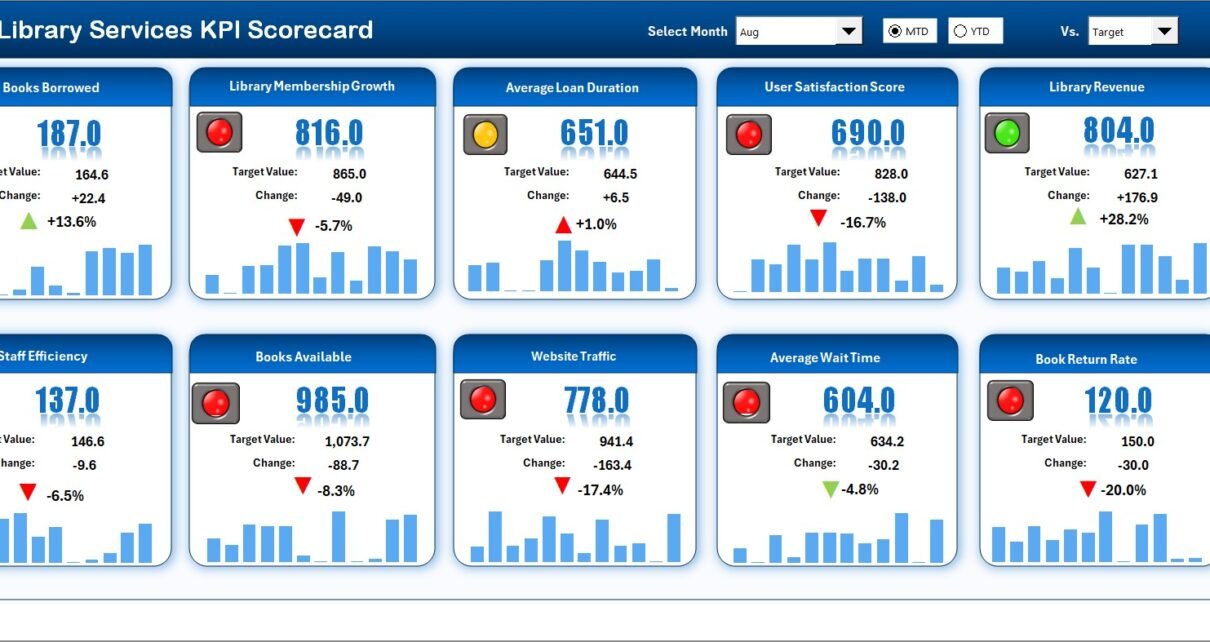
This is the main dashboard where you can monitor KPI performance instantly.
- Dropdown Menus: Select the month and choose between MTD or YTD performance views for detailed analysis.
- Actual vs Target Values: Direct comparison between actual service delivery and your targets helps pinpoint gaps.
- Visual Indicators: Use of intuitive color codes to indicate performance status helps users quickly interpret data.
- Comprehensive KPI Overview: Displays all relevant KPIs with insights on monthly and yearly trends side by side.
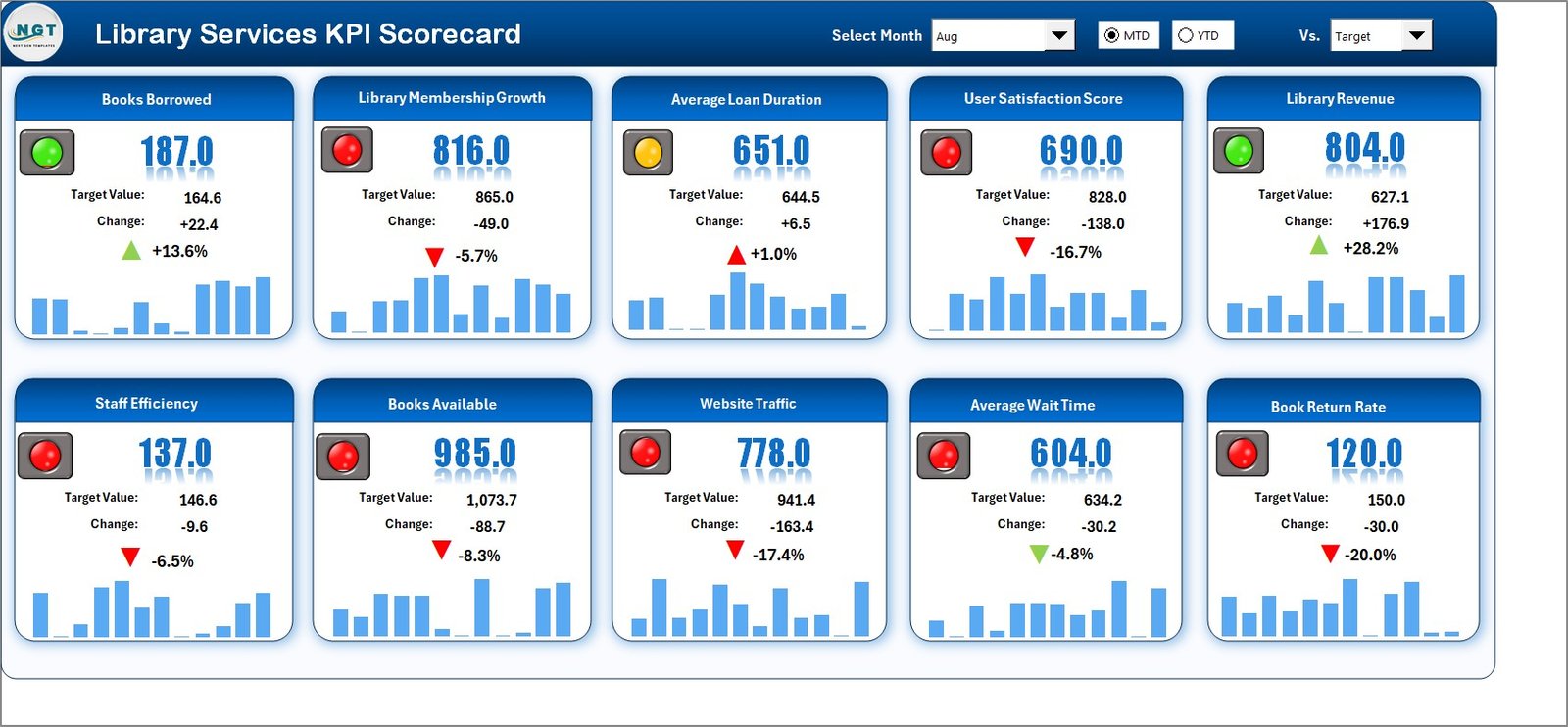 Library Services KPI Scorecard
Click to Buy Library Services KPI Scorecard in Excel
2. KPI Trend Sheet
This tab provides detailed trend analysis across various KPIs.
- KPI Selection: Use the dropdown in cell
C3to select the KPI you want to analyze. - Detailed KPI Info: Displays KPI Group, Unit of Measurement, KPI Type (whether lower or upper values are better), Formula, and Definition.
- Trend Charts: Visual graphs of MTD and YTD data for Actual values, Targets, and Prior Year metrics enable easy comparison.
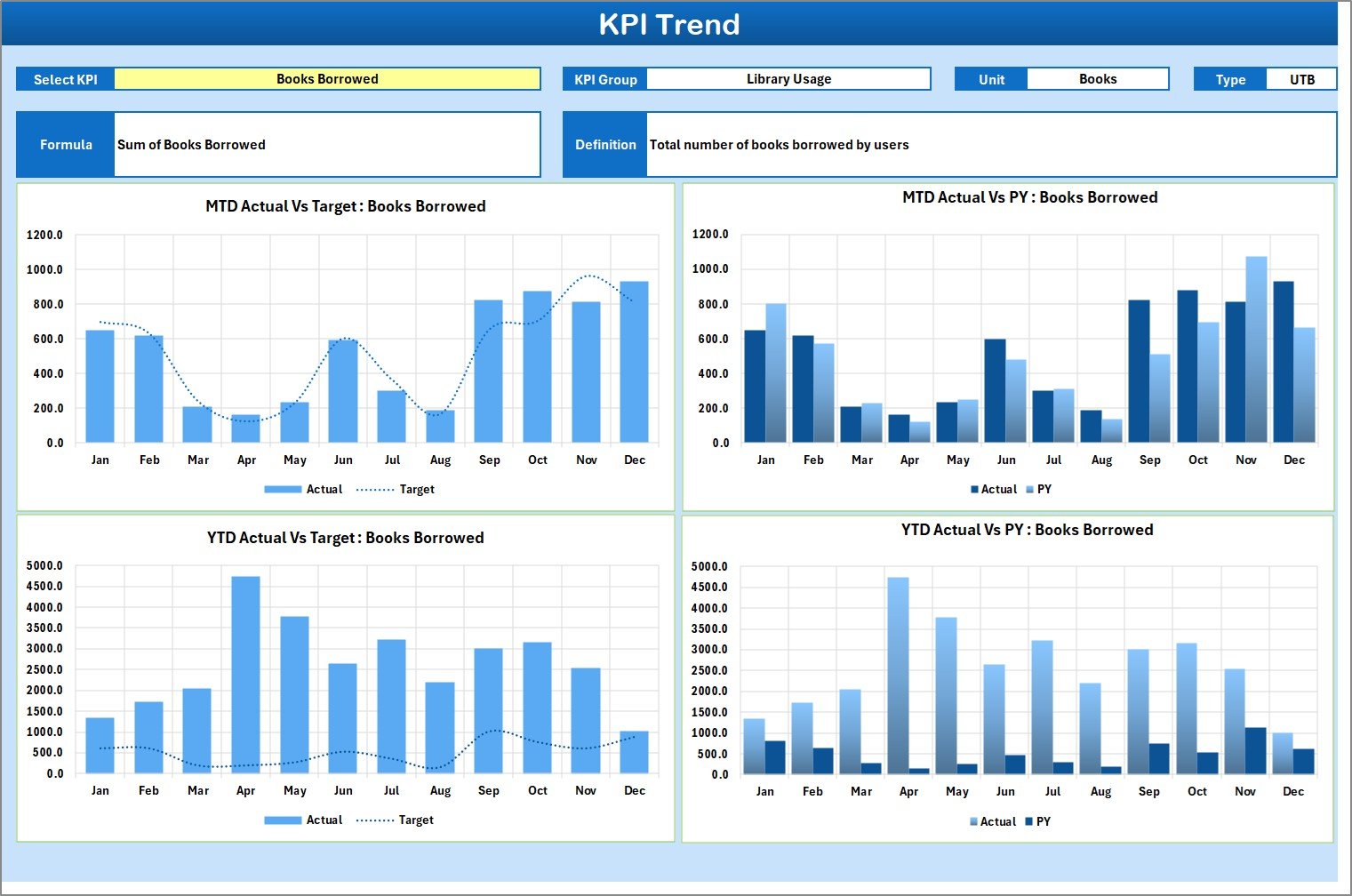 KPI Trend Sheet
Click to Buy Library Services KPI Scorecard in Excel
3. Input Data Sheet
This sheet is the backbone for feeding accurate KPI data into the scorecard.
- Data Entry: Record actual measurements, set targets, and input other related metrics.
- Flexibility: Easily update the sheet as new data comes in to ensure real-time scorecard accuracy.
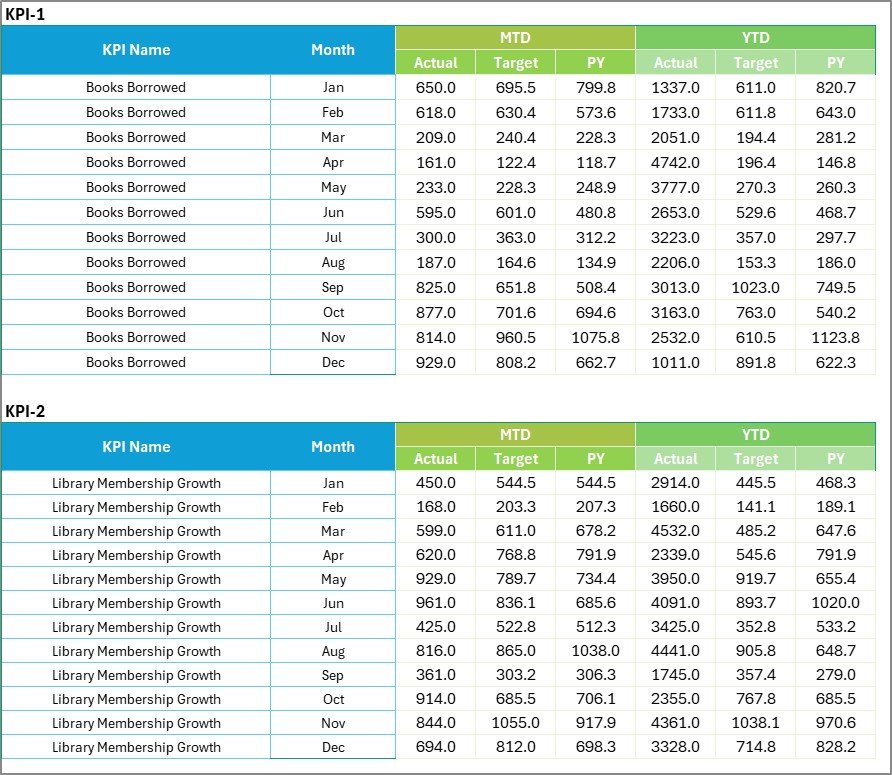 Input Data Sheet
4. KPI Definition Sheet
This tab maintains clarity and consistency by defining all KPIs comprehensively.
- Each KPI has a name, assigned group, unit of measure, calculation formula, and a clear definition to avoid ambiguity.
- This ensures every stakeholder understands what each KPI means and how it is calculated.
 KPI Definition sheet tab
Click to Buy Library Services KPI Scorecard in Excel
Advantages of Library Services KPI Scorecard
- Improved Decision Making: Immediate access to performance data allows for quick adjustments and strategic planning.
- Enhanced Accountability: Assign responsibility and measure progress consistently across teams.
- Resource Optimization: Identify underperforming areas to better allocate time and budget.
- Data-Driven Insights: Prevent subjective judgments by basing improvements on solid metric analysis.
- User Friendly: Designed for easy interpretation even by non-technical staff.
Opportunities for Improvement
- Automation: Linking the scorecard with your library management system via APIs or Excel macros could reduce manual data entry.
- Customization: Incorporate additional KPIs or create department-specific views to tailor the scorecard.
- Mobile Compatibility: Creating web or mobile-friendly versions can provide on-the-go access to KPI insights.
Best Practices
Click to Buy Library Services KPI Scorecard in Excel
- Regularly Update Data: Ensure the input sheet is updated frequently to maintain relevance.
- Train Your Team: Educate staff on KPI meanings and usage to promote ownership.
- Set Realistic Targets: Base targets on historical data and achievable benchmarks.
- Use Visual Cues: Leverage the scorecard’s visual indicators for quick communication during meetings.
- Review Periodically: Schedule KPI evaluations monthly or quarterly for continuous improvement.
FAQs
What is the main purpose of the Library Services KPI Scorecard?
It is designed to measure and monitor library service performance through specific KPIs, enabling better management and improvement.
Can I customize the KPIs in this scorecard?
Yes, the KPI Definition sheet allows you to add or modify KPIs according to your library’s unique goals.
How often should I update the KPI data?
Ideally, update data monthly or in real-time depending on your library’s reporting frequency.
Is this scorecard suitable for all types of libraries?
Yes, its flexible design fits academic, public, and corporate libraries alike.
Conclusion
Click to Buy Library Services KPI Scorecard in Excel
The Library Services KPI Scorecard is a vital tool for any library aiming to optimize its services and operations. By leveraging this comprehensive scorecard template, libraries can align their activities with strategic goals, monitor progress rigorously, and make informed decisions quickly. Download and start measuring your library performance today for continuous growth and enhanced user satisfaction.
For further learning, you may explore Microsoft’s official resources on KPI management: Microsoft Power BI KPI Overview.
Visit our YouTube channel to watch the demo: Youtube.com/@NextGenTemplates
Click to Buy Library Services KPI Scorecard in Excel