The Nonprofit Organizations Report in Excel tracks 5 headline KPIs across 4 sheets, with 5 interactive charts and dual slicers covering donor type, region, program, and month. According to the National Council of Nonprofits, the U.S. alone has over 1.8 million registered nonprofits, and the top reason most small ones avoid donor CRMs is cost — paid platforms typically run $99 to $499 per month per organization.
This Excel report file is built for nonprofits and NGOs that need a clean, board-ready snapshot of programs, donors, regions, and fund utilization without paying a monthly SaaS bill. Setup of the Nonprofit Organizations Report in Excel takes under 10 minutes — paste your data into the Data sheet and every KPI card, chart, and table refreshes automatically.
What is the Nonprofit Organizations Report in Excel?
The Nonprofit Organizations Report in Excel is a 4-sheet Microsoft Excel workbook designed for nonprofits, NGOs, and charities to consolidate program performance, donor analytics, regional impact, and fund utilization into a single reporting layer. The file uses standard Excel features only — no macros, no add-ins, and no internet connection — so it works equally well in Microsoft Excel for Windows, Mac, Excel 2019, Excel 2021, and Microsoft 365.
The workbook ships with realistic sample data covering programs, donor types, regions, fund flows, and impact satisfaction scores. Replace the samples with your own records and every visualization on the Summary Page and Report Page updates immediately.
Key Features of the Nonprofit Organizations Report
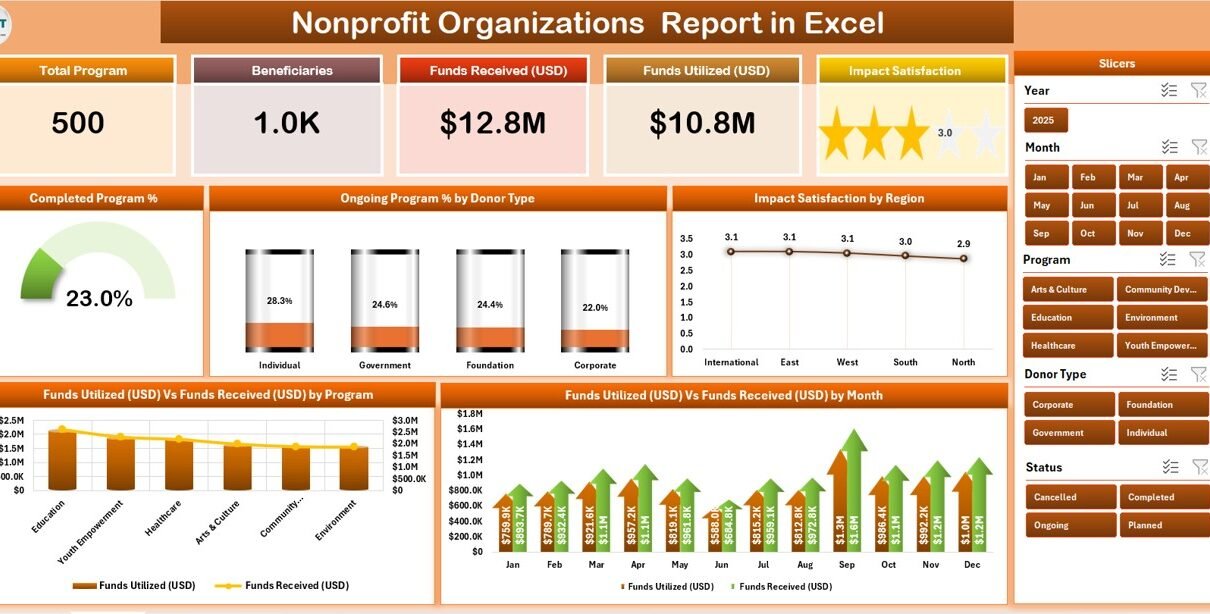
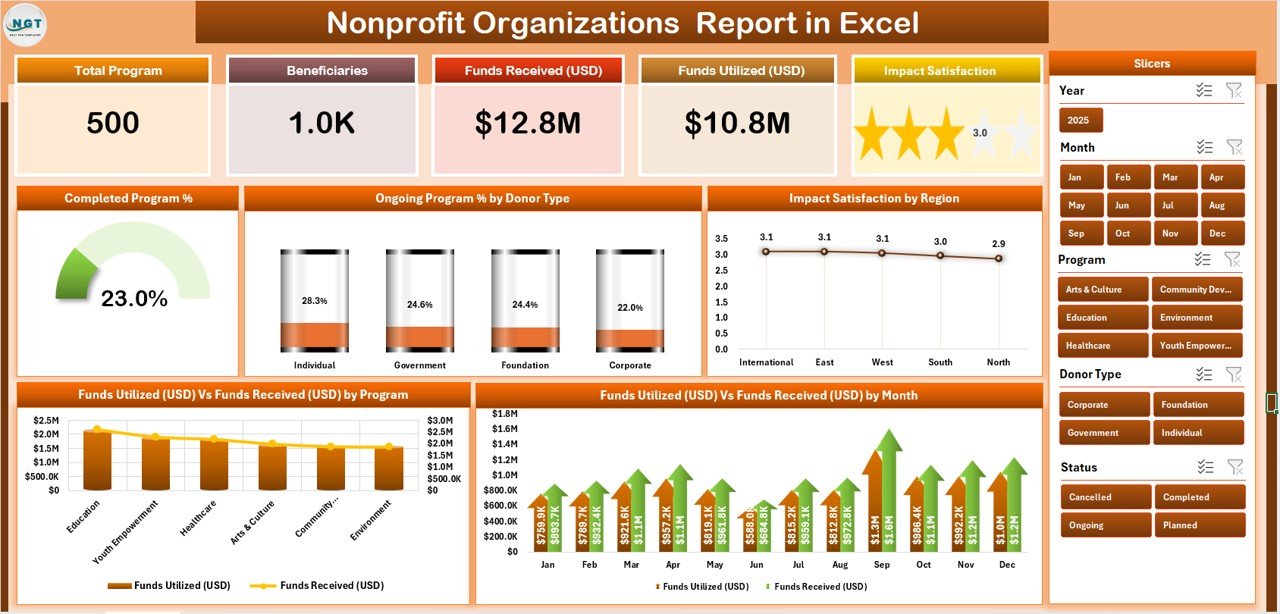
- 5 KPI cards on the Summary Page — Completed Programs, Ongoing Programs, Average Impact Satisfaction, Total Funds Received, and Total Funds Utilized.
- 5 interactive charts — Completed Program %, Ongoing Program % by Donor Type, Impact Satisfaction by Region, Funds Utilization vs Funds Received by Program, and Funds Utilization vs Funds Received by Month.
- Right-side slicer on the Summary Page that filters every card and chart at once.
- Dedicated Report Page with a left-side slicer and a tabular information view for board packs and donor letters.
- Editable Data sheet with 200+ sample rows and clear column headers.
- Support sheet housing lookup lists for regions, donor types, and programs.
- Works offline in Excel desktop on Windows and Mac (Microsoft 365, Excel 2019+).
- One-time $7.99 sale price — no subscription, no per-user fee, lifetime access.
Sheets Explanation
1. Summary Page — KPI Cards, Slicer, and 5 Charts
The Summary Page is the headline view of the Nonprofit Organizations Report. Five KPI cards sit across the top: completed programs, ongoing programs, average impact satisfaction, total funds received, and total funds utilized. To the right is a single slicer that drives the whole page — choose a region, a donor type, a program, or a year, and every chart and card updates together.
The five charts give you a complete picture: Completed Program % shows the share of programs that closed successfully; Ongoing Program % by Donor Type shows where active funding is concentrated; Impact Satisfaction by Region tells you which regions are reporting the strongest outcomes; Funds Utilization vs Funds Received by Program highlights where money is being spent fastest or sitting idle; and Funds Utilization vs Funds Received by Month gives the cash-flow rhythm across the year.
2. Report Page — Left Slicer and Information Table
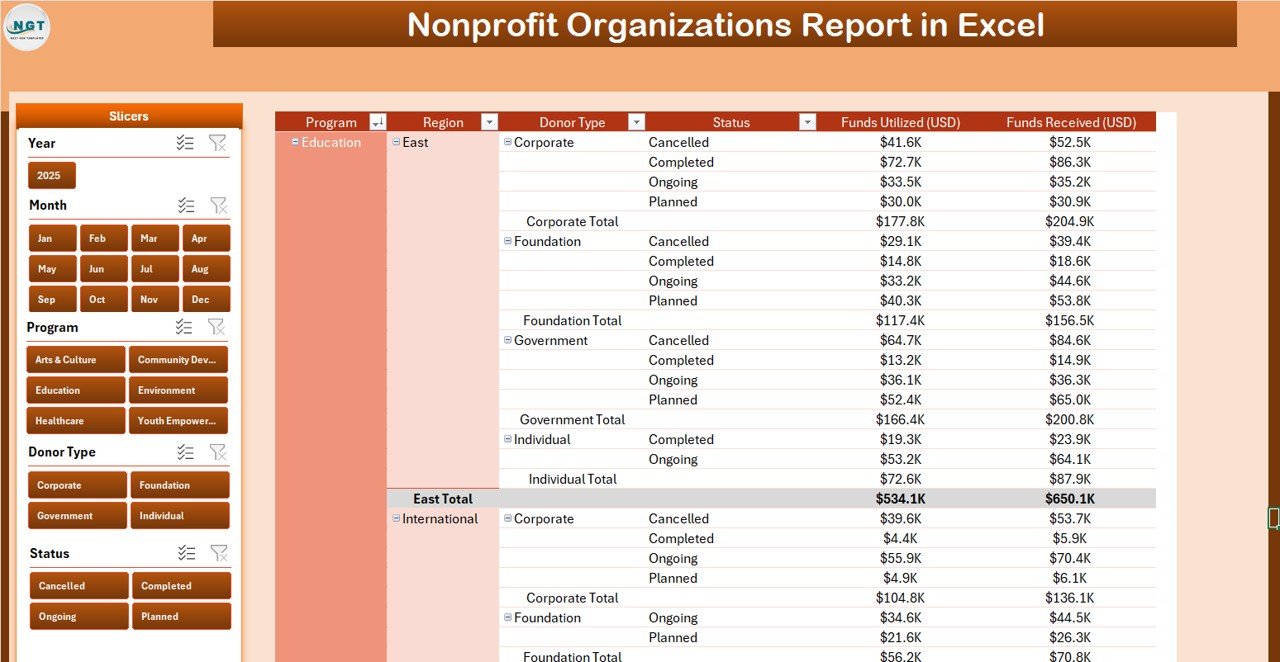
The Report Page strips the dashboard down to the essentials reviewers actually want: a clean, structured table of nonprofit records (program, donor type, region, funds received, funds utilized, impact rating, status) with a left-side slicer to filter it. This is the page you copy into a board deck, a grant report, or a stewardship letter to a major donor.
Filter the table by donor type to send a single funder a clean list of only their programs. Filter by region to brief regional managers. The Report Page is intentionally lighter on charts so it prints cleanly to PDF.
3. Data Sheet — Your Editable Source Records
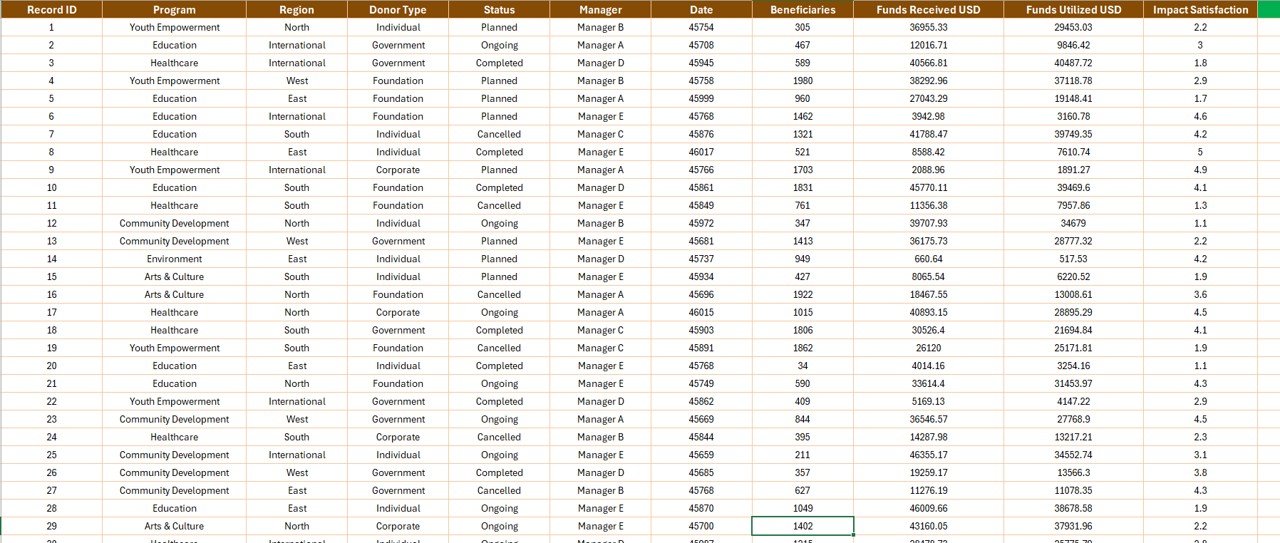
The Data sheet is where you paste or type your own records. Columns include date, program name, donor name, donor type, region, country, funds received, funds utilized, beneficiaries, impact satisfaction, and status. Keep the column headers exactly as shipped and the formulas powering the Summary and Report pages will keep working without any edits.

4. Support Sheet — Lookups and Dropdown Lists
The Support sheet holds the central lookup lists for regions, donor types, and programs. Update a list once and every dropdown on the Data sheet, every slicer label on the Summary and Report pages, and every chart category stays consistent. This is what keeps the workbook tidy as it grows.
Nonprofit Organizations Report vs. Google Sheets Equivalent vs. Paid Nonprofit CRMs — Feature Comparison
| Feature | Nonprofit Organizations Report (Excel) | Google Sheets equivalent | Salsa / Bloomerang / NeonCRM |
|---|---|---|---|
| Cost | $7.99 one-time | Free, but you build it | $99–$499 / month |
| Platform | Microsoft Excel desktop | Google Sheets | Cloud SaaS |
| Setup time | Under 10 minutes | Hours of formula work | Multi-week onboarding |
| Real-time co-authoring | Via OneDrive / SharePoint | ✅ Native | ✅ Native |
| Works offline | ✅ | ❌ | ❌ |
| Customizable fields | ✅ Full control | ✅ | Vendor-defined |
| Donor data ownership | ✅ Your file | ✅ | Hosted by vendor |
| Year-1 cost (5 users) | $7.99 once | $0 + your hours | $1,200–$6,000+ |
For nonprofits that want clean board-ready reports without paying $1,200+ a year for a donor CRM, the Nonprofit Organizations Report in Excel sits in the sweet spot.
Who Should Use This Template
Perfect for:
- Small to mid-size nonprofits and NGOs (5–100 staff) tracking donor funds, programs, and impact
- Program managers preparing quarterly board reports and grant utilization summaries
- Founders and executive directors who need a single-file financial and impact snapshot
- Charity finance volunteers using Excel — not a SaaS subscription — for monthly reporting
- Grant-funded teams reporting donor utilization to multiple funders separately
Not a fit if:
- You are a large international NGO needing SOC 2, SSO, and full audit-trail compliance
- You have never collected donor data and need fundraising platform features
- You only have web-only Excel without the desktop app (slicers behave with limits in Excel for the web)
Real-World Use Cases
Aisha runs operations at a 25-person education nonprofit in Nairobi. She uses the Nonprofit Organizations Report each quarter to show her board exactly how much of the $180,000 in donor funds was utilized across 6 programs, broken down by region. The Funds Utilization vs Funds Received chart has saved her from rebuilding the same pivot every quarter — and the right-side slicer lets her show a single funder only their programs without exposing the rest.
David is the executive director of a 12-person U.S. health charity. He uses the Report Page with its left-side slicer to filter the information table by donor type and export it for individual donor stewardship letters. Replacing his old Educational NGOs KPI Dashboard in Excel with this lighter report file means his program managers can update one Data sheet and he gets a clean snapshot in minutes instead of hours.
Priya volunteers as the finance lead for a community NGO in Mumbai. Her team came off a $99/month nonprofit CRM and now shares this Excel report on OneDrive. Five program leads paste their monthly numbers into the Data sheet; the Summary Page keeps the impact-satisfaction-by-region chart up to date, and the board sees the same view as the funders.
Advantages of the Nonprofit Organizations Report
- $1,200+ per year saved compared to entry-level paid nonprofit CRMs at 5 seats — and the file is yours forever.
- Quarterly reporting cycle compresses from days to hours because slicers replace manual pivot rebuilds.
- Works offline and on Mac, which matters for field teams in regions with patchy internet.
- Single-file portability — email it, OneDrive it, or share it with auditors without any vendor lock-in.
- Total customization — every formula and chart is editable, unlike a vendor SaaS where the schema is fixed.
Opportunities for Improvement
Honesty matters. There are areas where this report file has limits:
- No automatic donor email automation — for that, pair this report with a fundraising tool like Charity Fundraising KPI Scorecard in Google Sheets.
- Single-currency by default — if you accept multi-currency donations you’ll need to add a conversion column on the Data sheet.
- Not a CRM — there is no individual donor profile, communication log, or pledge tracking. This is reporting, not relationship management.
- No automated audit trail — Excel keeps revision history via OneDrive, but it is not an SOC-2 audit log.
Best Practices
- Lock the Support sheet after setup so volunteers don’t accidentally rename a region or program.
- Save the file on OneDrive or SharePoint for co-authoring across program leads.
- Keep a monthly archive copy — at month-end, save a snapshot version (e.g., “Nonprofit_Report_2026_04.xlsx”) for board records.
- Standardize donor type names at the start (Foundation, Individual, Corporate, Government) so the slicer stays clean.
- Refresh before reporting using Ctrl+Alt+F5 — easy to forget when you’re rushing to send a quarterly update.
Explore Relevant Templates
- 📊 Educational NGOs KPI Dashboard in Excel — fuller KPI dashboard if you need more than 5 charts.
- 💰 Crowdfunding Platforms KPI Dashboard in Excel — pair this report with a crowdfunding-specific dashboard if you also run online campaigns.
- ⛪ Church Finance Dashboard in Google Sheets — Google Sheets alternative for faith-based nonprofits.
- ❤️ Charity Fundraising KPI Scorecard in Google Sheets — fundraising-specific scorecard, complementary to this reporting file.
- 🎉 Event Management Analysis Dashboard in Excel — useful for nonprofits that run fundraisers and galas.
Frequently Asked Questions
What KPIs does the Nonprofit Organizations Report track?
The Nonprofit Organizations Report tracks 5 headline KPIs on cards (completed programs, ongoing programs, impact satisfaction, funds received, funds utilized) plus 5 charts covering completed program %, ongoing program % by donor type, impact satisfaction by region, and funds utilization vs received by program and by month.
Does the Nonprofit Organizations Report work in Excel for Mac?
Yes. The Nonprofit Organizations Report works in Microsoft Excel for Windows and Mac (Excel 2019, Excel 2021, and Microsoft 365). Slicers, charts, and KPI cards all function on both platforms because the file uses standard Excel features only — no macros, no add-ins, no internet required.
Can multiple staff members edit the Data sheet at the same time?
Yes — if you save the Nonprofit Organizations Report on OneDrive or SharePoint, multiple staff members can edit the Data sheet simultaneously through Excel’s co-authoring. Charts on the Summary and Report pages refresh for everyone when a record is updated, with no extra cost per user.
How does this compare to a paid nonprofit CRM like Bloomerang or NeonCRM?
Bloomerang and NeonCRM are full donor CRMs starting at roughly $99–$499 per month. The Nonprofit Organizations Report is a $7.99 one-time Excel reporting layer — perfect if you already track donors elsewhere and just need a clean board-ready report file with KPI cards, slicers, and 5 charts.
How long does setup take?
Setup of the Nonprofit Organizations Report takes under 10 minutes. Open the file, replace the sample rows on the Data sheet with your own donor and program records, refresh the workbook (Ctrl+Alt+F5), and the Summary Page and Report Page update automatically.
Can I customize the regions, donor types, and programs?
Yes. The Nonprofit Organizations Report uses a Support sheet that holds lookup lists for regions, donor types, and programs. Edit those lists once and every dropdown, slicer, and chart in the workbook reflects your nonprofit’s structure.
Do slicers work in Excel for the web?
Slicers display in Excel for the web, but interactive filtering is most reliable in Excel desktop. For the smoothest experience with the Nonprofit Organizations Report, open the file in Excel desktop on Windows or Mac.
About the Author
Built by PK — Microsoft Certified Professional with 15+ years of Excel, Google Sheets, and Power BI experience. Founder of NextGenTemplates, reaching 300K+ subscribers across YouTube channels. Every template is hand-built and tested before release.
Conclusion
The Nonprofit Organizations Report in Excel gives small and mid-size nonprofits a clean, board-ready reporting layer for programs, donors, regions, and fund utilization — at $7.99 one-time instead of $99–$499 per month. With 5 KPI cards, 5 interactive charts, dual slicers, and a Data sheet built for replacement, you can move from raw spreadsheets to a proper quarterly report in under 10 minutes.
👉 Click here to Purchase the Nonprofit Organizations Report in Excel
✅ Instant download · One-time payment · No subscription · Lifetime access
🎥 Visit Youtube.com/@PK-AnExcelExpert for free Excel and dashboard tutorials.
📅 Last updated: April 2026