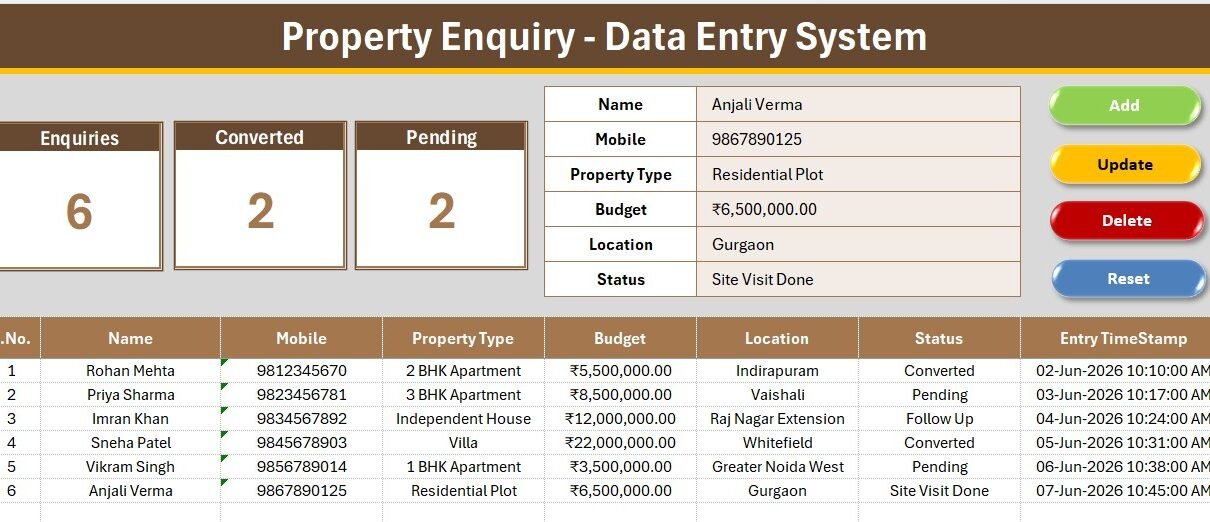
The Property Enquiry Data Entry System in Excel gives real estate agents a single, offline place to log every buyer and tenant lead across 6 fields and watch 3 pipeline KPIs — Enquiries, Converted, and Pending — update automatically. Built as a macro-powered workbook, it captures a new enquiry and refreshes every metric in seconds, with zero add-ins and a setup time under 10 minutes.
Most agents still track leads in a notebook, a phone gallery of screenshots, or a messy shared sheet — and lose follow-ups as a result. This template replaces that chaos with a structured Excel register: clean dropdowns for Property Type, Location, and Status, one-click Add, Update, Delete, and Reset buttons, and an automatic records table that timestamps every entry.
Key Features of the Property Enquiry Data Entry System in Excel
Every part of this template is built to shorten the distance between a phone call and a logged, trackable lead. Here is what you get:
- One-click VBA buttons. Add, Update, Delete, and Reset macros handle every write to the records table, so you never manually insert rows, drag formulas, or risk breaking the sheet.
- Three live KPI cards. Enquiries, Converted, and Pending read straight from the Status column and recalculate the instant a record changes — an always-current snapshot of your pipeline.
- Three controlled dropdowns. Property Type (12 options), Location (12 areas), and Status (8 stages) pull from named ranges on the Setting sheet, keeping every entry consistent and filter-friendly.
- Automatic records table. Each enquiry receives an auto S.No, a currency-formatted Budget, and an Entry TimeStamp, giving you an audit-ready log without extra typing.
- Four clean sheets. Data Entry, Setting, Instructions, and Get More Templates keep the working area, the lists, and the guidance separate and tidy.
Because it runs entirely in Excel, the Property Enquiry Data Entry System works offline, needs no monthly fee, and travels in a single file you can back up or share.
Template Structure and Sheets Explanation
Property Enquiry Dashboard
The Data Entry sheet is the command center. The form sits at the top with all six fields, the three KPI cards report Enquiries, Converted, and Pending, and the Add, Delete, Update, and Reset buttons sit in a tidy block — all above the live records table.
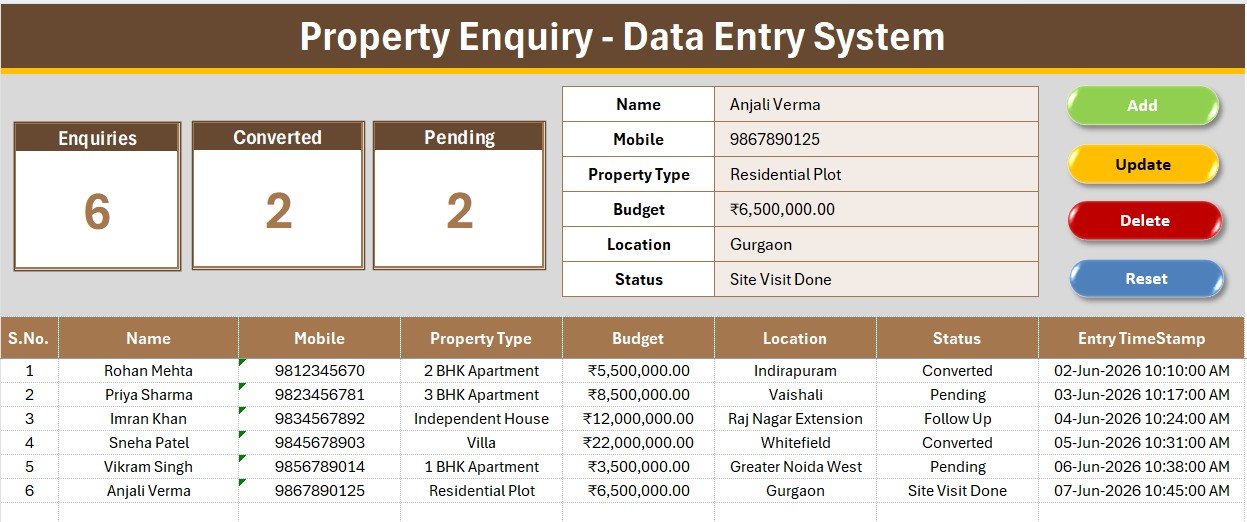
Enquiry Records and Live KPI Tracking
As you add leads, each one is written to the records table with its serial number, budget, and timestamp. The KPI cards above respond immediately, so a glance tells you how many total enquiries you hold, how many converted, and how many are still pending a call-back.
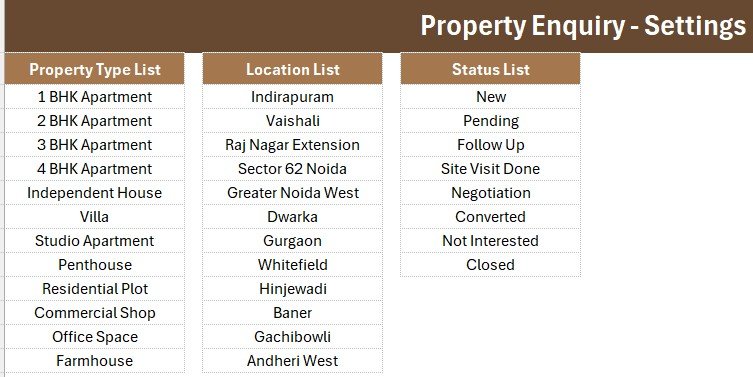
Dropdown Settings Sheet
The Setting sheet stores the three source lists. Change a city in Location, add a new Property Type, or rename a pipeline Status once, and every dropdown on the form updates through named ranges — no formula edits required.
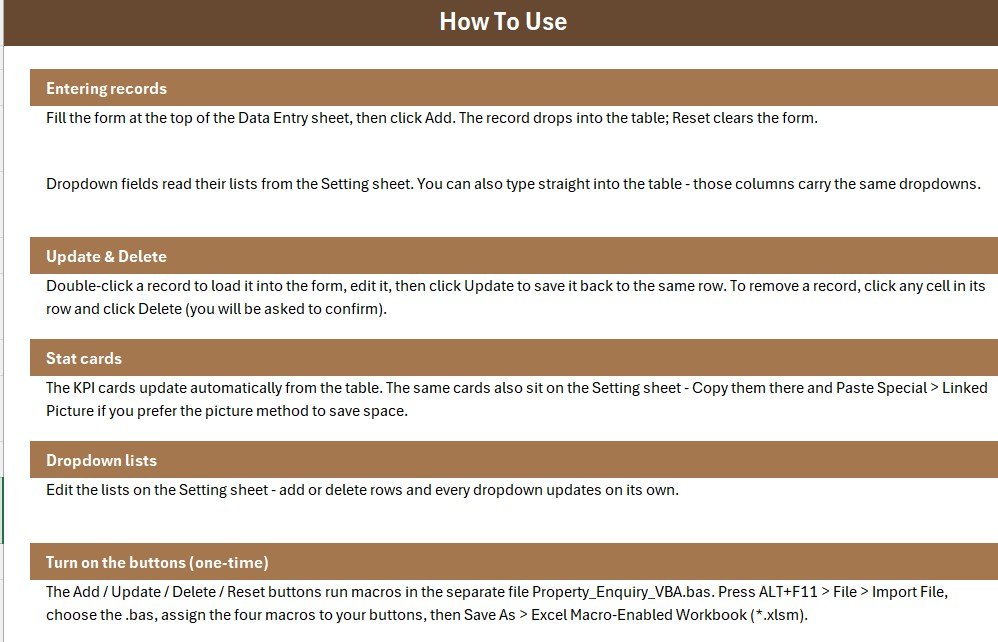
An Instructions sheet mirrors the setup used across our data entry systems, and the Get More Templates sheet points to related Excel tools.
Property Enquiry System vs. Google Sheets vs. Real Estate CRM SaaS — Feature Comparison
| Feature | Property Enquiry System (Excel) | Google Sheets equivalent | Real Estate CRM (Wise Agent / Follow Up Boss) |
|---|---|---|---|
| Cost | $5.99 one-time | Free but manual to build | $25–$150 / user / month |
| Platform | Microsoft Excel (offline) | Google Sheets (online) | Cloud SaaS |
| Setup time | Under 10 minutes | 2–4 hours | Days of onboarding |
| Enquiry pipeline KPIs | Built-in (Enquiries, Converted, Pending) | Manual formulas | Included |
| Works offline | Yes | No | No |
| Customizable fields | Fully editable | Editable | Limited to plan |
| Per-user fees | None | None | Charged per seat |
| Year-1 cost at 5 users | $5.99 total | $0 plus your time | $1,500–$9,000 |
For agents and small brokerages that want a clean enquiry log without paying per-seat CRM fees, the Property Enquiry Data Entry System sits in the sweet spot.
Who Should Use This Template
Perfect for:
- Solo real estate agents and brokers who need a reliable enquiry log
- Small property desks that want one shared, offline register
- Rental managers moving leads from first contact to signed tenant
- Anyone replacing scattered notes and screenshots with structured data
Not a fit if:
- You need cloud multi-user access with automated email or SMS drips
- You require SOC 2, SSO, or portal integrations with Zillow, 99acres, or MLS feeds
Real-World Use Cases
Rahul, a solo agent in Noida, logs every walk-in and phone enquiry with the caller’s budget and preferred location. Each morning he sorts by the Pending status to see exactly who needs a follow-up call, and marks deals Converted as they close — all without a monthly CRM bill.
Aisha runs a three-person property desk. Her team shares one workbook, records enquiries as they arrive, and updates the Status dropdown through the pipeline. At month-end, the Converted KPI gives the owner an instant closings count for the review meeting.
Vikram manages rentals part-time. He starts each tenant lead in this system, then hands the confirmed ones over to the Rent Collection Data Entry System to track deposits and monthly rent — two lightweight Excel tools covering the full journey.
Advantages of the Property Enquiry Data Entry System
The biggest advantage is cost certainty: a one-time $5.99 purchase versus $25 to $150 per user every month for a real estate CRM. Over a year with a small team, that is the difference between a few dollars and several thousand.
Beyond price, the template is fast to learn, works offline on any Windows machine with Excel, and keeps your data in a file you own outright. The controlled dropdowns cut typos, the timestamp column creates a natural activity trail, and the KPI cards remove the need to build reporting formulas yourself. For another form built on the same pattern, see our Service Booking Data Entry System.
Opportunities for Improvement
Being honest about limits: because it is Excel-based, the Property Enquiry Data Entry System is single-user at a time and does not send automated reminders, emails, or SMS. There is no built-in mobile app — you would open it on a laptop or via Excel mobile. Very large teams needing simultaneous cloud editing or portal integrations will outgrow it. For heavier invoicing needs, you can pair it with a Client Invoice Tracker or move reporting into Power BI.
Best Practices
- Customize the three dropdown lists on the Setting sheet before your first entry so your data is consistent from day one.
- Use the Status field diligently — accurate Converted and Pending counts depend on it. Microsoft’s guide to creating drop-down lists is a handy reference if you expand the lists.
- Keep a dated backup copy of the file each week, especially if several people use it.
- Always enable macros from a trusted file location so the buttons work every session.
- Review the Pending card daily to make sure no lead slips through the cracks.
Explore Relevant Templates
- Rent Collection Data Entry System in Excel — track rent due and payments for converted tenants.
- Property Portfolio Dashboard in Google Sheets — monitor owned units, occupancy, and yield.
- Home Inspection Dashboard in Power BI — visualise inspection outcomes across listings.
- Project Time Log Data Entry System — another Excel data-entry tool built on the same pattern.
💎 Want the full set? The Real Estate & Property Bundle packs seven tools together and saves up to 66%.
Frequently Asked Questions
What is the Property Enquiry Data Entry System in Excel?
It is a macro-powered Excel workbook that captures property buyer and tenant enquiries across six fields and tracks Enquiries, Converted, and Pending KPIs automatically, giving real estate agents a simple offline lead register.
Do I need to enable macros to use it?
Yes. The Add, Update, Delete, and Reset buttons run on VBA, so enable macros when Excel prompts you. Once enabled, the Property Enquiry Data Entry System works entirely offline with no add-ins.
How do the Enquiries, Converted, and Pending KPIs work?
Each KPI card reads the Status column of your records table. Enquiries counts every lead, Converted counts rows marked Converted, and Pending counts rows marked Pending, all recalculating the moment you add or edit an entry.
Can I change the Property Type, Location, and Status options?
Absolutely. Open the Setting sheet and edit the three lists; the form dropdowns update instantly through named ranges, so you can match the template to any city, property type, or sales stage.
Can more than one person use it at the same time?
The Property Enquiry Data Entry System is an Excel file, so it is single-user at a time. For simultaneous multi-user editing you would need a cloud tool, but for solo agents and small desks the shared-file approach works well.
How does this compare to a paid real estate CRM?
A CRM like Wise Agent or Follow Up Boss charges $25 to $150 per user each month. The Property Enquiry Data Entry System is a $5.99 one-time purchase that covers core enquiry logging and pipeline counts for solo agents and small teams.
About the Author
Built by PK — Microsoft Certified Professional with 15+ years of Excel, Google Sheets, and Power BI experience. Founder of NextGenTemplates, reaching 300K+ subscribers across YouTube channels. Every template is hand-built and tested before release.
Conclusion
If you are tired of losing property leads to scattered notes, the Property Enquiry Data Entry System in Excel gives you a clean, offline register with live pipeline KPIs for the price of a coffee. Click here to purchase the Property Enquiry Data Entry System in Excel and start logging enquiries in the next 10 minutes.
Instant download · One-time payment · No subscription. For step-by-step Excel tutorials, visit YouTube.com/@PK-AnExcelExpert.
Last updated: July 2026