Most hospital on-call rotas are published as a Word table, emailed on the 25th of the month, printed once, and then argued about for four weeks. The information is fine. The format is the problem: you cannot see next week without counting rows, you cannot see the year at all, and the moment one duty is swapped the printed copy is wrong.
The Doctor On-Call Calendar in Excel is a macro-enabled workbook built for exactly that gap. It holds 7 sheets and 4 linked views of one dataset, and it ships with 100 worked sample duties running from 02-Jan-2026 to 31-Dec-2026 across 8 hospital departments and 65 distinct duty types – so you can see how a full year of cover behaves before you type a single line of your own. Every month of the sample year is populated, between 8 and 9 duties each.
This walkthrough covers what is in the file, what each page does, where it stops, and who should not buy it.
Key Features of the Doctor On-Call Calendar in Excel
- One dataset, four views. Annual View, Monthly View, Daily View and This Month all read the same Events sheet. Type a duty once and it appears in all four.
- A whole year on one page. Annual View draws twelve months in a 3 x 4 grid with every covered date shaded.
- Month grid with pickers. Monthly View has Month and Year dropdowns and writes the duty name straight into the day cell.
- Date-range list. Daily View takes a Start Date and an End Date and rebuilds a seven-column table for that window.
- A month summary page. This Month gives four count cards, an Events by Day of Week breakdown, a Top 5 Locations table and the month list.
- VBA data entry. Add New Record, Update Record and Delete Record open a six-field form; the weekday fills itself in from the date you choose.
- 31 years and 5 themes. The Setting sheet offers 2021 to 2051, any starting month, any week start day, and Default, Blue, Red, Black or Orange colour schemes.
- No staff or patient columns. Seven fields, none of them a person – a design decision covered in full below.
The Pages, One by One
Home
A navigation page with five buttons – Annual View, Monthly View, Daily View, This Month and Events. Every other sheet has a home icon in the header for the trip back. It is deliberately plain; the point is that nobody has to be taught where anything lives.
Annual View
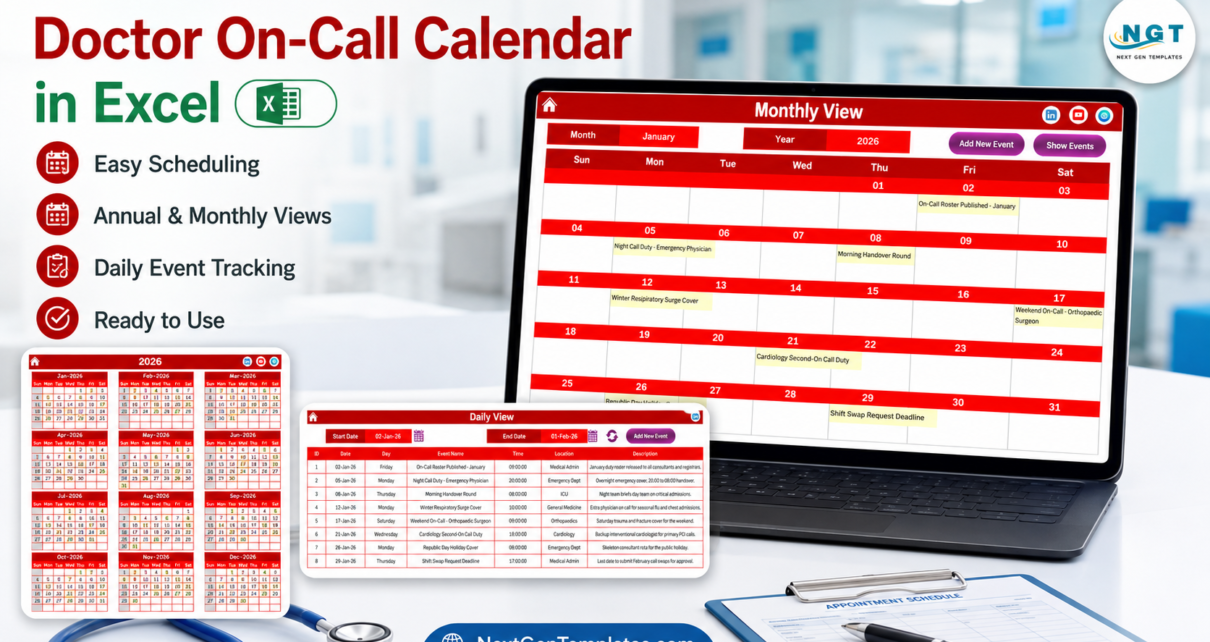
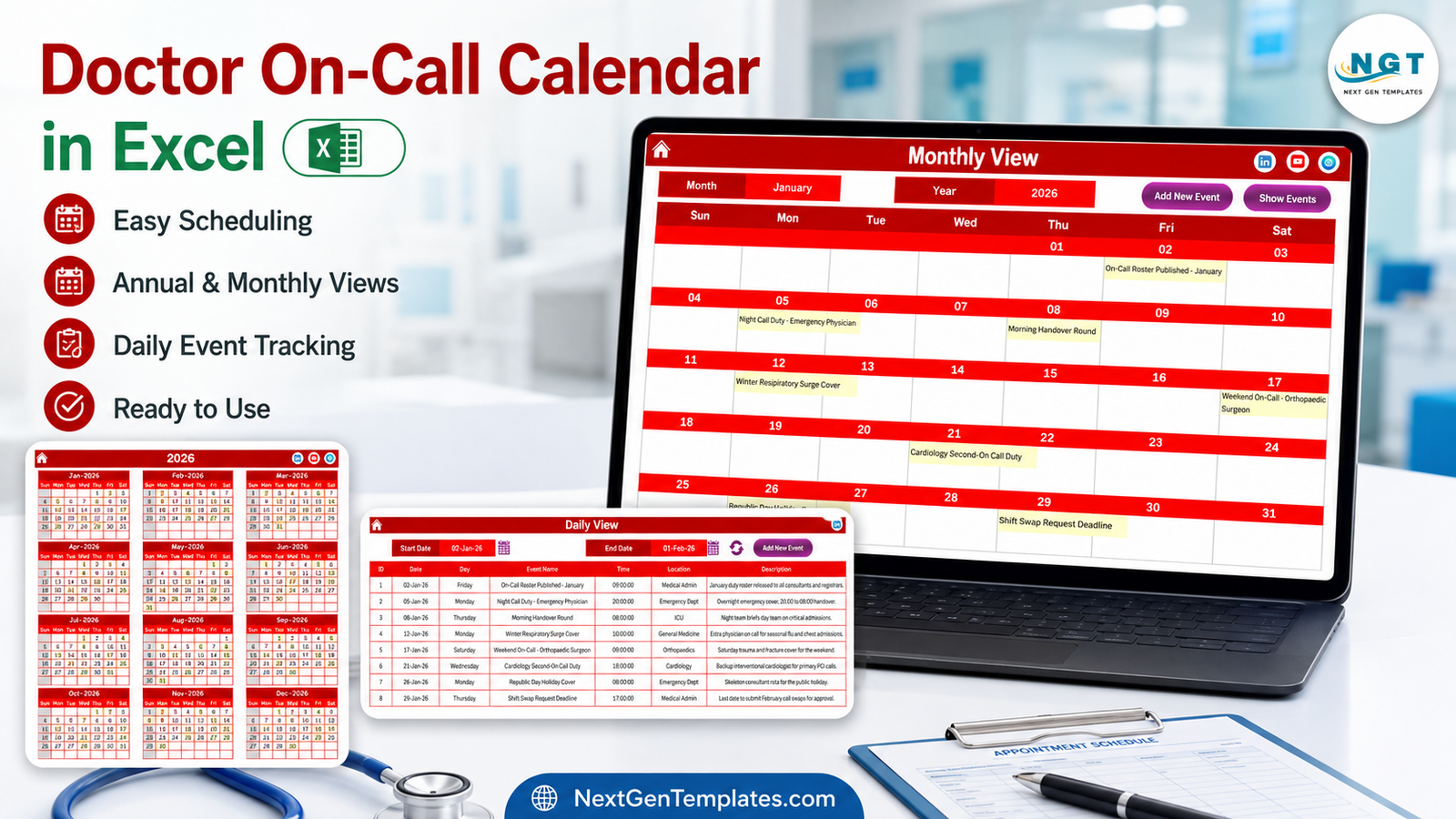
Twelve months of the selected year in a 3 x 4 grid. Dates carrying a duty are shaded, which turns the year into a density map: in the sample year, January 2026 shows eight shaded dates – the 2nd, 5th, 8th, 12th, 17th, 21st, 26th and 29th. Print it at A3 and it works as the noticeboard copy for the whole rota year.
Monthly View
The page most people will actually live in. A Sun-to-Sat grid with the duty name inside the day cell, plus Add New Event and Show Events buttons. January 2026 in the shipped file reads On-Call Roster Published – January (2nd), Night Call Duty – Emergency Physician (5th), Morning Handover Round (8th), Winter Respiratory Surge Cover (12th), Weekend On-Call – Orthopaedic Surgeon (17th), Cardiology Second-On Call Duty (21st), Republic Day Holiday Cover (26th) and Shift Swap Request Deadline (29th).
Daily View
Set Start Date and End Date – the sample ships at 02-Jan-26 to 01-Feb-26 – and the table underneath rebuilds with ID, Date, Day, Event Name, Time, Location and Description. This is the view to use when someone asks what cover exists across a specific weekend or a specific fortnight.
This Month
A one-screen summary with its own Month and Year pickers. In the shipped August 2026 view the four cards read Events This Month 8, Active Days 8, Locations Used 6 and Next 7 Days 2. Below them, Events by Day of Week splits those eight duties as Saturday 3, Monday 2, Tuesday 1, Wednesday 1, Thursday 1, Sunday 0, Friday 0 – which is the kind of number that starts a useful conversation about weekend load. A Top 5 Locations table ranks the busiest departments, and the eight August duties are listed in full underneath.
Events
The source of truth: rows 5 to 104, IDs 1 to 100, seven columns, with Add New Record, Update Record and Delete Record across the top. Nothing else in the workbook is meant to be typed into.
Setting
Year, starting month, week start day, two day-of-week highlight slots, a highlight-duties toggle, and the colour theme. Change the year here and all four views redraw.
What the 100 Sample Duties Actually Contain
Sample data is usually padding. Here it is worth reading, because it shows the shape the workbook expects. The 8 departments are weighted the way a real hospital calendar is: Medical Admin 29, Emergency Dept 16, General Medicine 12, ICU 10, Cardiology 9, Orthopaedics 8, Paediatrics 8 and Obstetrics 8. Start times fall into 10 slots between 08:00 and 20:00.
The 65 duty names cover first and second on-call, night calls by specialty, weekend cover, labour-ward cover, locum cover for study leave, morning and evening handover rounds, cardiac arrest and difficult airway drills, monsoon and heatwave surge planning, festival and public-holiday cover, shift-swap deadlines, and the monthly roster publication dates. In other words: the administrative furniture of a rota, not just the clinical shifts.
Doctor On-Call Calendar in Excel vs. Google Sheets vs. Paid Rota Software – Feature Comparison
| This Excel calendar | Google Sheets equivalent | Paid rota / scheduling SaaS | |
|---|---|---|---|
| Cost | $4.99 once (reg. $8.99) | $4.99 once (reg. $8.99) | Per-clinician monthly subscription |
| Platform | Excel for Windows, desktop | Any browser | Browser plus mobile app |
| Setup time | Minutes | Minutes | Weeks, usually with onboarding |
| Real-time collaboration | No | Yes | Yes |
| Mobile access | Limited – macros do not run on mobile Excel | Yes | Yes |
| Customisable fields | Yes | Yes | Only what the vendor exposes |
| Share with a link | No – you send the file | Yes | Yes |
| Year-1 cost, 5 users | $4.99 | $4.99 | Typically hundreds to thousands |
| Generates the rota | No | No | Yes |
| Swap requests and approvals | No | No | Yes |
| Works offline | Yes | No | No |
The distinction that matters: rota software builds and enforces a rota. This workbook displays one that has already been agreed in a meeting.
Who Should Use This Template
It fits a rota coordinator, clinical lead or practice manager publishing cover for one department or a small hospital, working on a Windows desktop, who wants the month printable and the year visible. It fits anyone whose current answer is a Word table.
It does not fit you if you need names attached to duties inside the file, if you need the rota generated rather than recorded, if several people must edit the same rota simultaneously, if you work on a Mac or an iPad, or if you expect reminders and alerts. Those are real gaps, and it is cheaper for everyone if you know them before you download.
Real-World Use Cases
The district hospital rota office
One workbook per department, eight departments, one coordinator. The agreed cover goes in as soon as the consultants sign off, Monthly View is printed for each noticeboard, and the two dates that drive the whole cycle – roster publication and the swap-request deadline – live in the calendar as entries in their own right rather than in somebody head.
The emergency medicine clinical lead
This Month, Monday morning. Next 7 Days answers how much cover is coming; Events by Day of Week answers whether the weekend is carrying too much of it. For a specific question – what is on this Saturday – Daily View narrowed to that weekend answers in about five seconds.
The five-consultant private clinic
Annual View, once a year. Holiday cover, drill days and roster-publication dates get marked first, and the rest is worked backwards from there. No IT department, no scheduling budget, no appetite for either.
Advantages of the Doctor On-Call Calendar in Excel
- It is readable. Four ways of looking at the same rota means the answer is always one click away rather than one scroll away.
- It is offline. A hospital rota that lives in a file on a coordinator PC never depends on a login, a network, or a vendor staying in business.
- It is cheap enough to be disposable. At $4.99 you can keep a separate workbook per department without a procurement conversation.
- It prints. Every view has a print area already configured, which matters more in hospitals than in most workplaces.
- It carries no personal data. Nothing in the file identifies a clinician or a patient, so emailing it around is a much smaller decision than emailing a staffing spreadsheet.
- It is yours. Add a column, change a theme, rewrite a heading – it is an ordinary workbook, not a locked product.
Opportunities for Improvement
These were checked against the file itself rather than the screenshots, and they are worth stating plainly.
- No clinician name column. The workbook records what cover exists, not who provides it. You can put a name in Event Name or Description, but you cannot filter, count or report by person.
- Monthly View shows one duty per date. The grid uses a lookup that returns the first match and prints no more-events counter, so a date carrying two duties displays only one of them in the month grid. Daily View and This Month both list all of them. In the shipped sample all 100 duties sit on 100 different dates, so this never shows up until you start entering your own.
- No end time. Time is a single start value, so the file cannot total on-call hours, measure rest between duties, or cost a rota.
- No clash detection. Two duties in the same department at the same time are accepted silently.
- Top 5 Locations is exactly five rows. It is labelled honestly, but Locations Used can read higher – 6 against 5 rows in the August 2026 sample.
- Windows desktop only. The VBA UserForm and the view refreshes will not run in Excel for the web, on iPad, on Android, or on Excel for Mac.
Best Practices
- Enable macros deliberately, not reflexively. Rather than clicking Enable Content every time, add the folder to your Excel Trust Center trusted locations. Microsoft documents both routes in Enable or disable macros in Microsoft 365 files.
- Set the year before you type anything. Choose the year and the starting month on the Setting sheet first; departments on an April-to-March rota year should set the starting month to April.
- Keep one workbook per department. Because there is no department filter beyond the Location column, one file per rota is easier to read and easier to hand over than one file for everything.
- Put the administrative dates in. Roster publication and swap deadlines are in the sample data for a reason – they are the dates people miss.
- Avoid two duties on one date where you can. Given the Monthly View limitation, splitting a busy date into two clearly named entries and checking it in Daily View avoids a surprise on the printed grid.
- Save a PDF of each published month. It gives you an audit trail of what was circulated, which the workbook itself does not keep.
- Keep names somewhere else. Pair the calendar with your existing staff list rather than pasting names into the Description column, and the file stays as low-risk as it was designed to be.
Excel or Google Sheets?
The same calendar is published on both platforms at the same price. Choose Excel if the rota lives on one coordinator Windows PC, if it gets printed, if you work offline, or if hospital IT would rather it never left the network. Choose the Doctor On-Call Calendar in Google Sheets if several people need to edit the same rota, if clinicians want it on their phones, or if a view-only link beats an emailed attachment. Four views, 100 sample duties, same structure – only the medium changes.
Explore Relevant Templates
If you are building out the scheduling side of a hospital in Excel, these cover the neighbouring problems: Nurse Duty Roster Calendar in Excel for ward-level shift bands, Operation Theatre Booking Calendar in Excel for theatre lists, Radiology Slot Booking Calendar in Excel for scanner slots, Patient Follow-Up Visit Calendar in Excel for review clinics, Physiotherapy Session Calendar in Excel for therapy sessions, and Dental Clinic Appointment Calendar in Excel for chairside bookings.
Frequently Asked Questions
Is this an EHR, EMR or hospital management system?
No. It is a Microsoft Excel calendar workbook. It stores no medical records, connects to no clinical system, and is not an EHR, EMR, RIS, PACS or practice-management product.
Does it hold any patient data?
No. There is no patient name, patient ID, hospital number, date of birth, diagnosis or clinical-notes field anywhere in the workbook, and none of the 100 sample duties carries a patient identifier.
Is it HIPAA or GDPR compliant?
No. The file has no encryption, no access control, no audit trail and no user accounts. No spreadsheet is compliant on its own; how your organisation stores and shares it is what decides that.
Does it check safe-staffing or working-time rules?
No. It enforces no staffing ratio, rest-break rule, working-time regulation or contractual agreement, and it makes no clinical or safety recommendation.
Do the macros have to be enabled?
Yes. The entry form, the Add, Update and Delete buttons and the Daily View and This Month refreshes are all VBA. Without macros the workbook is a static picture. If VBA is new to you, Microsoft Excel VBA reference on Microsoft Learn is the primary source.
Which versions of Excel does it need?
Excel for Windows, desktop, 2010 or later, including Microsoft 365. Excel for Mac, Excel for the web, iPad and Android are not supported because they cannot run VBA UserForms.
Can I use a year other than 2026?
Yes – the Setting sheet year list runs 2021 to 2051, and the calendar can start on any month.
About the Author
Built by PK – Microsoft Certified Professional with 15+ years of Excel, Google Sheets, and Power BI experience. Founder of NextGenTemplates, reaching 300K+ subscribers across YouTube channels. Every template is hand-built and tested before release.
Conclusion
The Doctor On-Call Calendar in Excel is not trying to replace rota software, and the comparison table above says so in as many words. What it does is take a rota that has already been agreed and make it legible – by month, by date range, by year, and by a summary page that answers what is coming this week. Seven sheets, four views, 100 worked sample duties, five colour themes, 31 selectable years, and no personal data anywhere in the file.
If your department publishes its on-call cover in a Word table, this is a $4.99 upgrade that takes an afternoon to adopt and no budget approval to buy.
Get the Doctor On-Call Calendar in Excel on NextGenTemplates – $4.99 (regular $8.99), instant download, PDF user manual included.
For step-by-step Excel and VBA video tutorials, subscribe at youtube.com/@PKAnExcelExpert.