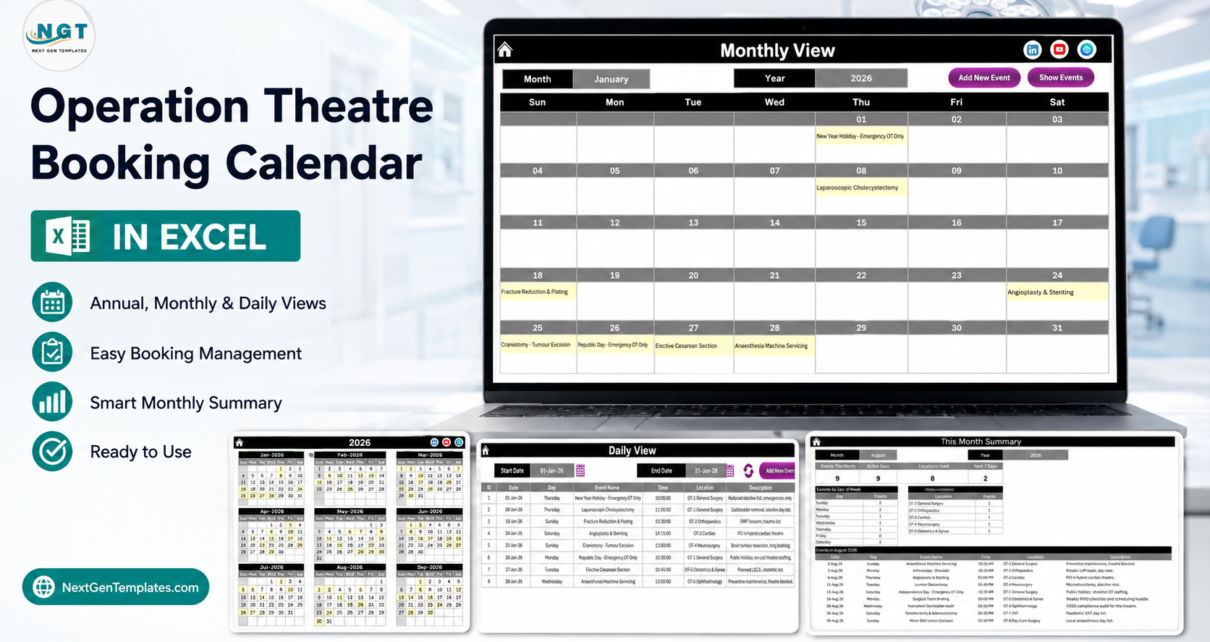
Most operating-theatre diaries are still a laminated grid on a wall, a whiteboard someone photographs on a Friday, or a spreadsheet that has been copied so many times nobody knows which version is current. The Operation Theatre Booking Calendar in Excel replaces all three with one macro-enabled workbook: seven worksheets, 100 pre-filled sample theatre bookings dated across the whole of 2026 – 1 January to 30 December, every one of the twelve months populated – spread across eight operating theatres and written from 42 distinct booking types, from Coronary Artery Bypass Graft to OT Deep Cleaning & Fumigation.
Before anything else, the important part. This workbook is a scheduling calendar and nothing more. It is not a patient record, not an EHR or EMR, and not a theatre-management, perioperative or surgical information system. It is not HIPAA, GDPR or any other health-data-protection compliant or certified, and it has no access control, no encryption and no audit trail. It takes no online bookings and sends no reminders, confirmations, SMS or email. It connects to no clinical, anaesthetic, consent, sterile-services, insurance or billing system. It makes no clinical or safety recommendation of any kind – it does not check theatre capacity, staffing, equipment availability or case suitability, and nothing it displays should inform a clinical, consent or patient-safety decision. The Events sheet has no patient name and no patient ID column at all, and all 100 shipped sample records are written purely as procedure types, theatres, dates and times. That is deliberate, and it is how the file should be used.
Key Features of the Operation Theatre Booking Calendar in Excel
- One list, four views. Annual View, Monthly View, Daily View and This Month all read the same Events sheet, so a case typed once appears in all of them. There is no second copy of the theatre diary to keep in step.
- Eight theatres already populated. OT-1 General Surgery carries 22 of the sample bookings, OT-2 Orthopaedics 13, OT-3 Cardiac 12, OT-4 Neurosurgery 12, OT-5 Obstetrics & Gynae 12, OT-6 Ophthalmology 12, OT-7 ENT 11 and OT-8 Day Care Surgery 6.
- VBA record management. Add New Record, Update Record and Delete Record buttons above the Events table; Add New Event repeated on the Monthly and Daily views, with Show Events on Monthly and a refresh control on Daily.
- A six-field pop-up entry form with a calendar picker on Date and a clock picker on Time, filling Day automatically from the date chosen. Event Name, Location and Description are typed. There is no patient field.
- Non-surgical theatre time is a first-class citizen. The sample set includes OT Deep Cleaning & Fumigation, Anaesthesia Machine Servicing, Instrument Sterilization Audit, OT Air Quality / HEPA Check and Surgical Team Briefing alongside the operating lists, which is why an apparently free slot can be visibly blocked.
- A This Month summary with four recalculating cards – Events This Month, Active Days, Locations Used, Next 7 Days – plus a weekday spread and a Top 5 Locations ranking.
- Five colour themes and 31 selectable years. Default, Blue, Red, Black and Orange; any year from 2021 to 2051; configurable start month, week-start day, two highlight-weekday rules and a highlight-events switch.
- Print areas already defined on Home, Annual, Monthly, Daily, This Month and Events.
Worksheets Explained
Home Menu
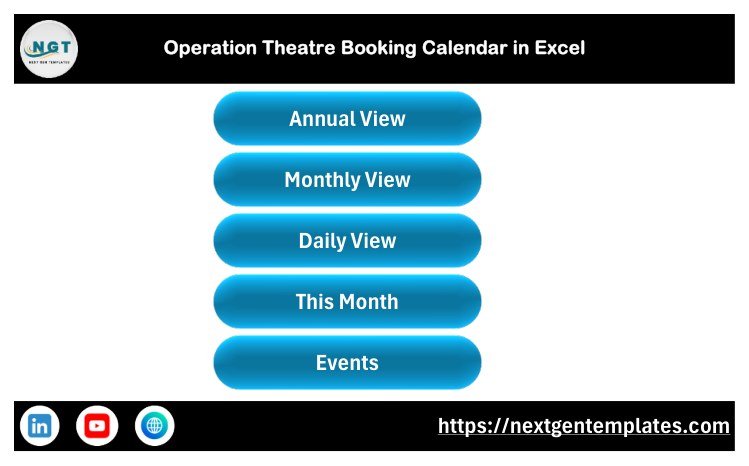
A branded landing page with five large buttons – Annual View, Monthly View, Daily View, This Month and Events. Leave it open and anyone in the department lands on the right sheet without hunting through tabs.
Annual View
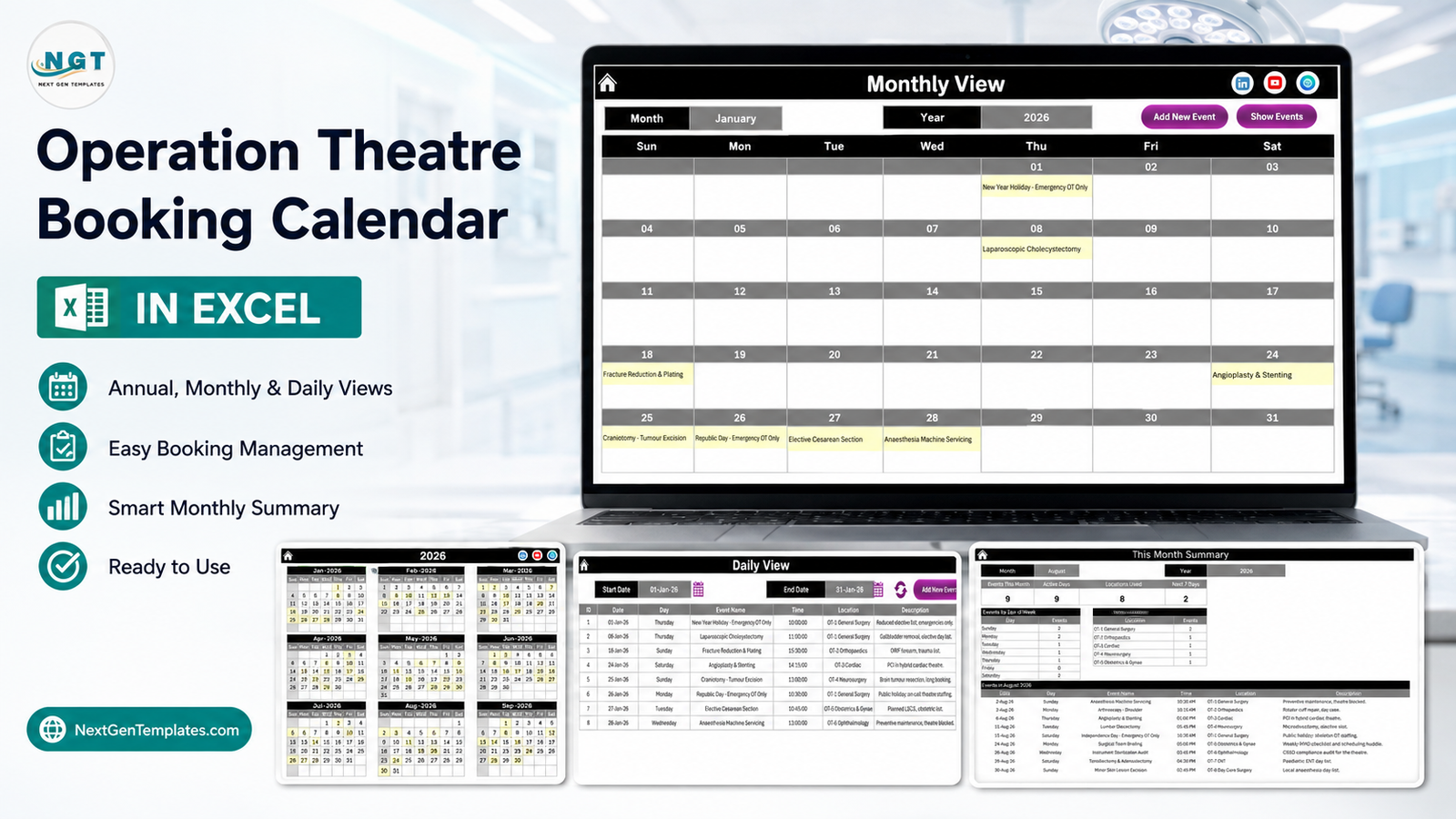
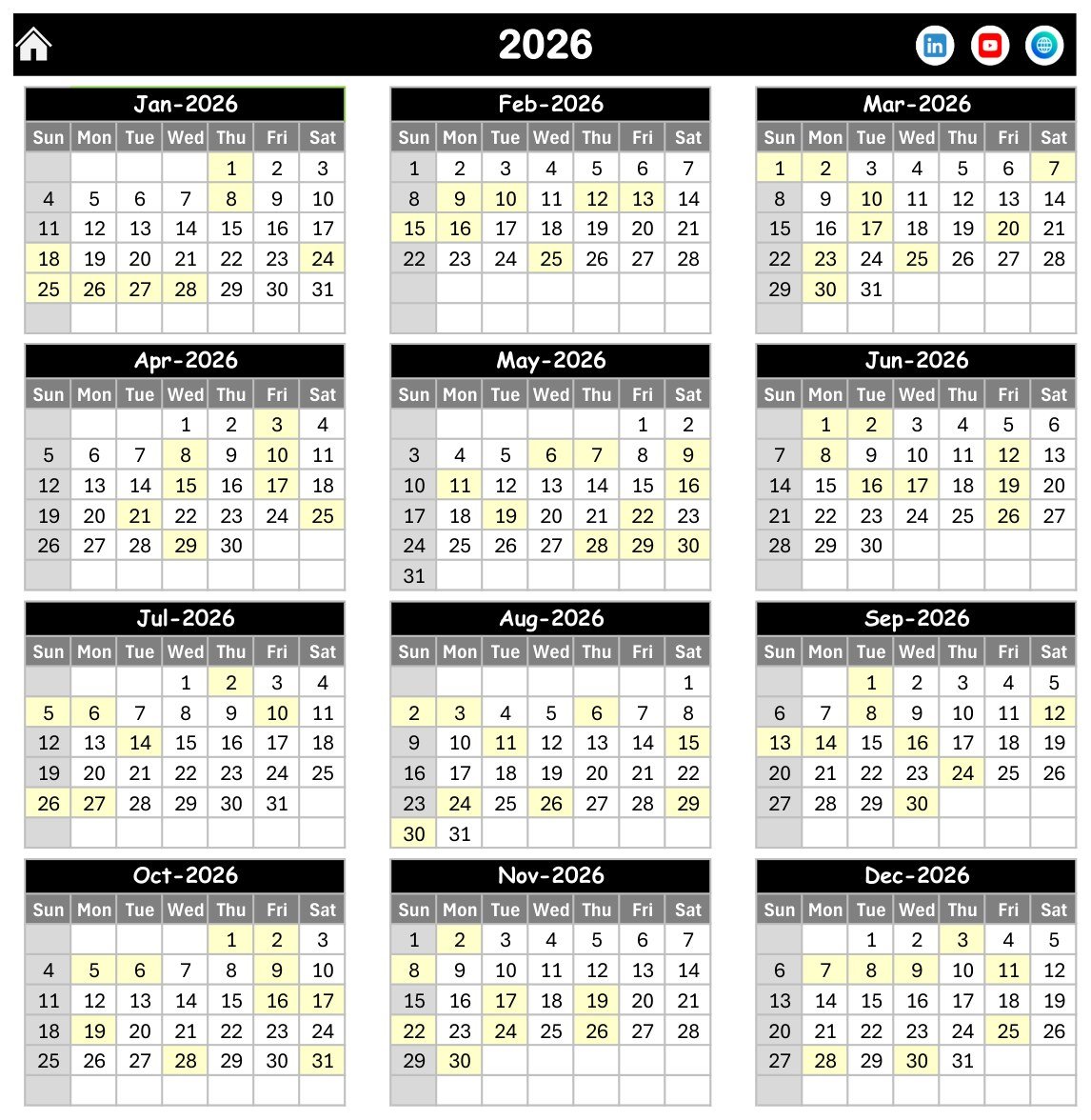
Twelve months of the selected year on a single page in a three-across, four-down grid, with every date carrying a booking shaded. This is the sheet you use when a surgeon asks whether the third week of March is busy – it answers in a glance, and it prints on one sheet of paper.
Monthly View
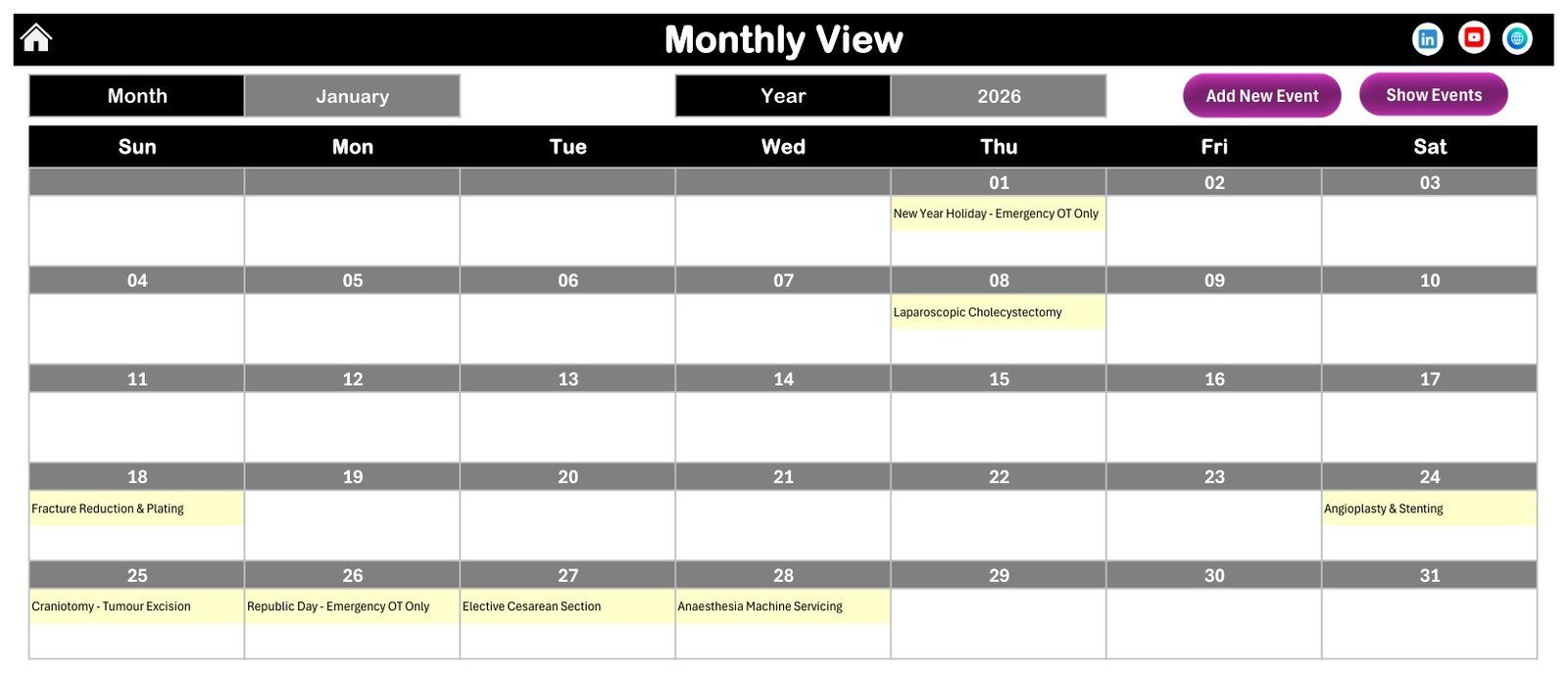
Two grey selectors set the month and the year, and the seven-column grid rebuilds with the booking name printed inside each date cell. January 2026 shows New Year Holiday – Emergency OT Only on the 1st, Laparoscopic Cholecystectomy on the 8th, Fracture Reduction & Plating on the 18th, Angioplasty & Stenting on the 24th, then Craniotomy – Tumour Excision, Republic Day – Emergency OT Only, Elective Cesarean Section and Anaesthesia Machine Servicing across the 25th to the 28th. Where a date holds more than one case, the cell shows the first booking and an “N more…” counter underneath.
Daily View
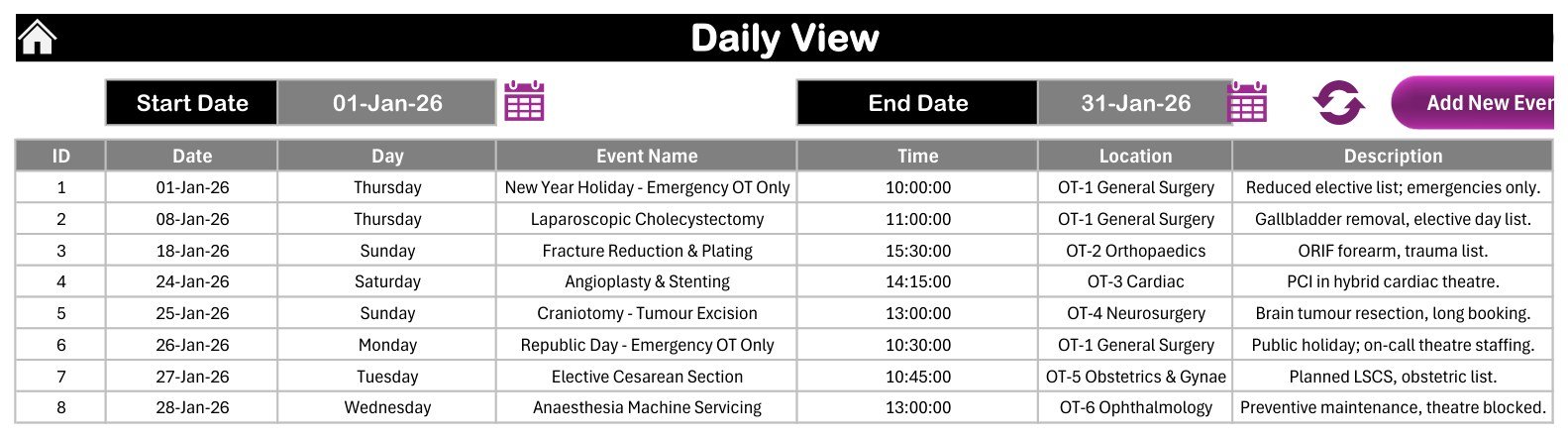
Set a Start Date and an End Date and the table below lists every booking in that window with ID, Date, Day, Event Name, Time, Location and Description. Shipped set to 01-Jan-26 through 31-Jan-26, it returns January’s eight cases with times running from 10:00 to 15:30 across five different theatres. Narrow the window to one date for tomorrow’s run sheet; widen it to a week for the Monday scheduling meeting.
This Month Summary
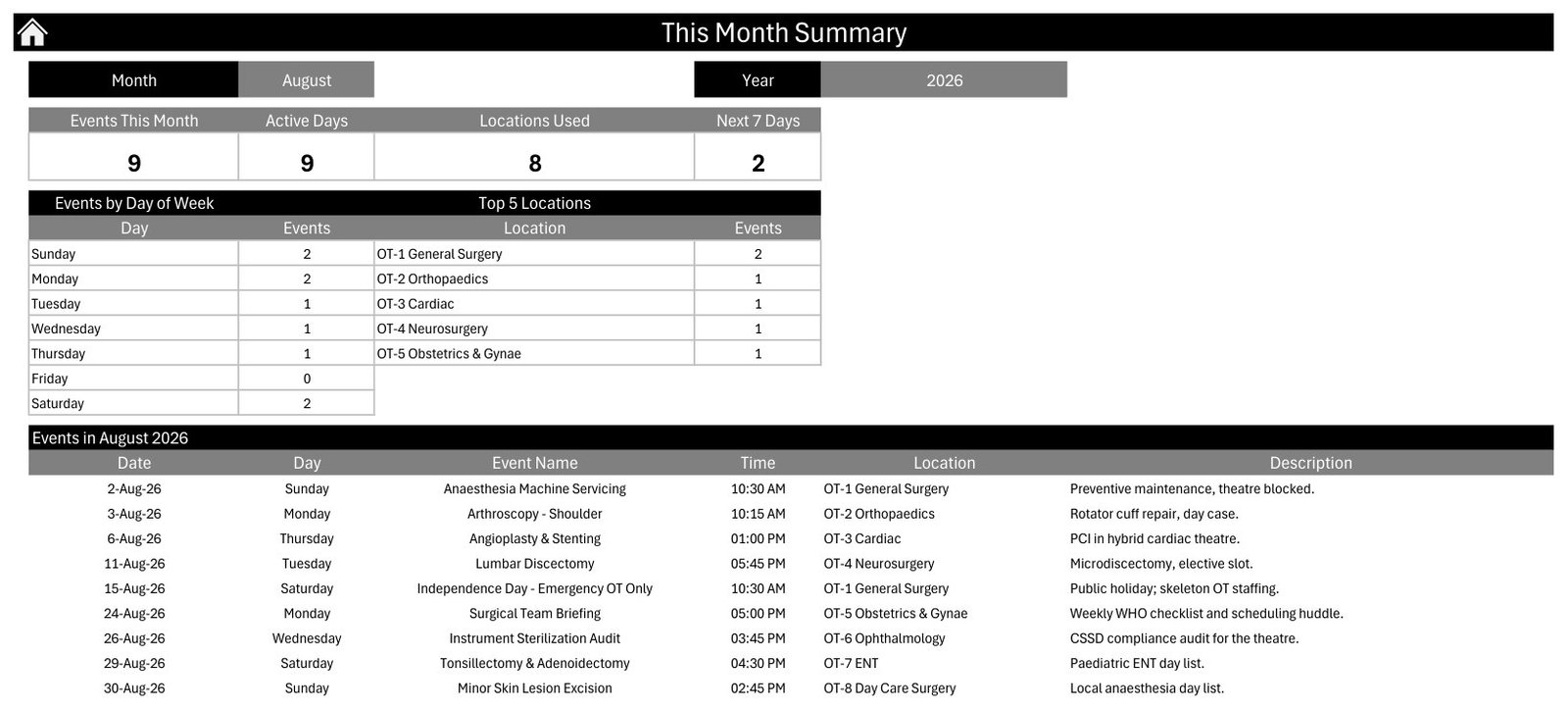
Pick a month and year and four cards recalculate. For the shipped August 2026 they read Events This Month 9, Active Days 9, Locations Used 8 and Next 7 Days 2. Below them an Events by Day of Week table splits the month Sunday to Saturday – August 2026 runs 2, 2, 1, 1, 1, 0, 2, so Friday is the one clear day – and a Top 5 Locations table ranks the busiest theatres. A full month table then lists all nine August bookings, from Anaesthesia Machine Servicing on the 2nd to Minor Skin Lesion Excision on the 30th.
Events Database
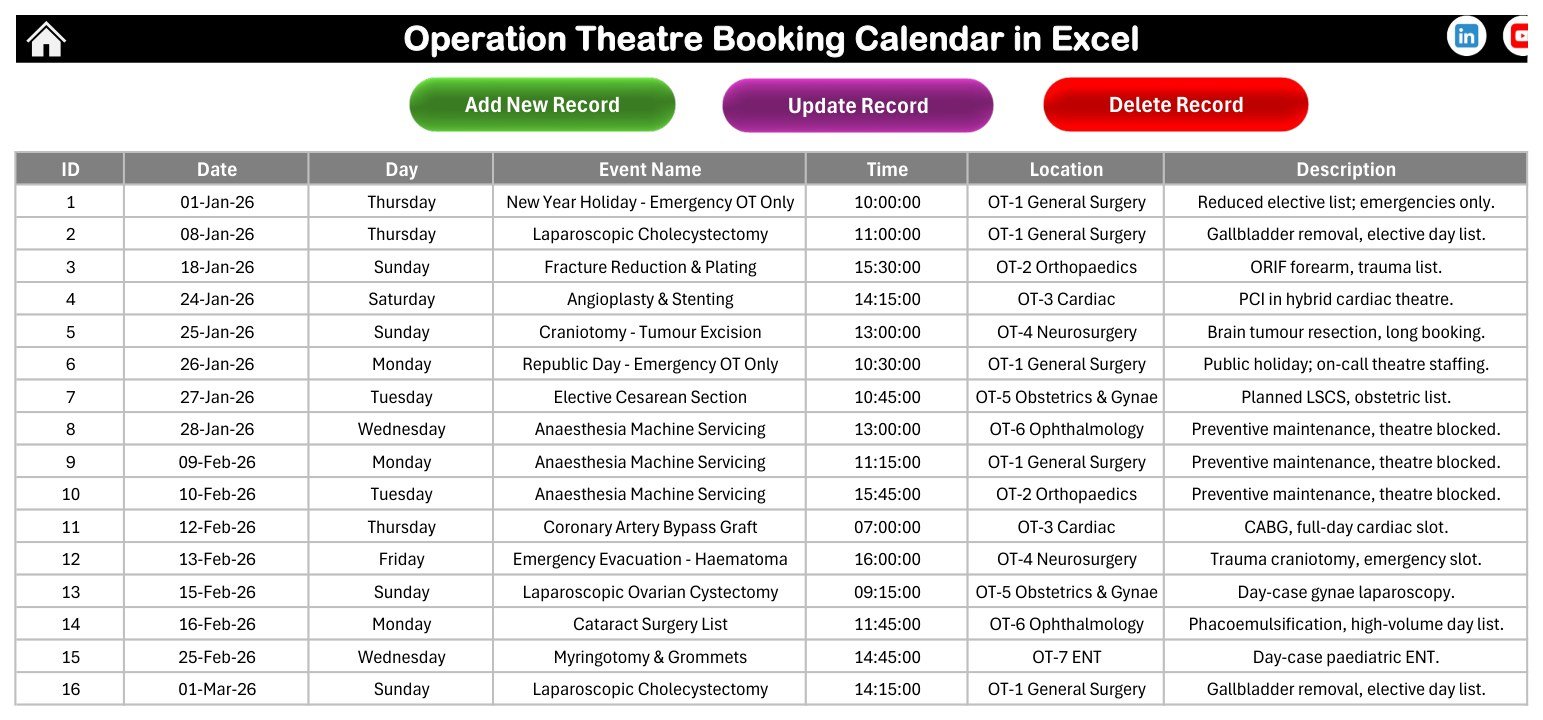
The single source of truth. A seven-column table – ID, Date, Day, Event Name, Time, Location, Description – holding the 100 sample bookings on rows 5 to 104 with a filter already applied, and green Add New Record, purple Update Record and red Delete Record buttons above it. Everything else in the workbook is a view of this sheet.
The Entry Form
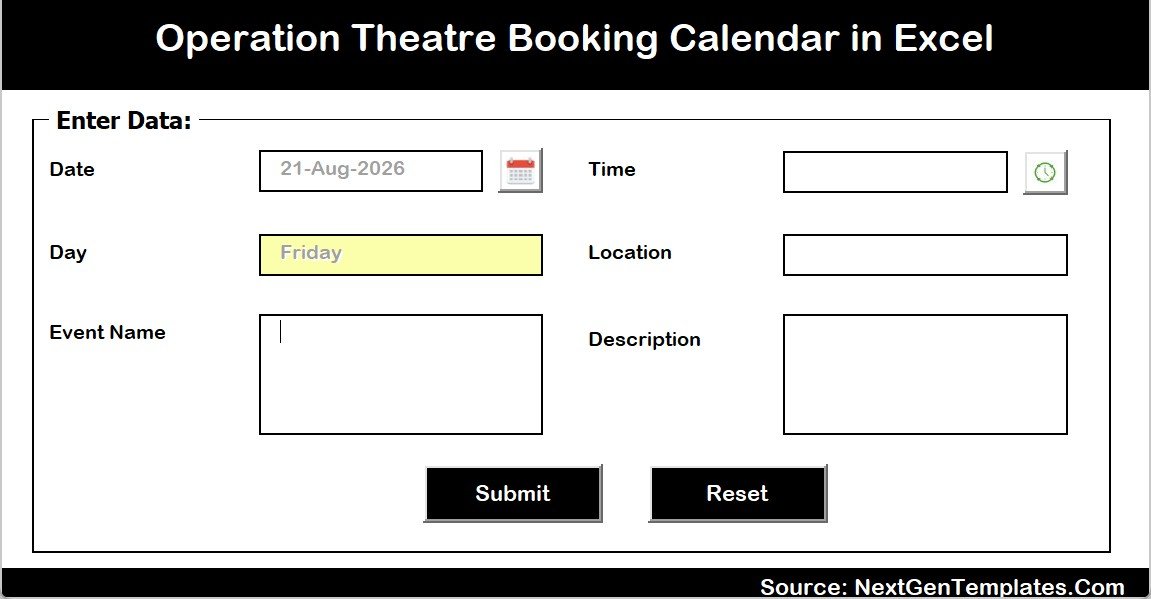
Add New Record opens a pop-up headed “Enter Data:” carrying Date with a calendar picker, Day filled automatically and shaded yellow, Event Name, Time with a clock picker, Location, Description, and Submit and Reset buttons. Six fields, and the absence of a seventh is the point – there is no patient name box to fill in by habit.
Setting
The control panel: Year (2021 to 2051), Start with Month, Week start with Day, two Highlight Day of Week rules, a Highlight Event switch, and a Colour Theme selector offering Default, Blue, Red, Black and Orange. The shipped file sits on Black, January start, Sunday week-start and 2026.
Excel Calendar vs. Google Sheets vs. Paid Theatre-Management Software
| What you get | This Excel calendar | Google Sheets calendar | Paid OR / theatre-management software |
|---|---|---|---|
| Cost | $4.99 one-time | $4.99 one-time | Quoted per site, not published |
| Platform | Excel for Windows, desktop, macros on | Any browser, Google account | Vendor-hosted or in-hospital deployment |
| Setup time | Under 10 minutes | Under 10 minutes | Weeks to months, with IT and clinical sign-off |
| Real-time team collaboration | No – one editor at a time | Yes – simultaneous editing | Yes, role-based |
| Mobile access | View only, macros will not run | Yes, via the Sheets app | Yes, usually with an app |
| Customisable fields | Yes – it is your workbook | Yes | Configurable within the vendor’s model |
| Share with a link | No – you send the file | Yes | Yes, inside the hospital network |
| Year-1 cost at 5 users | $4.99 total | $4.99 total | Quoted per site, not published |
| Stops a double-booking | No | No | Yes |
| Stores patient records | No, by design | No, by design | Yes, within a governed clinical system |
| Sends reminders or confirmations | No | No | Yes |
| Calculates theatre utilisation | No – a start time is stored, not a duration | No | Yes |
Who Should Use This Template
A good fit: theatre scheduling co-ordinators in small and mid-sized hospitals; day-surgery and single-speciality units running two to eight theatres; private surgical centres that want a session planner they own outright; theatre managers who need a month-on-a-page and a printable day sheet more than they need analytics; anyone handing a schedule to a team that lives in Excel and will not sign in to another platform.
The wrong tool if you need to store patient-identifiable data, prevent double-bookings, validate staffing or equipment, report theatre utilisation or turnaround time, have several people edit at once, send automatic reminders, or run on Mac, Excel for the web or a phone.
Real-World Use Cases
A 120-bed private hospital. Six theatre lists that used to live on a laminated wall grid now sit in the Events sheet. Daily View prints the run sheet for each morning; Monthly View is pinned at theatre reception; Annual View answers capacity questions on the spot instead of a walk to the board.
A four-theatre day-surgery unit. Deep cleans, HEPA checks, machine servicing and the Monday briefing go into the same calendar as the cases. A slot that looks empty is visibly blocked for fumigation, which is exactly the mistake an operating-list-only spreadsheet keeps causing.
An independent surgical centre. Five staff, no per-user licence, no vendor login. The Setting sheet is set to the financial year, the eight sample theatres are renamed down to three, and the This Month summary is printed for the monthly partners’ meeting to show how load splits by weekday and by theatre.
Advantages of the Operation Theatre Booking Calendar in Excel
- One source of truth. Four views, one Events sheet – there is no reconciliation step and no stale second copy.
- It works offline and it prints. A theatre corridor does not always have a reliable network; a printed Daily View always works.
- You own it outright. One payment, no subscription, no per-user fee, no vendor account, and the file is yours to modify.
- The scope is enforced by the design. No patient field on the sheet and none on the form means the file cannot quietly drift into being an unsecured patient record.
- Non-surgical theatre time is visible, so cleaning, servicing and audit windows compete for the diary the way they do in reality.
- Nothing is hidden. The formulas are ordinary Excel – VLOOKUP, COUNTIF, EOMONTH – so anyone comfortable in a spreadsheet can extend it.
Opportunities for Improvement
Being straight about what this workbook does not do is more useful than a feature list, so here are the four real limitations.
- No clash detection. Nothing stops you entering two cases in one theatre at the same hour. The workbook will accept it silently.
- Monthly View shows the first booking on a busy day. The grid cell prints one case name plus an “N more…” counter; you have to open Daily View or This Month to read the rest of that date.
- No duration, so no utilisation. Events stores a start Time and no end time, which means percentage utilisation, turnaround time and over-run reporting are simply out of scope.
- The Top 5 Locations panel shows five theatres while the Locations Used card can read 8 – the ranking is a top-five list, not a complete breakdown, and the label says so.
Best Practices
- Book by procedure type, theatre, date and time. Never add a patient name, hospital number or clinical note – keep those in your governed clinical system.
- Rename the theatres first. Replace OT-1 to OT-8 with your own numbers before you type real bookings, so the summary tables group correctly from day one.
- Treat “N more…” as a prompt, not a warning. Whenever Monthly View shows it, cross-check Daily View for that date before you promise a surgeon a slot.
- Print Daily View, share Monthly View. One owner edits the .xlsm; everyone else gets a printout or a read-only copy. That avoids the shared-drive lock entirely.
- Keep the file as .xlsm. Saving as .xlsx strips every button and the entry form without warning. See Microsoft’s guidance on enabling macros in Microsoft 365 files if the security bar does not appear.
- Back up before a big edit. There is no undo history and no version trail; a dated copy of the file before you clear the sample rows costs nothing.
Frequently Asked Questions
Is the Operation Theatre Booking Calendar in Excel a patient record system, and is it HIPAA or GDPR compliant?
No. It is a scheduling calendar and nothing else – not a patient record, not an EHR or EMR, not a theatre-management or surgical information system, and not HIPAA, GDPR or any other health-data-protection compliant or certified. It has no access control, no encryption and no audit trail. The Events sheet carries no patient name and no patient ID column, and none should be added.
Does it make any clinical or safety recommendation?
No. It holds no clinical data and produces no clinical output. It does not check theatre capacity, staffing, equipment or implant availability, anaesthetic cover or case suitability, and it will accept a booking that is clinically impossible. Nothing in it should inform a clinical, consent or patient-safety decision.
Will it stop me double-booking a theatre?
No. There is no validation on theatre and time. On a date with more than one case, Monthly View shows the first booking and an “N more…” counter – that is your cue to open Daily View. Clash prevention is the thing paid theatre-management software gives you and a spreadsheet does not.
Can it report theatre utilisation?
No. The Events sheet stores a start Time with no duration or end time, so there is no basis for a utilisation figure. This Month counts bookings, active days, theatres used and the weekday spread – counts, not minutes.
Will it send reminders or confirmations?
No. It takes no online bookings and sends nothing at all – no email, no SMS, no notifications. It is a file you open, read and print.
Do I need macros, and does it work on Mac?
Yes to macros, no to Mac. Add New Record, Update Record, Delete Record, the Add New Event buttons and the pop-up form are all VBA, so you need Excel for Windows on the desktop with macros enabled and the file kept as .xlsm. It will not run in Excel for the web, Excel for Mac, Google Sheets or a mobile app. The Events sheet can still be read and hand-edited anywhere – only the buttons need Windows.
Can I use it for a year other than 2026?
Yes. The Setting sheet’s Year list runs from 2021 to 2051 and every view rebuilds from it, and the start month is configurable, so an April-to-March calendar works as well as January-to-December.
How does it compare to the Radiology or Patient Follow-Up calendars?
Same seven-sheet engine, different caseload and different sample data. The Radiology Slot Booking Calendar is built around imaging-room slots, the Patient Follow-Up Visit Calendar around outpatient review clinics, and this one around operating theatres with eight OT locations and 42 surgical, emergency and maintenance booking types. If you run more than one department, they sit side by side without competing.
Explore Relevant Templates
- Operation Theatre Booking Calendar in Excel – the template this article covers.
- Radiology Slot Booking Calendar in Excel – the same engine for imaging rooms.
- Patient Follow-Up Visit Calendar in Excel – the outpatient review side of the pathway.
- Healthcare Staff Duty Calendar in Excel – who is on duty, alongside what is scheduled.
- Doctor Duty Roster Data Entry System in Excel – a searchable roster with a form and summary cards.
- Medical Appointment Calendar in Google Sheets – the shared, multi-editor, browser-based alternative.
- Healthcare Administrator Toolkit – nine premium Excel templates for healthcare administration in one bundle.
About the Author
Built by PK – Microsoft Certified Professional with 15+ years of Excel, Google Sheets, and Power BI experience. Founder of NextGenTemplates, reaching 300K+ subscribers across YouTube channels. Every template is hand-built and tested before release.
Conclusion
The Operation Theatre Booking Calendar in Excel is a deliberately narrow tool: a printable, offline, one-file theatre diary with four linked views, a VBA entry form, 100 worked sample bookings across eight theatres and a monthly summary that recalculates itself. It will not prevent a clash, report utilisation or hold a patient record, and it does not pretend to – the value is that a scheduling co-ordinator can own it, edit it and pin it on a wall the same afternoon they buy it, for a one-time $4.99 with no subscription and no per-user fee.
👉 Get the Operation Theatre Booking Calendar in Excel on NextGenTemplates
🎥 For step-by-step Excel and VBA tutorials, visit YouTube.com/@PKAnExcelExpert
📅 Last updated: August 2026