Medication schedules have a habit of living in four places at once: a strip of paper taped inside a kitchen cupboard, a phone alarm that somebody silenced in a meeting, a pharmacy text about a refill, and a memory of when the next blood test is due. The Medication Reminder Calendar in Excel pulls the planning half of that into one macro-enabled workbook – seven sheets, four linked views, one event table – and ships with 100 worked entries dated 2 January to 30 December 2026 so you can see the shape of a whole year before you type anything.
The most important sentence in this article, first: this calendar does not remind you. There is no alert, no notification, no alarm, no pop-up, no email, no SMS and no sync to your phone, Outlook or Google Calendar. Nothing fires at 08:00. You open the file and read it, or you print it and read that. The word “Reminder” in the title describes what the plan is for – it is not a feature the workbook performs. If you want a bell at dose time, keep using a phone alarm or a pill box; this file is the written plan behind it.
And the second most important sentence: this is not medical advice. It is a blank scheduling grid with sample data in it. It does not replace your pharmacist, your prescriber, a nurse or any care provider. It validates no dose, detects no interaction, measures no adherence and judges no schedule safe or unsafe. It is not an EHR, EMR, eMAR or pharmacy system, and it carries no HIPAA, GDPR or any other compliance certification. Do not rely on it for medication safety. Every dose, every timing and every change is a conversation with the person who prescribed or dispensed it.
With that boundary drawn, here is what is actually inside the file, what it does well, and what it deliberately does not do.
Key Features of the Medication Reminder Calendar in Excel
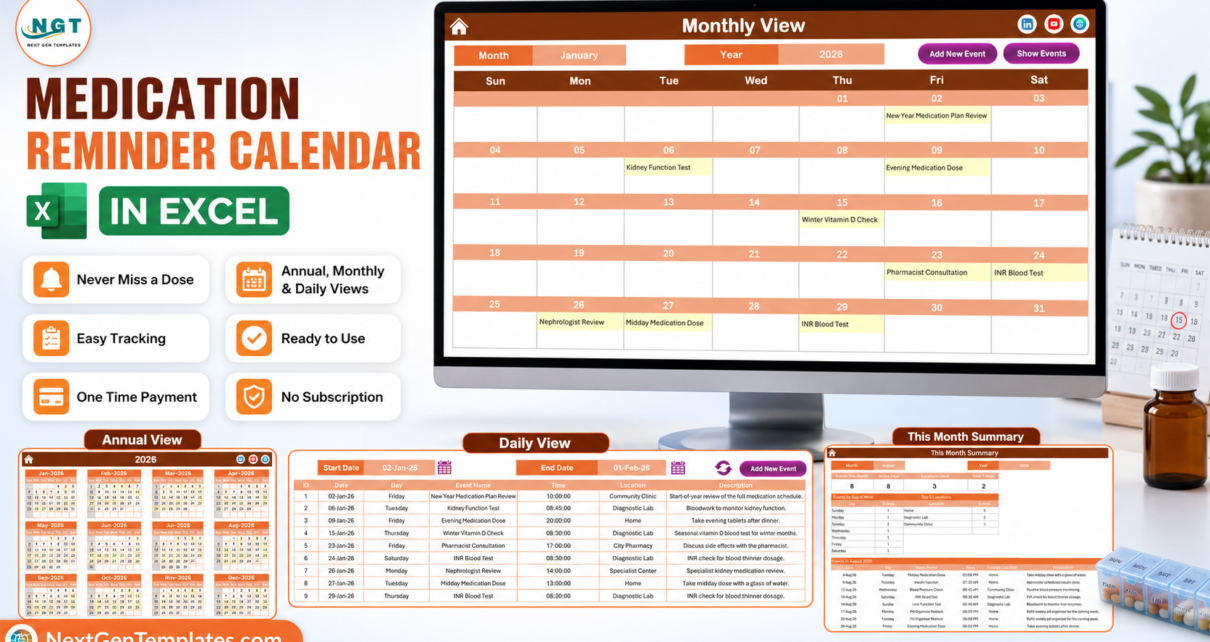
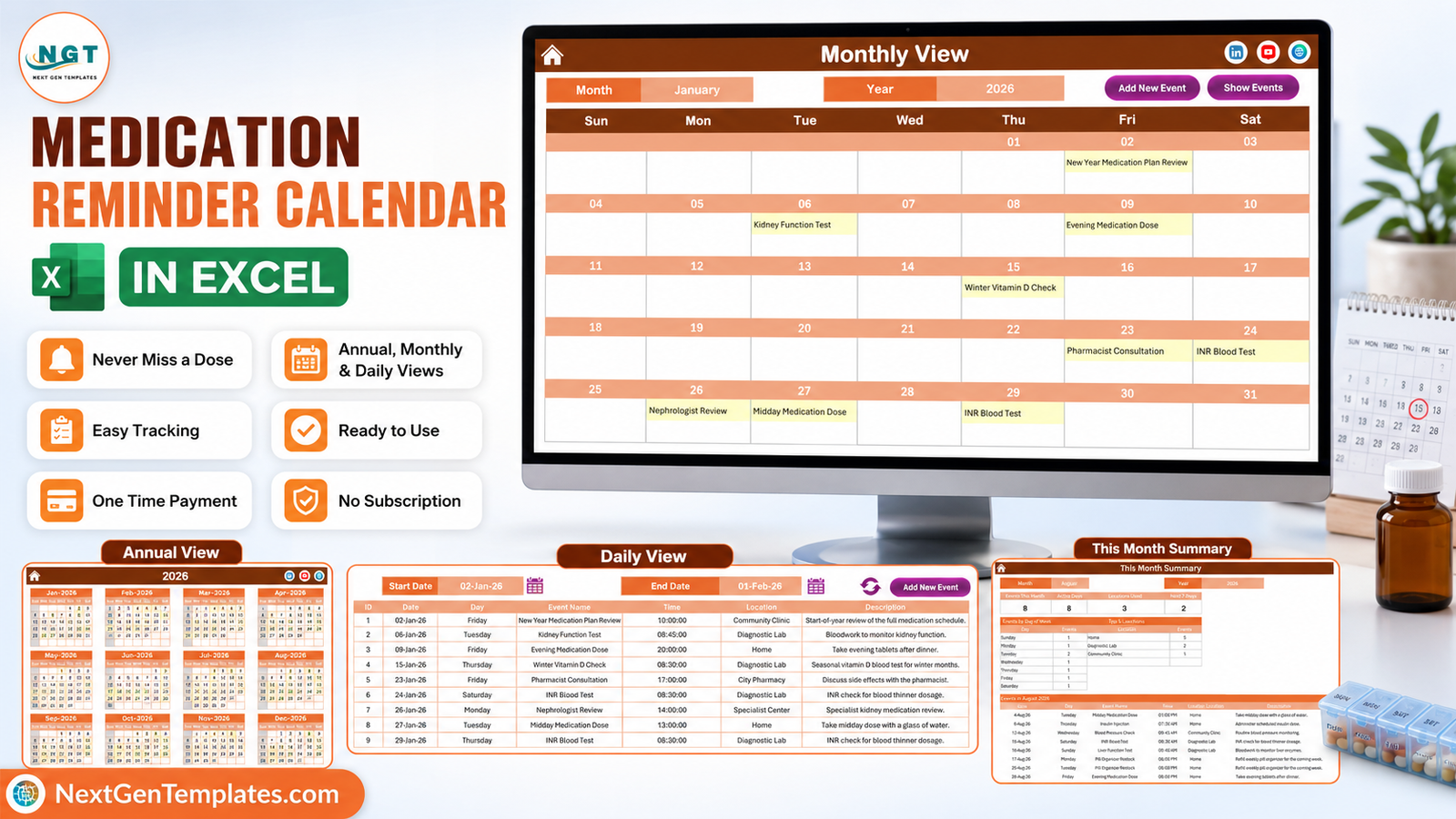
- Four views off one table. Annual View, Monthly View, Daily View and This Month all read the single Events sheet. Enter something once and it appears in all four.
- Annual View on one printable page. Twelve months of the chosen year, three across and four down, with every scheduled date highlighted. The print area is pre-set for a single landscape sheet – the version that ends up on the cupboard door.
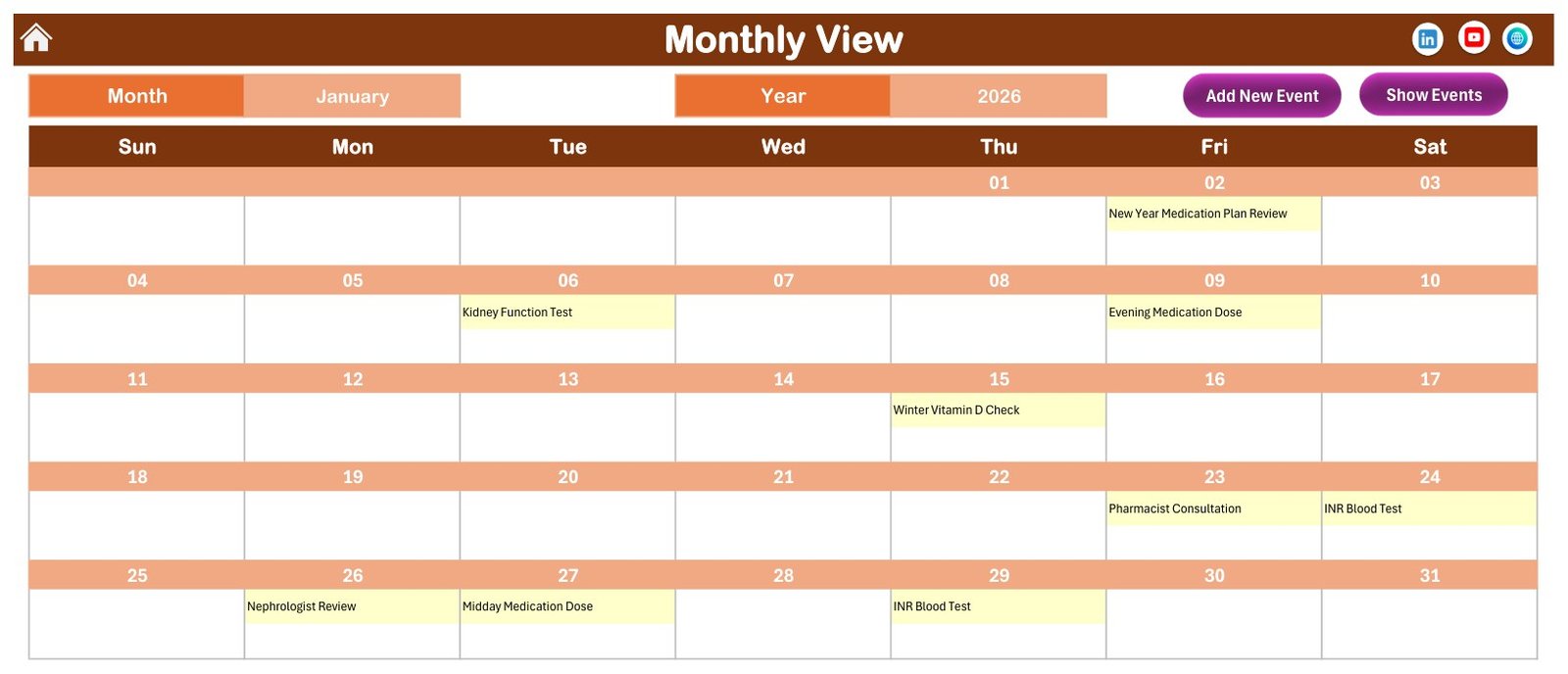
- Monthly View with month and year pickers. A full Sunday-to-Saturday grid with the entry name printed inside its date cell, plus Add New Event and Show Events buttons.
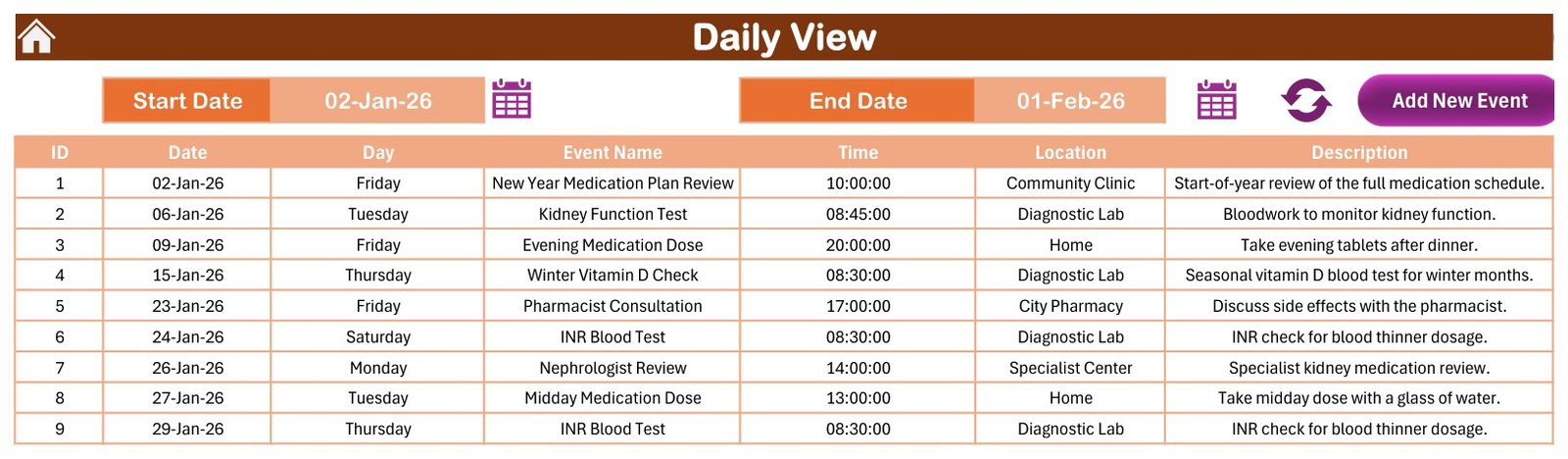
- Daily View over any date range. Two date pickers, a refresh button, and a clean list of ID, Date, Day, Event Name, Time, Location and Description. The shipped file is set to 02-Jan-26 to 01-Feb-26 and returns the nine January entries.
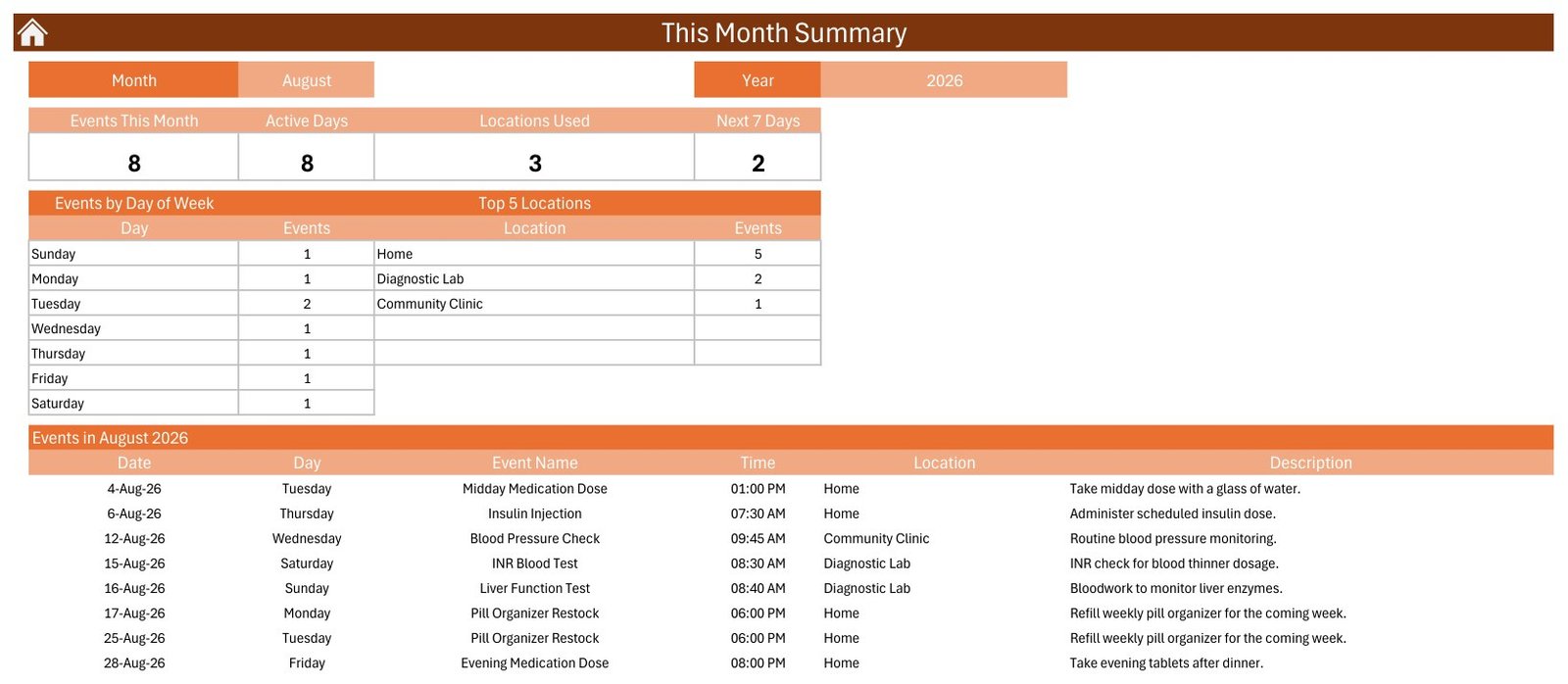
- This Month summary. Events This Month, Active Days, Locations Used and Next 7 Days tiles, an Events by Day of Week table, a Top 5 Locations table, then the full month list. The shipped file opens on August 2026 with 8 events, 8 active days and 3 locations.
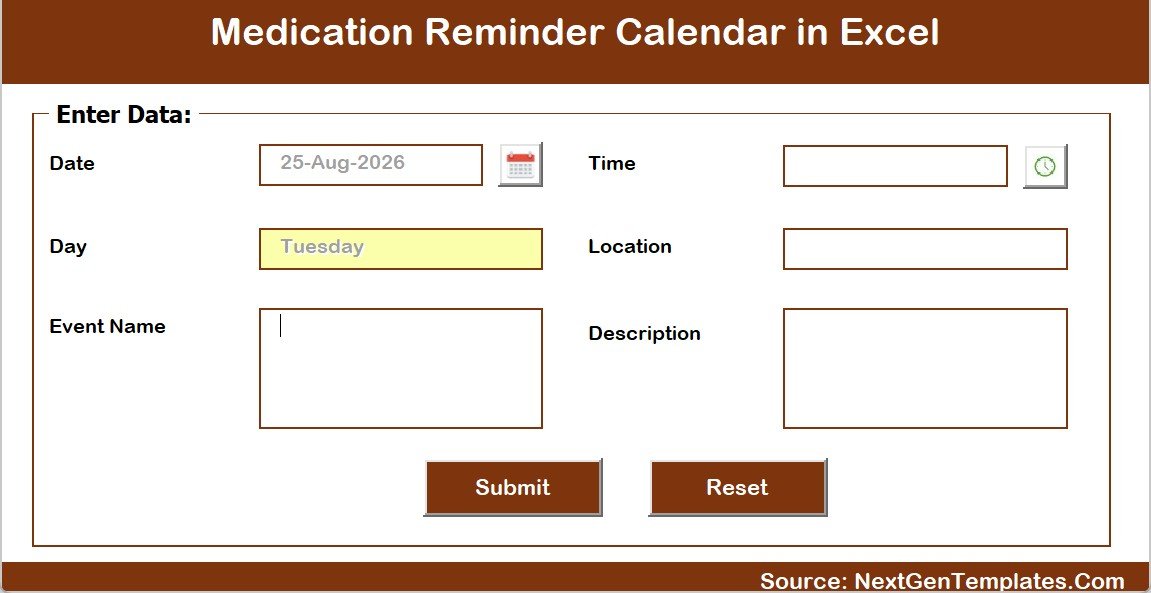
- A real entry form, not typing into cells. Add New Record opens a VBA form with six fields – Date, Day (filled automatically from the date), Event Name, Time, Location, Description – a calendar picker, a clock picker, Submit and Reset. Update Record and Delete Record sit beside it. IDs are assigned for you.
- Setting control panel. Year 2021 to 2051, start month, week-start day, two highlight day-of-week slots and an event-highlight toggle. Shipped on 2026, January, week starting Sunday.
- Five colour themes – Default, Blue, Red, Black, Orange – switched from the Annual View control panel. The file ships on Orange.
- No name, drug or dose fields. The Events sheet is only ID, Date, Day, Event Name, Time, Location and Description. That absence is a design decision, and the reason is a whole section further down.
The Seven Sheets, Page by Page
Home. A plain navigation panel with five buttons – Annual View, Monthly View, Daily View, This Month, Events – and the site link in the footer. Every other sheet has a house icon that brings you back.
Annual View. The whole year at a glance. In the shipped 2026 file, 1 January sits on a Thursday and every one of the 100 sample dates is shaded, so the density of the schedule is visible before you read a single entry. The Setting sheet’s year, start month and week-start day all drive this page, and it is the one built almost entirely out of formulas – over 600 of them.
Monthly View. A Sun-Sat grid for the picked month with the entry name inside the date cell. January 2026 shows the New Year Medication Plan Review on Friday the 2nd, a Kidney Function Test on Tuesday the 6th, an Evening Medication Dose on Friday the 9th, the Winter Vitamin D Check on Thursday the 15th, a Pharmacist Consultation on Friday the 23rd, an INR Blood Test on Saturday the 24th, a Nephrologist Review on Monday the 26th, a Midday Medication Dose on Tuesday the 27th and a second INR Blood Test on Thursday the 29th.
Daily View. Set Start Date and End Date, hit refresh, and the range rebuilds as a list. This is the sheet you print for a carer, for a fortnight on the fridge, or to take into an appointment.
This Month. The only analytical page in the workbook. Four tiles, two small tables and the month’s full list. It is the page that tells you a month is lopsided – that Tuesdays are carrying twice the load, or that almost everything happens at Home and the lab visits cluster.
Events. The master table – seven columns, rows 5 to 104, IDs 1 to 100 – with Add New Record, Update Record and Delete Record buttons above it. Everything else in the workbook is a view of this one sheet.
Setting. Year, start month, week-start day, two highlight days, the event-highlight toggle and the colour theme. Small sheet, large effect.
What the 100 Sample Entries Actually Are
The shipped file carries exactly 100 rows, IDs 1 to 100, dated 2 January to 30 December 2026, with every month populated – nine in January, eight in February, nine in March, and so on down to seven in December. There are 35 distinct entry names and 25 start times between 07:00 and 20:00, spread across five locations: Home (27 entries), Community Clinic (24), Diagnostic Lab (21), Specialist Center (16) and City Pharmacy (12).
The mix is deliberately broad: Morning, Midday and Evening Medication Dose; Insulin Injection; Inhaler Use; Pill Organizer Restock; Blood Sugar Monitoring; Prescription Refill Pickup, Repeat Prescription Order and Prescription Renewal; Pharmacy Delivery Expected; Pharmacist Consultation; Medication Review and Dosage Adjustment Visit; INR Blood Test, Blood Test – Fasting, Kidney Function Test and Liver Function Test; Blood Pressure Check; Endocrinologist, Nephrologist, Neurologist and Cardiologist appointments; Vaccine Booster Shot and Tetanus Booster; plus a handful of seasonal and awareness-day entries.
None of it is a real schedule and none of it is advice. The sample data exists to show how the four views populate – nothing more. It is not a regimen to copy, and the intervals between the tests in it imply no recommended frequency for anything. A few descriptions mention broad drug categories – a blood thinner, an inhaler, insulin, an antihistamine – purely so the rows read like real entries; no brand name, no strength and no dose appears anywhere in the file. Delete all 100 rows once you have looked at them.
One quality note, because it matters more here than on an ordinary calendar: every one of the 100 weekday labels was recomputed against its date before release – 100 rows checked, zero mismatches. On a schedule that someone might act on, a date sitting under the wrong weekday is not a cosmetic fault.
Macros Are Load-Bearing – Do Not Skip This
Plenty of Excel templates say “enable macros” when they mean “some buttons will not work”. This one means it literally. Read straight out of the workbook’s own XML: the Daily View and This Month sheets contain zero formulas. Not few – none. Every value you see on those two pages is written there by VBA when a button runs.
So with macros disabled, or after a save as .xlsx, you do not get a slightly reduced calendar. Two of the five working sheets stop updating, the navigation buttons do nothing, the Add / Update / Delete forms never open and the theme switcher is dead. Enable content when Excel asks, and always save as .xlsm or .xlsb.
It also means Microsoft Excel on Windows desktop only. The forms and buttons are VBA with ActiveX controls, which do not run on Mac, iPad or Excel for the web.
Medication Schedules Are Health Data – Handle the File Accordingly
The Events sheet has no name column, and no row in the shipped file names anybody. That is genuinely useful: a filled-in copy is a list of dates, times and places, not a patient record. But a completed calendar still describes someone’s health, and it deserves the care you would give any other health document.
- Do not add a patient or client name column. If you keep calendars for several people, use a short code – C1, C2 – and hold the code-to-person key somewhere separate and access-controlled.
- Keep drug names, strengths and doses out of it. There is no field for them, and there should not be. Use neutral entries – “Morning Dose”, “Evening Dose”, “Refill Pickup” – and let the prescriber’s or pharmacist’s record hold the detail.
- Share with named people, never with “anyone with the link”. On OneDrive, Google Drive, Dropbox or a network share, invite named accounts and review that list periodically.
- Be careful with shared cloud folders. A family, team or clinic folder that everybody can browse is the wrong home for a health schedule. An
.xlsmon disk is unencrypted, and Excel’s own file password is a convenience rather than real protection. - If you are a carer or work in a care setting, your organisation’s information-governance rules apply to this workbook exactly as they do to every other file. Nothing in the template satisfies them on your behalf.
Medication Reminder Calendar in Excel vs. a Reminder App vs. Paper – Feature Comparison
| What you need | This Excel calendar ($8.99, one payment) | A phone reminder app | Paper chart or wall calendar |
|---|---|---|---|
| Alerts you at dose time | No. Nothing fires; you open the file | Yes – that is the whole point of an app | No |
| One-page year plan you can print and pin up | Yes – Annual View, print area pre-set | Rarely | Yes |
| Month grid with the entry named in the date cell | Yes | Varies | If you write small |
| Date-range run sheet for a carer or an appointment | Yes – Daily View, two dates and print | Usually not | No |
| Counts by day of week and by location | Yes – This Month summary | No | No |
| Works with no internet, no account, no phone | Yes | No | Yes |
| Data stays on your own machine | Yes | Usually uploaded to a vendor | Yes |
| Cost | $8.99 once (currently $4.99) | Free to $5-10 a month | Near zero |
| Editable, brandable, reusable to 2051 | Yes | No | No |
| Checks doses, interactions or adherence | No | No | No |
| Multi-person simultaneous editing | No – desktop workbook | Sometimes | No |
The honest reading of that table: an app and this workbook are not competitors. An app is good at prompting and bad at showing you a year. A spreadsheet is the reverse. Most people who buy this keep their phone alarm exactly where it is.
Who Should Use This Template
It fits someone managing a long-term regimen who wants the year written down and printable; a family member coordinating appointments, refills and lab dates for a relative; a home-care or day-centre coordinator planning visit dates; a small clinic administrator who wants a month plan for the noticeboard; and anybody who would rather own a file than rent an app.
It does not fit anyone who needs an actual alert at dose time, an adherence log with tick-offs and timestamps, dose or interaction checking, a patient record, a pharmacy dispensing or stock system, simultaneous multi-user editing, or access from a phone. And it does not fit Mac-only or Excel-on-the-web users, because the forms and buttons need Excel on Windows desktop.
Real-World Use Cases
Rekha, managing her own long-term prescriptions. Three Home entries a day, plus refill pickups and INR test dates. She prints the Annual View each January and tapes it inside a kitchen cupboard. Her phone alarm still does the prompting – the calendar tells her what the year looks like and when the next refill falls due.
Daniel, coordinating care for his father. His Location values are Home, City Pharmacy, Diagnostic Lab and the specialist’s clinic. He prints a Daily View for each fortnight and leaves it with whoever is on duty. Before a consultant appointment he prints the month so the doctor can see what was scheduled – not what was taken, which this file makes no claim to know.
Priya, administrator at a small community clinic. One workbook per programme rather than per person, with session dates and locations only and no names in any row. The day-of-week table showed Tuesdays running at double the load, so a session moved to Thursday.
Sam, a district nurse team lead. Uses it purely as a printable planning artefact alongside the organisation’s real clinical system, because the workbook holds nothing the clinical record needs to own.
Advantages of the Medication Reminder Calendar in Excel
- One table, four views. No duplicate entry, no drifting copies of the same schedule.
- Genuinely printable. Print areas are pre-set on the Annual View, Monthly View, Daily View, This Month and Events sheets. This is a template built by somebody who expected paper to be involved.
- Structured entry. The VBA form and assigned IDs stop the slow decay that free-typing into a grid always produces.
- Nothing to sign up for. No account, no cloud, no subscription, no vendor holding a health schedule.
- Twenty-six years of runway. The Setting sheet accepts 2021 to 2051.
- Privacy by omission. The template cannot leak a patient name or a dosage because it has nowhere to put one.
- Verified data. All 100 shipped weekday labels recomputed against their dates; zero mismatches.
Opportunities for Improvement
Stated plainly, because a health-adjacent template is the wrong place for a sales pitch with the awkward parts removed:
- No reminders of any kind. Worth repeating a third time: nothing alerts, nothing syncs, nothing notifies.
- No status field. An entry cannot be marked taken, missed, rescheduled or cancelled – which is precisely why this is a plan and not an adherence record.
- No end time or duration. You cannot work out how long anything runs for.
- The Day column is typed text, not a formula. The form fills it in when a record is added, but if you later edit a date directly in the grid the Day cell keeps the old weekday, and the Daily View, the month list and the day-of-week tally all inherit that stale value. Either re-enter the row through Update Record, or put
=TEXT(B5,"dddd")in C5 and fill it down column C so the day is always derived from the date. - The Monthly View shows only the first entry on a date plus an “N more…” counter. Because the shipped sample carries exactly one entry per date, you will not see that counter until you add a second one yourself.
- “Top 5 Locations” is literally five. It lists at most five rows even when Locations Used reads higher.
- Macro-dependent and Windows-only, as set out above.
- Single-user. The second person to open it gets read-only.
Best Practices
- Unzip to a real folder, right-click the workbook, Properties, tick Unblock, then open and Enable Content.
- Set your Year, start month and week-start day on the Setting sheet before anything else.
- Delete all 100 sample rows before entering your own. They are illustrative filler, not a starting schedule.
- Keep entry names neutral. “Morning Dose” travels safely; a drug name and a strength does not.
- Use Location as your category – Home, the pharmacy, the lab, each clinic – because the This Month page groups by it.
- Add and change rows through the buttons rather than typing into cells, so IDs and Day labels stay consistent.
- Print the Daily View for the coming fortnight and put it where the person actually is.
- Save as
.xlsmor.xlsb. A save as.xlsxsilently strips every macro and button. - Set your real alerts elsewhere – a phone alarm, a pill organiser, a carer’s call.
- Take the printed month to appointments and let the clinician correct it. The file is a record of intent, not of fact.
Explore Relevant Templates
- Medication & Pill Tracker in Google Sheets – the logging counterpart: what was taken, rather than what is planned.
- Pharmacy Stock Expiry Calendar in Excel – the same engine, aimed at stock and expiry dates.
- Patient Follow-Up Visit Calendar in Excel – the same engine, aimed at follow-up appointments.
- Dialysis Session Calendar in Excel – the same engine, aimed at recurring treatment sessions.
- Home Nursing Visit Calendar in Excel – the same engine, aimed at home visits.
- Doctor Appointments & Medical History Tracker in Google Sheets – appointment history rather than a forward plan.
- Blood Sugar (Diabetes) Log Tracker in Google Sheets – a reading log, again logging rather than scheduling.
More on this blog: Birthday Reminder Data Entry System in Excel, Ambulance Duty Calendar in Excel and Doctor On-Call Calendar in Excel.
Frequently Asked Questions
Does it actually remind me? Will it beep, buzz or email me?
No. There are no reminders, notifications, alarms, pop-ups, emails or SMS, and no sync to a phone, to Outlook or to Google Calendar. It is a spreadsheet you open and read. Set your alerts somewhere else. The name describes the plan, not an alerting feature.
Is this medical advice? Can I rely on it for medication safety?
No, on both counts. It is a blank scheduling grid. It does not replace your pharmacist, prescriber, nurse or any care provider; it validates no dose, detects no interaction, measures no adherence and judges no schedule safe or unsafe. Confirm every dose, timing and change with the person who prescribed or dispensed it, and if something feels wrong contact a health professional rather than a spreadsheet.
Is it an EHR, EMR, eMAR or pharmacy system? Is it HIPAA or GDPR compliant?
No. It is a macro-enabled Excel workbook with no clinical record, no audit trail, no access control, no encryption and no certification of any kind. It has never been validated against HIPAA, GDPR or any other standard, and using it changes none of your own obligations.
Does it store patient names or drug and dose details?
No. The Events sheet is only ID, Date, Day, Event Name, Time, Location and Description, and no row in the shipped file names a person. There is no drug field, no strength field and no dose field. Keep it that way: use a code if you must reference someone, hold the key separately, and leave drug and dosage detail in the record your prescriber or pharmacist maintains.
Are the 100 sample entries a real medication schedule?
No. They are illustrative filler chosen to show how the views populate. They are not a regimen, not a recommended test frequency and not advice. No brand name, strength or dose appears anywhere in the file. Delete them all before you enter your own.
Do I really need macros?
Yes. The Daily View and This Month sheets carry no formulas at all – VBA writes every value on them. The navigation buttons, the Add / Update / Delete forms and the theme switcher are macros too. Disable them, or save as .xlsx, and you are left with a broken file rather than a reduced one.
Does it work on Mac, on iPad, or in Excel for the web?
No. The forms and buttons are VBA with ActiveX controls, which need Microsoft Excel on Windows desktop.
Can two people use it at the same time?
Not usefully – the second person gets it read-only. If several people must edit at once, a Google Sheets calendar suits better, though a shared link makes the health-data cautions above more important, not less.
What happens if I change a date after entering it?
Retype the Day cell, or re-enter the row through Update Record. The Day column is typed text rather than a formula, so an edited date leaves a stale weekday behind. The permanent fix is =TEXT(B5,"dddd") filled down column C.
What exactly is in the download?
One ZIP holding two files: the macro-enabled Medication Reminder Calendar in Excel.xlsm workbook and a 5-page Excel Calendar – User Manual PDF. Nothing else.
About the Author
Built by PK – Microsoft Certified Professional with 15+ years of Excel, Google Sheets, and Power BI experience. Founder of NextGenTemplates, reaching 300K+ subscribers across YouTube channels. Every template is hand-built and tested before release.
Conclusion
If the plan behind somebody’s medication currently lives on a cupboard door, in a phone alarm and in three text messages from the pharmacy, this workbook gathers the planning half of it into one file you own – a printable year, a month grid, a date-range run sheet and a small monthly summary, all driven from one table. What it will not do is prompt anybody, check anything, or know whether a dose was taken. It is a calendar, it says so plainly, and the alarms and the clinical judgement stay exactly where they belong.
For step-by-step Excel and VBA walkthroughs, subscribe at youtube.com/@PKAnExcelExpert.