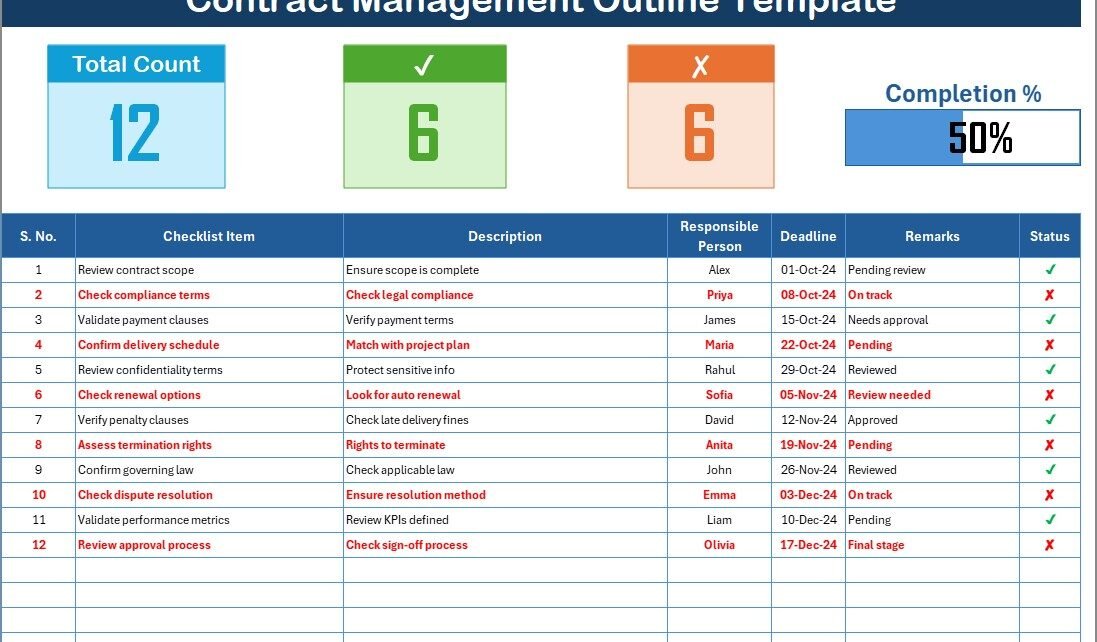
Managing contracts efficiently is one of the most critical responsibilities in any organization. Contracts define business relationships, establish responsibilities, and protect companies from risks. However, without a structured approach, managing them can lead to compliance issues, missed deadlines, or even financial losses. That’s where a Contract Management Outline Checklist in Excel becomes invaluable.
This article explores everything you need to know about this template—its structure, benefits, use cases, and best practices. We’ll also cover practical steps to implement it effectively and finish with answers to common questions.
What Is a Contract Management Outline Checklist in Excel?
A Contract Management Outline Checklist in Excel is a ready-to-use tool designed to streamline how businesses track and evaluate their contracts. Instead of relying on scattered notes, this template provides a centralized system to capture all relevant information, assign responsibilities, and monitor progress.
It usually includes:
-
A main checklist sheet with essential fields like serial number, item description, responsible person, deadline, and remarks.
-
A list sheet that contains a database of responsible persons to create dynamic dropdown menus.
-
A summary section at the top with metrics such as total items, completed items, pending items, and a progress bar.
This structured approach ensures that no critical detail is overlooked.
Why Do Businesses Need a Contract Management Checklist?
Every company deals with contracts—from supplier agreements and service contracts to customer commitments and compliance documents. Without proper management, the risks include:
-
Missed renewal dates leading to unnecessary costs.
-
Overlooked compliance obligations resulting in penalties.
-
Unclear responsibilities that cause delays and disputes.
-
Lack of visibility into the overall status of contracts.
With a checklist in Excel, businesses gain clarity, accountability, and control over their contract processes.
Key Features of the Contract Management Outline Checklist Template
Click to Purchases Contract Management Outline Checklist in Excel
This template is built for simplicity and functionality. Let’s explore its main features:
1. Top Section Summary
The top part of the template includes quick insights:
-
Total Count – Total number of contract items listed.
-
Completed Count – Number of items marked as ✔.
-
Pending Count – Items still open or marked ✘.
-
Progress Bar – A visual indicator showing completion percentage.
This feature helps managers monitor progress instantly without digging into details.
2. Checklist Table
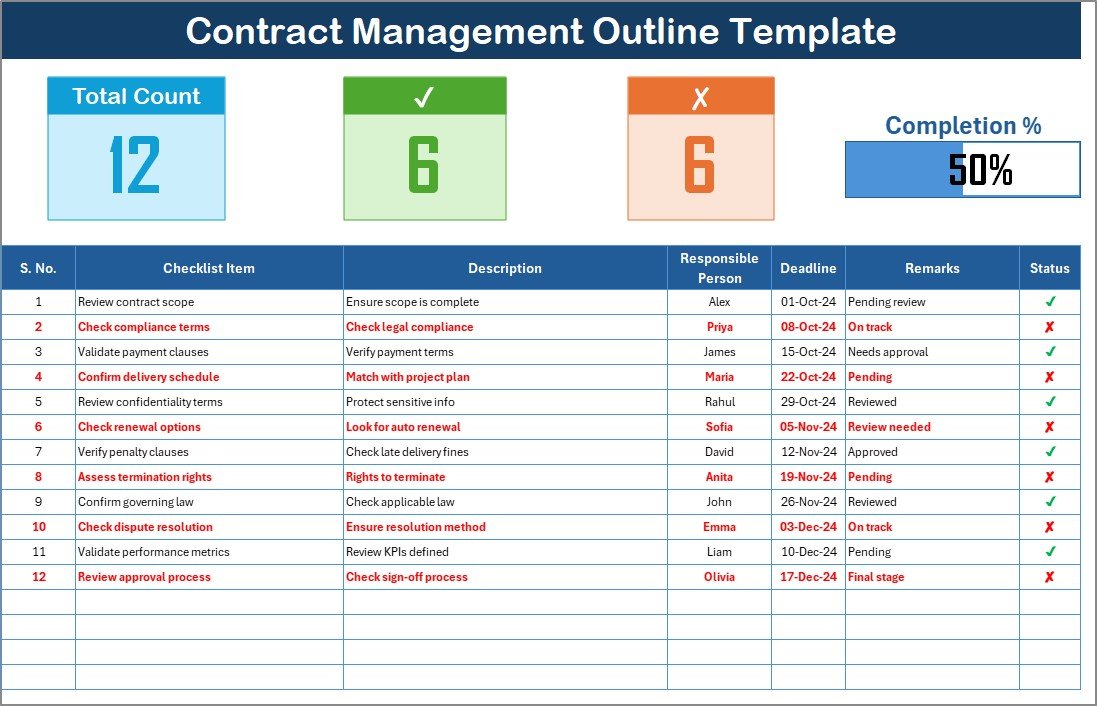
The main table captures detailed contract management activities with columns like:
- Serial No. – Unique identifier for each item.
- Checklist Item – Task or responsibility related to the contract.
- Description – Brief details about the task.
- Responsible Person – Person accountable for completion.
- Deadline – Target completion date.
- Remarks – Notes or observations.
- Status – Marked as ✔ (done) or ✘ (pending).
3. List Sheet for Responsible Persons
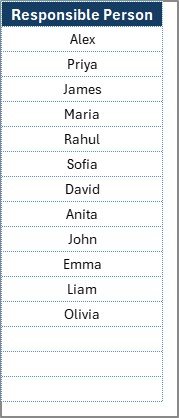
The secondary tab stores a unique list of responsible persons. This list is linked to the main checklist for dropdown menus, ensuring consistency and eliminating manual entry errors.
Advantages of Contract Management Outline Checklist in Excel
Using this Excel template provides several benefits:
-
Centralized Tracking – All contract-related tasks stored in one place.
-
Enhanced Accountability – Clear assignment of responsibilities.
-
Deadline Monitoring – Easy to track due dates and avoid missed renewals.
-
Visual Insights – Progress bar and summary metrics for quick decision-making.
-
Customizable – Flexible enough to adapt to different industries and contract types.
-
Cost-Effective – No need for expensive contract management software.
How to Use the Contract Management Outline Checklist in Excel?
Implementing the template is simple. Here’s a step-by-step process:
-
Download the Template
Start with a prebuilt Excel file that contains the outlined structure. -
List Contract Tasks
Enter all contract-related items such as agreement review, renewal tracking, or compliance checks. -
Assign Responsibilities
Use the dropdown menu to assign each item to the relevant person. -
Set Deadlines
Define clear timelines for each item to avoid delays. -
Update Status
Mark tasks as ✔ (completed) or ✘ (pending) as progress happens. -
Monitor Progress
Use the summary metrics and progress bar to track overall completion.
Best Practices for Contract Management Outline Checklist
To maximize efficiency, follow these best practices:
✅ Keep Descriptions Short – Use clear, concise language for tasks.
✅ Update Regularly – Review and update the checklist weekly.
✅ Set Realistic Deadlines – Avoid unrealistic timelines that cause bottlenecks.
✅ Use Color Coding – Highlight overdue tasks in red for quick visibility.
✅ Integrate with Alerts – Set Excel reminders or pair with Outlook for deadline notifications.
✅ Review Quarterly – Audit the checklist every quarter to identify gaps.
Opportunities for Improvement
Even though the Excel checklist is powerful, there are areas to improve:
📌 Automation – Linking it with VBA macros for automated reminders.
📌 Integration – Connecting it with tools like Power BI for advanced analytics.
📌 Scalability – For organizations with thousands of contracts, upgrading to a contract management system may be required.
Click to Purchases Contract Management Outline Checklist in Excel
Conclusion
A Contract Management Outline Checklist in Excel is a practical, cost-effective solution for businesses of all sizes. It improves visibility, accountability, and compliance while minimizing risks associated with poor contract handling. By adopting this template, organizations can ensure that no contract obligation is ever missed and that every stakeholder knows their responsibility.
Frequently Asked Questions (FAQs)
1. What is the purpose of a Contract Management Outline Checklist?
The checklist ensures all contract-related activities—like reviews, renewals, and compliance checks—are tracked and completed on time.
2. Can small businesses use this template?
Yes. It’s designed to be flexible and can benefit both small companies and large enterprises.
3. How does the progress bar help in contract management?
The progress bar visually shows task completion percentage, making it easier for managers to track overall progress at a glance.
4. Can I customize the checklist columns?
Absolutely. You can add or remove columns based on your organization’s needs.
5. How often should I update the checklist?
Ideally, you should update it weekly to ensure all data is current and accurate.
6. Does this Excel template replace contract management software?
It works well for small to mid-sized businesses. For very large-scale operations, dedicated software might still be necessary.
7. Can deadlines trigger reminders in Excel?
By default, Excel doesn’t send alerts. However, you can use conditional formatting or VBA macros to set up reminders.
Visit our YouTube channel to learn step-by-step video tutorials
Click to Purchases Contract Management Outline Checklist in Excel
Watch the step-by-step video tutorial: