Managing contracts efficiently is one of the most critical responsibilities for businesses of any size. A contract not only defines the obligations between parties but also helps protect business interests, reduce risks, and ensure compliance. However, without a structured approach, managing multiple contracts can quickly become chaotic. This is where a Contract Management Action Plan Checklist in Excel becomes an invaluable tool.
In this comprehensive guide, we will explore everything you need to know about using an Excel-based checklist for contract management. From its structure and features to its advantages, best practices, and frequently asked questions, this article will equip you with the knowledge you need to streamline contract management in your organization.
Click to Purchases Contract Management Action Plan Checklist in Excel
What Is a Contract Management Action Plan Checklist in Excel?
A Contract Management Action Plan Checklist in Excel is a pre-built template designed to simplify the way businesses handle contract lifecycles. Instead of juggling paperwork, emails, or scattered files, this tool consolidates tasks and responsibilities into one organized Excel sheet.
The template allows users to:
-
Track contract details and obligations
-
Assign responsibilities to team members
-
Monitor progress using a progress bar and status indicators
-
Ensure timely renewals and compliance
By using Excel, businesses avoid the need for expensive contract management software while still benefiting from automation, organization, and clarity.
Structure of the Contract Management Action Plan Checklist
This template includes two primary worksheets that work together to streamline contract tracking and accountability.
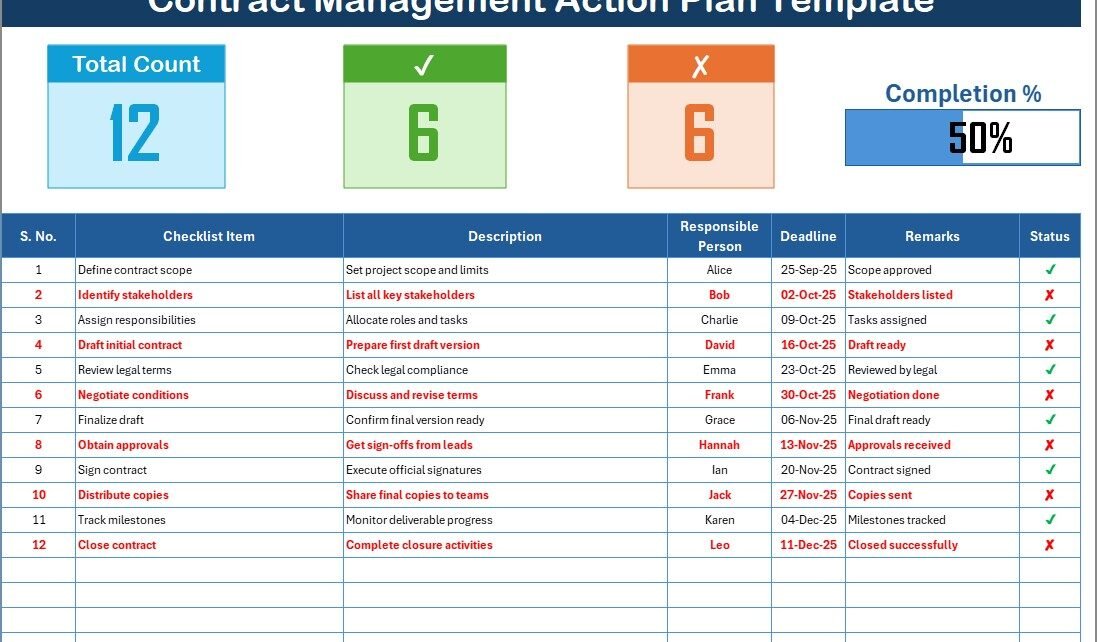
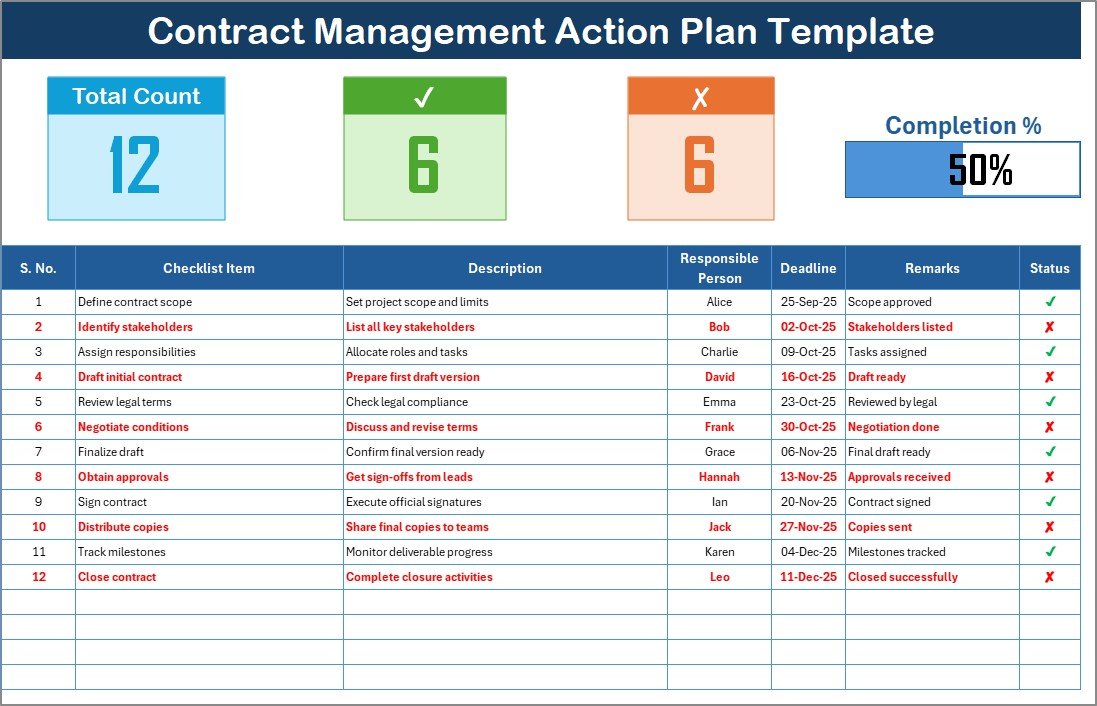
1. Contract Management Action Plan Checklist Sheet
Click to Purchases Contract Management Action Plan Checklist in Excel
This is the main working sheet where you capture and update contract-related tasks.
-
Top Section Features:
-
Total Count: Displays the total number of checklist items.
-
Checked Count: Tracks completed items.
-
Crossed Count: Displays incomplete or pending items.
-
Progress Bar: A visual indicator of completion percentage.
-
Checklist Table Columns:
- Serial No. – Unique identifier for each checklist item
- Checklist Item – Name of the task or requirement
- Description – Brief explanation of the item
- Responsible Person – Assigned stakeholder or team member
- Deadline – Due date for task completion
- Remarks – Notes or additional comments
- Status – Marked as ✔ (done) or ✘ (not done)
This setup makes it easy to monitor ongoing contract activities and track accountability.
2. List Sheet Tab
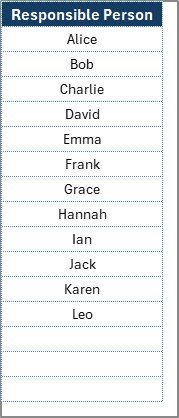
The second sheet supports the checklist by providing a unique list of Responsible Persons. This list is linked to the main sheet through a drop-down menu, ensuring data consistency and reducing manual errors.
Why Do You Need a Contract Management Checklist?
Contracts are the foundation of business relationships. A missing signature, an overlooked renewal date, or a missed compliance clause can lead to financial losses, penalties, or legal risks. Having a checklist ensures:
-
Nothing gets overlooked – Every step, from drafting to execution, is accounted for.
-
Accountability is clear – Each item is tied to a responsible person.
-
Timelines are enforced – Deadlines reduce delays and contract breaches.
-
Progress is visible – The progress bar provides instant clarity on status.
Advantages of Using a Contract Management Action Plan Checklist in Excel
Using Excel as the foundation for a contract management checklist offers multiple benefits:
Click to Purchases Contract Management Action Plan Checklist in Excel
1. Cost-Effective Solution
You don’t need costly software or complex systems. Excel is widely available and easy to use.
2. Simplicity and Flexibility
The checklist is straightforward, with no steep learning curve. It can be easily customized to suit different industries and contract types.
3. Real-Time Tracking
The use of progress bars and counters allows instant visibility into contract management status.
4. Improved Accountability
Since each task is linked to a responsible person, ownership is clear.
5. Automation Through Excel Features
Drop-downs, formulas, and conditional formatting reduce human error and save time.
6. Scalability
Whether you have 10 contracts or 1,000, the template can be scaled to match business needs.
Key Features of the Template
The Contract Management Action Plan Checklist in Excel provides several unique features:
-
✔ Status indicators for task completion
-
📊 Progress bar linked to completion percentage
-
🗂 Structured columns for details like deadlines, remarks, and responsibilities
-
🔄 Drop-down list to assign responsible persons consistently
-
📅 Deadline monitoring for proactive contract management
Best Practices for the Contract Management Action Plan Checklist
To get the maximum benefit from this template, follow these best practices:
1. Define Clear Roles
Ensure every checklist item has an assigned person. This avoids confusion and enhances accountability.
2. Regularly Update Status
Encourage team members to mark ✔ or ✘ promptly to maintain accurate records.
3. Monitor Deadlines
Use Excel’s conditional formatting to highlight overdue tasks in red.
4. Conduct Periodic Reviews
Review the checklist weekly or monthly to ensure progress aligns with business goals.
5. Customize for Your Business
Modify checklist items to reflect your unique contract processes—whether compliance audits, vendor management, or client contracts.
6. Backup and Protect Data
Use password protection and cloud backup to secure sensitive contract information.
Opportunities for Improvement in Contract Management
While Excel is powerful, organizations can improve further by:
-
Integrating Alerts: Adding automated reminders for deadlines.
-
Linking Documents: Attaching relevant contracts or PDFs for direct access.
-
Expanding Reporting: Using pivot tables and charts to analyze contract trends.
-
Collaborating Online: Using Excel in Microsoft 365 or Google Sheets for real-time team collaboration.
How to Use the Contract Management Action Plan Checklist in Excel
Here’s a step-by-step guide to using the template effectively:
-
Download the Template – Save the checklist file to your system.
-
Enter Contract Items – Add details like contract titles, obligations, and tasks.
-
Assign Responsible Persons – Use the drop-down list to ensure consistency.
-
Set Deadlines – Input realistic completion dates for each task.
-
Update Status Regularly – Mark ✔ when a task is complete or ✘ if pending.
-
Monitor Progress Bar – Review completion percentage to track performance.
-
Review Remarks Section – Use it for notes, challenges, or next steps.
Who Can Benefit from This Checklist?
This checklist is ideal for:
-
Small Businesses – Affordable way to manage contracts without extra software.
-
Legal Teams – Track compliance and reduce legal risks.
-
Procurement Departments – Manage supplier contracts and renewals.
-
Project Managers – Monitor obligations tied to projects.
-
HR Departments – Track employee contracts and agreements.
Conclusion
Contracts are the lifeblood of modern business. Mismanaging them can lead to missed opportunities, financial losses, or compliance issues. With the Contract Management Action Plan Checklist in Excel, organizations gain a simple yet powerful tool to track, manage, and complete contract obligations effectively.
This ready-to-use template not only simplifies workflows but also brings accountability and transparency to the contract management process. By following best practices and leveraging Excel’s features, businesses can reduce risks, improve compliance, and ensure timely execution of all contracts.
Click to Purchases Contract Management Action Plan Checklist in Excel
Frequently Asked Questions (FAQs)
1. What is a Contract Management Action Plan Checklist in Excel?
It is a pre-built Excel template that helps organizations track, manage, and monitor contract tasks, responsibilities, and deadlines in one place.
2. How does the progress bar work in the template?
The progress bar automatically updates based on the percentage of tasks marked ✔ (completed) versus ✘ (pending).
3. Can this checklist be customized?
Yes. You can add or remove columns, change checklist items, or modify formatting to match your business needs.
4. Is this tool suitable for large organizations?
Absolutely. The template can scale to handle hundreds of contracts, especially when used with pivot tables and Excel automation features.
5. Can multiple users update the checklist simultaneously?
Yes, if you use Excel Online (Microsoft 365) or upload it to Google Sheets, multiple users can collaborate in real time.
6. Does this template replace contract management software?
Not entirely. While it covers most needs, larger enterprises with complex requirements may still benefit from specialized software.
7. How secure is contract data in Excel?
You can enhance security by enabling password protection, using restricted access, and backing up files in secure cloud storage.
8. Who should use this checklist?
It is useful for legal teams, procurement managers, HR professionals, small businesses, and project managers who need an affordable yet efficient way to manage contracts.
Visit our YouTube channel to learn step-by-step video tutorials
Click to Purchases Contract Management Action Plan Checklist in Excel
Watch the step-by-step video tutorial: