Crowdfunding has transformed the way startups, creators, and organizations raise capital. Instead of relying only on banks or investors, businesses now connect directly with supporters through online platforms. However, as crowdfunding campaigns grow, managing performance without proper tracking becomes difficult.
That is exactly why a Crowdfunding KPI Scorecard in Excel becomes a powerful and essential tool.
Without clear KPIs, campaign managers struggle to understand funding progress, backer engagement, conversion rates, and goal achievement. Therefore, a structured KPI scorecard helps teams track performance accurately, identify gaps early, and make data-driven decisions.
In this detailed article, you will learn what a Crowdfunding KPI Scorecard in Excel is, why it is important, how it works, its worksheet structure, key features, advantages, best practices, and frequently asked questions. By the end, you will clearly understand how this ready-to-use Excel scorecard improves crowdfunding success.
Click to Purchases Crowdfunding KPI Scorecard in Excel
What Is a Crowdfunding KPI Scorecard in Excel?
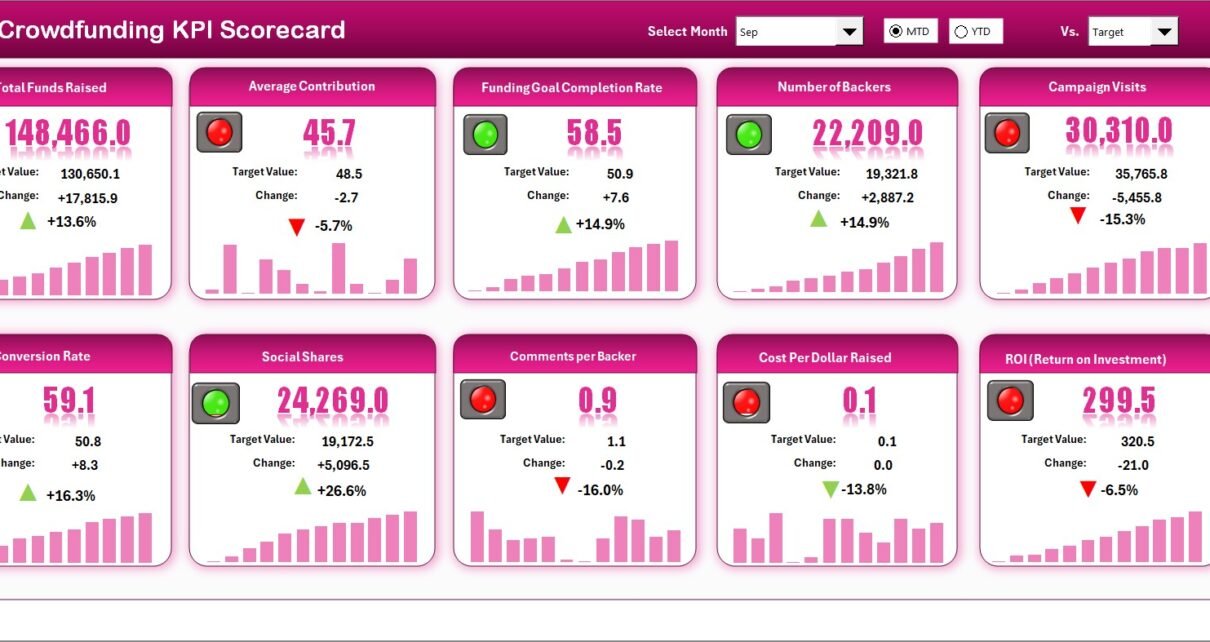
A Crowdfunding KPI Scorecard in Excel is a structured performance management tool designed to track and analyze key performance indicators related to crowdfunding campaigns.
Instead of reviewing raw numbers across multiple sheets or dashboards, teams use one centralized Excel scorecard to monitor:
-
Campaign funding progress
-
Backer engagement levels
-
Target vs actual performance
-
Month-to-date (MTD) and year-to-date (YTD) trends
-
Previous year (PY) comparisons
Because Excel supports formulas, charts, drop-downs, and conditional formatting, this scorecard delivers both clarity and control.
Why Do Crowdfunding Campaigns Need a KPI Scorecard?
Crowdfunding campaigns move fast. Therefore, without proper tracking, teams often miss warning signs.
Here is why a KPI scorecard becomes critical:
-
Because funding targets require continuous monitoring
-
Because campaign performance changes daily
-
Because teams need quick insights, not raw data
-
Because investor and backer confidence depends on transparency
-
Because decision-making must remain data-driven
As a result, a Crowdfunding KPI Scorecard in Excel brings structure, discipline, and visibility to campaign management.
How Does a Crowdfunding KPI Scorecard in Excel Work?
The working logic of this scorecard remains simple and intuitive.
First, users define KPIs and targets.
Next, users enter actual campaign data regularly.
Then, Excel compares actual values with targets and previous year data.
Finally, visual indicators and trend charts show performance clearly.
Because everything updates dynamically, teams always work with the latest data.
Click to Purchases Crowdfunding KPI Scorecard in Excel
What Are the Worksheets in the Crowdfunding KPI Scorecard in Excel?
This ready-to-use Crowdfunding KPI Scorecard in Excel includes four structured worksheets. Each worksheet plays a critical role in performance monitoring.
1. Scorecard Sheet – The Main Performance Dashboard
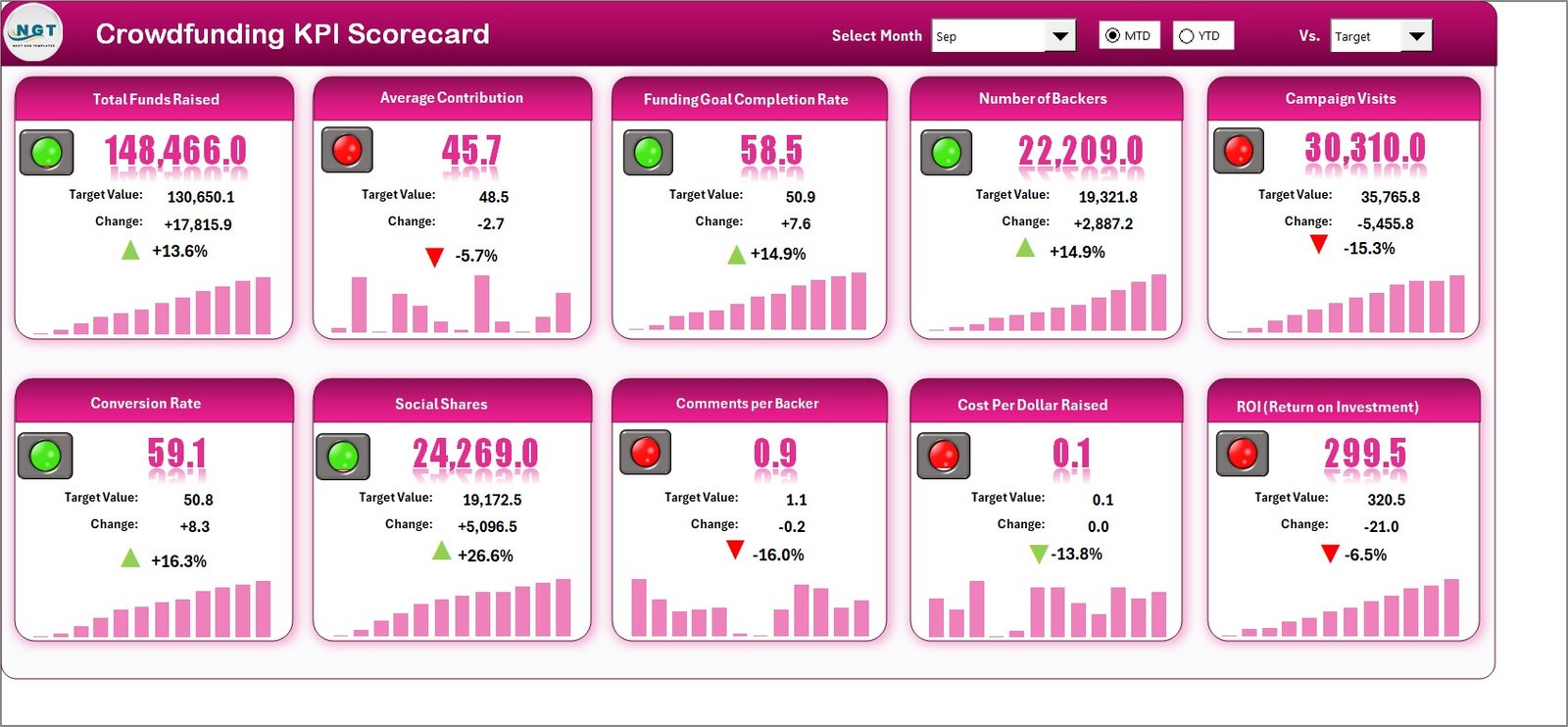
The Scorecard Sheet acts as the main interface of the KPI scorecard. Therefore, users start their analysis from this sheet.
What Are the Key Features of the Scorecard Sheet?
The Scorecard Sheet provides a high-level overview of all KPIs.
Key features include:
-
Dropdown Menus
Select Month, MTD (Month-to-Date), or YTD (Year-to-Date) for analysis. -
Actual vs Target Comparison
Compare real campaign performance against predefined targets. -
Visual Performance Indicators
Use color-coded indicators or conditional formatting to identify performance quickly. -
Comprehensive KPI Overview
Display KPI group, KPI name, unit, type, actual values, targets, and variances.
Because of this layout, decision-makers can assess campaign health within seconds.
How Does the Scorecard Sheet Support Decision-Making?
The Scorecard Sheet eliminates guesswork.
-
It highlights underperforming KPIs
-
It shows over-achieved targets
-
It supports quick corrective actions
-
It improves campaign transparency
As a result, teams respond faster and smarter.
Click to Purchases Crowdfunding KPI Scorecard in Excel
2. KPI Trend Sheet – How Are KPI Trends Analyzed?
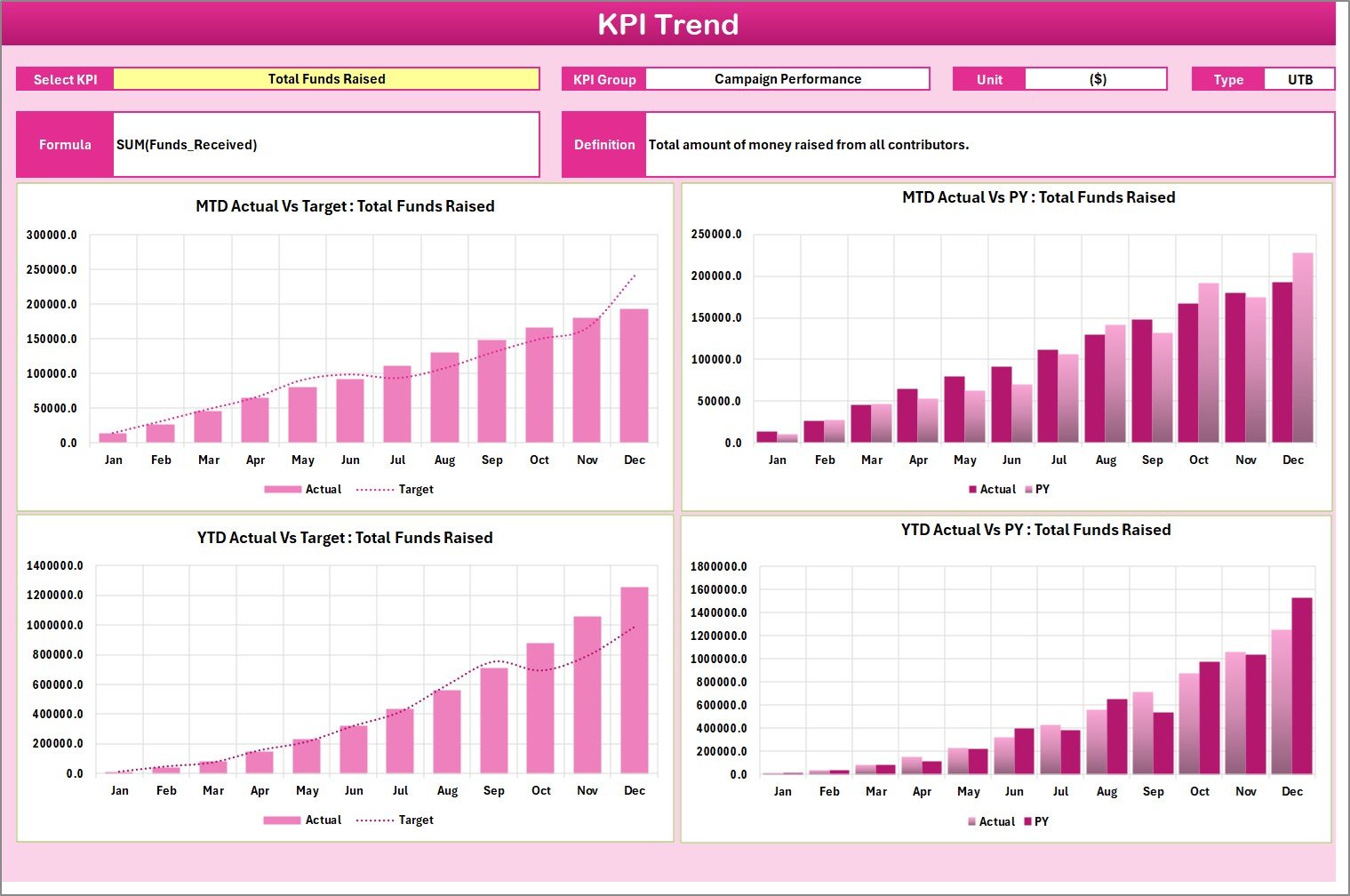
The KPI Trend Sheet focuses on detailed KPI-level analysis. Therefore, users rely on this sheet for deeper insights.
What Can You Do in the KPI Trend Sheet?
In this sheet, users can:
-
Select a KPI name from a dropdown (Cell C3)
-
View KPI Group and KPI Unit
-
Identify KPI Type (Lower the Better or Upper the Better)
-
Review KPI Formula and Definition
-
Analyze MTD and YTD trends visually
Moreover, the sheet displays trend charts for:
-
Actual values
-
Target values
-
Previous year (PY) values
Because of these charts, performance trends become easy to understand.
Click to Purchases Crowdfunding KPI Scorecard in Excel
Why Are KPI Trends Important in Crowdfunding?
Crowdfunding performance changes over time. Therefore, trends matter more than single values.
-
Trends show momentum
-
Trends highlight consistency or decline
-
Trends support forecasting
-
Trends improve strategic planning
As a result, this sheet helps teams plan smarter campaigns.
3. Input Data Sheet – Where Is the Data Entered?
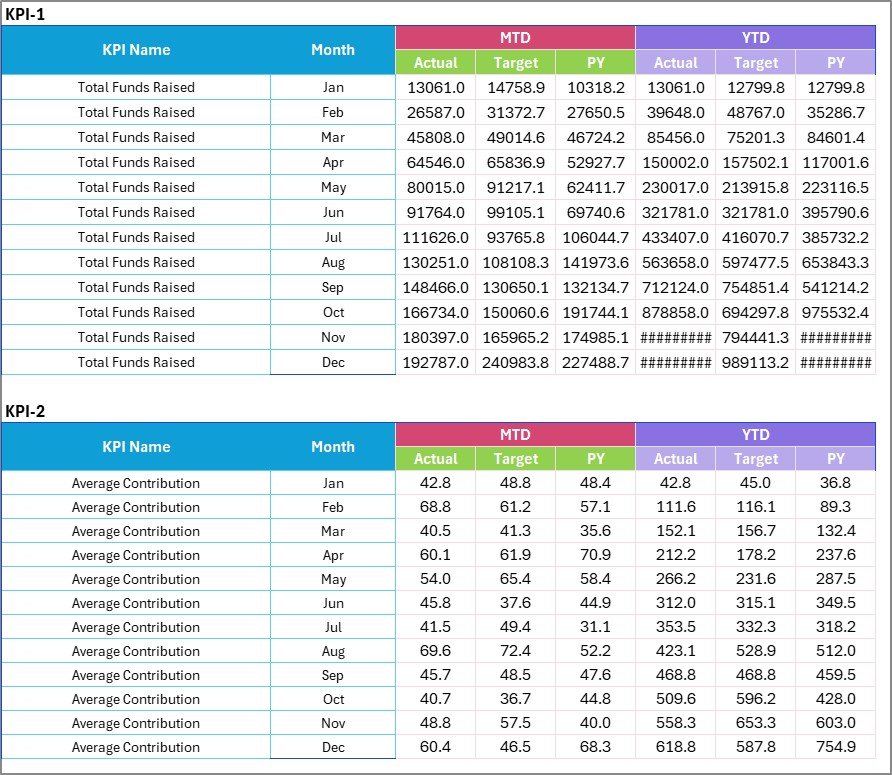
The Input Data Sheet acts as the data entry backbone of the scorecard.
What Is the Purpose of the Input Data Sheet?
This sheet allows users to enter and update KPI data easily.
Key functions include:
-
Recording actual KPI values
-
Entering target values
-
Updating campaign data regularly
-
Maintaining historical performance records
Because data entry remains centralized, the scorecard stays accurate and reliable.
Click to Purchases Crowdfunding KPI Scorecard in Excel
How Does the Input Data Sheet Improve Flexibility?
Crowdfunding campaigns evolve quickly. Therefore, flexibility becomes essential.
-
Users can update data anytime
-
Campaign results remain current
-
No structural changes are required
-
Excel recalculates results automatically
As a result, teams save time and avoid errors.
4. KPI Definition Sheet – How Are KPIs Standardized?

The KPI Definition Sheet ensures clarity and consistency across the scorecard.
What Information Does the KPI Definition Sheet Contain?
This sheet includes:
-
KPI Name
-
KPI Group
-
Unit of Measurement
-
Formula
-
KPI Definition
Because of this structure, every KPI remains clearly defined and standardized.
Why Is KPI Definition Important in Crowdfunding?
Clear KPI definitions prevent confusion.
-
Teams interpret KPIs correctly
-
Reports remain consistent
-
Stakeholders trust the data
-
New users onboard faster
Therefore, this sheet improves governance and reporting quality.
Click to Purchases Crowdfunding KPI Scorecard in Excel
What Types of Crowdfunding KPIs Can You Track?
A Crowdfunding KPI Scorecard in Excel supports multiple KPI categories, such as:
-
Funding Performance KPIs
-
Backer Engagement KPIs
-
Marketing Conversion KPIs
-
Campaign Efficiency KPIs
-
Financial Outcome KPIs
Because the template remains flexible, you can customize KPIs easily.
Advantages of Crowdfunding KPI Scorecard in Excel
Using a Crowdfunding KPI Scorecard in Excel offers several strong advantages.
1. Centralized Performance Tracking
All KPIs remain available in one structured file.
2. Improves Campaign Visibility
Visual indicators and charts provide instant insights.
3. Supports Data-Driven Decisions
Actual vs target comparisons guide strategic actions.
4. Easy to Use and Update
Excel requires no advanced technical skills.
5. Enhances Reporting Accuracy
Standardized KPIs ensure clean and reliable reporting.
6. Saves Time and Effort
Automation reduces manual calculations and errors.
Click to Purchases Crowdfunding KPI Scorecard in Excel
Best Practices for the Crowdfunding KPI Scorecard in Excel
To maximize value, follow these best practices.
1. Update Data Regularly
Frequent updates ensure accurate insights.
2. Set Realistic Targets
Clear and achievable targets improve analysis quality.
3. Review Trends Weekly
Weekly trend reviews highlight early warning signs.
4. Keep KPI Definitions Clear
Short and simple definitions avoid confusion.
5. Focus on Actionable KPIs
Track KPIs that directly impact campaign success.
6. Use Visual Indicators Wisely
Color coding should highlight priorities, not distract users.
Who Should Use a Crowdfunding KPI Scorecard in Excel?
This scorecard suits many users, including:
-
Startup founders
-
Campaign managers
-
Marketing teams
-
Finance teams
-
Crowdfunding consultants
-
Non-profit organizations
Therefore, anyone managing crowdfunding campaigns can benefit.
Click to Purchases Crowdfunding KPI Scorecard in Excel
Can You Customize the Crowdfunding KPI Scorecard?
Yes, customization remains easy.
You can:
-
Add or remove KPIs
-
Modify targets
-
Adjust time periods
-
Change visual formats
Because Excel is flexible, the scorecard adapts to different needs.
Conclusion: Why Should You Use a Crowdfunding KPI Scorecard in Excel?
A Crowdfunding KPI Scorecard in Excel provides a structured, reliable, and visual way to monitor crowdfunding performance. Instead of working with raw numbers, teams gain clarity, insights, and control.
Because the scorecard includes MTD, YTD, target comparisons, trend analysis, and KPI definitions, it supports smarter decisions and better campaign outcomes. As a result, organizations improve transparency, accountability, and funding success.
If you want a professional and ready-to-use performance monitoring tool, this Excel KPI scorecard is the right choice.
Frequently Asked Questions (FAQs)
What is a Crowdfunding KPI Scorecard in Excel?
It is an Excel-based tool used to track and analyze crowdfunding KPIs using structured worksheets and visuals.
Who can use this KPI scorecard?
Founders, campaign managers, marketers, and finance teams can use it easily.
Does this scorecard support MTD and YTD analysis?
Yes, it supports both Month-to-Date and Year-to-Date analysis.
Can I customize KPIs in this scorecard?
Yes, you can modify KPIs, targets, and formulas as needed.
Does this template require macros?
No, it works using standard Excel formulas.
How often should data be updated?
You should update data regularly, ideally daily or weekly.
Can this scorecard handle multiple campaigns?
Yes, with minor customization, you can track multiple campaigns.
Is this scorecard suitable for beginners?
Yes, it uses simple layouts and user-friendly features.
Click to Purchases Crowdfunding KPI Scorecard in Excel
Visit our YouTube channel to learn step-by-step video tutorials