Employee retention has become one of the most critical challenges for modern organizations. While hiring talent requires time and money, retaining skilled employees requires even more strategic effort. However, many organizations still struggle because they lack visibility into employee behavior, performance, engagement, and resignation trends. That is exactly where an Employee Retention Dashboard in Power BI plays a transformative role.
Instead of relying on manual HR reports or scattered Excel sheets, organizations now use Power BI dashboards to monitor retention metrics in real time. As a result, HR leaders, managers, and executives can make faster and smarter decisions. Moreover, they can identify early warning signs before employees disengage or resign.
In this detailed article, you will learn what an Employee Retention Dashboard in Power BI is, why it is important, how it works, its dashboard pages, key features, advantages, best practices, and frequently asked questions. By the end, you will clearly understand how this dashboard helps organizations reduce attrition and improve workforce stability.
What Is an Employee Retention Dashboard in Power BI?
An Employee Retention Dashboard in Power BI is an interactive HR analytics solution designed to track, analyze, and visualize employee retention and attrition metrics in a centralized manner.
Instead of reviewing static HR reports, organizations use this dashboard to:
- Monitor total, active, resigned, and terminated employees
- Analyze attrition trends by department, location, job role, and manager
- Track engagement scores, training hours, and performance ratings
- Identify high-risk employee segments
- Support proactive retention strategies
Because Power BI offers dynamic visuals, slicers, and drill-down features, HR teams can explore employee data from multiple perspectives. Consequently, decision-making becomes faster, clearer, and more accurate.
Why Do Organizations Need an Employee Retention Dashboard?
Employee turnover directly impacts productivity, morale, and operational costs. Moreover, frequent attrition often signals deeper organizational issues. Therefore, organizations need a reliable analytics system to understand why employees leave and how to retain them.
Here is why an Employee Retention Dashboard becomes essential:
- Manual HR reports delay insights
- Attrition patterns remain hidden in raw data
- Managers lack visibility into team-level issues
- Leadership struggles to measure engagement and performance trends
- HR teams cannot act proactively
However, when organizations implement a Power BI retention dashboard, they gain instant access to actionable insights. As a result, they can design targeted retention initiatives and improve employee satisfaction.
How Does an Employee Retention Dashboard in Power BI Work?
An Employee Retention Dashboard works by connecting employee-related data from HR systems, Excel files, or databases into Power BI. Once connected, the dashboard transforms raw data into meaningful visuals.
The workflow usually includes:
- Importing employee master data
- Loading resignation and termination records
- Adding performance, training, and engagement data
- Creating calculated metrics such as attrition percentage
- Designing interactive dashboard pages
Because Power BI updates data dynamically, HR teams always view the latest information. Therefore, they can track changes in real time and respond quickly.
What Are the Key Pages in an Employee Retention Dashboard in Power BI?
This Employee Retention Dashboard contains five professionally designed pages, each focusing on a specific analytical area. Together, these pages provide a complete retention analysis.
Overview Page: What Is Happening Across the Organization?
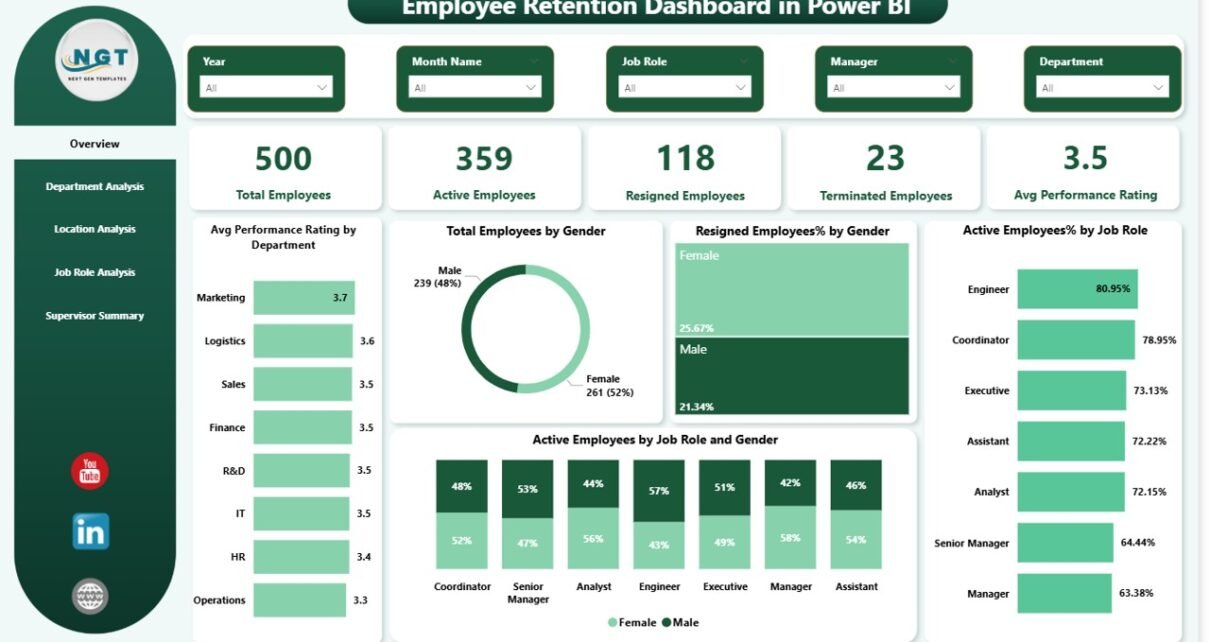
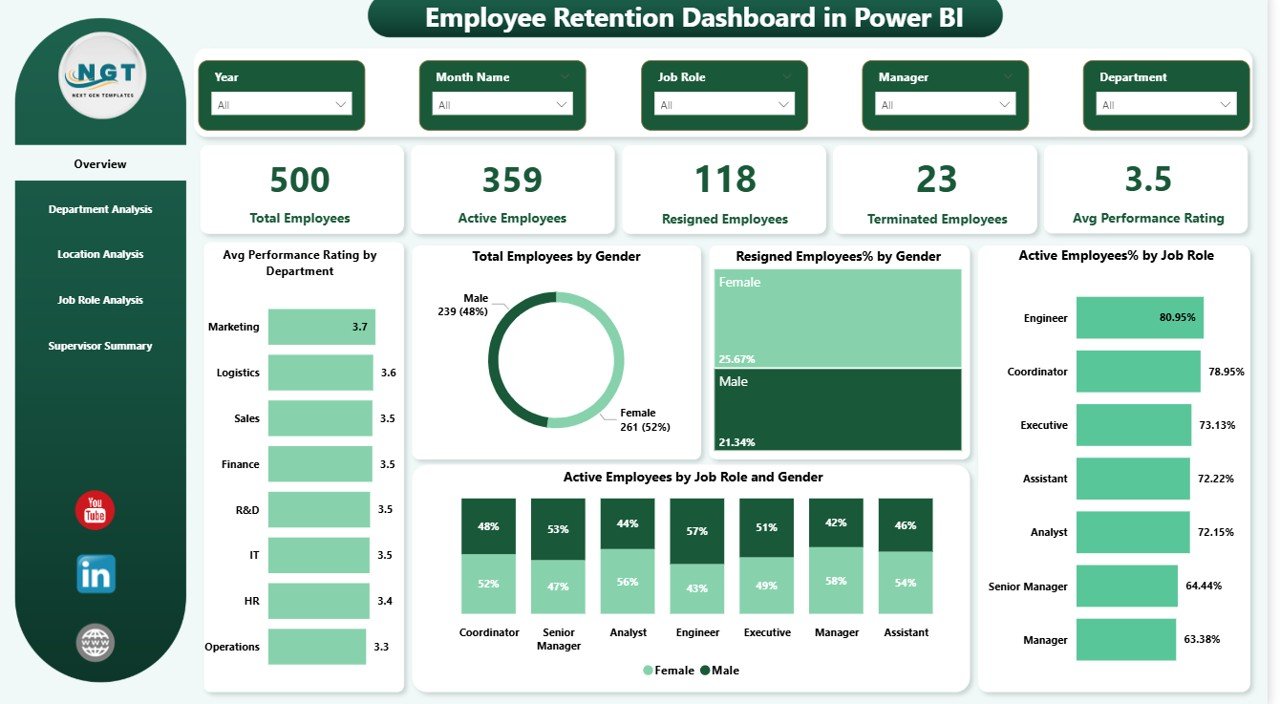
The Overview Page acts as the central snapshot of employee retention performance. It helps HR leaders understand the overall workforce situation instantly.
Key KPIs on the Overview Page
- Total Employees
- Active Employees
- Resigned Employees
- Terminated Employees
- Average Performance Rating
Because these KPIs appear as cards, decision-makers can quickly assess workforce health.
Visual Insights on the Overview Page
- Average performance rating by department
- Total employees by gender
- Resigned employee percentage by gender
- Active employees percentage by job role
- Active employees by job role and gender
As a result, HR teams can identify gender-based or role-based retention issues immediately.
Department Analysis: Which Departments Face Higher Attrition?
The Department Analysis Page focuses on retention performance across different departments. Since departments often operate differently, this analysis becomes extremely valuable.
Key Metrics on the Department Analysis Page
- Total employees by department
- Resigned employees by department
- Average training hours by department
- Average salary by department
Because this page uses slicers, HR teams can filter by time period or other dimensions. Consequently, they can identify departments that require urgent attention.
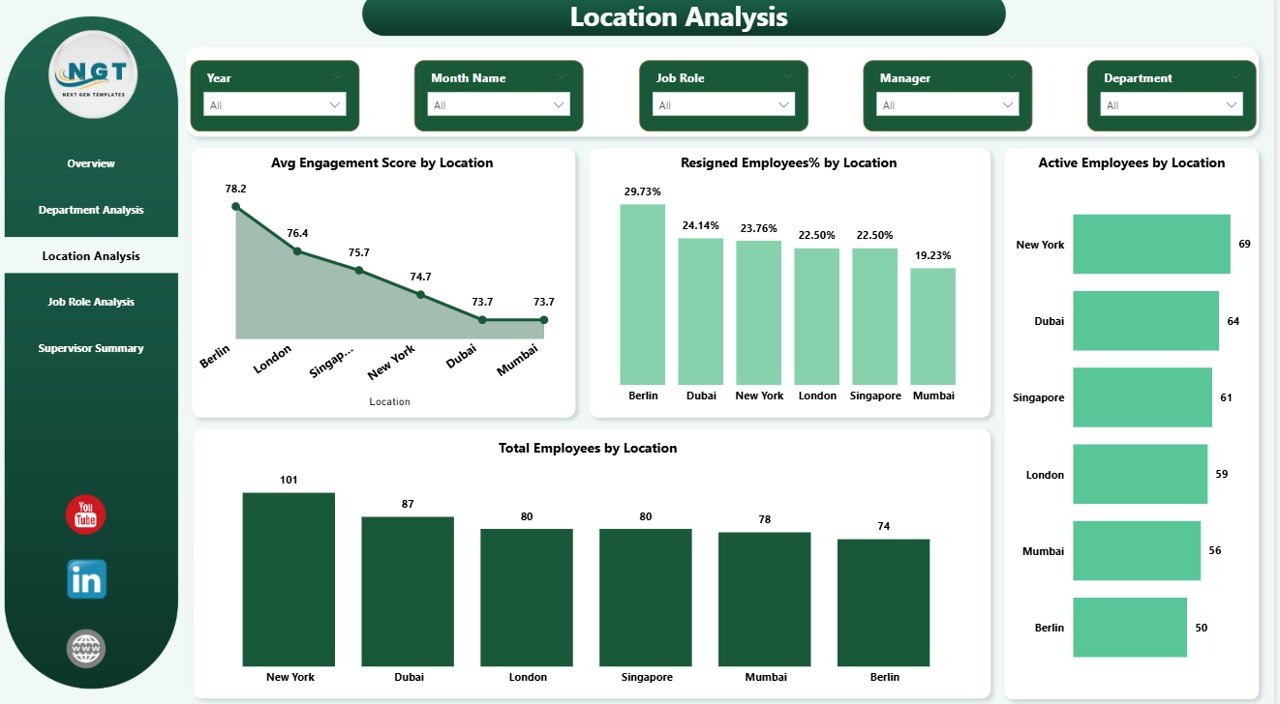
Location Analysis: Does Location Impact Employee Retention?
Employee retention often varies by location due to work culture, leadership, or operational challenges. Therefore, the Location Analysis Page plays a crucial role.
Key Insights from the Location Analysis Page
- Average engagement score by location
- Resigned employee percentage by location
- Active employees by location
- Total employees by location
By analyzing this page, organizations can understand which locations struggle with engagement or attrition. As a result, they can introduce location-specific retention initiatives.
Job Role Analysis: Which Roles Experience Higher Turnover?
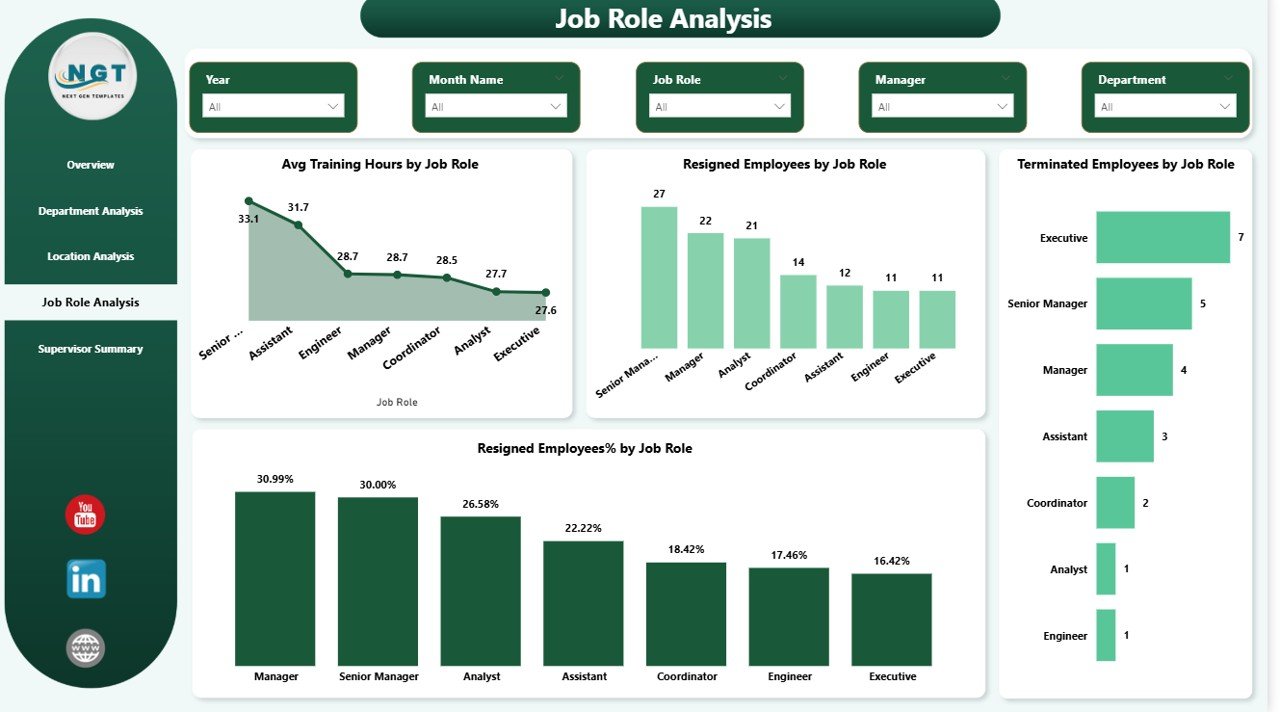
Some job roles naturally face higher turnover due to workload, stress, or market demand. The Job Role Analysis Page helps organizations detect these patterns.
Key Metrics on the Job Role Analysis Page
- Average training hours by job role
- Resigned employees by job role
- Terminated employees by job role
- Resigned employee percentage by job role
Because this page highlights role-specific risks, HR teams can redesign roles, improve training, or adjust compensation strategies.
Supervisor Summary: How Do Managers Influence Retention?
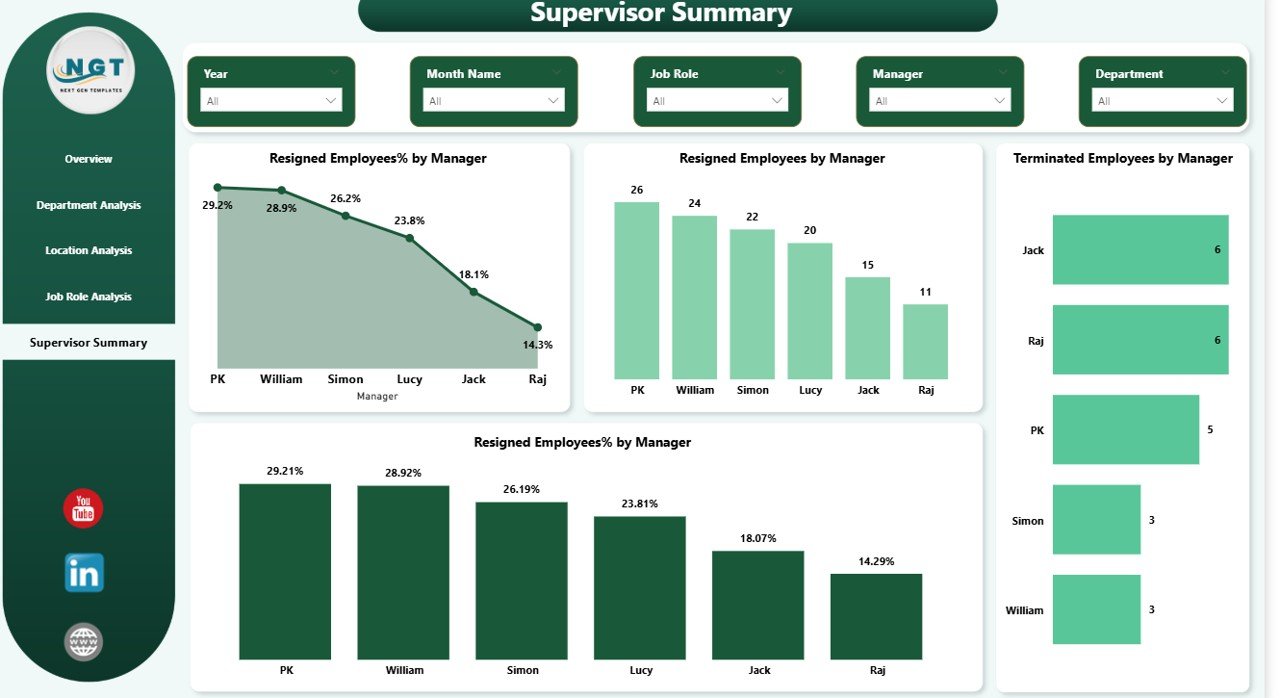
Managers play a significant role in employee satisfaction and retention. Therefore, the Supervisor Summary Page focuses on manager-level analysis.
Key Insights on the Supervisor Summary Page
- Resigned employee percentage by manager
- Resigned employees by manager
- Terminated employees by manager
With this page, leadership teams can identify managers who need coaching or support. As a result, organizations can improve leadership quality and employee experience.
What Are the Key Features of an Employee Retention Dashboard in Power BI?
An Employee Retention Dashboard includes several powerful features that make HR analytics effective and actionable.
Interactive Slicers
Users can filter data by department, location, job role, gender, or manager. Therefore, analysis becomes highly flexible.
KPI Cards
High-level metrics appear instantly, helping leaders make quick decisions.
Dynamic Visuals
Charts update automatically when users change filters. As a result, insights remain consistent and reliable.
Drill-Down Capabilities
Users can move from summary views to detailed insights without switching reports.
Real-Time Data Refresh
Because Power BI supports scheduled refresh, HR teams always work with updated data.
Advantages of Employee Retention Dashboard in Power BI
Implementing an Employee Retention Dashboard delivers long-term strategic benefits to organizations.
Improves Decision-Making
HR leaders base decisions on data rather than assumptions.
Reduces Employee Attrition
Organizations identify risk areas early and take corrective actions.
Enhances Workforce Planning
Managers plan hiring, training, and promotions more effectively.
Saves Time and Effort
Automation replaces manual HR reporting.
Improves Employee Engagement
Insights help design better engagement and development programs.
How Does This Dashboard Help HR Teams Strategically?
An Employee Retention Dashboard does more than show numbers. It supports long-term HR strategy.
- HR teams identify attrition trends early
- Leadership aligns retention goals with business objectives
- Managers receive actionable performance insights
- Organizations build a stable and motivated workforce
Because data drives every decision, retention strategies become measurable and effective.
Best Practices for the Employee Retention Dashboard in Power BI
To maximize the value of your dashboard, follow these best practices.
Use Clean and Structured Data
Ensure employee data remains accurate and consistent.
Track Leading Indicators
Monitor engagement scores and training hours, not just resignations.
Review Dashboard Regularly
Schedule monthly or quarterly retention reviews.
Combine Quantitative and Qualitative Data
Include performance and engagement metrics for deeper insights.
Train HR Teams and Managers
Ensure users understand how to interpret dashboard insights.
Who Can Benefit from an Employee Retention Dashboard?
This dashboard benefits multiple stakeholders.
- HR Managers and HR Analysts
- Department Heads and Team Leads
- Senior Management and Executives
- Workforce Planning Teams
Because each group views insights differently, the dashboard supports organization-wide alignment.
Conclusion: Why Is an Employee Retention Dashboard a Must-Have?
Employee retention directly influences organizational success. However, without visibility, organizations struggle to address retention challenges effectively. An Employee Retention Dashboard in Power BI solves this problem by converting HR data into actionable insights.
By using interactive visuals, dynamic filters, and real-time analytics, organizations gain a clear understanding of employee behavior. As a result, they can reduce attrition, improve engagement, and build a resilient workforce.
In today’s competitive talent market, this dashboard is no longer optional. Instead, it has become a strategic necessity.
Frequently Asked Questions (FAQs)
What is the main purpose of an Employee Retention Dashboard?
The main purpose is to analyze employee attrition, engagement, and retention trends using interactive visuals.
Can Power BI handle large employee datasets?
Yes, Power BI efficiently handles large HR datasets and updates insights dynamically.
Who should use an Employee Retention Dashboard?
HR teams, managers, and executives should use it for workforce planning and retention strategies.
How often should retention data be updated?
Organizations should refresh data weekly or monthly for accurate insights.
Does this dashboard help reduce attrition?
Yes, it helps identify risk factors early, enabling proactive retention actions.
Visit our YouTube channel to learn step-by-step video tutorials
Watch the step-by-step video tutorial: