Healthcare organizations manage complex purchasing operations every day. From medical equipment and consumables to medicines and services, purchasing decisions directly impact cost control, service quality, and operational continuity. However, when purchasing data remains scattered across spreadsheets and manual reports, finance teams and procurement managers struggle to gain clarity. As a result, overspending, delayed payments, and incomplete purchases become common problems.
That is exactly why a Health Purchasing Dashboard in ExcelHealth Project Management Dashboard in Excel becomes an essential solution. This ready-to-use dashboard converts raw purchasing data into clear, visual, and actionable insights. It helps hospitals, clinics, and healthcare organizations monitor planned costs, actual costs, quantities, payment status, vendor performance, and purchase completion—all in one Excel file.
In this article, we will explain how the Health Purchasing Dashboard in Excel works, its sheet structure, key charts, benefits, improvement opportunities, best practices, and frequently asked questions.
What Is a Health Purchasing Dashboard in Excel?
A Health Purchasing Dashboard in Excel is a structured reporting and analytics tool designed to track and analyze healthcare purchasing activities. It consolidates procurement data such as planned cost, actual cost, quantities, payment status, vendor performance, and purchase completion into interactive dashboards.
Because this dashboard is built in Microsoft Excel, it offers:
-
Familiar and user-friendly interface
-
Automated calculations and visuals
-
Easy customization
-
No dependency on expensive procurement software
-
Quick deployment across teams
This dashboard supports data-driven purchasing decisions while improving transparency and accountability.
Why Do Healthcare Organizations Need a Purchasing Dashboard?
Click to Buy Health purchasing Dashboard in Excel
Healthcare purchasing involves strict budgets, multiple vendors, regulatory requirements, and time-sensitive deliveries. Without a centralized dashboard:
-
Cost overruns remain unnoticed
-
Payment delays increase
-
Vendor performance becomes unclear
-
Procurement planning suffers
A Health Purchasing Dashboard in Excel solves these challenges by providing a single source of truth for procurement teams, finance teams, and management.
Overview Sheet Tab – Key Metrics at a Glance
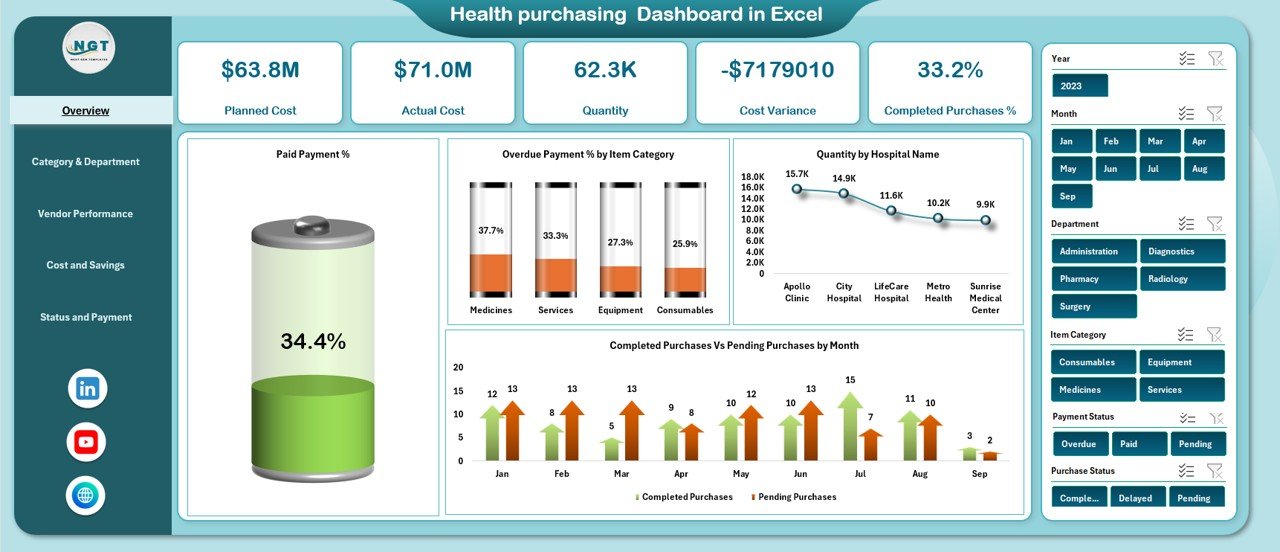
The Overview sheet is the main dashboard page. It provides an instant summary of purchasing performance through KPI cards and charts.
KPI Cards on the Overview Page
The dashboard displays the following key cards:
-
Planned Cost – Total budgeted purchasing cost
-
Actual Cost – Total actual spending
-
Quantity – Total quantity of items purchased
-
Cost Variance – Difference between planned and actual cost
-
Completed Purchases % – Percentage of completed purchases
These cards allow decision-makers to quickly understand purchasing health without deep analysis.
Charts on the Overview Sheet
Paid Payment %
Shows the percentage of purchases where payment is completed. This helps track financial discipline.
Overdue Payment % by Item Category
Highlights item categories with delayed payments, allowing quick corrective action.
Quantity by Hospital Name
Displays purchase quantities across hospitals, helping compare usage and demand.
Completed Purchases vs Pending Purchases by Month
Tracks procurement execution trends month by month.
Click to Buy Health purchasing Dashboard in Excel
Category & Department Analysis
This section helps organizations analyze purchasing performance across departments and item categories.
Paid Payment % by Department
Shows which departments clear payments on time.
Paid Payment % by Item Category
Helps identify categories causing payment delays.
Completed Purchases % by Department
Tracks procurement efficiency by department.
Total Purchases by Department
Provides visibility into purchasing volume across departments.
This analysis supports better departmental budgeting and accountability.

Click to Buy Health purchasing Dashboard in Excel
Vendor Performance Analysis
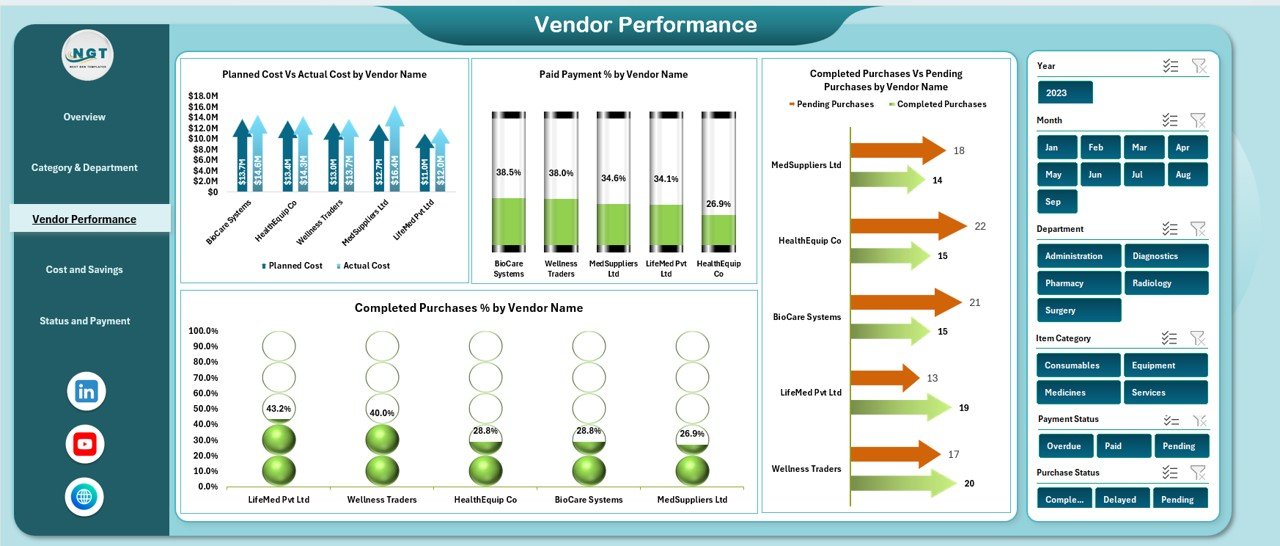
Vendor performance directly impacts healthcare operations. This section focuses on supplier-level insights.
Planned Cost vs Actual Cost by Vendor Name
Identifies vendors causing cost overruns.
Paid Payment % by Vendor Name
Shows payment discipline and vendor relationship health.
Completed Purchases vs Pending Purchases by Vendor Name
Highlights vendors with delivery or processing delays.
Completed Purchases % by Vendor Name
Measures vendor reliability and execution capability.
This information helps procurement teams renegotiate contracts and improve supplier selection.
Click to Buy Health purchasing Dashboard in Excel
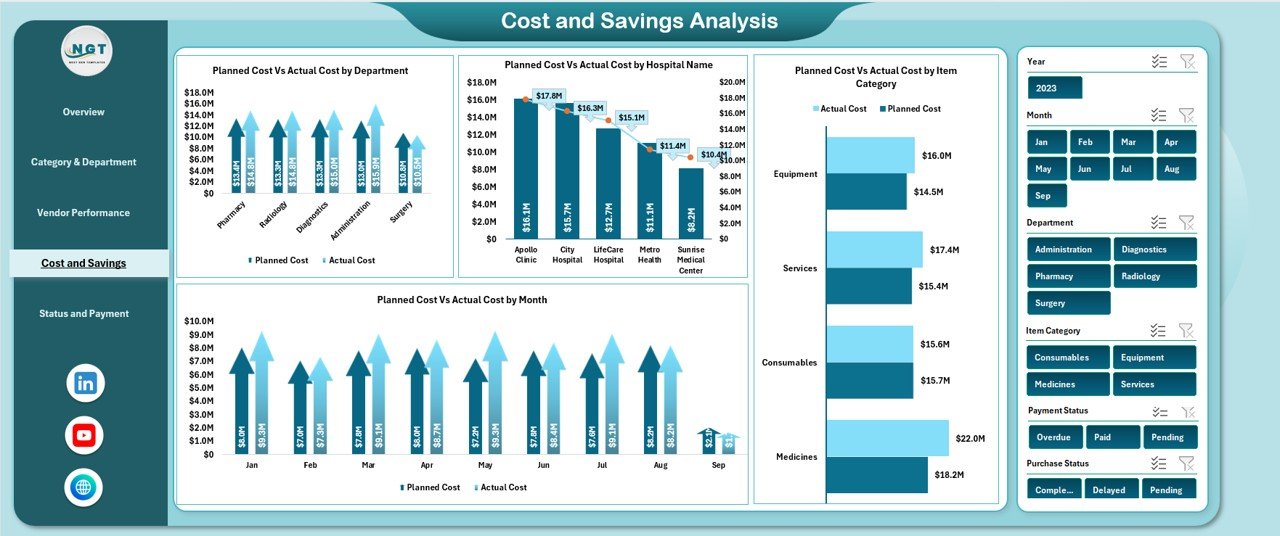
Cost and Savings Analysis
This section focuses on cost control and financial optimization.
Planned Cost vs Actual Cost by Department
Identifies departments exceeding budgets.
Planned Cost vs Actual Cost by Hospital Name
Compares spending efficiency across hospitals.
Planned Cost vs Actual Cost by Item Category
Highlights categories with consistent cost variance.
Planned Cost vs Actual Cost by Month
Reveals seasonal trends and spending spikes.
These insights support better forecasting and budgeting.
Click to Buy Health purchasing Dashboard in Excel
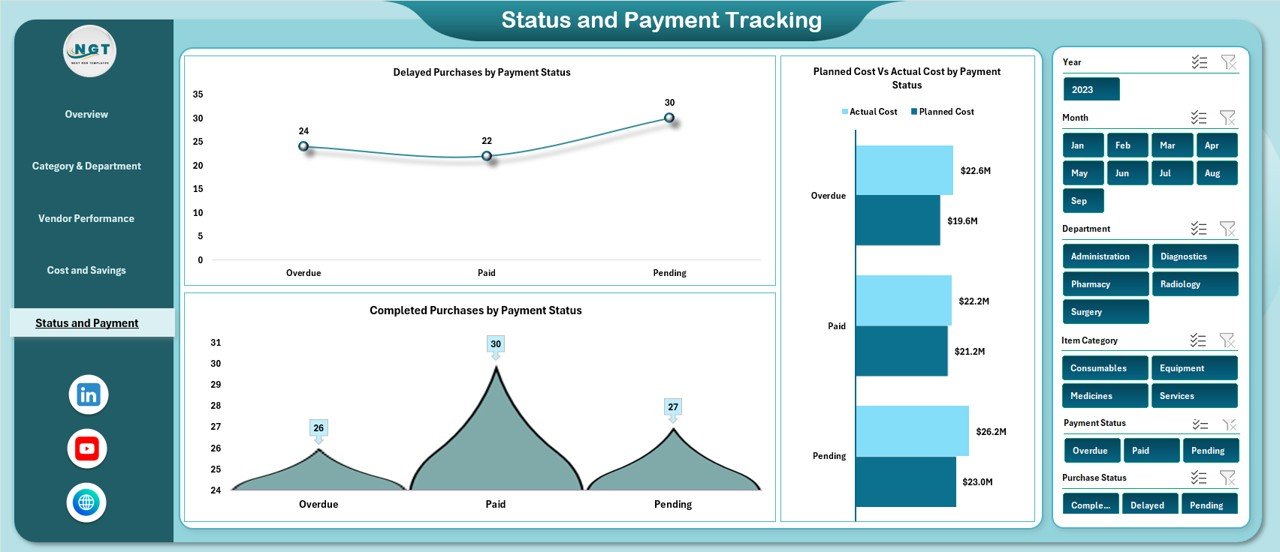
Status and Payment Tracking
This section monitors purchase status and payment health.
Delayed Purchases by Payment Status
Identifies purchases stuck due to payment issues.
Planned Cost vs Actual Cost by Payment Status
Shows cost behavior across paid, unpaid, and overdue purchases.
Completed Purchases by Payment Status
Helps finance teams prioritize settlements and reduce backlog.
Click to Buy Health purchasing Dashboard in Excel
Data Sheet
The Data sheet acts as the foundation of the dashboard. It stores:
-
Purchase date
-
Hospital name
-
Department
-
Item category
-
Vendor name
-
Planned cost
-
Actual cost
-
Quantity
-
Purchase status
-
Payment status
Once data is entered or updated, the entire dashboard refreshes automatically.
Advantages of Health Purchasing Dashboard in Excel
Centralized Purchasing Visibility
All procurement data stays in one structured dashboard.
Improved Cost Control
Planned vs actual cost tracking reduces overspending.
Better Vendor Management
Clear vendor-level insights improve negotiations.
Faster Decision-Making
Visual charts simplify complex purchasing data.
Enhanced Financial Discipline
Payment tracking reduces overdue payments.
Easy to Use and Customize
Excel familiarity ensures quick adoption.
Opportunities for Improvement in Health Purchasing Dashboards
Click to Buy Health purchasing Dashboard in Excel
Although the dashboard is powerful, organizations can enhance it further:
-
Add automated alerts for overdue payments
-
Include purchase cycle time analysis
-
Integrate contract expiry tracking
-
Add year-over-year comparison
-
Connect dashboard with ERP systems
These improvements strengthen long-term procurement strategy.
Best Practices for Using a Health Purchasing Dashboard
Click to Buy Health purchasing Dashboard in Excel
-
Update purchasing data regularly
-
Standardize item categories and departments
-
Review cost variance monthly
-
Monitor vendor performance consistently
-
Use insights during procurement reviews
-
Align purchasing goals with budget planning
Following these practices ensures maximum value from the dashboard.
Conclusion
A Health Purchasing Dashboard in Excel empowers healthcare organizations to manage procurement with clarity, accuracy, and confidence. It transforms complex purchasing data into meaningful insights that support cost control, vendor management, and operational efficiency. Because it is ready to use, customizable, and Excel-based, it fits perfectly into existing healthcare workflows.
With structured analysis across departments, vendors, hospitals, and payment status, this dashboard becomes a critical tool for smarter healthcare purchasing decisions.
Frequently Asked Questions (FAQs)
Click to Buy Health purchasing Dashboard in Excel
What is the main purpose of a Health Purchasing Dashboard?
It helps track costs, quantities, vendors, and payment status in one place.
Who should use this dashboard?
Procurement teams, finance teams, hospital administrators, and management.
Can this dashboard handle multiple hospitals?
Yes, it supports hospital-level analysis.
Is Excel suitable for healthcare purchasing dashboards?
Yes, Excel offers flexibility, automation, and easy customization.
Can I add more charts or KPIs?
Yes, the dashboard is fully customizable.
How often should data be updated?
Weekly or monthly updates work best for accurate insights.
Visit our YouTube channel to learn step-by-step video tutorials
Watch the step-by-step video tutorial:
Click to Buy Health purchasing Dashboard in Excel