This is ready to use Chart to Highlight Top or bottom N in Excel Chart. You can use it for office use. This is a totally dynamic chart.
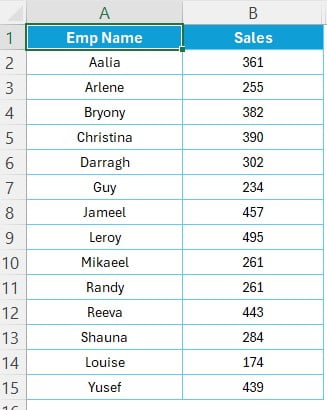
Data:
To create this chart we have used below given employee wise sales data
Key Features Highlight Top and Bottom N in Excel Chart:
Below are the key features of this chart:

Highlight Top and Bottom N in Excel Chart
- Form control Option buttons: we have given 2 form control option buttons on the top of the chart to select top or bottom.
- Form control spin button: this button is available on the top right of the chart. You can change the number of top or bottom employee using this.
- Auto highlight on the chart: Chart will show top or bottom employee as per the selecting in the buttons in Red or Green color.
Visit our YouTube channel to learn step-by-step video tutorials
Watch the step-by-step video tutorial:
Click hear to Download this practice file:
Looking for ready-made Excel Chart Templates?
Browse finished, fully working templates you can use with your own data straight away.
Want to master these skills step by step? Join the video course Excel Pivot Tables & Dashboards: Basic to Advanced.