The Incident Near Miss Data Entry System in Excel captures every safety event across 7 fields, summarises them in 4 live KPI cards, and ships with 4 editable dropdown lists holding 12 work locations, 13 incident types, 4 severity levels and 4 investigation statuses. The workbook is pre-formatted for 200 records and takes under 10 minutes to activate — import one VBA module, add four buttons, and your safety register is live.
Most safety programmes fail at the same point: the reporting itself. Workers see a hazard, mention it verbally, and nothing gets written down — so the pattern that would have predicted next quarter’s injury never shows up in any report. A near miss is a free lesson, but only if somebody records it. This template gives you a structured place to record it in the tool your team already has open.
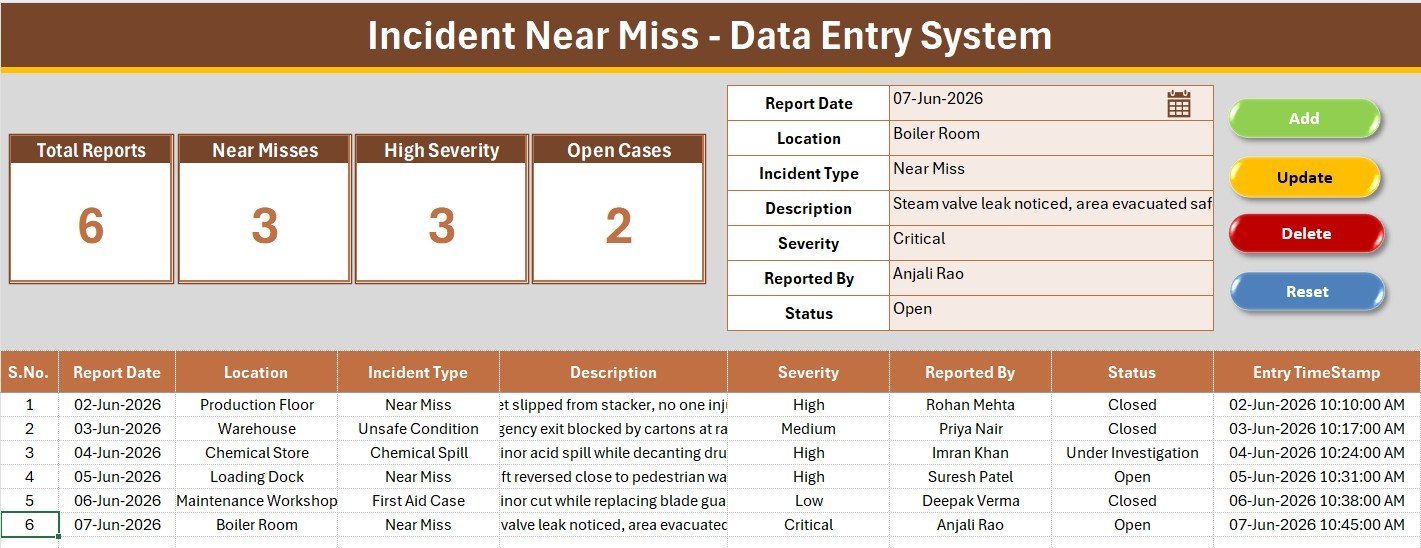
Key Features of the Incident Near Miss Data Entry System in Excel
- One-click VBA record handling. Four macros — Add_Record, Update_Record, Delete_Record and Reset_Form — move data between the form and the log, so nobody types directly into the register. That single design decision is what keeps a shared safety log clean past a few hundred rows.
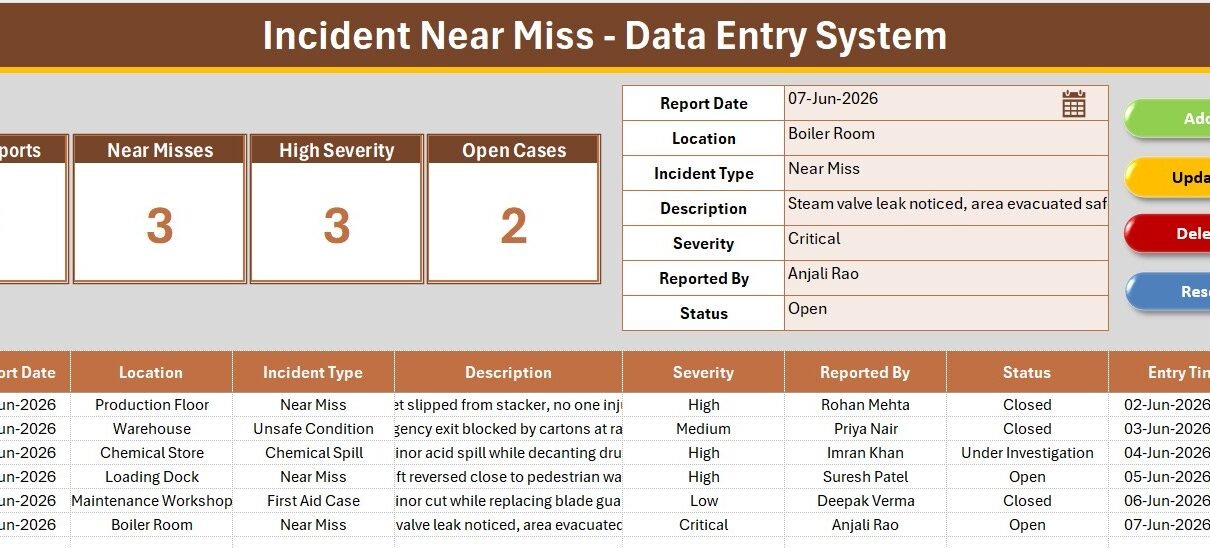
- Four live KPI cards. Total Reports, Near Misses, High Severity and Open Cases are COUNTA and COUNTIF formulas pointed at the log. They move the instant a record is added — no pivot refresh, no manual recount before a meeting.
- Near miss treated as a leading indicator. The Incident Type list deliberately separates Near Miss, Unsafe Act and Unsafe Condition from lagging outcomes like First Aid Case, Medical Treatment Case and Lost Time Injury. That split is the whole point of near miss reporting.
- Four dropdown lists you control. Location, Incident Type, Severity and Status read from named ranges on the Setting sheet. Change a list once and every one of the 200 data-validation cells follows.
- Automatic serial numbers and entry timestamps. Each report is numbered by formula and stamped with the date and time it was filed, which is exactly what an auditor asks for when they want to know whether reports were logged contemporaneously.
- Fully offline. No login, no cloud sync, no per-user licence. The workbook runs on a plant floor PC with no internet connection.
Sheets Explanation
Sheet 1: Data Entry Dashboard
The working screen. A grey dashboard panel carries the four KPI cards, the seven-field entry form sits alongside with dropdown-driven inputs, and the colour-coded Add, Delete, Update and Reset buttons sit in a 2×2 block. Below the divider, the records table logs every report with automatic S.No and Entry TimeStamp columns.
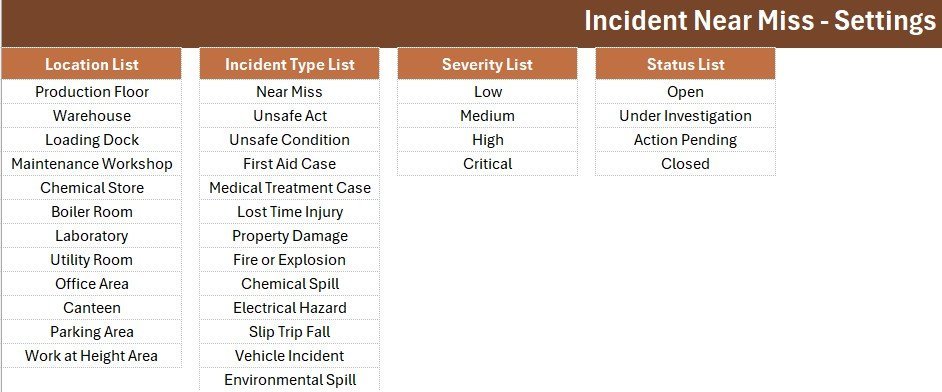
Sheet 2: Setting
The control room for the dropdowns. Four source lists — Location, Incident Type, Severity and Status — feed the form through named ranges, and a duplicate set of KPI cards sits beside them so you can copy and paste a linked picture of your safety stats straight into a monthly report or an email to management.
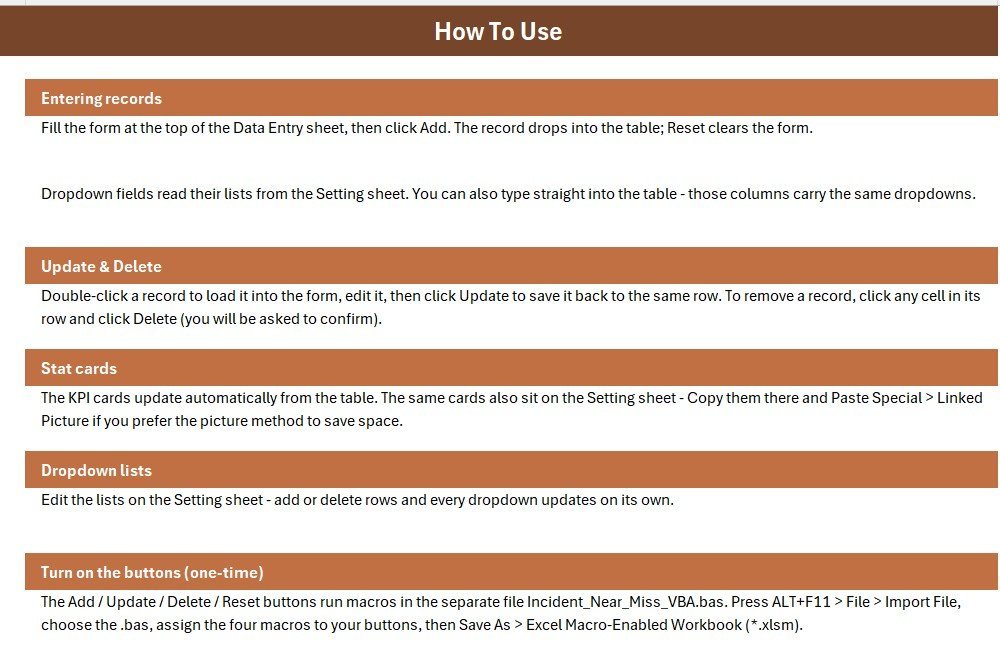
Sheet 3: Instructions
A one-page activation guide covering the VBA module import, button assignment and the Save As step to macro-enabled format. It exists so a colleague can set the workbook up on their own machine without coming back to you for help.
Incident Near Miss Data Entry System vs. Google Sheets vs. Paid EHS Software — Feature Comparison
| Feature | Incident Near Miss Data Entry System in Excel | DIY Google Sheets safety log | SafetyCulture / Intelex (paid EHS SaaS) |
|---|---|---|---|
| Cost | $5.99 one-time ✅ | Free, but you build it | Typically $20–35 / user / month |
| Platform | Excel 2016 or later (Windows) | Any browser | Web plus native mobile app |
| Setup time | Under 10 minutes ✅ | 2–4 hours to build from scratch | Days to weeks of onboarding |
| Real-time team collaboration | Via shared drive or SharePoint | ✅ Native multi-user | ✅ Native multi-user |
| Mobile reporting | View on Excel mobile | ✅ Browser-based | ✅ Native app with photo capture |
| Works fully offline | ✅ Yes | ❌ Needs connection | ❌ Sync required |
| Customisable dropdown lists | ✅ Unlimited, on the Setting sheet | ✅ Manual setup | Often gated by plan tier |
| Near-miss KPI cards built in | ✅ 4 live cards | ❌ Build your own formulas | ✅ Included |
| Year-1 cost at 5 users | $5.99 ✅ | $0 plus your build time | Roughly $1,200–2,100 |
For safety teams that want a working near-miss register today without a per-seat EHS subscription, the Incident Near Miss Data Entry System in Excel sits in the sweet spot.
Who Should Use This Template
Perfect for:
- EHS officers and safety coordinators at 10–500 person plants, warehouses, workshops and construction sites
- Production and plant supervisors who need a near-miss register for ISO 45001 or internal safety audits
- Small manufacturers and logistics operators who cannot justify $20+ per user per month for EHS software
- Safety consultants standardising reporting across several client sites
Not a fit if:
- You need SSO, user-level permissions and a tamper-proof audit trail
- Your workers must report from phones out in the field — this is a desktop Excel tool
- Your team is Mac-only, since VBA form-control buttons behave inconsistently in Excel for Mac
- You need automated root-cause workflow routing or direct regulatory e-filing
Real-World Use Cases
Ravi is the EHS officer at a 180-person auto components plant. Supervisors hand him near-miss slips through the week and he logs each one in the workbook. At Monday’s safety meeting he opens the Data Entry sheet and the four KPI cards answer the only questions anyone asks: how many reports came in, how many were near misses, how many were high severity, and how many are still open.
Meera runs operations across three cold-storage sites. Each site supervisor keeps a copy of the workbook and sends it to her monthly. She stacks the three logs and compares near-miss frequency by location, which tells her which site gets the next toolbox talk — and which loading dock needs a physical fix rather than a reminder.
Daniel is an independent safety consultant. Every new client gets the template as their starter incident register. He spends twenty minutes on the Setting sheet replacing the sample locations and incident types with the client’s real hazards, and they walk away with a defensible record from day one instead of a promise to build something later.
Advantages of the Incident Near Miss Data Entry System in Excel
The obvious advantage is cost. Five users on a mid-tier EHS platform runs roughly $1,200 to $2,100 in the first year; this workbook is a single $5.99 purchase with no renewal. For a 40-person workshop that number decides whether near-miss reporting happens at all.
The less obvious advantage is adoption. Safety software fails when the people expected to use it need a login they will forget and an app they will not install. This workbook opens on a machine they already use, with a form that has seven fields and four buttons. Lower friction means more reports, and more reports is the entire objective — OSHA’s recommended practices for safety and health programs put worker reporting of hazards and near misses at the centre of any functioning programme.
It is also portable. Because the log is a plain Excel table, you can point Power BI at it once you have a few hundred records and analyse trends without re-keying anything.
Opportunities for Improvement
Being straight about the limits: this is a single-file desktop tool, and that carries real constraints.
- No true multi-user editing. Two people cannot log reports into the same file at once. Larger sites should give each area its own copy and consolidate monthly, or move to the web app version.
- No photo attachments. Paid platforms let a worker photograph the hazard from their phone. Here you would reference a photo filename in the Description field.
- No corrective-action workflow. The Status field tells you a case is open; it will not chase the person who owns the fix. Pair it with a work-order log for that.
- Macros must be enabled. Some corporate IT policies block macros outright, which disables the four buttons. The data-entry table still works manually in that scenario.
- Mac limitations. The workbook opens in Excel for Mac but VBA form-control buttons are unreliable there.
Best Practices
- Edit the Setting sheet before anyone logs a report. Replace the 12 sample locations with your actual areas. Free-text locations are what make a safety log impossible to analyse six months later.
- Keep the near-miss categories separate. Resist merging Near Miss, Unsafe Act and Unsafe Condition into one bucket. The ratio between them tells you whether people are reporting conditions or behaviours.
- Review Open Cases weekly, not monthly. The Open Cases KPI card exists so this takes five seconds.
- Write the Description like an engineer, not a lawyer. What happened, where, and what nearly resulted. Blame-free language keeps reporting rates up.
- Back up the file weekly. It is a single workbook on a single machine — treat it accordingly.
- Save as .xlsm and keep the .bas file. If you ever need to rebuild, the VBA module is what you re-import. Microsoft’s Excel VBA reference is the place to start if you want to extend the macros yourself.
Explore Relevant Templates
- Office Safety Inspection Tracker in Excel — scheduled inspections that catch hazards before they generate an incident report.
- Incident Management KPI Dashboard in Power BI — the analysis layer once your log has enough history. Browse more Power BI Dashboards.
- Maintenance Work Order Data Entry System in Excel — the natural companion for logging the corrective work that follows an unsafe condition. We covered it in detail in the maintenance work order write-up.
- Incident Tracker and Report Web App — also available as: the multi-user browser version for teams that need field reporting and concurrent access.
- Payroll Data Entry System in Excel — the same form-plus-log architecture applied to HR records. See all Excel Dashboard Templates.
Frequently Asked Questions
What does the Incident Near Miss Data Entry System in Excel track?
The Incident Near Miss Data Entry System in Excel tracks seven fields per report: Report Date, Location, Incident Type, Description, Severity, Reported By and Status. Four KPI cards summarise Total Reports, Near Misses, High Severity events and Open Cases automatically as records are added.
How long does setup take?
Setup takes under 10 minutes. You import one VBA module through the Visual Basic editor, draw four buttons over the coloured cells, save the file as .xlsm, then replace the sample dropdown values on the Setting sheet with your own locations and incident types.
How does this compare to SafetyCulture or Intelex?
Paid EHS platforms add mobile capture, workflow routing and audit trails, and typically cost $20–35 per user per month. The Incident Near Miss Data Entry System in Excel is a $5.99 one-time purchase covering logging, dropdown control and near-miss KPIs, and it runs offline.
Can I add my own locations and incident types?
Yes. Every dropdown in the Incident Near Miss Data Entry System reads from a named range on the Setting sheet. Edit or extend the 12 locations, 13 incident types, 4 severity levels and 4 statuses, and all 200 validation cells pick up the change immediately.
Do I need to enable macros?
Yes. The Add, Update, Delete and Reset buttons run VBA, so the workbook must be saved as a macro-enabled file with macros enabled. The VBA module ships as a separate .bas file that you import once during setup.
Can several people use it at the same time?
Not in the same file. The Incident Near Miss Data Entry System in Excel is a single-user desktop workbook. Multi-site teams should keep one copy per area and consolidate monthly, or use the web app version for concurrent access.
How many records can it hold?
The records table is pre-formatted for 200 rows with grid lines, date formatting and automatic serial numbering. You can extend it by copying the formatting down — Excel itself supports over a million rows per sheet.
About the Author
Built by PK — Microsoft Certified Professional with 15+ years of Excel, Google Sheets, and Power BI experience. Founder of NextGenTemplates, reaching 300K+ subscribers across YouTube channels. Every template is hand-built and tested before release.
🎥 For step-by-step video walkthroughs, visit Youtube.com/@PK-AnExcelExpert.
Conclusion
Near-miss reporting only works when logging a report is easier than ignoring one. The Incident Near Miss Data Entry System in Excel strips that job down to a seven-field form, four buttons and four KPI cards that tell you what your safety programme is actually doing this month — in a tool your team already has installed, with no login and no monthly bill.
👉 Click here to Purchase the Incident Near Miss Data Entry System in Excel
✅ Instant download · One-time payment · No subscription
📅 Last updated: July 2026