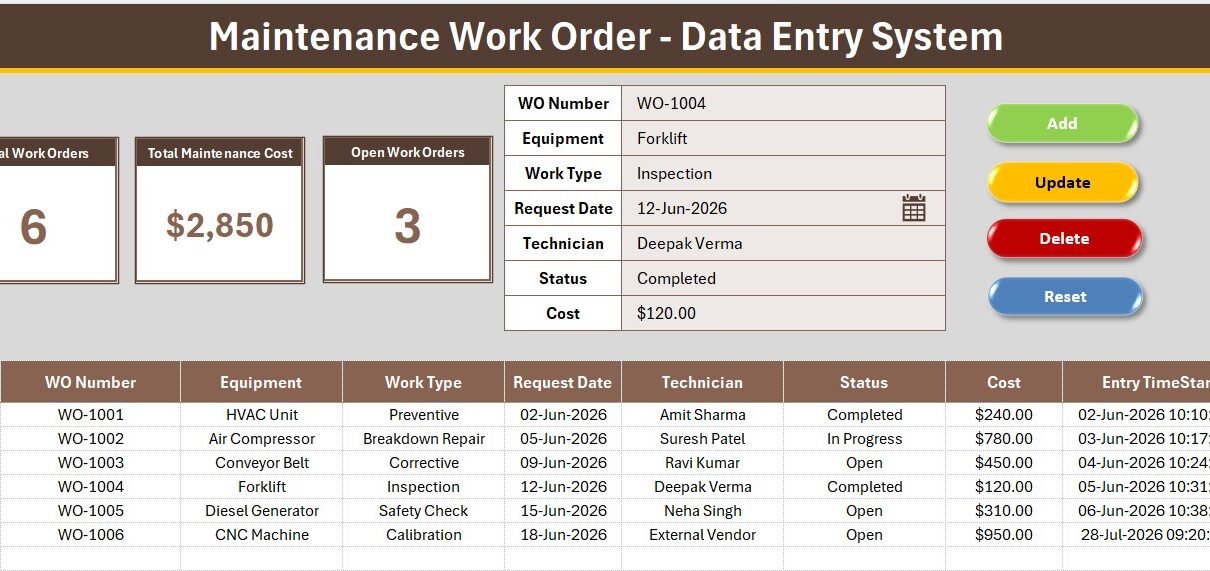
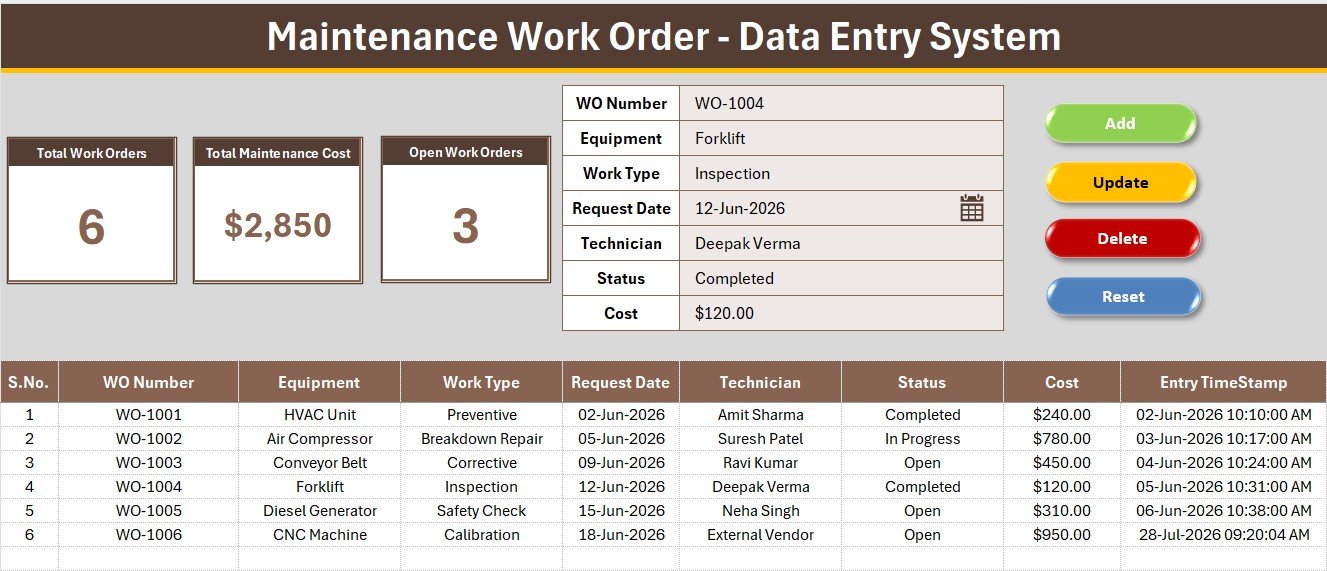
The Maintenance Work Order Data Entry System in Excel captures 7 fields for every job raised — WO Number, Equipment, Work Type, Request Date, Technician, Status and Cost — and drives 3 live KPI cards straight off those rows: Total Work Orders, Total Maintenance Cost and Open Work Orders. Four VBA macros run the whole workflow, 4 dropdowns keep equipment names and work types consistent across hundreds of jobs, and 6 sample work orders ship pre-loaded so the cards show real numbers the moment the file opens.
Most maintenance teams do not have a maintenance problem, they have a record problem. A pump fails, someone calls the technician, the job gets done, and nothing is written down until an auditor or a budget review asks what was spent on the compressor last year. This work order data entry system replaces that with a single form, a single table and four buttons — no CMMS subscription, no per-technician licence, and nothing leaving your machine.
Key Features of the Maintenance Work Order Data Entry System
- 7-field work order form. WO Number, Equipment, Work Type, Request Date, Technician, Status and Cost. Work Type is the field most homemade logs skip — without it you can total your spend, but you can never separate planned preventive work from reactive breakdowns.
- 3 live KPI cards. Total Work Orders, Total Maintenance Cost and Open Work Orders sit on a grey dashboard panel above the form. They run on COUNTA, SUM and COUNTIF pointed directly at the records table, so there is no pivot to refresh and nothing to rebuild.
- Four one-click VBA macros. Add_Record writes the form to the next empty row, Update_Record edits the selected row, Delete_Record removes it after a confirmation prompt, and Reset_Form clears the inputs for the next job.
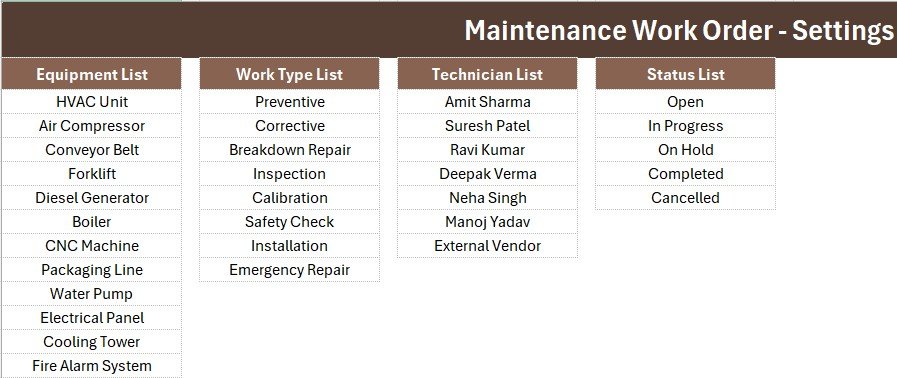
- 4 editable dropdowns. 12 equipment items covering HVAC Unit, Air Compressor, Conveyor Belt, Forklift, Diesel Generator, Boiler, CNC Machine, Packaging Line, Water Pump, Electrical Panel, Cooling Tower and Fire Alarm System; 8 work types from Preventive through Breakdown Repair, Calibration and Emergency Repair; 7 technicians plus External Vendor; and 5 statuses — Open, In Progress, On Hold, Completed and Cancelled. All four live on the Setting sheet as named ranges.
- Auto serial number and Entry TimeStamp. Serial numbers renumber themselves as rows come and go, and every saved work order is date-time stamped. That timestamp is what turns the sheet into evidence during a safety or ISO audit.
- Runs entirely offline. No account, no API key, no internet connection. The workbook sits on your drive or your shared folder.
Sheets Explanation
Sheet 1: Data Entry
This is the sheet you actually work in. The warm brown heading bar sits at the top with a gold divider under it; below that, a grey panel holds the three KPI cards on the left and the seven-field form with its four dropdowns on the right. The Add, Delete, Update and Reset button cells form a 2×2 block, and the records table begins at row 15 with auto S.No, currency-formatted Cost and the Entry TimeStamp column at the far right.
Sheet 2: Setting
The control sheet. The four dropdown source lists live here as named ranges wired into the form’s data validation, so adding a new machine or a new technician makes it appear in the form immediately. A duplicate set of the three KPI cards also sits on this sheet, which you can copy and paste as a Linked Picture into a monthly maintenance report or an email without breaking any formulas.
Sheet 3: Instructions
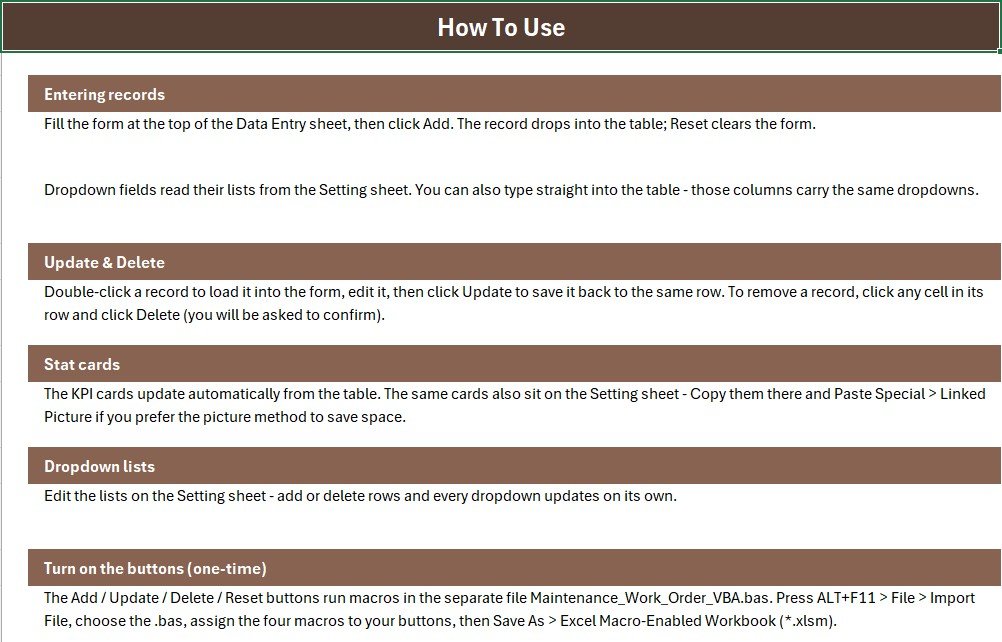
The one-time activation guide, written for someone who has never opened the VBA editor. It covers importing the module, drawing the four buttons over the coloured cells, assigning the macros, and saving the file as a macro-enabled workbook. It also explains how to extend the dropdown lists and how the Linked Picture trick works.
Sheet 4: Get More Templates
A short index into the rest of the NextGenTemplates catalogue for when the work order log becomes one piece of a larger maintenance stack — asset trackers, maintenance dashboards and the production bundles.
Maintenance Work Order System vs. Google Sheets Maintenance Log vs. Limble / UpKeep — Feature Comparison
| Feature | Maintenance Work Order System (Excel) | Google Sheets maintenance log | Limble / UpKeep CMMS |
|---|---|---|---|
| Cost | $5.99 one-time | $6.99 one-time | $20-$100 per technician / month |
| Platform | Microsoft Excel, offline | Browser, Google account required | Cloud only, account required |
| Setup time | Under 10 minutes | Under 10 minutes | Days to weeks of asset onboarding |
| One-click entry form | Yes — 4 VBA macros | Apps Script sidebar | Yes, via mobile app |
| Preventive vs breakdown split | Yes — Work Type dropdown | Yes, if you build it | Yes |
| Real-time team collaboration | Shared drive or co-authoring | Yes, native | Yes |
| Technician mobile app | No | Browser only | Yes |
| Data stays on your machine | Yes | No — stored in Google Drive | No — vendor cloud |
| Year-1 cost for 5 technicians | $5.99 total | $6.99 total | $1,200-$6,000 |
For maintenance teams that want a clean, auditable work order log without paying per technician per month for scheduling features they never open, the Maintenance Work Order Data Entry System in Excel sits in the sweet spot.
Who Should Use This Template
Perfect for:
- Facility and plant managers running roughly 10 to 200 assets who currently log breakdowns in a notebook or a WhatsApp group
- Maintenance supervisors who need a work order record that survives an ISO 9001 or internal safety audit
- Small manufacturing units, schools, hospitals and hotels with two to eight technicians and no CMMS budget
- Office and admin staff who would rather fill a form than type into a wide grid
Not a fit if:
- You need automatic preventive maintenance scheduling with due-date alerts — that is genuinely a Limble or UpKeep job
- Your technicians must raise and close jobs from a phone on the shop floor; this is a desktop Excel file
- You are on Excel for Mac with macros blocked by IT policy, since the four buttons depend on VBA
- You want spare-parts inventory and stock deduction tied to each work order
Real-World Use Cases
Anil manages maintenance at a 40-machine packaging unit in Ghaziabad. Breakdown calls used to reach him by phone and stay there. He now raises a work order the moment a call comes in, sets the status to Open, and closes it with the cost once the technician reports back. Because Work Type is a dropdown, he could show his plant head that 62% of last quarter’s jobs were Breakdown Repair rather than Preventive — the argument that finally got him a scheduled servicing budget.
Priya runs facilities for a 3-floor corporate office. HVAC units, water pumps and the fire alarm system all sit in the Equipment dropdown. At month end she copies the Setting-sheet KPI cards as a Linked Picture into the admin report, and the Open Work Orders card gives the leadership team a single number for what is still pending without anyone opening the file.
Rakesh coordinates a hospital biomedical team of five technicians. Every job is logged against a technician name from the dropdown, so when the annual accreditation visit comes, the auditor gets one table with WO numbers, dates, statuses and time stamps instead of a folder of loose service slips.
Advantages of the Maintenance Work Order Data Entry System
The obvious advantage is cost. A five-technician team on an entry-level CMMS will spend somewhere between $1,200 and $6,000 in year one; this workbook is $5.99 once, forever. But the more useful advantage is structural. Because the form enforces the same 7 fields every time, and because four of those fields are dropdowns rather than free text, you end up with a table that is actually analysable — no “Air Compressor” in one row and “AirComp-2” in the next.
The dropdowns are ordinary Excel data validation pointed at named ranges, which is worth knowing because it means you can extend them without touching any code. If you want to understand the mechanics, Microsoft’s own reference on the Excel VBA object model and its getting started with VBA in Office guide cover everything the four macros in this file do.
Time is the third advantage. Raising a job is one form and one click rather than scrolling to the bottom of a sheet, and the KPI cards mean nobody builds a summary at month end — the totals already sit at the top of the sheet.
Opportunities for Improvement
Being straight about the limits: this is a data capture tool, not a maintenance management platform. There are no charts in the workbook, no due-date reminders, no priority field and no spare-parts inventory. Those are deliberate omissions to keep the file fast and easy to extend, but if you want visuals or scheduling you will either add a pivot yourself or pair it with a dashboard.
It is also desktop-only and single-user in practice. Two people can work on it via co-authoring on OneDrive, but the VBA buttons behave best with one person entering data at a time. If several supervisors across different plants need to raise work orders simultaneously, the Google Sheets route is genuinely the better fit. And because the file relies on macros, a locked-down corporate Excel install may block the four buttons entirely — worth checking before you buy.
Best Practices
- Replace all four dropdown lists on the Setting sheet before your first real entry, and delete the 6 sample rows so the KPI cards start from zero.
- Use a consistent WO Number series such as WO-1001 onwards, and never reuse a number even after a job is cancelled.
- Enter the cost the day the job closes, not at month end. A blank Cost column is the single biggest reason maintenance spend reports go wrong.
- Keep one workbook per financial year rather than letting the table run to tens of thousands of rows.
- Add a helper column for turnaround time once you have a few weeks of data: subtract Request Date from the Entry TimeStamp of the closing update.
- Back the file up weekly. It is a local file, which is the point, but that also means there is no vendor cloud to restore from.
Explore Relevant Templates
- Work Order Request Tracker in Excel — the bigger sibling, with a login screen, dashboard charts and user management.
- Equipment Maintenance Log Tracker in Excel — adds scheduling and a slicer-driven dashboard on top of the log.
- Office Maintenance Dashboard in Excel — point it at your accumulated work orders for cost and priority analysis.
- Equipment Maintenance Log Tracker in Google Sheets — the browser-based route when several sites need to log jobs at once.
- Save 40%: the Plant Production Manager Toolkit bundles 9 plant and production templates in one download.
If you like this format, the same engine powers our other entry systems: the Fleet Fuel Log Data Entry System in Excel, the Purchase and GRN Data-Entry System in Excel, the Payroll Data Entry System in Excel and the Employee Master and Record Data Entry System in Excel.
Frequently Asked Questions
What fields does the Maintenance Work Order Data Entry System capture?
The Maintenance Work Order Data Entry System in Excel captures 7 fields per job: WO Number, Equipment, Work Type, Request Date, Technician, Status and Cost. Four of those are dropdowns, and every saved row also receives an automatic serial number and an entry time stamp.
Do I need to know VBA to use it?
No. The Maintenance Work Order Data Entry System ships with the VBA already written in a separate module file. You import it once via ALT+F11, assign the four macros to the coloured button cells, and save as .xlsm. The Instructions sheet walks through all three steps and no coding is required.
How long does setup take?
Under 10 minutes. Importing the module and assigning the four macros takes about five minutes; swapping the sample equipment names, work types and technicians on the Setting sheet takes a few more. The 6 pre-loaded sample work orders let you confirm the KPI cards work before deleting them.
Can I separate preventive maintenance from breakdown repairs?
Yes. The Work Type dropdown in the Maintenance Work Order Data Entry System offers 8 options including Preventive, Corrective, Breakdown Repair, Inspection, Calibration, Safety Check, Installation and Emergency Repair, so a simple COUNTIF or pivot splits planned work from reactive work at any time.
How does this compare to Limble or UpKeep?
Limble and UpKeep charge roughly $20 to $100 per technician per month and bundle preventive scheduling, asset hierarchies and mobile apps. The Maintenance Work Order Data Entry System is a $5.99 one-time Excel file that handles the work order logging part offline. For a five-technician team that is $5.99 against $1,200 or more in the first year.
Can more than one person use it at the same time?
Not comfortably. The Maintenance Work Order Data Entry System is a desktop Excel file and the VBA buttons work best with one person entering data. If several plants need to raise work orders simultaneously, use the Equipment Maintenance Log Tracker in Google Sheets instead.
Does it work on Excel for Mac?
The formulas and dropdowns work everywhere, but the four Add, Update, Delete and Reset buttons depend on VBA, which some Mac and locked-down corporate Excel installations restrict. If macros are blocked in your environment, you can still use the records table manually.
About the Author
Built by PK — Microsoft Certified Professional with 15+ years of Excel, Google Sheets and Power BI experience. Founder of NextGenTemplates, reaching 300K+ subscribers across YouTube channels. Every template is hand-built and tested before release. Subscribe at Youtube.com/@PK-AnExcelExpert for step-by-step walkthroughs.
Conclusion
If your maintenance history currently lives in a phone call and a memory, the fix is not a CMMS contract — it is a form that takes ten seconds to fill and a table that stays consistent. The Maintenance Work Order Data Entry System in Excel gives you both, plus three KPI cards that answer the month-end question before anyone asks it.
👉 Click here to Purchase the Maintenance Work Order Data Entry System in Excel
Instant download · One-time payment · No subscription
Last updated: July 2026