Inventory management plays a critical role in business operations across industries such as manufacturing, retail, logistics, warehousing, and distribution. However, many organizations struggle to maintain accurate inventory records because audit activities often rely on manual tracking or scattered spreadsheets. As a result, audit tasks get missed, accountability becomes unclear, and discrepancies remain unresolved.
Therefore, businesses increasingly adopt structured audit monitoring tools. One simple yet highly effective solution is the Inventory Audit Review Checklist in Excel.
In this comprehensive guide, you will learn everything about the Inventory Audit Review Checklist in Excel, including its structure, features, advantages, implementation process, best practices, and real-world applications. Moreover, this ready-to-use Excel template helps organizations track audit activities efficiently and maintain inventory accuracy.
Click to Purchases Inventory Audit Review Checklist in Excel
What Is an Inventory Audit Review Checklist in Excel?
An Inventory Audit Review Checklist in Excel is a structured task-management tool designed to monitor inventory audit activities using a checklist format inside an Excel workbook.
Instead of managing audit tasks through emails or handwritten notes, teams can record, track, and review audit progress in one centralized file. Additionally, the checklist automatically calculates completion progress based on task status.
Typically, the checklist helps organizations manage:
-
Inventory verification tasks
-
Stock inspection activities
-
Warehouse audits
-
Compliance reviews
-
Documentation checks
-
Process validation steps
Because Excel remains widely accessible, organizations can implement this checklist quickly without specialized software.
Why Do Businesses Need an Inventory Audit Review Checklist?
Inventory audits ensure that physical stock matches recorded inventory. However, without structured tracking, audit processes become inefficient.
Common Challenges Without a Checklist
-
Missed audit tasks
-
Lack of accountability
-
Inconsistent audit procedures
-
Poor progress visibility
-
Manual tracking errors
However, a structured Excel checklist solves these challenges by organizing audit workflows.
Click to Purchases Inventory Audit Review Checklist in Excel
Key Features of Inventory Audit Review Checklist in Excel
This ready-to-use template includes two structured worksheets, each serving a specific purpose.
1. Inventory Audit Review Checklist Sheet – Main Working Area
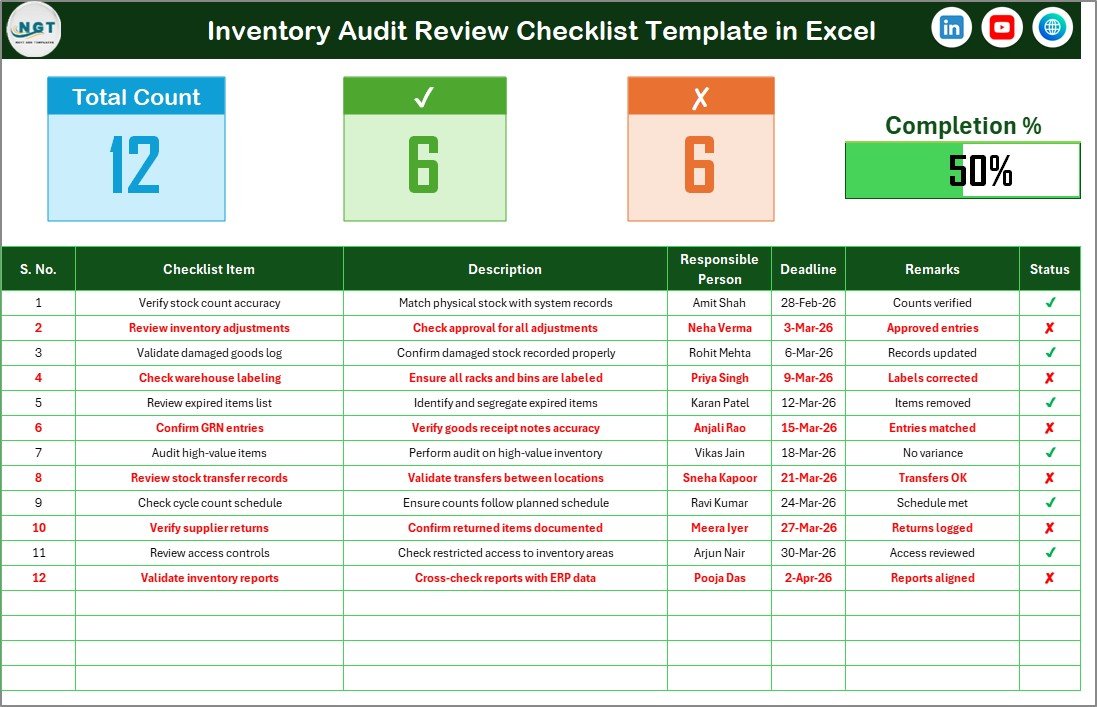
The Inventory Audit Review Checklist Sheet acts as the primary interface where users manage audit activities.
Top Section – Audit Summary Dashboard
At the top of the sheet, users can quickly view audit progress metrics.
Information Displayed
-
Total Count of Checklist Items
-
Checked Count (Completed Tasks)
-
Crossed Count (Pending Tasks)
-
Progress Bar showing completion percentage
Because these indicators update automatically, managers instantly understand audit status.
Checklist Table – Core Audit Tracking Area
The checklist table forms the heart of the template.
Users simply update the Status column using:
-
✔ (Completed)
-
✘ (Pending)
As soon as status changes, summary metrics update automatically.
Columns Included in Checklist Table
-
Serial No. – Task sequence number
-
Checklist Item – Audit activity name
-
Description – Short explanation of task
-
Responsible Person – Assigned team member
-
Deadline – Task completion date
-
Remarks – Additional notes
-
Status – Task progress indicator
Therefore, the template ensures structured audit tracking.
Click to Purchases Inventory Audit Review Checklist in Excel
2. List Sheet – Dropdown Management

The List Sheet stores unique values used in dropdown selections.
Main Purpose
-
Maintain list of Responsible Persons
-
Create dropdown menus in main checklist table
-
Ensure consistent data entry
Because dropdowns prevent manual typing errors, data remains standardized.
How Does the Inventory Audit Checklist Improve Audit Efficiency?
A structured checklist transforms inventory audits into organized workflows.
Key Improvements
-
Clear task assignment
-
Real-time progress monitoring
-
Reduced audit errors
-
Improved accountability
-
Faster audit completion
Consequently, teams perform audits more efficiently.
Click to Purchases Inventory Audit Review Checklist in Excel
Advantages of Inventory Audit Review Checklist in Excel
✅ Centralized Audit Tracking
All audit activities remain in one file.
✅ Easy Status Monitoring
Progress bar shows completion instantly.
✅ Improved Accountability
Each task has an assigned responsible person.
✅ Error Reduction
Dropdown lists standardize data entry.
✅ Simple to Use
No technical expertise required.
✅ Customizable Structure
Users can add or modify checklist items.
✅ Cost-Effective Solution
No additional software investment needed.
Who Should Use This Checklist Template?
The checklist supports multiple industries and roles.
Ideal Users
-
Warehouse managers
-
Inventory controllers
-
Internal audit teams
-
Retail operations managers
-
Manufacturing supervisors
-
Supply chain professionals
Thus, the template fits organizations of all sizes.
Real-World Applications of Inventory Audit Review Checklist
Warehouse Stock Verification
Ensure physical inventory matches records.
Compliance Audits
Track regulatory audit tasks.
Periodic Inventory Reviews
Manage monthly or quarterly audits.
Asset Verification
Confirm equipment and materials availability.
Process Improvement Audits
Evaluate operational efficiency.
How to Use the Inventory Audit Review Checklist Step-by-Step?
Step 1: Define Audit Tasks
Enter checklist items and descriptions.
Step 2: Assign Responsibilities
Select responsible persons using dropdown lists.
Step 3: Set Deadlines
Add completion dates for accountability.
Step 4: Update Status
Mark tasks as ✔ or ✘.
Step 5: Monitor Progress
Review progress bar and counts.
Step 6: Add Remarks
Document observations and findings.
Following these steps ensures organized audit execution.
Click to Purchases Inventory Audit Review Checklist in Excel
Best Practices for the Inventory Audit Review Checklist
Standardize Checklist Items
Use consistent audit procedures.
Update Status Regularly
Keep progress information accurate.
Assign Clear Ownership
Every task must have a responsible person.
Review Progress Daily
Managers should monitor completion frequently.
Keep Descriptions Short and Clear
Avoid confusion during audits.
Backup the File
Protect audit records from data loss.
Applying these practices improves audit reliability.
Common Mistakes to Avoid
-
Leaving tasks without responsible persons
-
Updating status late
-
Using inconsistent checklist naming
-
Ignoring deadlines
-
Not reviewing progress metrics
Avoiding these mistakes ensures successful audits.
Why Excel Is Ideal for Audit Checklists?
Excel remains one of the most practical tools for operational tracking.
Key Reasons
-
Easy customization
-
Familiar interface
-
Built-in formulas
-
Simple sharing options
-
Quick implementation
Therefore, organizations prefer Excel-based audit tools.
Future Scope of Inventory Audit Automation
As businesses adopt digital transformation, audit tracking will evolve further.
Future enhancements may include:
-
Power BI integration
-
Automated reminders
-
Cloud collaboration
-
Mobile audit tracking
-
Data analytics dashboards
Thus, Excel checklists can grow into advanced audit management systems.
Conclusion
The Inventory Audit Review Checklist in Excel provides a structured and efficient way to manage inventory audits. By combining task tracking, automated progress monitoring, and accountability features, the template simplifies complex audit processes.
Moreover, organizations gain better visibility, improved compliance, and faster audit completion. Because the system remains easy to use and customizable, businesses can implement it immediately and improve inventory accuracy.
Ultimately, a well-managed audit checklist strengthens operational control and reduces inventory risks.
Click to Purchases Inventory Audit Review Checklist in Excel
Frequently Asked Questions (FAQs)
What is an Inventory Audit Review Checklist?
It is an Excel-based checklist used to track and manage inventory audit tasks.
Can beginners use this template?
Yes. The template uses simple Excel features and dropdown selections.
How is progress calculated?
Progress updates automatically based on ✔ and ✘ status selections.
Can I add more checklist items?
Yes. Users can easily expand the checklist table.
Why is assigning responsible persons important?
It improves accountability and ensures tasks get completed.
How often should audits be reviewed?
Organizations should review audit progress daily or weekly.
Is this template suitable for small businesses?
Yes. It works for both small and large organizations.
Click to Purchases Inventory Audit Review Checklist in Excel
Visit our YouTube channel to learn step-by-step video tutorials