Introduction
The Neurology Hospitals KPI Dashboard is an essential tool designed to help healthcare professionals monitor and manage key performance indicators effectively. This ready-to-use template simplifies the tracking of vital metrics, ensuring that neurology departments achieve operational excellence and deliver superior patient care.
Key Features of Neurology Hospitals KPI Dashboard
- Comprehensive view of all KPIs related to neurology hospital performance.
- Interactive dashboard with month selection to review data for specific periods.
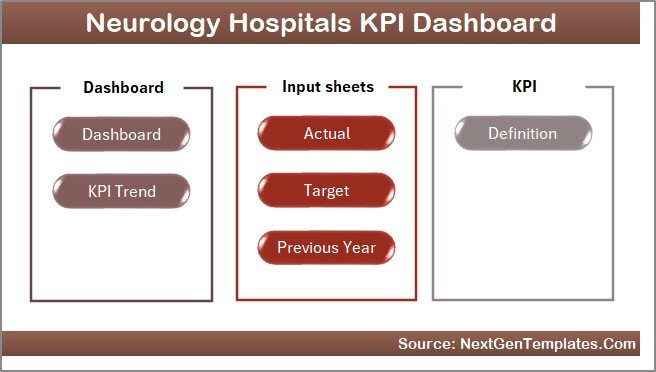
- Includes seven well-structured worksheets for data input, analysis, and KPI definitions.
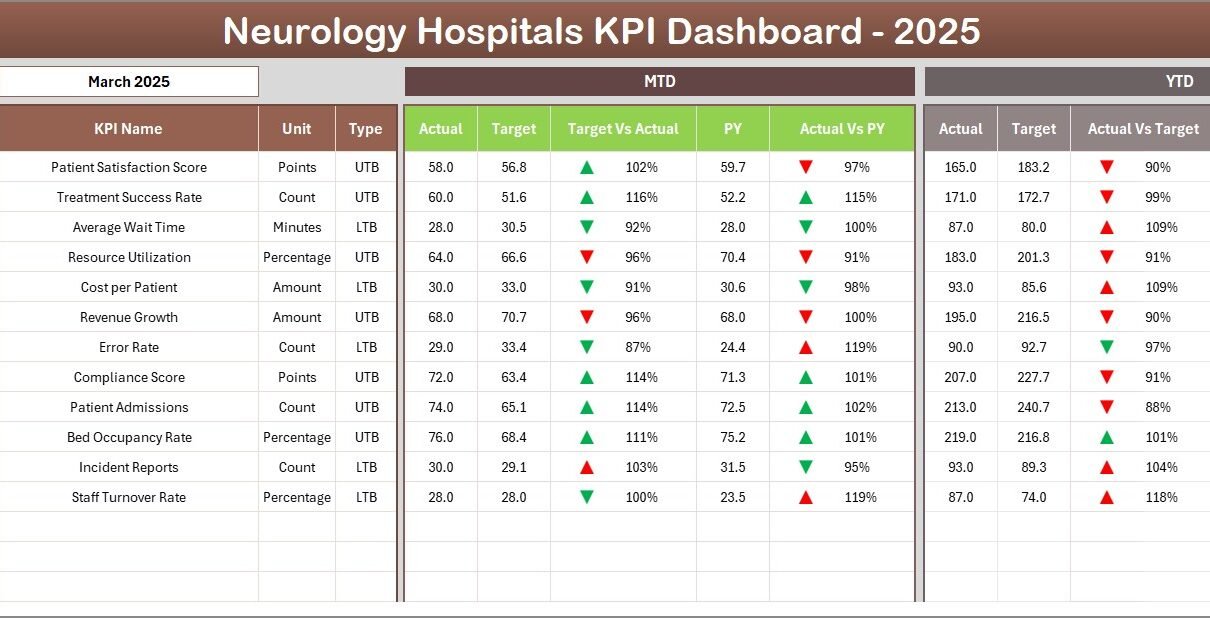
- Conditional formatting with up and down arrows for quick visual assessment of targets vs actuals and previous year comparisons.
- Trend charts to track progress for Monthly-To-Date (MTD) and Year-To-Date (YTD) figures.
- User-friendly navigation via a home sheet with buttons to jump between sheets.
- Structured input for actuals, targets, previous year data, and detailed KPI definitions.
Dashboard Pages Explanation
1. Home Sheet
This is the index page featuring six buttons for easy navigation to the respective sheets.
 Home Page
2. Dashboard Sheet Tab
The main dashboard where you can select the month (cell D3) from a drop-down, dynamically updating all KPI numbers.
- Displays MTD Actual, Target, Previous Year Data
- Shows Target vs Actual and PY vs Actual with conditional formatting arrows for quick insights
- Presents YTD Actual, Target, Previous Year Data similarly
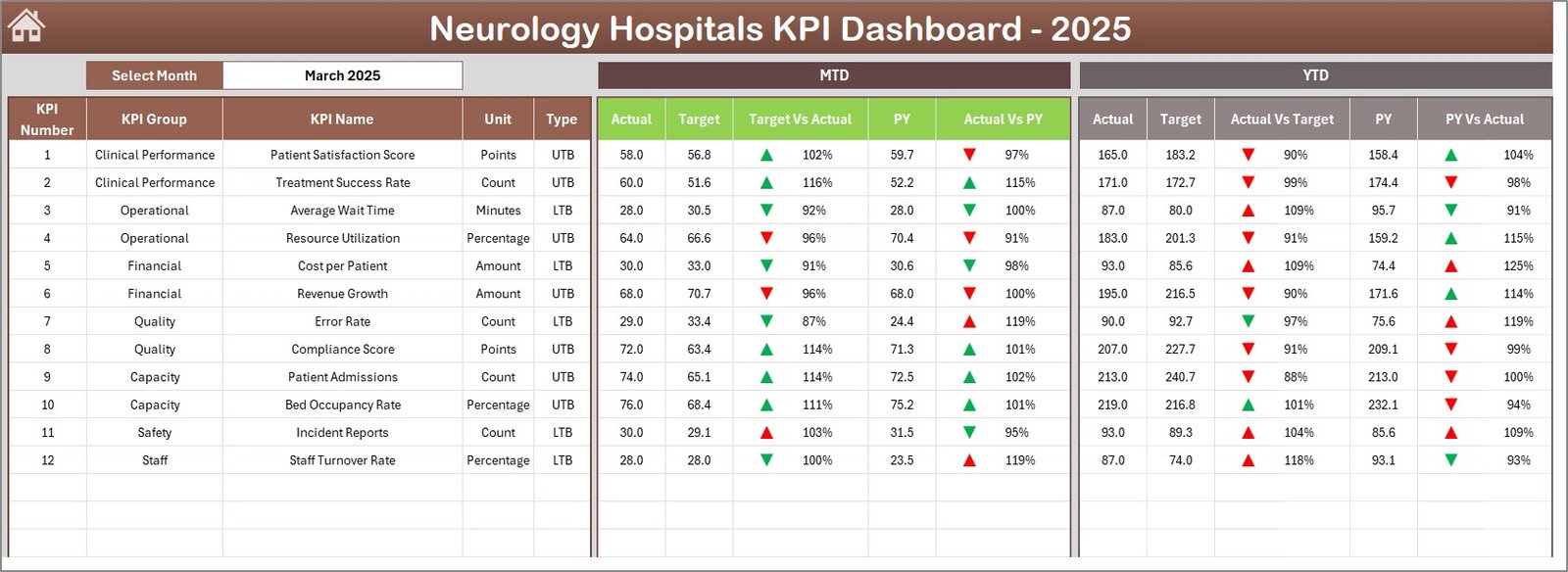 Neurology Hospitals KPI Dashboard
3. KPI Trend Sheet Tab
Allows KPI selection from a drop-down (cell C3), displaying detailed KPI information and trends, including:
- KPI Group
- Unit of KPI
- Type of KPI (Lower The Better or Upper The Better)
- Formula and Definition
- Trend charts for MTD and YTD Actual, Target, and Previous Year data
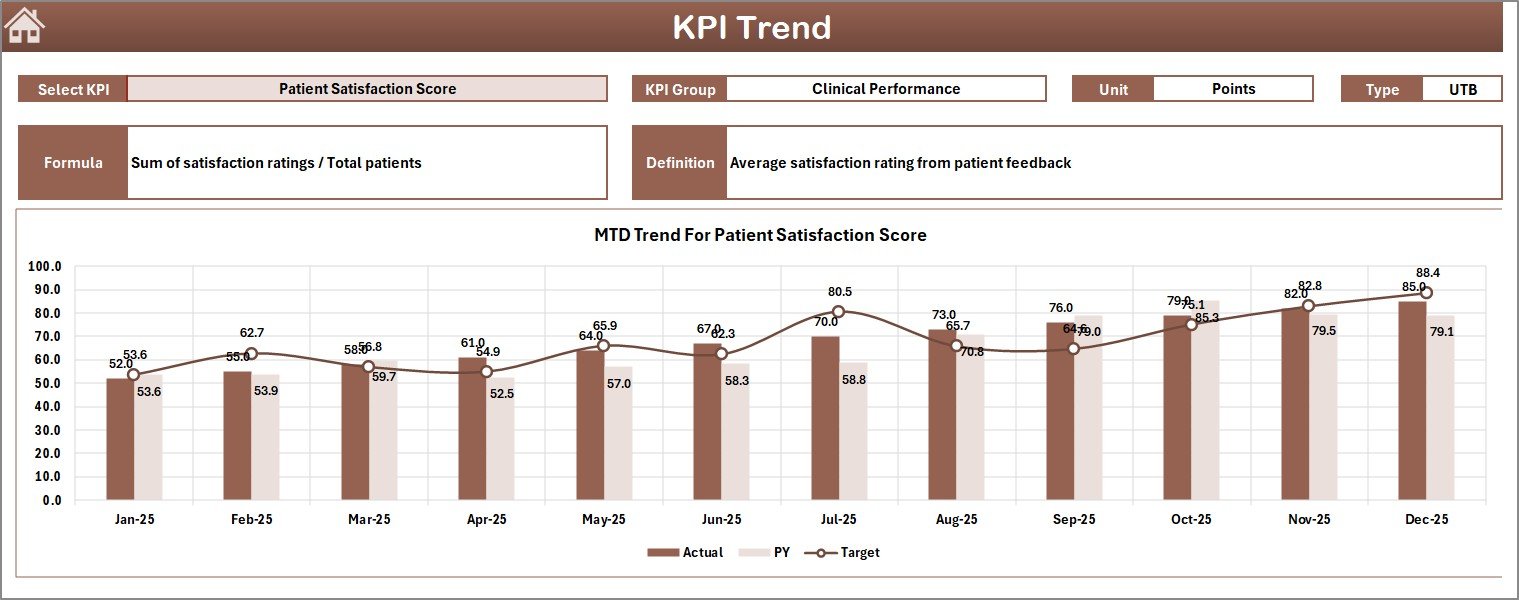 KPI Trend Sheet
4. Actual Numbers Input Sheet
Designed for inputting the actual performance numbers month-wise. You can change the start month at cell E1.
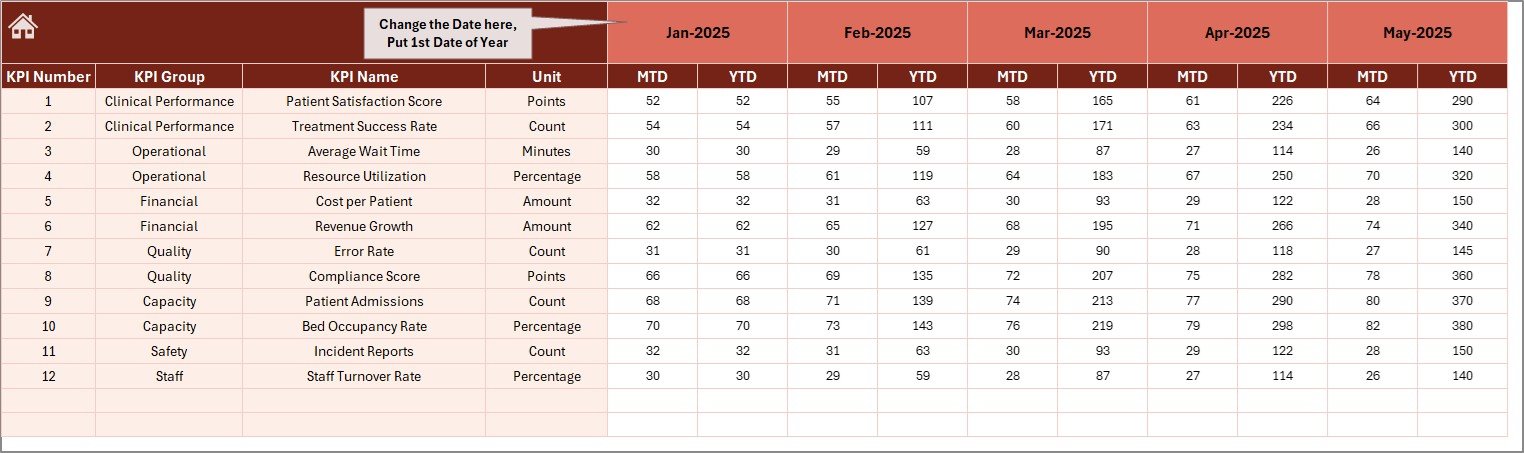 Actual Numbers Input sheet
5. Target Number Input Sheet
This sheet helps you enter the Target numbers for each KPI, both for MTD and YTD periods.
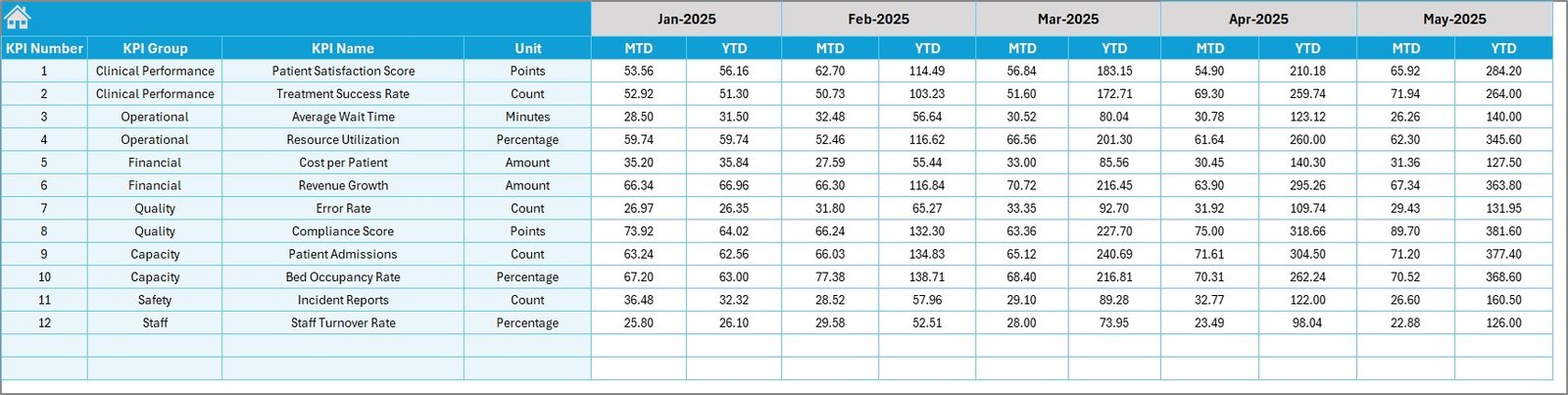 Target Number Input sheet
6. Previous Year Number Sheet Tab
Input the previous year’s numbers similarly to compare and analyze performance over time.
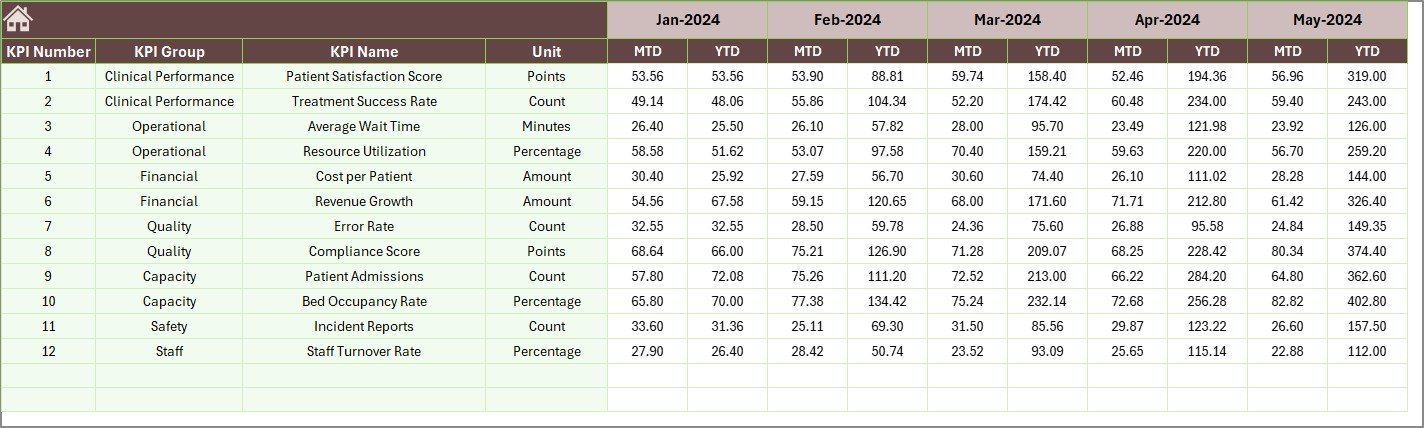 Previous Year Number Input sheet
7. KPI Definition Sheet Tab
This critical sheet provides the KPI Name, Group, Unit, Formula, and Definition. You also specify the KPI type as LTB (Lower The Better) or UTB (Upper The Better).
 KPI Definition sheet
Advantages of Neurology Hospitals KPI Dashboard
- Enables easy monitoring of multiple KPIs in one consolidated view.
- Improves decision-making by comparing actual vs target and historical performance.
- Reduces manual reporting efforts and errors.
- Supports proactive management through visual cues like conditional formatting and trend charts.
- Facilitates transparency and accountability in hospital performance management.
Opportunities for Improvement
Click to Buy Neurology Hospitals KPI Dashboard in Excel
- Integration with real-time hospital data systems for automatic updates.
- Adding user access control for multi-user environments.
- Incorporation of advanced analytics like predictive modeling.
- Mobile-friendly version for remote monitoring.
Best Practices
- Regularly update actual, target, and previous year data to keep dashboards relevant.
- Train staff on interpreting KPIs and using the dashboard effectively.
- Customize KPI definitions periodically to align with evolving hospital goals.
- Use the trend analysis to identify patterns and areas requiring attention.
- Leverage dashboard insights in management meetings for strategic planning.
FAQs
Click to Buy Neurology Hospitals KPI Dashboard in Excel
Q1. Can I customize the KPI list?
Yes, the KPI Definition sheet allows you to add or edit KPIs as per your hospital’s requirements.
Q2. Is it possible to add more months than the default setup?
You can adjust the months input in the Actual, Target, and Previous Year sheets by extending the data range accordingly.
Q3. Can the dashboard handle data for multiple neurology departments?
While designed for a single hospital unit, you can replicate the dashboard or modify it to accommodate multiple departments with advanced Excel techniques.
Q4. Does the dashboard support other hospital specialties?
This template is specialized for neurology but can be adapted for other specialties by modifying KPIs and terminology.
Conclusion
Click to Buy Neurology Hospitals KPI Dashboard in Excel
The Neurology Hospitals KPI Dashboard is a powerful and user-friendly tool that streamlines tracking and managing critical performance metrics. By leveraging its comprehensive features and intuitive design, hospitals can enhance operational efficiency, ensure higher standards of patient care, and make data-driven decisions effectively.
For more insights and a detailed demo, visit our YouTube channel.
Explore Microsoft’s official documentation on Excel here to enhance your dashboard skills.
Neurology Hospitals KPI Dashboard