The Childcare Services Dashboard in Excel tracks 5 KPI cards and 16+ pivot-driven charts across 5 interactive pages, covering enrollments, revenue, attendance, and program performance for every center you run. The workbook holds 7 sheets in total — 5 dashboard pages, a Data sheet, and a hidden Support sheet — and a brand new center director can have the entire dashboard live in under 10 minutes by pasting their data and clicking Refresh All.
Running multi-center childcare operations on scattered spreadsheets is painful: enrollments live in one tab, revenue in another, attendance in a third, and the board meeting is on Monday. This Childcare Services Dashboard in Excel solves that by pulling Total Revenue, Net Profit, Total Enrollments, Avg. Satisfaction, and Attendance Rate % into a single Overview, then drilling down into Enrollment Analysis, Center Performance, Program Insights, and Monthly Trend — all driven by pivots so the entire view refreshes from one click.
👉 Click here to Purchase the Childcare Services Dashboard in Excel
Key Features of the Childcare Services Dashboard in Excel
- 7 Sheets in One Workbook – Overview, Enrollment Analysis, Center Performance, Program Insights, Monthly Trend, Data, and Support — all linked so updates flow through automatically.
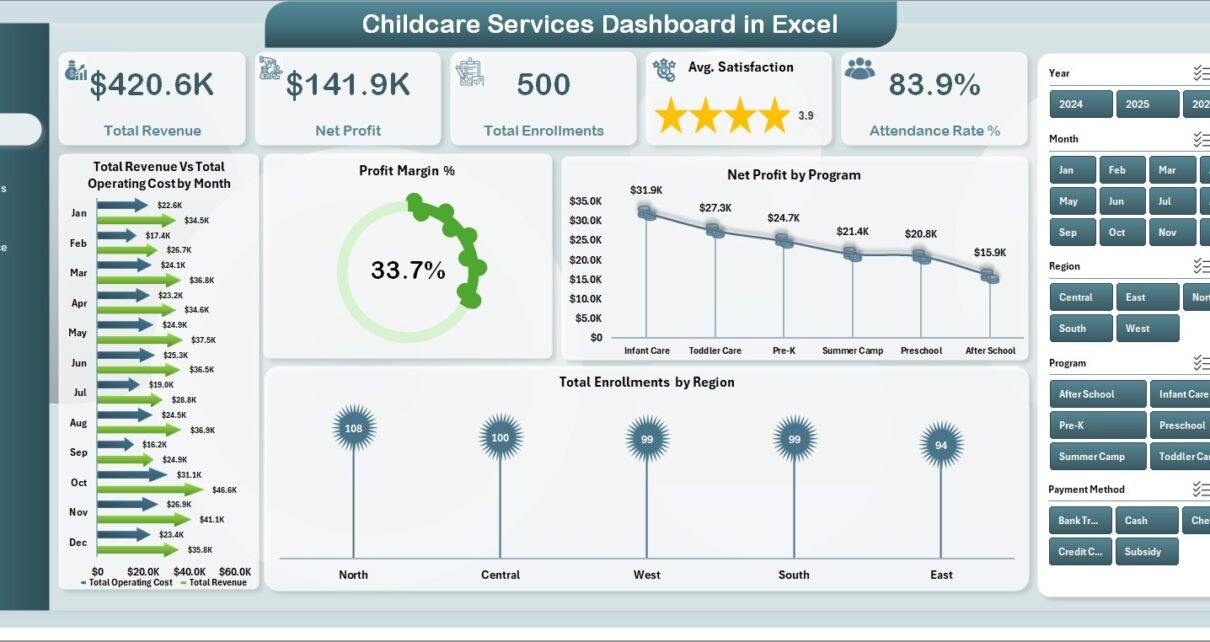
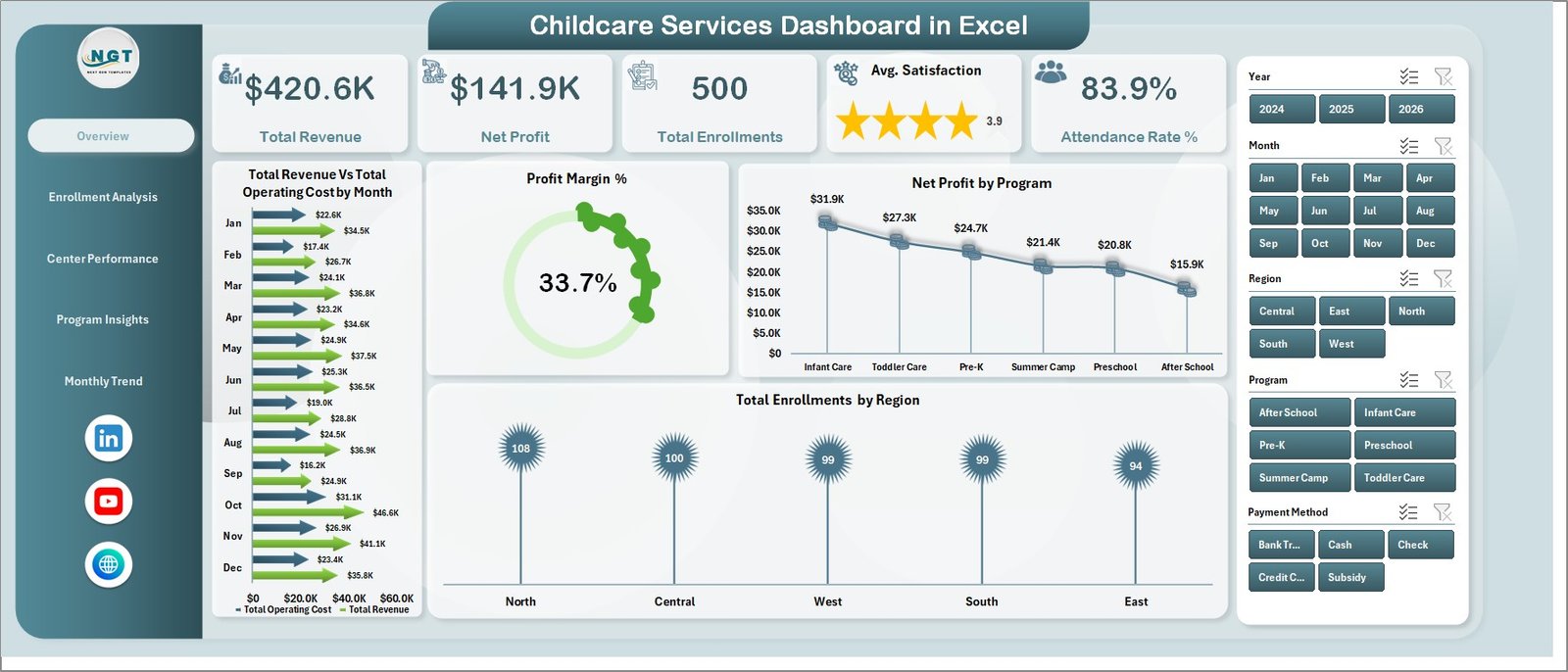
- 5 KPI Cards on Page 1 – Total Revenue, Net Profit, Total Enrollments, Avg. Satisfaction, and Attendance Rate % update the moment you refresh the data.
- 16+ Pre-Built Charts – Every chart is wired to a pivot table on the Support sheet. Replace 100 or 100,000 rows of data, click Refresh All on the Excel ribbon, and the entire dashboard updates in seconds.
- Connected Slicers – Filter the whole page by Center Name, Region, Program, Age Group, Status, Enrollment Type, and Year.
- Multi-Center P&L View – Total Revenue vs Total Operating Cost by Center Name and by Region in one chart — spot loss-making locations instantly.
- Works on Excel 2016+ – Microsoft 365, Excel 2019/2021/2024, Windows and macOS. No add-ins, no Power Query, no macros.
Dashboard Pages Explanation
Page 1: Overview
The Overview page is the executive snapshot. At the top, 5 KPI cards display Total Revenue, Net Profit, Total Enrollments, Avg. Satisfaction, and Attendance Rate %. Below, four charts — Total Revenue vs Total Operating Cost by Month, Profit Margin %, Net Profit by Program, and Total Enrollments by Region — give you the full operating picture in one screen. Slicers at the top reshape every chart simultaneously so directors can filter by center, region, or program in seconds.
Page 2: Enrollment Analysis
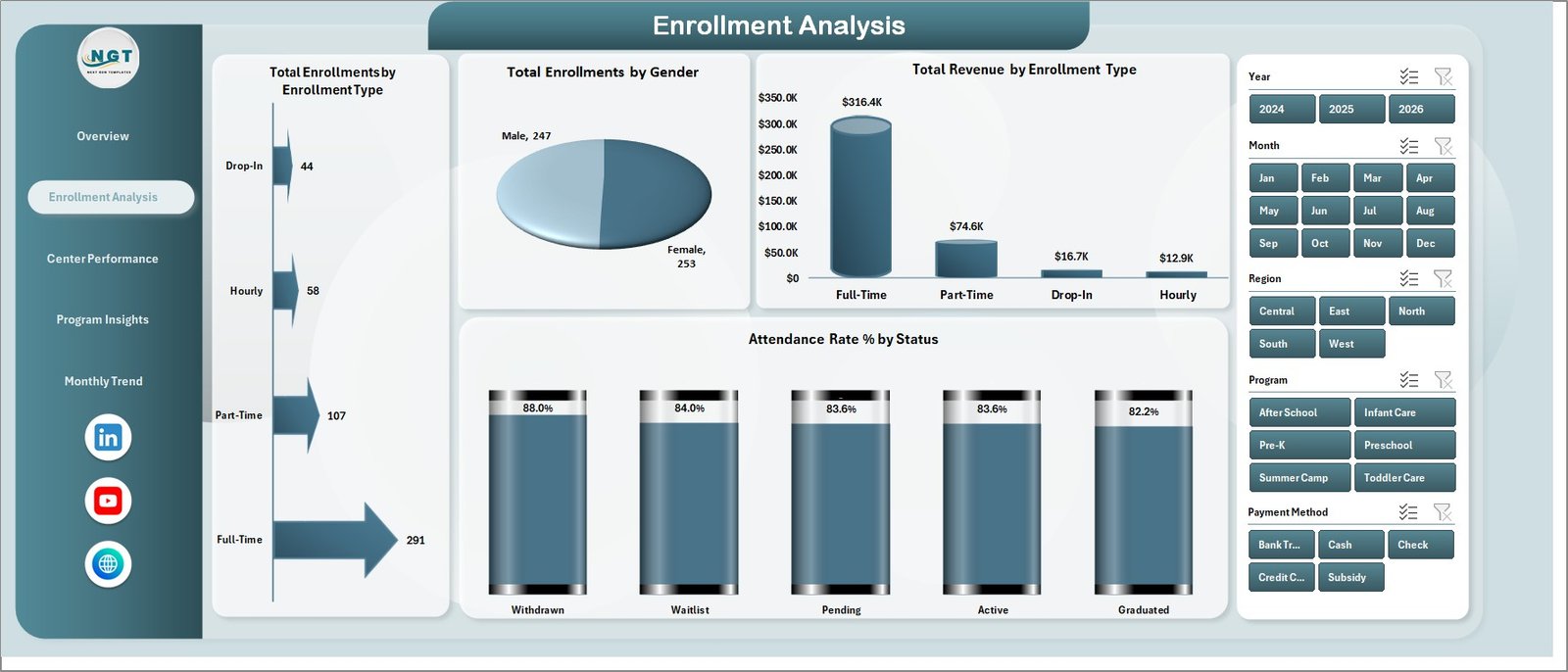
The Enrollment Analysis page answers the question “who’s enrolling, and is it profitable?” Charts include Total Enrollments by Enrollment Type, Total Enrollments by Gender, Total Revenue by Enrollment Type, and Attendance Rate % by Status. This is the page enrollment coordinators open every Monday to see which programs are growing and which are losing momentum.
Page 3: Center Performance
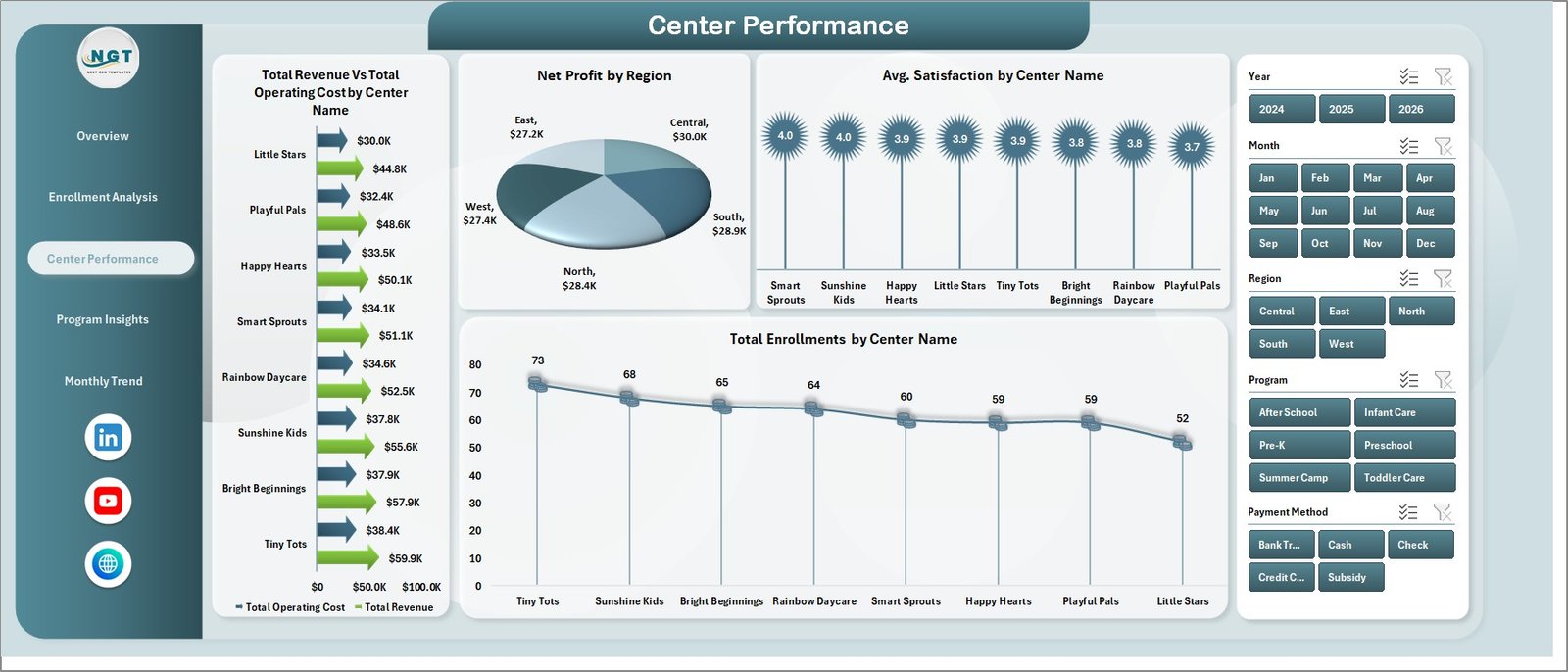
The Center Performance page benchmarks every center against the rest of the network. Total Revenue vs Total Operating Cost by Center Name shows you the P&L picture for each location side by side. Net Profit by Region rolls everything up to regional totals. Avg. Satisfaction by Center Name and Total Enrollments by Center Name complete the picture.
Page 4: Program Insights
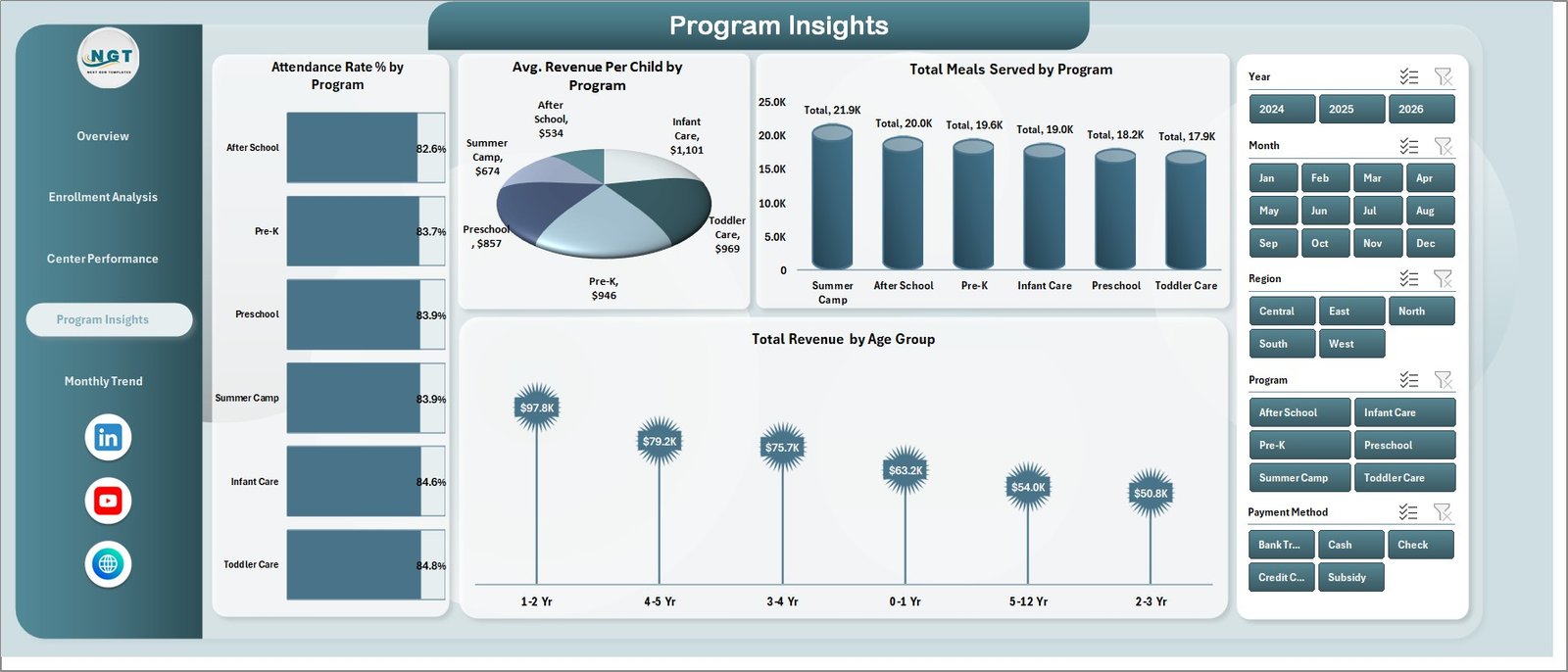
Program Insights drills into the program level. Charts include Attendance Rate % by Program, Avg. Revenue Per Child by Program, Total Meals Served by Program, and Total Revenue by Age Group. This is where program coordinators decide which offerings to expand, which to reprice, and which to retire — backed by data, not gut feel.
Page 5: Monthly Trend
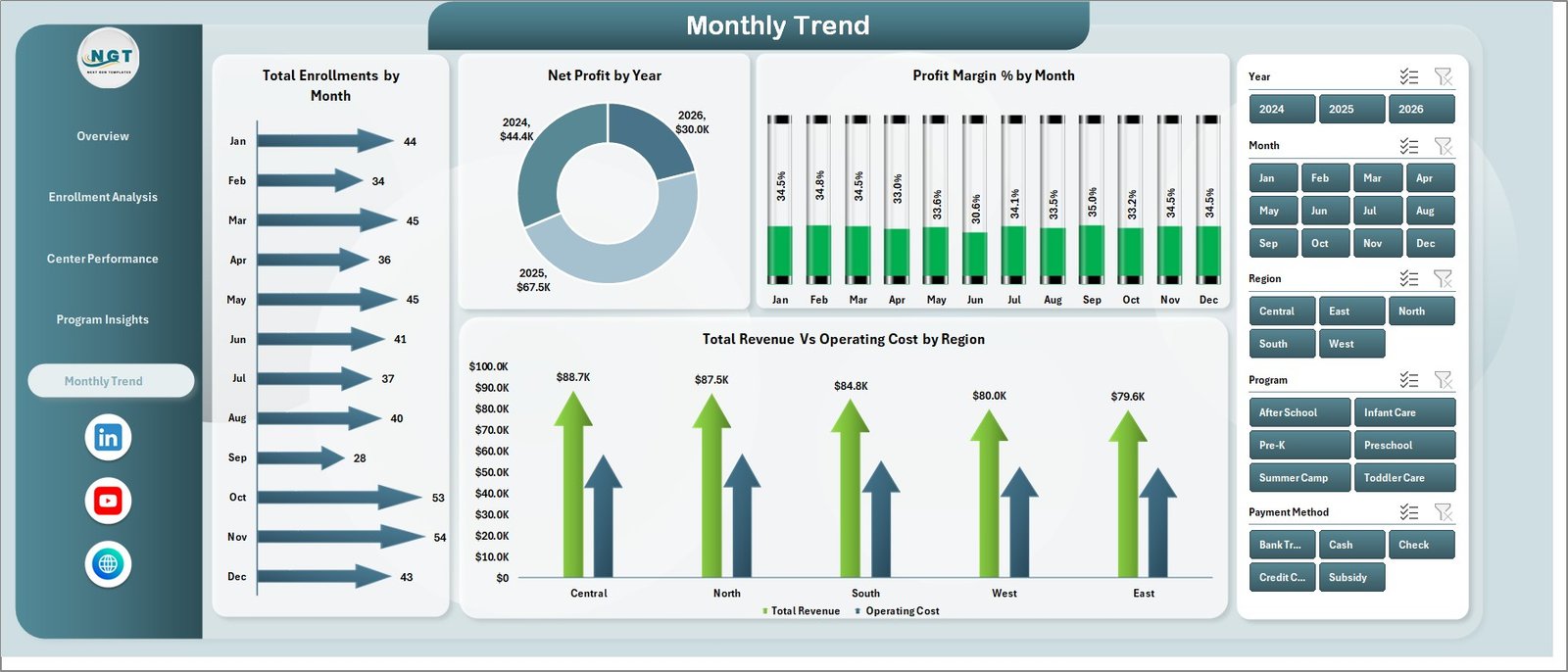
The Monthly Trend page handles the time-series view: Total Enrollments by Month, Net Profit by Year, Profit Margin % by Month, and Total Revenue vs Operating Cost by Region. Use this page for board reviews, investor updates, and seasonality planning.
Data Sheet
The Data sheet is the only place you’ll need to type. Columns include Date, Center, Region, Program, Enrollment Type, Gender, Age Group, Status, Revenue, Operating Cost, Satisfaction, Attendance, and Meals Served. Add a new row, hit Refresh All, and the entire dashboard absorbs the new record. The workbook handles thousands of rows without lag.

Support Sheet
The Support sheet hosts every pivot table that powers the charts. Once data is updated, click the Data tab in the Excel ribbon and hit Refresh All — every pivot and every chart refreshes together. The Support sheet can be hidden during daily use so directors never accidentally edit the pivots.

Childcare Services Dashboard in Excel vs. Google Sheets Equivalent vs. Paid Childcare SaaS — Feature Comparison
| Feature | Childcare Services Dashboard in Excel | Google Sheets Equivalent | Brightwheel / Procare SaaS |
|---|---|---|---|
| Cost | $17.99 one-time | $9.99 one-time | $99–$300 / center / month |
| Platform | Microsoft Excel 2016+ | Google Sheets (browser) | Web app + iOS / Android |
| Setup time | Under 10 minutes ✅ | Under 10 minutes ✅ | 2–6 weeks onboarding |
| Pivot-driven refresh | ✅ One-click Refresh All | Manual range updates | Real-time but vendor-locked |
| Multi-center P&L | ✅ Built-in | ✅ Built-in | ✅ Enterprise tier only |
| Customizable fields | ✅ Unlimited | ✅ Unlimited | Limited to vendor schema |
| Works offline | ✅ | ❌ | ❌ |
| Year-1 cost (3 centers) | $17.99 | $9.99 | $3,600–$10,800 |
For childcare operators that want full P&L visibility across centers without paying a SaaS bill per location, the Childcare Services Dashboard in Excel sits in the sweet spot.
Who Should Use This Template
Perfect for:
- Owners and directors running 1–20 childcare centers who need consolidated P&L, enrollment, and attendance reporting.
- Preschool and after-school program leaders presenting monthly KPIs to a board or parent committee.
- Operations managers replacing a stack of separate spreadsheets with one connected workbook.
- Childcare consultants who want a polished review deliverable for every client engagement.
Not a fit if:
- You need integrated parent communication, billing, and check-in — use Brightwheel or Procare for those modules.
- You only manage a single home-based provider with under 5 children — a simple tracker is enough.
- You don’t have Microsoft Excel 2016 or later — use the Daycare Center Dashboard in Google Sheets instead.
Real-World Use Cases
Priya runs three childcare centers in Mumbai. Every Monday morning she opens the Childcare Services Dashboard in Excel, pastes the previous week’s enrollments into the Data sheet, clicks Refresh All, and screenshots the Overview page for her co-founder before their weekly call. She used to pay $720 per month for a SaaS enterprise plan she only used 10% of — swapping that for a one-time $17.99 spend pays for the entire workbook in under a day.
David is a program director at a US-based preschool chain. He uses Page 3 (Center Performance) and Page 4 (Program Insights) every month to identify centers where Avg. Satisfaction is dropping or where Avg. Revenue Per Child is below the network average. Then he sits with regional managers to rework pricing or staffing before the next enrollment cycle starts — with the dashboard as the shared source of truth.
Aarti is an independent childcare consultant in Bengaluru. She keeps a clean copy of the Childcare Services Dashboard in Excel as a template, drops each client’s data in, and walks them through their own numbers using the slicers. She bills $150 per hour for the engagement and never needs to license a separate analytics platform.
Advantages of the Childcare Services Dashboard in Excel
- One-time payment, lifetime use — $17.99 once vs. $99–$300 per center per month for childcare SaaS. The dashboard pays for itself in the first hour.
- Pivot architecture, not formulas — Charts refresh in seconds without recalculating thousands of cells, and adding rows never breaks the dashboard.
- Full editability — Add new KPIs, swap chart types, change colors, or add a logo. It’s your file.
- Offline-friendly — Works on a laptop with no internet during off-site board meetings.
- Cross-platform compatibility — The same workbook opens on Windows, macOS, and Excel for the web.
Opportunities for Improvement
- No direct database connection — Data is pasted into the Data sheet, not pulled live from a billing or attendance system. Power Query users can wire that up in an hour.
- Not a parent-facing tool — The dashboard is built for operators and directors, not for daily check-in/check-out by parents.
- Single-user editing — Excel files are best for one editor at a time; for live multi-user collaboration, the Google Sheets sibling is the better choice.
- No built-in mobile app — Excel mobile works, but a SaaS-style mobile-first experience isn’t the design target.
Best Practices
- Keep the Data sheet column structure unchanged — Adding columns is fine, but renaming or reordering existing columns will break the pivots until you refresh and remap them.
- Refresh after every data paste — Data tab → Refresh All. Make it muscle memory.
- Save a master copy — Keep an untouched template version so you can always start fresh if you customize too aggressively.
- Hide the Support sheet in day-to-day use so non-technical team members don’t accidentally edit pivot ranges.
- Use OneDrive or SharePoint for storing the workbook so all your directors are looking at the latest version.
- Bookmark Microsoft’s pivot table refresh guide from Microsoft Support for new team members.
Explore Relevant Templates
- Cross-platform siblings: Daycare Center Dashboard in Excel, Daycare Center Dashboard in Google Sheets, and Daycare Center Dashboard in Power BI.
- Childcare Services KPI Dashboard in Excel — a scorecard-style alternative focused on KPI vs target.
- Preschool KPI Dashboard in Google Sheets — lighter pre-K view in browser.
- Student Enrollment KPI Scorecard in Excel — standalone enrollment scorecard for schools.
- Related companion posts: Daycare Center Dashboard in Excel and Childcare Services KPI Dashboard in Excel.
- Browse the full Excel Dashboards collection and Education templates.
Frequently Asked Questions
What KPIs does the Childcare Services Dashboard in Excel track?
The Childcare Services Dashboard in Excel tracks 5 headline KPIs — Total Revenue, Net Profit, Total Enrollments, Avg. Satisfaction, and Attendance Rate % — plus secondary metrics including Profit Margin %, Avg. Revenue Per Child, Total Operating Cost, and Total Meals Served. Every KPI recalculates instantly when you refresh the workbook.
How long does setup take?
Most owners finish setup in under 10 minutes. Open the workbook, paste your enrollment data into the Data sheet using the same column structure, then click Refresh All on the Excel Data ribbon. Every pivot and chart in the Childcare Services Dashboard in Excel updates together with no formula edits.
How does this compare to Brightwheel or Procare?
Brightwheel and Procare are full childcare management platforms with billing, attendance check-in, and parent communication, running $99 to $300 per center per month. The Childcare Services Dashboard in Excel is a $17.99 one-time analytics layer focused on multi-center P&L, enrollment, and attendance reporting. Many operators run both side by side.
Does it work on Mac and Windows?
Yes. The Childcare Services Dashboard in Excel works on Microsoft Excel 2016 and later on both Windows and macOS, including Microsoft 365. No VBA macros, no add-ins, and no Power Query connections are required, so installation is just opening the file.
Can I add my own programs, centers, and regions?
Absolutely. Add any new Program, Center, or Region values directly in the Data sheet. The pivot tables on the Support sheet will pick them up at the next Refresh All, and the slicers will auto-extend to include the new categories without any manual remapping.
Can I share the dashboard with my team?
Yes. Save the workbook to OneDrive, SharePoint, or any shared drive, and your team can open it in desktop Excel or Excel for the web. For full browser-based real-time collaboration, the Daycare Center Dashboard in Google Sheets is the better fit.
Is there a tutorial video?
Yes — step-by-step walkthroughs for the Childcare Services Dashboard in Excel and dozens of related Excel dashboards live on the PK: An Excel Expert YouTube channel, with 300K+ subscribers across our three channels.
About the Author
Built by PK — Microsoft Certified Professional with 15+ years of Excel, Google Sheets, and Power BI experience. Founder of NextGenTemplates, reaching 300K+ subscribers across YouTube channels. Every template is hand-built and tested before release.
Conclusion
The Childcare Services Dashboard in Excel turns a scattered spreadsheet workflow into a single connected workbook. With 5 KPI cards, 16+ pivot-driven charts, 5 interactive pages, and one-click slicer filtering across centers, regions, programs, and age groups, it gives childcare owners and directors the operating picture they need to grow profitably — without paying $99–$300 per center per month for SaaS.
👉 Click here to Purchase the Childcare Services Dashboard in Excel
Instant download · One-time payment · No subscription · Lifetime access
🎥 For step-by-step video tutorials, visit youtube.com/@PK-AnExcelExpert.
📅 Last updated: May 2026