Running a daycare center is a daily juggling act. Owners and managers must track enrollment, attendance, fees, meal costs, teacher workload, and parent satisfaction — yet most centers still rely on scattered spreadsheets and manual reports. The Daycare Center Dashboard in Excel brings every one of those moving parts into one workbook with 5 KPI cards, 16+ pivot-driven charts, and slicer-based filtering. Setup takes under 10 minutes, and a single Refresh All click updates the entire dashboard.
In this detailed guide, you’ll learn what’s inside each page of the Daycare Center Dashboard in Excel, the KPIs it tracks, how to use it day-to-day, where it fits against Google Sheets and paid daycare SaaS, and frequently asked questions about deploying it in real childcare centers.
👉 Click to Purchase the Daycare Center Dashboard in Excel
Key Features of the Daycare Center Dashboard in Excel
- 📊 5 Interactive Pages — Overview, Enrollment Analysis, Attendance Tracking, Financial Overview, and Staff & Activities — each built for a specific management view.
- 🎯 5 Headline KPI Cards — Total Fees, Total Records, Total Present, Total Paid, and Avg. Satisfaction sit on the Overview page for a 10-second center health check.
- 📈 16+ Pre-Built Pivot Charts — Every chart is pivot-driven from the Support Sheet, so one Refresh All click updates everything at once.
- 🧭 Multiple Slicers — Filter by age group, program, classroom, payment status, or month and watch all charts and KPI cards respond instantly.
- 📋 Editable Data Sheet — Replace the sample records with your own, keep the column structure, and the entire dashboard updates automatically.
- 🔒 One-Time Purchase — No monthly subscription, no per-user fees, no renewal. You own the file forever.
Dashboard Pages Explanation
The Daycare Center Dashboard in Excel is organized into seven worksheets. Five are analysis pages, one is the Data Sheet, and one is a hidden Support Sheet that powers all pivots.
Page 1: Overview Page
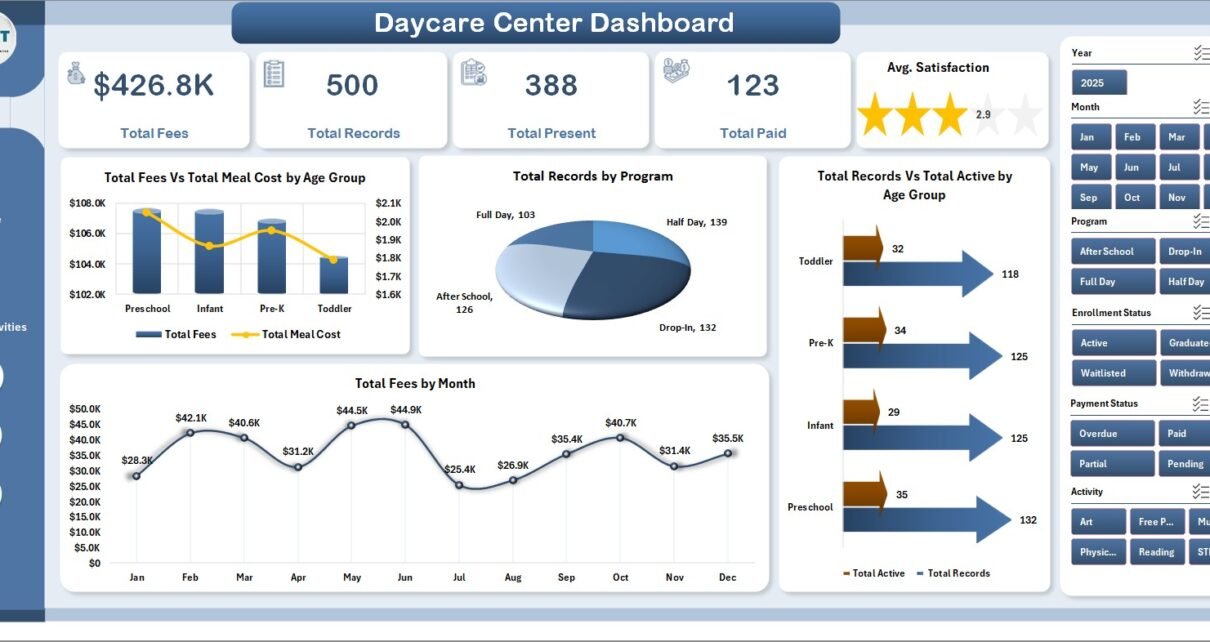
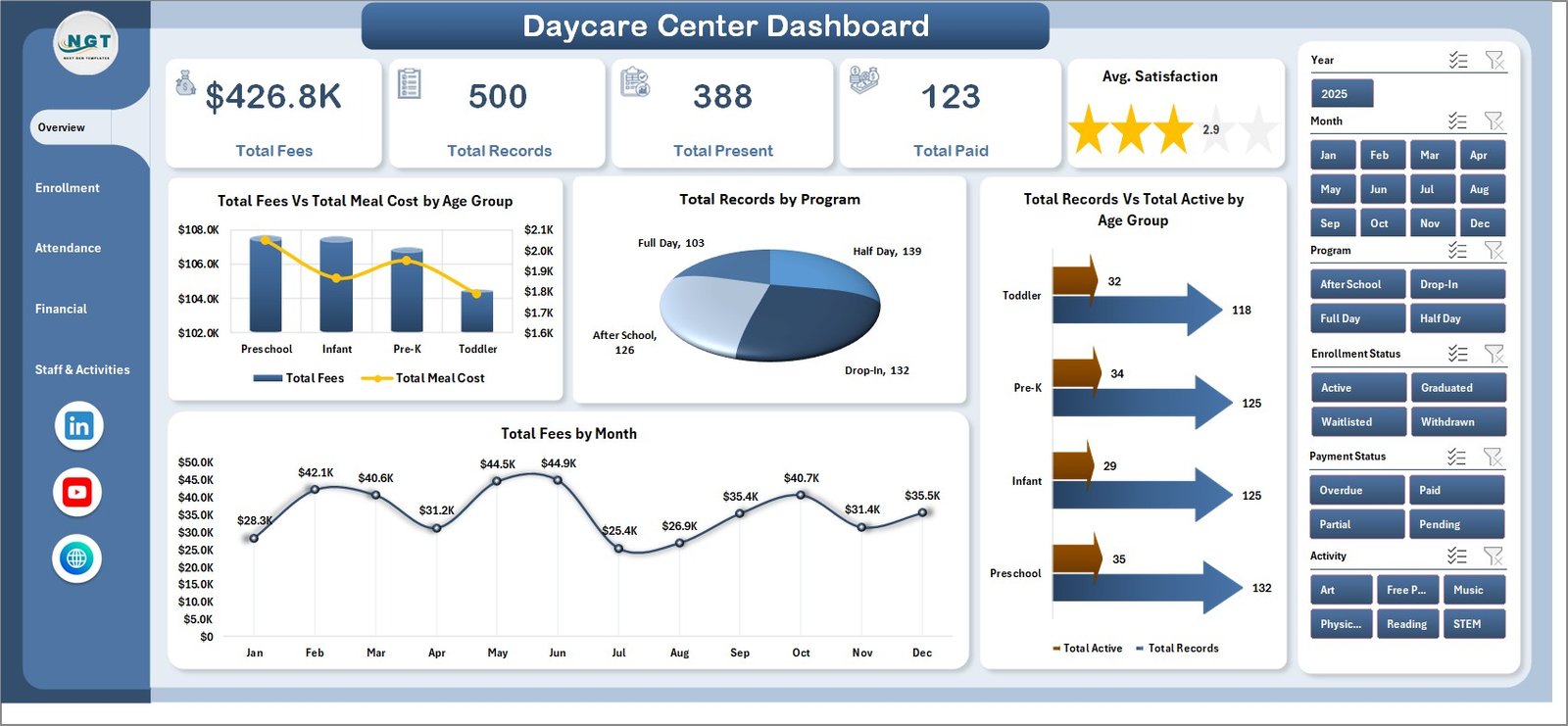
The Overview Page is the executive summary. Five KPI cards across the top — Total Fees, Total Records, Total Present, Total Paid, and Avg. Satisfaction — give an instant read on the daycare center’s health. Below the cards, four pivot-driven charts visualize the high-level performance: Total Fees Vs Total Meal Cost by Age Group (revenue vs meal expense by toddler/preschool/pre-K cohort), Total Records by Program (enrollment distribution across programs), Total Records Vs Total Active by Age Group (currently active children compared to total enrolled), and Total Fees by Month (revenue trend over the year). Slicers at the top of the page let you filter every chart and KPI card with a single click.
Page 2: Enrollment Analysis
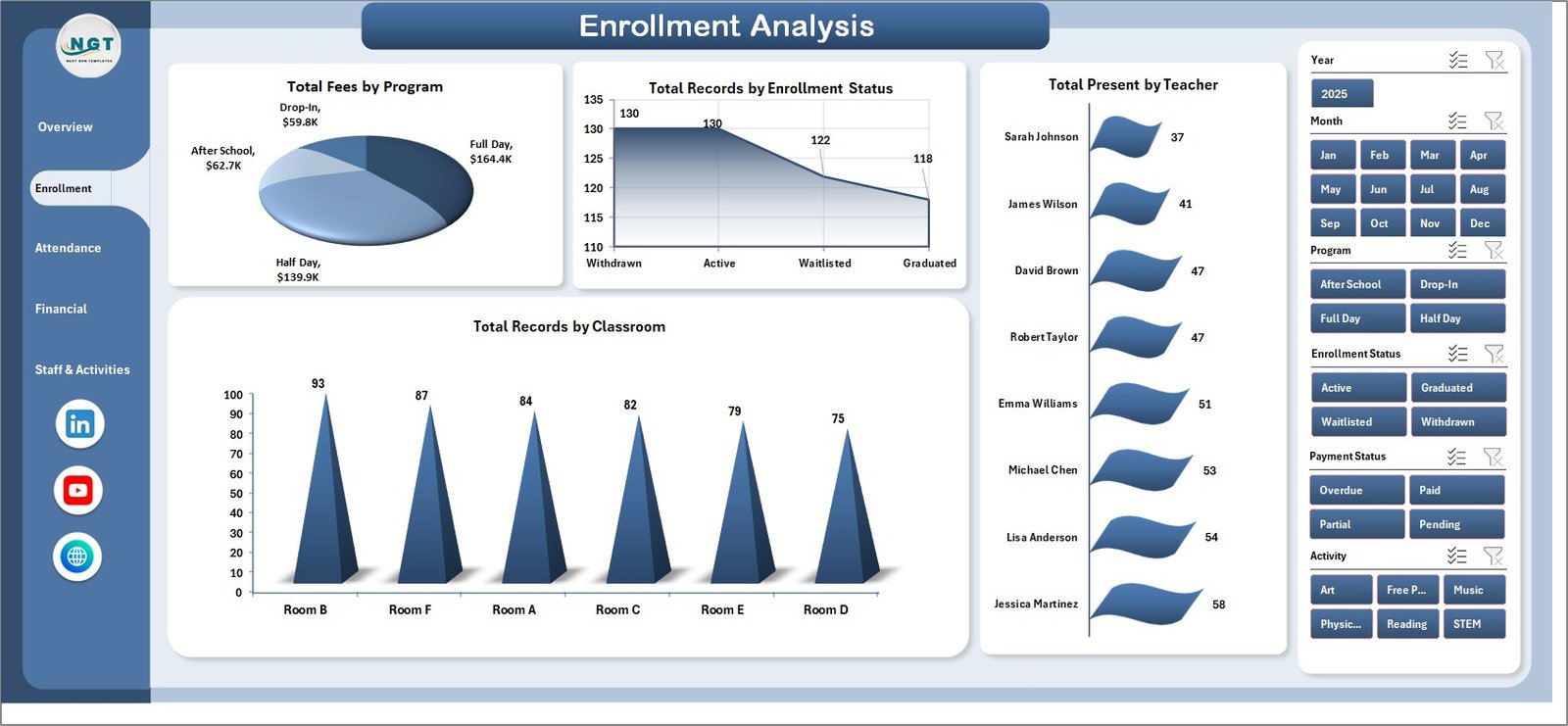
The Enrollment Analysis page focuses on how the center is growing and where capacity is being used. Charts include Total Fees by Program (revenue contribution of each program), Total Records by Enrollment Status (active, waitlisted, withdrawn breakdown), Total Present by Teacher (attendance distribution across staff), and Total Records by Classroom (capacity utilization per classroom). This page is the go-to view when planning a new program launch or rebalancing classrooms.
Page 3: Attendance Tracking
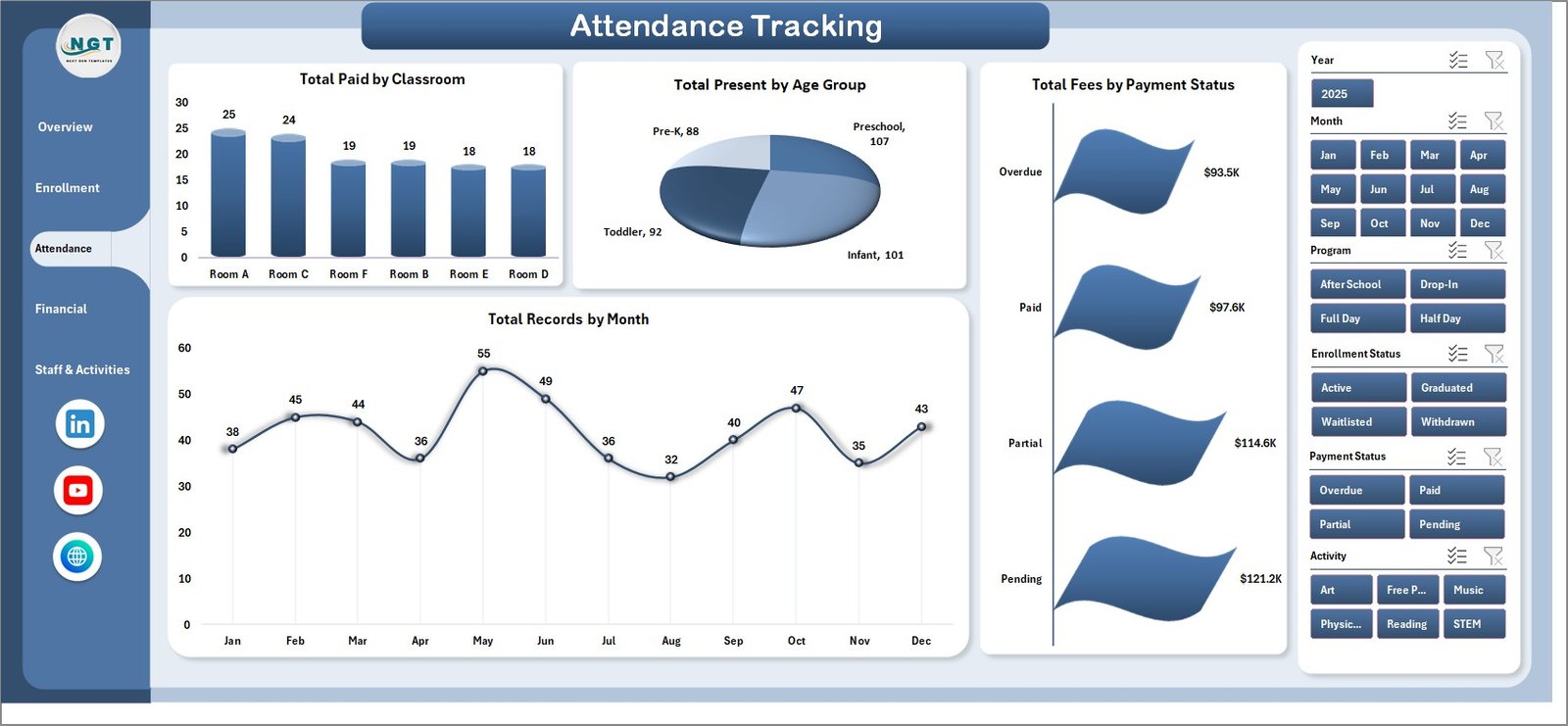
Attendance Tracking is the day-to-day operations view. Charts include Total Paid by Classroom (fee collection at the classroom level), Total Present by Age Group (daily attendance by cohort), Total Fees by Payment Status (paid, pending, overdue split), and Total Records by Month (enrollment seasonality). Use this page to catch attendance dips early and stay on top of payment delays.
Page 4: Financial Overview
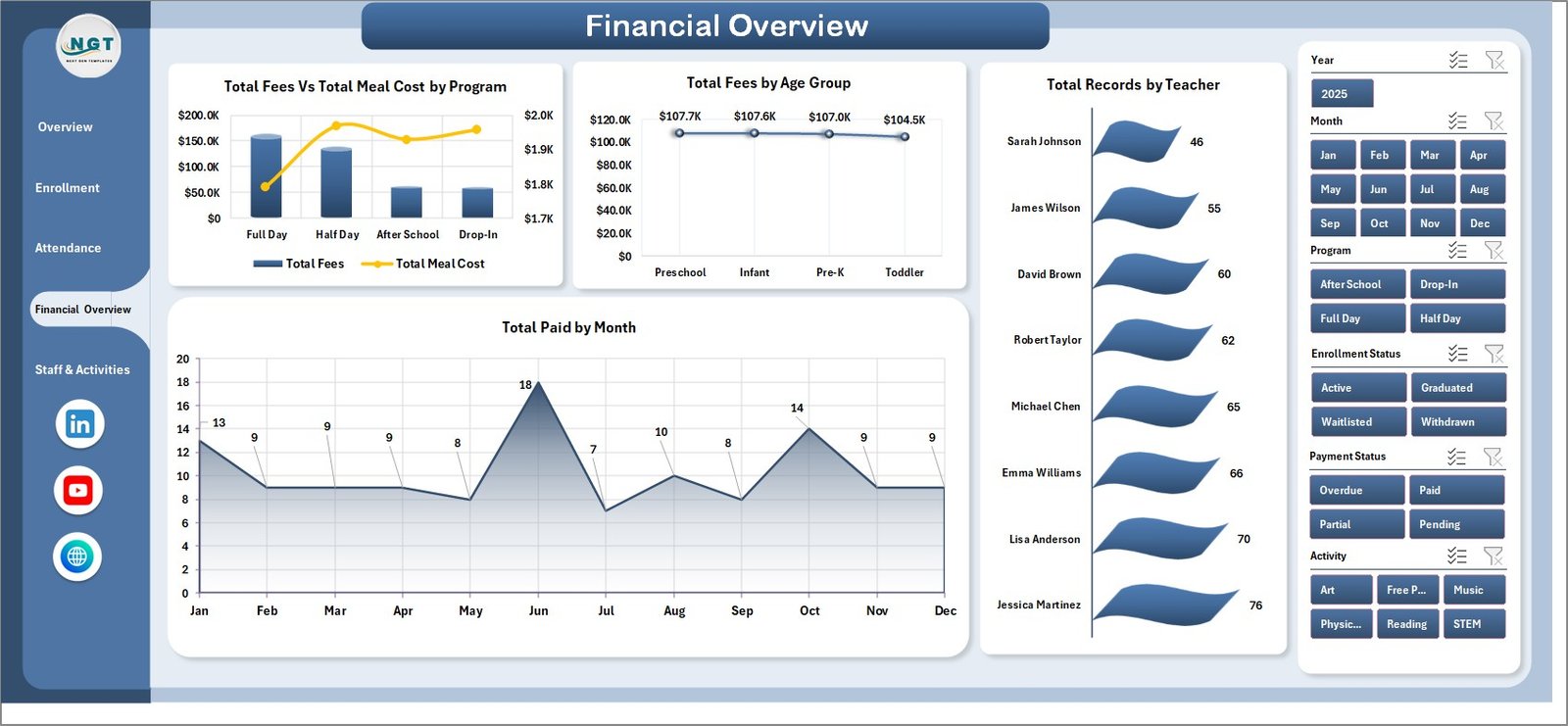
Financial Overview is the money view. Charts include Total Fees Vs Total Meal Cost by Program (program-level profit signal), Total Fees by Age Group (revenue mix by cohort), Total Records by Teacher (workload concentration by teacher), and Total Paid by Month (cash collection trend). This is the page your finance team and accountant will care about most.
Page 5: Staff & Activities
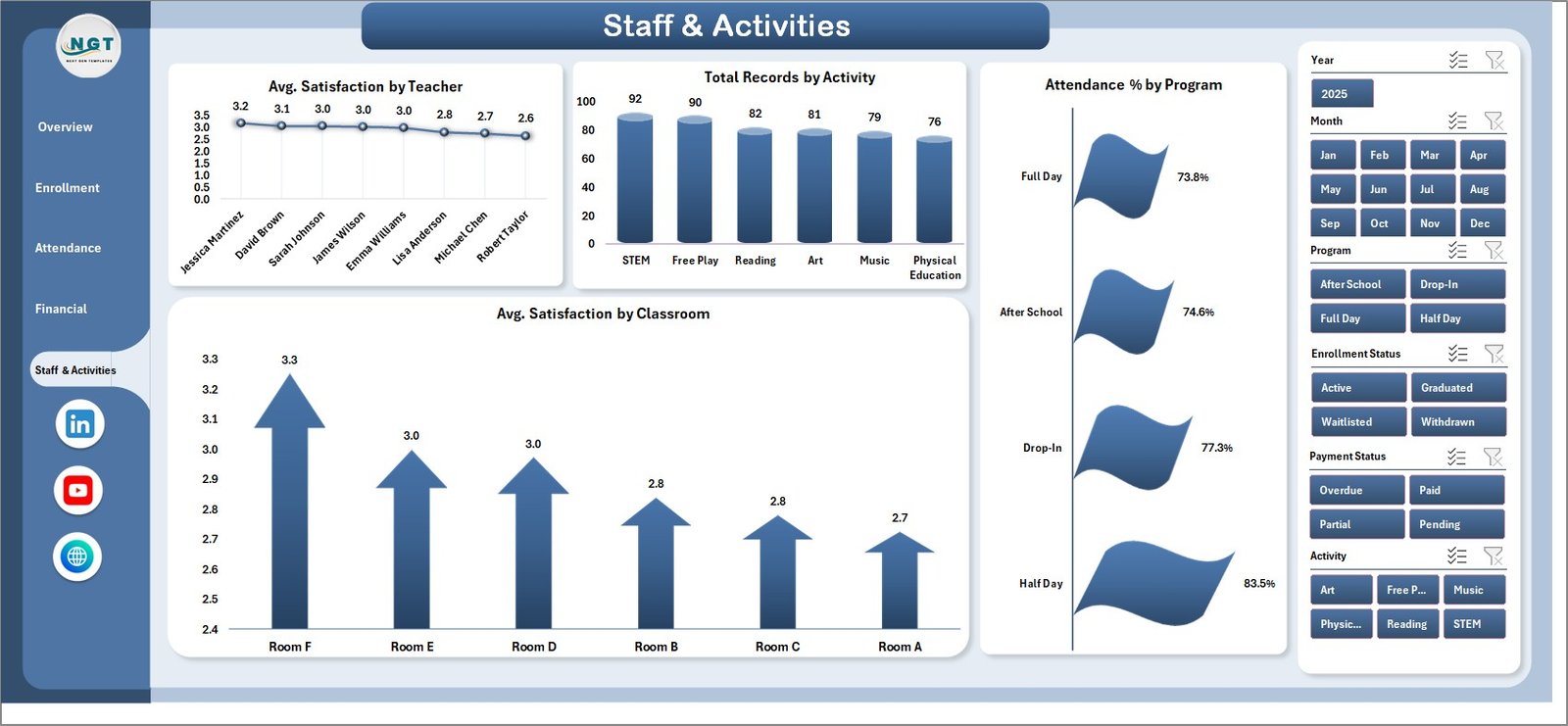
The Staff & Activities page connects parent satisfaction back to the team. Charts include Avg. Satisfaction by Teacher (parent satisfaction tied to each teaching staff member), Total Records by Activity (most popular activity focus areas), Attendance % by Program (engagement by program), and Avg. Satisfaction by Classroom (room-level parent feedback). Use this page during quarterly staff reviews.
Data Sheet tab
The Data Sheet is the source of truth. Add or edit daycare records in the same column format used in the sample data. The pivot tables in the Support Sheet pull from this entire range, so adding new rows automatically expands every chart and KPI calculation across all five analysis pages.

Support Sheet tab
The Support Sheet is the hidden engine. It contains every pivot table that drives every chart on every page. After you update the Data Sheet, go to the Data tab in the Excel Ribbon and click Refresh All. All pivots refresh, and therefore every chart on every page refreshes too. You can keep this sheet hidden from end-users without affecting the dashboard.

Daycare Center Dashboard in Excel vs. Google Sheets vs. Paid Daycare SaaS — Feature Comparison
| Feature | Daycare Center Dashboard in Excel | Google Sheets Equivalent | Paid Daycare SaaS (Procare / brightwheel / HiMama) |
|---|---|---|---|
| Cost | $17.99 one-time | $10-20 one-time | $59-149 / center / month |
| Platform | Microsoft Excel (offline) | Google Sheets (cloud) | Web + mobile app |
| Setup time | Under 10 minutes | Under 10 minutes | 2-4 weeks onboarding |
| Slicer filtering | ✅ Native Excel slicers | ✅ Native Sheets slicers | ✅ Built-in filters |
| Offline access | ✅ | ❌ Needs internet | ❌ Cloud-only |
| Multi-branch view | ✅ Add Location column | ✅ Add Location column | ✅ Native multi-site |
| Per-user fees | ✅ None — unlimited users | ✅ None | ❌ $5-15 / user / month |
| Year-1 cost at 5 users | $17.99 total | ~$15 total | ~$3,540 – $8,940 |
| Pivot-driven refresh | ✅ One-click Refresh All | ⚠️ Manual sometimes | N/A |
For daycare owners who want operational, financial, and staff visibility without paying $59-149 / center / month, the Daycare Center Dashboard in Excel sits in the sweet spot.
Who Should Use This Template
Perfect for:
- Daycare center owners running 1-5 locations who want a single Excel file as their operating dashboard
- Childcare and preschool managers tracking enrollment, attendance, fees, and parent satisfaction in one place
- Franchise operators and multi-branch directors who want a portable, no-subscription reporting layer
- Education consultants delivering ready-made dashboards to client centers
- Finance and admin teams in small-to-mid daycare networks producing monthly performance reports
Not a fit if:
- You run a 50+ center daycare chain that needs SOC 2, SSO, and centralized parent-billing — use Procare or brightwheel instead
- You need a parent-facing app for real-time messaging, photos, and check-in/check-out
- You’re on a Mac without Microsoft 365 (some pivot features are limited in older Excel for Mac)
Real-World Use Cases
Aisha owns a 35-child daycare in Pune. She uses the Daycare Center Dashboard in Excel to track monthly fees collected against meal costs by age group, identify which classrooms have the highest attendance percentage, and report monthly enrollment trends to her parent investors — without paying ₹6,000/month for a daycare SaaS subscription. Every month-end she opens the Financial Overview page, exports the charts as PNGs, and pastes them into a one-page investor update.
Marcus runs a 3-branch childcare network in Atlanta. He added a Location column to the Data Sheet and now uses the slicers to switch between branches. Every Monday his admin team enters the prior week’s data, hits Refresh All, and the leadership team reviews the Financial Overview page on Tuesday morning before the weekly ops meeting.
Priya is an education consultant. She delivers this template to four small daycare clients during onboarding and saves about 20 hours of custom dashboard build work per engagement. Clients who need senior-level KPI tracking layer on the Childcare Services KPI Dashboard in Excel for MTD/YTD scorecards.
Advantages of the Daycare Center Dashboard in Excel
- One-click refresh — Update the Data Sheet, hit Data → Refresh All, every page is current.
- No subscription — Pay $17.99 once, own it forever. The savings vs $59-149/month SaaS pay for many other improvements in year one.
- Offline-capable — Open and use the dashboard without internet. Good for low-bandwidth locations and travel.
- Familiar tool — Most admin staff already know Excel; no training overhead.
- Slicer-driven exploration — Five filters on the Overview page let any reader drill into the data without writing a formula.
- Print- and export-ready — Each page is laid out for a clean print or PDF export to share with parents and investors.
Opportunities for Improvement
The Daycare Center Dashboard in Excel is purposely a reporting and analysis tool — it is not a full daycare operations system. Honest limitations to note:
- No automatic data sync — You must enter data into the Data Sheet manually or paste it from your billing system. If you’re already on Procare or brightwheel, you’d be exporting data on a schedule.
- No mobile app — This is a desktop Excel file. For a parent-facing app, pair it with a dedicated platform.
- Single-user editing — Excel files don’t co-edit cleanly. If you need real-time team collaboration, the Google Sheets version is a better fit.
- Older Excel versions — Excel 2013 and earlier have limited slicer support; Excel 2016+ is recommended.
Best Practices
To get the most from the Daycare Center Dashboard in Excel, follow these practices:
- Refresh weekly, not daily — One weekly refresh keeps the dashboard meaningful without becoming a chore.
- Lock the column structure — Don’t reorder, rename, or delete columns in the Data Sheet; the pivots are bound to those exact names.
- Keep the Support Sheet hidden — Hide it before sharing the file with non-technical staff to avoid accidental pivot edits.
- Use a single source of truth — Either Excel or your daycare SaaS is the master record; don’t try to keep both perfectly in sync.
- Back up monthly — Save a dated copy at month-end (e.g., Daycare-Center-Dashboard-2026-03.xlsx) so you can look back at historical states.
- Pair with the KPI scorecard — Use the Childcare Services KPI Dashboard in Excel for MTD/YTD targets and use this dashboard for operational depth. To see how that scorecard is structured, read the Childcare Services KPI Dashboard blog post.
For Microsoft’s official guide on refreshing pivot tables across multiple sheets, see the Refresh PivotTable data article on Microsoft Support.
Explore Relevant Templates
📌 Daycare Center Dashboard in Google Sheets — Cloud-native version for teams that want real-time collaboration.
📌 Childcare Services KPI Dashboard in Excel — MTD/YTD scorecard companion for senior performance reviews.
📌 Preschool KPI Dashboard in Excel — Companion KPI dashboard for early-learning centers.
📌 Preschool KPI Dashboard in Power BI — Power BI alternative with drill-through KPI definitions.
📌 Browse all Excel Dashboard Templates on NextGenTemplates.
Also available as: Google Sheets version — pick the platform your team already uses.
Frequently Asked Questions
What KPIs does the Daycare Center Dashboard in Excel track?
The Daycare Center Dashboard in Excel tracks five headline KPIs — Total Fees, Total Records, Total Present, Total Paid, and Average Satisfaction — alongside 16+ pivot-driven charts covering fees vs meal cost by age group, enrollment status, payment status, teacher workload, classroom capacity, and monthly revenue trends.
How does this compare to paid daycare SaaS like Procare or brightwheel?
The Daycare Center Dashboard in Excel is a one-time-purchase analytics workbook, while Procare and brightwheel are full-service daycare platforms with billing, parent apps, and check-in. At $17.99 vs $59-149/month, the cost difference is significant. Many centers run this dashboard alongside a SaaS for reporting their investors and accountant can consume without a SaaS login.
How long does setup take?
Setup of the Daycare Center Dashboard in Excel takes under 10 minutes. Download the file, paste your records into the Data Sheet, click Data → Refresh All in the Excel ribbon, and every chart, KPI card, and slicer on the five analysis pages refreshes automatically.
Can I use this template for multiple daycare locations?
Yes. Add a Location column to the Data Sheet, drop records for each branch into the same table, then use the slicers on the Overview page to filter by Location. You can also save a separate copy of the file per branch if you prefer fully isolated dashboards.
Do I need advanced Excel skills to use this daycare dashboard?
No. The Daycare Center Dashboard in Excel is pre-built with pivot tables, formulas, slicers, and charts already wired up. You only need to update the Data Sheet with your real daycare records and click Refresh All. The Support Sheet does the heavy lifting in the background.
Will formulas and charts break when I replace the sample data?
No. As long as you keep the same column structure on the Data Sheet, all pivot tables in the Support Sheet stay intact, all charts stay bound to those pivots, and every slicer keeps working. The pivots use the full Data Sheet range, so adding new rows is fully supported.
Is this a one-time purchase or a subscription?
The Daycare Center Dashboard in Excel is a one-time purchase with lifetime access — no subscription, no per-user fees, no renewal. You can use it on unlimited devices and across as many locations as you operate.
About the Author
Built by PK — Microsoft Certified Professional with 15+ years of Excel, Google Sheets, and Power BI experience. Founder of NextGenTemplates, reaching 300K+ subscribers across YouTube channels (@PK-AnExcelExpert, @NextGenTemplates, @NeoTechNavigators). Every template is hand-built and tested before release.
Conclusion
The Daycare Center Dashboard in Excel turns scattered childcare data into a single, pivot-driven decision tool. Five interactive pages, five headline KPIs, 16+ charts, and slicer-based filtering — all in one Excel file that costs less than two months of any paid daycare SaaS reporting add-on.
👉 Click here to Purchase the Daycare Center Dashboard in Excel
✅ Instant download · One-time payment · No subscription · Lifetime access
Visit our YouTube channel for step-by-step video tutorials.
📅 Last updated: May 2026