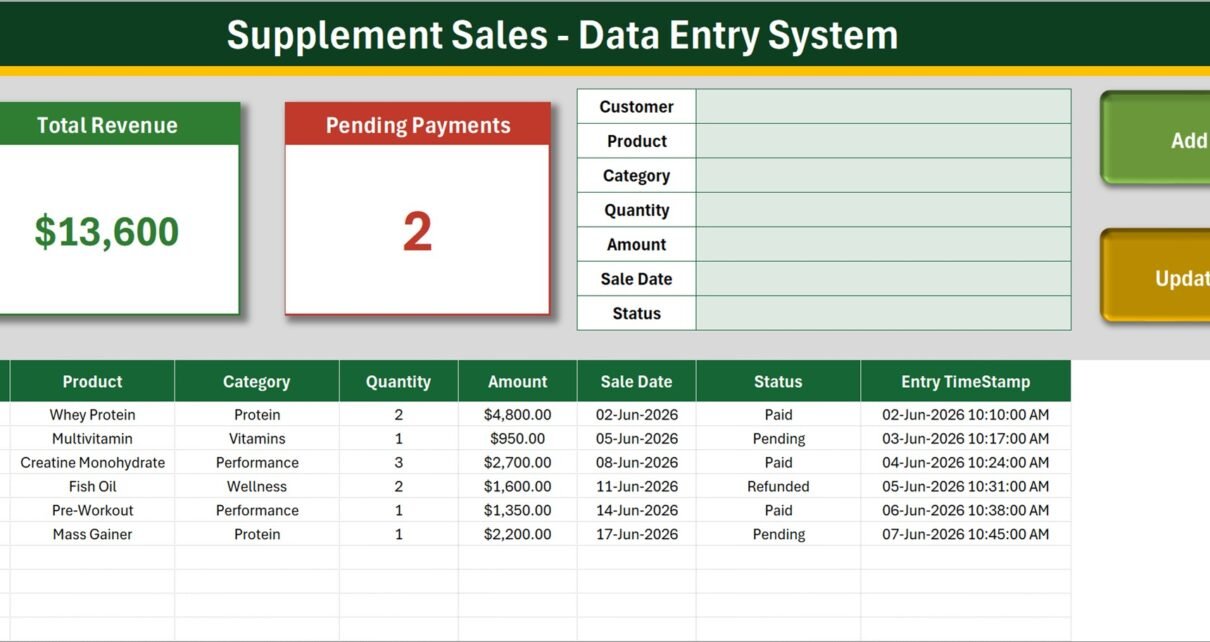
The Supplement Sales Data Entry System in Excel is a macro-enabled workbook built around one job: recording supplement orders quickly and accurately. It ships with a 7-field entry form, 3 live KPI cards, a 10-column records table, 4 VBA buttons and 4 sheets. The Setting sheet arrives pre-filled with 10 products, 6 categories and 4 payment statuses, all of which you can edit in about a minute.
Most small supplement retailers and distributors end up with the same problem: sales are recorded in a plain spreadsheet where every row is typed by hand, category names drift (“Protein”, “protein”, “Proteins”), and nobody can say with confidence which invoices are still unpaid. This template fixes that by putting a guided form in front of the data and letting VBA write the rows.
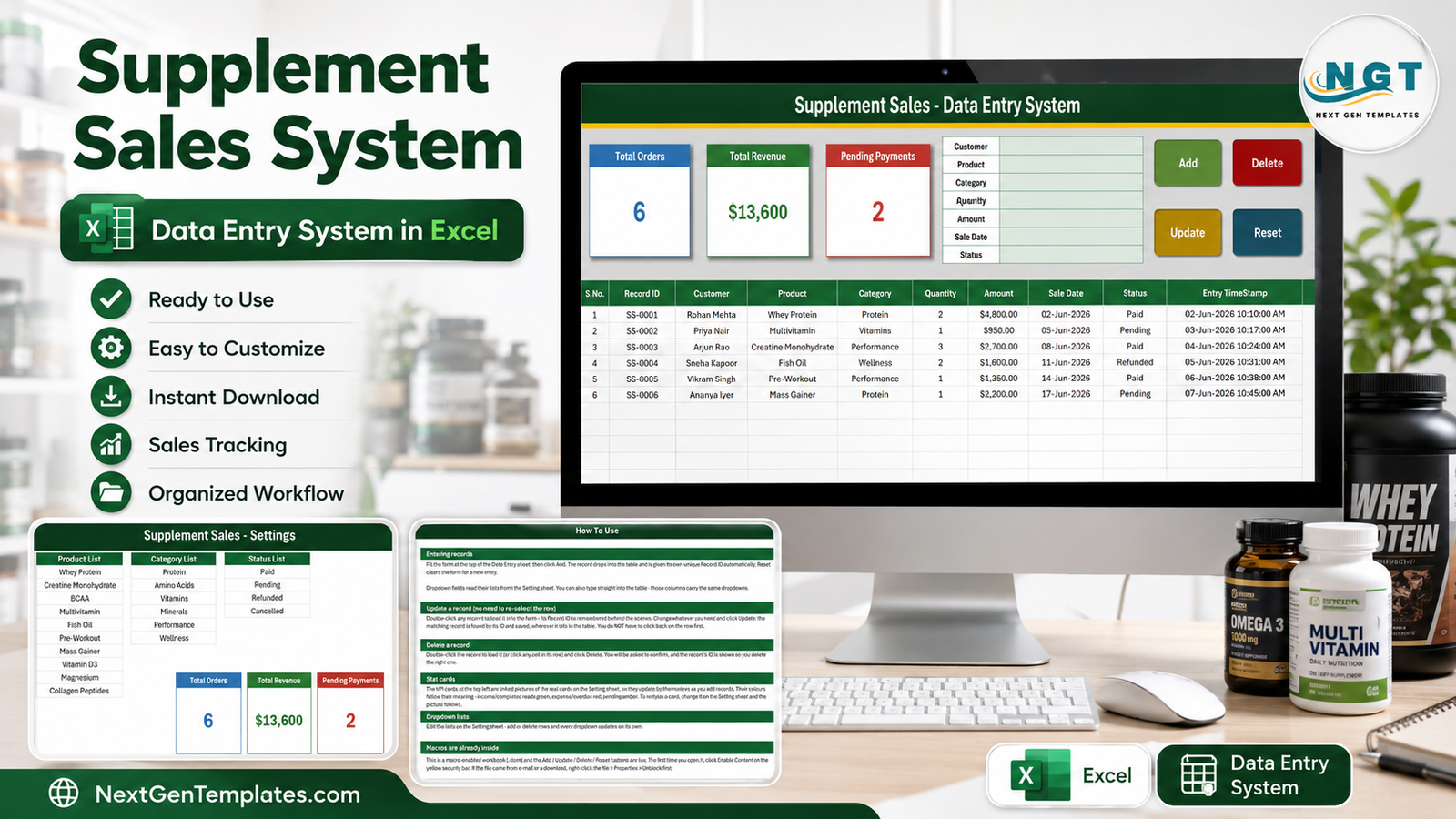
A note on scope: this is a sales and stock record-keeping tool for a retail or distribution business. It records transactions – who bought what, for how much, on what date, and whether payment cleared. It makes no health, nutrition, dosage or efficacy claims, and it offers no labelling or regulatory guidance. Every product name and figure in the screenshots below is sample data.
Key Features of the Supplement Sales Data Entry System in Excel
- A 7-field entry form. Customer, Product, Category, Quantity, Amount, Sale Date and Status. Product, Category and Status are dropdowns fed from the Setting sheet, so the three fields most likely to be mistyped are the three you cannot mistype.
- Four VBA buttons. Add writes a new record, Update saves an edited one, Delete removes a record after confirming, and Reset clears the form ready for the next entry. There is nothing else to learn.
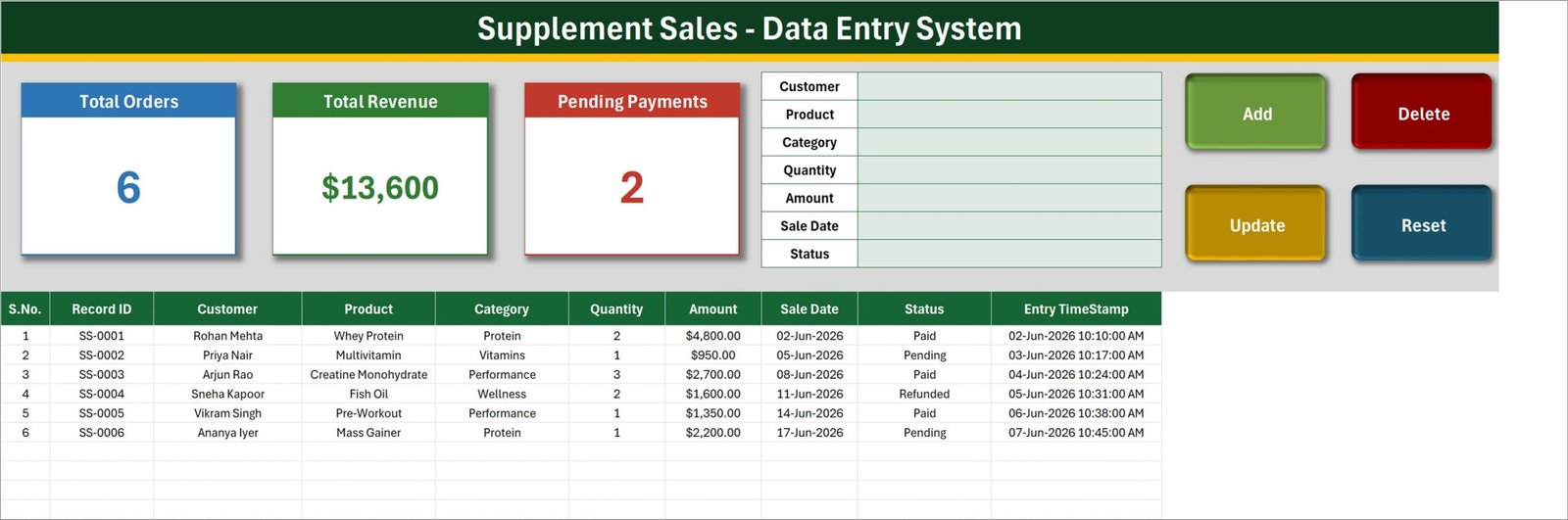
- Three KPI cards. Total Orders, Total Revenue and Pending Payments sit above the table and change the moment a record is saved. They are linked pictures of the real cards on the Setting sheet, so restyling one restyles both.
- Automatic Record IDs. Each sale gets a sequential ID in the SS-0001 format plus an Entry TimeStamp. Because updates match on the ID rather than the row position, you can sort or filter the table freely and editing still lands on the right record.
- A 10-column records table. S.No., Record ID, Customer, Product, Category, Quantity, Amount, Sale Date, Status and Entry TimeStamp – ordinary Excel columns you can filter, sort, pivot or copy into a report.
- Editable lists. Ten products, six categories and four statuses ship as samples. Add rows, delete rows, rename them – the dropdowns follow without any formula edits.
Template Structure – Sheet by Sheet
The download is one .xlsm file containing four sheets.
Sheet 1: Data Entry
The screen you actually work on. The KPI cards (Total Orders, Total Revenue, Pending Payments) run across the top left, the 7-field form sits in the middle, and the Add, Update, Delete and Reset buttons are on the right. Below all of it, the records table logs every saved sale with its Record ID and timestamp.
Sheet 2: Setting
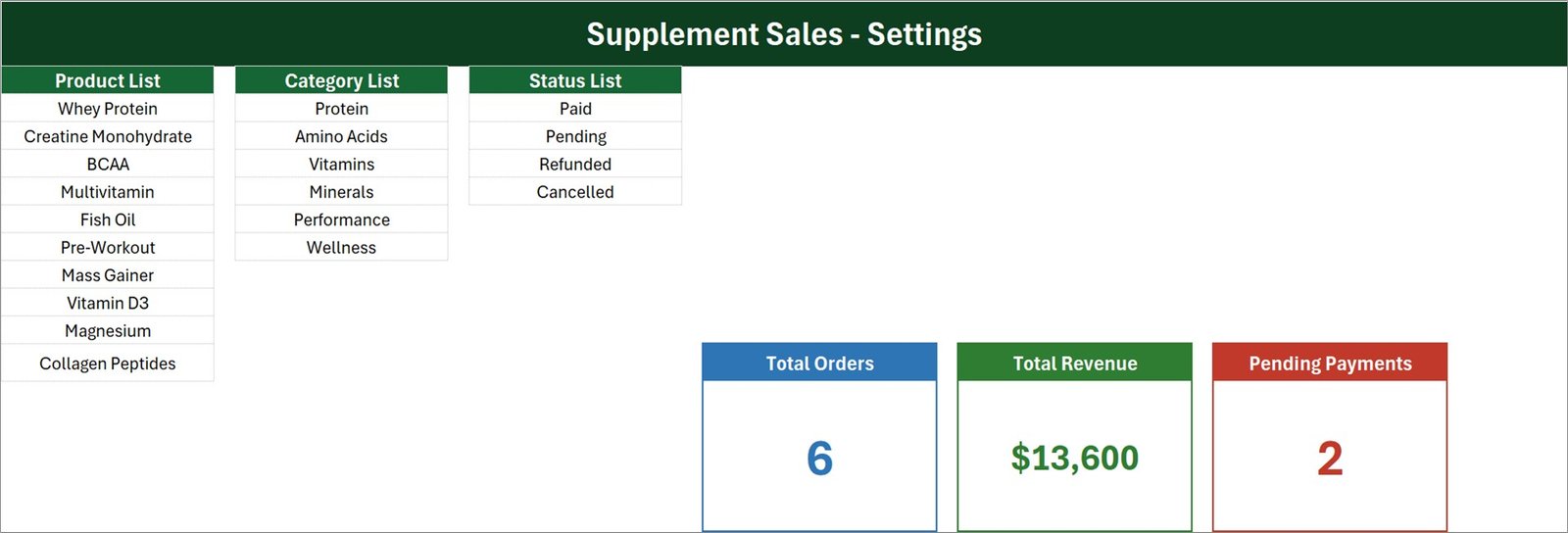
The control sheet. The Product List holds ten sample items (Whey Protein, Creatine Monohydrate, BCAA, Multivitamin, Fish Oil, Pre-Workout, Mass Gainer, Vitamin D3, Magnesium, Collagen Peptides), the Category List holds six (Protein, Amino Acids, Vitamins, Minerals, Performance, Wellness) and the Status List holds four (Paid, Pending, Refunded, Cancelled). The three source KPI cards live here too – the Data Entry sheet just mirrors them.
Sheet 3: Instructions
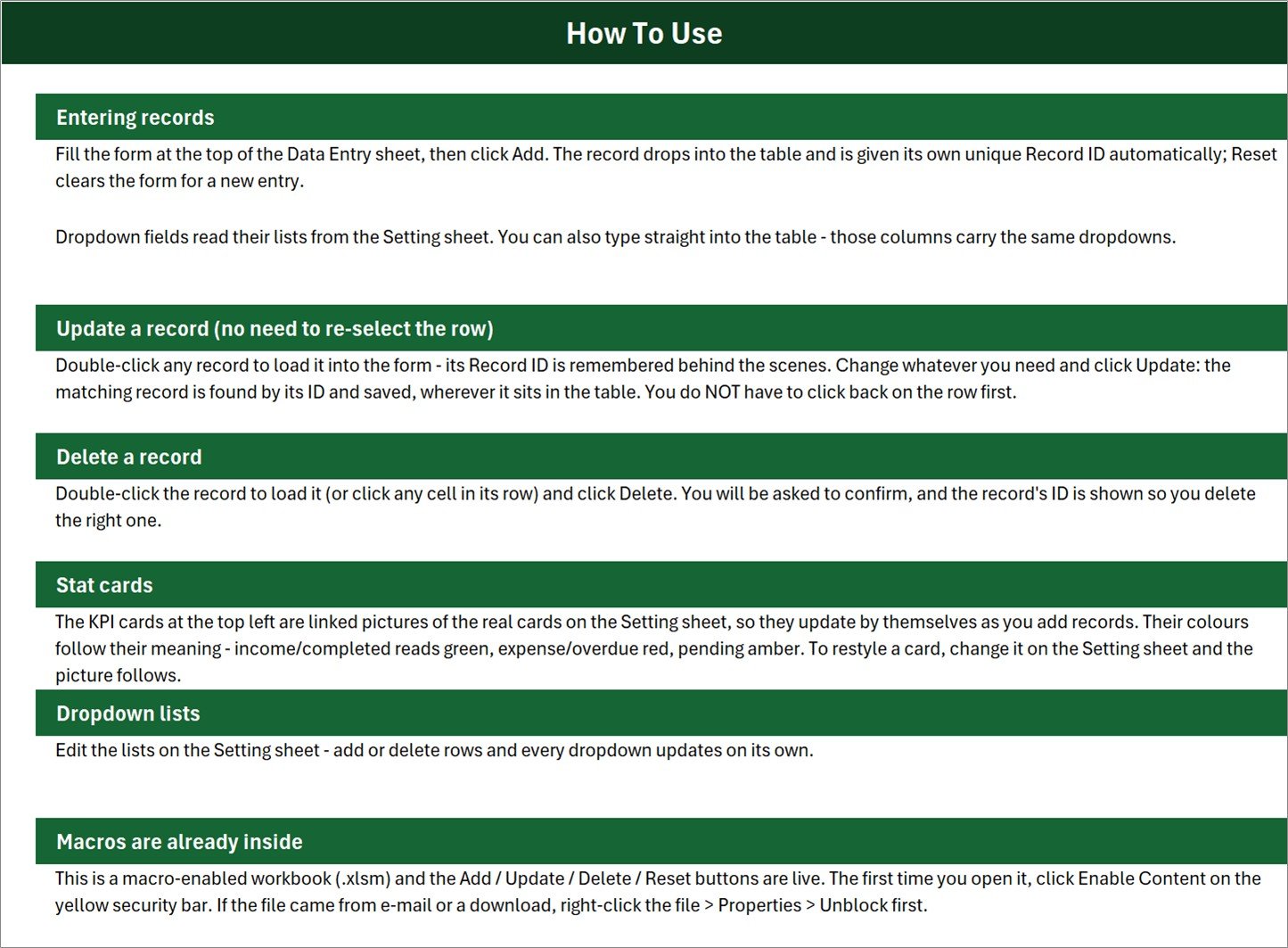
A built-in How To Use page covering entering records, updating a record without re-selecting its row, deleting safely, how the stat cards are wired, how to edit the dropdown lists, and the macro-security step needed on first open. It means the workbook can be handed to a new staff member without a training session.
Sheet 4: Get More Templates
A short in-workbook page pointing back to the wider NextGenTemplates library.
Supplement Sales Data Entry System in Excel vs. a Google Sheets Log vs. Retail POS Software – Feature Comparison
| Feature | Supplement Sales Data Entry System in Excel | Google Sheets sales log | Zoho Inventory / Square for Retail |
|---|---|---|---|
| Cost | $6.99 one-time | Free, but you build it yourself | $29-99 / month, per location |
| Platform | Desktop Microsoft Excel (.xlsm) | Browser, any device | Cloud app + card reader |
| Setup time | Under 10 minutes | 2-4 hours to build form and formulas | 1-2 days incl. catalogue import |
| Guided entry form with dropdowns | Built in, 7 fields | You have to build it | Yes |
| Update and delete a record safely | Yes – ID-matched, with confirmation | Manual row editing | Yes |
| Real-time team collaboration | No – single desktop file | Yes | Yes |
| Mobile access | No | Yes | Yes |
| Data stays on your own machine | Yes | Stored in Google Drive | Stored on the vendor’s cloud |
| Year-1 cost at 5 users | $6.99 total | $0 + your build time | $1,700-5,900 |
For a supplement store or distributor that wants a clean, auditable sales log without paying for POS software it does not need, the Supplement Sales Data Entry System in Excel sits in the sweet spot.
Who Should Use This Template
Perfect for:
- Independent supplement and nutrition retailers logging 10-500 orders a month
- Small distributors and wholesalers who invoice offline and need to see what is still unpaid
- Gym and studio owners reselling products at the counter alongside memberships
- Online sellers consolidating marketplace exports into one Excel log with payment status
- Bookkeepers and virtual assistants who want structure instead of a raw sheet
Not a fit if:
- Several people need to enter sales at the same time – this is one desktop file, not a shared database
- You work only in Google Sheets or Excel for the web – neither runs the VBA behind the buttons
- You need card processing, barcode scanning, batch or expiry tracking, or automatic stock deduction
- You are looking for product, health or regulatory guidance – the workbook records transactions and nothing else
Real-World Use Cases
Nadia runs a single-store supplement shop. At close she logs the day’s counter sales through the form, marks card payments Paid and account customers Pending, and checks the Pending Payments card each Monday to see who still owes her. One till, one file, no monthly POS bill.
Marcus supplies gyms in three cities. Every wholesale order is entered as it ships. He uses the Category List to keep Protein, Performance and Wellness lines separate, then pivots the records table at month end to see which categories carried the revenue and which are drifting.
Priya keeps the books for two nutrition retailers. She runs one copy of the workbook per client, enters the month’s orders through the form, and hands back a filtered records table where Record IDs and timestamps reconcile line by line against the bank statement.
Advantages of the Supplement Sales Data Entry System in Excel
- Data quality by design. Three of the seven fields are dropdowns, so categories and statuses stay consistent and every later pivot or filter actually works.
- No monthly cost. At $6.99 one-time against $29-99 per month for POS software, the workbook pays for itself in the first week for a business that only needs a record.
- Minutes, not days, to adopt. Enable macros, swap the lists, delete the samples. There is no catalogue import, no account setup and no onboarding call.
- Safe editing. Because Update and Delete match on the Record ID rather than the selected row, the classic spreadsheet accident – overwriting the wrong line after a sort – simply does not happen.
- It stays Excel. The records table is a normal range, so anything you already do in Excel – pivot tables, charts, SUMIFS, Power Query – still works on top of it.
Opportunities for Improvement
Being straight about the limits is only fair:
- Single user. One person at a time. Two people cannot enter sales into the same file simultaneously.
- Desktop only. The VBA behind the four buttons will not run in Excel for the web, in Google Sheets, or reliably on a tablet. See Microsoft’s guidance on enabling macros in Microsoft 365 files before first use.
- No stock ledger. Quantity is recorded per sale, but nothing is deducted from an inventory count and there is no batch or expiry field. Pair it with a purchase or stock register if you need both halves.
- No built-in charts. The three KPI cards are the whole visual layer. If you want trends by month or by category you will build a pivot chart on top of the records table yourself.
- Macro-security friction. Files downloaded from the internet arrive blocked on Windows; the file has to be unblocked via right-click, Properties, Unblock before Enable Content will stick.
Best Practices
- Set up the Setting sheet before the first real entry. Retro-fitting categories after 200 records is tedious.
- Keep the Product List short and specific. Ten to thirty items covers most independent retailers; a list of 300 turns the dropdown into a scroll.
- Use Status honestly. Pending should mean money you are actually waiting on – that is what makes the Pending Payments card useful on a Monday morning.
- Save a clean, empty copy as your master before you start, so you can spin up a fresh file each financial year.
- Back up the file on a schedule. It is a single .xlsm – keep it in OneDrive or Drive so version history covers you.
- Build reports on a separate sheet with pivot tables pointed at the records table. Learn more about creating a PivotTable if you have not before.
Explore Relevant Templates
- Purchase and GRN Data-Entry System in Excel – the buying side of the same cycle.
- Bar Stock Register Data Entry System in Excel, Gift Register Data Entry System in Excel, Petty Reimbursement Data Entry System in Excel and Livestock Register Data Entry System in Excel – sibling systems running the same four-button engine.
- RetailTech Dashboard in Excel – a full multi-page retail dashboard for when the log has real history behind it.
- HealthTech Dashboard in Google Sheets – the browser-based option when the team needs shared access.
Related reading on this blog: Employee Document Data Entry System in Excel, Class Schedule Data Entry System in Excel, Pocket Money Log Data Entry System in Excel and Blood Donor Register Data Entry System in Excel.
Frequently Asked Questions
Do I have to enable macros?
Yes. The Supplement Sales Data Entry System in Excel is a macro-enabled .xlsm workbook and the Add, Update, Delete and Reset buttons are VBA. Click Enable Content on the yellow security bar the first time you open the file, or the buttons will not respond.
Does it work in Google Sheets or Excel for the web?
No. The Supplement Sales Data Entry System in Excel is a desktop Excel product. Neither Google Sheets nor Excel for the web runs VBA, so the four buttons will not function there. Use Microsoft Excel for Windows or Mac.
How long does setup take?
Under 10 minutes. Enable macros, replace the three lists on the Setting sheet, delete the six sample records and the Supplement Sales Data Entry System in Excel is ready for live entries. No formulas need rewiring.
Can I add my own products and categories?
Yes. The Setting sheet of the Supplement Sales Data Entry System in Excel holds all three dropdown sources – 10 products, 6 categories and 4 statuses by default. Add or delete rows and every dropdown, on the form and in the table, updates automatically.
How does this compare to Zoho Inventory or Square for Retail?
Those are full POS and inventory platforms with card processing at $29-99 per month. The Supplement Sales Data Entry System in Excel is a $6.99 one-time record-keeping workbook – it logs customers, products, amounts and payment status, and leaves processing to whatever you already use.
Does it manage stock levels or expiry dates?
No. The Supplement Sales Data Entry System in Excel records sales transactions only: product, category, quantity, amount, date and payment status. It does not deduct inventory, scan barcodes or hold batch or expiry information.
Is the data in the screenshots real?
No. Every customer name, product name and amount shown is sample data included to demonstrate the layout. Delete the six sample rows before you begin using the Supplement Sales Data Entry System in Excel.
About the Author
Built by PK – Microsoft Certified Professional with 15+ years of Excel, Google Sheets and Power BI experience. Founder of NextGenTemplates, reaching 300K+ subscribers across YouTube channels. Every template is hand-built and tested before release.
Conclusion
If your supplement sales currently live in an untidy spreadsheet, this workbook is the smallest possible step to a proper record: one guided form, four buttons, three KPI cards and a clean table with IDs and timestamps behind every line. It will not process a card or count your stock, and it is honest about that – but for logging what sold and who still owes you, it does the job in under ten minutes of setup.
Click here to Purchase the Supplement Sales Data Entry System in Excel
Instant download · One-time payment · No subscription
For step-by-step video walkthroughs, visit Youtube.com/@PK-AnExcelExpert.
Last updated: August 2026