Every business needs a proper cash flow management system to make smart financial decisions. Cash flow tells you whether your business has enough money to pay bills, invest in growth, and handle unexpected expenses. However, managing cash inflows and outflows manually becomes time-consuming and error-prone.
The Cash Flow Template in Excel solves this problem instantly. It provides a clean, ready-to-use solution to track monthly cash inflows, outflows, net cash, and closing balances. With automated formulas, easy data entry, and a visually appealing dashboard, the template gives you a real-time view of your financial health.
In this article, we will explain every component of the Cash Flow Template—including the Data Entry Sheet, Dashboard Sheet, inflow/outflow structure, charts, benefits, and best practices.
What Is a Cash Flow Template in Excel?
Click to Buy Cash Flow Template in Excel
A Cash Flow Template in Excel is a pre-built workbook used to record and analyze all incoming and outgoing cash for each month. It helps entrepreneurs, finance teams, accountants, and business owners track their liquidity with accuracy.
This template includes:
✔ A detailed monthly inflow/outflow table
✔ Automatically calculated net cash change
✔ Closing balance computation
✔ Visual dashboard with KPIs and charts
✔ A Waterfall chart that clearly shows movement from Opening to Closing Balance
The template is suitable for all industries—small businesses, startups, consulting firms, retail shops, manufacturing units, service companies, and more.
Data Entry Sheet Tab – Structure Explained
The Data Entry Sheet is the core part of the template. All monthly figures are entered here. Based on this sheet, the dashboard updates automatically.
1. Opening & Closing Balances
At the top of the sheet:
2. Cash Inflows
This section captures all sources of income.
Categories Included:
-
Sales Revenue
-
Investment Income
-
Loan Received
-
Other Income
You can also add custom fields such as OTHER1, OTHER2, OTHER3.
3. Cash Outflows
Click to Buy Cash Flow Template in Excel
This section includes business expenses and other payments.
Categories Included:
-
Operating Expenses
-
Employee Salaries
-
Loan Repayment
-
Asset Purchase
-
Miscellaneous Expenses
-
Other Custom Fields
Example of Outflows
🔹 4. Net Cash Change & Net Cash Flow
-
Net Cash Change shows the difference between monthly inflow and outflow
-
Net Cash Flow includes cumulative effect + starting balance
These sections instantly help you understand whether the business generated or consumed cash.
Click to Buy Cash Flow Template in Excel
Dashboard Sheet Tab – Visual & KPI Insights
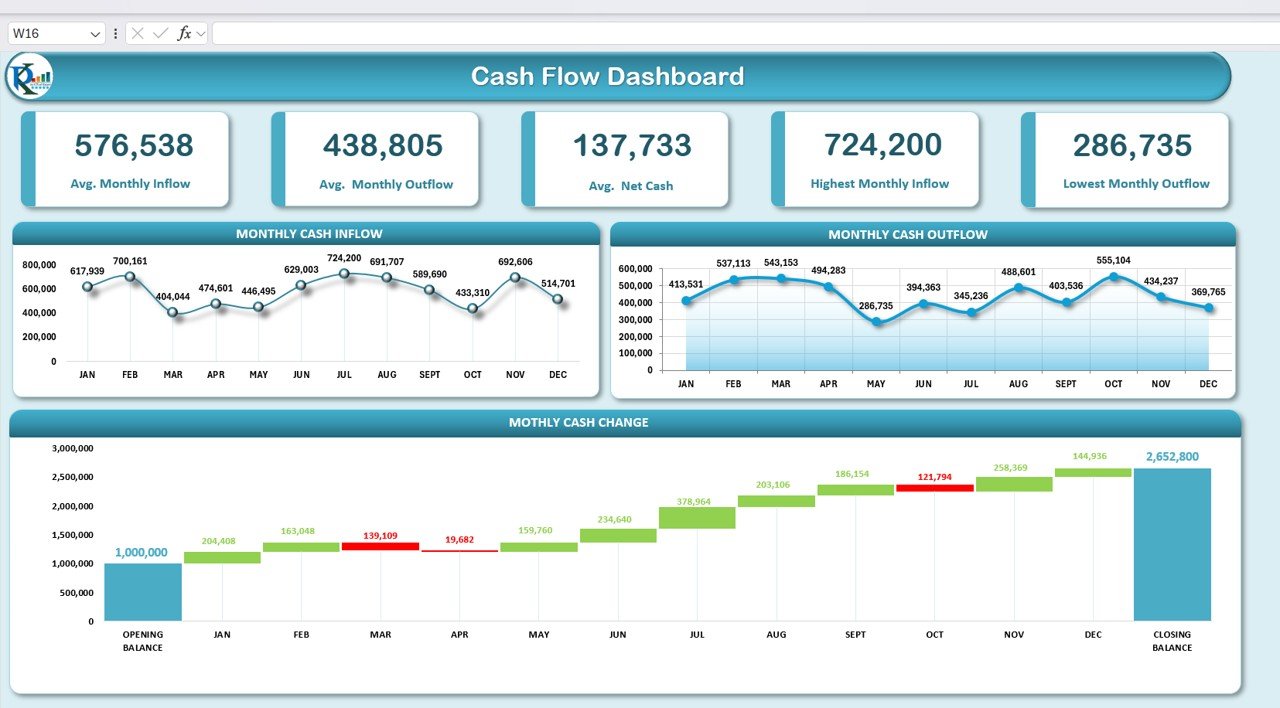
The Dashboard Sheet gives an instant view of cash health.
Dashboard Cards
1. Average Monthly Inflow
Shows the average income per month.
2. Average Monthly Outflow
Displays average spending per month.
3. Average Net Cash Flow
Indicates whether the business is generally cash positive or cash negative.
4. Highest Monthly Inflow
Finds the month where business earned most.
5. Lowest Monthly Outflow
Shows the most efficient cost month.
These KPIs help financial teams assess performance immediately.
Dashboard Charts
Click to Buy Cash Flow Template in Excel
1. Monthly Cash Inflow Chart
Visualizes inflow patterns month-wise.
2. Monthly Cash Outflow Chart
Shows where expenses rise or fall.
3. Waterfall Chart
This is one of the most powerful tools in cash flow reporting.
It visually displays:
-
Starting balance
-
Each month’s net cash movement
-
Final closing balance
This helps stakeholders understand the cash journey throughout the year.
Click to Buy Cash Flow Template in Excel
Advantages of Using This Cash Flow Template
-
Helps forecast cash needs
-
Identifies months with low liquidity
-
Helps plan investments and expense control
-
Simple and intuitive dashboard
-
Automatically calculates totals, balances, and net cash
-
Helps prepare monthly financial reports
-
Good for budgeting and financial planning
-
No coding or complex formulas required
Opportunities for Improvement
Click to Buy Cash Flow Template in Excel
You can enhance the template with:
-
Automated year-to-date variance analysis
-
Conditional formatting for negative months
-
Dynamic charts for inflow/outflow comparison
-
Department-wise cash segmentation
-
Rolling 12-month forecast
-
Integration with bank statements for automated updates
Best Practices for Cash Flow Management
-
Update inflows and outflows weekly
-
Categorize expenses properly
-
Review the dashboard monthly
-
Maintain a buffer for unexpected expenses
-
Track large, one-time payments separately
-
Compare cash flow with budgeted values
-
Always monitor net cash and closing balance
Conclusion
Click to Buy Cash Flow Template in Excel
The Cash Flow Template in Excel is a powerful tool that simplifies financial tracking for businesses of all sizes. With clear inflow/outflow tables, automated totals, and an interactive dashboard, it helps businesses maintain financial clarity and build stronger cash strategies.
If you want to improve your budgeting, manage liquidity, and make better decisions, this template gives you everything you need in a single, easy-to-use system.
Frequently Asked Questions (FAQ)
1. Can I customize the categories?
Yes, you can add more inflow/outflow fields as needed.
2. Does the template calculate closing balance automatically?
Yes, it uses formulas to compute opening, monthly net changes, and closing balance.
3. Can I use this for multi-year cash flow?
Yes — duplicate the sheet and update months accordingly.
4. Is the dashboard dynamic?
Yes — charts and KPIs update automatically based on Data Entry values.
5. Do I need Excel expertise to use this?
No, the template is easy and beginner-friendly.
Visit our YouTube channel to learn step-by-step video tutorials
Click to Buy Cash Flow Template in Excel