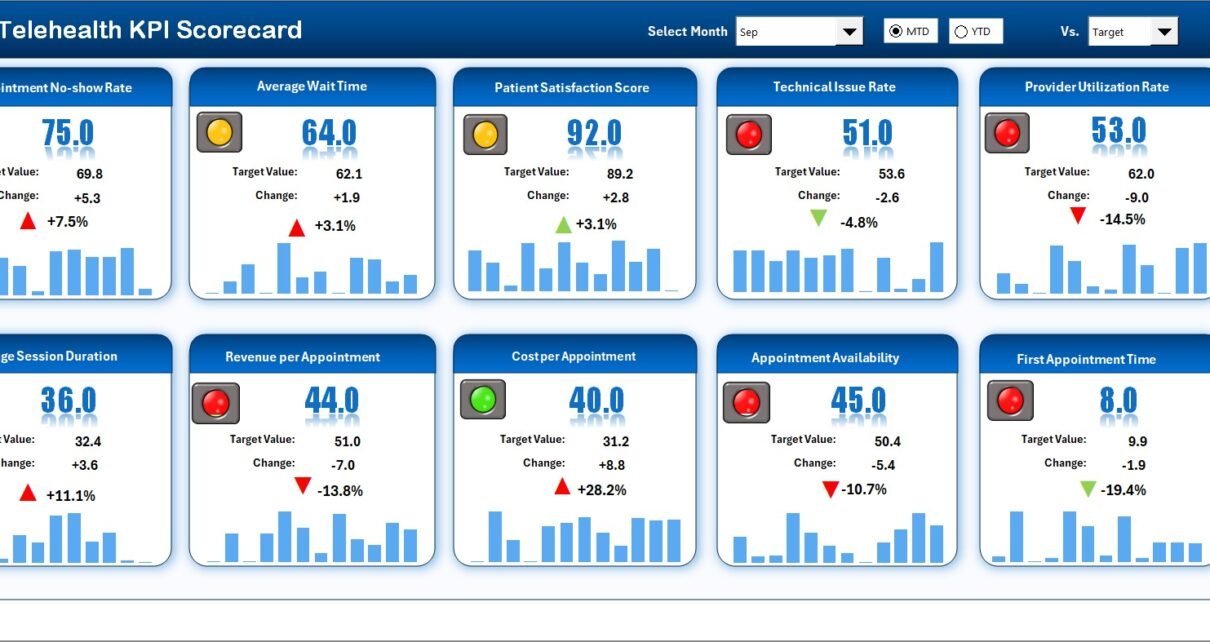
Telehealth has transformed healthcare delivery by making medical services accessible, faster, and more convenient. However, managing telehealth operations without proper performance tracking creates challenges. Healthcare providers often struggle to measure appointment efficiency, patient satisfaction, clinician productivity, and service quality. As a result, decision-making becomes reactive instead of proactive.
That is exactly where a Telehealth KPI Scorecard in Excel becomes a powerful and practical solution.
In this detailed article, you will learn what a Telehealth KPI Scorecard in Excel is, why healthcare organizations need it, how it works, its worksheet-wise structure, key features, advantages, best practices, and frequently asked questions. Moreover, this guide uses clear explanations and real-world logic so you can apply it immediately.
Click to Purchases Telehealth KPI Scorecard in Excel
What Is a Telehealth KPI Scorecard in Excel?
A Telehealth KPI Scorecard in Excel is a structured performance-tracking tool designed to monitor key telehealth metrics in one centralized view. Instead of reviewing scattered reports or multiple dashboards, healthcare teams use this scorecard to evaluate performance consistently.
Because the scorecard is built in Excel, it remains flexible, easy to use, and cost-effective. Moreover, users can update data quickly and track MTD and YTD performance without complex systems.
As a result, healthcare leaders gain clarity, control, and confidence while managing telehealth services.
Why Do Healthcare Organizations Need a Telehealth KPI Scorecard?
Telehealth operations involve multiple moving parts. However, without structured KPI tracking, performance gaps often go unnoticed.
Healthcare organizations need a Telehealth KPI Scorecard because:
-
Patient volumes fluctuate every month
-
Appointment completion rates vary
-
Clinician availability impacts service quality
-
Technical issues affect patient satisfaction
-
Regulatory and compliance metrics require tracking
Therefore, a Telehealth KPI Scorecard in Excel helps organizations monitor performance continuously and take timely corrective actions.
Key Objectives of a Telehealth KPI Scorecard in Excel
This scorecard supports several operational and strategic goals:
-
Centralize telehealth KPIs in one file
-
Track performance using MTD and YTD views
-
Compare Actual vs Target results clearly
-
Analyze trends over time
-
Improve service quality and patient experience
-
Support data-driven healthcare decisions
Key Features of the Telehealth KPI Scorecard in Excel
This ready-to-use Telehealth KPI Scorecard includes a clean design and practical analytics features.
Click to Purchases Telehealth KPI Scorecard in Excel
Worksheet Structure of the Telehealth KPI Scorecard in Excel
The scorecard contains 4 well-organized worksheets, each designed for a specific purpose.
1. Scorecard Sheet – Main Performance View
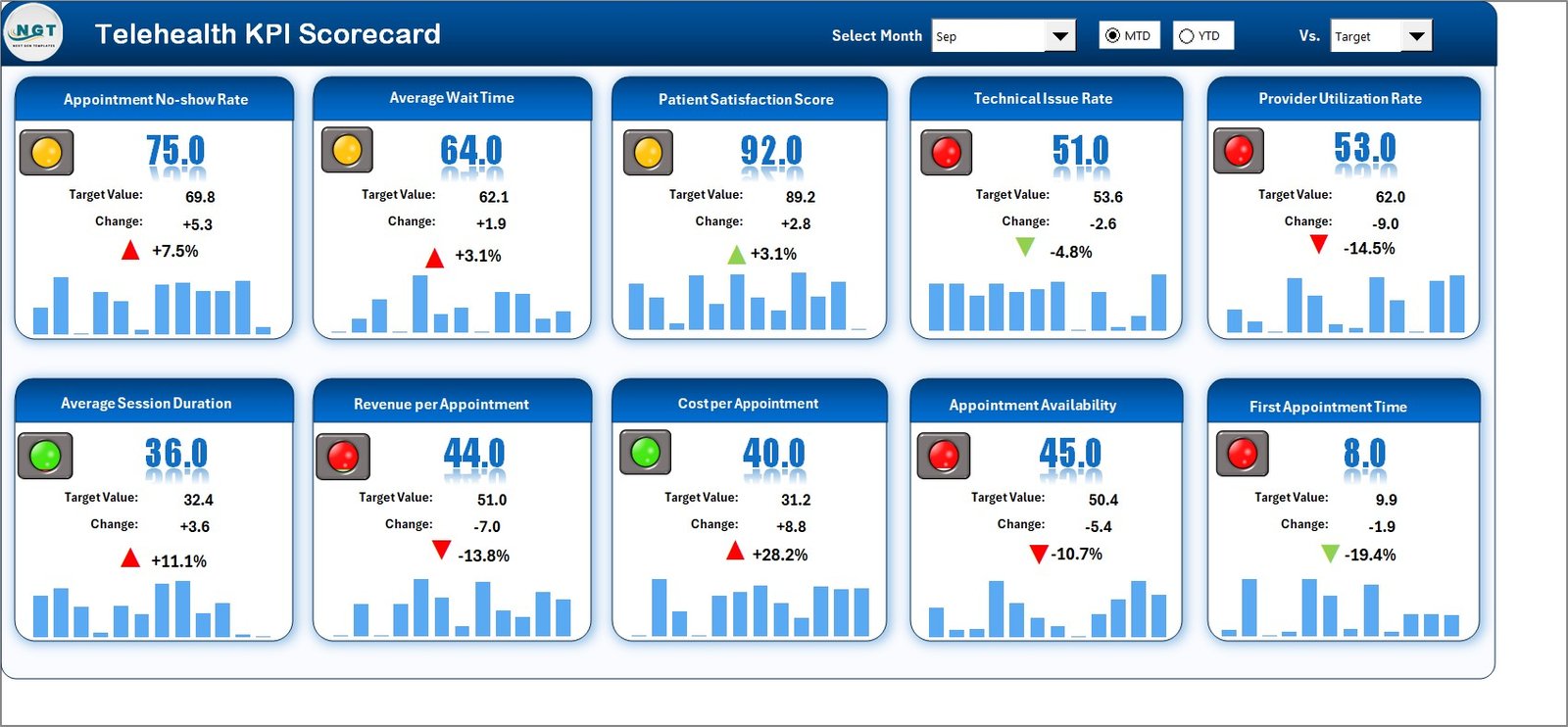
The Scorecard Sheet acts as the primary interface of the Telehealth KPI Scorecard.
Key Features of the Scorecard Sheet:
Dropdown Menus for Easy Analysis
-
Select the Month
-
Switch between MTD (Month-to-Date) and YTD (Year-to-Date)
-
Instantly refresh all KPI values
This flexibility allows users to analyze performance from different perspectives.
Actual vs Target Comparison
The scorecard clearly displays:
-
Actual KPI values
-
Target KPI values
As a result, users instantly understand whether performance meets expectations.
Visual Performance Indicators
The scorecard uses:
-
Color-coded indicators
-
Conditional formatting
These visuals highlight good and poor performance quickly, without reading raw numbers.
Comprehensive KPI Overview
The Scorecard Sheet shows:
-
KPI Name
-
KPI Group
-
Unit of measurement
-
MTD performance
-
YTD performance
Therefore, decision-makers get a complete snapshot of telehealth performance in one view.
Click to Purchases Telehealth KPI Scorecard in Excel
2. KPI Trend Sheet – Detailed KPI Analysis
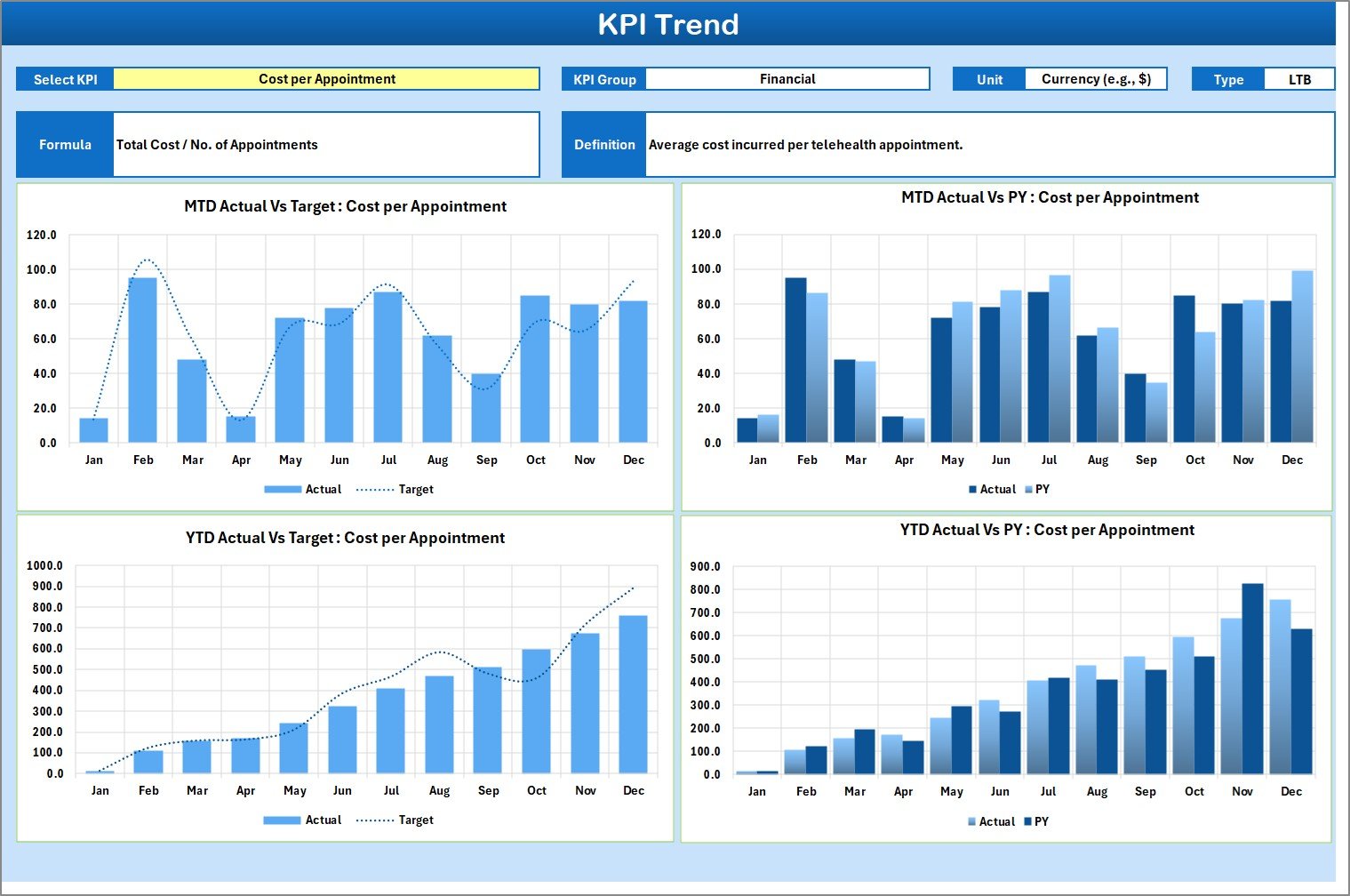
The KPI Trend Sheet provides deeper insights into individual KPIs.
How the KPI Trend Sheet Works:
-
KPI selection drop-down available at cell C3
-
Automatic update of KPI details and charts
Information Displayed on the KPI Trend Sheet:
-
KPI Group
-
Unit of KPI
-
KPI Type
-
LTB (Lower the Better)
-
UTB (Upper the Better)
-
-
KPI Formula
-
KPI Definition
This information ensures clarity and consistency for all users.
Trend Charts Included:
-
MTD Trend Chart
-
YTD Trend Chart
Each chart compares:
-
Actual values
-
Target values
-
Previous Year (PY) values
As a result, users identify patterns, seasonality, and performance gaps easily.
Click to Purchases Telehealth KPI Scorecard in Excel
3. Input Data Sheet – Central Data Entry Point
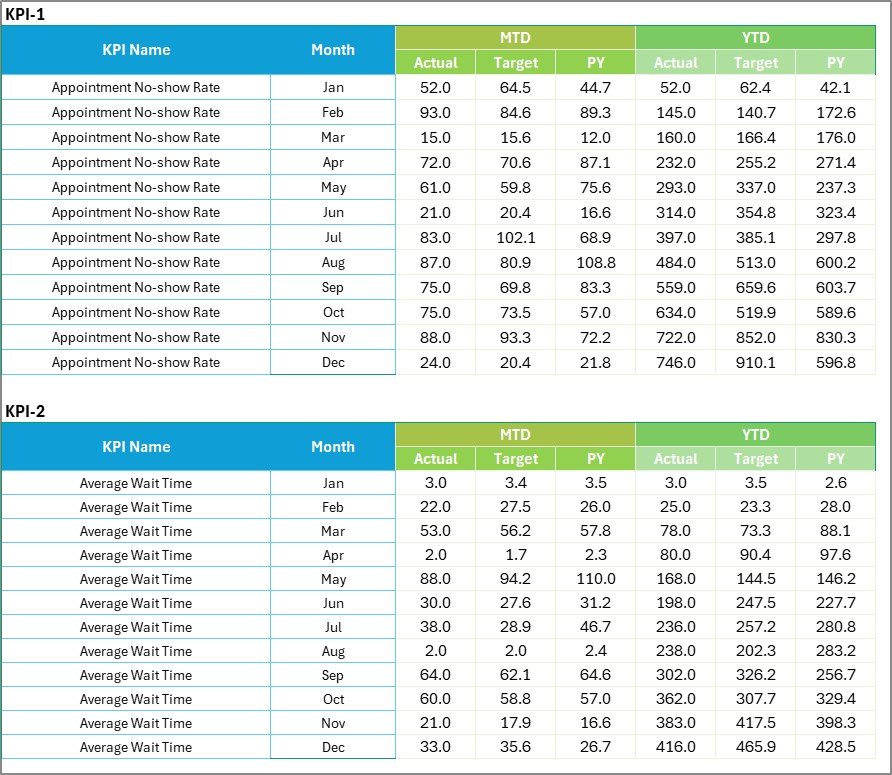
The Input Data Sheet is where users enter all KPI data.
Key Features of the Input Data Sheet:
Structured Data Entry
Users enter:
-
Actual KPI values
-
Target KPI values
-
Monthly data
This structure ensures accuracy and consistency.
Flexibility and Ease of Updates
Because the sheet uses Excel:
-
Data updates remain simple
-
New data integrates seamlessly
-
The scorecard stays current
Therefore, healthcare teams avoid manual recalculations and reporting delays.
4. KPI Definition Sheet – KPI Reference Guide

The KPI Definition Sheet acts as a documentation and reference page.
Information Captured:
-
KPI Name
-
KPI Group
-
Unit of measurement
-
KPI Formula
-
KPI Definition
This sheet ensures everyone interprets KPIs in the same way, which improves alignment across teams.
What KPIs Can Be Tracked in a Telehealth KPI Scorecard?
A Telehealth KPI Scorecard can track KPIs across multiple categories.
Clinical Performance KPIs
-
Appointment Completion Rate
-
Average Consultation Duration
-
Follow-Up Compliance Rate
Operational KPIs
-
Appointment No-Show Rate
-
Provider Utilization Rate
-
Average Wait Time
Patient Experience KPIs
-
Patient Satisfaction Score
-
First Contact Resolution Rate
-
Repeat Consultation Rate
Technology & Quality KPIs
-
Platform Downtime
-
Call Drop Rate
-
Technical Issue Resolution Time
Advantages of Telehealth KPI Scorecard in Excel
Using a Telehealth KPI Scorecard in Excel provides several advantages.
1. Centralized Performance Monitoring
All telehealth KPIs appear in one scorecard, which saves time and reduces confusion.
2. Faster Decision-Making
Because performance indicators update instantly, leaders take timely action.
3. Improved Patient Experience
Tracking service quality metrics helps improve satisfaction and care delivery.
4. Better Resource Utilization
Clinician productivity and availability become easier to manage.
5. Easy Customization
Excel allows users to add KPIs, adjust targets, and modify layouts easily.
6. Cost-Effective Solution
The scorecard works without expensive telehealth analytics tools.
Click to Purchases Telehealth KPI Scorecard in Excel
Best Practices for Telehealth KPI Scorecard in Excel
To maximize the value of the scorecard, follow these best practices.
Define KPIs Clearly
Ensure every KPI has a clear definition and formula.
Update Data Regularly
Keep Actual and Target values up to date to maintain accuracy.
Review Trends Consistently
Analyze both MTD and YTD trends instead of focusing on a single month.
Align KPIs with Healthcare Goals
Choose KPIs that support quality, efficiency, and patient outcomes.
Train Scorecard Users
Ensure teams understand how to read and interpret KPI results.
Maintain Clean Data
Consistent data entry improves reliability and trust in the scorecard.
Who Can Use a Telehealth KPI Scorecard?
This scorecard suits a wide range of healthcare professionals:
-
Telehealth program managers
-
Healthcare administrators
-
Clinical operations teams
-
Quality assurance teams
-
Hospital leadership
-
Healthcare analysts
How Does This Scorecard Improve Telehealth Performance?
The Telehealth KPI Scorecard improves performance by:
-
Reducing manual reporting effort
-
Improving operational transparency
-
Highlighting underperforming areas early
-
Supporting continuous improvement
-
Enabling data-driven healthcare decisions
Conclusion
A Telehealth KPI Scorecard in Excel transforms raw telehealth data into meaningful insights. Instead of relying on disconnected reports, healthcare organizations gain a single, structured, and easy-to-use performance tool.
With features like MTD and YTD tracking, Actual vs Target comparison, KPI trend analysis, and clear KPI definitions, this scorecard supports better service quality, improved efficiency, and higher patient satisfaction.
For healthcare organizations focused on growth and quality, this scorecard becomes an essential management tool.
Click to Purchases Telehealth KPI Scorecard in Excel
Frequently Asked Questions (FAQs)
What is a Telehealth KPI Scorecard in Excel?
It is an Excel-based scorecard used to track telehealth KPIs using MTD, YTD, Actual, Target, and trend analysis.
Can I customize the KPIs?
Yes, you can easily add, remove, or modify KPIs in Excel.
Do I need advanced Excel skills?
No, basic Excel knowledge is enough to use the scorecard.
How often should I update the data?
You should update the data monthly or as frequently as needed.
Is this scorecard suitable for small clinics?
Yes, it works for small clinics, hospitals, and large healthcare networks.
Click to Purchases Telehealth KPI Scorecard in Excel
Visit our YouTube channel to learn step-by-step video tutorials