Managing software licenses manually is one of the fastest ways to lose control over compliance, renewals, and IT assets. As organizations grow, tracking licenses across vendors, devices, employees, and departments becomes increasingly complex.
That is exactly where Software License Management System V1.0 comes in.
This Excel and VBA-based, ready-to-use tool is designed to help businesses centrally manage software licenses, assignments, users, vendors, and reports—all from a single, secure Excel desktop application.
If you are looking for a powerful yet simple Software License Management System without investing in expensive enterprise software, this tool is the perfect solution.
Click to Purchases Software License Management System V1.0
What Is Software License Management System V1.0?
Software License Management System V1.0 is a professionally designed Excel + VBA tool that enables you to:
-
Track software licenses in a structured inventory
-
Assign licenses to employees and devices
-
Maintain vendor, software, and device masters
-
Control user access with role-based permissions
-
Generate license reports instantly in Excel format
It works entirely within Microsoft Excel Desktop, making it familiar, flexible, and cost-effective for small to mid-sized organizations.
Key Features of Software License Management System V1.0
🔐 Secure Login Form

The tool starts with a secure login screen, ensuring controlled access to the system.
Default Login Credentials
Admin Role
-
Username:
Admin1 -
Password:
abcd
User Role
-
Username:
User1 -
Password:
abcd
Once logged in, users are redirected to the main management interface based on their assigned access rights.
🧭 Main Form – Central Control Panel

The Main Form acts as the operational hub of the entire system. From here, you can manage, update, and analyze all license-related data.
📋 Central List Box
-
Displays all relevant records in a structured format
-
Allows quick selection and review of data
🔍 Advanced Filters
-
Filter data by date range
-
Filter by selected column values
🔃 Sort Functionality
-
Sort records directly from the interface
-
Helps organize data quickly without manual effort
🎛️ Control Buttons on Main Form
The system provides intuitive action buttons for everyday operations:
-
Add New Record
-
Add a new software license entry instantly
-
-
Update Existing Record
-
Select a record and update it
-
Double-click on any record to open the update form
-
-
Delete Record
-
Remove unwanted or obsolete records safely
-
-
Export to Excel
-
Export filtered or complete data into a new Excel file
-
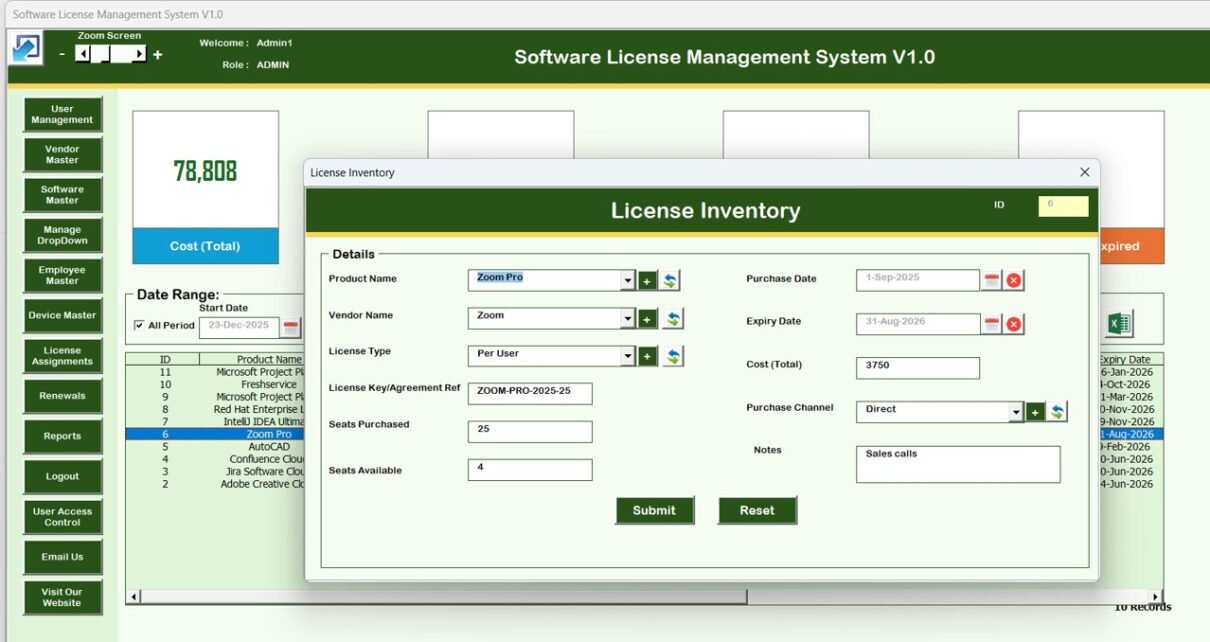
📦 License Inventory Form

The License Inventory Form opens when adding or updating records.
This form allows you to:
-
Enter structured license details
-
Update existing inventory data
-
Maintain consistency across records
Navigation Menu – Complete License Management Ecosystem
Click to Purchases Software License Management System V1.0
The left-side navigation menu provides access to all major modules:
🏢 Firm Information
-
Update and save your company or firm details
👥 User Management

-
Add, update, delete users
-
Reset passwords
-
Change user credentials
📑 Manage Lists

-
Manage dropdown and reference lists
-
Add or delete list values
🧾 Vendor Master

-
Maintain a centralized vendor database
💻 Software Master

-
Store all software product details
👤 Employee Master

-
Maintain employee information for license assignments
🖥️ Device Master

-
Track devices linked to licenses
-
Click to Purchases Software License Management System V1.0
🔗 License Assignments

-
Assign software licenses to employees and devices
📊 Reports

-
Generate Excel-based reports
-
Filter reports by selected date ranges
🔐 Manage User Access Control
Click to Purchases Software License Management System V1.0

-
Assign role-based access permissions
-
Available only for Admin users
🚪 Logout
-
Saves all data securely
-
Closes forms and Excel file safely
📧 Email Us
-
Contact support for customization or assistance
🌐 Visit Our Website
-
Access and purchase additional tools and templates
System Compatibility & Important Notes ⚠️
Click to Purchases Software License Management System V1.0
Please review the compatibility requirements carefully:
-
✅ Compatible with Windows 10 and above
-
✅ Requires Microsoft Excel 2010 or later (Desktop version only)
-
❌ Not supported on Mobile or Tablet devices
-
❌ Not compatible with Mac Operating System
This tool works only on Microsoft Excel Desktop installed on a laptop or desktop computer.
Advantages of Software License Management System V1.0
-
✅ Eliminates manual license tracking
-
✅ Centralized control over software assets
-
✅ Secure role-based access control
-
✅ Easy-to-use Excel interface
-
✅ No recurring subscription cost
-
✅ Export-ready Excel reports
-
✅ Ideal for IT teams, admins, and small businesses
Opportunities for Improvement
-
🔧 Can be extended with SQL Server integration
-
🔧 Email alerts for license expiry can be added
-
🔧 Dashboard visuals can be integrated for analytics
-
🔧 Cloud-based version can be developed for remote access
Best Practices for Using This Tool
-
📌 Assign Admin access only to authorized users
-
📌 Update license inventory regularly
-
📌 Maintain accurate employee and device masters
-
📌 Export reports periodically for audits
-
📌 Take regular backups of the Excel file
Who Should Use This Tool?
This Software License Management System is ideal for:
-
IT Administrators
-
Small and Medium-Sized Businesses
-
Corporate Offices
-
Software Asset Managers
-
Compliance and Audit Teams
Final Thoughts
Click to Purchases Software License Management System V1.0
The Software License Management System V1.0 is a powerful, cost-effective, and ready-to-use Excel solution for managing software licenses efficiently.
If you want full control over your software assets without expensive tools or complex systems, this Excel & VBA-based solution is the perfect choice.
📌 Simple. Secure. Scalable.
If you need customization, enhancements, or additional modules, feel free to reach out using the Email Us option inside the tool.
Visit our YouTube channel to learn step-by-step video tutorials