Vendor management plays a critical role in business success. Companies rely on suppliers for quality products, timely delivery, and cost efficiency. However, many organizations still track vendor evaluations using scattered notes or manual records. As a result, they miss deadlines. Moreover, they fail to measure performance consistently.
So, how can you track vendor evaluation tasks, monitor checklist completion, and improve supplier accountability in one structured system?
The answer is simple.
You need a Vendor Evaluation Tracking Checklist in Excel.
In this complete guide, you will learn:
-
What a Vendor Evaluation Tracking Checklist in Excel is
-
Why businesses need it
-
Detailed explanation of the 2 worksheets
-
Key checklist components
-
Advantages of Vendor Evaluation Tracking Checklist in Excel
-
Best Practices for Vendor Evaluation Tracking Checklist
-
Frequently Asked Questions with Answers
Let us explore everything step by step.
Click to Purchases Vendor Evaluation Tracking Checklist in Excel
What Is a Vendor Evaluation Tracking Checklist in Excel?
A Vendor Evaluation Tracking Checklist in Excel is a ready-to-use task management template that helps businesses monitor vendor evaluation activities in a structured way.
Instead of managing vendor assessments in emails or paper documents, you can:
-
Track evaluation tasks
-
Assign responsibilities
-
Monitor deadlines
-
Measure progress percentage
-
Identify pending actions
Because Excel provides flexibility and simplicity, you can use this template without any advanced tools.
Why Is Vendor Evaluation Important?
Vendor performance directly impacts product quality, service reliability, and operational efficiency. Therefore, businesses must evaluate vendors regularly.
When companies track vendor evaluation properly:
-
They reduce supply chain risks
-
They improve vendor accountability
-
They ensure compliance
-
They control costs effectively
-
They maintain service quality
However, without structured tracking, evaluation tasks often get delayed. Consequently, businesses face operational disruptions.
That is why a Vendor Evaluation Tracking Checklist in Excel becomes essential.
Click to Purchases Vendor Evaluation Tracking Checklist in Excel
How Does the Vendor Evaluation Tracking Checklist in Excel Work?
This ready-to-use template includes 2 powerful worksheets. Each sheet plays an important role in organizing vendor evaluation activities.
Let us understand both sheets in detail.
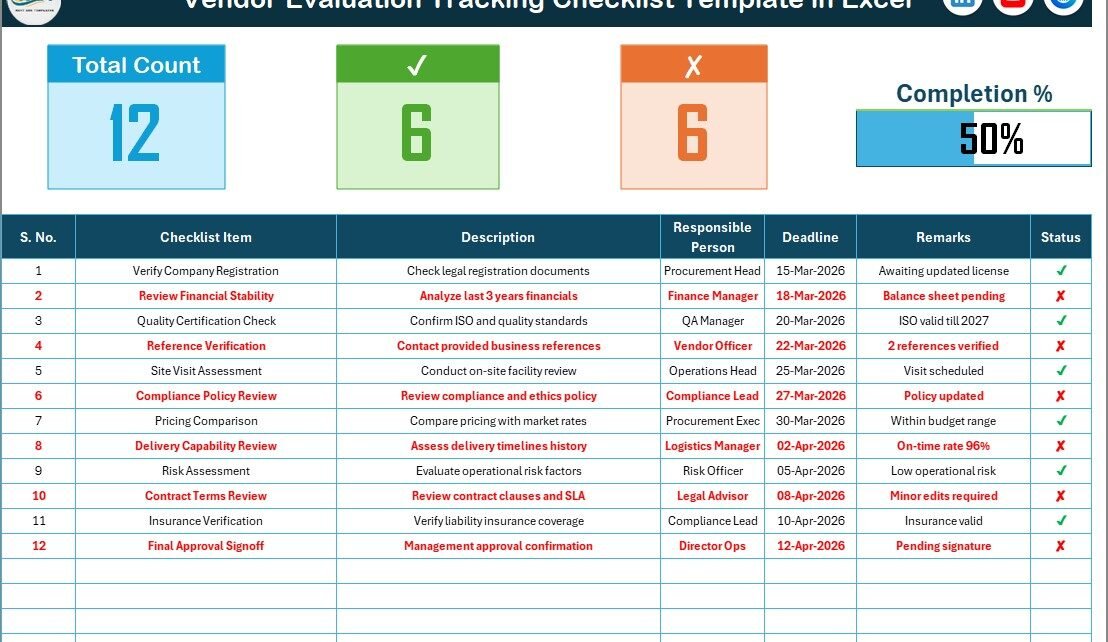
1️⃣ Vendor Evaluation Tracking Checklist Sheet – Main Working Area
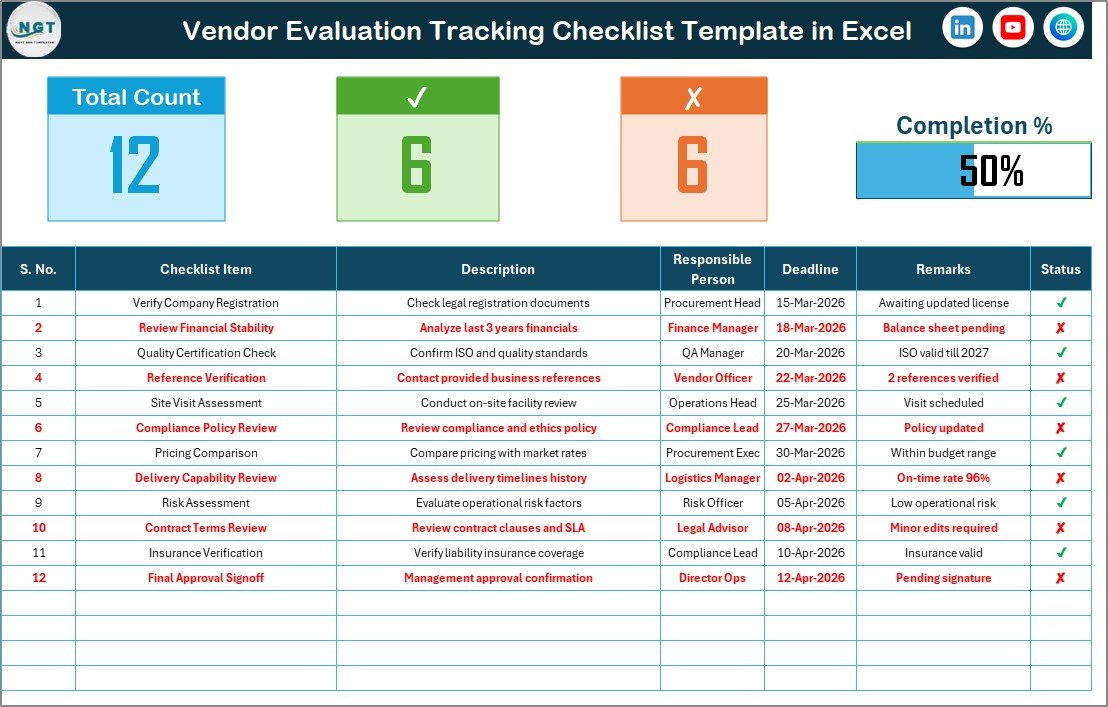
This is the primary sheet where you capture all checklist information.
🔷 Top Section – Summary Overview
The top section provides a quick performance snapshot.
Here, you can see:
-
Total Count – Total checklist items
-
Checked Count – Completed tasks
-
Crossed Count – Incomplete or rejected tasks
-
Progress Bar – Completion percentage
Because of this summary, managers can instantly see progress. Moreover, the visual progress bar makes monitoring easier.
🔷 Checklist Table – Core Task Management Area
This is the main checklist table where you manage vendor evaluation tasks.
You only need to update the Status column with:
-
✔ for completed tasks
-
✘ for pending or rejected tasks
Once you update the status, the progress bar updates automatically. Therefore, you can track performance in real time.
Columns Included in the Checklist Table:
-
Serial No. – Task number
-
Checklist Item – Evaluation criteria
-
Description – Details of the task
-
Responsible Person – Assigned team member
-
Deadline – Due date
-
Remarks – Additional notes
-
Status – ✔ or ✘
Because the table follows a structured format, you can manage vendor assessments efficiently.
Click to Purchases Vendor Evaluation Tracking Checklist in Excel
2️⃣ List Sheet Tab – Dropdown Management
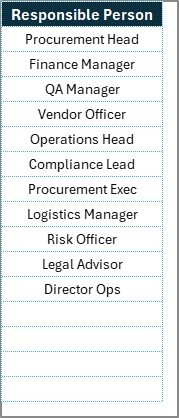
The List Sheet captures the unique list of Responsible Persons.
This sheet helps you:
-
Maintain standardized names
-
Create dropdown lists
-
Avoid duplicate entries
-
Ensure data consistency
When you select a responsible person in the main sheet, Excel pulls the list from this sheet. Therefore, data entry becomes faster and more accurate.
What Should You Include in a Vendor Evaluation Checklist?
An effective vendor evaluation checklist should cover critical assessment areas.
Here are some common checklist items:
📌 Quality Assessment
-
Product quality compliance
-
Certification verification
-
Defect rate analysis
📌 Delivery Performance
-
On-time delivery percentage
-
Lead time accuracy
-
Order fulfillment rate
📌 Cost Evaluation
-
Price competitiveness
-
Payment terms
-
Cost consistency
📌 Compliance and Risk
-
Regulatory compliance
-
Safety standards
-
Contract adherence
📌 Service and Support
-
Communication efficiency
-
Issue resolution speed
-
Customer service quality
By including these evaluation criteria, businesses can ensure comprehensive vendor assessment.
Click to Purchases Vendor Evaluation Tracking Checklist in Excel
Advantages of Vendor Evaluation Tracking Checklist in Excel
Let us explore the major benefits.
✔ 1. Simple and Easy to Use
Anyone with basic Excel knowledge can operate this template. Therefore, no special training becomes necessary.
✔ 2. Clear Task Visibility
The progress bar and summary section show overall completion instantly. As a result, managers gain quick insights.
✔ 3. Improves Accountability
Because each task includes a responsible person and deadline, team members stay accountable.
✔ 4. Real-Time Status Updates
Once you update ✔ or ✘, the progress updates automatically. Therefore, tracking becomes seamless.
✔ 5. Organized Vendor Records
The structured format ensures systematic documentation.
✔ 6. Better Compliance Management
With proper checklist tracking, you reduce compliance risks.
✔ 7. Cost-Effective Solution
Excel eliminates expensive vendor management software costs.
Click to Purchases Vendor Evaluation Tracking Checklist in Excel
Best Practices for the Vendor Evaluation Tracking Checklist
To maximize the benefits of this checklist, follow these best practices.
✅ 1. Define Clear Evaluation Criteria
Write clear checklist items. Avoid vague statements.
✅ 2. Assign Responsibilities Properly
Ensure each task has a responsible person. Otherwise, tasks may remain incomplete.
✅ 3. Set Realistic Deadlines
Define practical deadlines to maintain workflow efficiency.
✅ 4. Review Progress Weekly
Monitor the progress bar weekly. Therefore, you can address delays early.
✅ 5. Keep the List Sheet Updated
Update the responsible person list regularly. This ensures clean dropdown entries.
✅ 6. Document Remarks Clearly
Use the remarks column to record vendor performance insights.
✅ 7. Conduct Periodic Vendor Reviews
Use this checklist quarterly or annually for better vendor management.
How Can This Checklist Improve Vendor Management?
When organizations track vendor evaluation systematically:
-
They reduce procurement risks
-
They improve supplier performance
-
They strengthen vendor relationships
-
They prevent operational disruptions
-
They maintain compliance standards
Moreover, management gains visibility into evaluation progress. Therefore, decision-making becomes faster and more accurate.
Click to Purchases Vendor Evaluation Tracking Checklist in Excel
Who Can Use Vendor Evaluation Tracking Checklist in Excel?
This template suits:
-
Procurement teams
-
Supply chain managers
-
Vendor management departments
-
Manufacturing companies
-
Service-based organizations
-
Retail businesses
-
Logistics firms
Because the template remains flexible, any organization that works with vendors can use it.
Conclusion
Vendor evaluation requires consistency, structure, and accountability. However, manual tracking creates confusion and delays.
The Vendor Evaluation Tracking Checklist in Excel offers a simple yet powerful solution. It includes:
-
Main checklist sheet
-
Progress tracking system
-
Structured task table
-
Dropdown management sheet
Therefore, businesses can manage vendor assessments efficiently, monitor progress easily, and improve supplier accountability.
If you want better vendor control, reduced risks, and organized tracking, this Excel checklist provides the perfect solution.
Click to Purchases Vendor Evaluation Tracking Checklist in Excel
Frequently Asked Questions with Answers
1. What is a Vendor Evaluation Tracking Checklist in Excel?
It is an Excel template that helps track vendor evaluation tasks using a structured checklist format.
2. How do I update the checklist status?
You simply mark ✔ for completed tasks and ✘ for pending tasks.
3. Can I customize checklist items?
Yes. You can modify, add, or remove checklist items easily.
4. Does the template calculate progress automatically?
Yes. The progress bar updates automatically based on checklist status.
5. Can small businesses use this template?
Yes. Small and medium businesses can use this cost-effective Excel solution.
6. How often should I evaluate vendors?
Most businesses conduct vendor evaluations quarterly or annually.
7. Do I need advanced Excel skills?
No. Basic Excel knowledge is sufficient to use this template.
Click to Purchases Vendor Evaluation Tracking Checklist in Excel
Visit our YouTube channel to learn step-by-step video tutorials