Launching a product feels exciting. However, it also feels overwhelming. Teams manage marketing, sales, operations, logistics, approvals, and customer communication at the same time. Therefore, even one missed task can delay the entire launch.
So, how do successful companies execute smooth product launches?
They follow a structured system.
That is exactly where the Product Launch Planner Checklist in Excel becomes powerful.
Instead of juggling emails, sticky notes, and scattered spreadsheets, you can track every launch activity inside one organized Excel template. Moreover, you can monitor progress instantly with a dynamic progress bar, status tracking, and clear accountability.
In this complete guide, you will learn:
-
What a Product Launch Planner Checklist in Excel is
-
Why businesses need it
-
Detailed explanation of both worksheets
-
Key benefits of using this template
-
Advantages of Product Launch Planner Checklist in Excel
-
Best Practices for the Product Launch Planner Checklist in Excel
-
Frequently Asked Questions with Answers
Let us explore everything step by step.
Click to Purchases Product Launch Planner Checklist in Excel
What Is a Product Launch Planner Checklist in Excel?
A Product Launch Planner Checklist in Excel is a ready-to-use tracking system designed to organize and monitor all tasks related to a product launch.
Instead of relying on memory or informal coordination, you use a structured checklist that ensures:
-
Clear task allocation
-
Defined deadlines
-
Responsibility assignment
-
Real-time progress tracking
-
Organized documentation
Therefore, the template brings clarity and accountability to the entire launch process.
Why Do You Need a Product Launch Checklist?
Product launches include multiple moving parts. Marketing prepares campaigns. Sales prepares pitch decks. Operations prepares logistics. Meanwhile, management reviews timelines.
Without structure:
-
Teams duplicate work
-
Deadlines get missed
-
Tasks remain incomplete
-
Communication gaps appear
However, a Product Launch Planner Checklist eliminates confusion.
Because it centralizes tasks, everyone knows:
-
What to do
-
When to do it
-
Who owns it
-
Whether it is complete
As a result, teams work faster and with greater confidence.
Detailed Explanation of the Template Structure
The Product Launch Planner Checklist in Excel includes 2 worksheets:
-
Product Launch Planner Checklist (Main Sheet)
-
List Sheet (Dropdown Management)
Each worksheet plays a specific role.
Click to Purchases Product Launch Planner Checklist in Excel
1️⃣ Product Launch Planner Checklist Sheet – The Main Dashboard
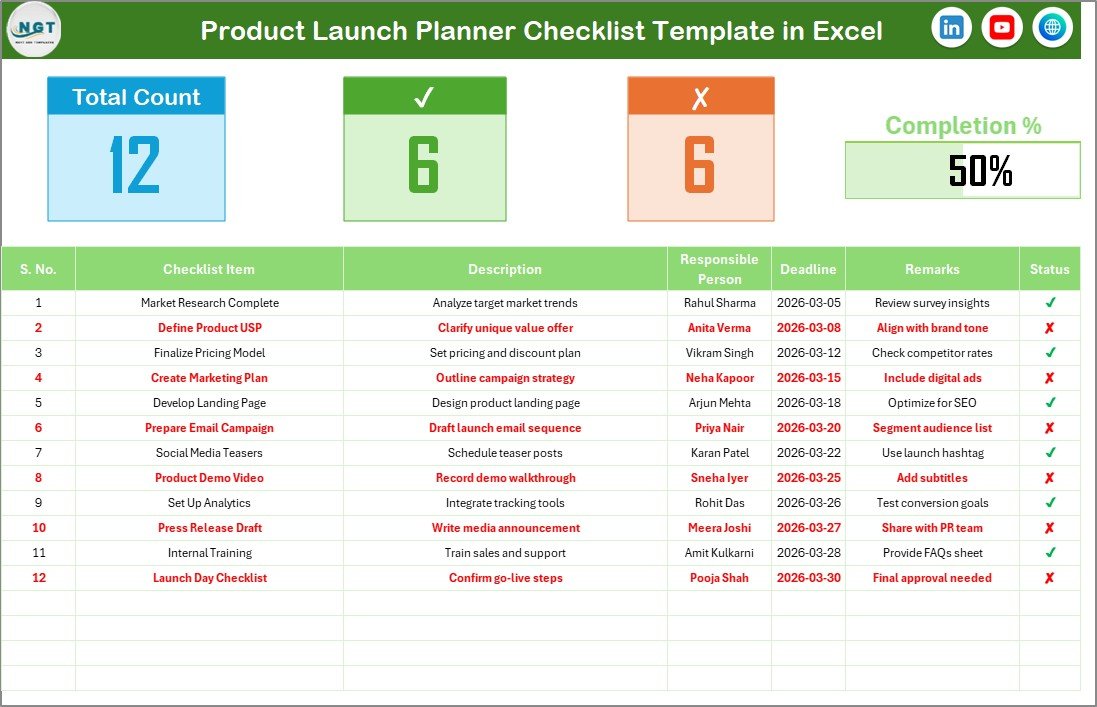
This sheet acts as the core of the template.
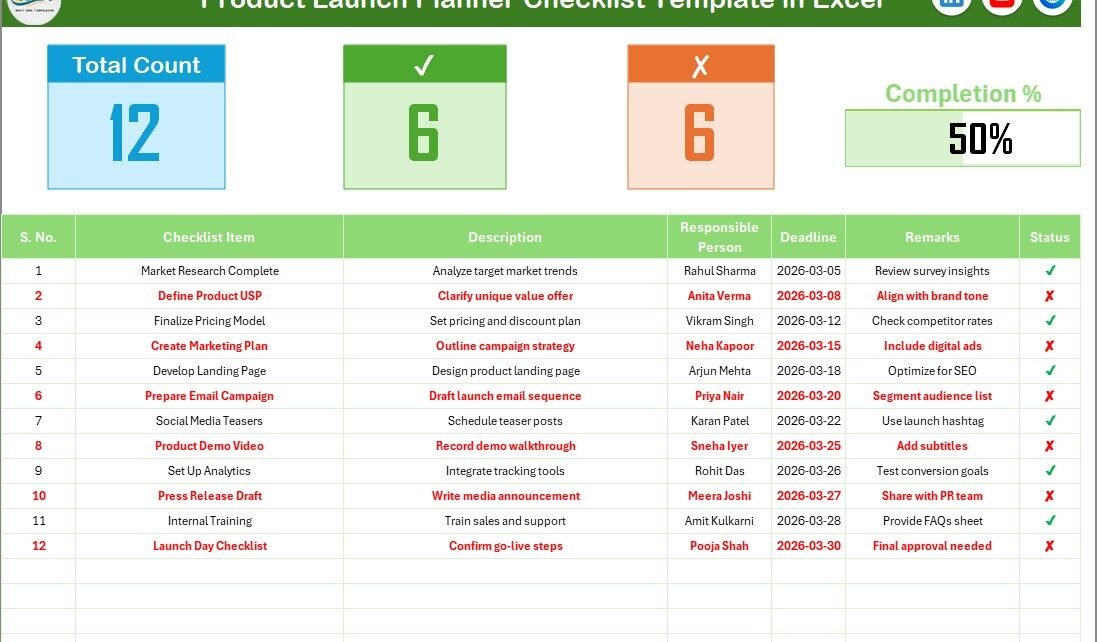
It contains two main sections:
-
Top Summary Section
-
Checklist Table
Let us understand each part clearly.
🔝 Top Section – Progress Overview
At the top of the sheet, you see summary metrics:
-
Total Count
-
Checked Count
-
Crossed Count
-
Progress Bar for Checked %
This section provides instant visibility.
For example:
-
Total Count shows total tasks.
-
Checked Count shows completed tasks (✔).
-
Crossed Count shows rejected or incomplete tasks (✘).
-
Progress Bar shows overall completion percentage.
Therefore, managers can immediately assess launch readiness.
Instead of scanning rows manually, you view launch progress in seconds.
📋 Checklist Table – Task Management Area
The checklist table forms the backbone of this template.
Here, you update task status using ✔ or ✘.
The table includes the following columns:
-
Serial No.
-
Checklist Item
-
Description
-
Responsible Person
-
Deadline
-
Remarks
-
Status
Let us understand why each column matters.
Serial No.
It keeps tasks organized. Moreover, it allows easy reference during meetings.
Checklist Item
This column contains the main task name. For example:
-
Finalize pricing strategy
-
Prepare product packaging
-
Create landing page
-
Approve marketing creatives
Therefore, each row represents one actionable task.
Description
This column explains the task clearly. Because clarity reduces confusion, teams execute better.
Responsible Person
Accountability drives performance.
Instead of assigning tasks to departments, you assign tasks to individuals. Therefore, ownership becomes clear.
Deadline
Deadlines create urgency. Moreover, they help teams prioritize tasks.
Remarks
This column allows additional comments, updates, or special instructions.
Status (✔ or ✘)
This column controls progress tracking.
-
✔ means completed
-
✘ means not completed
As soon as you update status, the summary section and progress bar update automatically.
Therefore, the template delivers real-time monitoring.
Click to Purchases Product Launch Planner Checklist in Excel
2️⃣ List Sheet – Dropdown Management

The List sheet captures the unique list of Responsible Persons.
This sheet helps create dropdown lists in the main checklist table.
Why does this matter?
Because it ensures:
-
Data consistency
-
No spelling errors
-
Clean reporting
-
Structured assignment
Moreover, it prevents duplicate names. Therefore, reports remain accurate.
Key Use Cases of Product Launch Planner Checklist in Excel
You can use this template for:
-
New product launches
-
Software releases
-
Startup product rollouts
-
E-commerce product launches
-
Marketing campaign launches
-
Feature updates
-
Seasonal product releases
Because the template adapts easily, businesses across industries can use it.
Click to Purchases Product Launch Planner Checklist in Excel
Advantages of Product Launch Planner Checklist in Excel
Now let us explore the major advantages.
1️⃣ Centralized Launch Planning
You manage all tasks in one structured file. Therefore, coordination improves instantly.
2️⃣ Clear Accountability
Each task has a responsible person. Consequently, ownership becomes visible.
3️⃣ Real-Time Progress Tracking
The progress bar updates automatically. As a result, managers track readiness instantly.
4️⃣ Simple and User-Friendly
You only need to update ✔ or ✘. Therefore, even non-technical users can manage it easily.
5️⃣ Deadline Visibility
Because every task includes a deadline, teams stay aligned with timelines.
6️⃣ Better Team Communication
During review meetings, you reference the checklist directly. Consequently, discussions become structured.
7️⃣ Reduced Launch Risk
Because you track every task, you reduce the chance of missing critical steps.
How Does This Template Improve Launch Success?
Product launches fail when teams overlook small details. However, this checklist prevents oversight.
It improves success by:
-
Organizing tasks logically
-
Highlighting incomplete activities
-
Increasing accountability
-
Encouraging timely updates
-
Improving transparency
Moreover, it helps managers detect bottlenecks early. Therefore, they take corrective action quickly.
Example Checklist Categories for a Product Launch
You can structure your checklist using categories such as:
Product Development
-
Final product testing
-
Quality approval
-
Packaging design finalization
Marketing Preparation
-
Website update
-
Email campaign creation
-
Social media scheduling
-
Ad creative approval
Sales Readiness
-
Sales training session
-
Pricing approval
-
Distributor communication
Operations
-
Inventory confirmation
-
Logistics planning
-
Vendor coordination
Post-Launch Monitoring
-
Customer feedback collection
-
Performance tracking
-
Issue resolution plan
Because the template allows flexibility, you can customize it according to your launch strategy.
Click to Purchases Product Launch Planner Checklist in Excel
Best Practices for the Product Launch Planner Checklist in Excel
To maximize benefits, follow these best practices.
✔ Define Tasks Clearly
Avoid vague tasks like “Marketing work.” Instead, write specific tasks like “Create Facebook Ad Campaign.”
✔ Assign One Responsible Person
Do not assign tasks to multiple people. Instead, assign one owner for accountability.
✔ Set Realistic Deadlines
Choose deadlines that align with your launch timeline. Therefore, pressure remains manageable.
✔ Update Status Regularly
Encourage team members to update ✔ or ✘ daily. Consequently, the progress bar reflects accurate information.
✔ Review Weekly
Conduct weekly launch meetings using the checklist as the central reference.
✔ Maintain Clean List Sheet
Keep the Responsible Person list updated to ensure dropdown accuracy.
✔ Archive Completed Launches
After launch completion, save a copy for documentation and learning purposes.
Who Can Use This Template?
The Product Launch Planner Checklist in Excel benefits:
-
Product managers
-
Startup founders
-
Marketing managers
-
E-commerce businesses
-
SaaS companies
-
Manufacturing firms
-
Corporate teams
Therefore, any organization launching products can use it effectively.
Conclusion
Product launches demand coordination, timing, and precision. However, without structured tracking, even strong teams struggle.
The Product Launch Planner Checklist in Excel provides:
-
Organized task tracking
-
Clear accountability
-
Deadline visibility
-
Real-time progress monitoring
-
Simple and user-friendly management
Moreover, it reduces risk and improves launch success.
If you want smoother launches, better coordination, and higher efficiency, this checklist template offers a practical and powerful solution.
Click to Purchases Product Launch Planner Checklist in Excel
Frequently Asked Questions with Answers
1️⃣ What is a Product Launch Planner Checklist in Excel?
It is a ready-to-use Excel template that helps businesses track and manage all tasks related to a product launch.
2️⃣ Can I customize the checklist items?
Yes. You can add, edit, or remove tasks according to your launch needs.
3️⃣ How does the progress bar work?
The progress bar updates automatically based on the number of ✔ marked tasks.
4️⃣ Can I assign tasks to multiple people?
You can, but assigning one responsible person improves accountability.
5️⃣ Is this template suitable for startups?
Yes. Startups can use it to manage product releases effectively.
6️⃣ Do I need advanced Excel knowledge?
No. You only update status and task details.
7️⃣ Can I use this for recurring product launches?
Yes. You can duplicate the sheet and modify tasks for each new launch.
Click to Purchases Product Launch Planner Checklist in Excel
Visit our YouTube channel to learn step-by-step video tutorials