The gaming hardware industry grows faster than ever. Companies manufacture gaming laptops, graphics cards, consoles, accessories, processors, and peripherals to meet increasing global demand. However, growth also creates challenges. Businesses must monitor production efficiency, sales performance, product quality, inventory levels, and customer satisfaction simultaneously.
Many organizations still rely on scattered spreadsheets or manual reports. As a result, teams struggle to understand performance trends quickly. Decision-makers often spend hours compiling reports instead of analyzing insights.
Therefore, companies need a structured and easy performance monitoring system. This is exactly where a Gaming Hardware KPI Scorecard in Excel becomes valuable.
A Gaming Hardware KPI Scorecard in Excel provides a centralized platform that tracks key performance indicators (KPIs), compares actual performance with targets, and presents insights using clear visuals. Instead of managing multiple files, businesses can monitor everything in one professional dashboard.
In this comprehensive guide, you will learn:
- What a Gaming Hardware KPI Scorecard is
- Why gaming hardware companies need KPI tracking
- Template structure and worksheets
- Key benefits and advantages
- Implementation steps
- Best practices for effective KPI management
- Frequently asked questions
Click to buy Gaming Hardware KPI Scorecard in Excel
What Is a Gaming Hardware KPI Scorecard in Excel?
A Gaming Hardware KPI Scorecard in Excel is a performance monitoring tool designed to track and evaluate critical business metrics related to gaming hardware operations.
It helps organizations measure success across areas such as:
- Manufacturing efficiency
- Product quality performance
- Sales growth
- Supply chain effectiveness
- Customer satisfaction
- Profitability metrics
Instead of reviewing raw data, managers can instantly analyze performance through structured KPI views, trend charts, and comparisons.
Moreover, Excel makes the system accessible because most teams already understand how to use it. Consequently, organizations avoid expensive software investments while still gaining powerful analytics.
Why Are KPIs Important in the Gaming Hardware Industry?
Gaming hardware businesses operate in a competitive and fast-changing market. New technology releases frequently, and customer expectations remain high.
Without KPIs, companies face several problems:
- Lack of performance visibility
- Slow decision-making
- Inefficient production planning
- Inventory imbalances
- Missed revenue opportunities
However, when teams track KPIs consistently, they gain measurable advantages.
Key Reasons KPI Tracking Matters
- Monitor product performance across categories
- Improve manufacturing productivity
- Optimize inventory and supply chains
- Track profitability and cost efficiency
- Improve customer satisfaction levels
Therefore, KPI scorecards transform operational data into actionable insights.
Overview of the Gaming Hardware KPI Scorecard in Excel Template
This ready-to-use Excel template provides a structured KPI monitoring system. It includes four worksheets designed to simplify data entry, analysis, and reporting.
Let us explore each worksheet in detail.
Scorecard Sheet – The Main Performance Dashboard
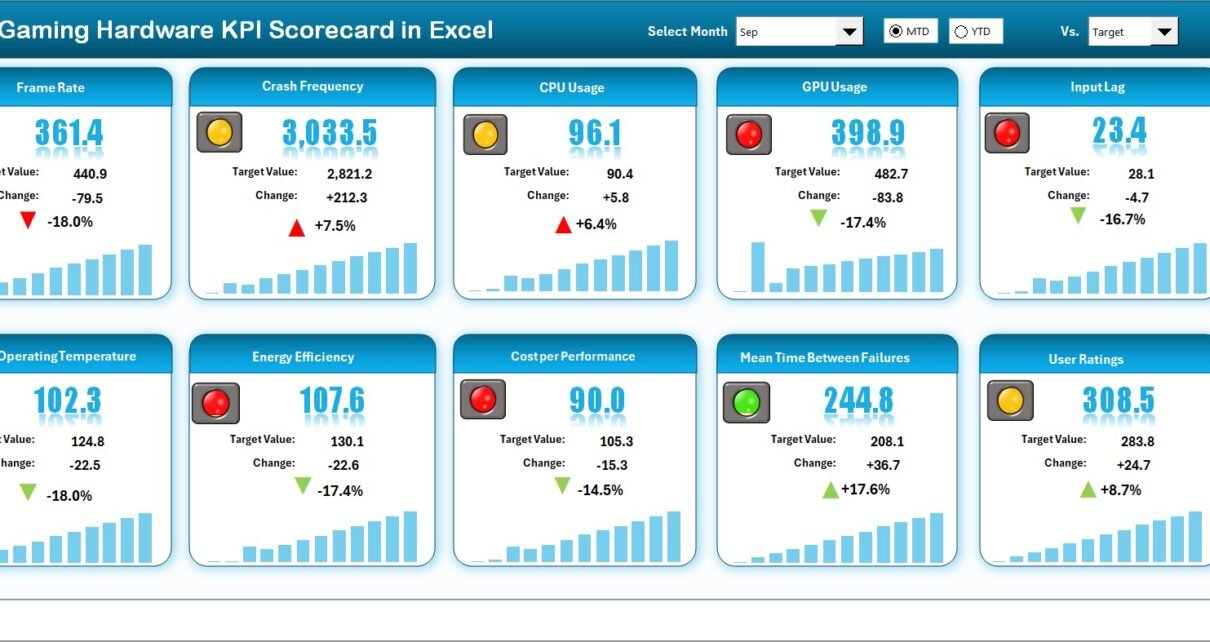
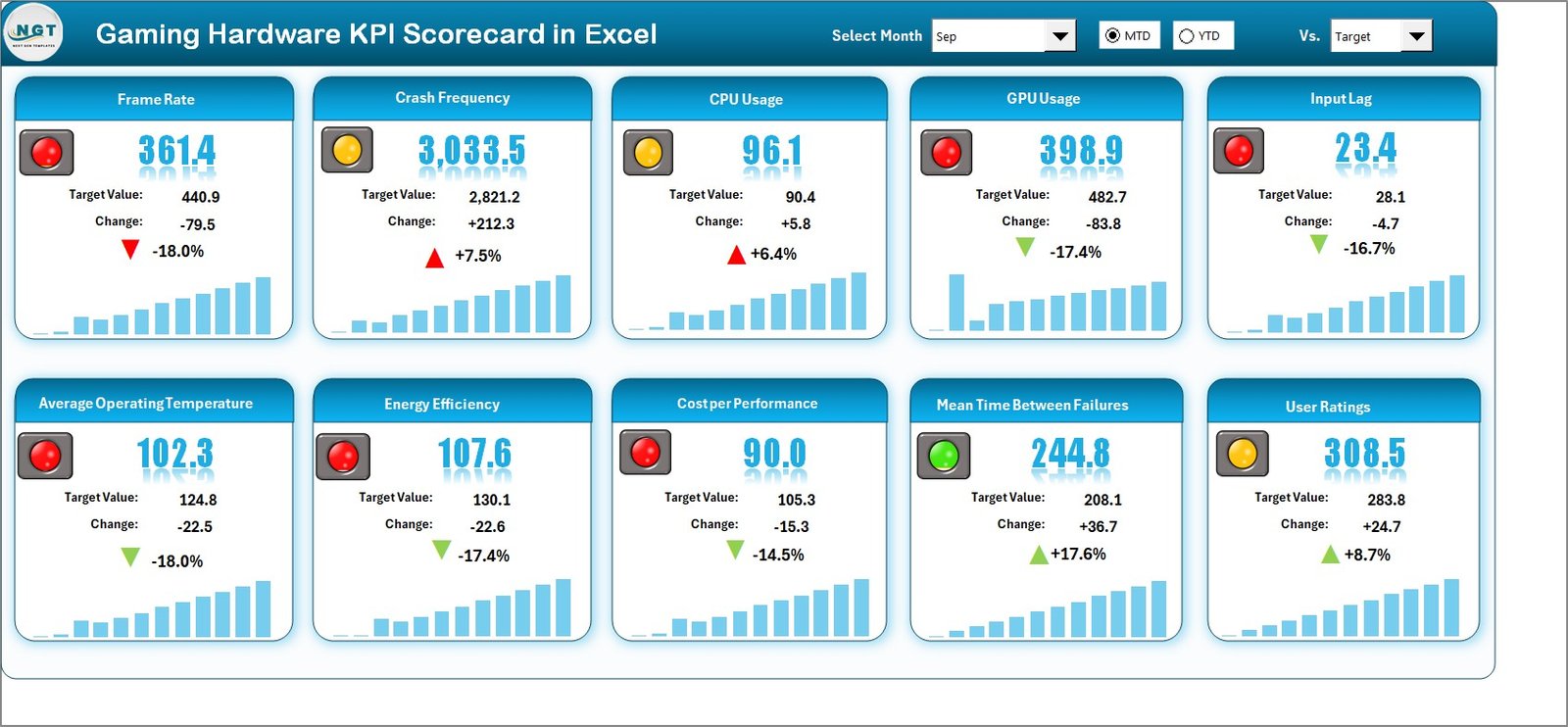
The Scorecard Sheet acts as the central interface of the KPI system. Users can quickly evaluate business performance without reviewing raw data tables.
Key Features
- Dropdown Menus
- Select Month
- Choose MTD (Month-to-Date)
- Choose YTD (Year-to-Date)
- Because of these options, users can instantly switch between time periods.
- Actual vs Target Comparison
- Displays real performance against planned goals.
- Helps identify underperforming areas quickly.
- Visual Indicators
- Conditional formatting highlights performance.
- Color signals simplify decision-making:
- Green = Performing well
- Yellow = Needs attention
- Red = Immediate action required
- Comprehensive KPI Overview
- Shows all KPI details in one view.
- Includes MTD and YTD comparisons.
- 10 KPIs Displayed Simultaneously
- Enables quick executive-level monitoring.
As a result, leaders understand performance within seconds.
Click to buy Gaming Hardware KPI Scorecard in Excel
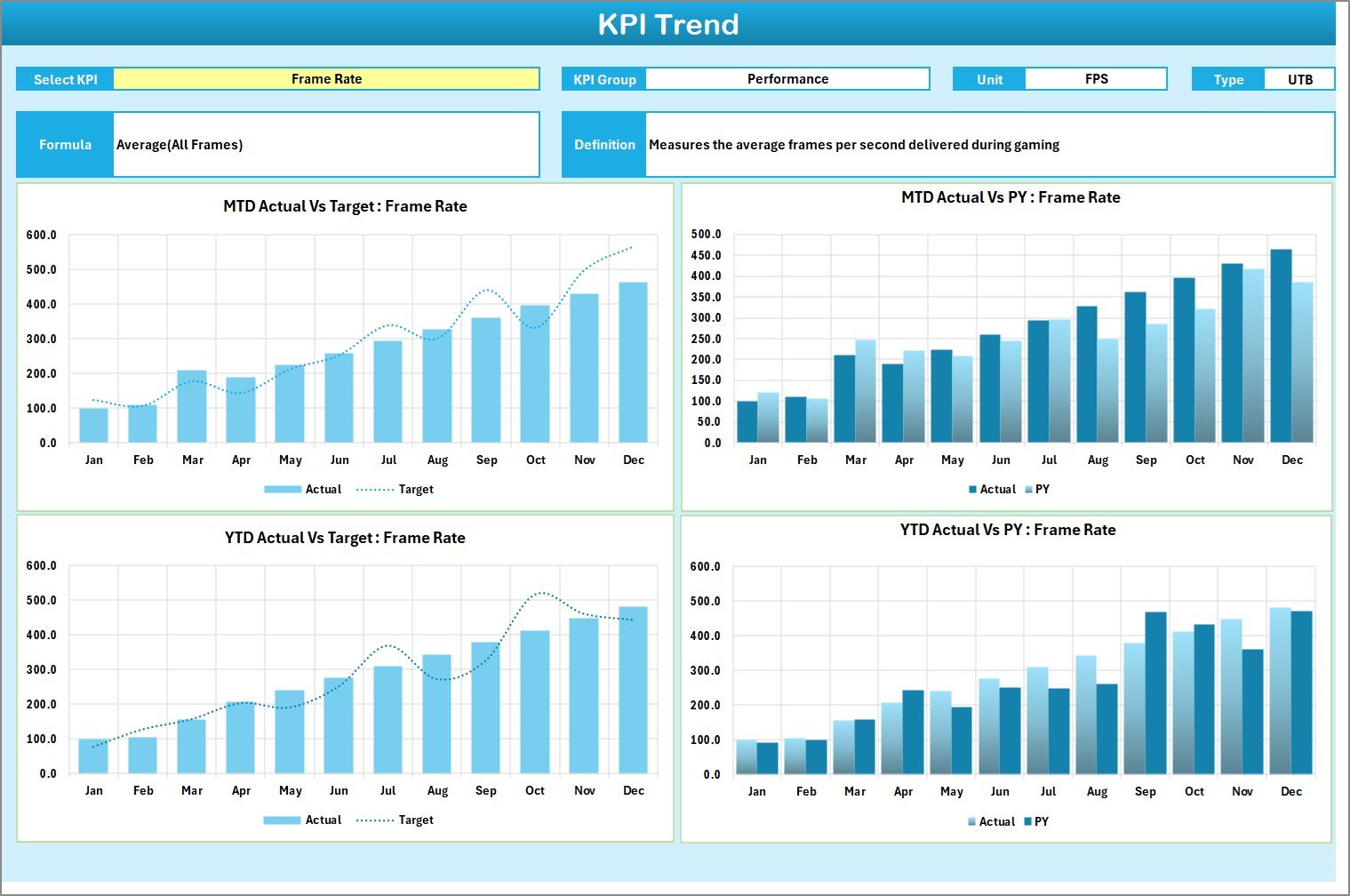
KPI Trend Sheet – Performance Analysis Over Time
While the scorecard shows current performance, the KPI Trend Sheet explains performance behavior over time.
How It Works
Users select a KPI using the dropdown in cell C3, and the dashboard automatically updates.
Information Displayed
- KPI Group
- KPI Unit
- KPI Type (Lower the Better / Upper the Better)
- KPI Formula
- KPI Definition
Additionally, trend charts visualize performance.
Trend Charts Included
- Actual Values Trend
- Target Performance Trend
- Previous Year (PY) Comparison
Therefore, managers can easily answer questions like:
- Is performance improving?
- Are targets realistic?
- How does this year compare with last year?
Trend analysis helps organizations move from reactive decisions to proactive planning.
Click to buy Gaming Hardware KPI Scorecard in Excel
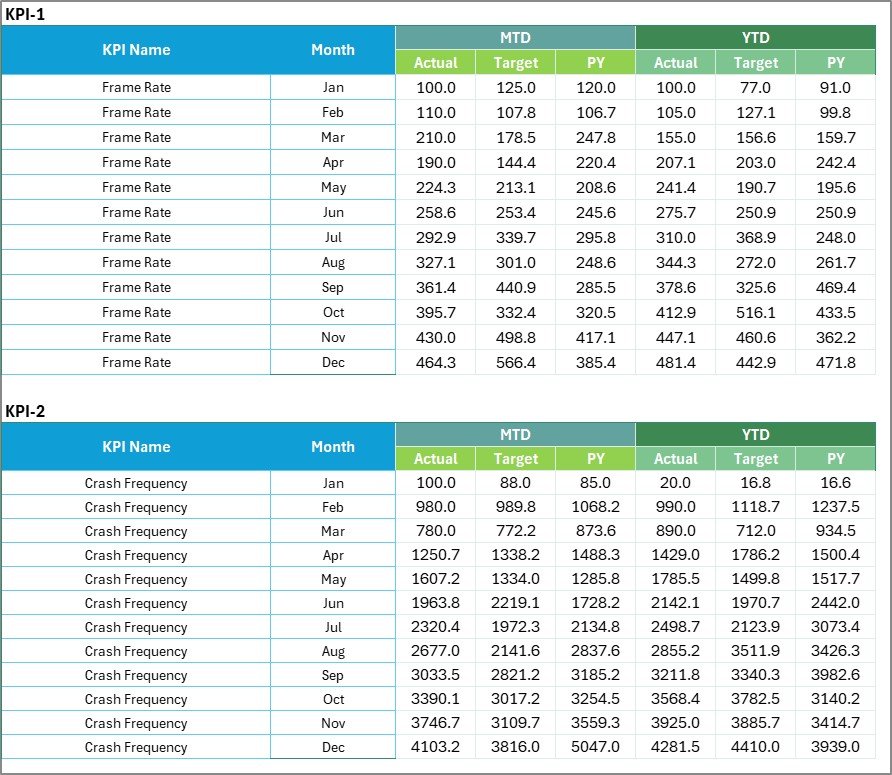
Input Data Sheet – Centralized Data Entry
The Input Data Sheet serves as the backbone of the scorecard.
Main Functions
- Record KPI actual values
- Enter targets
- Update monthly results
- Maintain performance history
Because all calculations connect to this sheet, users only need to update data once.
Benefits of Structured Data Entry
- Reduces manual errors
- Ensures consistency
- Keeps reports updated automatically
- Saves reporting time
Whenever new results become available, users simply update the data, and the dashboard refreshes instantly.
Click to buy Gaming Hardware KPI Scorecard in Excel
KPI Definition Sheet – KPI Standardization
Many organizations struggle because teams interpret KPIs differently. The KPI Definition Sheet solves this issue.
Information Maintained
- KPI Name
- KPI Group
- Unit of Measurement
- Formula
- KPI Definition
Since every KPI includes a clear explanation, teams maintain alignment across departments.
Consequently, everyone evaluates performance using the same standards.

Click to buy Gaming Hardware KPI Scorecard in Excel
What KPIs Can Be Tracked in a Gaming Hardware Scorecard?
Gaming hardware companies can track various performance indicators depending on their operations.
Example KPI Categories
Production KPIs
- Production Output Rate
- Manufacturing Cycle Time
- Defect Rate
- Equipment Utilization
Financial KPIs
- Revenue Growth
- Profit Margin
- Cost per Unit
- Operating Expense Ratio
Supply Chain KPIs
- Inventory Turnover
- Order Fulfillment Time
- Supplier Lead Time
Customer KPIs
- Customer Satisfaction Score
- Warranty Claim Rate
- Product Return Percentage
By monitoring these KPIs together, organizations achieve balanced performance management.
Advantages of Gaming Hardware KPI Scorecard in Excel
Implementing this scorecard delivers multiple business advantages.
Improved Decision Making
Managers access real-time insights instead of waiting for reports.
Better Performance Visibility
Teams clearly see which areas perform well and which require improvement.
Faster Reporting
Automated calculations eliminate manual report preparation.
Data Consistency
Centralized KPI definitions prevent confusion.
Cost-Effective Solution
Excel provides powerful analytics without expensive software.
Easy Customization
Organizations can modify KPIs based on business needs.
Enhanced Accountability
Departments track measurable targets, which increases responsibility.
How to Implement the Gaming Hardware KPI Scorecard in Excel?
Successful implementation requires a structured approach.
Step 1: Define Business Objectives
Identify goals such as revenue growth, quality improvement, or operational efficiency.
Step 2: Select Relevant KPIs
Choose measurable metrics aligned with objectives.
Step 3: Populate KPI Definition Sheet
Add KPI names, formulas, and descriptions.
Step 4: Enter Historical Data
Input baseline values into the Input Data Sheet.
Step 5: Set Targets
Define achievable yet challenging goals.
Step 6: Review Scorecard Dashboard
Analyze performance using visual indicators.
Step 7: Conduct Monthly Reviews
Discuss KPI outcomes and improvement strategies.
Following these steps ensures long-term success.
How Does the Scorecard Improve Management Decisions?
A structured KPI scorecard changes how leaders manage operations.
Instead of guessing, managers rely on data trends. Moreover, visual signals highlight risks early. Therefore, teams respond faster to performance issues.
For example:
- Declining defect rates indicate quality improvements.
- Falling revenue trends signal market challenges.
- Inventory spikes reveal supply chain inefficiencies.
Thus, decision-making becomes proactive rather than reactive.
Best Practices for the Gaming Hardware KPI Scorecard in Excel
To maximize results, organizations should follow proven practices.
Choose Meaningful KPIs
Avoid tracking too many metrics. Focus on strategic indicators.
Update Data Regularly
Frequent updates maintain dashboard accuracy.
Maintain KPI Definitions
Clear definitions ensure consistency across teams.
Use Monthly Reviews
Regular discussions drive accountability.
Monitor Trends, Not Just Numbers
Trend analysis reveals long-term patterns.
Align KPIs With Strategy
Every KPI should support business goals.
Train Team Members
Ensure users understand how to interpret dashboards.
Who Can Benefit from This KPI Scorecard?
Many professionals within gaming hardware organizations benefit from this template.
- Operations Managers
- Manufacturing Teams
- Finance Departments
- Sales Managers
- Supply Chain Analysts
- Executive Leadership
Additionally, startups and large enterprises both gain value from structured KPI monitoring.
Future Scope of KPI Scorecards in Gaming Hardware Businesses
As gaming technology evolves, performance monitoring will become even more important.
Companies increasingly integrate:
- Real-time analytics
- Automation tools
- Predictive forecasting
- AI-driven insights
However, Excel scorecards remain a strong foundation because they provide flexibility and simplicity.
Therefore, businesses can start with Excel and later expand into advanced analytics platforms.
Conclusion
The Gaming Hardware KPI Scorecard in Excel provides a practical and powerful solution for monitoring business performance. It transforms raw operational data into meaningful insights through structured dashboards, trend analysis, and standardized KPI definitions.
Because the template combines simplicity with analytical power, organizations can improve decision-making, increase efficiency, and align teams around measurable goals.
Moreover, the scorecard encourages continuous improvement. When teams review KPIs regularly, they identify opportunities faster and respond effectively to market changes.
Ultimately, businesses that track performance consistently achieve stronger growth, better operational control, and higher competitiveness in the gaming hardware industry.
Frequently Asked Questions (FAQs)
- What is a KPI scorecard in Excel?
A KPI scorecard in Excel tracks business performance metrics using dashboards, comparisons, and visual indicators.
- Why should gaming hardware companies use KPI scorecards?
They help monitor production, sales, quality, and financial performance in one centralized system.
- Can beginners use this KPI template?
Yes. The template uses simple Excel features, so users with basic knowledge can operate it easily.
- How often should KPI data be updated?
Organizations should update data monthly or weekly depending on business needs.
- Can I customize KPIs in the scorecard?
Yes. Users can add, remove, or modify KPIs according to organizational goals.
- Does the scorecard support trend analysis?
Yes. The KPI Trend Sheet displays MTD, YTD, and previous-year comparisons.
- Is Excel suitable for KPI management?
Yes. Excel offers flexibility, automation, and visualization without high software costs.
Watch the step-by-step video tutorial:
Visit our YouTube channel to learn step-by-step video tutorials
Click to buy Gaming Hardware KPI Scorecard in Excel