Managing financial activities during events can quickly become complicated. Whether organizations plan corporate events, financial audits, investor meetings, fundraising programs, conferences, or annual celebrations, financial responsibilities always demand accuracy and timely execution. However, teams often struggle because they track tasks through emails, notebooks, or scattered spreadsheets. As a result, deadlines get missed, responsibilities become unclear, and financial risks increase.
Therefore, businesses now prefer structured digital tools that organize financial tasks clearly. One powerful and practical solution is the Financial Event Checklist in Excel — a ready-to-use template designed to track, monitor, and manage financial event activities efficiently.
In this comprehensive guide, you will learn everything about the Financial Event Checklist in Excel, including its structure, features, benefits, use cases, best practices, and frequently asked questions. Moreover, you will understand how this simple Excel tool transforms event finance management into a smooth and organized workflow.
Click to buy Financial Event Checklist in Excel
What Is a Financial Event Checklist in Excel?
A Financial Event Checklist in Excel is a structured task-management template created to organize and monitor all financial activities related to an event in one centralized system.
Instead of managing multiple documents, teams record every financial responsibility inside a single checklist. Consequently, managers gain complete visibility into task progress, accountability, and deadlines.
This checklist helps organizations:
- Track financial preparation activities
- Assign responsibilities clearly
- Monitor deadlines effectively
- Reduce financial errors
- Improve coordination between departments
Because Excel provides automation, dropdowns, and progress tracking, users manage financial tasks without needing complex software.
Why Do Financial Events Require a Checklist?
Financial events involve multiple moving parts. For example, teams must manage budgets, approvals, payments, vendor coordination, tax documentation, and reporting. Without structure, confusion grows quickly.
Common Challenges Without a Checklist
- Missed payment deadlines
- Duplicate financial tasks
- Poor responsibility tracking
- Lack of progress visibility
- Compliance risks
- Manual follow-ups
However, when teams use a Financial Event Checklist, they organize responsibilities clearly. As a result, everyone understands what to do and when to complete it.
Key Features of Financial Event Checklist in Excel
The template comes as a ready-to-use Excel solution designed for simplicity and efficiency. Furthermore, it requires minimal setup.
Workbook Structure
The template contains two worksheets, each serving a specific purpose.
Financial Event Checklist Sheet (Main Sheet)
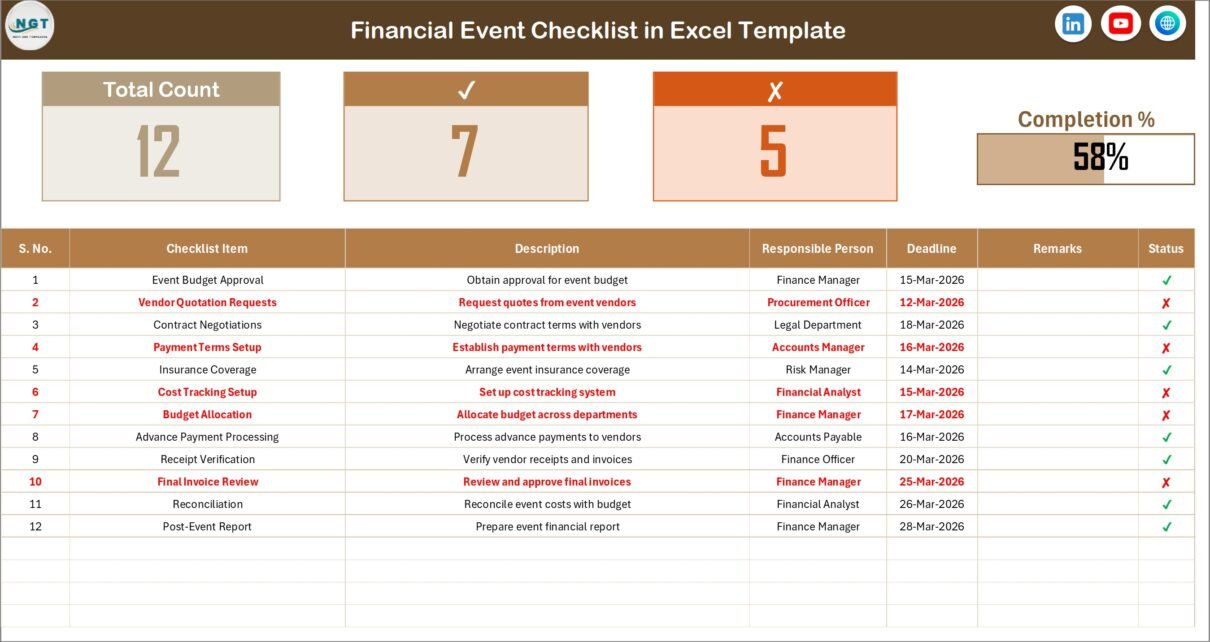
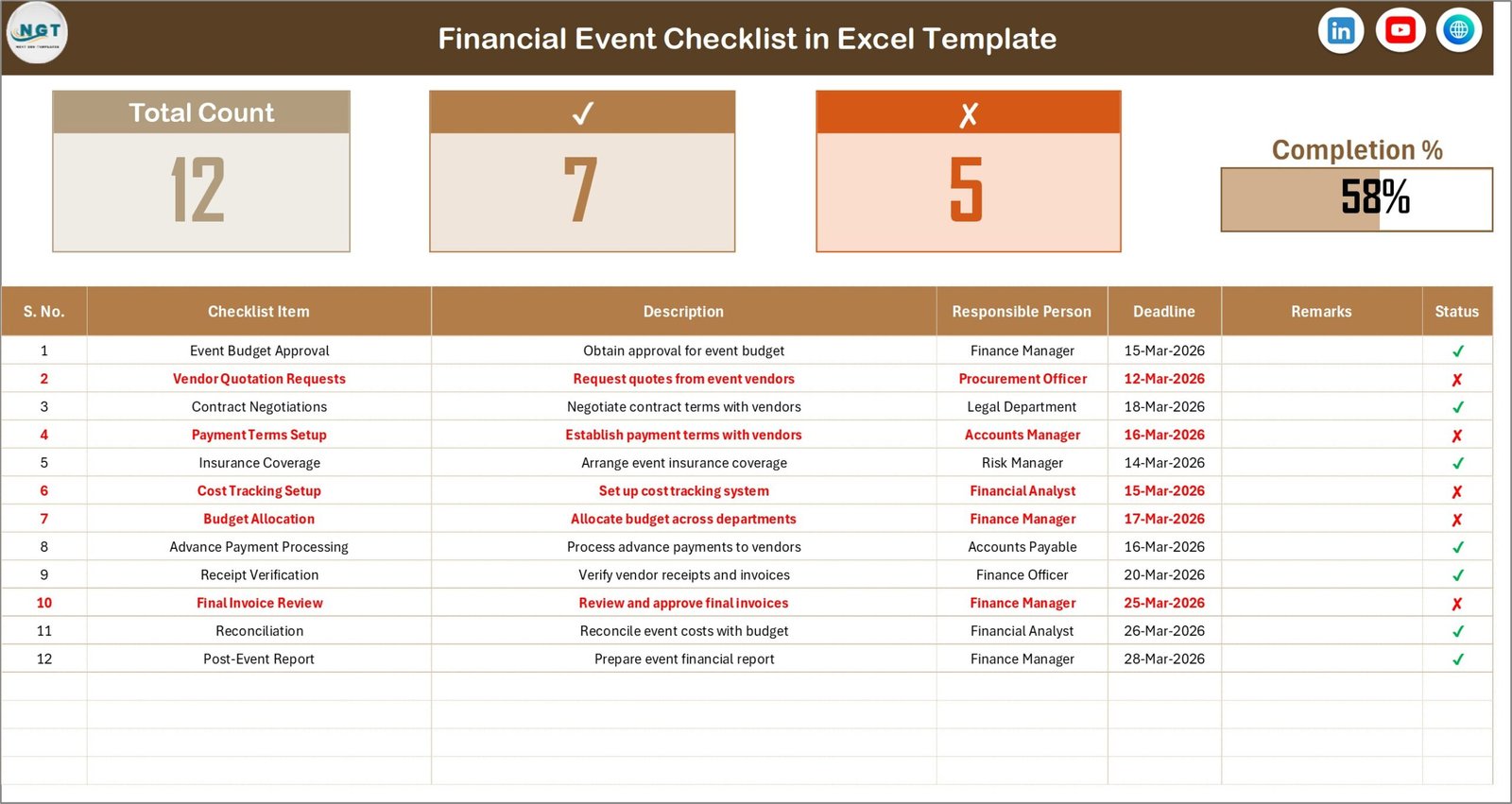
This sheet works as the central workspace where users capture and manage all checklist information.
Top Section Overview
At the top of the sheet, users see summary indicators that provide instant insights into task progress.
Included Metrics:
- Total Count of Tasks
- Checked Count (Completed Tasks)
- Crossed Count (Pending Tasks)
- Progress Bar showing completion percentage
Therefore, managers quickly understand event readiness without reviewing each task manually.
Click to buy Financial Event Checklist in Excel
List Sheet Tab
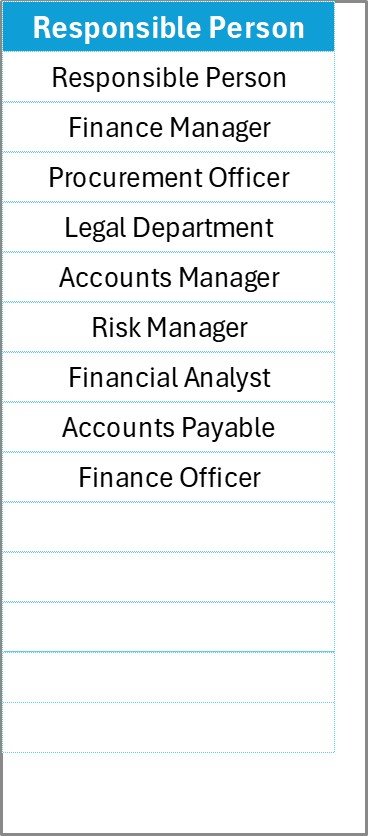
The List sheet supports automation and data validation.
What Does This Sheet Do?
- Stores a unique list of responsible persons
- Creates dropdown selections in the main checklist
- Maintains standardized data entry
As a result, users avoid typing errors and maintain consistent records across the checklist.
Click to buy Financial Event Checklist in Excel
How Does the Financial Event Checklist Work?
The workflow remains straightforward and user-friendly.
Step-by-Step Process
- Add financial tasks in the checklist table.
- Assign a responsible person using dropdown selection.
- Set deadlines for each activity.
- Update remarks whenever required.
- Mark status as ✔ or ✘.
- Monitor progress automatically from the top dashboard.
Consequently, teams track financial readiness in real time.
What Financial Tasks Can You Manage Using This Template?
You can manage almost every financial activity related to events.
Examples Include:
- Budget planning approval
- Vendor payment scheduling
- Invoice verification
- Sponsorship payment tracking
- Expense monitoring
- Tax documentation preparation
- Audit preparation tasks
- Financial reporting submissions
- Reimbursement approvals
Therefore, the checklist becomes a single source of truth for financial event operations.
Advantages of Financial Event Checklist in Excel
Using this template offers several operational and strategic advantages.
Improved Financial Organization
Teams maintain all tasks in one structured location. Consequently, confusion decreases significantly.
Better Accountability
Every task includes a responsible person. Therefore, ownership becomes clear.
Real-Time Progress Tracking
The progress bar instantly shows completion percentage. Managers quickly identify delays.
Reduced Financial Risk
Structured tracking prevents missed payments and compliance issues.
Easy to Use
Excel familiarity allows quick adoption without training.
Cost-Effective Solution
Organizations avoid investing in expensive event management software.
Flexible and Customizable
Users easily modify columns, tasks, and categories according to event requirements.
Who Can Use the Financial Event Checklist?
Many industries benefit from this template.
Ideal Users Include:
- Finance departments
- Event management teams
- Corporate organizations
- Non-profit organizations
- Educational institutions
- Conference organizers
- Audit teams
- Startup founders
- Project managers
Because financial planning exists in every event, this checklist suits multiple use cases.
How Does Excel Improve Financial Event Management?
Excel provides powerful features that enhance productivity.
Key Excel Benefits
- Data validation dropdowns
- Automated calculations
- Progress visualization
- Easy sorting and filtering
- Custom reporting capability
Moreover, users integrate the checklist with other dashboards or financial trackers.
How Can You Customize the Financial Event Checklist?
Customization allows organizations to align the template with their workflow.
Customization Ideas
- Add priority levels (High, Medium, Low)
- Include budget columns
- Add approval status
- Track payment amounts
- Insert department categories
- Add conditional formatting alerts
As a result, the checklist evolves into a powerful event finance management system.
Best Practices for the Financial Event Checklist
Following best practices ensures maximum effectiveness.
- Define Tasks Early
Create the checklist during event planning instead of waiting until execution begins.
- Assign Clear Ownership
Always assign one responsible person per task.
- Update Status Regularly
Encourage daily or weekly updates to maintain accuracy.
- Use Deadlines Realistically
Set achievable timelines to avoid unnecessary pressure.
- Review Progress Frequently
Managers should review completion percentage regularly.
- Standardize Naming Conventions
Use consistent task names to improve reporting clarity.
- Keep Remarks Updated
Add notes for delays or changes to maintain transparency.
- Backup the File
Store the checklist in cloud storage to prevent data loss.
How Does This Checklist Improve Team Collaboration?
Financial events require coordination between finance, operations, vendors, and leadership teams. However, miscommunication often causes delays.
This checklist improves collaboration because:
- Everyone views the same data
- Responsibilities remain transparent
- Updates appear instantly
- Managers track progress without meetings
Therefore, teams spend less time coordinating and more time executing.
Common Mistakes to Avoid When Using Financial Checklists
Even simple tools require proper usage.
Avoid These Mistakes:
- Leaving tasks without owners
- Not updating status regularly
- Creating overly complex columns
- Ignoring deadline tracking
- Maintaining multiple checklist versions
Instead, maintain one master checklist to ensure accuracy.
How Does the Financial Event Checklist Support Compliance?
Financial compliance plays a major role during events.
The checklist helps by:
- Tracking documentation deadlines
- Monitoring approvals
- Recording audit-related tasks
- Maintaining accountability records
Consequently, organizations reduce regulatory risks and improve audit readiness.
Future Scope of Financial Event Management in Excel
Although many tools exist today, Excel continues to evolve.
Organizations increasingly combine checklists with:
- KPI dashboards
- Budget tracking systems
- Power BI analytics
- Automated reporting
Therefore, a simple checklist can become part of a larger financial intelligence ecosystem.
Conclusion
Financial events demand precision, coordination, and timely execution. However, manual tracking methods often create confusion and risk. The Financial Event Checklist in Excel solves this challenge by offering a structured, easy-to-use, and highly practical solution.
Because the template centralizes tasks, assigns responsibilities, and tracks progress automatically, teams gain better visibility and control over financial activities. Moreover, organizations improve accountability, reduce errors, and ensure successful event execution.
Whether you manage corporate events, audits, conferences, or financial programs, this checklist provides a reliable foundation for organized financial management.
Frequently Asked Questions (FAQs)
- What is a Financial Event Checklist in Excel used for?
It helps organizations track and manage financial tasks related to events, ensuring timely completion and accountability.
- Do I need advanced Excel skills to use this template?
No. The template uses simple Excel features, so beginners can use it easily.
- Can I customize the checklist?
Yes. You can add columns, modify tasks, and adjust formats according to your needs.
- How does the progress bar work?
The progress bar automatically calculates completion percentage based on completed tasks.
- Can multiple users use the checklist?
Yes. Teams can share the file through cloud platforms like OneDrive or Google Drive.
- Is this checklist suitable for small businesses?
Absolutely. Small businesses benefit greatly because the solution remains simple and cost-effective.
- Can this checklist support audit preparation?
Yes. It helps track documentation, approvals, and deadlines required for audits.
Watch the step-by-step video tutorial:
Visit our YouTube channel to learn step-by-step video tutorials
Click to buy Financial Event Checklist in Excel