Vocational training organizations lose visibility into program outcomes when KPI data is scattered across spreadsheets, reports, and LMS exports. The Vocational Training KPI Scorecard in Excel consolidates all training KPIs into 4 structured worksheets, with MTD and YTD trend charts comparing Actual, Target, and Prior Year performance in one place. According to Microsoft, Excel remains the most widely used analysis tool in education and workforce development globally — making it the most practical choice for training KPI reporting without requiring costly SaaS subscriptions.
In this article, we have created the Vocational Training KPI Scorecard in Excel. This is a ready-to-use Scorecard template. Below are the key features of this KPI Scorecard.
Key Features of Vocational Training KPI Scorecard in Excel
🛝 Click here to Purchase the Vocational Training KPI Scorecard in Excel
The Vocational Training KPI Scorecard in Excel tracks training performance across 4 worksheets with Month/MTD/YTD dropdown selection, Actual vs. Target comparison, color-coded status indicators, and MTD/YTD trend charts for every KPI. The KPI Definition sheet drives all dropdown lists and chart labels, ensuring the entire template stays synchronized as you add or rename KPIs.
Setup takes under 10 minutes: enter KPI definitions once, add monthly data to the Input Data sheet, and every scorecard view and trend chart updates automatically — no formula editing required. The template works on Excel 2016 and later (including Microsoft 365) with no VBA, macros, or add-ins.
Dashboard Pages Explanation
In this template, we have 4 worksheets:
1. Scorecard Sheet
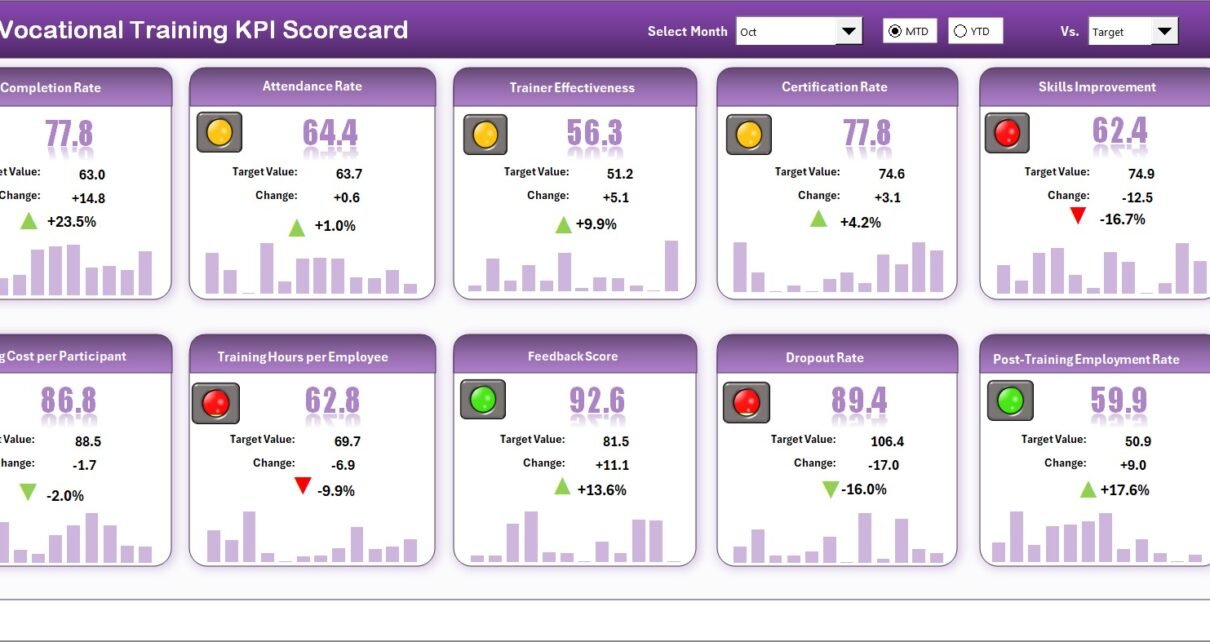
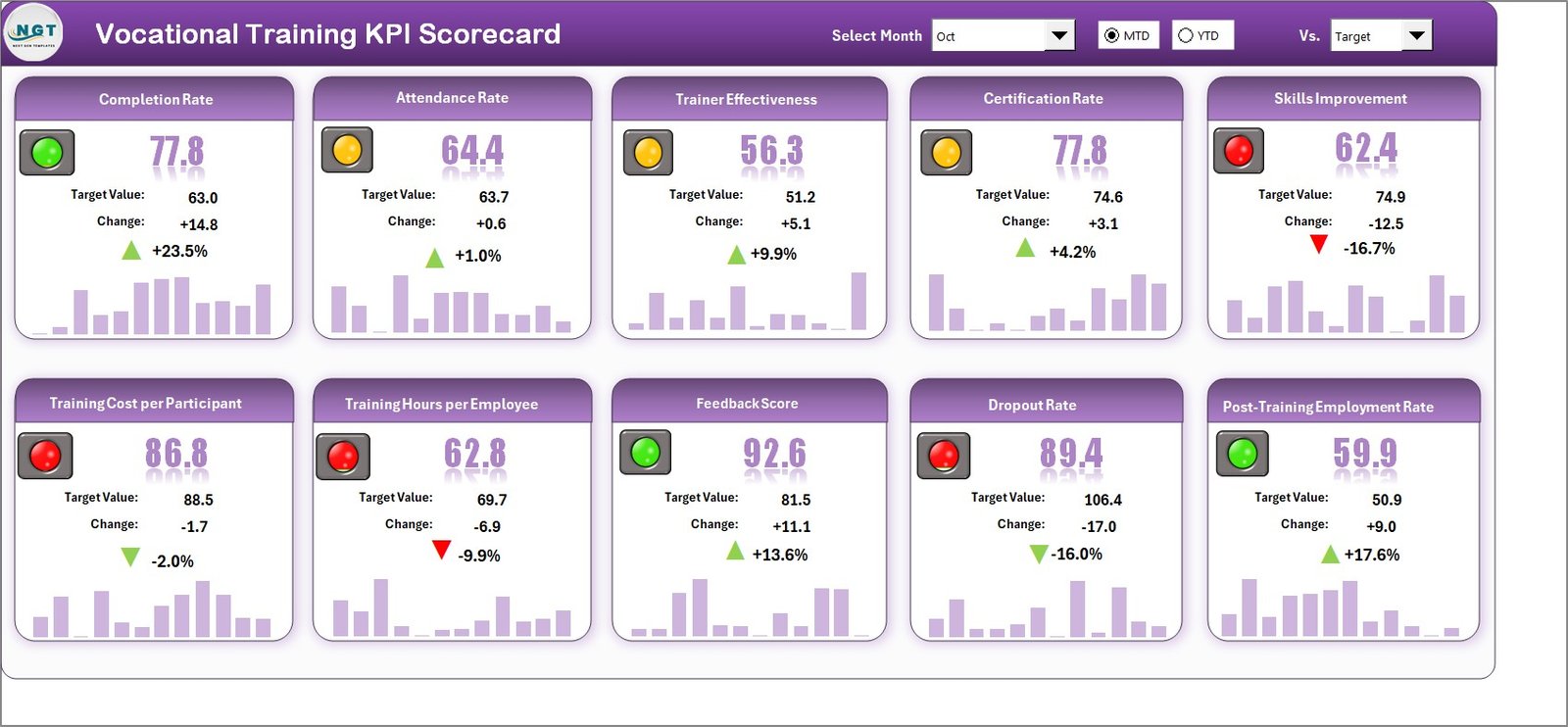
Vocational Training KPI Scorecard in Excel🛝 Click here to Purchase the Vocational Training KPI Scorecard in Excel
The Scorecard sheet is the main interface where you can view KPI performance. Key features include:
- Dropdown Menus: Select the month, MTD (Month-to-Date), or YTD (Year-to-Date) for performance analysis.
- Actual vs Target Values: Compare actual performance against targets for each KPI.
- Visual Indicators: Quickly see performance status using color-coded visuals or conditional formatting.
- Comprehensive KPI Overview: Display all relevant information about KPIs, including MTD and YTD comparisons.
2. KPI Trend Sheet
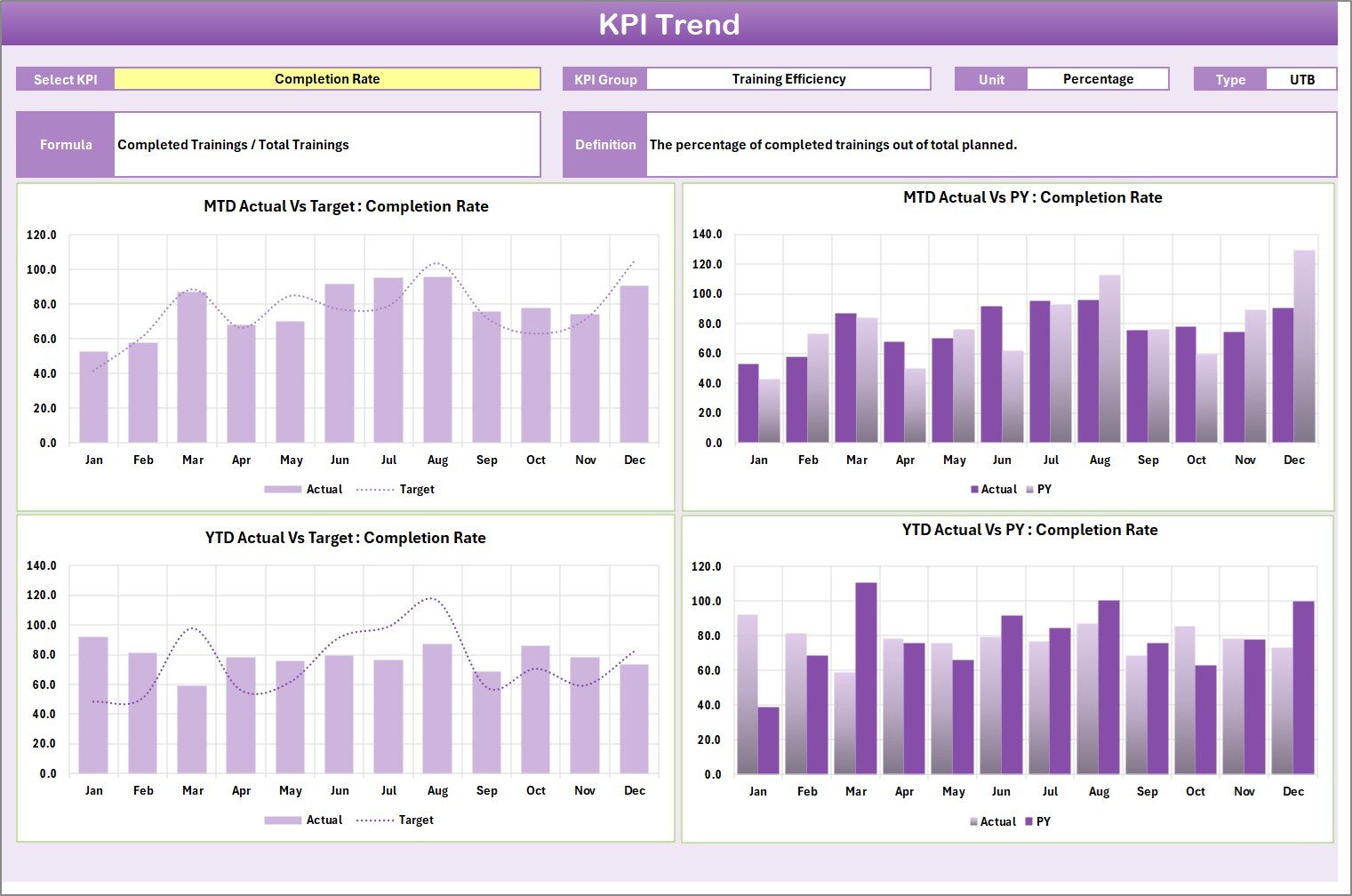 KPI Trend Sheet
🛝 Click here to Purchase the Vocational Training KPI Scorecard in Excel
Here you can select the KPI name from the dropdown available on range C3. We have displayed the KPI Group, Unit of KPI, Type of KPI (Lower the Better or Upper the Better), Formula of the KPI and Definition of the KPI. We are also showing the MTD and YTD trend chart for Actual, Target and PY numbers.
3. Input Data Sheet
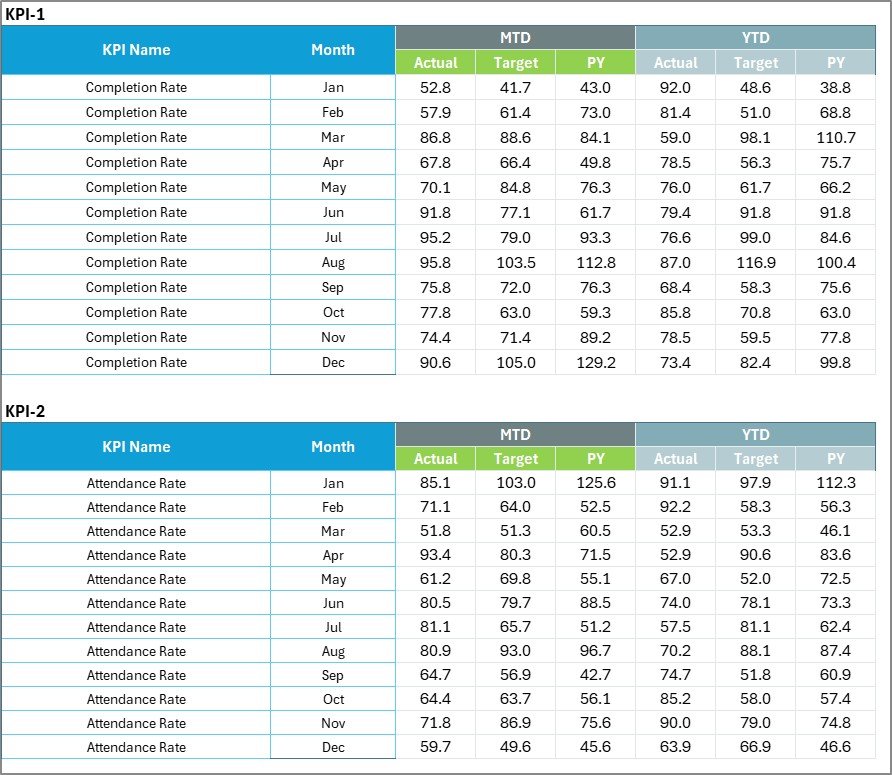 Input Data Sheet
The Input Data sheet is where you enter all KPI data:
- Data Entry: Record actual values, targets, and other metrics for each KPI.
- Flexibility: Easily update data as new results become available, ensuring the scorecard remains current.
4. KPI Definition Sheet
 KPI Definition Sheet
🛝 Click here to Purchase the Vocational Training KPI Scorecard in Excel
In this sheet tab, you have to enter the KPI Name, KPI Group, Unit, Formula and KPI definition. This structured library ensures every team member interprets KPIs consistently, and it drives all dropdown lists and chart labels throughout the template.
Vocational Training KPI Scorecard in Excel vs. Google Sheets KPI Template vs. Paid LMS Platform — Feature Comparison
| Feature | Vocational Training KPI Scorecard in Excel | Google Sheets KPI Template | Paid LMS/Training SaaS (TalentLMS / Absorb) |
|---|---|---|---|
| Cost | $12.99 one-time ✅ | Free–$15 one-time | $3–12 / user / month |
| Platform | Microsoft Excel ✅ | Google Sheets (browser) | Cloud SaaS (browser) |
| Setup time | Under 10 minutes ✅ | 10–20 minutes | 2–8 hours (config + import) |
| MTD / YTD tracking | Built-in ✅ | Manual formulas required | Varies by plan |
| KPI Trend Charts (Actual + Target + PY) | Yes ✅ | Basic charts only | Reporting dashboards (extra cost) |
| Color-coded status indicators | Conditional formatting ✅ | Available with setup | Traffic lights on premium plans |
| KPI Definition library | Built-in sheet ✅ | Manual | Tied to LMS data fields |
| Works offline | Yes ✅ | No | No |
| Year-1 cost at 10 users | $12.99 total ✅ | ~$0–15 | $360–1,440 |
For vocational training centers that need clear KPI visibility without a SaaS subscription, the Vocational Training KPI Scorecard in Excel sits in the sweet spot.
Who Should Use This Template
Perfect for:
- Vocational school administrators and TVET center managers who need monthly KPI reporting
- Corporate L&D managers tracking training completion rates, pass rates, and cost per trainee
- Apprenticeship program coordinators comparing cohort outcomes across periods
- Trade school directors presenting performance data to boards and funding bodies
- HR training departments in manufacturing, healthcare, and logistics sectors
Not a fit if:
- You need real-time LMS integration or automatic data feeds from a training platform
- Your team works exclusively in Google Sheets (see our Small Business KPI Scorecard in Google Sheets)
- You require multi-site consolidated reporting with role-based access controls at enterprise scale
Real-World Use Cases
🛝 Click here to Purchase the Vocational Training KPI Scorecard in Excel
Maria manages operations at a TVET center with 12 trade programs. Every month she uses the Vocational Training KPI Scorecard in Excel to track enrollment rates, course completion, trainer utilization, and graduate employment outcomes — then presents the color-coded scorecard to her board in 15 minutes, without pulling data from three different systems.
James leads L&D at a 500-person logistics company. His team runs monthly forklift certification, safety, and compliance training. He tracks pass rates, training hours per employee, and cost per trainee MTD vs. YTD using this scorecard — catching budget overruns early before they escalate to leadership.
Priya coordinates an apprenticeship program for a regional manufacturing cluster. She uses the KPI Trend sheet to compare cohort pass rates against prior year targets, identifying which trade programs need intervention before the mid-year review cycle.
Advantages of Vocational Training KPI Scorecard in Excel
The template’s biggest advantage is simplicity at scale: one KPI Definition sheet controls the entire template’s dropdown lists, chart labels, and trend data. Training managers can add new KPIs without touching a single formula. The color-coded Scorecard sheet gives instant status visibility — particularly valuable for monthly board presentations where decision-makers need answers in seconds, not minutes of spreadsheet navigation.
The MTD and YTD trend charts that compare Actual, Target, and Prior Year are another key differentiator. Most basic scorecard templates show only current vs. target; this template surfaces whether a shortfall is a one-month blip or a worsening multi-month trend — the difference that drives smart intervention decisions in vocational program management.
At $12.99 one-time, the template eliminates the per-user recurring costs of LMS reporting modules (typically $3–12/user/month), making it accessible to small TVET centers and NGO-run training programs with constrained budgets.
Opportunities for Improvement
🛝 Click here to Purchase the Vocational Training KPI Scorecard in Excel
The template is designed for manual data entry, which means it requires a monthly update discipline to remain useful. Organizations with LMS platforms that export data automatically may prefer a reporting tool that connects directly to their data source. Additionally, the single-file format means multi-site organizations would need to maintain separate scorecards per site and consolidate manually — an acceptable trade-off for most independent training centers, but a limitation for larger networks.
Best Practices
Define your KPI library completely before entering input data — changing KPI names after data has been entered requires careful verification that formulas remain correct. Keep KPI Group categories consistent (e.g., “Learner Outcomes”, “Operational Efficiency”, “Financial Performance”) so the Scorecard sheet groups metrics meaningfully. Update the Input Data sheet at the same point each month — ideally within the first week after month close — to ensure the MTD vs. PY comparisons are always comparing equivalent periods.
Explore Relevant Templates
If you’re tracking education and training performance, these related templates may also help:
- Senior Living KPI Scorecard in Excel — Same 4-sheet framework adapted for healthcare and senior care KPIs
- Virtual Classrooms KPI Dashboard in Excel — Full multi-page dashboard for online education KPIs
- Vocational Training Dashboard in Excel — Multi-page Excel dashboard for vocational program analytics
- Teacher Training Institutes KPI Dashboard in Excel — KPI dashboard for teacher and educator training programs
Frequently Asked Questions
🛝 Click here to Purchase the Vocational Training KPI Scorecard in Excel
What KPIs does the Vocational Training KPI Scorecard in Excel track?
The Vocational Training KPI Scorecard in Excel tracks any KPIs you define in the KPI Definition sheet — typical vocational metrics include course completion rate, student pass rate, trainer utilization, cost per trainee, and graduate employment rate. The template is fully customizable to your specific program metrics.
How long does setup take?
Setup takes under 10 minutes. Enter your KPI names in the KPI Definition sheet, add monthly data to the Input Data sheet, and every Scorecard and Trend view updates automatically — no formula editing required.
Does the Vocational Training KPI Scorecard in Excel work on all Excel versions?
Yes. The template works on Excel 2016 and later, including Microsoft 365. It requires no VBA macros, Power Query, or add-ins — just standard Excel formulas and conditional formatting.
How does this compare to TalentLMS or Absorb LMS?
TalentLMS and Absorb LMS are full learning management platforms starting at $3–12 per user per month. This scorecard is a $12.99 one-time purchase focused on KPI tracking and reporting — not course delivery. It works as a standalone reporting layer alongside any LMS you already use.
Can I add my own KPIs?
Yes. The KPI Definition sheet is fully editable. Add, remove, or rename KPIs at any time, and the Scorecard and KPI Trend sheets reflect your changes automatically — no coding or formula changes needed.
Does it include sample data?
Yes. The Vocational Training KPI Scorecard in Excel ships with pre-populated sample data so you can see the scorecard in action immediately. Replace the sample values with your own and every view updates automatically.
Can I track multiple training programs in one scorecard?
Yes. You can define KPIs for each training program using different KPI Groups in the KPI Definition sheet. The Scorecard sheet displays all KPIs together, and the KPI Trend sheet lets you drill into any individual KPI’s trend over time.
About the Author
Built by PK — Microsoft Certified Professional with 15+ years of Excel, Google Sheets, and Power BI experience. Founder of NextGenTemplates, reaching 300K+ subscribers across YouTube channels. Every template is hand-built and tested before release.
Conclusion
The Vocational Training KPI Scorecard in Excel gives TVET centers, trade schools, apprenticeship programs, and corporate training departments a practical, low-cost way to track program KPIs with MTD/YTD visibility and Prior Year benchmarking — all in a familiar Excel interface that requires no training to use.
🛝 Click here to Purchase the Vocational Training KPI Scorecard in Excel
✅ Instant download · One-time payment · No subscription
📅 Last updated: May 2026
🎥 Follow us on YouTube: Youtube.com/@PK-AnExcelExpert