Social media managers lose an average of 6 hours per week to disorganized content schedules across multiple platforms — that’s over 300 hours a year spent chasing missed posting dates and scrambling to fill content gaps. The Multi-Platform Social Media Calendar in Excel solves this by consolidating all your social content planning into 5 structured worksheets, 4 interactive calendar views, and a VBA-powered Events database that captures 7 data fields per post entry. Setup takes under 10 minutes — enter your content schedule and every view updates automatically.
🌍 Join 8,400+ teams in 40+ countries using NextGenTemplates to replace paid SaaS tools with one-time-purchase Excel, Google Sheets, Power BI, and HTML templates.
✅ Instant download · One-time payment of $4.99 · No subscription · No per-user fees · Lifetime access
In this article we have created a Multi-Platform Social Media Calendar in Excel. This is a ready to use Calendar template in Excel. Below are the key features of this calendar.
Key Features of Multi-Platform Social Media Calendar in Excel
Click here to Purchase the Multi-Platform Social Media Calendar in Excel
The Multi-Platform Social Media Calendar in Excel is built around 5 worksheets that give you every angle of your content schedule — from a full 12-month annual overview to a single-day event view. The template tracks 7 data fields per event (ID, Date, Day, Event Name, Time, Location, Description) and supports VBA forms for all event operations, so your team can add, update, or delete posts without touching a formula.
Three definitive capabilities stand out. First, the Annual View displays all 12 months in one screen with configurable year, starting month, and starting weekday — ideal for quarterly content planning sessions. Second, the 5 built-in color themes let you switch the entire workbook’s appearance in one click, perfect for brand-aligned presentations to clients or leadership. Third, the VBA event forms prevent data-entry errors by enforcing structured input every time a new social post is added to the calendar.
This template also includes day and event highlighting — you can mark up to 2 weekdays in custom colors and toggle yellow event highlighting on the annual view, making high-posting weeks visually obvious at a glance.
In this template, we have 5 worksheets:
1. Home Sheet Tab
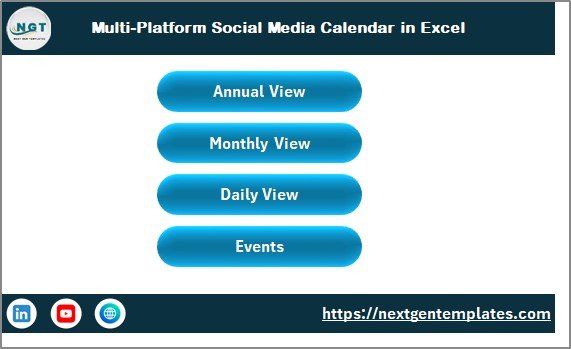
This is an index sheet where we have given 4 buttons to jump to the respective sheet: Annual View, Monthly View, Daily View, and Events. Use it as your content calendar command center.
Multi-Platform Social Media Calendar in Excel
2. Annual View Sheet Tab
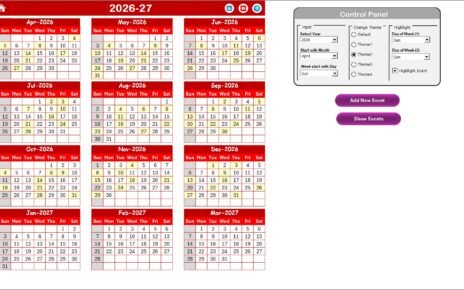
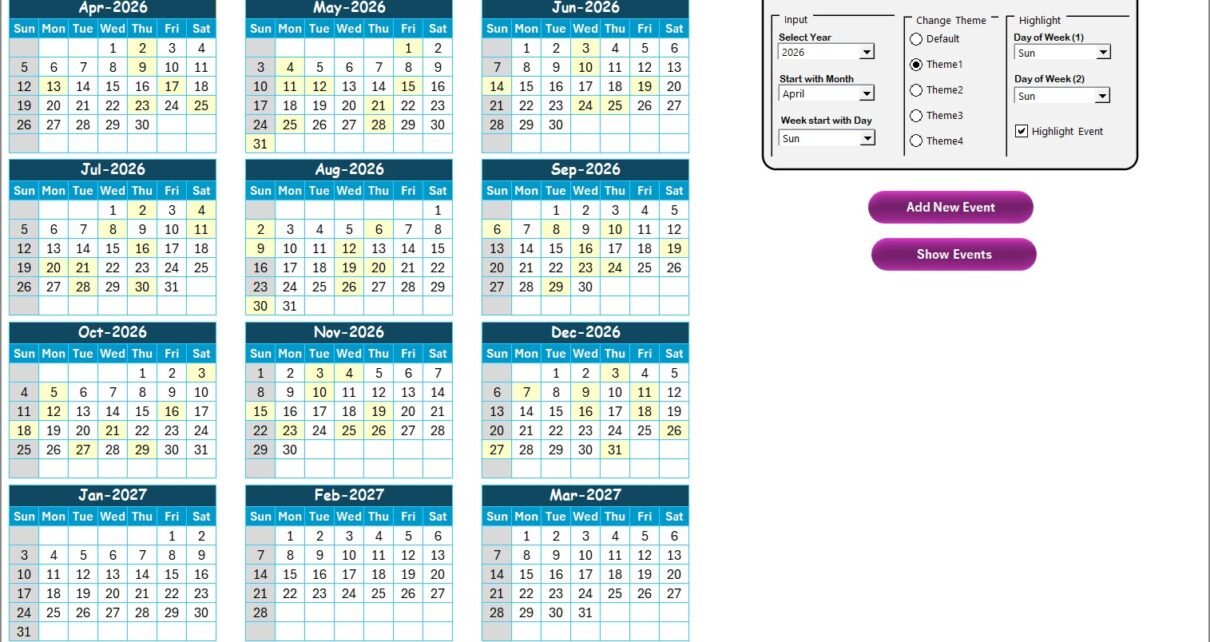
This is the Annual View Sheet showing all 12 months at once. On this sheet we have given 1 control panel and 2 buttons.
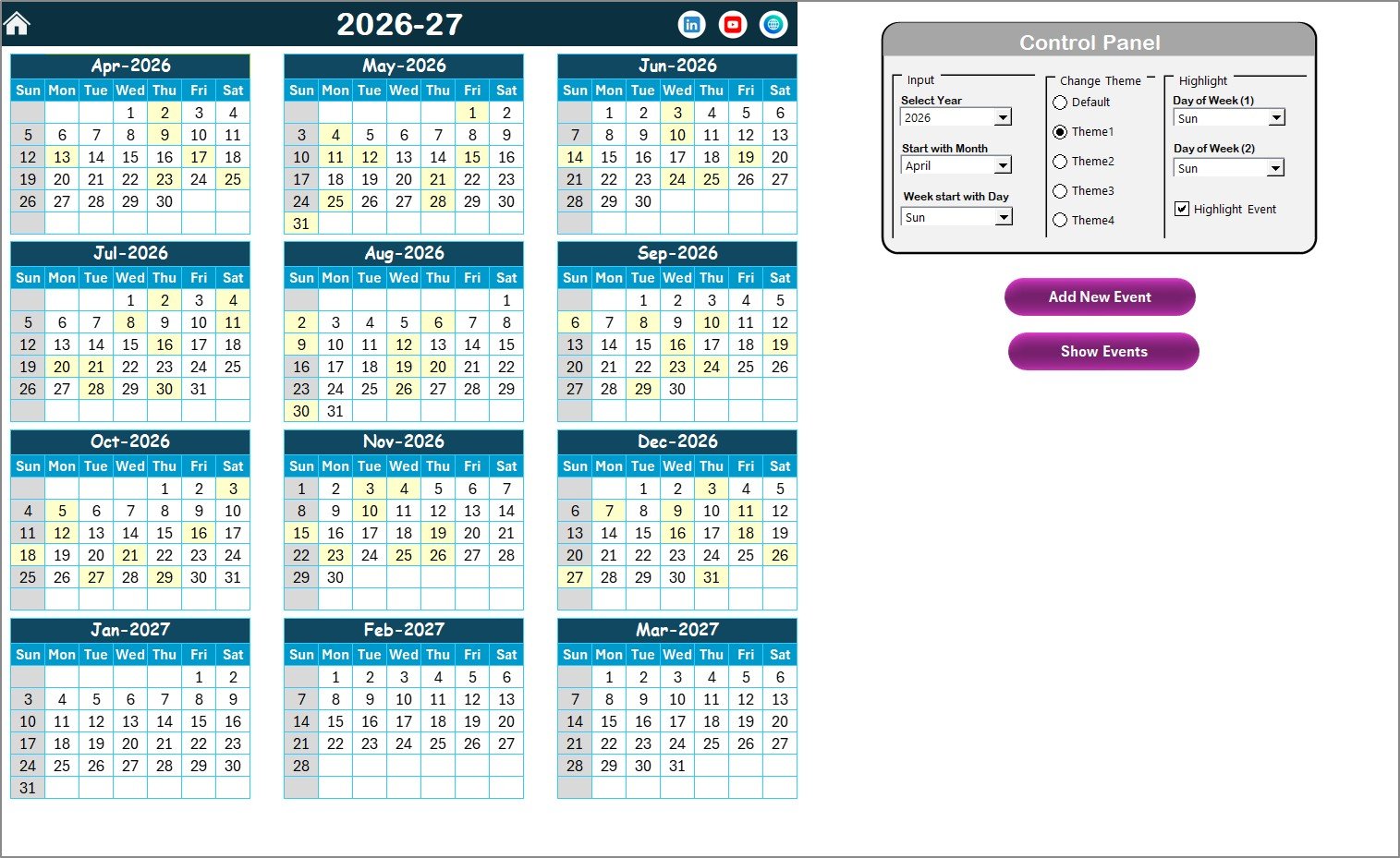
Annual View Sheet tab
Control Panel:
- Input Group: Select the Year to change the annual calendar automatically. You can also change the starting month and starting day of the week.
- Change Theme Group: 5 color themes available. Select the theme you want to apply across the entire workbook.
- Highlight Group: Select up to 2 days of the week to highlight (e.g., Saturday in grey and Sunday in grey). Toggle the Highlight Event checkbox to show events in yellow on the annual calendar.
Add New Event button: Select a date on the calendar and click this button to open the Add New Event form. Fill in the details and click Submit to save.
Show Event button: Click this to see the list of events on the selected date.
3. Monthly View Sheet Tab
A single calendar for the selected month. Select the Month and Year from the top and the calendar updates automatically. It shows 1 event per date; if there are multiple events on a date, it displays “more than 1…”.
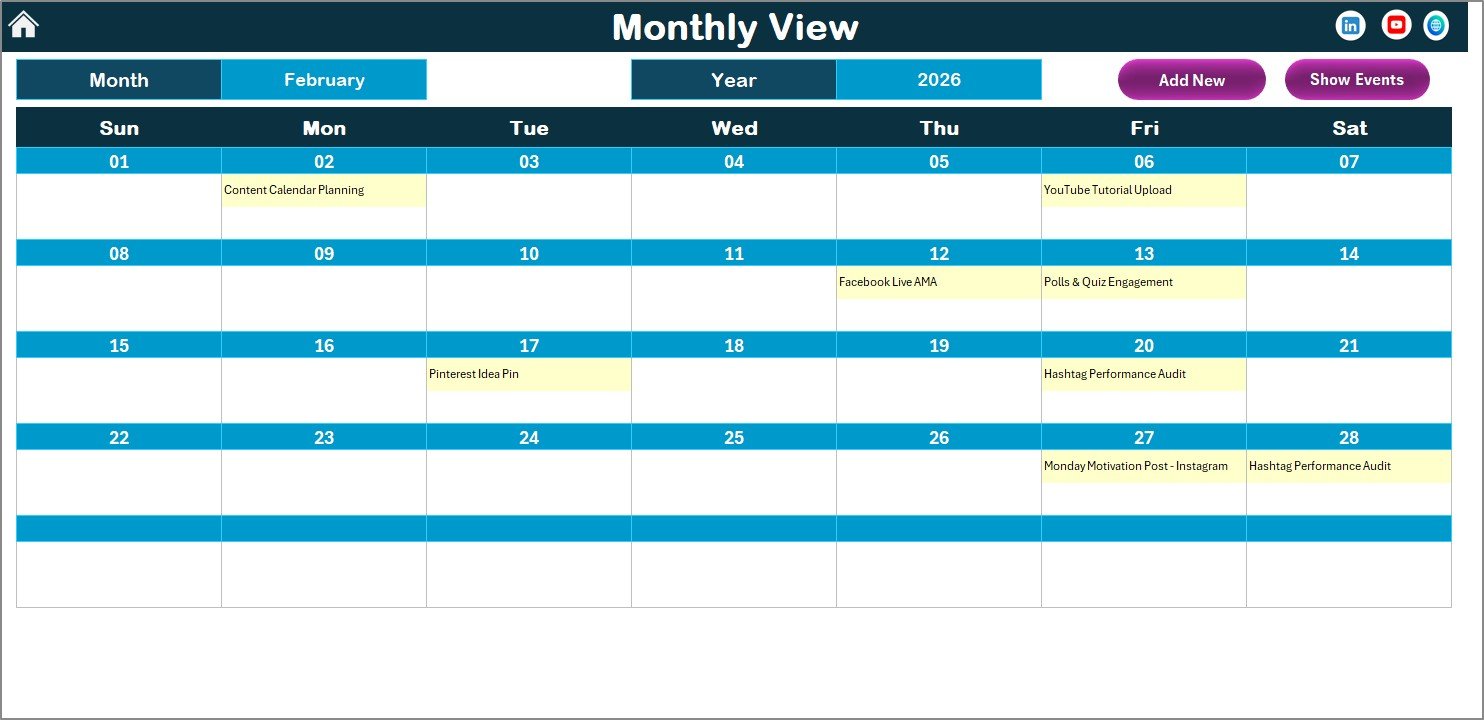
Two buttons are available at the top: Add New Event (opens the event form for the selected date) and Show Event (lists all events for the selected date).
4. Daily View Sheet Tab
This sheet shows the list of events with full details for any selected date range. Enter a Start Date and End Date using the calendar date picker icons at the top. Click the Refresh button to load the latest data for the selected range — ideal for weekly sprint reviews and platform-specific scheduling checks.
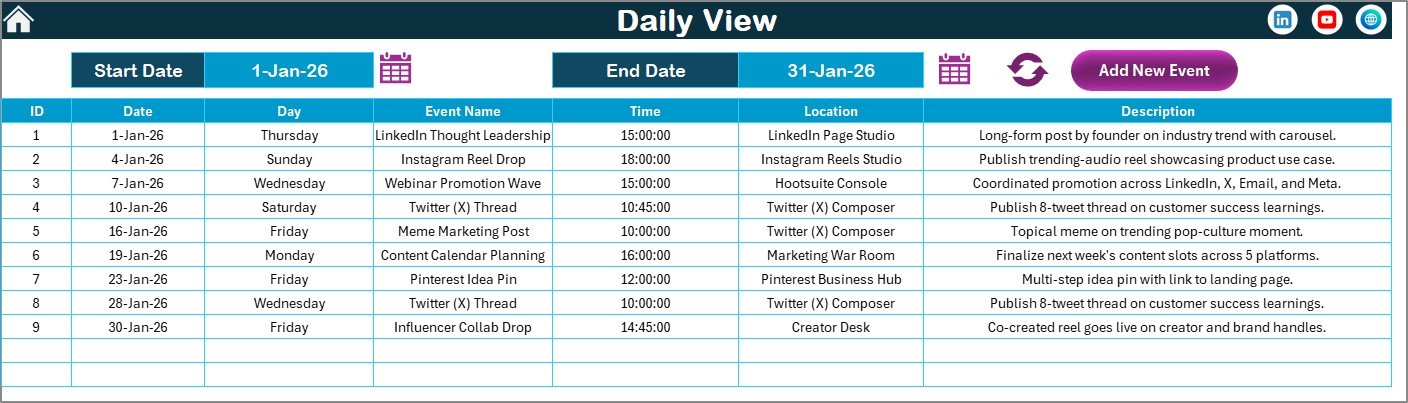
Daily View Sheet tab
The Add New Event button at the top opens the event form to add new entries from within the Daily View.
5. Events Sheet Tab (Database)
This is the master database sheet capturing details of all events. The following fields are stored for each entry:
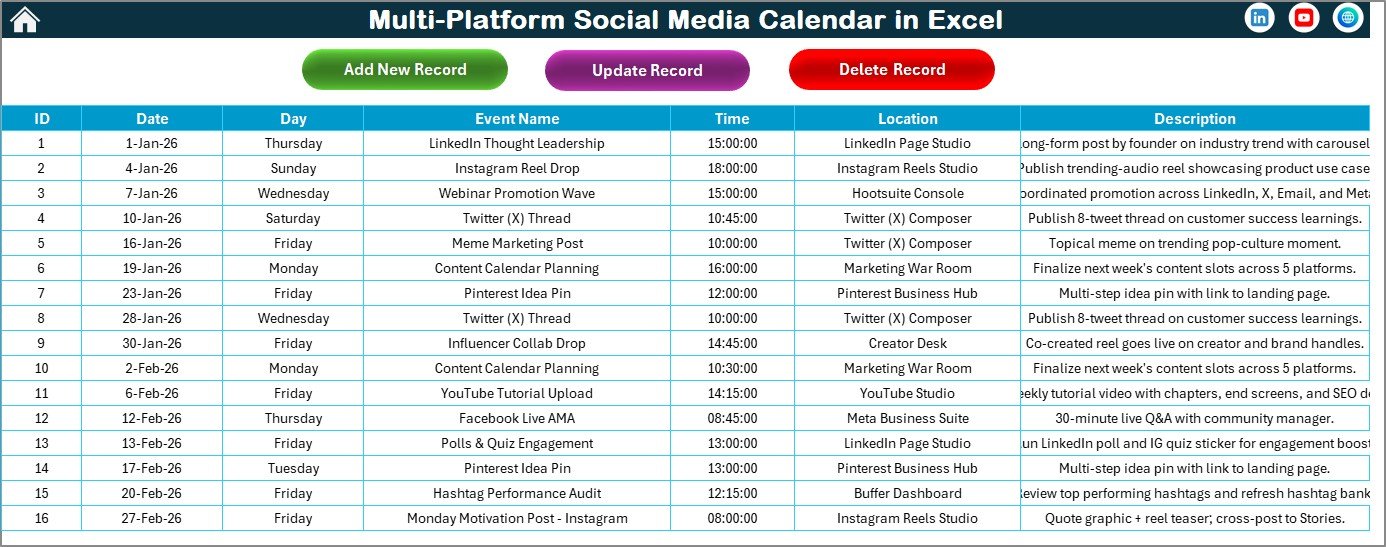
Events Database Sheet tab
- ID: Auto-generated unique number
- Date: Date of the event/post
- Day: Day of week (Sunday, Monday, etc.)
- Event Name: Name of the event or post
- Time: Time of the event
- Location: Platform or location of the post
- Description: Short description of the content
Three buttons at the top manage all records:
- Add New Record: Opens the Add Event form to create a new entry.
- Update Existing Record: Select the ID of the record you want to update, click this button, and the form opens with pre-filled data. Modify and submit.
- Delete Record: Select the ID of the record to delete and click this button to remove the entry.
Multi-Platform Social Media Calendar in Excel vs. Google Sheets Calendar vs. Buffer/Hootsuite — Feature Comparison
| Feature | Multi-Platform Social Media Calendar in Excel | Google Sheets Calendar | Buffer / Hootsuite |
|---|---|---|---|
| Cost | $4.99 one-time | Free – $4.99 | $18–$99/user/month |
| Platform | Microsoft Excel (offline) | Google Sheets (browser) | Cloud SaaS |
| Setup time | <10 minutes | <10 minutes | 2–4 hours + onboarding |
| Annual 12-month view | ✅ | Partial | ❌ |
| VBA event forms (CRUD) | ✅ | ❌ | ✅ (different UI) |
| 5 color themes | ✅ | ❌ | ✅ |
| Works fully offline | ✅ | Limited | ❌ |
| Auto-publishing to social | ❌ (planning only) | ❌ | ✅ |
| Year-1 cost (5 users) | $4.99 total | $0–$24.95 | $1,080–$5,940 |
For social media managers who want a structured multi-view content calendar without per-seat SaaS fees, the Multi-Platform Social Media Calendar in Excel sits in the sweet spot.
Who Should Use This Template
✅ Perfect for:
- Social media managers at small-to-mid agencies planning posts across Instagram, LinkedIn, Twitter, Facebook, and YouTube
- Content creators and freelancers who plan weekly content in Excel and want a visual multi-view calendar
- Marketing coordinators who need a date-range event list and full-year content overview without paying SaaS fees
- Teams already working in Microsoft Excel who want zero additional software costs
❌ Not a fit if:
- You need live auto-publishing to social media accounts (this is a planning tool, not a scheduling app like Buffer)
- Your enterprise team requires approval workflows, analytics dashboards, or SSO access controls
- Your team prefers browser-first tools and doesn’t have Microsoft Excel installed
Real-World Use Cases
Click here to Purchase the Multi-Platform Social Media Calendar in Excel
Priya manages social media for a 3-person digital marketing agency. She uses the Multi-Platform Social Media Calendar in Excel to map out Instagram posts, LinkedIn articles, and Twitter threads 4 weeks ahead. The Daily View lets her pull up every scheduled post for any given week, and the Annual View gives her a campaign density check before pitching a new client engagement. She switched from a $25/month Hootsuite plan and saves $300 a year with one $4.99 purchase.
Carlos handles content for a mid-size e-commerce brand. He tracks product launches, seasonal promotions, and influencer partnership post dates in the Events database. The VBA form lets his junior coordinator add entries without breaking any formulas, and the 5 color theme feature lets him differentiate Instagram content from LinkedIn thought leadership posts using visual cues.
A nonprofit communications coordinator uses the template to schedule awareness campaign posts across Facebook and Instagram. The Monthly View gives her a clear visual of weekly posting density, helping her identify content gaps and prevent over-posting burnout two weeks before they happen. The free-forever access means no budget approval required.
Advantages of Multi-Platform Social Media Calendar in Excel
The most compelling advantage is the combination of a full 12-month annual view alongside daily drill-down capability — most free alternatives offer one or the other but rarely both in the same file. The 5-color theme system also stands out: a single click changes the entire workbook’s appearance, which is genuinely useful when presenting social content schedules to clients or marketing leadership who judge presentation quality alongside content quality.
The VBA form architecture prevents the most common source of calendar errors: free-form row entries where team members add events in inconsistent formats. Every entry goes through a structured form with defined fields, which keeps the Events database clean and queryable over time. Learn more about enabling macros in Excel for the VBA forms to work correctly.
Cost efficiency is significant: at $4.99 one-time, this replaces tools that cost $18–$99 per user per month. For a 5-person social media team, that’s a saving of $1,075–$5,935 in year one alone.
Opportunities for Improvement
The template does not auto-publish to social media platforms — it is a planning and scheduling tool only. Teams that need automated posting at specific times will still need a tool like Buffer or Later for the publishing layer. Additionally, since the template relies on VBA macros, users on Excel for Mac may encounter some ActiveX control differences. For the most consistent experience, Microsoft Excel on Windows is recommended.
The Events database currently has a fixed 7-field structure; teams wanting to add custom fields (e.g., platform-specific hashtags or approval status columns) would need to modify the VBA code, which requires basic Excel VBA knowledge.
Best Practices
- Plan 4 weeks ahead: Use the Monthly View to fill in the next 4 weeks every Friday. This gives you a buffer for content revisions and approvals.
- Use Location field for platform tagging: Enter the platform name (Instagram, LinkedIn, Twitter) in the Location field so you can visually scan platform distribution in the Daily View.
- Color-code by campaign: Use the 5 color themes to differentiate between major campaign periods — for example, switch themes during product launches or seasonal campaigns for immediate visual recognition.
- Use the Annual View for campaign density checks: Before launching a new campaign, open the Annual View to check for scheduling conflicts or over-concentrated posting periods.
- Enable macros on first open: The template requires macros enabled to use the Add, Update, and Delete event forms. Enable them once and Excel will remember your preference for that file.
Explore Relevant Templates
Looking for more Excel calendar and marketing templates? Here are related picks from NextGenTemplates:
- 📅 Retail Sales and Promotion Calendar in Excel — schedule product promotions and sales campaign dates
- 📅 Subscription and SaaS Renewal Calendar in Excel — track subscription renewal and contract deadlines
- 📅 Marketing Asset Creation Calendar in Google Sheets — the Google Sheets version for browser-based teams
- 📅 PR Outreach Calendar in Google Sheets — plan PR campaigns and media outreach schedules
Also browse the full Excel Calendar Templates collection for over 400 calendar options across every business department.
Frequently Asked Questions
Click here to Purchase the Multi-Platform Social Media Calendar in Excel
What does the Multi-Platform Social Media Calendar in Excel include?
The Multi-Platform Social Media Calendar in Excel includes 5 worksheets: a Home navigation sheet, Annual View (12-month calendar with control panel), Monthly View, Daily View with date-range filtering, and an Events database. Each event stores 7 data fields — ID, Date, Day, Event Name, Time, Location, and Description — all managed via VBA pop-up forms. The template also includes 5 color themes and configurable calendar start settings.
Does the template work on Mac?
The template uses VBA macros. Excel for Mac supports VBA, but some ActiveX form controls may behave differently from Windows. For the most reliable experience with all form features, use the Multi-Platform Social Media Calendar in Excel on Microsoft Excel for Windows.
How long does setup take?
Setup takes under 10 minutes. Open the file in Excel, enable macros when prompted, configure your year, starting month, and color theme in the Annual View control panel, and start adding social media events immediately. No external data connections or formula configuration required.
How does this compare to Buffer or Hootsuite?
Buffer and Hootsuite connect directly to social accounts and automate post publishing at scheduled times. The Multi-Platform Social Media Calendar in Excel is a planning and scheduling template — it helps you organize what content to post and when, but does not publish automatically. It costs $4.99 one-time versus $18–$99 per user per month for SaaS publishing tools, making it ideal for teams that handle their own publishing manually.
Can I track multiple social platforms in one template?
Yes. The Events database Event Name and Location fields accept any platform label — Instagram, LinkedIn, Twitter/X, Facebook, YouTube, Pinterest, TikTok, or any custom channel. There are no built-in platform restrictions, so you can manage all your social platforms in one unified calendar.
Is it a one-time purchase or does it require a subscription?
The Multi-Platform Social Media Calendar in Excel is a one-time purchase at $4.99 (regular price $8.99). There is no subscription, no renewal fee, and no per-user charge. Download once and use the template indefinitely, including any future updates to the file.
Can I customize the calendar year and starting month?
Yes. The Annual View control panel Input Group lets you select the Year, set the starting month of the calendar, and choose the starting day of the week. The entire 12-month view refreshes automatically when you change any of these settings, making it easy to align with fiscal years or editorial calendars that start in months other than January.
About the Author
Built by PK — Microsoft Certified Professional with 15+ years of Excel, Google Sheets, and Power BI experience. Founder of NextGenTemplates, reaching 300K+ subscribers across YouTube channels (@PK-AnExcelExpert, @NextGenTemplates, @NeoTechNavigators). Every template is hand-built and tested before release.
Conclusion
The Multi-Platform Social Media Calendar in Excel gives social media managers, content creators, and marketing teams a structured, multi-view planning system — without the monthly cost of SaaS tools. With 5 worksheets, 4 calendar views, VBA event management forms, 5 color themes, and a clean Events database, it covers every aspect of content scheduling from annual campaign planning down to daily post tracking.
Click here to Purchase the Multi-Platform Social Media Calendar in Excel
✅ Instant download · One-time payment · No subscription · Lifetime access
🎥 Watch the tutorial on Youtube.com/@PK-AnExcelExpert
📅 Last updated: May 2026