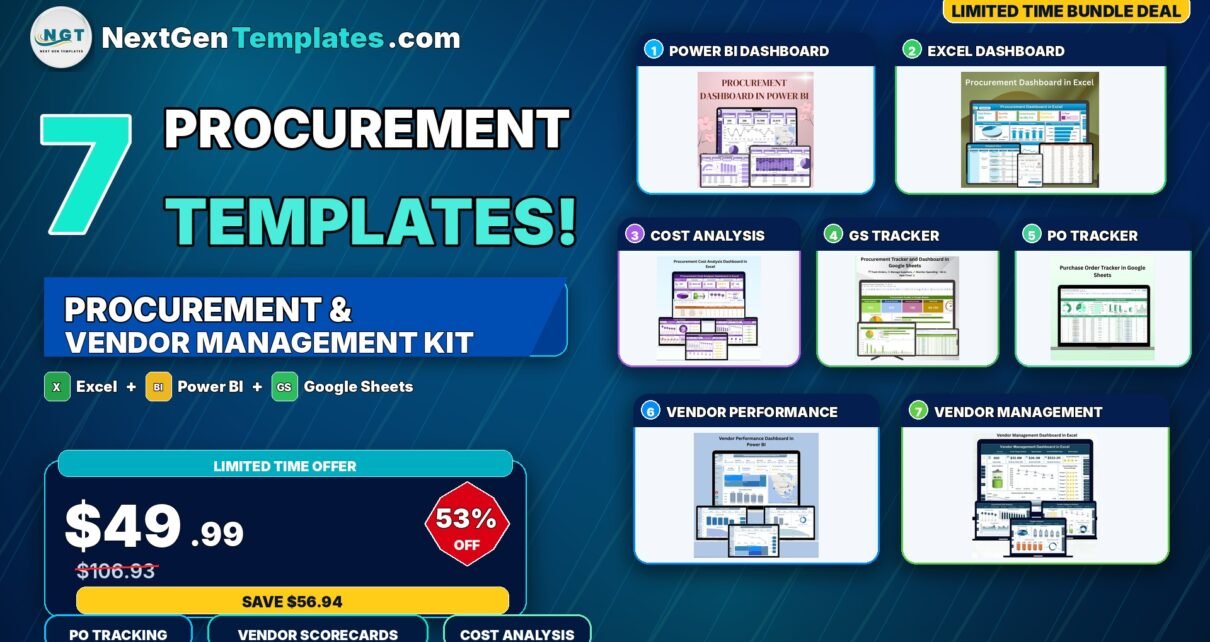
If you’re running procurement, supply chain, or finance and you’re tired of stitching together half a dozen disconnected spreadsheets just to answer one vendor question, the Procurement & Vendor Management Kit is built for you. This 7-template bundle covers every stage of the procure-to-pay lifecycle — purchase order tracking, vendor performance scoring, cost analysis, payment variance, and category-wise spend — and spans the three platforms most procurement teams actually use day-to-day: Microsoft Excel, Power BI, and Google Sheets. Buy the 7 templates individually and you pay $106.93. Get the complete kit today for just $49.99 and save $56.94 (53% OFF).
This kit is part of the larger Supply Chain & Procurement collection on NextGenTemplates and complements other industry packs like the Template Bundles range. If you’ve ever evaluated SaaS procurement platforms like SAP Ariba, Coupa, or Jaggaer, you know the subscription pricing is brutal — this kit gives you 80% of what those tools do for 100% less recurring cost.
🛒 Get the Procurement & Vendor Management Kit
7 Premium Templates · Excel + Power BI + Google Sheets
$106.93 $49.99
💸 Save $56.94 (53% OFF)
🛒 Click Here to Purchase the Bundle
✅ Instant download · ✅ One-time payment · ✅ Lifetime access · ✅ No subscriptions
🔑 Key Features of the Procurement & Vendor Management Kit
End-to-end procure-to-pay coverage. The bundle is intentionally curated so every stage of the procurement lifecycle has a dedicated template. Purchase order creation and tracking? Covered by the Purchase Order Tracker in Google Sheets. Supplier performance scoring? Handled by both the Vendor Performance Dashboard in Power BI and the Vendor Management Dashboard in Excel. Cost optimization and spend analysis? That’s where the Procurement Cost Analysis Dashboard in Excel shines. Day-to-day procurement operations get a unified view through the Procurement Dashboards in Excel, Power BI, and Google Sheets. Nothing important falls through the cracks.
Three platforms, one purchase. Procurement teams rarely standardize on a single tool. Finance prefers Excel for offline analysis and audit trails. Leadership wants polished Power BI dashboards for board reviews. Operations and remote vendor managers need Google Sheets for real-time collaboration. By bundling all three platforms, this kit lets every stakeholder use their preferred tool while the underlying data and KPI logic remain consistent across the organization.
Vendor performance scoring built-in. Both vendor dashboards include rating frameworks across quality, communication, on-time delivery, and overall satisfaction. Compare suppliers side-by-side, rank them by total spend, and identify the top 20% who deserve preferred status — and the bottom 10% who need a tough quarterly review.
Payment variance and cash-flow visibility. The Vendor Management Dashboard in Excel includes a dedicated Actual Paid USD analysis page that tracks contract value versus actual paid by region, account manager, vendor category, and month. Combine that with the Payment Status charts in the Purchase Order Tracker and you have full visibility into where money is going, what’s overdue, and which vendors stretch your payment terms the most.
Multi-dimensional slicers and drill-downs. Every dashboard in the bundle uses slicers to filter by vendor, category, region, month, account manager, and payment status. You’re never stuck looking at a single static view — every chart and KPI updates instantly when you change a filter.
📦 What’s Included in the Procurement & Vendor Management Kit
1. Procurement Dashboard in Power BI ($17.99)
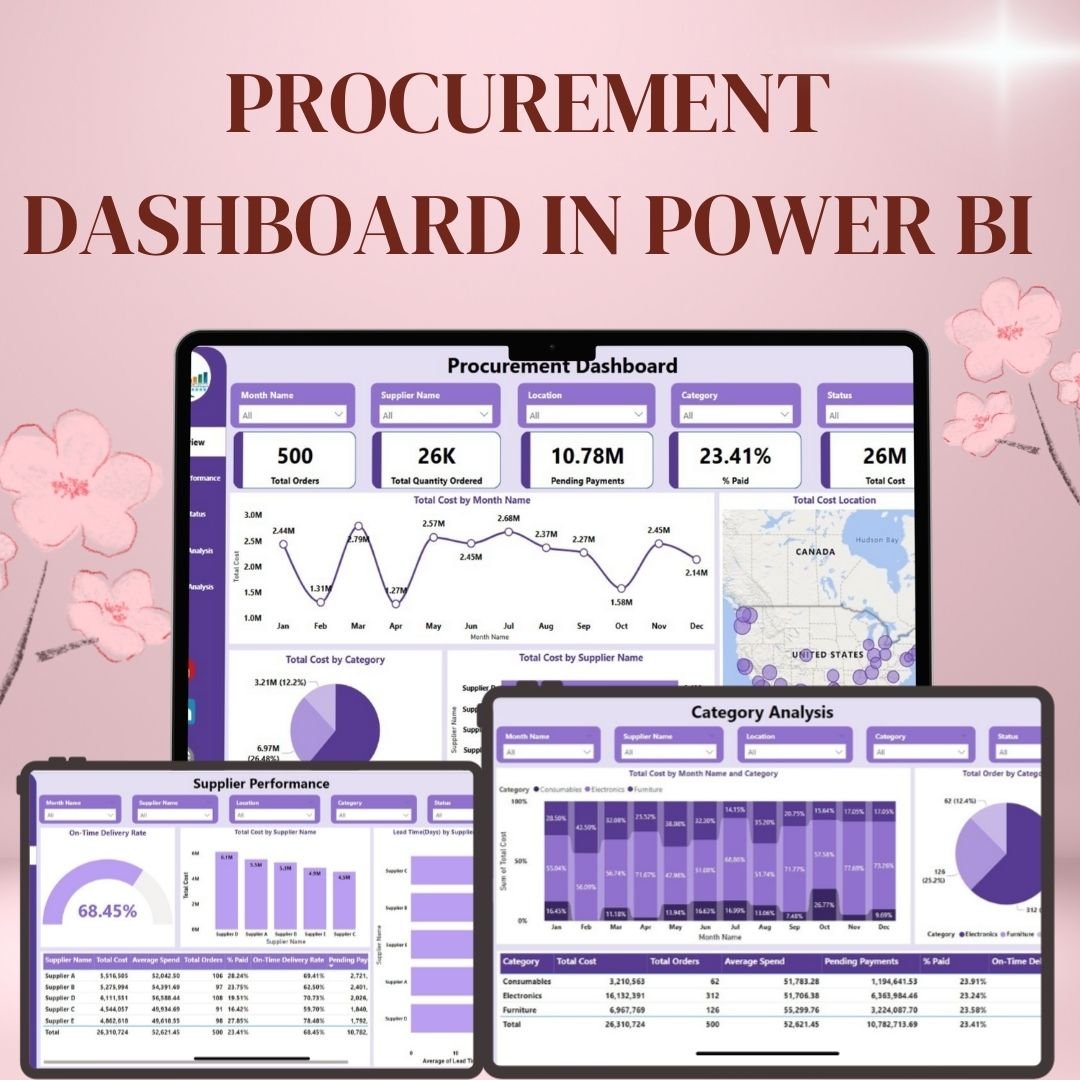
A multi-page Power BI dashboard with five focused views: Overview (total orders, total cost, pending payments, % paid), Supplier Performance (on-time delivery rate, lead time by supplier, average spend per supplier), Order Status (pending vs delivered vs delayed), Payment Analysis (paid vs unpaid vs overdue, overdue amount by supplier, payment terms comparison), and Category Analysis (cost by month and category). Includes geographical cost mapping. Best for executive reporting and quarterly business reviews.
2. Procurement Dashboard in Excel ($17.99)

A slicer-driven Excel dashboard with summary cards for total orders, quantity ordered, pending payments, total cost, and percentage paid. Filter dynamically by year, month, supplier, and category. Visual charts include cost by category (pie), cost by supplier (arrow), cost by month and year (line), and cost by location (bar). Includes a separate Detailed View sheet with pivot tables.
3. Procurement Cost Analysis Dashboard in Excel ($17.99)
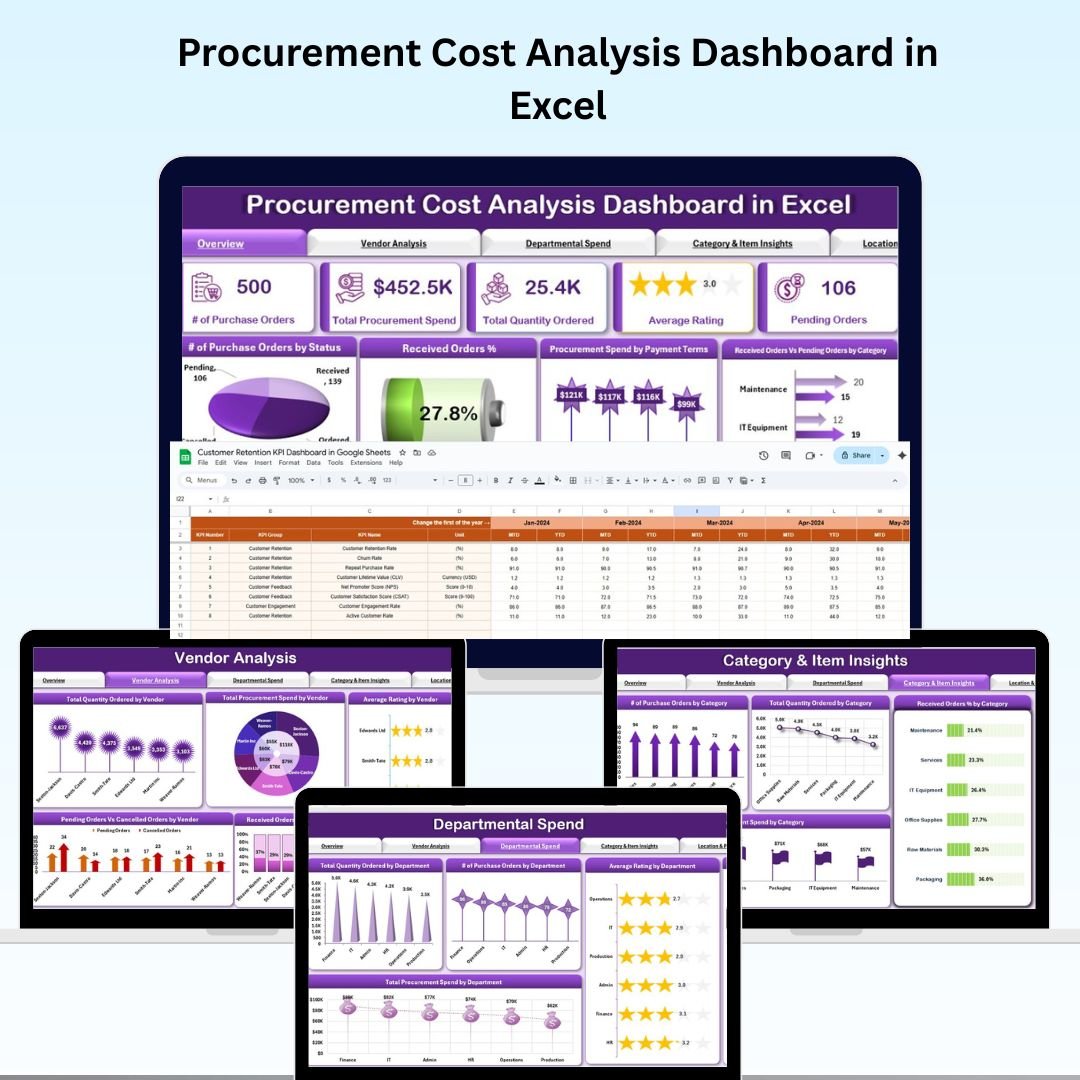
A specialized cost-focused Excel dashboard with six analytical tabs: Overview (KPI cards for purchase orders, total spend, quantity ordered, average rating, pending orders), Vendor Analysis, Departmental Spend, Category & Item Insights, Location & Payment Terms, and a centralized Data Input Sheet that auto-feeds every chart.
4. Procurement Tracker and Dashboard in Google Sheets ($9.99)

A cloud-collaborative Google Sheets tracker designed for teams that need real-time sharing. Includes purchase order management, supplier tracking with contact and pricing history, financial overview with built-in charts, customizable fields for materials and services, and real-time collaboration.
5. Purchase Order Tracker in Google Sheets ($6.99)
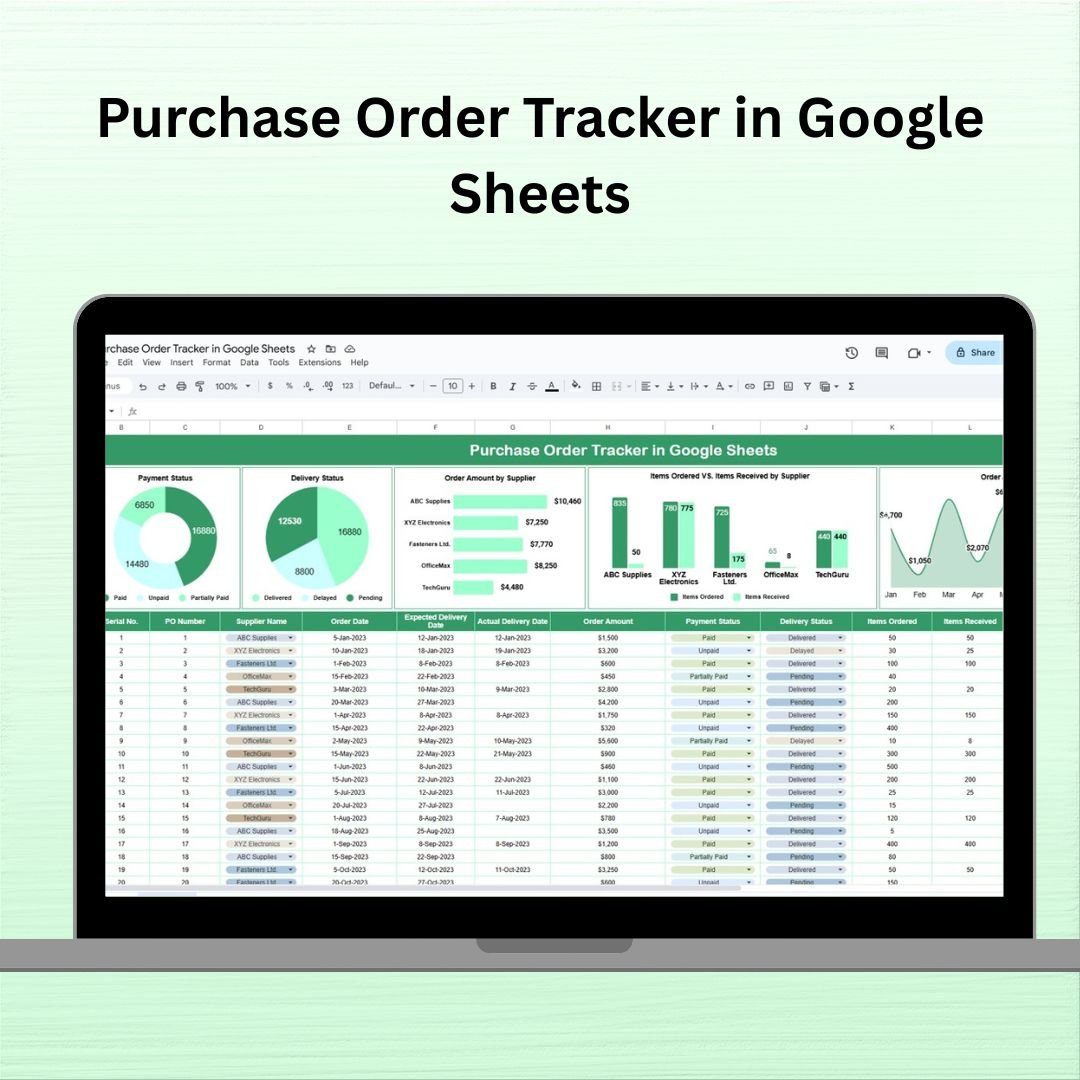
The lightest, most focused tool in the bundle — a Google Sheets PO tracker with structured fields for serial number, PO number, supplier, order/delivery dates, order amount, items ordered vs received, payment status, and delivery status. Backed by 5 auto-updating charts.
6. Vendor Performance Dashboard in Power BI ($17.99)
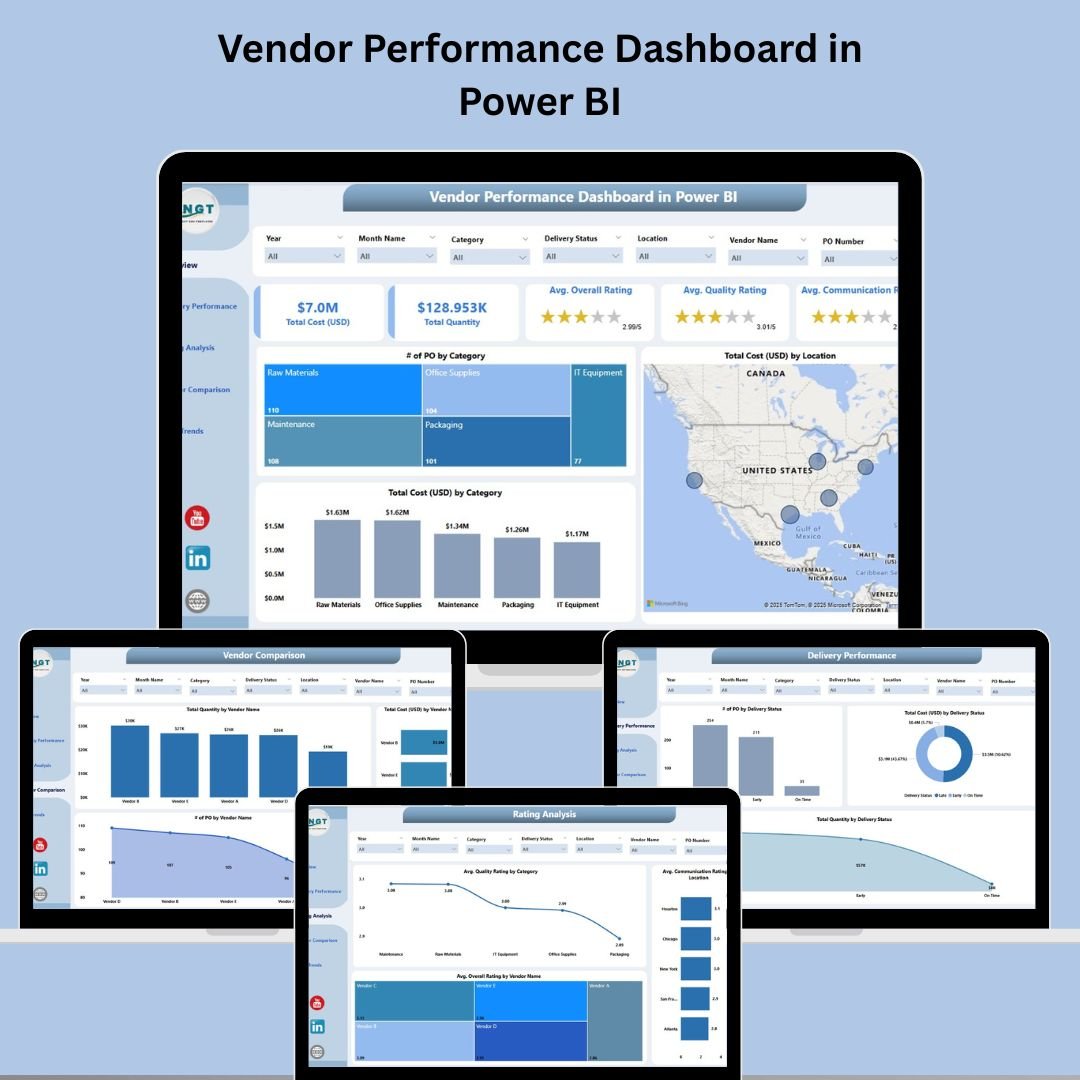
A 5-page Power BI dashboard purpose-built for vendor evaluation: Overview, Delivery Performance, Rating Analysis, Vendor Comparison, and Time Trends. Uses 7 slicers for filtering. Ideal for quarterly vendor business reviews and sourcing strategy meetings.
7. Vendor Management Dashboard in Excel ($17.99)
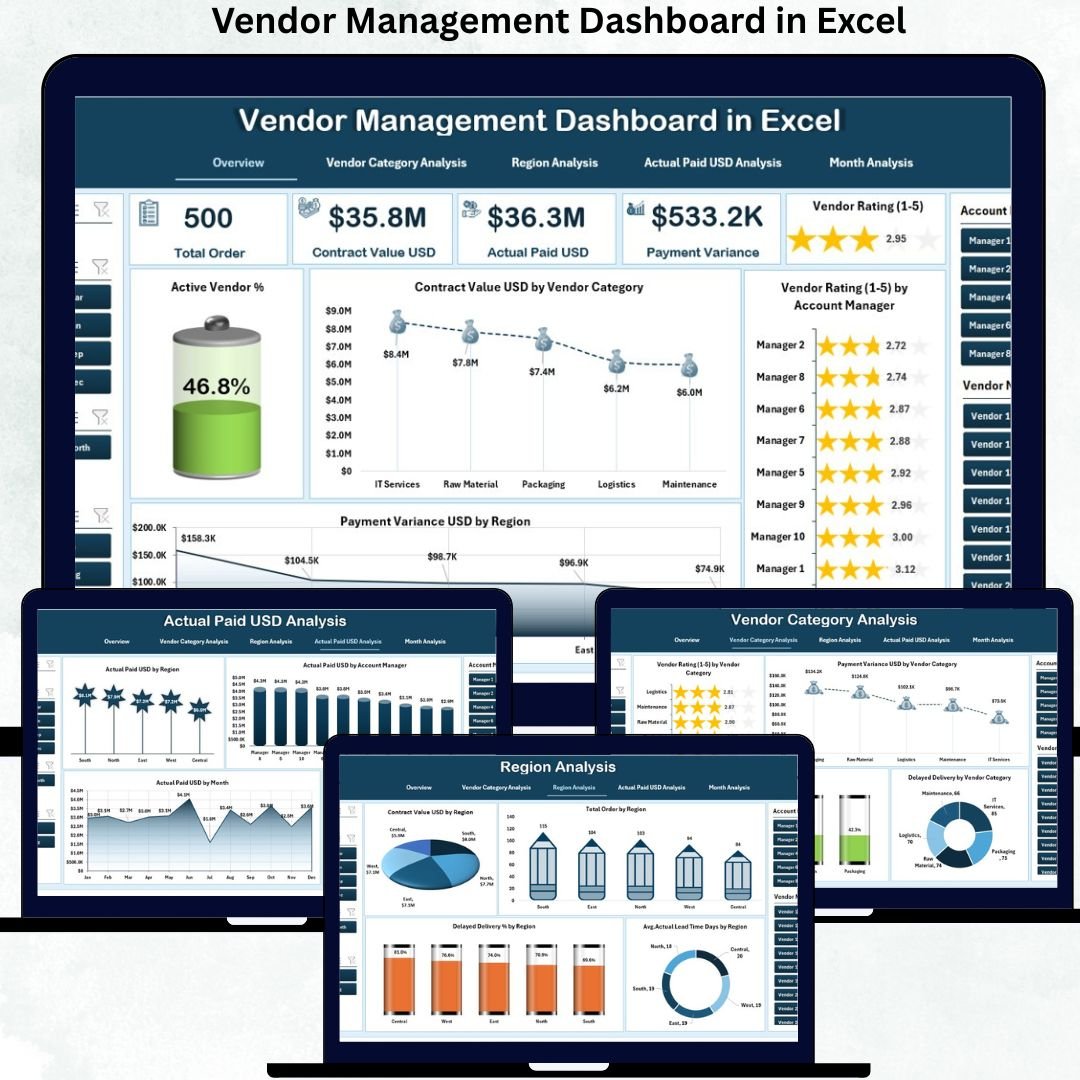
An executive-grade Excel vendor management dashboard with five professional analysis pages: Overview (5 KPI cards — Active Vendor %, Total Contract Value, Average Rating, Total Payment Variance, Delayed Delivery %), Vendor Category Analysis, Region Analysis, Actual Paid USD Analysis, and Month Analysis.
💡 Smart Comparison — Individual vs Bundle
| # | Template | Platform | Individual Price |
|---|---|---|---|
| 1 | Procurement Dashboard in Power BI | Power BI | $17.99 |
| 2 | Procurement Dashboard in Excel | MS Excel | $17.99 |
| 3 | Procurement Cost Analysis Dashboard in Excel | MS Excel | $17.99 |
| 4 | Procurement Tracker and Dashboard in Google Sheets | Google Sheets | $9.99 |
| 5 | Purchase Order Tracker in Google Sheets | Google Sheets | $6.99 |
| 6 | Vendor Performance Dashboard in Power BI | Power BI | $17.99 |
| 7 | Vendor Management Dashboard in Excel | MS Excel | $17.99 |
| Individual Total | |||
| Bundle Price (53% OFF) | $49.99 | ||
| You Save | $56.94 | ||
🎯 Strategic Advantages of the Bundle vs Individual Purchase
1. Significant cost savings. $56.94 saved on the upfront purchase — equivalent to three free templates.
2. Consistent KPI definitions across the organization. When everyone in procurement, supply chain, and finance uses templates from the same bundle, definitions of “on-time delivery”, “vendor rating”, and “payment variance” are aligned.
3. Reduced onboarding time. New procurement hires can learn the entire analytics stack in one sitting because the design language and KPI card layouts are consistent across all 7 templates.
4. Cross-platform flexibility. A regional manager can use Google Sheets for live collaboration. The CFO can review Power BI dashboards. Finance audits the raw figures in Excel. Same source of truth, three interfaces.
⚙️ Best Practices for Deploying the Bundle
Start with the trackers. Roll out the Purchase Order Tracker in Google Sheets and the Procurement Tracker first. These are the data-entry layer — without clean PO data, the dashboards won’t tell you anything useful.
Layer in the operational dashboards next. Once you have 3-4 weeks of clean PO data, deploy the Procurement Dashboards (Excel and Power BI). Use them in your weekly procurement standups.
Add vendor scoring last. The Vendor Performance and Vendor Management dashboards work best when you have at least 2-3 months of vendor data. Use them quarterly for vendor business reviews.
Automate the data flow. If your ERP can export procurement data to Excel or CSV, set up a weekly automated export and dump it into the Data sheets. The dashboards refresh automatically.
Customize the rating dimensions. The default vendor rating model uses quality, communication, and on-time delivery. Extend the rating fields in the Data sheet if your industry weighs sustainability or compliance more heavily.
🔗 Explore More Template Collections
❓ Frequently Asked Questions
Q1. Do I need Power BI Pro to use the Power BI dashboards in this bundle?
No. Power BI Desktop is a free download from Microsoft and runs both included Power BI dashboards without any subscription. You only need Power BI Pro if you want to publish dashboards to the Power BI Service for shared online viewing.
Q2. Can I use the Google Sheets templates without a Google Workspace subscription?
Yes. A free personal Google account is enough to run the Procurement Tracker and Purchase Order Tracker in Google Sheets.
Q3. How do I get the bundle download? Is it one file or seven?
You receive one ZIP file containing all 7 templates organized in subfolders by platform (Excel, Power BI, Google Sheets). Download it once after purchase and you have lifetime access — no subscription, no per-user fees, no expiration.
Q4. Can I customize the dashboards to match my company branding?
Absolutely. Every template is fully editable. Change colors, swap logos, add or remove KPI cards, adjust slicer fields, modify chart types, and extend the data model.
Q5. Will I get future updates to these templates for free?
Yes. When any of the 7 individual templates gets an update (bug fixes, new charts, additional features), bundle customers receive the updated version free through their account download area.
Q6. Is this bundle suitable for small businesses or only large enterprises?
Both. The templates scale from 10 vendors to 1,000+. Small businesses get enterprise-grade analytics without paying for SAP, Coupa, or Ariba. Large enterprises use it for departmental or regional procurement teams that don’t sit on the main ERP.
✅ Conclusion
If you’ve been managing procurement and vendors with disconnected spreadsheets, email chains, and the occasional all-hands meeting to “just get the numbers right,” the Procurement & Vendor Management Kit gives you the structured analytics layer you’ve been missing — without the SaaS subscription pain. Seven production-ready templates. Three platforms. One purchase. Save $56.94 compared to individual pricing.
🚀 Ready to Get Started?
Procurement & Vendor Management Kit · 7 Templates · 3 Platforms
$106.93 $49.99
💸 Save $56.94 (53% OFF)
✅ Instant download · ✅ One-time payment · ✅ Lifetime access · ✅ No subscriptions