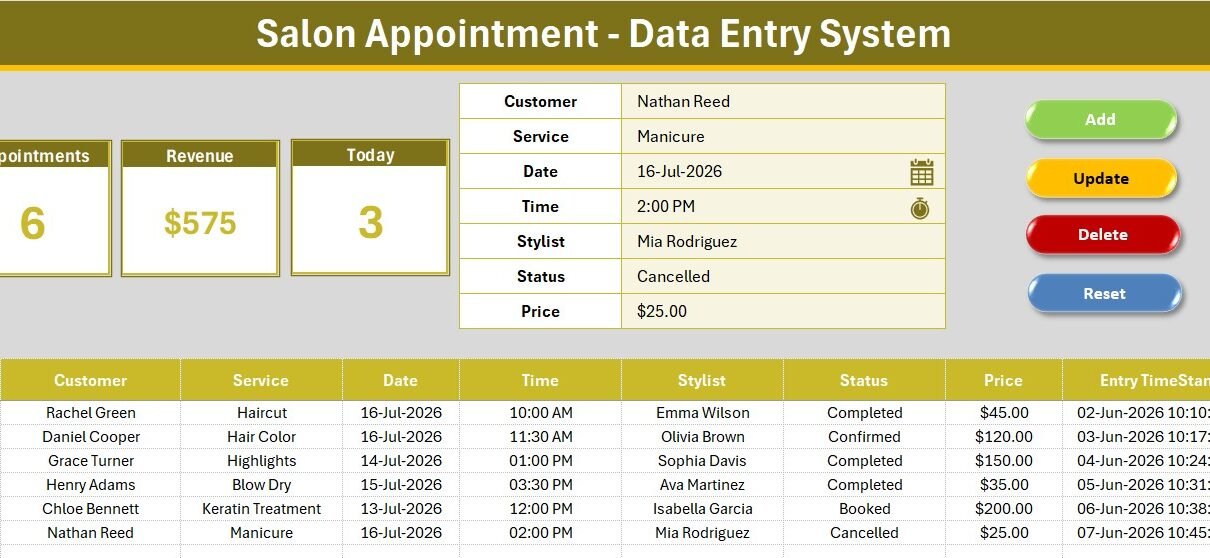
The Salon Appointment Data Entry System in Excel books every client through a 7-field form, tracks 3 live KPI cards, and ships with 14 pre-loaded services, 8 stylists and 5 booking statuses. It runs on 206 live formulas and four VBA buttons — Add, Update, Delete and Reset — and it costs $5.99 once instead of $25–$200 every month for salon booking software.
If you still run your salon on a paper appointment book or a messy spreadsheet, this tool gives you a clean, offline alternative in under 10 minutes. Below is a full walkthrough of how the Salon Appointment Data Entry System in Excel is built, what each sheet does, how it compares to Fresha, Vagaro and Booksy, and how to get the most out of it.
Key Features of the Salon Appointment Data Entry System
The tool is designed so a receptionist can log a booking in seconds and an owner can read the day’s numbers at a glance. Its core features are:
- 🔹 7-field appointment form — Customer, Service, Date, Time, Stylist, Status and Price, with Service, Stylist and Status controlled by dropdowns.
- 🔹 Four VBA macros — Add_Record, Update_Record, Delete_Record and Reset_Form, plus a double-click loader that pulls any booking back into the form for editing.
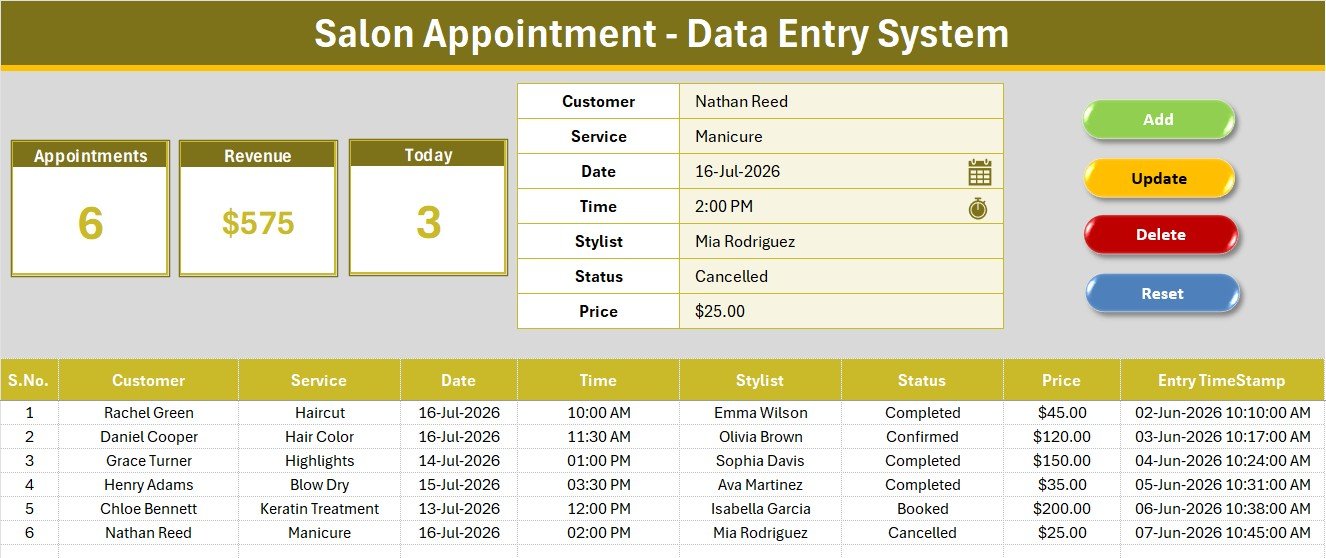
- 🔹 3 live KPI cards — Appointments counts every booking (COUNTA), Revenue sums the Price column (SUM), and Today uses a COUNTIF on Excel’s TODAY() function to show how many appointments are booked for the current date.
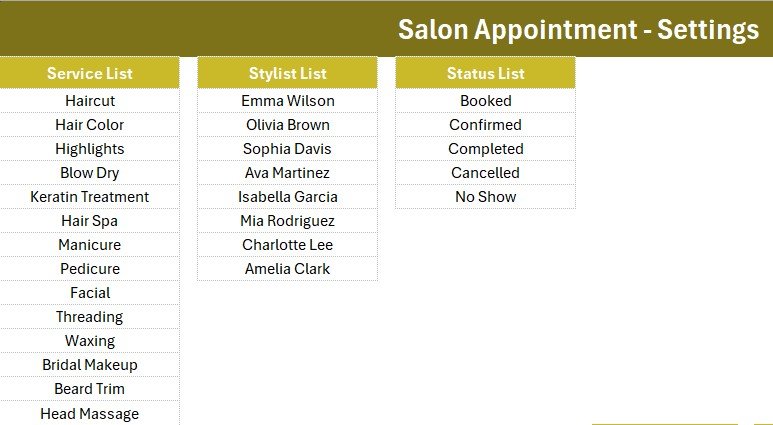
- 🔹 14 services and 8 stylists pre-loaded — from Haircut and Hair Color to Facial, Bridal Makeup and Head Massage, all editable on the Setting sheet.
- 🔹 5 booking statuses — Booked, Confirmed, Completed, Cancelled and No Show.
- 🔹 Auto S.No and Entry TimeStamp — every record is numbered and time-stamped so you keep a clean audit trail.
Because the Today card is built on Excel’s native TODAY() date function, it recalculates every time you open the file — there is nothing to filter or refresh.
Template Structure — Sheet by Sheet
Data Entry Dashboard
The main working sheet pairs the three KPI cards (Appointments, Revenue, Today) with the 7-field form and the four colour-coded Add, Delete, Update and Reset buttons in a 2×2 block. Below sits the records table with automatic serial numbers, currency-formatted prices and an Entry TimeStamp column.
Appointment Form and Records Table
Fill the form once and click Add — the appointment drops into the table below. Double-click any row to load it straight back into the form, then Update to save changes or Delete to remove it after a confirmation prompt. There is no manual copy-paste and no risk of breaking a formula by typing into the wrong cell.
Setting Sheet
The Setting sheet holds all three dropdown source lists — Service, Stylist and Status — wired to the form through named ranges, plus linked copies of the KPI stat cards. Add a new service or a new stylist here and it appears in the form dropdown instantly, with no formula editing.
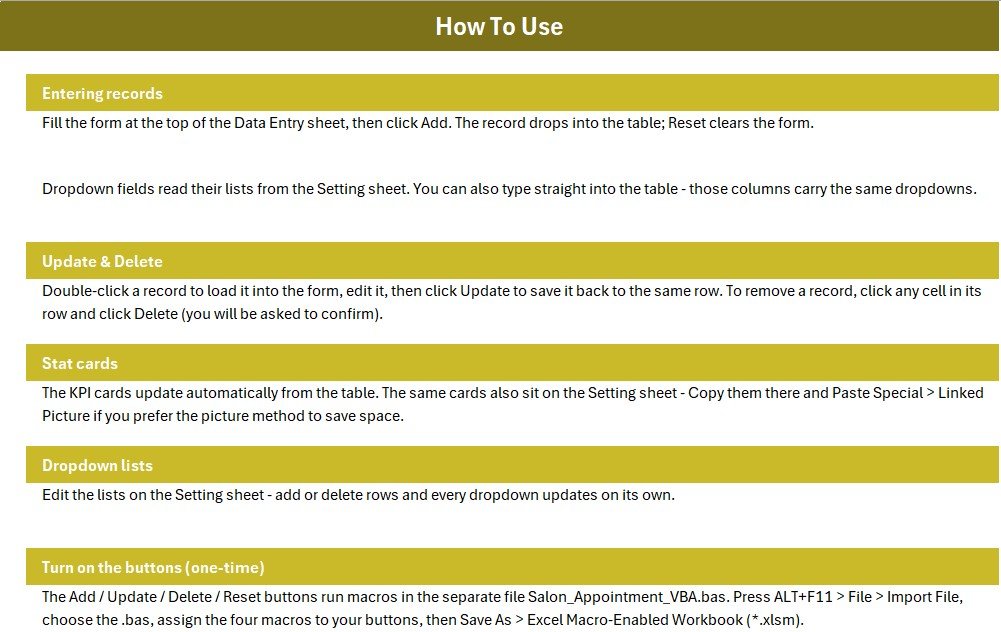
Two more sheets round out the workbook: an Instructions sheet that walks through the one-time VBA activation, and a Get More Templates sheet linking to related tools.
Salon Appointment Data Entry System vs. Google Sheets vs. Fresha / Vagaro / Booksy — Feature Comparison
| Feature | Salon Appointment Data Entry System | Google Sheets Booking Sheet | Fresha / Vagaro / Booksy |
|---|---|---|---|
| Cost | $5.99 one-time ✅ | Free, but built by you | $25–$200 / month |
| Platform | Microsoft Excel (desktop) | Browser | Cloud SaaS |
| Setup time | Under 10 minutes ✅ | 2–4 hours of building | Days of onboarding |
| One-click Add / Update / Delete | 4 VBA buttons + double-click edit ✅ | Manual row editing | ✅ Included |
| Live Appointments, Revenue & Today KPIs | 3 cards, auto-recalculating ✅ | Formulas you write yourself | ✅ Included |
| Works offline | Yes ✅ | ❌ Needs internet | ❌ Needs internet |
| Customizable services & stylists | Editable Setting sheet ✅ | Yes | Limited by plan tier |
| Online client self-booking | ❌ Not included | ❌ Not included | ✅ Included |
| Year-1 cost (single chair) | $5.99 ✅ | $0 + your time | $300–$2,400 |
For salon and spa owners who want organised appointment records and daily booking visibility without paying a monthly software bill, the Salon Appointment Data Entry System in Excel sits in the sweet spot.
Who Should Use This Template
Perfect for:
- Independent hair salons, beauty parlours, nail bars and barber shops with one or a few chairs
- Spa and grooming studios that book clients by phone, walk-in or WhatsApp and log them at reception
- Front-desk staff who want a fast, offline tool on the PC already at the counter
Not a fit if:
- You run a multi-branch chain that needs online self-booking, automated SMS reminders or card payments
- You need several people editing bookings in the browser at the same time
- You are on Mac only — the VBA macros require Excel on Windows
Real-World Use Cases
Priya runs a 3-chair hair salon. Her receptionist logs every booking in the form, and the Today card tells her each morning how many clients are expected — so she can staff the chairs and order stock, without paying $30 a month for Vagaro.
Arjun owns a barber shop with two stylists. He records each cut and its price, and the Revenue card gives him an instant daily takings figure for his accountant, replacing a paper register that never added up.
Neha manages a spa and nail studio. She marks each appointment Confirmed, Completed or No Show, then reviews the No Show entries every week to decide who needs a reminder call before their next visit.
Advantages of the Salon Appointment Data Entry System
The biggest advantage is cost: a one-time $5.99 purchase replaces $300–$2,400 a year of salon booking software for a single-chair operation. Because it runs entirely in Excel, it works offline and keeps client data on your own PC rather than a third-party cloud. The dropdown-driven form keeps your service names and stylist roster consistent, which makes the Revenue and Appointments totals trustworthy. And since every list lives on the Setting sheet, you can reshape the tool for a barber shop, nail bar or day spa in minutes.
Opportunities for Improvement
Being honest about the limits helps you decide if it fits. The Salon Appointment Data Entry System is a single-file desktop tool, so it does not offer online client self-booking, automated reminders or card payments — those belong to a full SaaS platform. Real-time multi-user editing is limited; sharing over OneDrive works, but two people editing the same file at once is not ideal. The macros also require Excel on Windows, so Mac-only and Excel Online users will not get the button features. If you outgrow it, our Google Sheets and web-app tools add browser-based, multi-user options.
Best Practices
- Edit the Service and Stylist lists on the Setting sheet before your first booking so your dropdowns match your real menu and team.
- Set the Status accurately on every visit — the Today and Appointments cards are only as useful as the data behind them.
- Keep one workbook per location; if you run two branches, copy the file rather than mixing bookings in one sheet.
- Save as a macro-enabled workbook (.xlsm) after importing the VBA, and back the file up weekly.
Explore Relevant Templates
- Gym Membership Data Entry System in Excel — the same one-click entry engine for fitness memberships.
- Hotel Room Booking Data Entry System in Excel — booking capture and live occupancy for small hotels.
- Vehicle Service Log Data Entry System in Excel — service-record tracking for garages and workshops.
- Excel VBA Tools & Utilities Pack — get this style of tool plus 7 more VBA systems and save 40%.
- Browse the full Excel VBA Tools collection on NextGenTemplates.
Frequently Asked Questions
What does the Salon Appointment Data Entry System in Excel track?
The Salon Appointment Data Entry System in Excel tracks seven fields per booking — Customer, Service, Date, Time, Stylist, Status and Price — plus three live KPI cards: Appointments, Revenue and Today. Every stat recalculates automatically as records change.
What does the Today KPI card show?
The Today card uses a live COUNTIF on Excel’s TODAY() function to count how many appointments in the table are booked for the current date. Open the file any morning and it shows that day’s booking count with no manual filtering.
Do I need to know VBA to use it?
No. The Salon Appointment Data Entry System ships with a ready-made VBA module and step-by-step import instructions on the built-in Instructions sheet. You import the file once, assign the four buttons, save as .xlsm, and never touch code again.
How does this compare to Fresha, Vagaro or Booksy?
Those salon platforms add online booking and payments for $25–$200 per month. The Salon Appointment Data Entry System in Excel costs $5.99 once and covers appointment records, stylist tracking and daily revenue — offline on your own PC.
Can I customise the services and stylists?
Yes. The Setting sheet holds all three dropdown lists. Add, rename or remove services and update your stylist roster, and the form dropdowns update instantly through named ranges — no formula editing required.
How long does setup take?
Under 10 minutes. Unzip, open the workbook, import the VBA module via ALT+F11, add the four buttons, and save as a macro-enabled workbook. Sample bookings are included so you can see it working immediately.
About the Author
Built by PK — Microsoft Certified Professional with 15+ years of Excel, Google Sheets and Power BI experience. Founder of NextGenTemplates, reaching 300K+ subscribers across YouTube channels. Every template is hand-built and tested before release.
Conclusion
The Salon Appointment Data Entry System in Excel turns a paper appointment book into a clean, formula-driven record with live daily numbers — for a one-time $5.99 instead of an endless monthly subscription. Click here to purchase the Salon Appointment Data Entry System in Excel and download it instantly.
Instant download · One-time payment · No subscription.
For step-by-step video tutorials, visit our YouTube channel: Youtube.com/@PK-AnExcelExpert
Last updated: July 2026