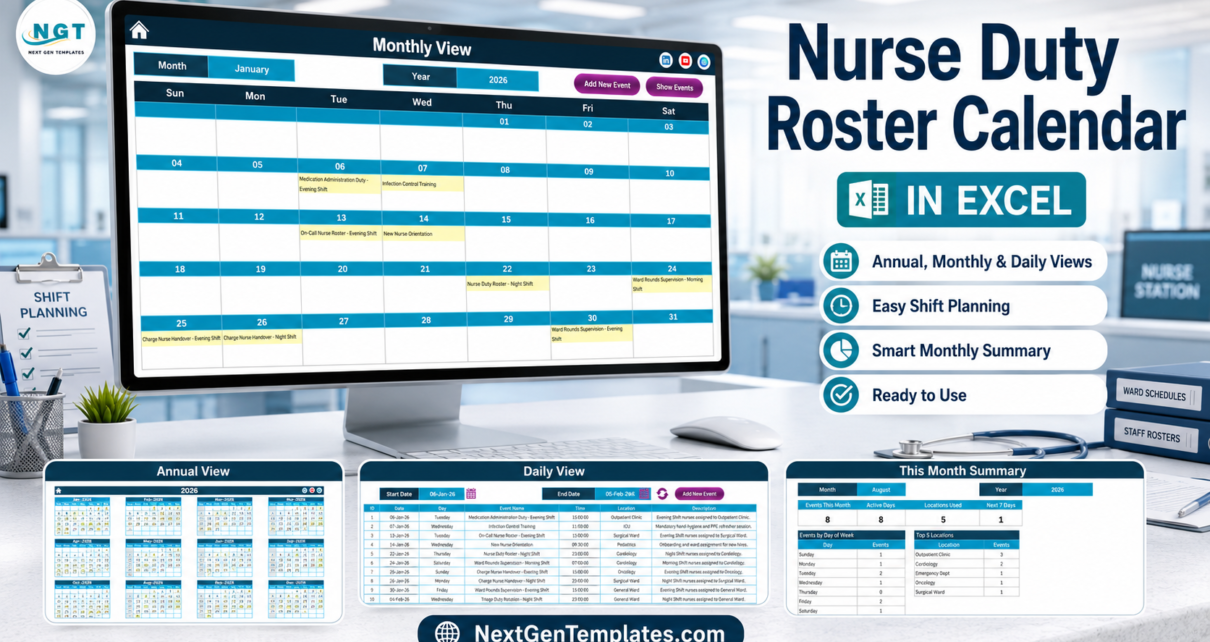
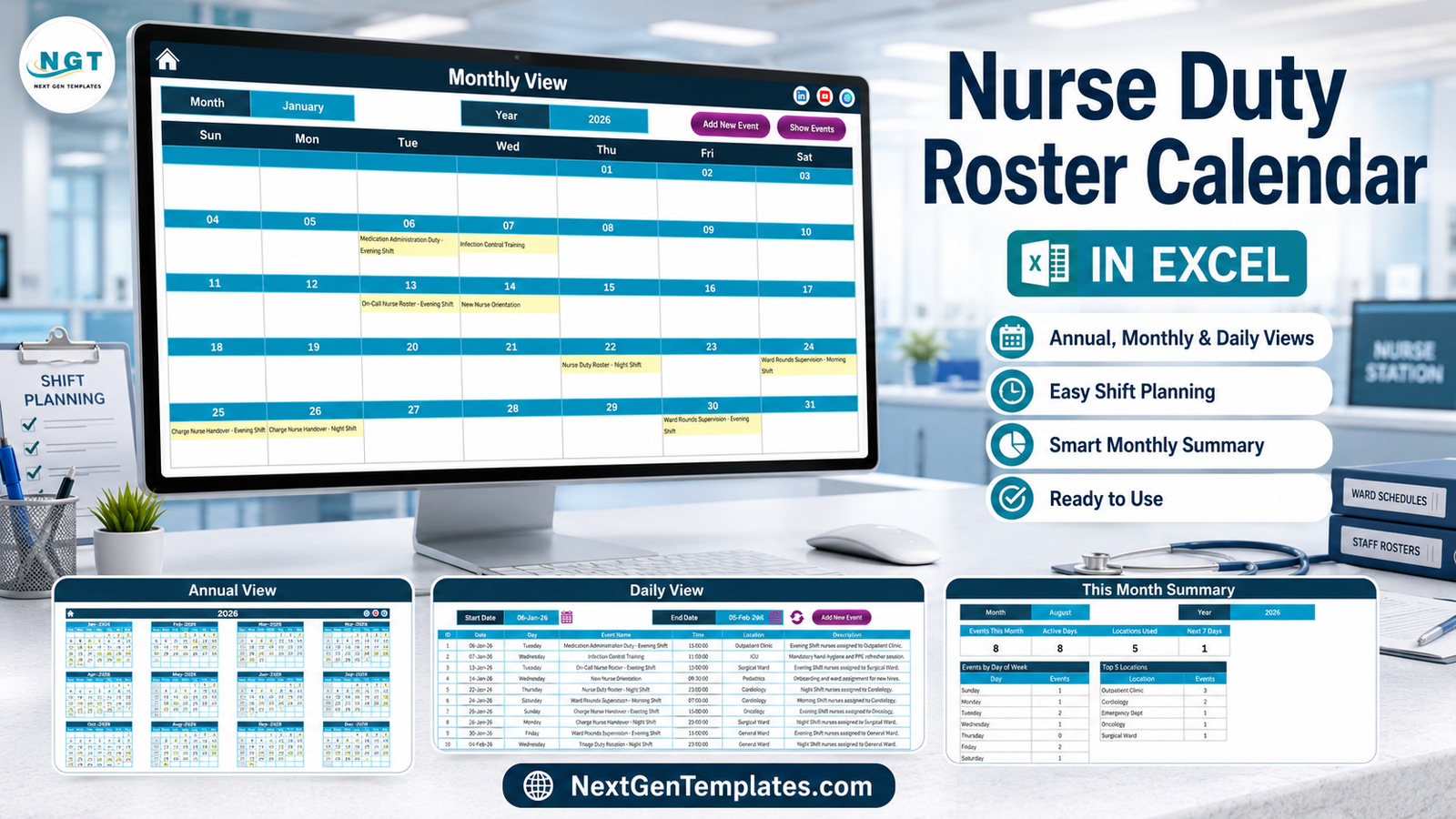
The Nurse Duty Roster Calendar in Excel is a macro-enabled workbook of 7 worksheets that turns a single duty table into 5 linked scheduling views. It arrives with 100 sample nursing duties covering 06-Jan-2026 to 29-Dec-2026 across 9 wards and units – Cardiology, Emergency Dept, General Ward, ICU, Maternity Ward, Oncology, Outpatient Clinic, Pediatrics and Surgical Ward – so you can see exactly how the layout behaves before you type a row of your own. Setup takes under 10 minutes: unzip, enable macros, set the year, replace the sample rows.
Most wards still plan the roster on a whiteboard. The morning shift coverage, the night on-call rota, the charge-nurse handovers, the mandatory infection-control refresher, the CPR recertification drill and the new-starter orientation all live in different heads, different WhatsApp groups and different printed sheets, and the first time anyone notices a gap is the shift it happens on. The Nurse Duty Roster Calendar in Excel puts all of it in one table and then draws that table as a year planner, a month grid, a printable day list and a monthly summary.
One thing to be clear about first. This is a shift-scheduling spreadsheet. It is not an HR system, not a payroll system, not a time-and-attendance or clock-in system, and not a patient record. It does not check or enforce any nurse-to-patient staffing ratio, working-time regulation, rest-break rule, union agreement or safe-staffing standard – it validates nothing and records exactly what you type. It carries no HIPAA, GDPR or other health-data certification, it has no access control, no encryption and no audit trail, it sends no reminders and it connects to nothing. Roster by duty, shift band and ward; keep staff records in your HR system and patient records in your clinical system.
Key Features of the Nurse Duty Roster Calendar in Excel
- 7 worksheets: Home, Annual View, Monthly View, Daily View, This Month, Events and Setting.
- One master table drives everything. The Events sheet holds 7 columns – ID, Date, Day, Event Name, Time, Location and Description – and all four calendar views read from it, so a duty entered once appears everywhere.
- Exactly 100 sample duties across a full year, from a Medication Administration Duty on 06-Jan-2026 to the last roster entry on 29-Dec-2026, with entries in all twelve months.
- 9 wards and units already set up – Cardiology, Emergency Dept, General Ward, ICU, Maternity Ward, Oncology, Outpatient Clinic, Pediatrics and Surgical Ward.
- Three shift bands with real clock times – Morning at 07:00, Evening at 15:00 and Night at 23:00 – plus daytime entries such as an 09:30 New Nurse Orientation and an 11:00 Infection Control Training.
- 28 named duty types, including Nurse Duty Roster, On-Call Nurse Roster, Charge Nurse Handover, Ward Rounds Supervision, Triage Duty Rotation, Medication Administration Duty, Shift Coverage Assignment, Patient Care Assignment, Infection Control Training, CPR Recertification Drill, New Nurse Orientation, Staff Nurse Roster Meeting and Roster Planning Review.
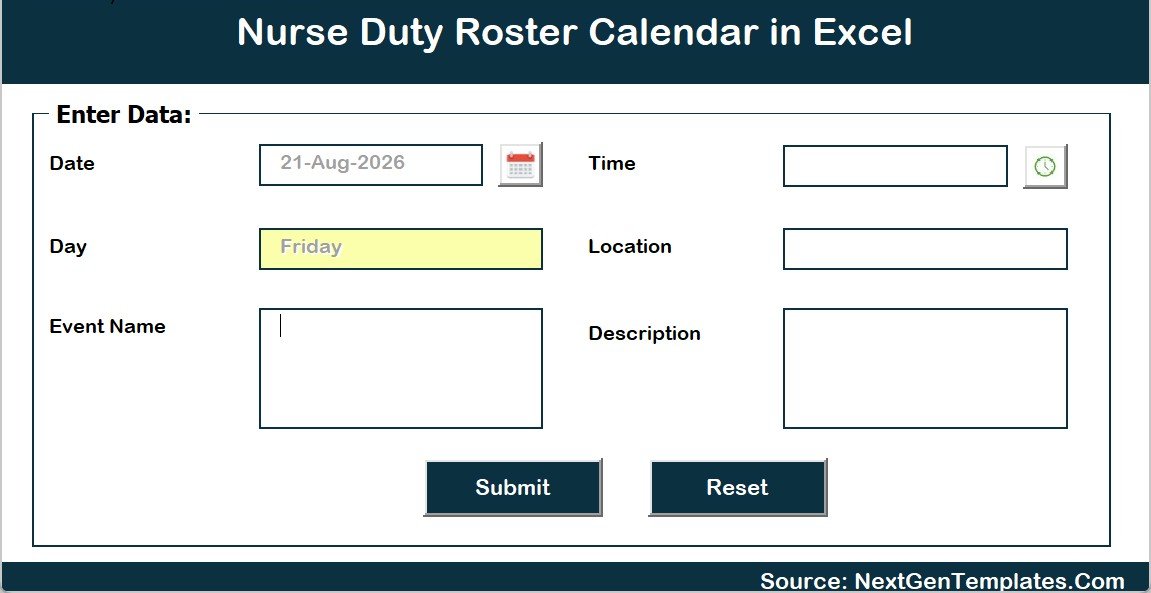
- A 6-field pop-up entry form that captures Date, Event Name, Time, Location and Description and fills the Day field automatically from the date you pick, with a calendar picker on the date box and a clock picker on the time box.
- Add, Update and Delete controls on the Events sheet, plus Add New Event and Show Events buttons on the Monthly View and an Add New Event button with a refresh control on the Daily View.
- 5 one-click colour themes – Default, Blue, Red, Black and Orange – applied to the whole workbook from the Setting sheet.
- Configurable calendar rules: set the year from a 2021-2051 list, the month the calendar starts with, the day the week starts on, two highlighted weekday columns and an event highlight switch.
- No staff-name, employee-ID, contact or pay column anywhere in the file. The roster is built around the duty, the shift band and the ward – not the person.
- Macros required. Microsoft Excel for Windows, desktop only.
Sheets Explanation
Home – the navigation page
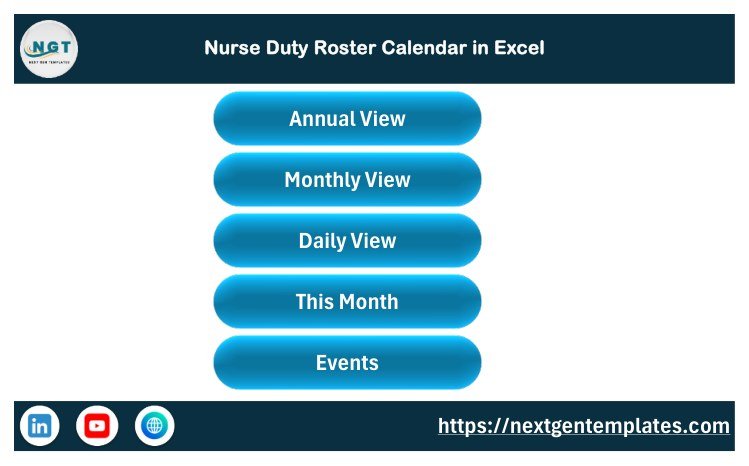
A branded landing page carrying five buttons: Annual View, Monthly View, Daily View, This Month and Events. Anyone on the unit can move around the workbook without knowing where the sheet tabs are. The footer carries the NextGenTemplates link and the social icons.
Annual View – the whole year on one page
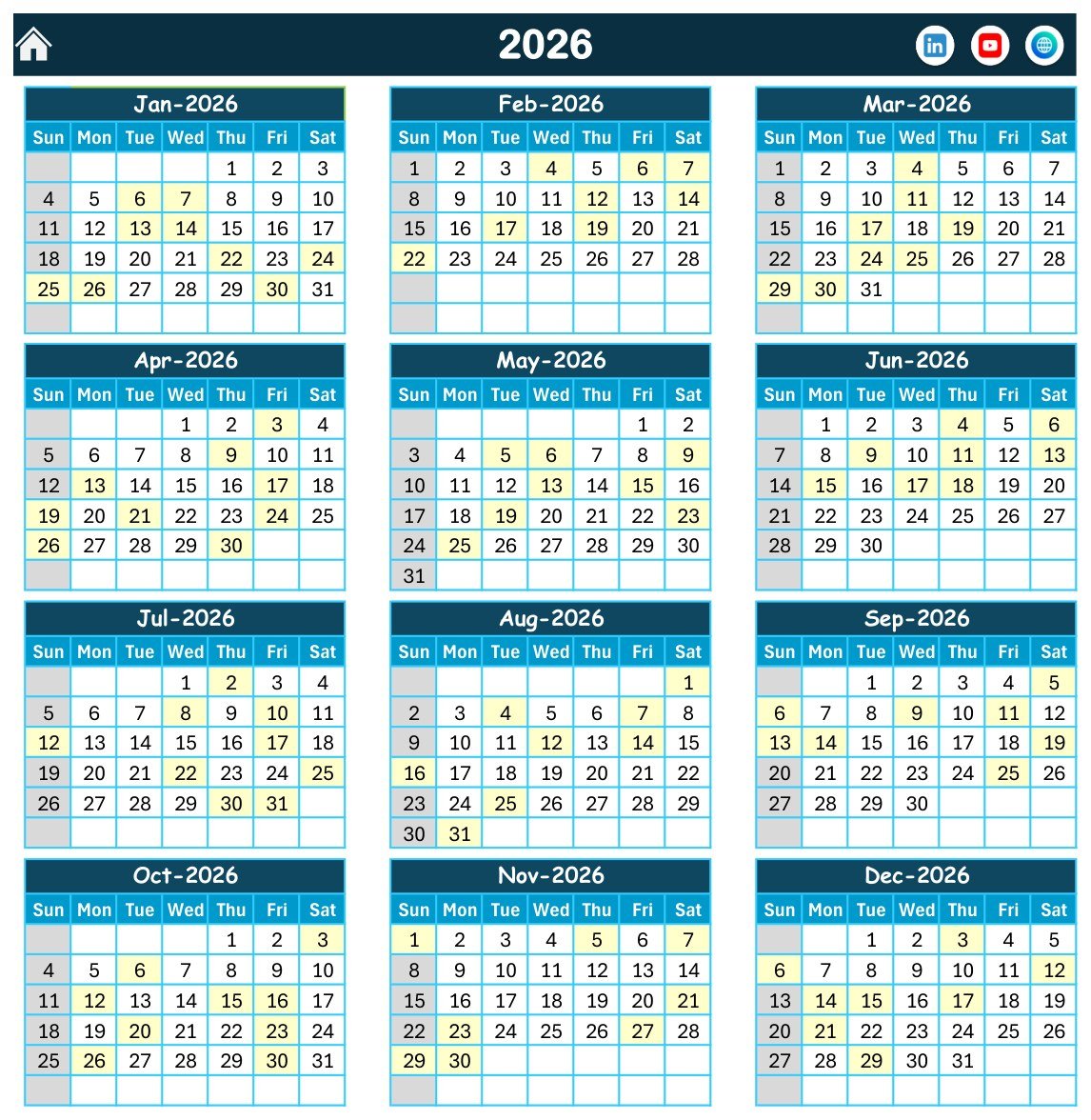
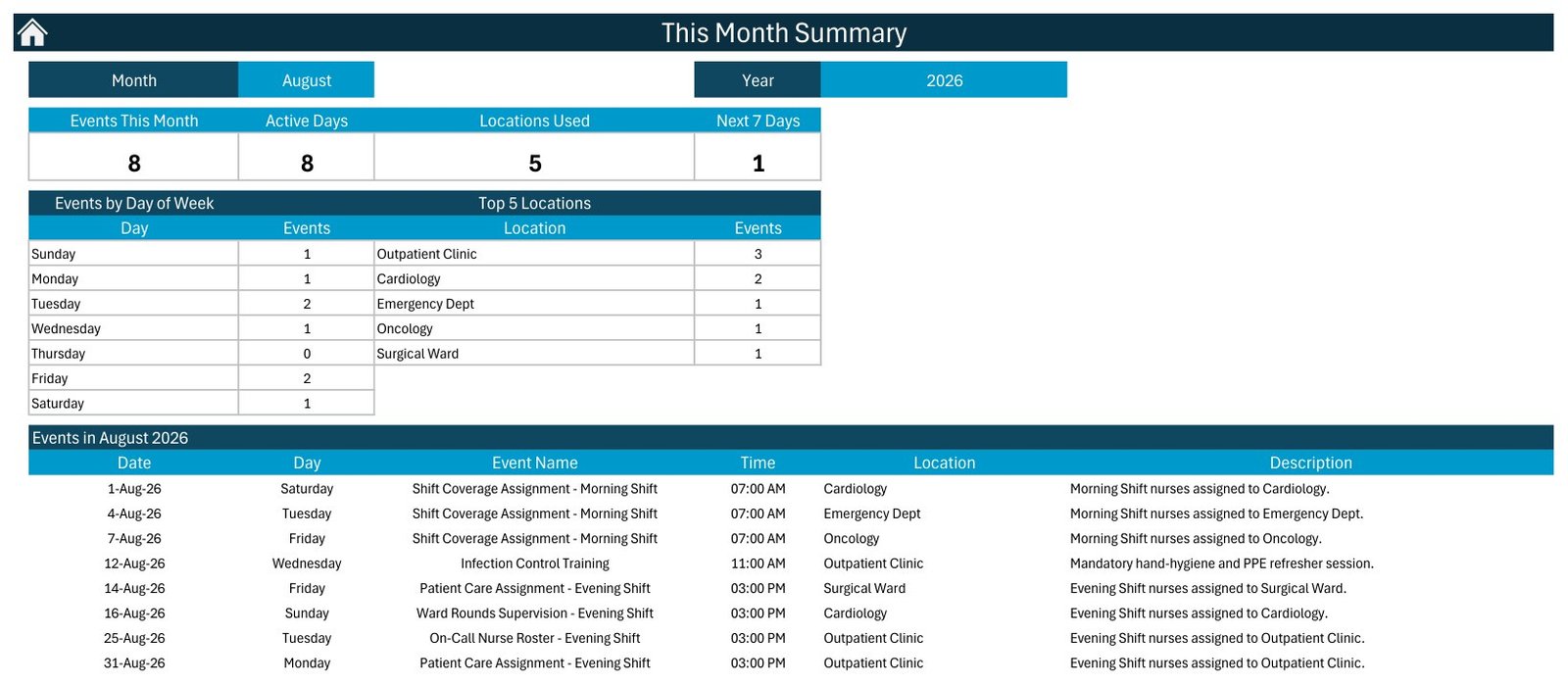
Twelve months of the chosen year in a three-across, four-down grid, with every day that carries a duty shaded pale yellow. Sundays are greyed and the two weekday columns you nominate on the Setting sheet are highlighted. In the shipped file, August 2026 shows eight shaded days – the 1st, 4th, 7th, 12th, 14th, 16th, 25th and 31st – which is exactly the eight duties the Events table holds for that month. This is the sheet you print for the noticeboard.
Monthly View – the working grid
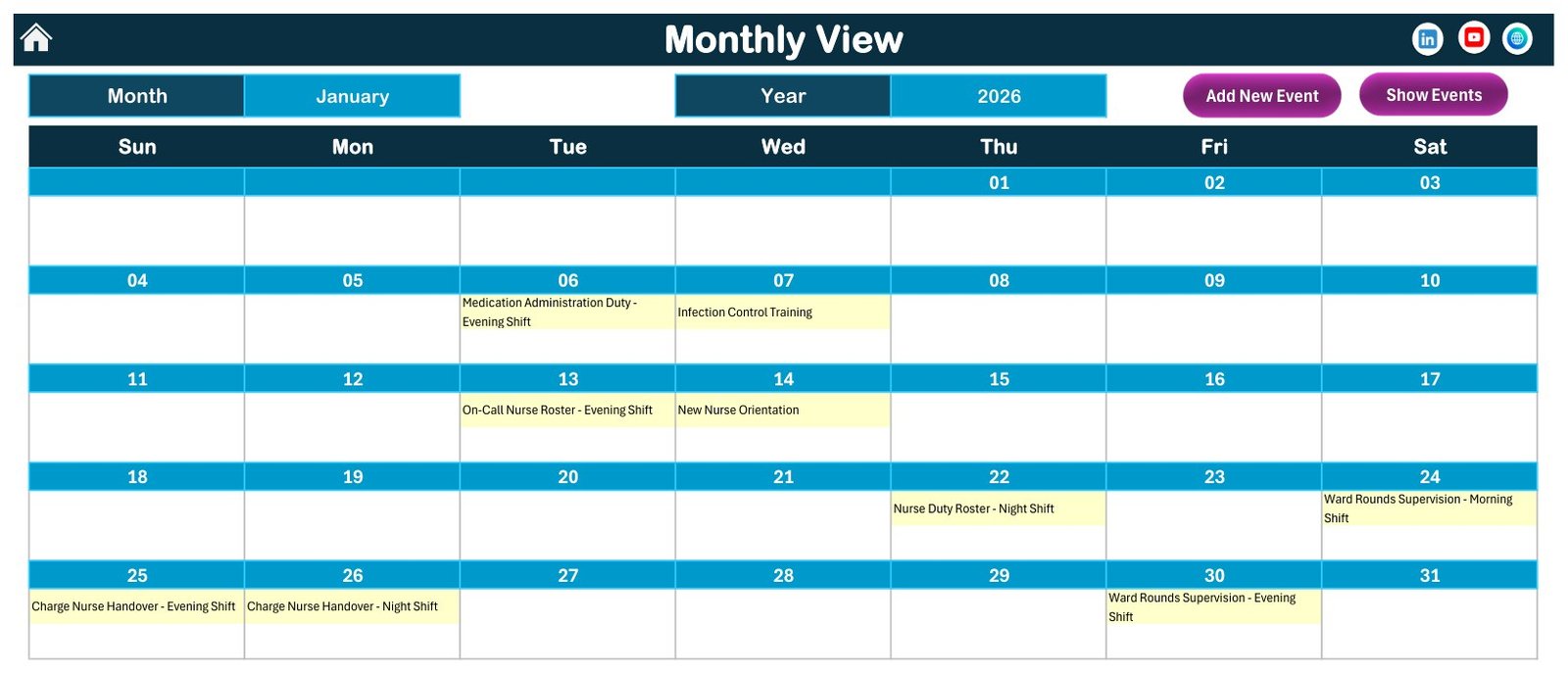
Pick a month and a year from the two drop-downs and the grid redraws with each duty printed inside its own date cell. January 2026 shows the 06-Jan Medication Administration Duty (Evening Shift), the 07-Jan Infection Control Training, the 13-Jan On-Call Nurse Roster, the 14-Jan New Nurse Orientation, the 22-Jan Nurse Duty Roster (Night Shift), Ward Rounds Supervision on the 24th and the 30th, and Charge Nurse Handovers on the 25th and 26th. Add New Event and Show Events buttons sit directly above the grid.
Daily View – the printable date range
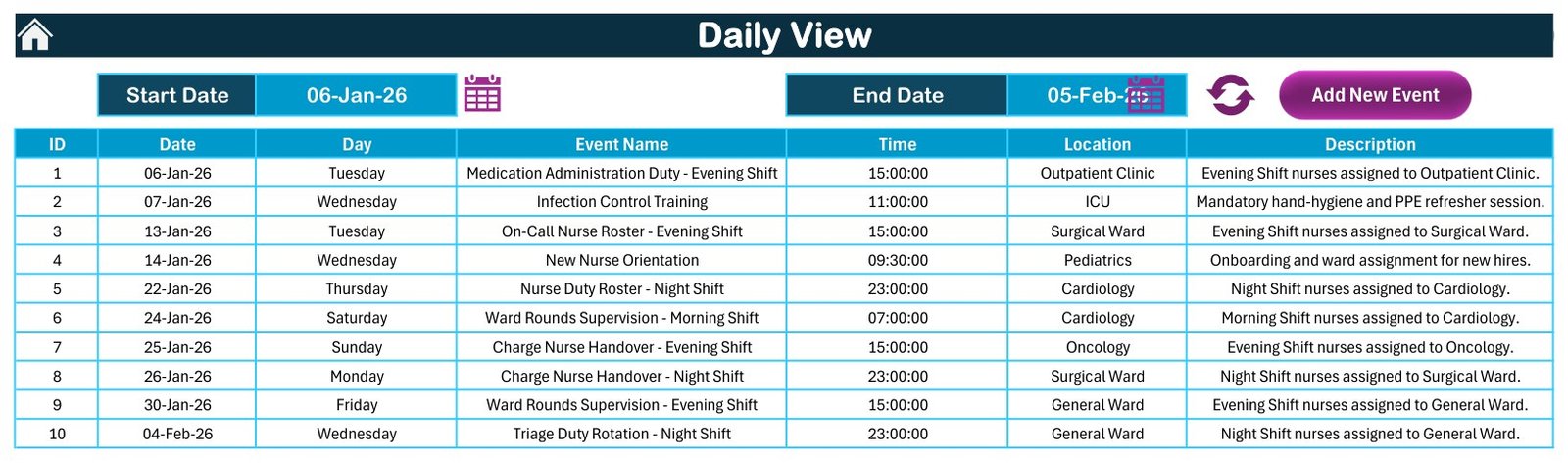
Set a Start Date and an End Date and the sheet lists every duty in that window as a clean seven-column table: ID, Date, Day, Event Name, Time, Location and Description. The shipped range of 06-Jan-26 to 05-Feb-26 returns ten duties, from the 15:00 Outpatient Clinic medication round on the 6th to the 23:00 General Ward triage rotation on 04-Feb. This is the sheet you print for the shift board or the handover folder.
This Month – the coverage summary
Four cards across the top – Events This Month, Active Days, Locations Used and Next 7 Days – then two small tables, Events by Day of Week and Top 5 Locations, and then the full list of that month’s duties. For August 2026 the shipped file reads 8 duties on 8 active days across 5 units, with the Outpatient Clinic carrying 3 and Cardiology 2, and Thursday showing a clean zero. That zero is the useful number: it is the weekday nothing is scheduled on.
Events – the master table
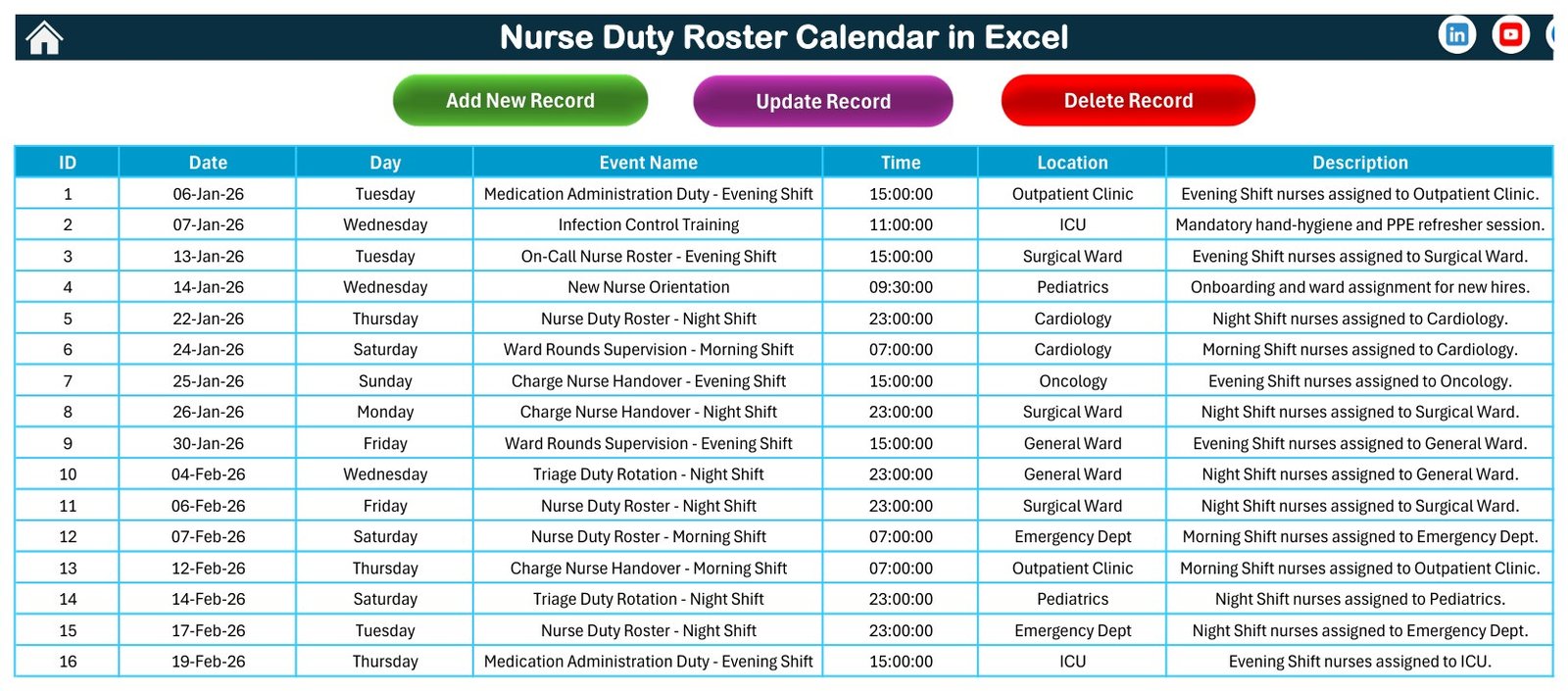
The single source of truth: 100 rows under the seven column headers, with Add New Record, Update Record and Delete Record buttons across the top. Edit here, or through the pop-up form, and every other view follows. Note what is not here: no staff name, no employee number, no contact detail, no hourly rate. The table describes the duty, not the person carrying it.
The entry form
A pop-up VBA form with six fields: Date with a calendar picker, Day filled in for you the moment you pick a date, Event Name, Time with a clock picker, Location and Description, then Submit or Reset. It exists so nobody types a date in the wrong format and quietly breaks the sort order of the whole workbook.
Setting – the configuration sheet
The controls behind every view: Year, Start with Month, Week start with Day, two Day of Week highlight columns, a Highlight Event switch and the Whole Theme colour picker. The file ships set to 2026, January, a Sunday week start and the Blue theme. Change the year here and the entire workbook rolls forward.
Nurse Duty Roster Calendar in Excel vs. a Google Sheets roster vs. paid workforce-scheduling SaaS – Feature Comparison
| Feature | Nurse Duty Roster Calendar in Excel | Google Sheets roster equivalent | Paid nurse-scheduling SaaS (Kronos / Deputy / When I Work) |
|---|---|---|---|
| Cost | $8.99 one-time | Free to $16.99 one-time | $3-$8 per employee per month, often plus a platform fee |
| Platform | Microsoft Excel for Windows, desktop, macros required | Any browser | Vendor cloud plus mobile apps |
| Setup time | Under 10 minutes | Under 10 minutes | Weeks, with vendor onboarding |
| Views included | 5 – Annual, Monthly, Daily range, This Month summary, Events table | Usually 2-3 | Many, plus per-employee and per-unit calendars |
| Sample data to start from | 100 nursing duties, 9 units, 3 shift bands | Usually none | None – you import your own |
| Real-time team collaboration | No – one file at a time | Yes, multi-user | Yes |
| Mobile access for staff | No – Windows desktop only | Yes | Yes |
| Shift swaps, self-service, push notifications | None | None | Yes |
| Time and attendance, payroll export | None | None | Yes |
| Staffing-ratio and working-time rule checking | None – the workbook validates nothing | None | Yes, configurable |
| Year-1 cost for a 30-nurse unit | $8.99 total | $0-$16.99 total | $1,000-$3,000+ |
For a ward that plans shift coverage, handovers, training days and on-call rotations on a whiteboard and simply needs it visible, printable and in one place, the Nurse Duty Roster Calendar in Excel sits in the sweet spot – as long as nobody mistakes it for a rule engine.
Who Should Use This Template
Perfect for:
- Ward managers and charge nurses planning shift coverage, ward rounds and handovers across a year
- Small hospitals, nursing homes, clinics and single-unit teams whose roster lives on a whiteboard today
- Nurse educators scheduling infection-control refreshers, CPR recertification drills and new-starter orientation
- Anyone who has to hand a printed year planner or a printed day list to staff who do not have logins to the hospital system
- Excel users who would rather own the file outright than rent a seat per nurse per month
Not a fit if:
- You need an HR, payroll or time-and-attendance system – this workbook produces no timesheet, no hours total and no pay figure, and captures no clock-in
- You need staffing ratios, maximum-hours rules, rest breaks, union agreements or safe-staffing standards checked or enforced – the workbook validates nothing
- You need to store patient records – this is not an EHR or EMR and has no access control, encryption or audit trail
- You need HIPAA or GDPR compliance guarantees or a data-processing agreement – the workbook carries no certification of any kind
- You need shift-swap requests, self-service, mobile access or push notifications
- Your team is on Mac, iPad, Android or the browser – the VBA forms and buttons need Excel for Windows on the desktop
Real-World Use Cases
- A 30-bed general ward plans morning, evening and night coverage for the quarter and prints the month grid for the staff room.
- A nursing home maps on-call rotations and charge-nurse handovers so no shift is left without a scheduled responsible duty.
- A nurse educator blocks out infection-control training, CPR recertification drills and new-nurse orientation across the year, then checks on the Annual View that they never land in the same week as a ward audit.
- An emergency department lead prints the next fortnight’s triage duty rotations from the Daily View for the board.
- A clinic manager reviews the This Month summary at month end to see which units carried the most scheduled duties and which weekday is consistently empty.
- A bank/agency coordinator uses the Annual View to spot the weeks where scheduled coverage thins out, well before the rota is finalised.
Advantages of the Nurse Duty Roster Calendar in Excel
- One entry, five views. Type a duty once and it appears on the year planner, the month grid, the day list and the monthly summary.
- It prints. The Annual View fits one page and the Daily View is built as a handout – which matters on a unit where half the staff will never open the file.
- It starts full, not empty. 100 realistic duties across nine units mean you can judge the layout in two minutes rather than after an hour of data entry.
- Privacy by omission. With no staff-name or employee-ID column, the default file holds no personal data at all – a genuinely lower-risk starting point than most rota spreadsheets.
- One-time cost, no seats. $8.99 once, for the whole unit, forever.
- Ordinary Excel underneath. No add-ins, no accounts, no vendor. If you can use Excel you can change it.
Opportunities for Improvement
Worth knowing before you buy, so there are no surprises:
- Single user at a time. It is a desktop file, not a shared app. Two people cannot edit it simultaneously.
- Windows desktop only. The VBA forms do not run on Excel for Mac, Excel on the web, iPad or Android.
- No conflict detection. Nothing stops you scheduling two duties in the same ward at the same hour, or leaving a night shift blank. The workbook draws what you type.
- No staff column by design. If you want a named nurse against each duty you will have to put the name into the Event Name or Description field yourself – and at that point the file starts holding personal data, so treat it accordingly.
- No hours or cost roll-up. The This Month summary counts duties and days, not hours worked or money spent.
- Macros must be enabled, which some hospital IT policies block outright. Check before you buy.
Best Practices
- Set the Setting sheet first, before you enter anything: year, start month, week start day, highlight columns and theme.
- Replace the Location list with your real wards so the Top 5 Locations table means something from day one.
- Always add duties through the pop-up form rather than typing straight into the Events sheet – the form fills the Day column and keeps the date format consistent.
- Keep duty names in a fixed vocabulary (for example always “Charge Nurse Handover – Night Shift”, never “night handover”), so the counts group cleanly.
- Delete the 100 sample rows before your first real month, or you will be counting demo data alongside your own.
- Keep one file per unit rather than one giant file for the hospital – the views are designed around a single roster.
- Do not put patient details in it, and think twice before putting staff names in it. Store both where they belong.
- Back the file up. It is a single .xlsm with no version history of its own.
Explore Relevant Templates
Four other clinical calendars run on the same engine, and they schedule appointments and rooms rather than duties and shifts: the Dental Clinic Appointment Calendar in Excel, the Physiotherapy Session Calendar in Excel, the Radiology Slot Booking Calendar in Excel and the Patient Follow-Up Visit Calendar in Excel.
To roster the medical staff rather than the nursing team, the Doctor Duty Roster Data Entry System in Excel is a form-driven register rather than a calendar. For a general, non-nursing version of this same calendar there is the older Healthcare Staff Duty Calendar in Excel.
Once you have a few months of duties recorded, the analysis layer is where the value moves: the Hospital Operations KPI Scorecard in Excel and the Home Healthcare KPI Dashboard in Excel both work on top of operational data like this.
Need multi-user instead? A browser-based, multi-user calendar on the same idea is the Medical Appointment Calendar in Google Sheets, and for logins, roles and a real database there is the Hospital Management System Web App.
Frequently Asked Questions
Is the Nurse Duty Roster Calendar in Excel an HR, payroll or time-and-attendance system?
No. It is a scheduling calendar and nothing more. There is no staff-name, employee-ID, contact, hours or pay column anywhere in the file, it produces no timesheet and no payroll export, and it captures no clock-in or clock-out. Keep employment records, hours and pay in your governed HR and payroll systems.
Does it check nurse-to-patient ratios, maximum hours or rest breaks?
No. The workbook enforces no staffing ratio, no working-time regulation, no rest-break rule, no union agreement and no safe-staffing standard. It has no validation of any kind – it records what you type and draws it on a calendar. Compliance with your local rules stays entirely your responsibility.
Can I store patient details in it?
No – please do not. This is not an EHR or EMR, it holds no clinical data model, and it has no access control, encryption or audit trail. The 100 sample rows carry no patient names or identifiers anywhere, which is exactly how the file is meant to be used: roster the duty, the shift and the ward, and keep patient records in your clinical system.
Do I have to enable macros, and does it work on a Mac?
Yes to macros – the file is a .xlsm and the navigation buttons, the Add/Update/Delete controls and the pop-up entry form are all VBA. It is built for Microsoft Excel for Windows on the desktop. Excel for Mac, Excel on the web, iPad and Android are not supported.
How long does setup take?
Under 10 minutes. Unzip, open the .xlsm, enable macros, set the year and week start on the Setting sheet, swap the nine sample locations for your own wards, then clear the sample rows.
How many sample duties are included, and can I delete them?
Exactly 100, dated 06-Jan-2026 to 29-Dec-2026 across 9 units. They are demonstration data, not a recommended roster or a staffing recommendation. Delete them all and the views simply come up empty, ready for your own entries.
Can I use it for a year other than 2026?
Yes. The Setting sheet carries a year list from 2021 to 2051. Change the year and every view redraws.
How does this compare to Deputy, When I Work or Kronos?
Those are workforce-management platforms with self-service, shift swaps, attendance capture, rule engines and payroll integration, priced per employee per month. This is a one-time $8.99 spreadsheet that shows a planned roster on a calendar and prints well. Different tools for different problems – if you need rule checking or attendance capture, you need the platform, not this.
Can I change the colours to match our unit branding?
Yes. The Setting sheet has a Whole Theme picker with five presets – Default, Blue, Red, Black and Orange – and one click repaints the whole workbook. The file ships on Blue.
About the Author
Built by PK – Microsoft Certified Professional with 15+ years of Excel, Google Sheets and Power BI experience. Founder of NextGenTemplates, reaching 300K+ subscribers across YouTube channels. Every template is hand-built and tested before release.
Conclusion
The Nurse Duty Roster Calendar in Excel does one job well: it takes the shift coverage, handovers, on-call rotations, training days and roster reviews that currently live on a whiteboard and in five people’s heads, and shows them as a year planner, a month grid, a printable day list and a monthly coverage summary – all from one table, for $8.99 once. It is not an HR system, not a payroll system and not a compliance tool, and it does not pretend to be. Use it to make the plan visible; keep the rules, the hours and the records where they belong.
👉 Click here to Purchase the Nurse Duty Roster Calendar in Excel
Instant download · One-time payment · No subscription
🎥 For step-by-step video tutorials, visit Youtube.com/@PK-AnExcelExpert
Last updated: August 2026