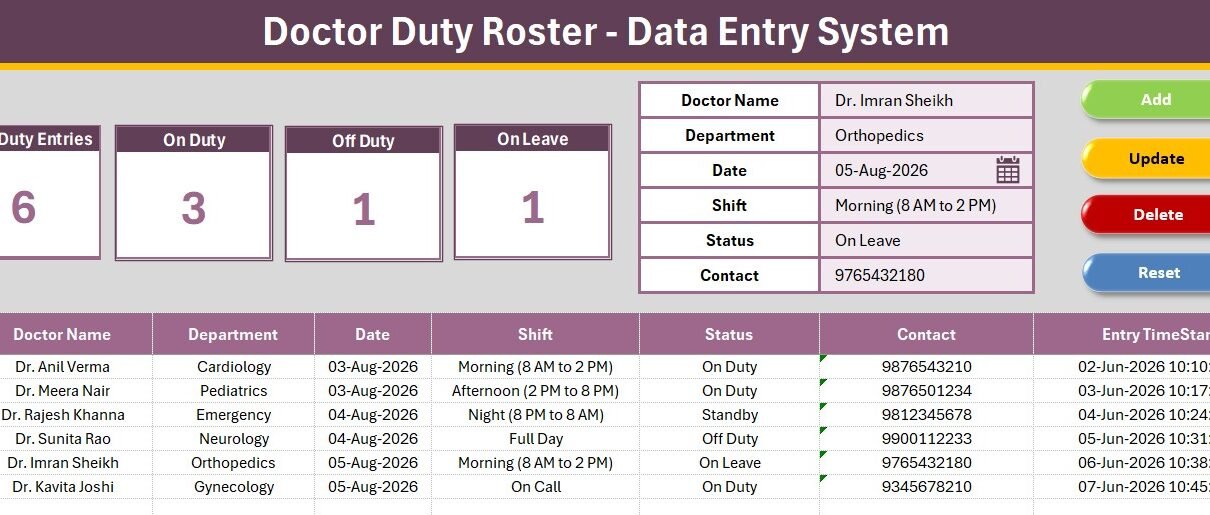
The Doctor Duty Roster Data Entry System in Excel records 6 fields per duty line, drives 4 live KPI cards, and ships with 15 pre-loaded hospital departments, 6 shift patterns and 5 duty statuses. Four VBA macros — Add, Update, Delete and Reset — do all the work, and the whole activation takes under 10 minutes. It costs $5.99 once, against $30–150 per user per month for cloud scheduling platforms.
Most small clinics still run their doctor duty roster on a whiteboard, a WhatsApp group, or a spreadsheet that three people type into differently. “Cardiology”, “cardio” and “Cardiology Dept” end up in the same column, filters stop working, and nobody can answer the one question that actually matters at 8 a.m.: how many doctors are on duty right now? This Excel duty roster template fixes that by forcing every entry through one form with locked dropdown lists.
Key Features of the Doctor Duty Roster Data Entry System in Excel
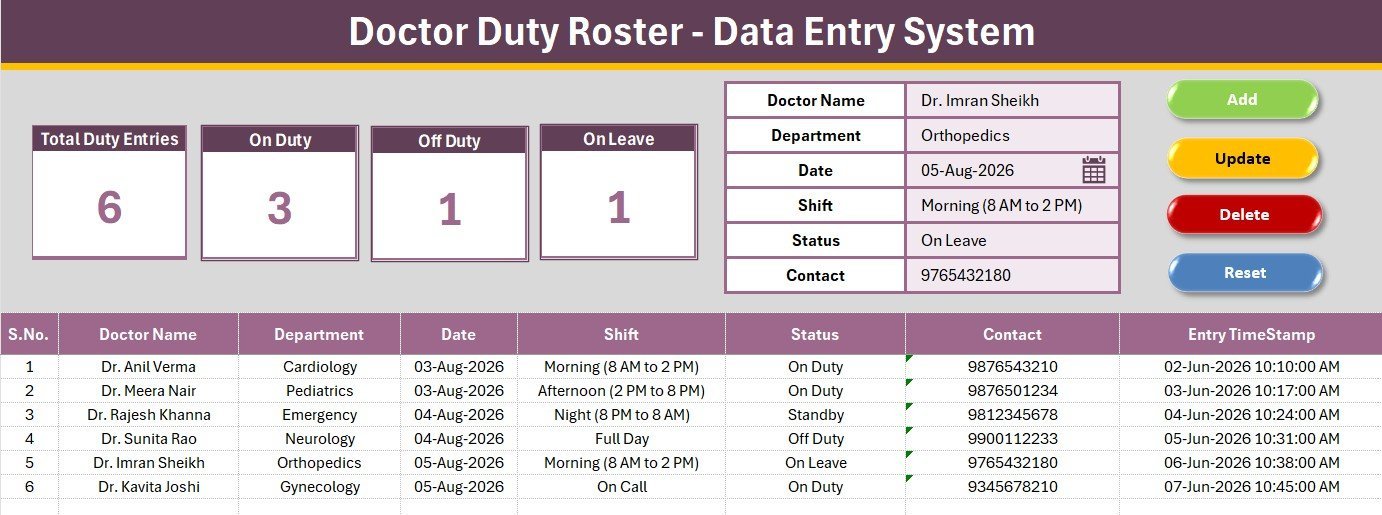
- Six-field duty form — Doctor Name, Department, Date, Shift, Status and Contact. Three of the six are dropdown-driven, so department and shift names stay consistent across every row.
- Four live KPI cards — Total Duty Entries, On Duty, Off Duty and On Leave. Each card is a COUNTIF formula pointing at the roster table, so the numbers move the moment a record is added, edited or removed.
- Four VBA macros —
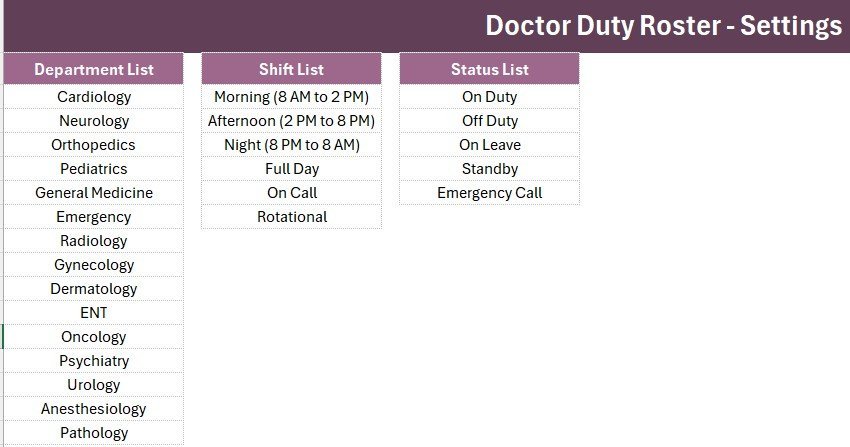
Add_Recordappends the form to the next blank row with a timestamp,Update_Recordedits the selected row in place,Delete_Recordremoves it after a confirmation prompt, andReset_Formclears the inputs. - 15 departments pre-loaded — Cardiology, Neurology, Orthopedics, Pediatrics, General Medicine, Emergency, Radiology, Gynecology, Dermatology, ENT, Oncology, Psychiatry, Urology, Anesthesiology and Pathology.
- 6 shift patterns and 5 statuses — Morning, Afternoon, Night, Full Day, On Call and Rotational; On Duty, Off Duty, On Leave, Standby and Emergency Call.
- Auto serial number and entry timestamp — the S.No is a formula, not a typed value, so deleting a row never leaves a gap in the numbering.
- Double-click to edit — an optional worksheet event loads any roster row straight back into the form, so a correction takes one click instead of six retyped fields.
Template Structure — Sheet by Sheet
Sheet 1: Data Entry — Form, KPI Cards and Roster Table
The working sheet. A gray dashboard panel holds the four KPI cards on the left and the six-field duty form on the right, with the Add, Delete, Update and Reset buttons in a 2×2 block. The roster table begins at row 15 with the auto S.No column, all six data columns, and an Entry TimeStamp column at the end.
Sheet 2: Setting — Dropdown Lists and Duplicated KPI Cards
Holds the three source lists that feed the form — Department, Shift and Status — each connected to the Data Entry sheet through a named range, so adding a new department is a matter of typing it under the existing list. The four KPI cards are duplicated here, ready to copy as a linked picture into a shift report or an email.
Sheets 3 and 4: Instructions and Get More Templates
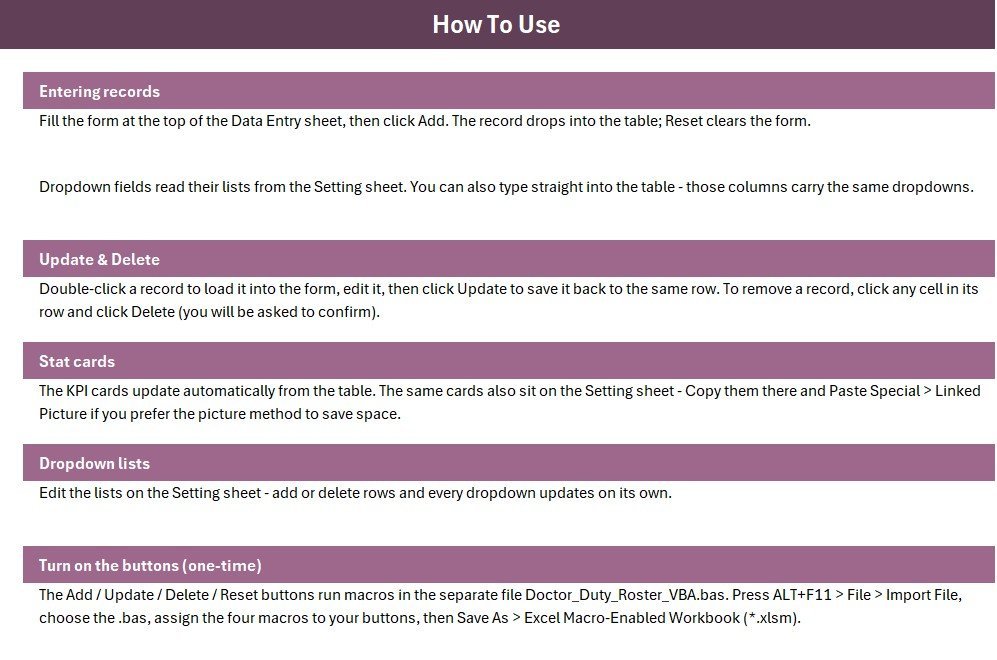
The Instructions sheet documents the one-time activation — importing the VBA module, assigning the four macros, saving as .xlsm. The Get More Templates sheet links back to the wider catalogue on NextGenTemplates.com.
How the VBA Works
The workbook ships as a plain .xlsx with the macros in a separate .bas module, so you can read every line before you run it. Four public subs sit in Module1, each bound to a Form Control button on the Data Entry sheet.
Add_Record finds the first blank row below the header at row 14, writes the six named input ranges into columns B through G, and stamps column H with Now. Update_Record does the same write but targets the currently selected row instead of a new one, so an edit never creates a duplicate. Delete_Record raises a Yes/No MsgBox before calling EntireRow.Delete — the S.No column is a formula (=IF($B15="","",ROW()-14)), so the numbering closes up on its own. Reset_Form runs a single ClearContents across the named input range and drops the cursor back on Doctor Name.
The optional Worksheet_BeforeDoubleClick event ships commented out at the bottom of the module. Paste it into the Data Entry sheet module, remove the apostrophes, and double-clicking any roster row loads it into the form for editing.
Doctor Duty Roster in Excel vs. Google Sheets vs. Paid Scheduling SaaS — Feature Comparison
| Feature | Doctor Duty Roster (Excel) | Google Sheets equivalent | Kareo / Athenahealth / When I Work |
|---|---|---|---|
| Cost | $5.99 one-time ✅ | Free to build, days of work | $30–150 / user / month |
| Platform | Desktop Excel, works offline ✅ | Browser only, needs internet | Browser + mobile app |
| Setup time | Under 10 minutes ✅ | Build it yourself | 1–4 weeks onboarding |
| Real-time team collaboration | Shared drive / OneDrive | Native, simultaneous ✅ | Native ✅ |
| Mobile access | Excel mobile app | Full ✅ | Full ✅ |
| Customisable fields | Any column, any dropdown ✅ | Fully open ✅ | Fixed by vendor plan |
| Data stays on your machine | Yes ✅ | Google servers | Vendor servers |
| Year-1 cost at 5 users | $5.99 ✅ | $0 + your build time | $1,800–$9,000 |
| On-duty / off-duty count | Live KPI cards ✅ | Build formulas yourself | Built in ✅ |
For clinics that want a fast, offline, private duty roster without paying per-user scheduling fees, the Doctor Duty Roster Data Entry System in Excel sits in the sweet spot.
Who Should Use This Template
Perfect for:
- Clinic managers and ward administrators rostering 5–80 doctors across departments
- Polyclinics, diagnostic centres and small hospitals still running duty charts on paper or a whiteboard
- Nursing supervisors who need an accurate on-duty count at the start of every shift
- Practice owners who prefer their roster data on their own machine rather than a vendor’s cloud
Not a fit if:
- You need doctor self-service logins, shift-swap requests or SMS alerts — that requires a web app, not a workbook
- Your IT policy blocks macros, or you cannot save .xlsm files
- You need HIPAA-audited, SOC 2 certified scheduling with role-based access control
- You want shift hours to feed payroll automatically — this records the roster, it does not compute pay
Real-World Use Cases
Dr. Anita runs a 40-bed multi-speciality clinic. Every Sunday evening she enters the coming week’s roster and prints the Data Entry sheet for reception. The On Duty card gives her a sanity check on coverage before she confirms the week — if the number looks thin for a Wednesday, she fixes it before anyone notices.
Ramesh is the ward administrator at a district hospital. When a consultant calls in sick, he double-clicks that roster line, changes Status from On Duty to On Leave, and hits Update. The On Leave count moves instantly and nobody reprints the whole chart.
Priya coordinates HR for a three-branch practice group. She keeps one workbook per branch on OneDrive and uses the Entry TimeStamp column to settle disputes about who last changed a contested shift.
Advantages of the Doctor Duty Roster Data Entry System in Excel
The cost case is the easiest one. A five-person scheduling subscription runs $1,800–$9,000 in year one; this workbook is $5.99 forever, with no renewal and no per-seat maths when you hire.
The time case is quieter but bigger. Because every entry goes through one form with locked dropdowns, the roster table stays clean enough to pivot, filter and chart without a cleanup pass. Anyone who has tried to build a monthly coverage report from a hand-typed roster knows how much of that work is really just fixing spelling.
And the training case: staff only ever touch six input cells and four buttons. There are no formulas to accidentally overwrite, because the formulas live in the KPI cards and the S.No column, not in anything a user types into.
Opportunities for Improvement
Being straight about the limits: this is a single-user workbook at heart. Two people editing the same file on a shared drive at the same time will fight over the lock — if you need simultaneous editing, a Google Apps Script web app is the right tool, not Excel.
There is also no conflict detection. Nothing stops you rostering the same doctor to a Morning and a Night shift on the same date; the template records what you tell it. A COUNTIFS-based warning cell is a reasonable DIY addition if that matters to you.
Finally, the Shift field is a text label, not a start/end time pair, so the workbook cannot total duty hours. Clinics that need hour totals should add two time columns and a simple subtraction.
Best Practices
- Customise the Setting sheet before your first real entry — changing a department name later means fixing every row that already used the old one.
- Keep the Status list short. Five values is already plenty; every extra one dilutes the KPI cards.
- Enter the whole week at once rather than day by day. The form is fast, and a full week lets the On Duty count act as a coverage check.
- Save a fresh copy at the start of each month and archive the old one. Roster tables are append-only by nature and get slow past a few thousand rows.
- Use the Entry TimeStamp column when two schedulers share a file — it is the only audit trail the workbook has.
- If macros are blocked on open, follow Microsoft’s guidance on enabling macros and unblock the file from its Properties dialog.
Explore Relevant Templates
The duty roster pairs naturally with the rest of the clinic front-desk set on NextGenTemplates.com: the Patient Appointment Data Entry System in Excel books slots against the rostered doctor, the Patient Visit Log Data Entry System in Excel records who was actually seen, the Prescription Record Data Entry System in Excel covers the pharmacy side, and the Lab Test Booking Data Entry System in Excel handles diagnostics.
Browse the full Excel VBA Tools range or the wider MS Excel Templates catalogue for more ready-to-run systems.
💎 Bundle option: this template is included alongside 8 others in the Healthcare Administrator Toolkit — 9 Premium Excel Templates, or grab the Excel VBA Tools & Utilities Pack and save 40%.
Frequently Asked Questions
What fields does the Doctor Duty Roster Data Entry System in Excel capture?
The Doctor Duty Roster Data Entry System in Excel captures six fields per record: Doctor Name, Department, Date, Shift, Status and Contact. Department, Shift and Status are dropdown-driven from the Setting sheet, and every saved row also gets an automatic serial number and an entry timestamp.
Do I need to know VBA to use this duty roster template?
No. The Doctor Duty Roster Data Entry System in Excel ships with the VBA already written in a separate module file. You import it once, assign four macros to four buttons, and save as .xlsm. Everything after that runs from the buttons — no code editing at all.
How long does setup take?
Under 10 minutes. Importing the VBA module takes about a minute, drawing and assigning the four buttons takes five, and the Save As takes seconds. Replacing the sample departments and shifts with your own is the only remaining step.
How does this compare to paid scheduling software like When I Work or Kareo?
Paid platforms charge $30–150 per user per month and add shift-swap requests, mobile alerts and doctor logins. The Doctor Duty Roster Data Entry System in Excel costs $5.99 once, works offline, keeps data on your own machine, and covers the roster itself rather than the workflow around it.
Can I add more departments or shift types?
Yes. Open the Setting sheet and type new values under the Department, Shift or Status list. The dropdowns are wired to named ranges, so new options appear in the form immediately without editing any validation rules or code.
Can two people use the same roster file at once?
Not simultaneously. The Doctor Duty Roster Data Entry System in Excel is a desktop workbook, so a shared-drive copy locks while one person edits. Clinics needing concurrent editing should use a Google Apps Script web app version instead.
Will this work on Excel for Mac?
The formulas, dropdowns and KPI cards work everywhere. The four macros need VBA support, which Excel for Mac provides, though some corporate Mac builds disable macros by policy — worth checking with your IT team before buying.
About the Author
Built by PK — Microsoft Certified Professional with 15+ years of Excel, Google Sheets, and Power BI experience. Founder of NextGenTemplates, reaching 300K+ subscribers across YouTube channels. Every template is hand-built and tested before release.
Conclusion
A duty roster only has one job: tell you who is working, where, and when — accurately, at a glance. The Doctor Duty Roster Data Entry System in Excel does that with six fields, four KPI cards and four buttons, and it does it offline, on your machine, for less than the price of a coffee.
👉 Click here to Purchase the Doctor Duty Roster Data Entry System in Excel
Instant download · One-time payment · No subscription
🎥 For step-by-step video tutorials, visit Youtube.com/@PK-AnExcelExpert
Last updated: August 2026