A privacy office lives or dies by one number: the percentage of data subject requests answered inside the statutory window. Under the GDPR that window is one month, extendable to three. Under the CCPA it is 45 days. Miss it often enough and the regulator stops asking politely. Yet most Data Protection Officers still track those deadlines in a flat case log and rebuild the same board slide by hand every month.
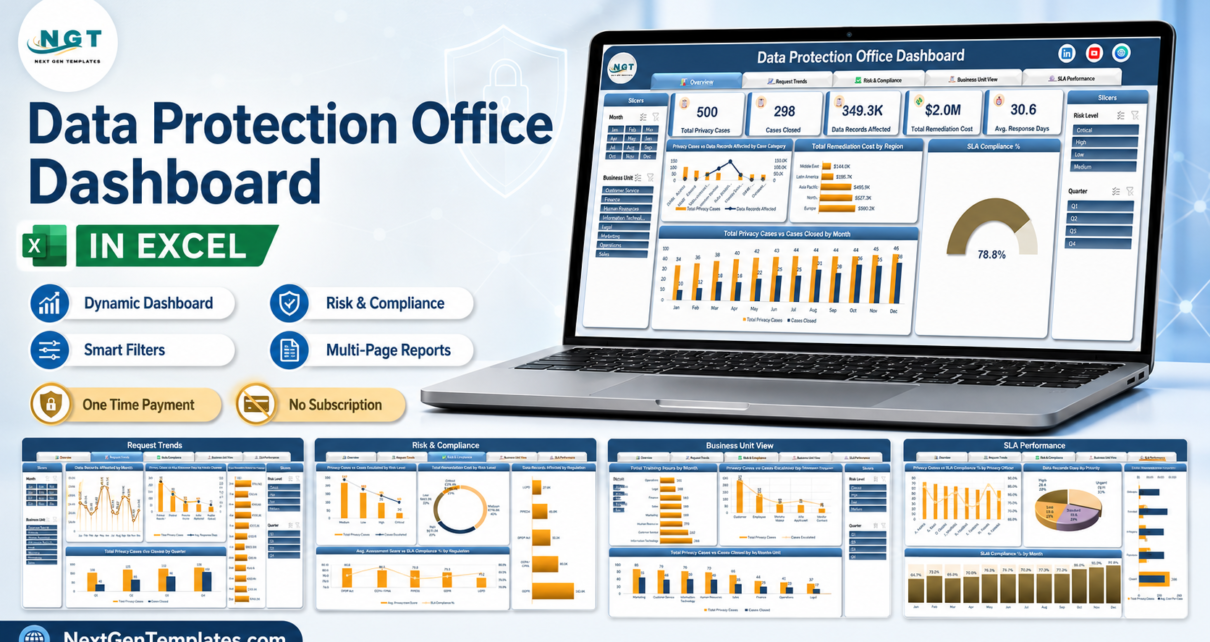
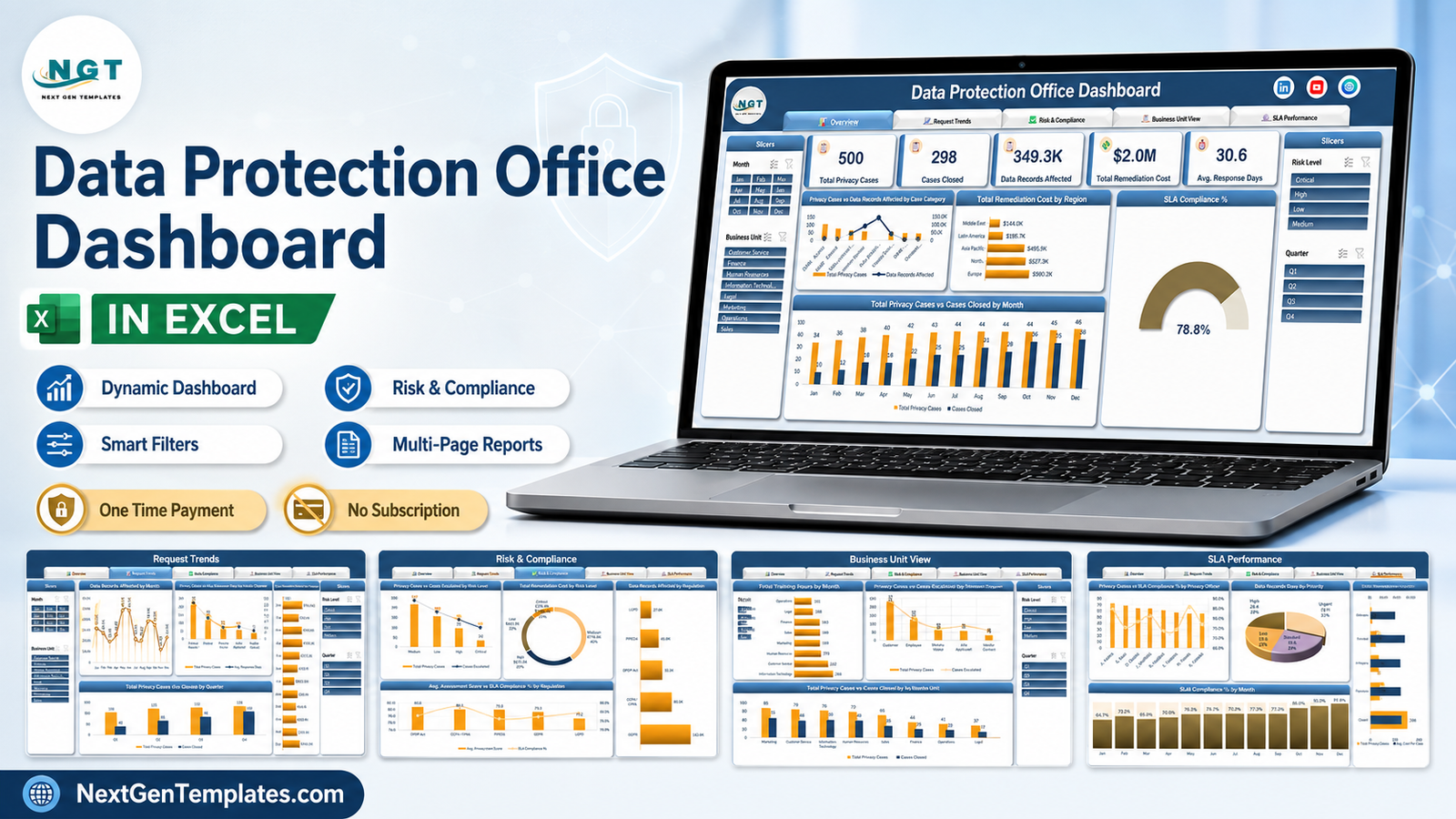
The Data Protection Office Dashboard in Excel replaces that monthly rebuild. The sample workbook carries 500 privacy cases, 298 of them closed, 349.3K data records affected, $2.0M of remediation cost and an average response time of 30.6 days – sitting at 78.8% SLA compliance overall. Every one of those figures is a formula over a single data sheet. Paste your own case export in and five report pages redraw themselves.
Key Features of the Data Protection Office Dashboard in Excel
- Five report pages reached from a tab strip repeated at the top of every sheet – Overview, Request Trends, Risk & Compliance, Business Unit View and SLA Performance.
- Five KPI cards on the Overview – Total Privacy Cases, Cases Closed, Data Records Affected, Total Remediation Cost and Avg. Response Days.
- Four slicers on every page – Month and Business Unit on the left rail, Risk Level and Quarter on the right.
- An SLA compliance gauge, reading 78.8% in the sample data.
- Five privacy regimes reported side by side – GDPR, CCPA/CPRA, DPDP Act, PIPEDA and LGPD.
- Intake channel analysis across Privacy Web Portal, Email, Phone, Postal Mail and Regulator Referral.
- Eight named privacy officers, each with their own caseload and SLA compliance line.
- No macros – a plain .xlsx workbook, so it opens on locked-down corporate builds without a security prompt.
Dashboard Pages Explanation
1. Overview
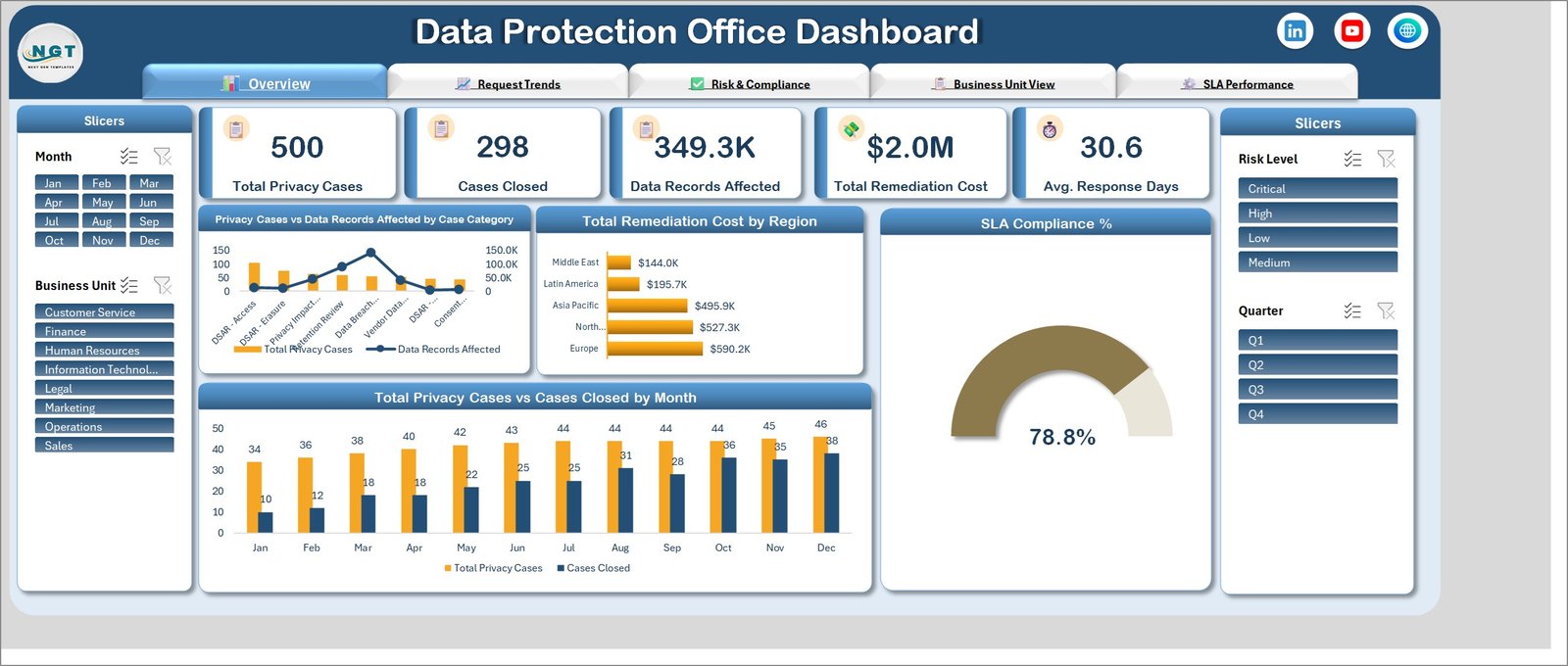
The five KPI cards run across the top. Below them, Privacy Cases vs Data Records Affected by Case Category pairs case volume against exposure – DSAR Access, DSAR Erasure, Privacy Impact Review, Retention Review, Data Breach, Vendor Data and Consent work all appear, and the line series makes the point that the highest-volume category is not the highest-exposure one.
Total Remediation Cost by Region ranks Europe at $590.2K, North America at $527.3K, Asia Pacific at $495.9K, Latin America at $195.7K and the Middle East at $144.0K. The SLA Compliance % gauge sits beside it at 78.8%. Along the bottom, Total Privacy Cases vs Cases Closed by Month shows intake rising gently from 34 in January to 46 in December while closures rise much faster, from 10 to 38 – the shape of a backlog being worked down.
2. Request Trends
This page is about flow rather than stock. Data Records Affected by Month spikes to 48.1K in May and 48.0K in June, then falls to 11.7K in November – a reminder that one large breach distorts a whole quarter. Privacy Cases vs Avg. Response Days by Intake Channel shows the Privacy Web Portal carrying 204 of the 500 cases, Email 119, Phone 74, Postal Mail 69 and Regulator Referral 44, with response days falling as the channel gets more structured.
Total Remediation Cost by Month runs down the right in horizontal bars, peaking at $193.4K in April. Total Privacy Cases vs Cases Closed by Quarter closes the page: Q1 108 raised against 40 closed, Q2 125 against 65, Q3 132 against 84, Q4 135 against 109.
3. Risk & Compliance
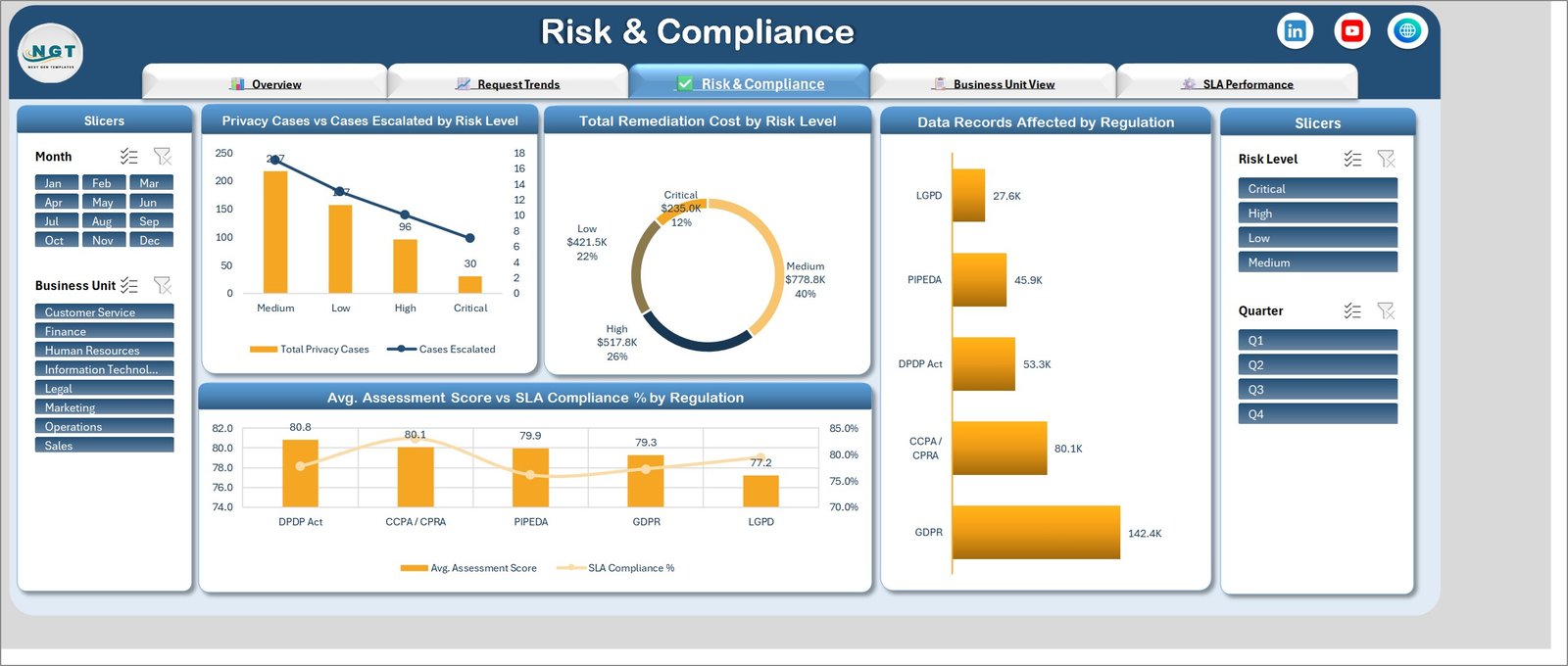
This is the page you take to a supervisory authority. Privacy Cases vs Cases Escalated by Risk Level puts 217 cases at Medium, 157 at Low, 96 at High and 30 at Critical, with the escalation line falling in step. The donut splits the $2.0M remediation spend: Medium $778.8K (40%), High $517.8K (26%), Low $421.5K (22%), Critical $235.0K (12%).
Data Records Affected by Regulation is the chart that settles budget arguments – GDPR touches 142.4K records, CCPA/CPRA 80.1K, DPDP Act 53.3K, PIPEDA 45.9K and LGPD 27.6K. Underneath, Avg. Assessment Score vs SLA Compliance % by Regulation pairs each regime’s average assessment score (80.8 for DPDP Act, 80.1 for CCPA/CPRA, 79.9 for PIPEDA, 79.3 for GDPR, 77.2 for LGPD) with its SLA rate.
4. Business Unit View
Privacy work is created by other departments, and this page names them. Total Training Hours by Business Unit runs from Information Technology at 268 hours down through Customer Service 232, Human Resources 173, Marketing 169, Sales 169, Finance 163, Legal 108 and Operations 101. Privacy Cases vs Cases Escalated by Data Subject Type separates Customer (232), Employee (123), Website Visitor (59), Job Applicant (57) and Vendor Contact (29).
Total Remediation Cost by Business Unit puts IT top at $358.3K, then Marketing $324.4K, HR $294.0K, Customer Service $281.6K, Sales $221.1K, Finance $185.9K, Operations $156.3K and Legal $131.5K. The closing chart pairs cases raised against closed per unit – Marketing 85/55, Customer Service 79/46, IT 76/50, Human Resources 73/48, Sales 65/35, Finance 44/25, Operations 41/22, Legal 37/17.
5. SLA Performance
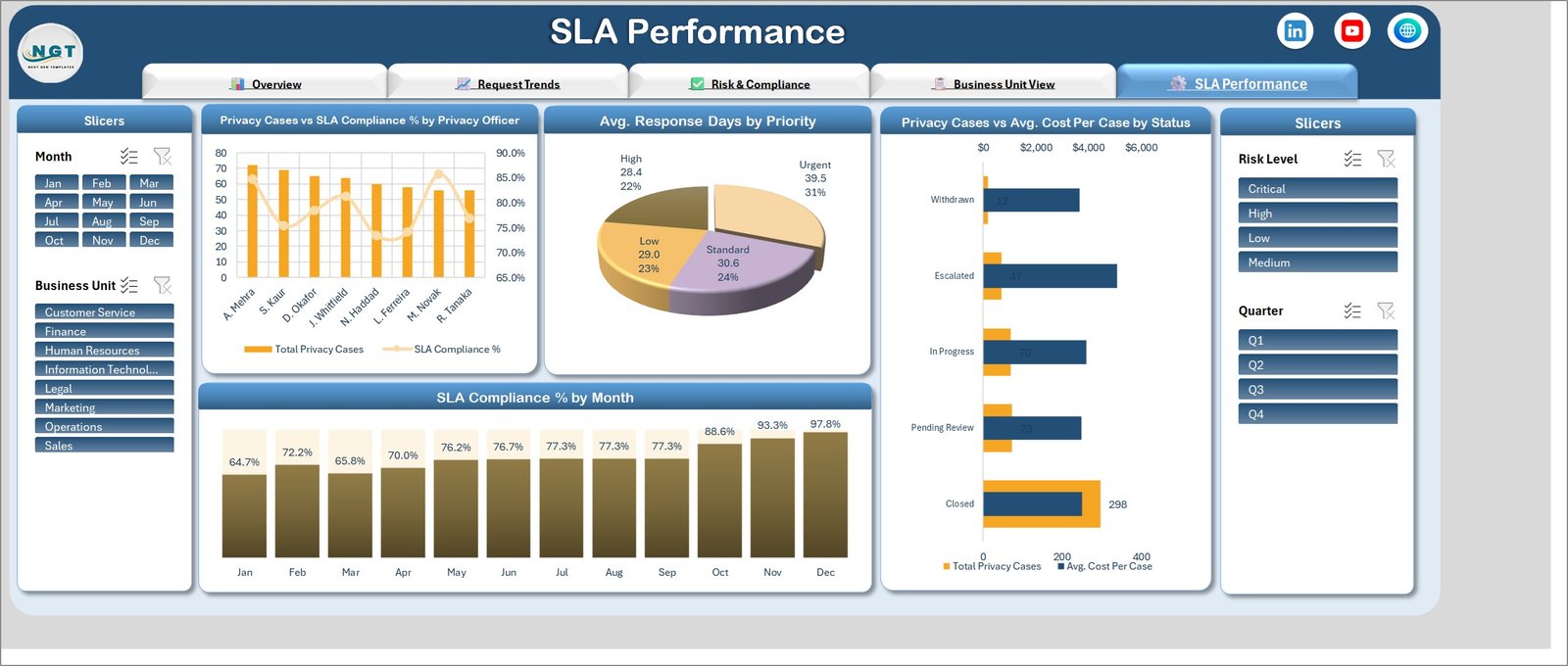
Privacy Cases vs SLA Compliance % by Privacy Officer gives each of the eight officers a bar and a compliance point, which is how you spot the officer carrying too many cases before they miss a deadline. Avg. Response Days by Priority is a pie: Urgent 39.5 days (31%), Standard 30.6 (24%), Low 29.0 (23%), High 28.4 (22%) – and yes, Urgent taking longest is exactly the kind of finding this page exists to surface.
Privacy Cases vs Avg. Cost Per Case by Status covers Closed (298), Pending Review (73), In Progress (70), Escalated (47) and Withdrawn (12). SLA Compliance % by Month closes the pack, climbing from 64.7% in January to 97.8% in December.
Excel vs. Google Sheets vs. Paid Privacy Management SaaS – Feature Comparison
| Criterion | This Excel Dashboard | Google Sheets equivalent | OneTrust / TrustArc |
|---|---|---|---|
| Cost | $17.99 once | $9.99-$16.99 once | $15,000+ per year |
| Platform | Excel 2016+ / Microsoft 365 | Browser | Vendor cloud |
| Setup time | 15 minutes | 10 minutes | 6-12 week implementation |
| Real-time team collaboration | OneDrive / SharePoint co-authoring | Native | Native |
| Mobile access | Excel mobile app | Browser and app | Native app |
| Customisable fields | Full | Full | Vendor-configured |
| Share with a link | OneDrive link | Sheet link | Seat-based login |
| Year-1 cost at 5 users | $17.99 | $16.99 | $15,000-$60,000 |
| Automated DSAR intake | No | No | Yes |
| Case data leaves your tenancy | No | Yes (Google) | Yes (vendor) |
Who Should Use This Template
It suits a Data Protection Officer or privacy lead handling a few hundred to a few thousand requests a year; a compliance manager who must evidence timeliness to a board or a regulator; a privacy consultant running the function for several clients; and an in-house legal team whose case log already lives in a spreadsheet.
It is not the right tool if you need automated DSAR intake with identity verification, a records-of-processing register, or a breach-notification workflow with statutory clocks running per case. Those are platform features, and a workbook should not pretend otherwise. The UK Information Commissioner’s Office publishes detailed guidance on the right of access that is worth reading before you decide which side of that line you sit on.
Real-World Use Cases
The quarterly board pack. A DPO at a 900-person fintech filters to Q4, exports the SLA Compliance % by Month chart showing 97.8% in December, and answers the board’s only real question in one slide.
The consultant’s client review. One workbook per client. The Business Unit View page carries the kick-off meeting – showing that Marketing raised 85 cases and closed 55 while Legal raised 37 and closed 17 makes the resourcing case without a word of argument.
The budget round. A compliance manager at a retail group uses Data Records Affected by Regulation to show that GDPR touches 142.4K records against 27.6K for LGPD, and the European programme gets the headcount.
Advantages of the Data Protection Office Dashboard in Excel
- The data never leaves your tenancy. No external connections, no vendor cloud – which matters more than usual when the data is itself a privacy case log.
- No macros. A plain .xlsx opens without a trust prompt and passes policies that block .xlsm attachments outright.
- One payment. $17.99 against five figures a year for a privacy platform.
- Fully editable. Add a regulation, rename a business unit, restyle the header band – it is an ordinary workbook.
- Five pages already laid out. The hard part of a dashboard is the layout, and that work is done.
Opportunities for Improvement
Being honest about the limits: there is no automated deadline alerting, so nobody gets an email at day 25 of a 30-day clock – you have to look at the workbook. Multi-user editing depends on OneDrive or SharePoint co-authoring rather than being native. There is no audit trail of who changed what. And the workbook reports on cases you have already logged; it does not capture them. If you need intake automation and statutory alerting, this is a reporting layer, not a replacement for a platform.
Best Practices
- Keep the column order. Add rows freely, but do not reorder or rename the Data sheet columns – the pivots resolve by header.
- Reuse the dropdown values. Free-typing “Med” where the list says “Medium” creates a second slicer entry.
- Refresh with Ctrl+Alt+F5 after every paste, before you read a number off a card.
- Export a PDF per month. Keep the monthly snapshot as evidence; regulators ask what you knew and when.
- Log the closure date, not just the status. Every SLA figure in the pack depends on it.
- Keep the file in a restricted SharePoint library. A privacy case log is itself personal data.
Explore Relevant Templates
- Compliance Monitoring Dashboard in Excel – control testing and monitoring above the privacy layer.
- Corporate Ethics Office Dashboard in Excel – the same office-level shape for ethics and whistleblowing cases.
- Cybersecurity Startups Dashboard in Excel – the security-sector counterpart.
- Risk Assessment Firms Dashboard in Power BI – if you would rather publish to the Power BI service.
- IT Manager & CISO Toolkit – ten templates in this family at a bundle price.
Frequently Asked Questions
Which Excel versions does it work in?
Excel 2016, 2019, 2021 and Microsoft 365 on Windows. It uses pivot tables, slicers and standard chart types, so it also opens on Excel for Mac, though slicer styling differs slightly.
Does it need macros?
No. It is a plain .xlsx with no VBA.
Can I add my own regulations or case categories?
Yes. Add the value in the Data sheet, refresh, and it flows into the charts and slicers.
How many cases can it hold?
The sample carries 500. Excel’s pivot engine is comfortable into the tens of thousands of rows.
Can I rebrand it for my organisation?
Yes – the header band, logo and colours are ordinary Excel objects.
Does any data leave my machine?
No. The workbook has no external connections of any kind.
What do I actually download?
A zip file containing the Excel workbook with all five report pages, the sample data sheet and every chart already built.
About the Author
Built by PK – Microsoft Certified Professional with 15+ years of Excel, Google Sheets, and Power BI experience. Founder of NextGenTemplates, reaching 300K+ subscribers across YouTube channels. Every template is hand-built and tested before release.
Conclusion
A privacy office does not need a five-figure platform to answer the questions it is actually asked: how many requests, how many closed, how fast, at what cost, and which department is generating the work. The Data Protection Office Dashboard in Excel answers all five across five pages, from a single data sheet, with no macros and no subscription.
Get the Data Protection Office Dashboard in Excel for $17.99 – instant download, lifetime use, yours to edit.
For walkthroughs of this and every other dashboard in the range, subscribe on YouTube at youtube.com/@PKAnExcelExpert.