Home nursing runs on a schedule that almost never fits a wall planner. A four-weekly catheter change, the third of six IV infusions, a weekly vital-signs round, a postnatal check on day ten, a supervisory visit that has to land on a real patient visit – and all of it spread across zones and routes that different nurses cover on different days. Most small agencies end up with a whiteboard, a shared calendar and someone’s memory holding the whole thing together.
The Home Nursing Visit Calendar in Excel is a macro-enabled workbook that puts all of it in one place: one list of visits, five linked views built from it, and a hundred realistic sample visits already typed in so you can see how it behaves before you commit your own data.
One thing to be clear about before anything else. This is a scheduling spreadsheet and nothing more. It is not a patient record, not an EHR or EMR, not a care-planning or clinical system, and not a medical device. It makes no HIPAA, GDPR, CQC, Joint Commission or other compliance claim, and it has no encryption, no access control and no audit trail. An ordinary workbook sitting on a laptop or a shared drive is not appropriate storage for protected health information, and your own privacy and record-keeping obligations stay yours. The sample data shows the intended discipline: visit types, times and service zones, with anonymous case references like “Case 214” instead of names.
What the workbook actually is
Seven worksheets – Home, Annual View, Monthly View, Daily View, This Month, Events and Setting. The Events sheet is the only place data lives. It holds seven columns: ID, Date, Day, Event Name, Time, Location and Description. Every other view reads from it, so you add a visit once and it turns up on the year planner, the month grid, the day list and the monthly summary without any copying.
The sample set runs the full year: 100 visits from 05-Jan-2026 to 30-Dec-2026, across eight locations – North Zone, South Zone, East Zone, West Zone, Central Zone, the Suburban Route, the Agency Office and Telehealth. That mix matters, because a home-nursing calendar is not only visits: monthly route and roster planning, documentation audits, infection-control spot checks and nurse training days sit on the same grid as the clinical work.
The five views, page by page
Home
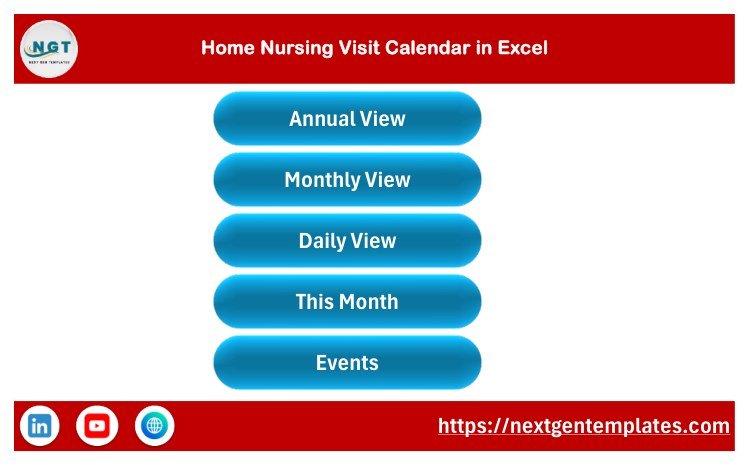
A banner and five buttons – Annual View, Monthly View, Daily View, This Month and Events. Every sheet carries a house icon that returns here. It is a small thing, but it is what makes the file feel like a tool rather than a stack of tabs.
Annual View
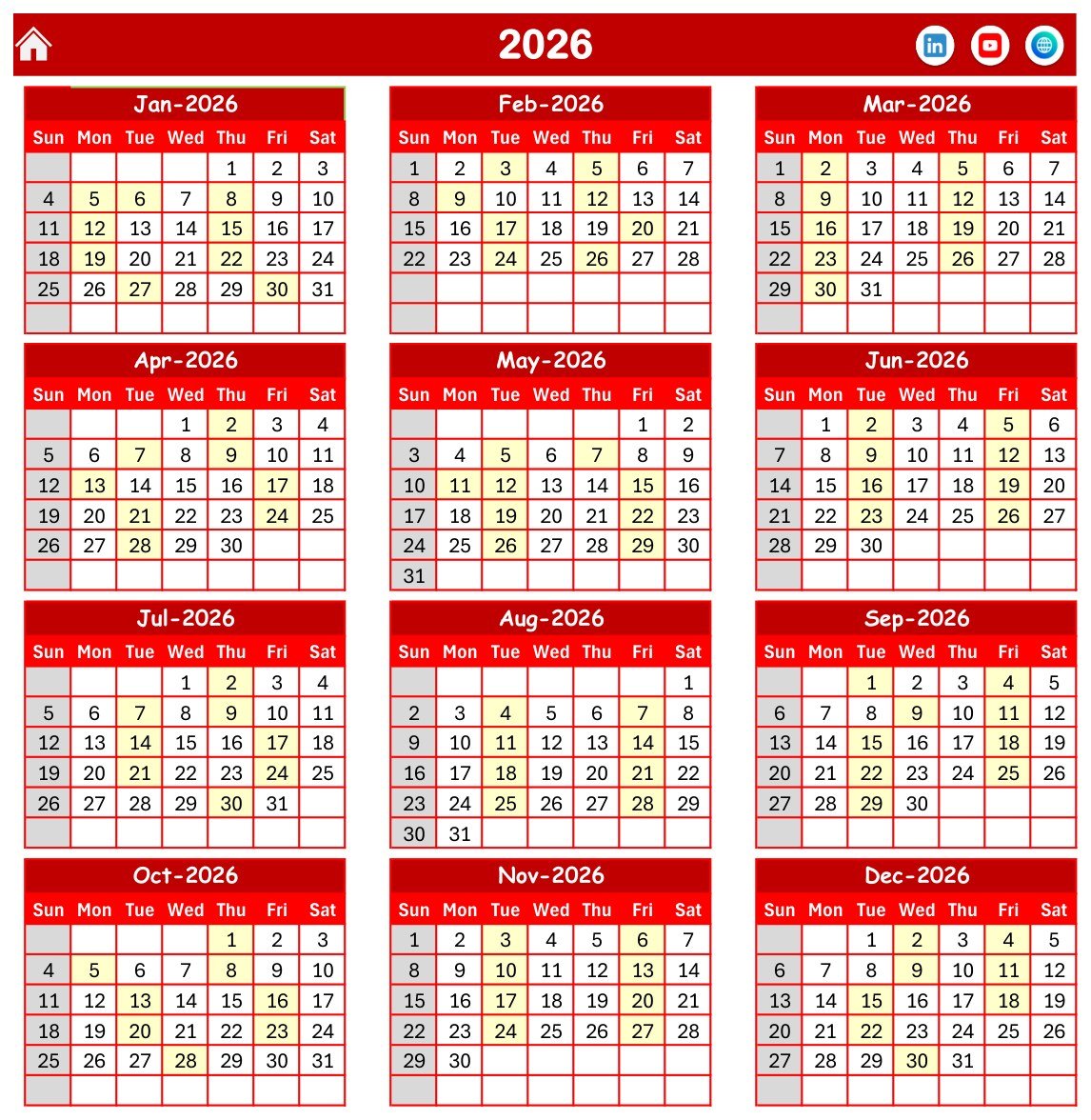
All twelve months of 2026 on one page, Sunday through Saturday, with any date carrying a scheduled visit shaded. A whole year of workload readable at arm’s length – this is the page you print for the office wall. The year is a single cell; change it and the grid rebuilds.
Monthly View
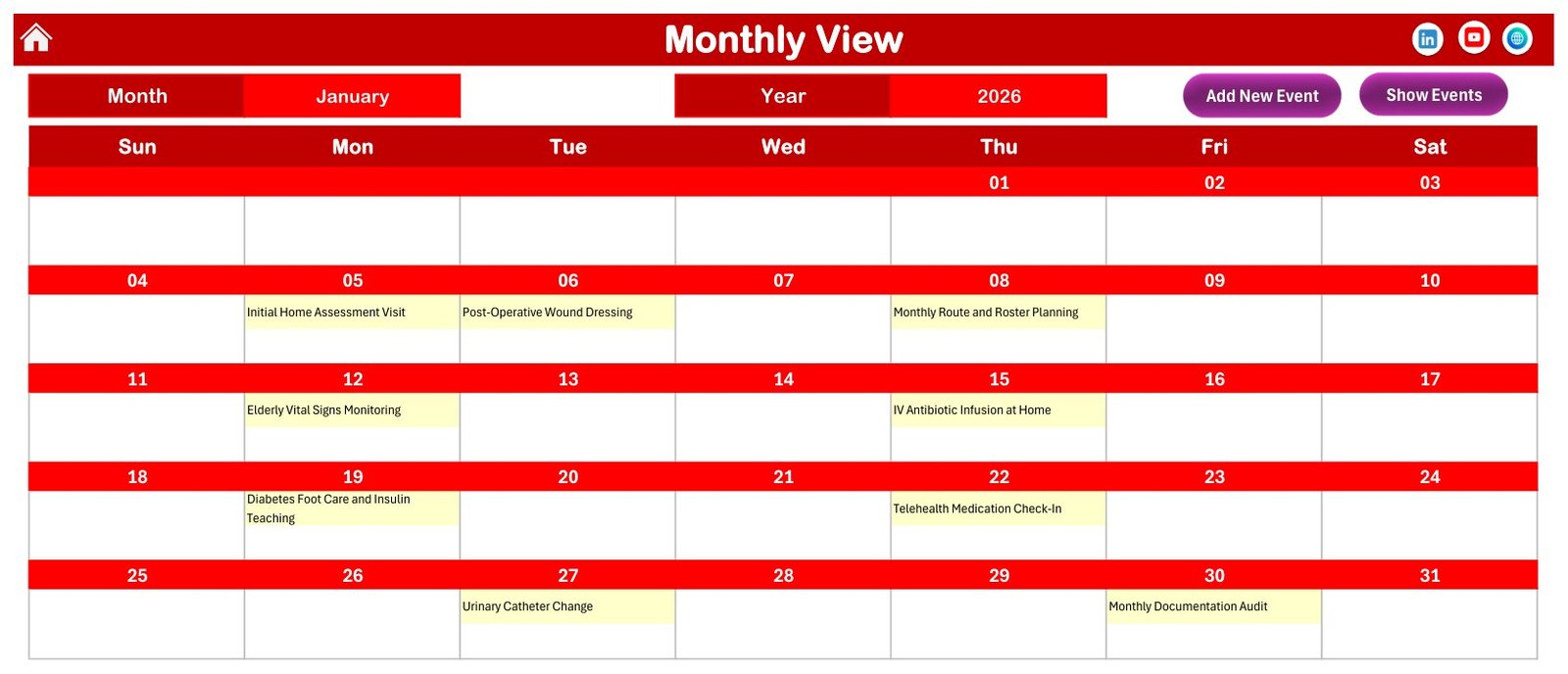
The working month. Pick a month and a year and the grid redraws with each visit written into its day cell. January 2026 in the shipped file reads like a real month: Initial Home Assessment Visit on the 5th, Post-Operative Wound Dressing on the 6th, Monthly Route and Roster Planning on the 8th, Elderly Vital Signs Monitoring on the 12th, IV Antibiotic Infusion at Home on the 15th, Diabetes Foot Care and Insulin Teaching on the 19th, Telehealth Medication Check-In on the 22nd, Urinary Catheter Change on the 27th, Monthly Documentation Audit on the 30th.
Two buttons sit above the grid. Add New Event opens the entry form; Show Events drops you into the master table.
Daily View
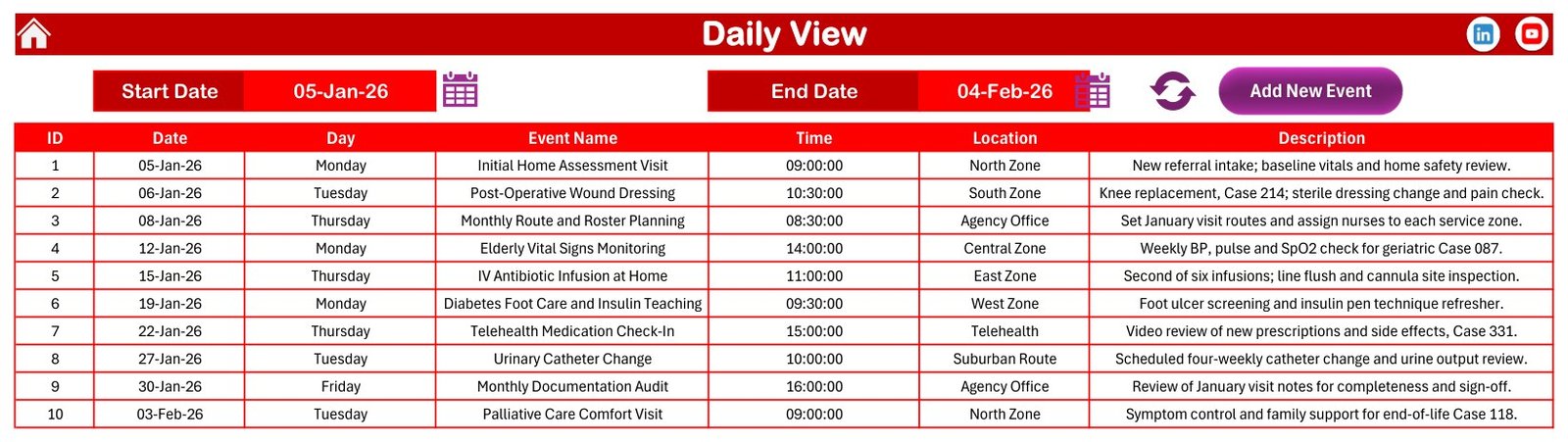
This is the coordinator’s page. Set a Start Date and an End Date, press refresh, and you get a flat list – ID, Date, Day, Event Name, Time, Location, Description. The shipped range of 05-Jan-26 to 04-Feb-26 returns ten visits between 09:00 and 16:00, spread over North, South, Central, East and West Zone, the Suburban Route, the Agency Office and Telehealth. Narrow the range to a single day and you have a nurse’s round; set it to a week and you have the route sheet.
This Month Summary
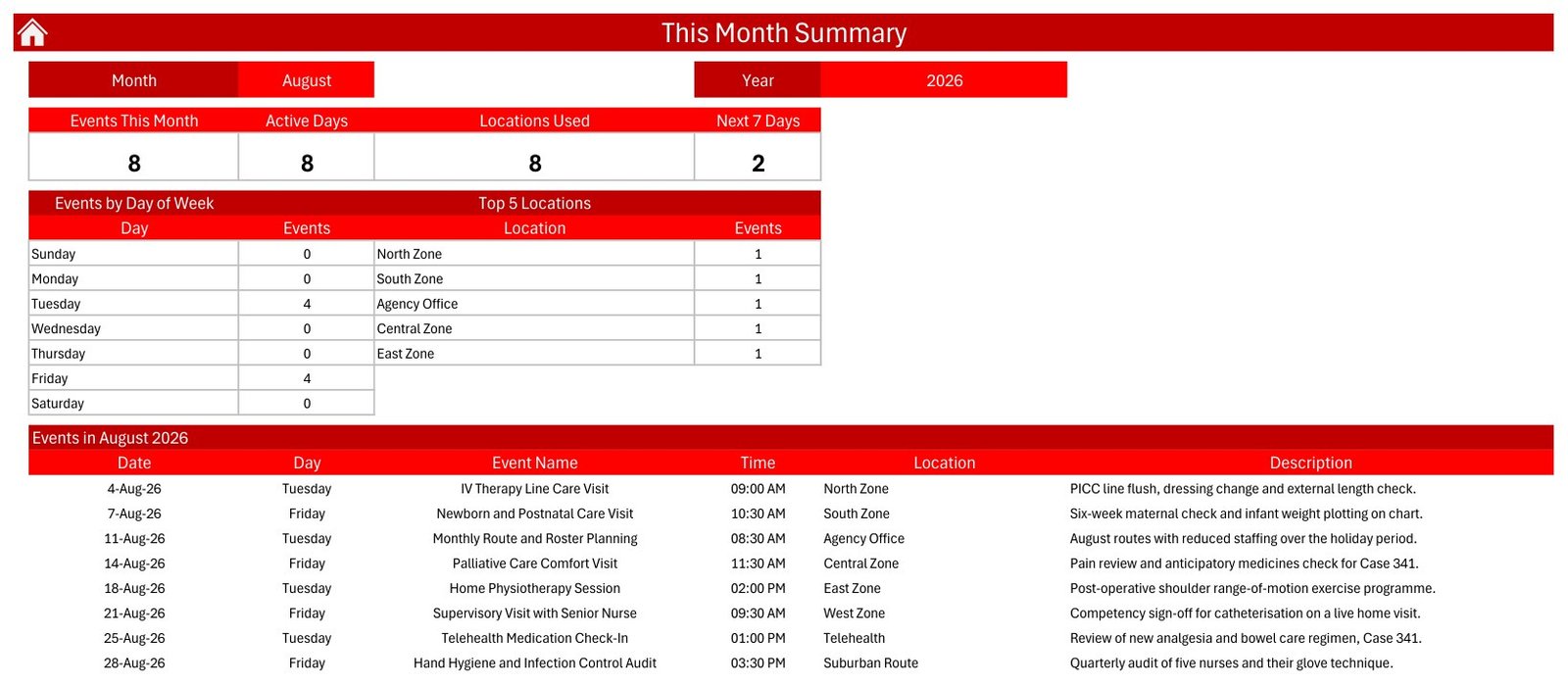
Four count tiles – Events This Month, Active Days, Locations Used and Next 7 Days – with an Events by Day of Week breakdown and a Top 5 Locations table beside them, and the month’s visits listed underneath. The shipped August 2026 view shows 8 visits, running from an IV Therapy Line Care Visit on the 4th to a Hand Hygiene and Infection Control Audit on the 28th. It is the page to open before a team meeting: how busy is next month, which days are already loaded, which zones are carrying the work.
Events – the master table
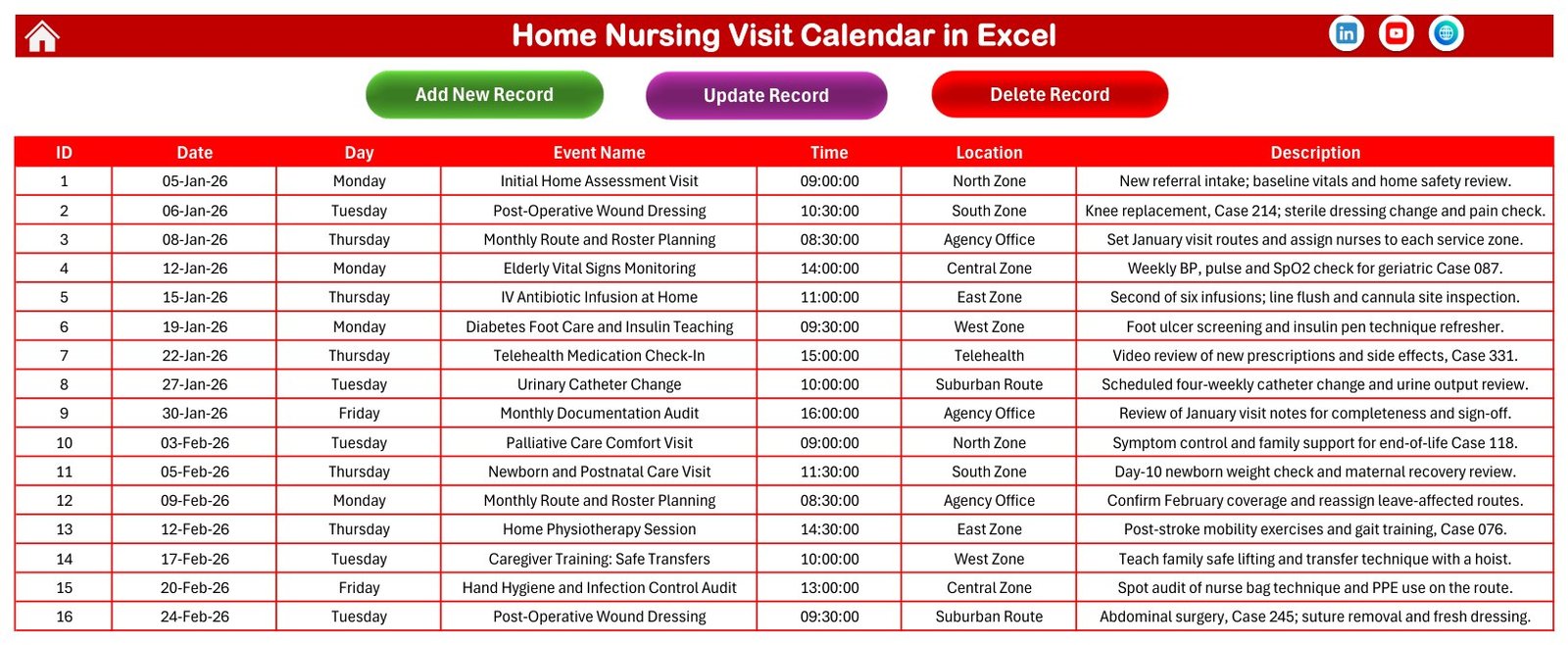
One hundred rows, seven columns, and three buttons across the top: Add New Record, Update Record, Delete Record. Everything upstream reads from here. The sample descriptions are worth reading before you type your own, because they model the right level of detail – “Second of six infusions; line flush and cannula site inspection”, “Weekly BP, pulse and SpO2 check for geriatric Case 087”, “Competency sign-off for catheterisation on a live home visit”. Enough for a covering nurse to know what the visit is. Not a clinical note, and never a name.
The entry form
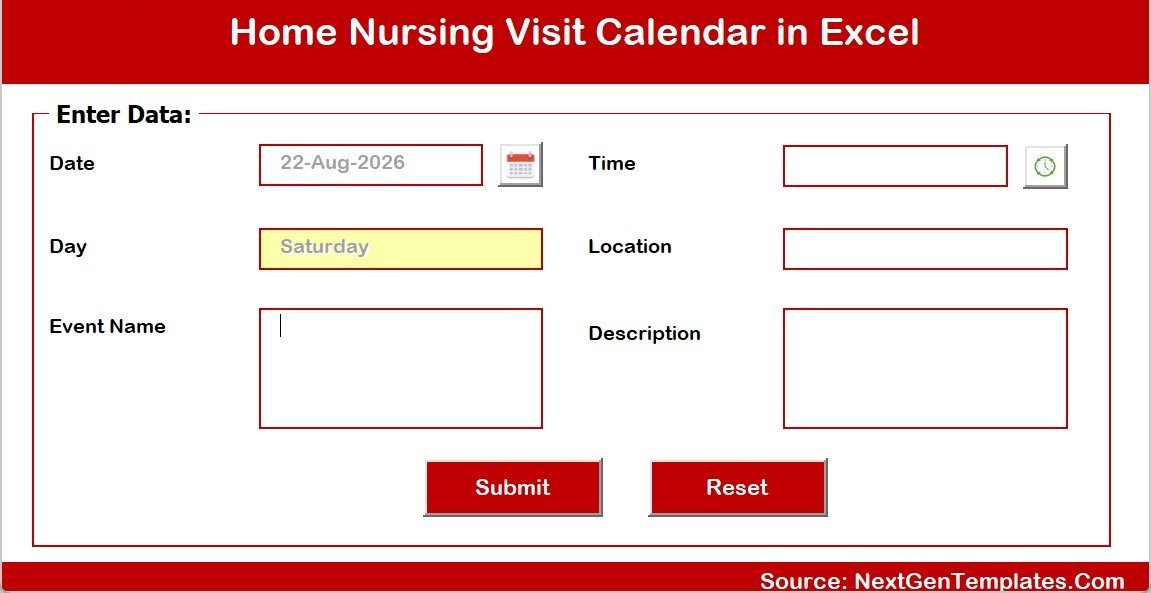
A VBA user form with a date picker, a time picker, an auto-filled Day box, and fields for Event Name, Location and Description, plus Submit and Reset. Update and Delete reopen the same form against an existing row, so the whole add-edit-remove cycle happens in one small window instead of down at the bottom of a growing table.
Setting
A Whole Theme picker with five presets – Default, Blue, Red, Black and Orange. One click repaints banners, headers and highlight shading across every sheet. The file ships on Red.
How it compares
| This Excel calendar | Wall planner or shared online calendar | Home-health scheduling / EVV software | |
|---|---|---|---|
| Cost | One-time $8.99 | Free to near-free | Per-nurse monthly subscription |
| Time to first useful schedule | Under 10 minutes | Minutes | Weeks, with onboarding |
| Sample data to learn from | 100 visits already in | None | Sales-led demo |
| Year / month / day / summary views | All four from one table | Usually one | Yes |
| Prints usefully | Year, month and date-range list | Yes | Varies |
| Mobile check-in, visit verification, mileage | No | No | Yes |
| Access control, encryption, audit trail | No | Limited | Yes |
| Appropriate for protected health information | No | No | Built for it |
| Works offline | Yes | Paper only | No |
| You own the file | Yes, permanently | n/a | No – rented access |
The honest read: if you need visit verification, rule-based rostering, payroll integration or a governed clinical record, buy the platform. If you want next month’s visits visible, printable and under your own control, this does that for the price of a coffee.
Who it suits, and who it does not
A good fit: small home-nursing and home-health agencies covering a handful of nurses; community and district nursing teams; independent and agency nurses running their own week; private-duty and live-in care coordinators; hospice and palliative visiting teams who need something printable; nursing educators who want a realistic scheduling workbook to teach from; and families coordinating a relative’s care visits at home.
Not for you if you need electronic visit verification, GPS check-in or mileage capture; if you need to hold patient names, addresses, diagnoses or clinical notes; if you need role-based access, encryption or an audit trail; if you need automated reminders to nurses or families; if you need rostering that enforces skill mix, continuity of carer or working-time rules; or if your organisation requires a certified clinical record system. The workbook does none of that and should not be pressed into doing it.
Getting it running
- Unzip and open the .xlsm in Microsoft Excel for Windows on the desktop. Click Enable Content – the buttons, the form and every view refresh are VBA, and none of it works with macros off.
- Set the year on the Annual View, and the month and year on Monthly View and This Month.
- Read a dozen sample rows on the Events sheet before you change anything. That is the pattern you want to copy.
- Delete the 100 sample rows when you are ready, keeping the header row and the buttons.
- Add your visits with Add New Record, or from the Monthly View’s Add New Event. Date, Time, Event Name, Location, Description – the Day fills itself in.
- Rename the locations to your own rounds or teams. They are plain text, so “North Zone” can become “Riverside Round” or “Team B”.
- Print what people need: the year planner for the wall, the month grid for the team meeting, a Daily View range for each nurse.
- Repaint from the Setting sheet if Red is not your agency’s colour.
A few ways teams use it
- A five-nurse agency plans the month by zone on the Monthly View, then prints a Daily View range per nurse every Friday for the week ahead.
- A district nursing team keeps the recurring work visible – four-weekly catheter changes, weekly vital-signs rounds, six-infusion antibiotic courses – so a covering nurse can see what is due without phoning anyone.
- A hospice visiting team schedules comfort visits and family support calls, and uses This Month to see how many active days the next month holds.
- An agency office manager puts the non-clinical work on the same calendar: route planning, documentation audits, infection-control spot checks, training days.
- A nursing educator hands students a year of realistic, fully anonymous visit records for a scheduling and documentation exercise.
Frequently asked questions
Do macros have to be enabled?
Yes. The navigation, the Add / Update / Delete controls, the entry form and every view refresh are VBA. Without macros the file opens as a static grid and does nothing.
Does it run on Mac, Excel Online or mobile?
No. It is a macro-enabled .xlsm for Microsoft Excel for Windows on the desktop. The other Excel flavours will open it, but the VBA will not run.
Can I put patient names and clinical notes in it?
Please do not. There is no encryption, no access control and no audit trail, and no compliance claim of any kind. Schedule by visit type, time and service zone and use anonymous case references, as the sample data does. Clinical and patient-identifiable records belong in your governed system, and your privacy obligations remain your own.
Is it a care-planning system?
No. It records when a visit is scheduled, what type it is, roughly where and a short note. No care plan, no assessment, no medication chart, no outcome, and it is not a medical device.
Is it locked to 2026?
No. The sample data is dated across 2026 so the views have something to show. The year is a cell – change it, or clear the samples and use any dates you like.
How many visits will it hold?
It ships with 100 and grows as you add rows. A few thousand is comfortable. Past that you have outgrown a calendar and want a database.
Does it send reminders?
No. It connects to nothing and sends nothing. It is a file you open, read and print.
What is in the download?
A single ZIP with the macro-enabled workbook (.xlsm) and the Excel Calendar user manual PDF, which covers every sheet and every button.
Get the template
Home Nursing Visit Calendar in Excel – regularly $8.99, currently $4.99. One-time purchase, yours permanently, includes the user manual.
If you need to roster the staff rather than the visits, the Nurse Duty Roster Calendar in Excel and the Doctor On-Call Calendar in Excel use the same engine. For site-based appointments rather than visits out on a route, see the Patient Follow-Up Visit Calendar in Excel, the Physiotherapy Session Calendar in Excel and the Dialysis Session Calendar in Excel. Once a few months of visits are recorded, the Home Healthcare KPI Dashboard in Excel is where the analysis lives.
For step-by-step video walkthroughs of this and other Excel templates, visit the PK – An Excel Expert YouTube channel.