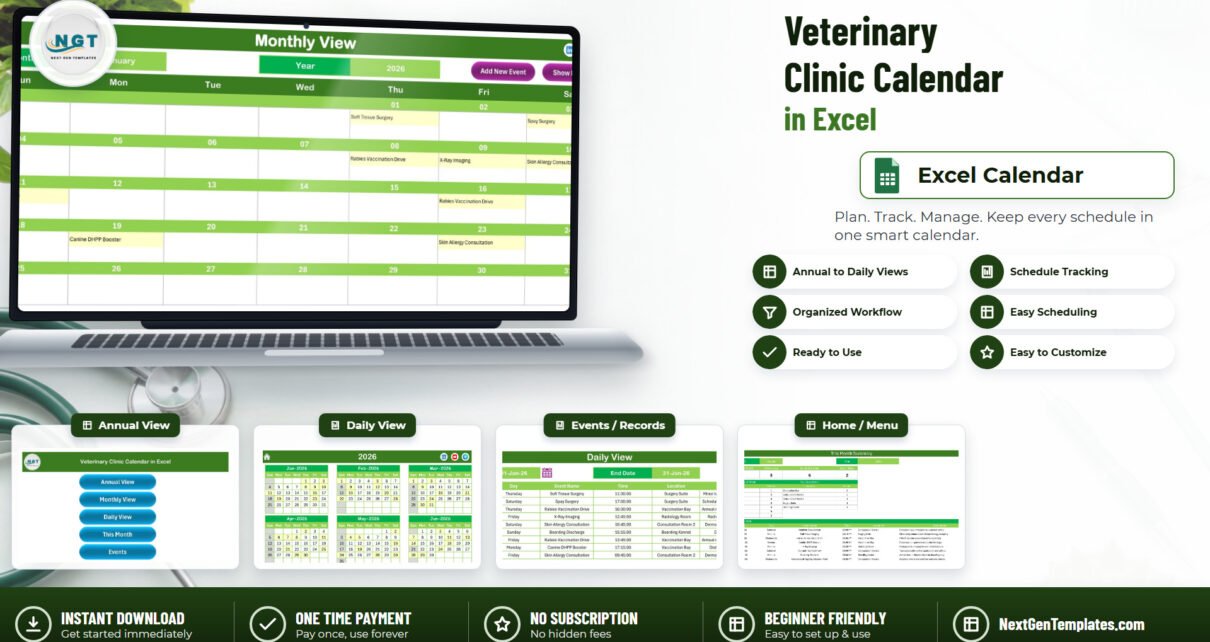
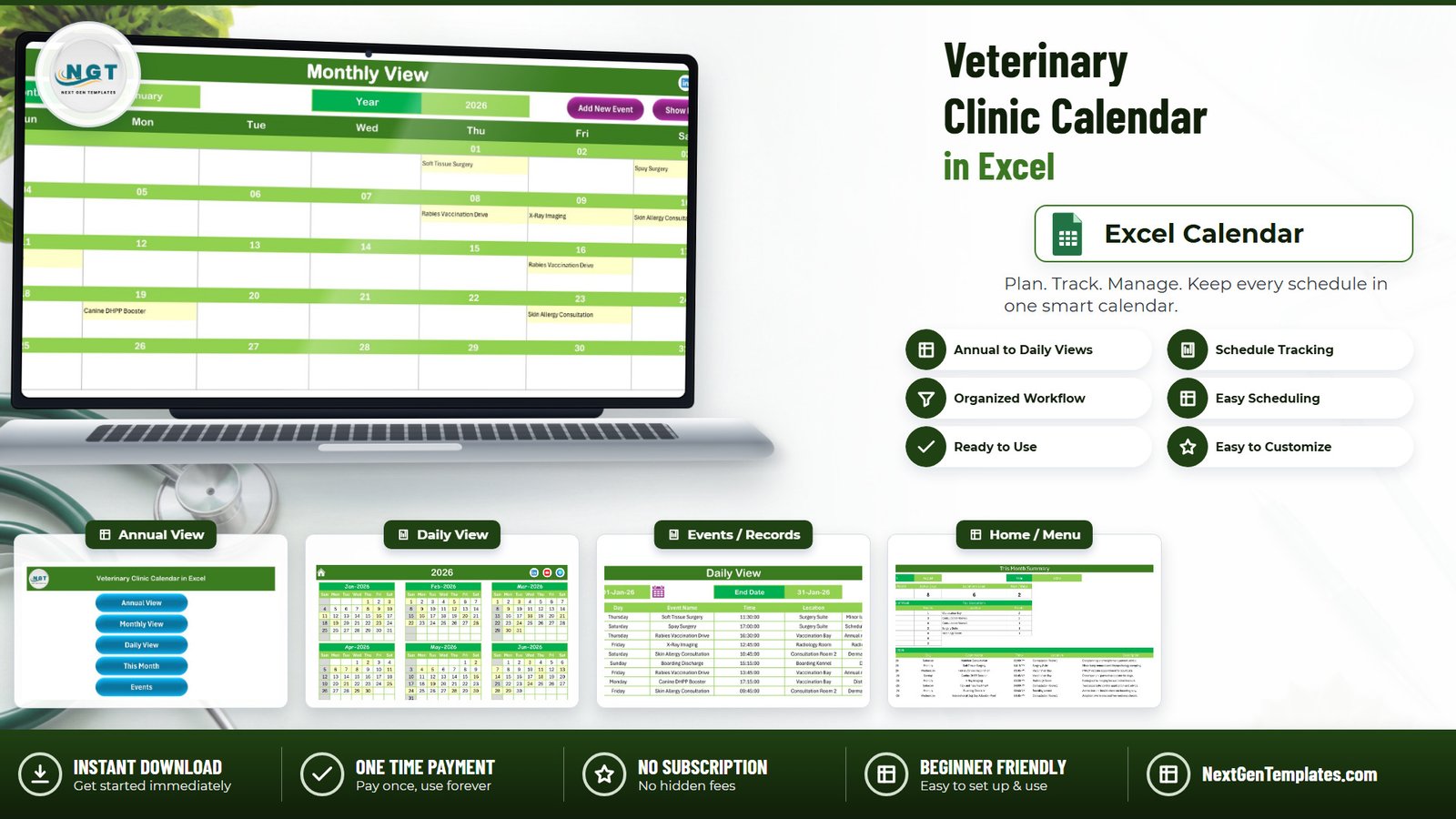
Most small animal practices still run the diary on a wall planner, a paper day book, or a shared calendar that nobody trusts by Wednesday. The Veterinary Clinic Calendar in Excel is a macro-enabled workbook that replaces that with seven linked sheets and one master booking list. It ships loaded with 100 sample appointments dated 1 January 2026 through 26 December 2026, spread across all twelve months, covering 31 appointment types, 10 clinic locations and 40 distinct start times from 08:00 to 18:45. Every one of those 100 rows carries a weekday that genuinely matches its date, which matters more than it sounds when you are reading a month grid at speed.
This post walks through what is actually in the file, what it deliberately does not do, and how to decide whether it belongs in your practice.
Key Features of the Veterinary Clinic Calendar in Excel
- Four views, one data source. Annual View, Monthly View, Daily View and This Month all read from the same Events sheet. Change a booking once and every view follows.
- A seven-column booking record – ID, Date, Day, Event Name, Time, Location and Description.
- VBA entry forms. Add New Event and Show Events sit on Monthly View and Daily View; Add New Record, Update Record and Delete Record sit on the Events sheet.
- A date-range Daily View. Set a Start Date and an End Date and the list rebuilds for that window.
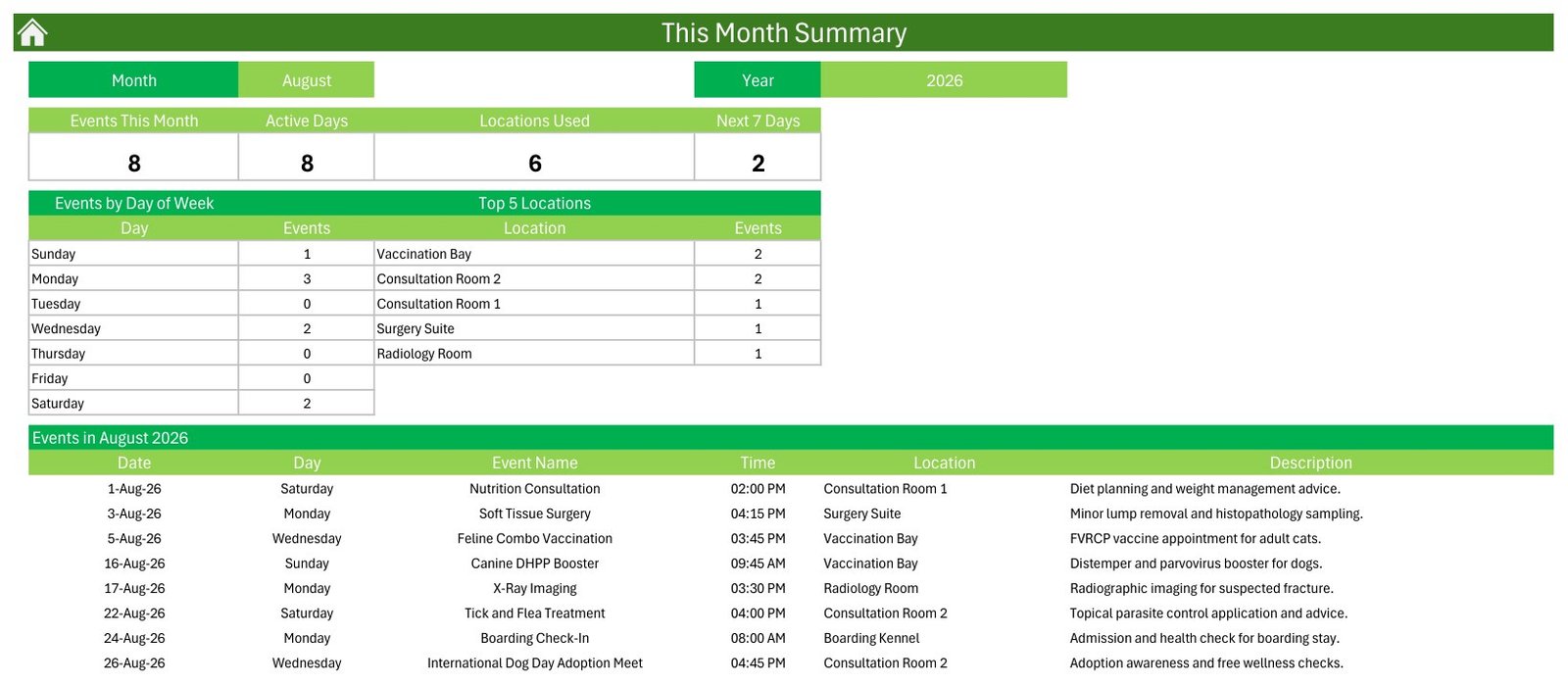
- A This Month summary with four cards – Events This Month, Active Days, Locations Used and Next 7 Days – plus an Events by Day of Week table and a Top 5 Locations table.
- A Setting control panel with a 2021-2051 year dropdown, a start-month picker, a week-start-day picker, two highlight days and an event-highlight toggle.
- Five colour themes – Default, Blue, Red, Black and Orange – applied workbook-wide from one dropdown. The file ships on the green Default theme.
- Print areas already set on every sheet.
Inside the Workbook: Every Sheet Explained
Home
A plain menu page with five buttons – Annual View, Monthly View, Daily View, This Month and Events. It exists so that whoever is on reception does not have to hunt through sheet tabs.
Annual View
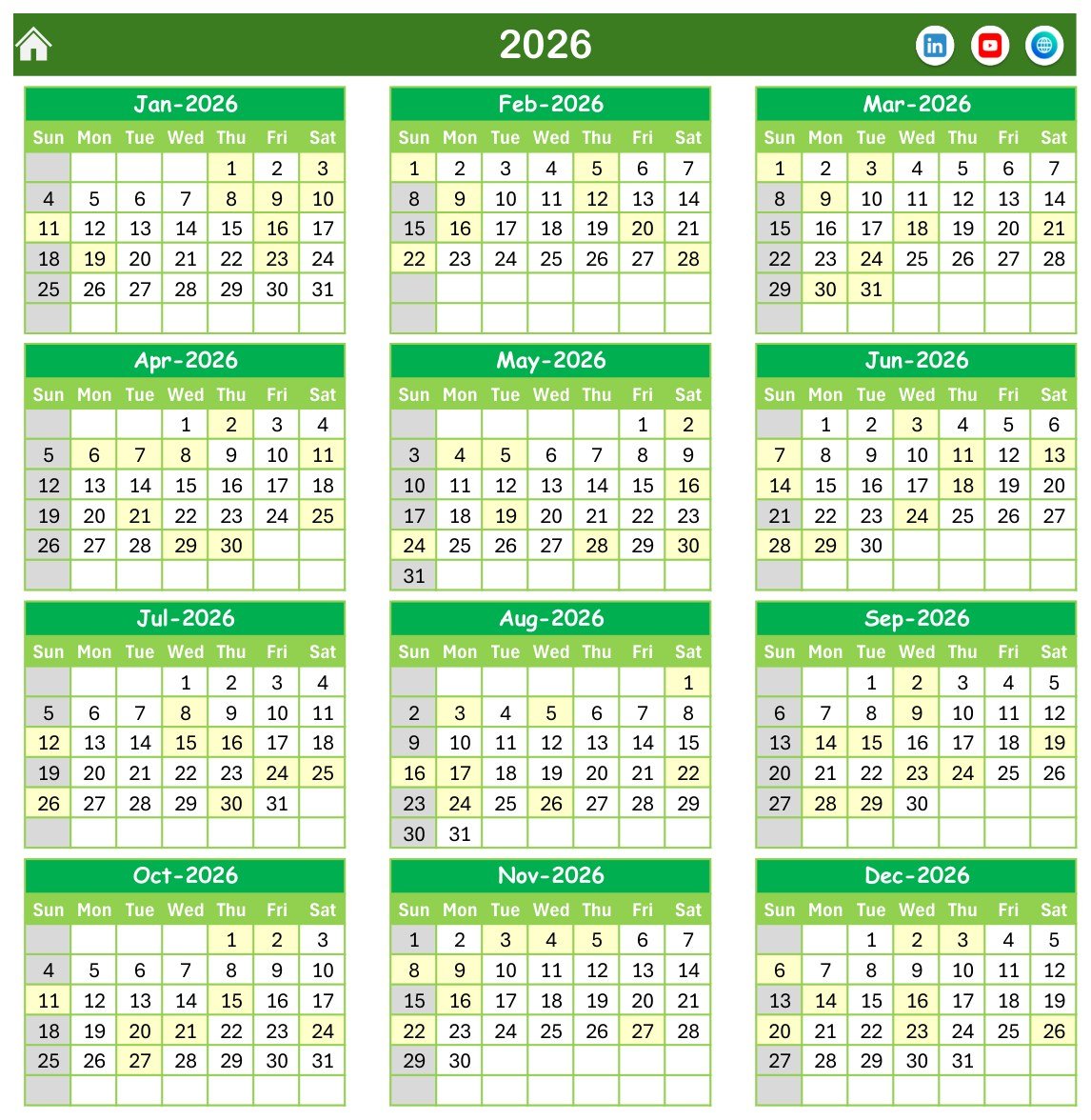
All twelve months of the chosen year in a 3×4 grid of month blocks, with the days that carry a booking shaded. This is the sheet you print in December to plan the year’s open days and community clinics.
Monthly View
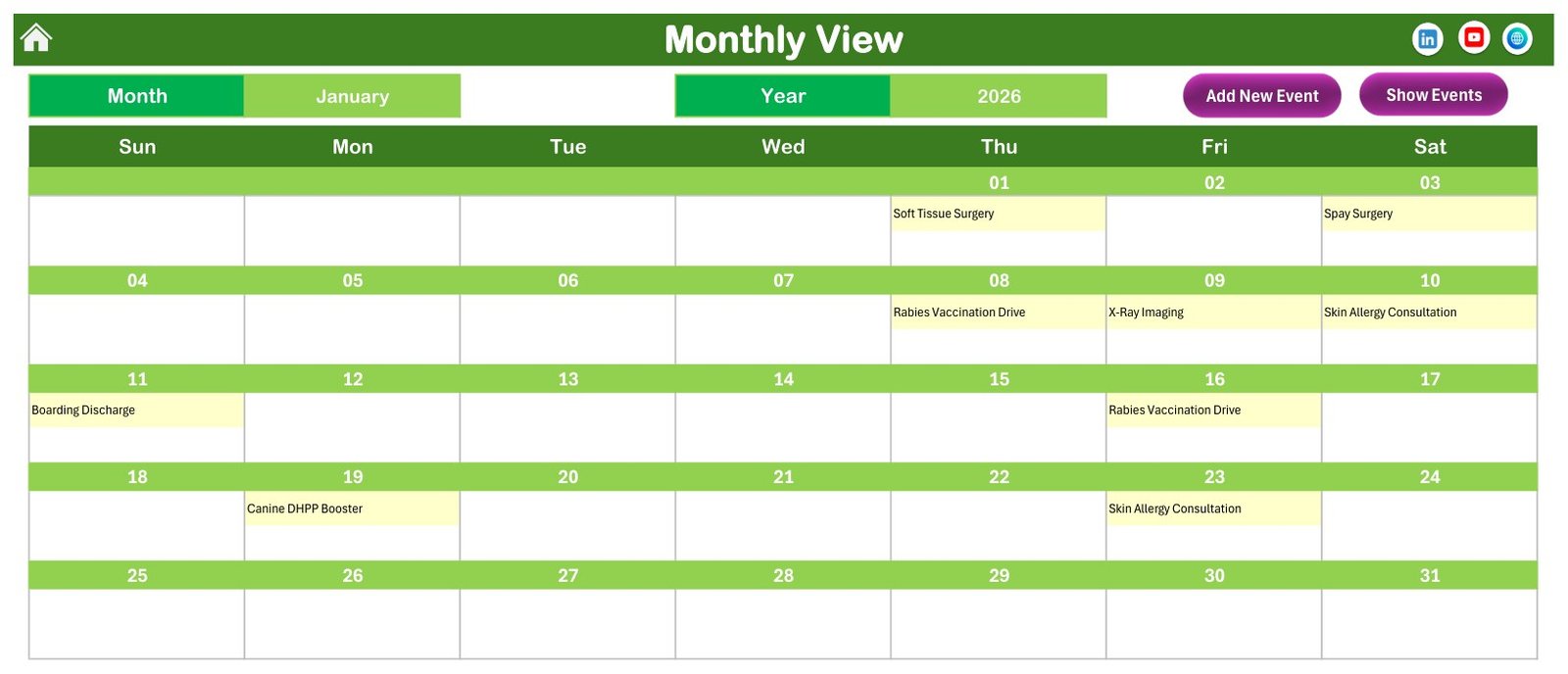
A seven-column week grid with its own Month and Year picker. Each date cell shows the appointment name. Where a date carries more than one booking, the cell shows the first plus a counter – it is a planning grid, not a full day list, and that is what the Daily View is for.
Daily View
The booking list for a Start Date to End Date window, showing all seven columns and a refresh control. The file ships showing 01-Jan-26 to 31-Jan-26. Narrow it to tomorrow for a run sheet, or to a week for the surgery block.
This Month
The management page. Pick a month and year and it counts the bookings, the active days and the locations used, tells you how many fall in the next seven days, breaks the month down by day of the week, and lists the top five locations by booking count. In the shipped sample, August 2026 reads 8 events across 8 active days and 6 locations.
Events
The master table – 100 rows in the sample file – with the three record buttons above it. Everything else in the workbook is a view of this sheet.
Setting
The control panel and theme switcher described above.
What the Sample Data Actually Contains
The 100 demonstration bookings are ordinary clinic diary entries: consultations, wellness and senior screenings, surgery bookings, dental appointments, diagnostic imaging and laboratory slots, parasite and grooming appointments, boarding check-ins and discharges, emergency slots, and a handful of awareness-day community events. The ten locations are Surgery Suite, Vaccination Bay, Radiology Room, two Consultation Rooms, Boarding Kennel, Dental Suite, Emergency Ward, Diagnostic Laboratory and Grooming Studio.
What the Events sheet does not contain is any clinical or client information whatsoever. There is no animal name, no owner name, no case or patient number, no species, weight, medication, dosage or outcome field anywhere in the workbook. It records what is booked, when, and in which room. That is a design decision worth stating plainly rather than burying, because it sets the boundary of what this file is for.
Veterinary Clinic Calendar in Excel vs. Google Sheets vs. Paid Veterinary Practice Software – Feature Comparison
| This template (Excel) | A Google Sheets calendar | Paid veterinary practice software | |
|---|---|---|---|
| Cost | $4.99 once | Free to $12.99 once | Recurring subscription, per user or per clinic |
| Platform | Excel on Windows desktop | Browser, any device | Browser plus vendor mobile app |
| Setup time | Minutes | Minutes | Days to weeks, usually with onboarding |
| Real-time team collaboration | No – one editor at a time | Yes | Yes |
| Mobile access | Read-only at best | Yes | Yes |
| Customisable fields | Yes – all free text | Yes | Limited to what the vendor exposes |
| Share with a link | No – you send the file | Yes | Yes |
| Year-1 cost at 5 users | $4.99 total | Up to $12.99 total | Recurring, and it keeps recurring |
| Client and animal records | No – scheduling only | No | Yes |
| Reminders, billing, stock control | No | No | Yes |
| Works offline | Yes | No | Rarely |
Practice management software runs a clinic. This runs a diary. The two are not competing for the same job, and pretending otherwise would not help anyone choose.
Who Should Use This Template
It suits single-vet and two-vet practices planning surgery lists and consultation rooms a month ahead; practice managers who want next year’s camps and open days mapped out in December; mobile and part-time vets who need a diary that works with no internet; and grooming, boarding or day-care operations where the constraint is the room rather than the animal.
It does not suit a clinic that needs client and patient records, automated reminders, invoicing or lab integration; a team where several people must book into the same diary simultaneously; or a Mac-only or tablet-only practice, because the forms and buttons are VBA and need Excel for Windows on the desktop.
Real-World Use Cases
The sole practitioner. Dr Anita blocks her surgery mornings for the quarter in Monthly View, keeps grooming and boarding on the same grid so reception can see the building is full, and prints the week every Friday. The whole diary is one file on one laptop, and it still works on the drive to a farm call.
The practice manager. Ravi checks This Month before agreeing to a Saturday clinic – Active Days and Locations Used tell him whether the rooms are genuinely busy or just busy-looking, and the Top 5 Locations table is the business case for the fourth consultation room.
The community welfare team. Volunteers plan the year’s awareness-day camps and open days in Annual View, print it, and slot routine bookings around them month by month.
Advantages of the Veterinary Clinic Calendar in Excel
- It is populated on first open. Every one of the twelve months carries bookings, so you can judge the workbook before committing your own data to it.
- One data source, four views. No reconciliation, no second copy going stale.
- Structured entry. The VBA form keeps the Date, Time and Location columns clean, which is what makes the summary tables trustworthy.
- It works with no internet and no account. A file, on a machine, that opens.
- Genuinely re-skinnable. Five themes and free-text locations mean it does not have to look or read like a veterinary template at all.
- One-time cost. $4.99 on offer against $8.99, with no seats and no renewal.
Opportunities for Improvement
Being straight about the limits is more useful than a longer feature list:
- No double-booking check. Nothing stops you putting two appointments in the same room at the same minute. Reading the grid is the control.
- No duration or end-time field. Because a booking has a start time only, you cannot calculate room or theatre utilisation from this file.
- Monthly View shows the first booking per date plus a counter, not the full list – drop into Daily View for a busy date.
- Single editor. An Excel file is one person at a time.
- Windows desktop only. The VBA does not run reliably on Excel for Mac, Excel for the web or the mobile apps.
- No reminders. No SMS, no email, no notifications of any kind.
Best Practices
- Enable macros deliberately, once. Put the file in a folder you have marked as a Trusted Location rather than clicking through the security bar every morning. Microsoft documents the trust-centre settings in its guide to enabling or disabling macros in Microsoft 365 files.
- Set the year and the week-start day before you enter anything. Both live on the Setting sheet and both change how every view reads.
- Keep your location names short. They have to fit a Monthly View cell and the Top 5 Locations table.
- Keep the January sample rows while you learn the buttons, then delete them in one pass before you go live.
- Do not put client or animal identifiers in the Description field. An unencrypted local workbook has no access control, no audit trail and no backup, which makes it the wrong home for anything identifying. Keep records where your practice already keeps records, and let this hold the slot.
- Back the file up. One file means one file to lose.
Explore Relevant Templates
- Veterinary Clinic Dashboard in Excel – the analytics side of the practice rather than the diary.
- Pet Boarding Data Entry System in Excel – for practices where boarding is its own business line.
- Vaccination Record Data Entry System in Excel – record keeping rather than scheduling.
- Dental Clinic Appointment Calendar in Excel and the Operation Theatre Booking Calendar in Excel – the same calendar engine in other settings.
- Animal Shelter Management System Web App – when you genuinely need multi-user and a browser.
A Home Nursing Visit Calendar in Excel built on the same engine is in preparation and will be listed shortly.
Frequently Asked Questions
Is this veterinary practice management software or an animal medical record?
No. It is a scheduling workbook. It is not practice management software, not an electronic medical record, not an EMR or EHR, not a client or patient database, and not a medical device. It stores no clinical data at all.
Can I keep client or animal details in it?
No, and you should not. An Excel file on a local drive is unencrypted, with no access control, no audit trail and no backup. Identifying information belongs in whatever system your practice already uses for records.
Does it claim compliance with any veterinary or data-protection standard?
No. The template makes no compliance claim of any kind, to any veterinary regulator, licensing board, animal-health authority or data-protection regime. Meeting your professional, record-keeping and privacy obligations remains your responsibility.
Do the macros have to be enabled?
Yes. The navigation, the entry forms, the record buttons and the theme switcher are all VBA. Without macros you can read the calendar but nothing will click.
Will it work on a Mac or an iPad?
Treat those as view-only. It is built and tested for Microsoft Excel on Windows desktop.
Can I use a year other than 2026?
Yes – the Setting sheet’s dropdown runs 2021 to 2051, and you can start the calendar on a month other than January if your year runs April to March.
How many appointments can it hold?
The sample ships with 100 rows, but the Events sheet is an ordinary Excel table – add as many as your machine will comfortably recalculate.
About the Author
Built by PK – Microsoft Certified Professional with 15+ years of Excel, Google Sheets, and Power BI experience. Founder of NextGenTemplates, reaching 300K+ subscribers across YouTube channels. Every template is hand-built and tested before release.
Conclusion
The Veterinary Clinic Calendar in Excel is a small, honest tool: a year, a month, a day and a summary, driven by one list of 100 sample bookings you replace with your own. It will not remind a client, raise an invoice or hold a patient record, and it does not pretend to. What it will do is put the whole clinic year on one printable page for a one-time $4.99 instead of a monthly bill.
Get the Veterinary Clinic Calendar in Excel – $4.99, regular $8.99, instant download, no subscription.
For Excel and VBA walkthroughs, subscribe at youtube.com/@PKAnExcelExpert.