Employee wellness has become a top priority for organizations worldwide. Companies now understand that a healthy workforce directly contributes to higher productivity, improved morale, and long-term retention. However, managing wellness programs manually often leads to confusion, errors, and wasted time.
To address this challenge, we created the Employee Wellness Program Enrolment Tracker in Excel, a ready-to-use tool powered by Excel and VBA. This tracker provides HR teams and wellness managers with a simple yet powerful solution to register employees, monitor participation, and analyze program success.
In this article, we will explore the features, benefits, and best practices of this enrolment tracker. We will also highlight how you can make the most out of it to streamline employee wellness initiatives in your organization.
Click to Purchases Employee Wellness Program Enrolment Tracker in Excel
What Is the Employee Wellness Program Enrolment Tracker?
The Employee Wellness Program Enrolment Tracker in Excel is an Excel-based management system enhanced with VBA automation. It works as a central hub where organizations can:
-
Record employee enrolments in wellness programs.
-
Manage updates and cancellations.
-
Track participation trends by department, location, or program type.
-
Generate insights through dashboards and charts.
Unlike traditional spreadsheets, this tool comes with user forms, buttons, slicers, and pre-built dashboards that make data entry and reporting seamless. You do not need advanced technical skills—just open the file, log in, and start managing enrolments.
Key Features of the Enrolment Tracker
The tool includes multiple forms and sheet tabs, each designed to make enrolment management smooth and efficient.
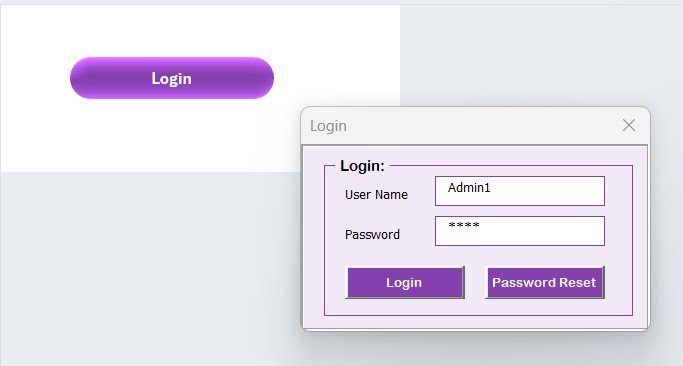
Login Form
-
Secure access through User ID and Password.
-
Default credentials: User ID Admin1 and Password abcd.
-
Press “Login” to access the system or hit Enter for quick navigation.
-
Supports multiple users with different credentials.
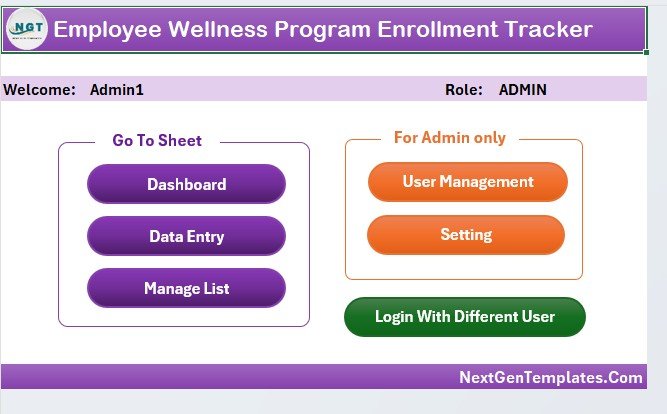
Main Form
-
Acts as the central control hub.
-
Provides navigation buttons to reach every module.
-
Displays essential functions in a simple, user-friendly layout.
-
Reduces errors by guiding users through a structured workflow.
Dashboard Sheet Tab
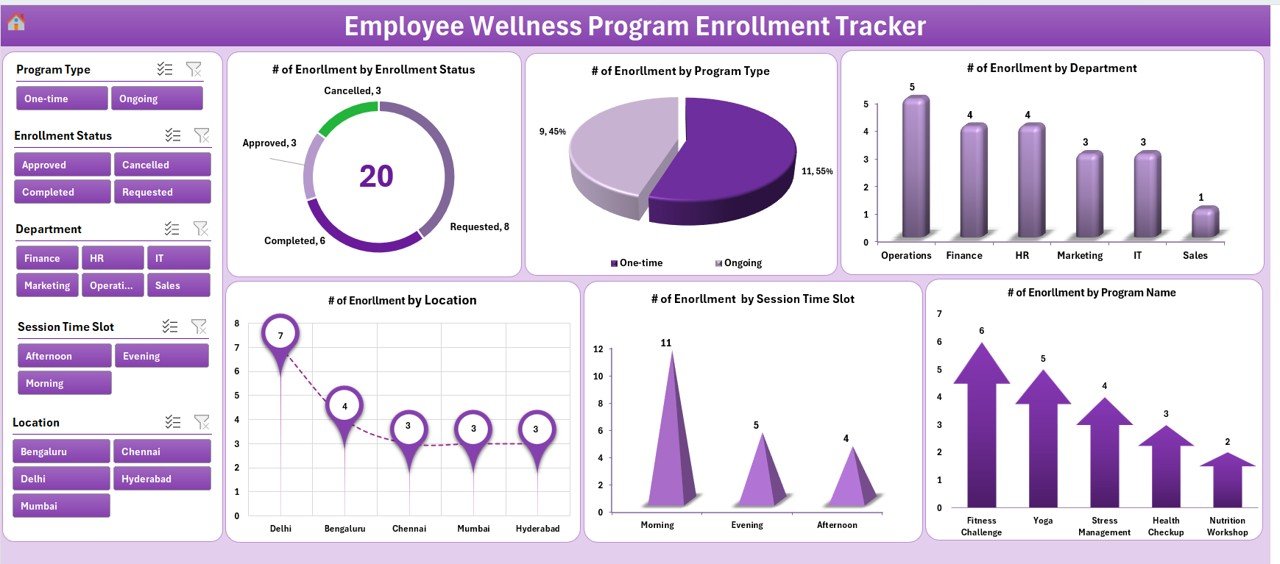
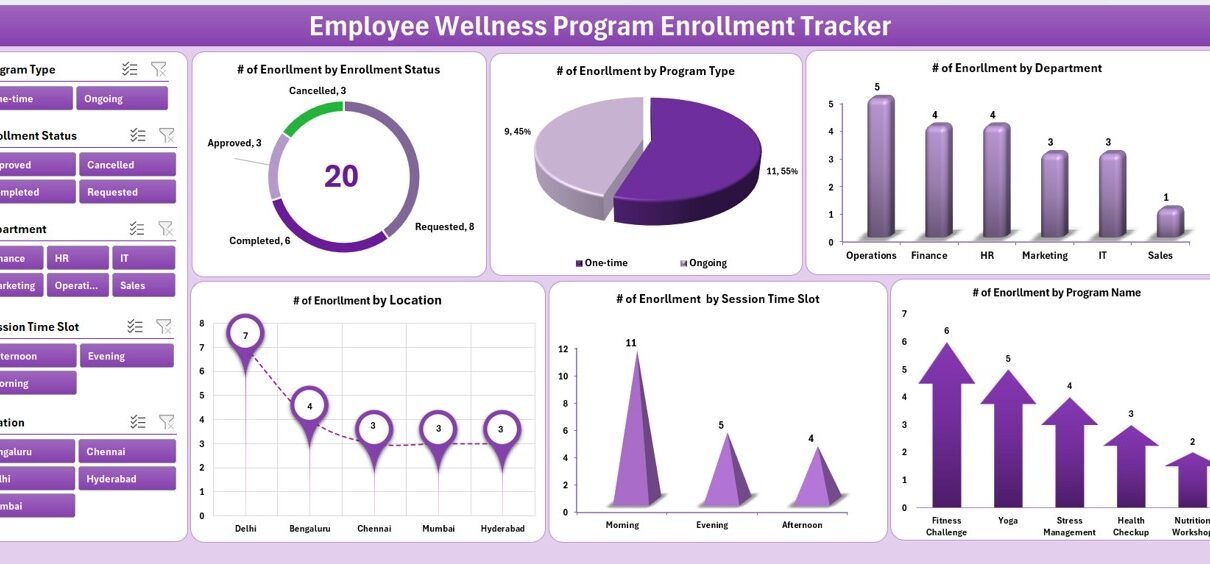
The dashboard is the heart of this tracker, where visual insights come alive.
-
5 interactive slicers for filtering data by time, department, or other criteria.
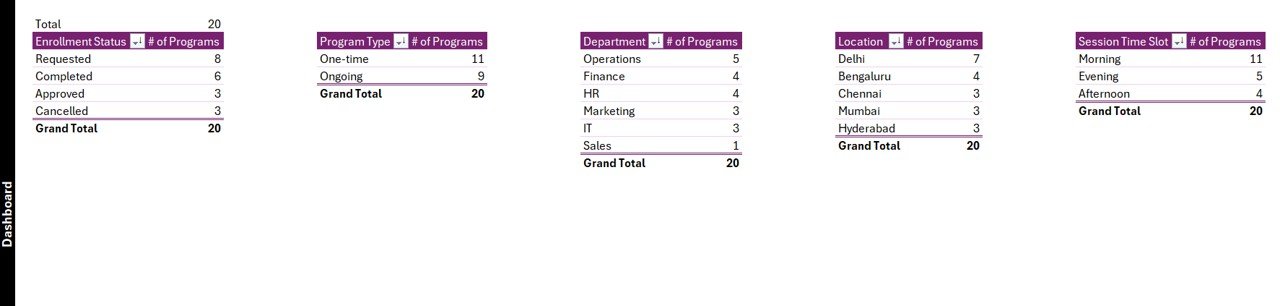
6 dynamic charts to show:
- Number of enrolments by status.
- Number of enrolments by program type.
- Number of enrolments by department.
- Number of enrolments by location.
- Number of enrolments by session time slot.
- Number of enrolments by program name.
-
Charts update automatically whenever new data is entered or modified.
Data Entry Sheet Tab
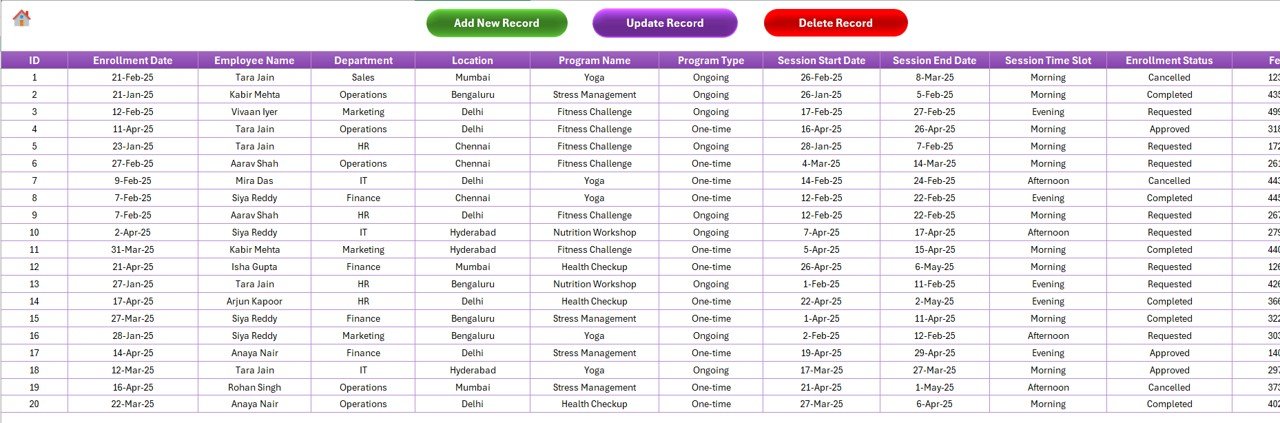
The data entry sheet makes it easy to add, update, or delete records without typing directly into the raw data.
Add New Record
- Opens a data entry form.
- Fill in employee details and program information.
- Click “Submit” to save and refresh the dashboard automatically.
Update Record
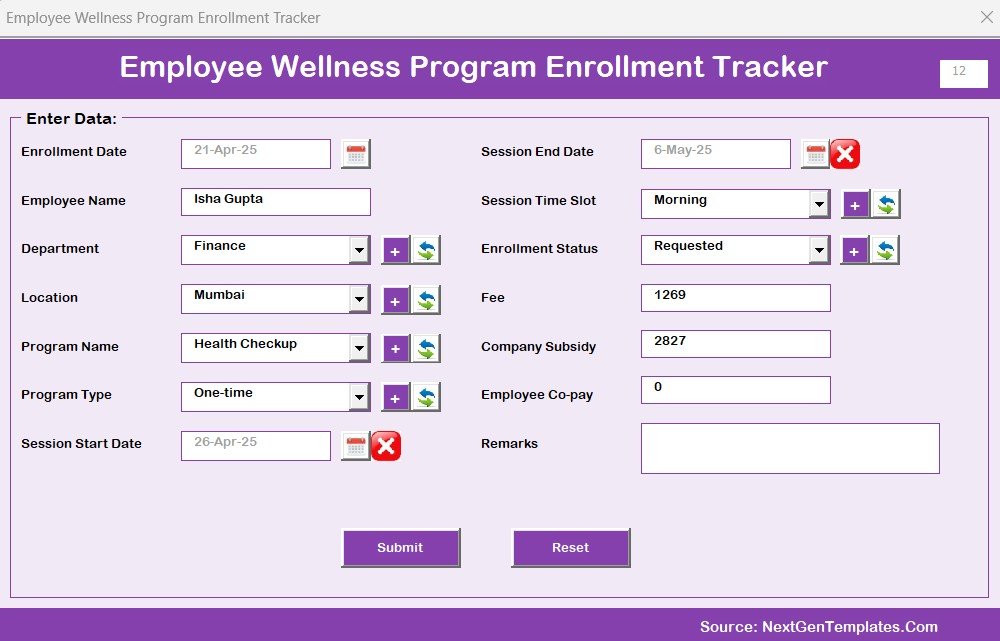
- Select the ID of an existing record.
- Click “Update Record” to open a pre-filled form.
- Edit details and save changes instantly.
Delete Record
- Select the ID of the record to delete.
- Click “Delete Record” to remove it permanently after confirmation.
This design reduces errors and ensures clean, consistent data entry.
Click to Purchases Employee Wellness Program Enrolment Tracker in Excel
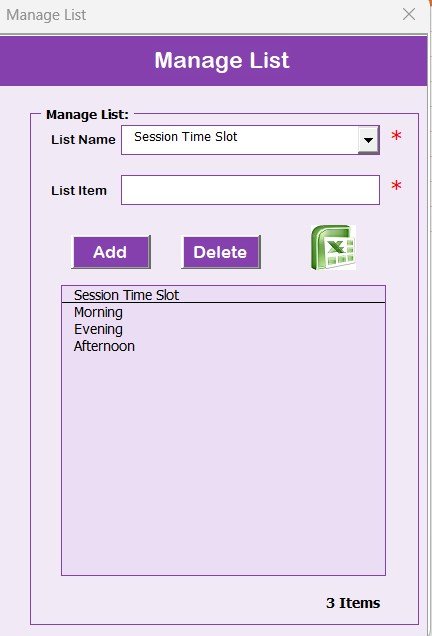
Manage List Sheet Tab
-
Centralized place to manage dropdown lists.
-
Lists feed the combo boxes in the data entry form.
-
Buttons available to Add or Delete items.
-
Keeps entries standardized (e.g., no duplicate or misspelled program names).
Support Sheet Tab
-
Stores pivot tables used to generate charts.
-
Completely automated; users do not need to edit it.
-
Can be hidden to keep the workspace clutter-free.
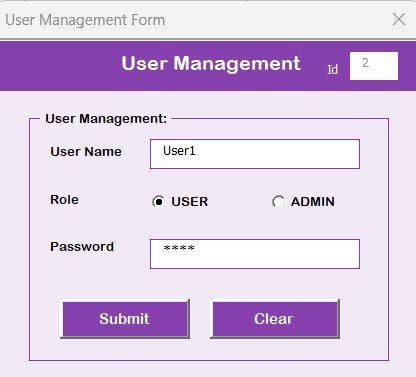
User Management
-
Dedicated screen to add, update, or delete users.
-
Option to change passwords for better security.
-
Helps organizations manage different user roles (HR, wellness coordinator, admin).
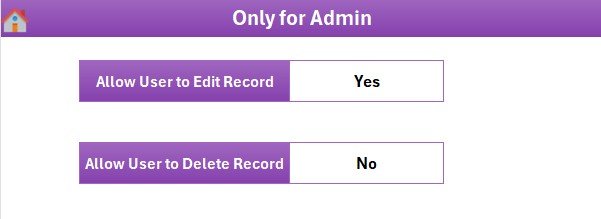
Settings Sheet
-
Customize default parameters for the system.
-
Flexible enough to adapt to specific company requirements.
Multi-User Login
-
Allows login with different user accounts.
-
Ensures secure access and accountability.
-
Tracks who made changes and when, improving data governance.
Why Do You Need an Enrolment Tracker?
Many organizations still rely on manual processes or basic spreadsheets to manage wellness programs. These methods lead to:
-
Inconsistent data entry.
-
Difficulty in generating reports.
-
Lack of visibility on enrolment trends.
-
Higher chances of duplicate or missing records.
By contrast, the Employee Wellness Program Enrolment Tracker in Excel offers automation, real-time dashboards, and structured forms. It eliminates guesswork and allows HR teams to focus on enhancing employee wellbeing instead of chasing data.
Advantages of the Employee Wellness Program Enrolment Tracker
Using this tool offers multiple benefits for HR teams and employees alike:
✅ Improved Data Accuracy – Dropdown lists and controlled forms minimize errors.
✅ Time Savings – Quick add, update, and delete functions reduce manual effort.
✅ Instant Insights – Dashboards provide real-time visual summaries.
✅ Better Engagement – Employees feel supported through structured program enrolment.
✅ Enhanced Security – Login system ensures only authorized staff can access data.
✅ Customizable – Settings allow adaptation to different industries and company sizes.
✅ Cost-Effective – Built entirely in Excel, so no expensive software is required.
Opportunities for Improvement
Even though the tracker is powerful, organizations can enhance it further by:
🔹 Integrating HR systems – Linking the tracker with HR or payroll software for seamless updates.
🔹 Adding reminders – Using automated email reminders for upcoming sessions.
🔹 Mobile compatibility – Making the tracker easier to use on tablets or smartphones.
🔹 Data export options – Adding a feature to export reports directly into PDF or PowerPoint.
🔹 Employee self-service – Allowing employees to log in and register themselves.
Best Practices for Using the Tracker
To get the most out of the Employee Wellness Program Enrolment Tracker in Excel, follow these best practices:
1. Define Clear Program Categories
Set up program types (fitness, nutrition, mental health, workshops) before you begin. This ensures clean data from the start.
2. Train Users Before Deployment
Provide a short session for HR staff on how to use forms, slicers, and dashboards. A little training avoids confusion later.
3. Use Manage List for Consistency
Keep the dropdown lists updated to prevent spelling variations or duplicates. This ensures cleaner reports.
4. Review Dashboard Regularly
Check charts weekly or monthly to identify participation trends. Use these insights to improve program planning.
5. Maintain Security
Update user IDs and passwords regularly. Remove inactive users from the system.
6. Back Up Data Frequently
Since it is Excel-based, maintain backups to prevent accidental data loss.
7. Align with HR Strategy
Make sure your wellness programs support your organization’s larger HR and business goals.
How Does This Tracker Improve Employee Wellness?
Employee wellness initiatives only work when managed efficiently. With this tracker, you:
-
Get a centralized system for all enrolments.
-
Avoid confusion by using structured forms.
-
Identify which programs employees prefer.
-
Spot departments or locations with low participation.
-
Take proactive steps to increase engagement.
The result is a more effective wellness program that improves both employee health and company performance.
Conclusion
The Employee Wellness Program Enrolment Tracker in Excel is more than a spreadsheet. It is a complete management system that helps HR professionals and wellness managers plan, track, and evaluate wellness programs effectively. With features like login forms, dashboards, user management, and automated data entry, it transforms the way companies handle enrolments.
By adopting this tracker, organizations can save time, reduce errors, and engage employees more effectively. It is a cost-efficient solution built on a familiar platform—Excel—yet it delivers professional-grade results.
Investing in wellness is investing in your people, and this tool ensures you can manage that investment with confidence.
Frequently Asked Questions (FAQs)
1. What is the Employee Wellness Program Enrolment Tracker in Excel?
It is an Excel- and VBA-based tool that helps organizations manage wellness program enrolments, track participation, and analyze results through dashboards.
2. Do I need advanced Excel skills to use this tool?
No, the tool comes with forms and buttons for easy use. Anyone with basic Excel knowledge can manage it.
3. Can I customize the tracker for my organization?
Yes. You can update lists, adjust settings, and even add custom program categories.
4. Is the data secure in this tracker?
Yes. The login form and user management features ensure that only authorized users have access.
5. Can multiple users log in?
Yes. The tracker supports multiple user accounts with unique credentials.
6. Does the dashboard update automatically?
Yes. Every time you add, update, or delete data, the dashboard refreshes instantly.
7. What type of programs can I track?
You can track fitness, nutrition, mental health, workshops, or any custom wellness programs relevant to your company.
8. Can I export reports from this tool?
Yes. Data can be exported into Excel reports, and with some customization, into PDF or PowerPoint as well.
9. How often should I back up the data?
We recommend weekly backups to avoid accidental data loss.
10. Why should my company use this tracker instead of other software?
Because it is simple, cost-effective, and runs entirely on Excel—no need for expensive or complicated software systems.
Visit our YouTube channel to learn step-by-step video tutorials