Every organization depends on third-party vendors for goods, services, or technology. But with partnerships come potential risks — from data breaches to compliance issues. That’s why every business needs a strong Vendor Risk Assessment Evaluation Checklist to identify, assess, and manage these risks effectively.
The Vendor Risk Assessment Evaluation Checklist in Excel from NextGenTemplates.com is a ready-to-use template that helps businesses standardize and automate the entire vendor risk evaluation process. With built-in progress tracking, dropdowns, and easy status updates, this checklist keeps your vendor management process organized, transparent, and accountable.
Click to Purchases Vendor Risk Assessment Evaluation Checklist in Excel
What Is a Vendor Risk Assessment Evaluation Checklist in Excel?
A Vendor Risk Assessment Evaluation Checklist in Excel is a structured, interactive Excel file that enables organizations to evaluate vendors systematically based on predefined risk factors such as compliance, data security, performance, and financial stability.
It helps you:
-
Identify potential risks before onboarding vendors.
-
Track vendor performance against compliance standards.
-
Ensure due diligence for critical partnerships.
-
Maintain transparency in procurement decisions.
This Excel-based checklist simplifies complex evaluations into easy-to-use tables, indicators, and progress visuals — giving decision-makers a clear picture of vendor reliability.
Click to Purchases Vendor Risk Assessment Evaluation Checklist in Excel
Key Features of the Vendor Risk Assessment Evaluation Checklist in Excel
This professional-grade template includes two key worksheet tabs — one for capturing checklist details and another for managing dropdown lists. Let’s explore each in detail.
1️⃣ Vendor Risk Assessment Evaluation Checklist Sheet Tab
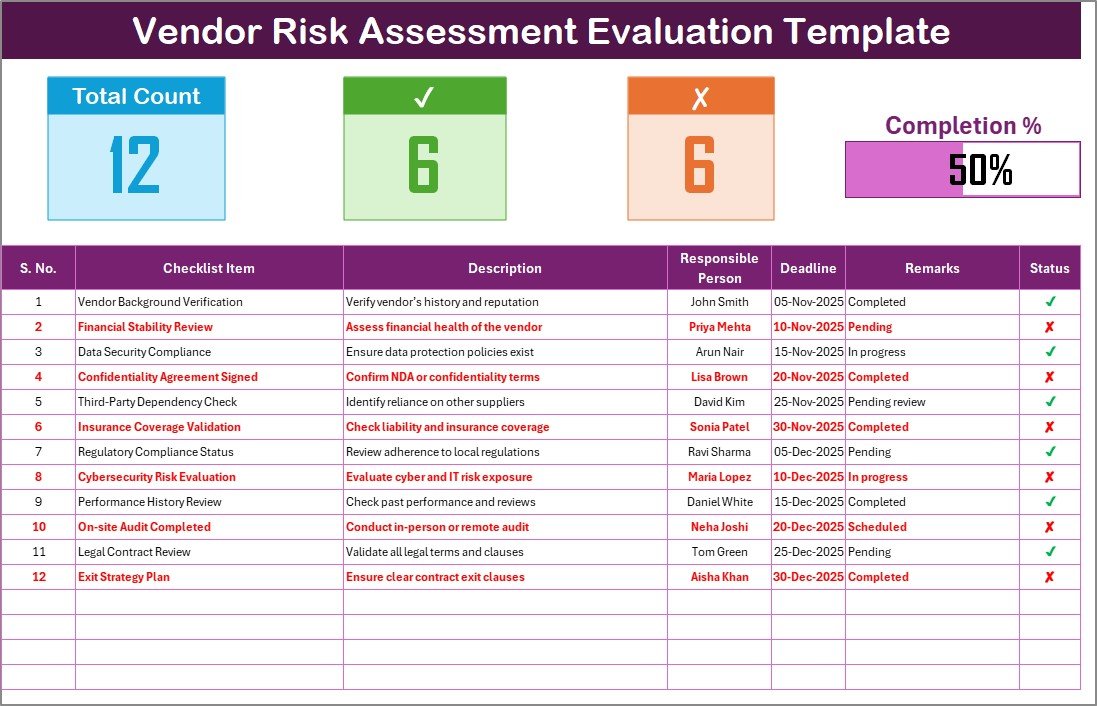
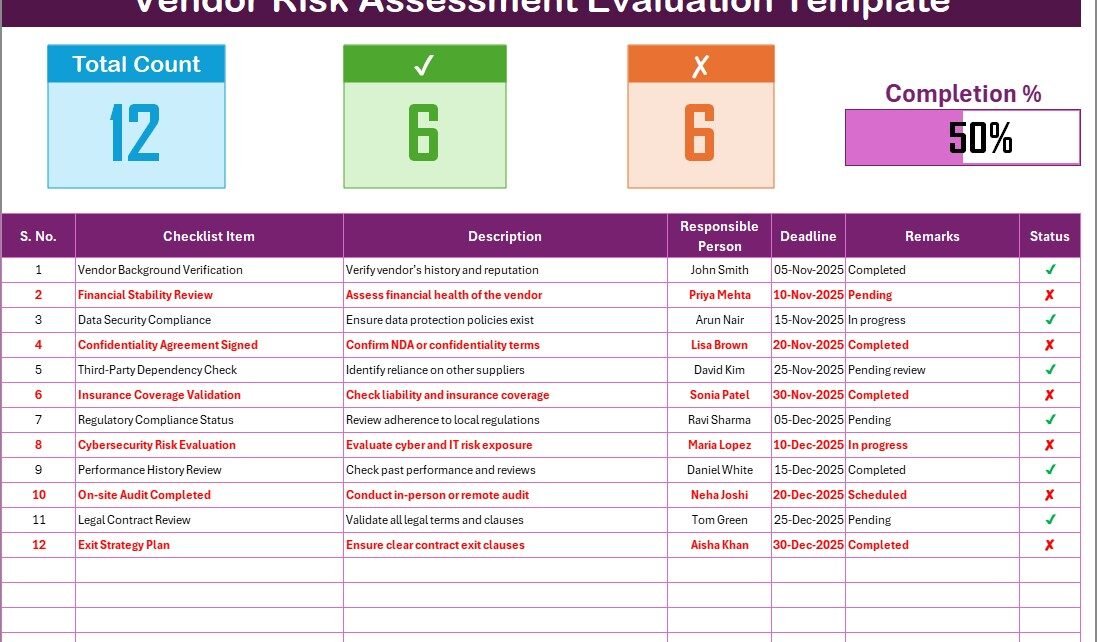
This is the main working area of the file — where all vendor evaluation details are entered and tracked.
Top Section: Dashboard Overview
At the top, you’ll find:
-
Total Count: Total number of checklist items.
-
Checked Count: Number of tasks marked as completed (✔).
-
Crossed Count: Number of tasks marked as not completed (✘).
-
Progress Bar: A visual indicator showing the overall completion percentage based on checked items.
This section gives an instant overview of evaluation progress — helping managers stay informed and proactive.
Main Checklist Table
The table forms the core of this template. Each row represents a specific evaluation criterion or compliance point.
Columns Included:
-
Serial No. – Sequential number for tracking each item.
-
Checklist Item – The specific criterion being evaluated (e.g., data privacy policy, SLA compliance, background verification).
-
Description – A short explanation of what the item covers.
-
Responsible Person – The team member or department accountable for evaluating this point.
-
Deadline – Due date for completing the evaluation.
-
Remarks – Notes or observations about vendor performance.
-
Status – Mark ✔ (completed/satisfactory) or ✘ (not satisfactory/pending).
Each checklist item can be updated manually, and the dashboard metrics update automatically — giving you a live progress view.
2️⃣ List Sheet Tab
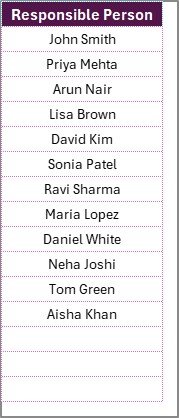
This sheet holds the unique list of Responsible Persons, used to create dropdown menus in the main checklist.
By maintaining this list, users can easily assign responsibility without repetitive typing or manual entry errors.
This design ensures the main checklist remains clean, accurate, and dynamic.
Click to Purchases Vendor Risk Assessment Evaluation Checklist in Excel
How the Vendor Risk Assessment Evaluation Checklist Works
The checklist template uses Excel formulas, conditional formatting, and data validation to automate calculations and dropdowns. Here’s how it functions:
-
Input Vendor Data:
Start by entering your vendor name, category, and evaluation details in the top section. -
Assign Responsibilities:
Use the dropdown to select the responsible person for each checklist item. -
Evaluate Vendors:
Review each criterion and update the Status column with ✔ or ✘. -
Track Progress:
The top progress bar and counts automatically refresh based on status updates. -
Review Results:
Identify vendors with low scores or multiple ✘ marks for further action or risk mitigation.
This process creates a consistent evaluation workflow that ensures every vendor gets assessed using the same criteria.
Why Businesses Need a Vendor Risk Assessment Checklist
In today’s interconnected business world, third-party risks are as critical as internal risks. Vendors handle sensitive data, supply key products, and influence service quality — so ignoring vendor risk can lead to major issues like compliance violations, financial loss, or reputational damage.
A Vendor Risk Assessment Evaluation Checklist helps organizations:
-
Conduct due diligence before vendor onboarding.
-
Ensure regulatory compliance (GDPR, ISO, SOC2, etc.).
-
Track vendor performance and reliability over time.
-
Document every evaluation for audit readiness.
-
Create a transparent vendor approval process.
This simple Excel-based template provides a clear, standardized method for vendor assessment — without complex software or external systems.
Click to Purchases Vendor Risk Assessment Evaluation Checklist in Excel
Advantages of Vendor Risk Assessment Evaluation Checklist in Excel
1. Easy to Use
You don’t need any technical skills. The checklist works right out of the box — just open it, update data, and start tracking.
2. Real-Time Progress Tracking
The dashboard counts and progress bar update automatically as you mark ✔ or ✘, providing instant visibility into evaluation completion.
3. Accountability and Ownership
Each item has a clearly assigned responsible person and deadline, ensuring timely follow-up and accountability.
4. Customizable and Scalable
You can add or remove checklist items, modify columns, or update dropdown lists to fit your organization’s unique requirements.
5. Standardized Evaluation
It ensures all vendors are evaluated based on the same objective parameters, reducing bias and improving accuracy.
6. Data-Driven Decisions
Visual indicators highlight weak areas, enabling better vendor selection and contract management decisions.
7. Cost-Effective Solution
It eliminates the need for expensive vendor risk management tools while maintaining high professional standards.
Click to Purchases Vendor Risk Assessment Evaluation Checklist in Excel
Best Practices for Using the Vendor Risk Assessment Evaluation Checklist in Excel
To maximize efficiency and accuracy, follow these best practices when using this template:
✅ Keep the Checklist Updated:
Review and revise checklist items periodically to include new risk areas such as cybersecurity or sustainability.
✅ Set Realistic Deadlines:
Assign achievable due dates to ensure thorough evaluations instead of rushed reviews.
✅ Train Your Team:
Ensure evaluators understand the meaning of each checklist item and scoring method.
✅ Maintain Audit Trails:
Keep a record of historical evaluations for compliance and future reference.
✅ Use Conditional Formatting:
Highlight ✘ or overdue tasks to focus on high-risk areas instantly.
✅ Automate Where Possible:
Use Excel formulas or Power Query to pull vendor data automatically from master files.
✅ Protect the Template:
Lock formulas and dropdown ranges to prevent accidental modifications.
✅ Review Results Monthly or Quarterly:
Schedule periodic reviews to reassess vendors and ensure continuous compliance.
These practices ensure that the checklist remains an effective and trustworthy risk management tool.
How to Customize the Template
The Vendor Risk Assessment Evaluation Checklist in Excel is fully customizable. You can:
-
Add new columns (like Vendor Category or Risk Score).
-
Include risk weighting for high-priority vendors.
-
Add color-coded indicators for vendor ratings.
-
Insert dropdowns for risk levels (Low, Medium, High).
-
Integrate with Power BI or dashboards for visual analytics.
Such flexibility makes it suitable for small businesses, large corporations, and procurement teams alike.
Click to Purchases Vendor Risk Assessment Evaluation Checklist in Excel
Practical Use Cases of the Vendor Risk Assessment Checklist
This checklist is valuable across various industries and functions:
-
Procurement Teams: Evaluate suppliers before contract signing.
-
Finance Departments: Assess vendors for financial stability and compliance.
-
IT & Security Teams: Verify data protection measures of software vendors.
-
Legal & Compliance Teams: Monitor regulatory adherence and contract fulfillment.
-
Operations Managers: Ensure service vendors meet performance expectations.
The versatility of this Excel template allows it to adapt to any organization’s vendor management process.
How the Progress Bar Helps in Vendor Evaluation
The visual progress bar at the top of the sheet makes this checklist unique.
As evaluators mark items as ✔, the progress bar fills automatically. This provides:
-
Instant visual tracking of completion status.
-
Motivation for teams to complete pending evaluations.
-
Quick identification of departments lagging behind.
It transforms a simple checklist into an engaging, trackable performance tool.
Why Excel Is Perfect for Vendor Risk Assessment
While many organizations use web-based tools, Excel remains the most flexible and accessible platform for building risk management frameworks.
Here’s why Excel works best:
-
Easy customization without programming.
-
Offline accessibility for confidential assessments.
-
Integration with Microsoft Teams, SharePoint, or Power BI.
-
Formula-driven automation for accurate progress tracking.
-
No licensing costs or vendor lock-ins.
It’s a simple yet powerful foundation for small and medium enterprises to implement structured risk assessment systems.
Conclusion
The Vendor Risk Assessment Evaluation Checklist in Excel is an essential tool for businesses aiming to strengthen their vendor governance framework.
It offers a clear structure, visual progress tracking, accountability, and complete transparency — all within Excel’s familiar interface.
By using this ready-to-use template from NextGenTemplates.com, your organization can easily evaluate vendor performance, mitigate risks, and ensure continuous compliance without relying on complex software.
Adopt this checklist today and transform your vendor management process into a streamlined, efficient, and risk-aware system.
Click to Purchases Vendor Risk Assessment Evaluation Checklist in Excel
Frequently Asked Questions (FAQs)
1. What is a Vendor Risk Assessment Evaluation Checklist in Excel?
It’s a structured Excel template that helps organizations assess vendors based on predefined risk and performance parameters.
2. Who can use this checklist?
Procurement, finance, compliance, IT, and operations teams can use it to evaluate and monitor vendors.
3. Can I customize this template?
Yes. You can add or remove checklist items, modify columns, and adjust dropdown lists as per your organization’s needs.
4. How does the progress bar work?
The progress bar automatically updates based on the number of checklist items marked as ✔, displaying real-time completion status.
5. Does it require Excel macros?
No. The template uses standard Excel formulas and conditional formatting, making it fully compatible across systems.
6. How often should vendor assessments be done?
Ideally, review vendor risk quarterly or whenever there’s a change in service, policy, or regulation.
7. Can this checklist be shared with multiple users?
Yes. It can be used in shared Excel files or collaborative environments like OneDrive or SharePoint.
8. Where can I download this checklist?
You can download the Vendor Risk Assessment Evaluation Checklist in Excel directly from NextGenTemplates.com.
Click to Purchases Vendor Risk Assessment Evaluation Checklist in Excel
Visit our YouTube channel to learn step-by-step video tutorials