The B&B Dashboard in Power BI tracks 5 high-level KPIs and 13 visuals across 5 interactive report pages, with multiple slicers for booking source, room type, guest type, country, and payment method. Setup takes under 10 minutes — point Power BI Desktop at your reservation data and refresh. Built specifically for independent bed-and-breakfast owners and small-inn operators who want professional Power BI reports without paying $70+ per-month for a property management subscription.
🌍 Join 8,400+ teams in 40+ countries using NextGenTemplates to replace paid SaaS tools with one-time-purchase Excel, Google Sheets, Power BI, and HTML templates.
✅ Instant download · One-time payment · No subscription · No per-user fees · Lifetime access
B&B Dashboard in Power BI
Key Features of B&B Dashboard in Power BI
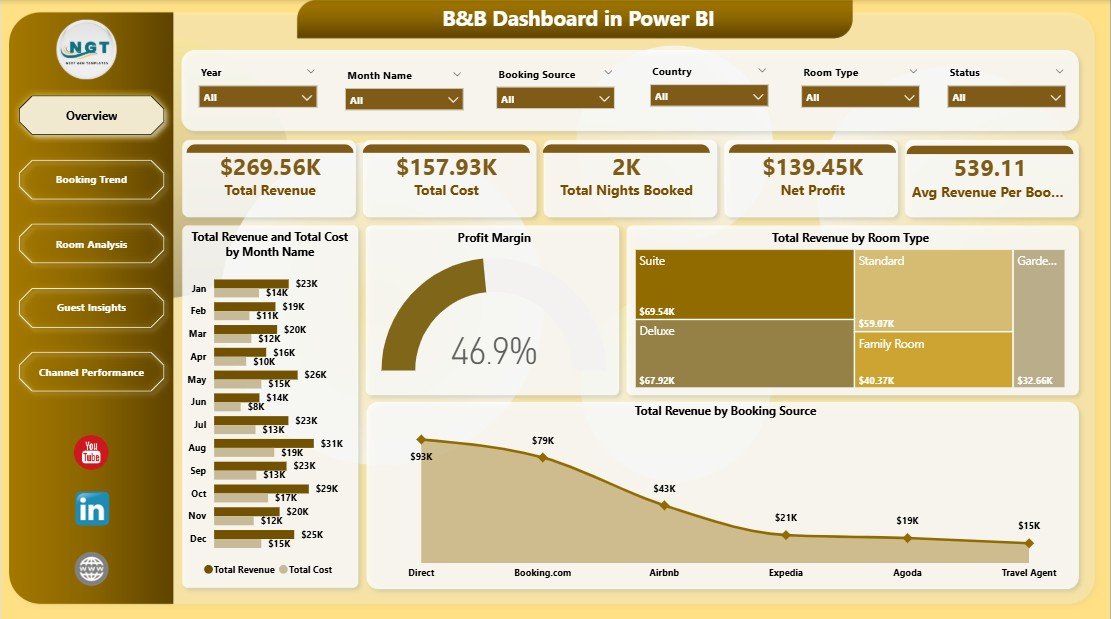
📊 Five Interactive Report Pages – Overview, Booking Trend, Room Analysis, Guest Insights, and Channel Performance pages give B&B owners a 360-degree view of bookings, revenue, costs, and channel ROI from a single .pbix file.
🎚️ Multiple Slicers and Cross-Filtering – Filter the entire report by booking source, room type, guest type, country, payment method, or status with a single click. Power BI’s cross-filtering feature is documented in the official Microsoft Power BI slicer guide.
💰 Revenue, Cost, and Profit Tracking – Five KPI cards on the Overview page display Total Revenue, Total Cost, Total Nights Booked, Net Profit, and Avg Revenue Per Booking. Profit Margin and Net Profit are also broken down by country and booking source on dedicated pages.
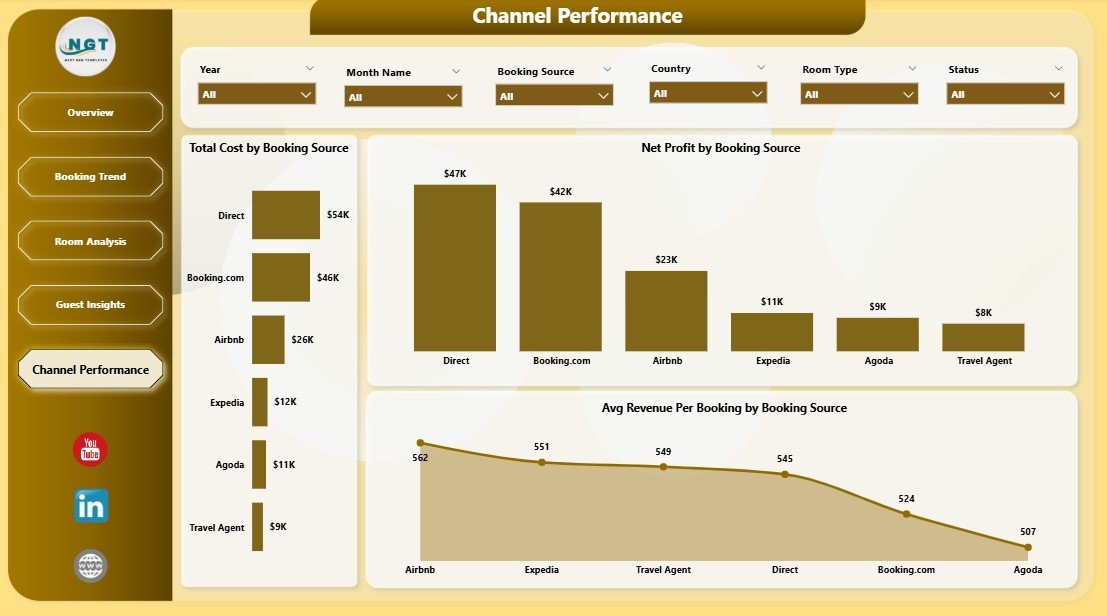
🌐 Channel Performance Reporting – Compares Total Cost, Net Profit, and Avg Revenue Per Booking across booking sources to show which OTAs or direct channels deliver the highest per-booking margin.
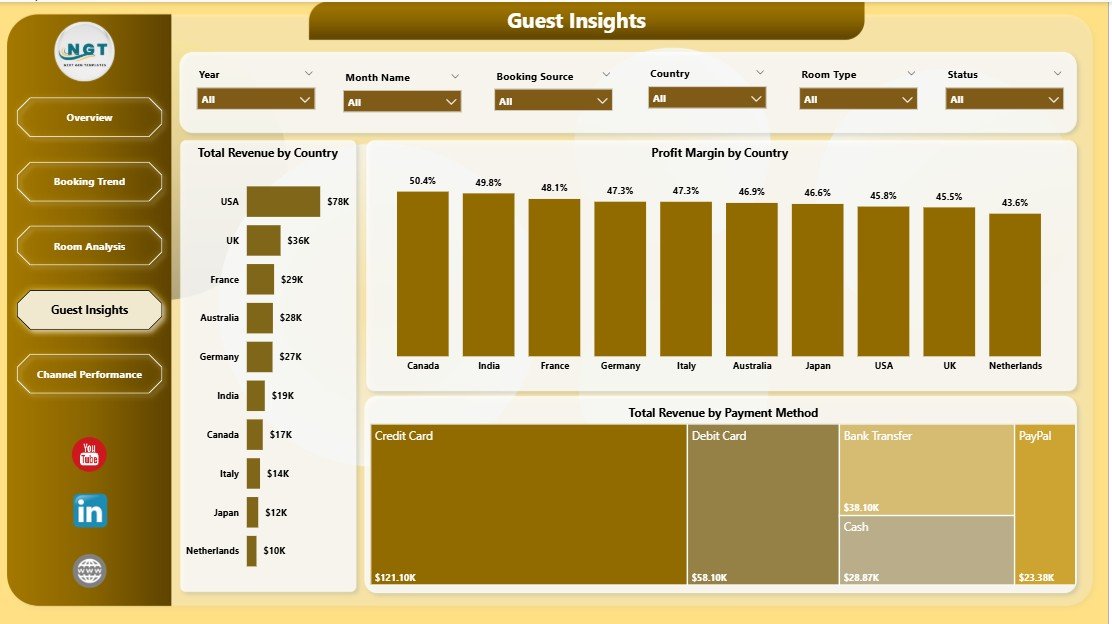
👥 Guest Segmentation Analytics – Total Revenue by Country, Profit Margin by Country, Total Revenue by Payment Method, and Total Revenue by Guest Type help target marketing toward the most profitable source markets and stay segments.
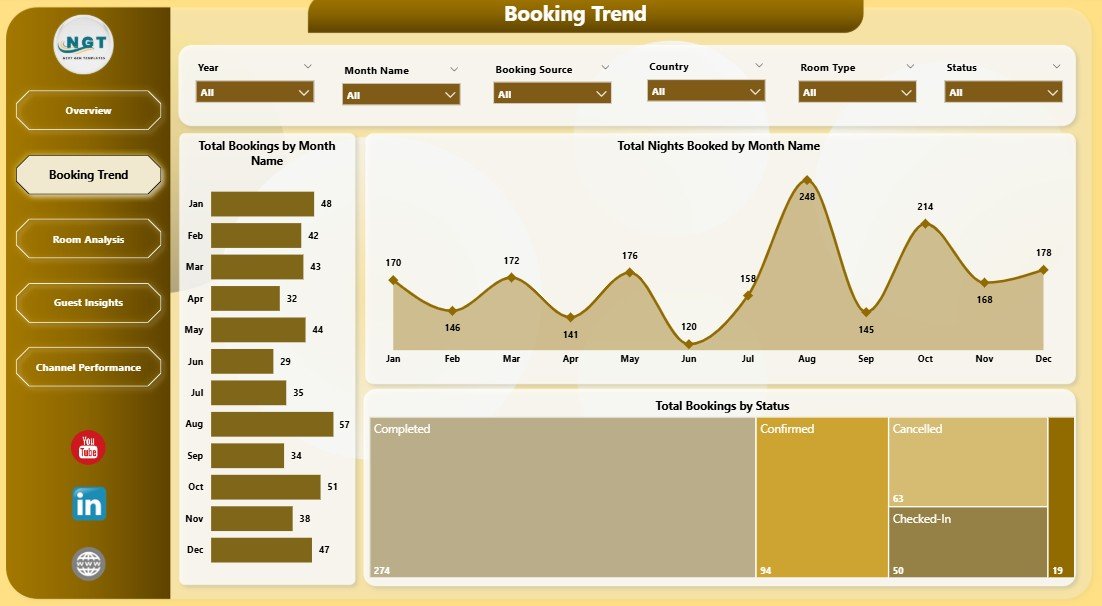
📅 Booking Trend Analysis – Total Bookings by Month, Total Nights Booked by Month, and Total Bookings by Status reveal peak-season timing, no-show patterns, and year-over-year growth trajectory.
Dashboard Pages Explanation
📌 1. Overview Page – Five high-level KPI cards display Total Revenue, Total Cost, Total Nights Booked, Net Profit, and Avg Revenue Per Booking. Visuals include Total Revenue and Total Cost by Month Name (compares revenue against cost across the calendar), Profit Margin (a high-level performance gauge), Total Revenue by Room Type (highlights top-earning room categories), and Total Revenue by Booking Source (shows channel contribution to revenue). Slicers at the top filter the entire page in one click.
Booking Trend
📅 2. Booking Trend – Time-series view containing Total Bookings by Month Name (spotlights peak booking months), Total Nights Booked by Month Name (highlights occupancy load by month), and Total Bookings by Status (separates confirmed, cancelled, and no-show bookings). Useful for spotting peak-season patterns and confirming year-over-year growth.
Room Analysis
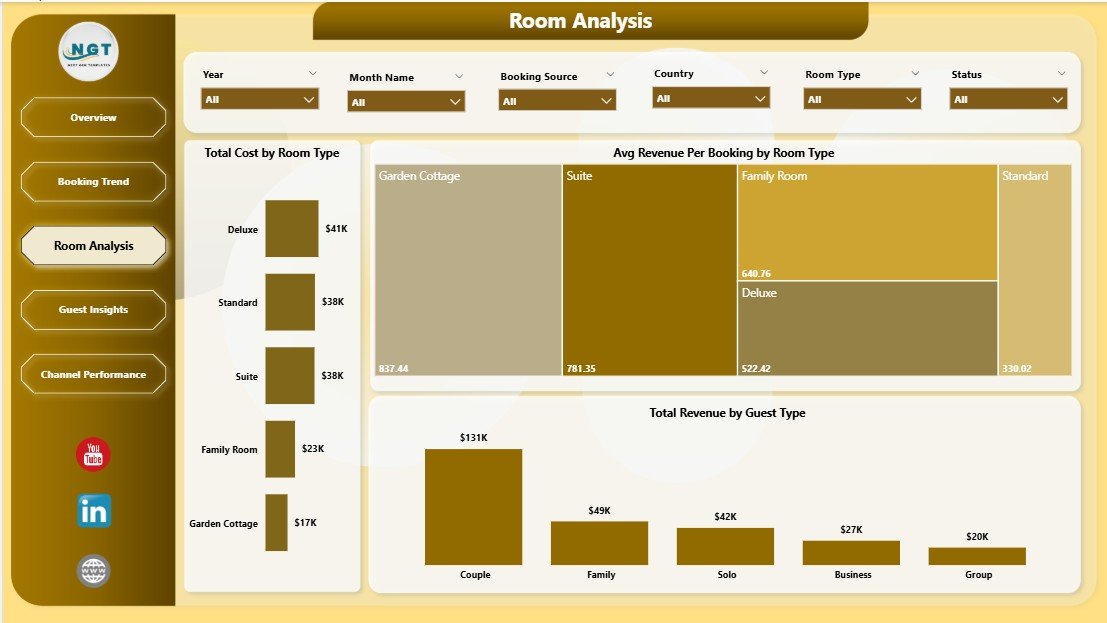
🛏️ 3. Room Analysis – Room-level economics with Total Cost by Room Type (shows operating cost variance across rooms), Avg Revenue Per Booking by Room Type (reveals which rooms produce the highest revenue per stay), and Total Revenue by Guest Type (compares contribution from leisure, business, family, and group guests). Helps adjust room pricing and marketing focus.
Guest Insights
👥 4. Guest Insights – Guest-segment analytics with Total Revenue by Country (highlights top source markets), Profit Margin by Country (flags high-margin vs. low-margin geographies), and Total Revenue by Payment Method (shows which payment channels carry the most revenue). Ideal for shaping multilingual marketing and payment-mix decisions.
Channel Performance
🌐 5. Channel Performance – Booking-channel ROI with Total Cost by Booking Source (shows commission and fulfilment cost by channel), Net Profit by Booking Source (reveals which channels actually make money after fees), and Avg Revenue Per Booking by Booking Source (highlights premium-vs-discount channels).
B&B Dashboard in Power BI vs. Tableau Hospitality Template vs. Cloudbeds / Little Hotelier — Feature Comparison
| Feature | B&B Dashboard in Power BI | Tableau Hospitality Template | Cloudbeds / Little Hotelier |
|---|---|---|---|
| Cost | $17.99 one-time | $15-$70 / user / month (Tableau license) | $70-$300 / property / month |
| Platform | Power BI Desktop (free) | Tableau Desktop / Cloud | Cloud SaaS PMS |
| Setup time | Under 10 minutes | 1-2 hours | 2-4 weeks onboarding |
| Real-time team collaboration | ✅ Power BI Service publish | ✅ Tableau Cloud | ✅ Native |
| Mobile access | ✅ Power BI mobile app | ✅ Tableau Mobile | ✅ Native app |
| Customizable visuals and DAX | ✅ Fully editable | ✅ Fully editable | Limited / paid add-ons |
| 5 hospitality-specific report pages | ✅ Built-in | Build from scratch | Fixed PMS reports |
| Year-1 cost (1 user, 1 property) | $17.99 | $180-$840+ | $840-$3,600 |
| Channel manager / OTA sync | ❌ (manual data entry) | ❌ (manual data entry) | ✅ Automated |
For independent B&B owners who want professional Power BI analytics without recurring SaaS or BI license fees, the B&B Dashboard in Power BI sits in the sweet spot.
Who Should Use This Template
✅ Perfect for:
- Independent B&B owners running 1-10 rooms wanting Power BI analytics without hiring a BI consultant
- Small inn and guesthouse operators wanting interactive, drillable revenue and channel reports
- Hospitality consultants delivering Power BI deliverables to small-property clients
- Boutique vacation-rental hosts who already use Power BI Desktop for other reporting
- Hospitality students learning Power BI through a real-world bookings dataset
❌ Not a fit if:
- You run a hotel chain with 50+ rooms needing real-time channel-manager OTA sync
- You don’t have Power BI Desktop installed or aren’t comfortable connecting data sources
- You need automated guest messaging, payment processing, or front-desk workflows
Real-World Use Cases
Maria runs a 6-room countryside B&B in Tuscany. She uses the B&B Dashboard in Power BI to compare monthly Net Profit across Booking.com, Airbnb, and direct website channels — and discovered direct bookings carried a 22% higher profit margin. After redirecting marketing spend toward her own website and email list, she saved roughly €4,200 in OTA commissions over the year while keeping occupancy steady through the next two seasons.
James operates a 4-room coastal guesthouse in Cornwall. He pointed the dashboard at 18 months of reservation history and used the Booking Trend page to confirm his peak season runs May to September. With that pattern in front of him, he negotiated a flexible off-season rate with his housekeeping contractor and now uses the Guest Insights page to plan targeted email campaigns to past UK and German guests in February — turning slower months into profitable ones.
Priya, a hospitality consultant in Mumbai, uses the dashboard for client work. She loads each B&B client’s last 12 months of bookings, publishes the report to Power BI Service, and shares interactive links with property owners — without paying a $1,200 BI license per client and without rebuilding visuals from scratch every project.
Advantages of B&B Dashboard in Power BI
💵 One-time cost vs. recurring SaaS fees – At $17.99 with lifetime access, the dashboard pays for itself within the first month versus a $70+ per-month PMS subscription.
⏱️ Fast setup – Under 10 minutes from download to a fully working Power BI report. No onboarding calls, no implementation fees.
🔧 Full editability – Every visual, KPI card, slicer, and DAX measure is fully editable. Add new room types, payment methods, booking sources, or country breakdowns without breaking the model.
📱 Mobile-ready via Power BI Service – Publish to Power BI Service and access the report from any browser or the Power BI mobile app, anywhere.
🧠 Decision-grade visibility – Five pages cover the four decisions B&B owners actually make every quarter: which rooms to keep priced higher, which channels to expand, which guest segments to target, and which months to run promotions.
Opportunities for Improvement
To be transparent, the B&B Dashboard in Power BI has scope limits worth knowing before you buy. It does not include automated channel-manager OTA sync — bookings still need to come from a CSV, Excel, or other data source you connect manually. There is no built-in guest messaging, payment processing, or housekeeping workflow. For a 50+ room hotel or chain, a full property-management system is the right choice. For 1-10 room B&Bs that simply need clear analytics on top of manual booking data, this Power BI report is built exactly for that scenario.
Best Practices
📥 Refresh monthly, not daily – Most OTAs and direct booking systems let you export bookings as CSV. Refreshing the Power BI report monthly keeps the workflow simple while still giving you up-to-date analytics.
🧹 Keep column names intact – Don’t rename columns in your bookings source file. The Power Query steps and DAX measures rely on the existing column names to work correctly.
🔄 Click Refresh before each review – Open the .pbix, click Refresh on the Home tab, then explore the dashboard. This guarantees every visual reflects the latest entries.
☁️ Publish to Power BI Service for sharing – Once you’re happy with a refresh, publish to Power BI Service so partners or co-owners can view the report from a browser or the Power BI mobile app.
📊 Use the slicers as your primary filter UX – Instead of filtering each visual manually, use the slicers at the top of each page. One click cross-filters every visual on that page.
Explore Relevant Templates
📊 Hotel and Hospitality Revenue Dashboard in Power BI – Broader Power BI analytics for full-service hotels with room revenue, F&B revenue, and property comparisons.
🏨 Boutique Hotels Dashboard in Power BI – Power BI dashboard tailored for boutique hotel operations and guest analytics.
🏠 Airbnb Host Dashboard in Power BI – For Airbnb hosts tracking listings, occupancy, guest reviews, and channel revenue with Power BI.
📈 B&B Dashboard in Excel – Same domain in pivot-driven Excel, for owners who prefer Excel over Power BI.
Also available as: Browse the full Power BI Dashboard Templates collection on NextGenTemplates for more analytics tools across industries.
Frequently Asked Questions
What KPIs does the B&B Dashboard in Power BI track?
The B&B Dashboard in Power BI tracks 5 primary KPIs — Total Revenue, Total Cost, Total Nights Booked, Net Profit, and Avg Revenue Per Booking — across 13 interactive visuals covering booking trends, room analysis, guest segments, country revenue, payment methods, and channel performance.
How long does setup take for the B&B Dashboard in Power BI?
Setup takes under 10 minutes. Open the .pbix in Power BI Desktop, point the data source at your bookings file using Transform Data > Data Source Settings, click Refresh, and the entire B&B Dashboard in Power BI updates automatically with no DAX changes required.
How does this compare to Cloudbeds or Little Hotelier?
Cloudbeds and Little Hotelier are full property-management systems costing $70-$300 per property per month with channel-manager OTA sync. The B&B Dashboard in Power BI is a one-time $17.99 analytics layer for owners who manage bookings manually but want drillable Power BI reports on top.
Can I customize the room types, booking sources, and countries?
Yes. Add or rename any room type, booking source, country, payment method, or guest type directly in your bookings data source, click Refresh, and the B&B Dashboard in Power BI adapts automatically. No DAX edits or model changes are needed for new categories.
Do I need a paid Power BI license to use this?
No. The B&B Dashboard in Power BI runs entirely on free Power BI Desktop for Windows. A Power BI Pro license is only needed if you want to publish the report to Power BI Service for online team sharing — single-user desktop use is free.
Can I add my own KPIs or visuals to the B&B Dashboard in Power BI?
Yes. The .pbix is fully editable — add new measures, calculated columns, custom visuals, or AI-driven Q&A panels alongside existing ones. The B&B Dashboard in Power BI has no protection or hidden objects, so it’s a solid starting point for further DAX customization.
Is this template a one-time payment?
Yes. The B&B Dashboard in Power BI is a one-time $17.99 purchase with lifetime access — no subscription, no per-user fees, and no recurring charges. You receive an instant download immediately after checkout.
About the Author
Built by PK — Microsoft Certified Professional with 15+ years of Excel, Google Sheets, and Power BI experience. Founder of NextGenTemplates, reaching 300K+ subscribers across YouTube channels. Every template is hand-built and tested before release.
Conclusion
If you run a small B&B, inn, guesthouse, or vacation rental and you’ve been making pricing and channel decisions on instinct rather than data, the B&B Dashboard in Power BI gives you 5 KPIs, 13 visuals, and 5 slicer-driven pages of insights for less than the cost of one night’s stay at most properties. It pays for itself the first time you reallocate a marketing dollar from a low-margin OTA to a higher-margin channel.
👉 Click here to Purchase B&B Dashboard in Power BI
✅ Instant download · One-time payment · No subscription
🎥 Visit our YouTube channel for step-by-step video tutorials: YouTube.com/@PK-AnExcelExpert
📅 Last updated: April 2026