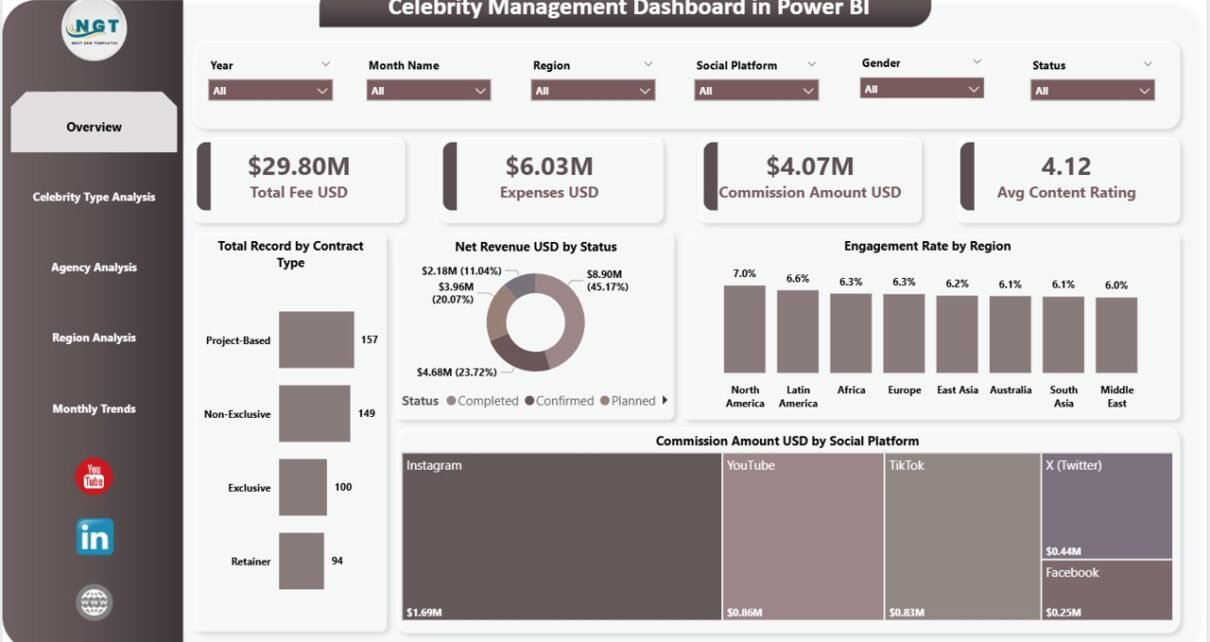
The entertainment and influencer industry continues to grow rapidly. Brands collaborate with celebrities, influencers, and public figures to promote products, launch campaigns, and increase engagement. However, managing multiple celebrity contracts, agencies, regions, and social platforms can become extremely complicated.
Therefore, agencies and marketing teams require a structured system that converts celebrity campaign data into meaningful insights. This is exactly where the Celebrity Management Dashboard in Power BI becomes extremely powerful.
The Celebrity Management Dashboard in Power BI is a ready-to-use analytics solution designed to monitor celebrity contracts, track campaign revenue, analyze engagement performance, and evaluate agency commissions. Because Power BI offers advanced data visualization and interactive filtering capabilities, users can quickly explore large amounts of celebrity campaign data and identify valuable insights.
In this comprehensive guide, we will explain everything about the Celebrity Management Dashboard in Power BI, including its features, dashboard pages, advantages, best practices, and how entertainment agencies and marketing teams can use it to improve campaign performance.
Click to Purchases Celebrity Management Dashboard in Power BI
What is a Celebrity Management Dashboard in Power BI?
A Celebrity Management Dashboard in Power BI is a centralized reporting system that analyzes celebrity campaign performance, contracts, fees, expenses, commissions, and engagement metrics.
Instead of reviewing multiple spreadsheets or reports, users can view all performance insights in one interactive dashboard.
This dashboard helps organizations track:
-
Celebrity campaign revenue
-
Total celebrity fees
-
Expenses related to campaigns
-
Agency commission earnings
-
Social media engagement performance
-
Campaign performance by region
-
Monthly revenue and engagement trends
Because Power BI provides interactive filters and visuals, users can explore campaign data from multiple angles and make faster decisions.
Why Do Agencies Need a Celebrity Management Dashboard?
Celebrity management agencies and marketing teams often handle several campaigns simultaneously. Each campaign may involve different celebrities, agencies, contracts, social media platforms, and regions.
Without a structured reporting system, teams may struggle with:
-
Tracking celebrity contract payments
-
Monitoring campaign expenses
-
Evaluating influencer engagement
-
Managing agency commissions
-
Measuring campaign performance across regions
-
Analyzing social media performance
However, when agencies implement a Celebrity Management Dashboard in Power BI, they gain clear visibility into campaign performance and financial metrics.
As a result, managers can quickly identify profitable campaigns and optimize marketing strategies.
Click to Purchases Celebrity Management Dashboard in Power BI
Key Features of the Celebrity Management Dashboard in Power BI
The Celebrity Management Dashboard in Power BI includes multiple analytical pages designed to provide complete campaign insights.
This dashboard contains five interactive pages in the Power BI Desktop file.
Each page focuses on a different dimension of celebrity campaign analytics.
1. Overview Page – What Insights Does the Main Dashboard Provide?
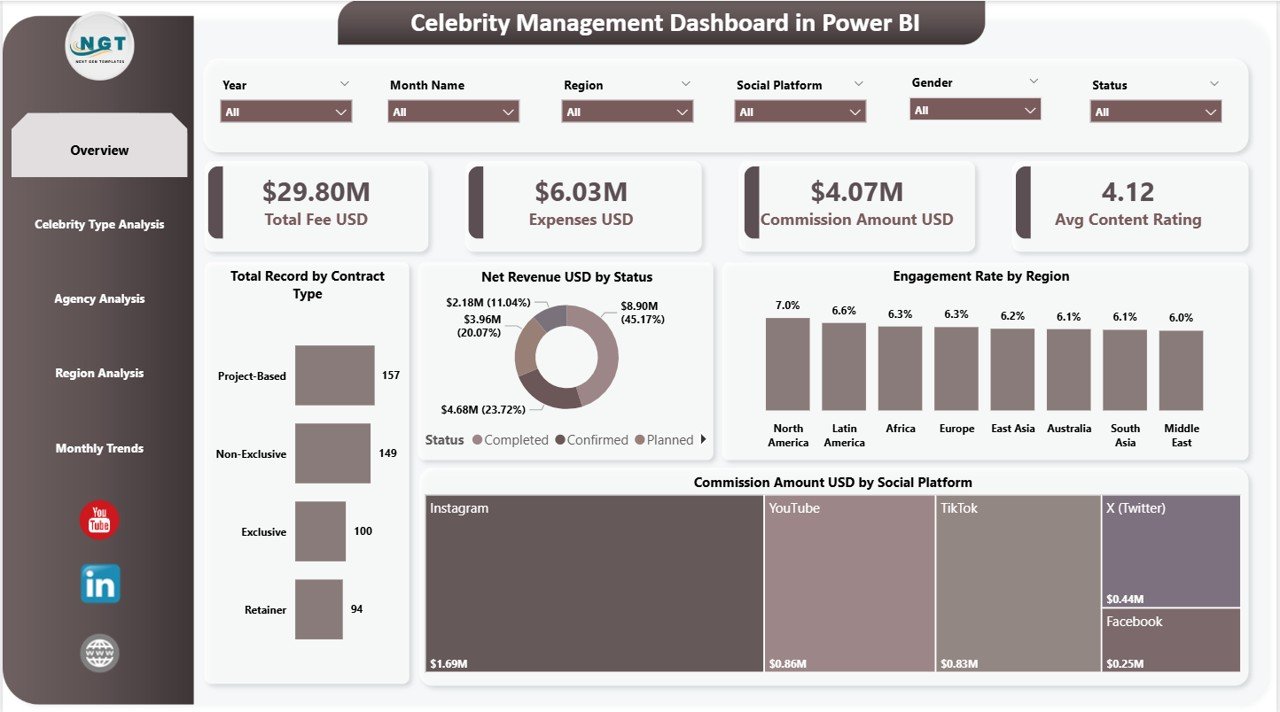
The Overview Page serves as the main monitoring screen of the dashboard. It presents a high-level summary of celebrity campaign performance.
The page includes slicers (filters) that allow users to analyze specific segments such as celebrity type, region, agency, or social platform.
KPI Cards on the Overview Page
The dashboard includes four key KPI cards:
-
Total Fee USD – Displays the total fees paid to celebrities across campaigns
-
Expenses USD – Shows the total campaign expenses
-
Commission Amount USD – Displays the total commission earned by agencies
-
Average Content Rating – Shows the average rating of celebrity-generated content
These KPIs provide an instant snapshot of campaign performance.
Charts Included in the Overview Page
The overview section also includes four analytical charts:
-
Total Record by Contract Type – Shows the distribution of celebrity contracts by contract category
-
Net Revenue USD by Status – Displays revenue performance based on campaign status
-
Engagement Rate by Region – Highlights audience engagement across geographic regions
-
Commission Amount USD by Social Platform – Shows commission earnings generated from different platforms
As a result, managers can quickly understand campaign performance at a glance.
Click to Purchases Celebrity Management Dashboard in Power BI
2. Celebrity Type Analysis – Which Celebrity Categories Perform Best?
Celebrity campaigns involve different types of personalities such as actors, athletes, influencers, musicians, and public figures.
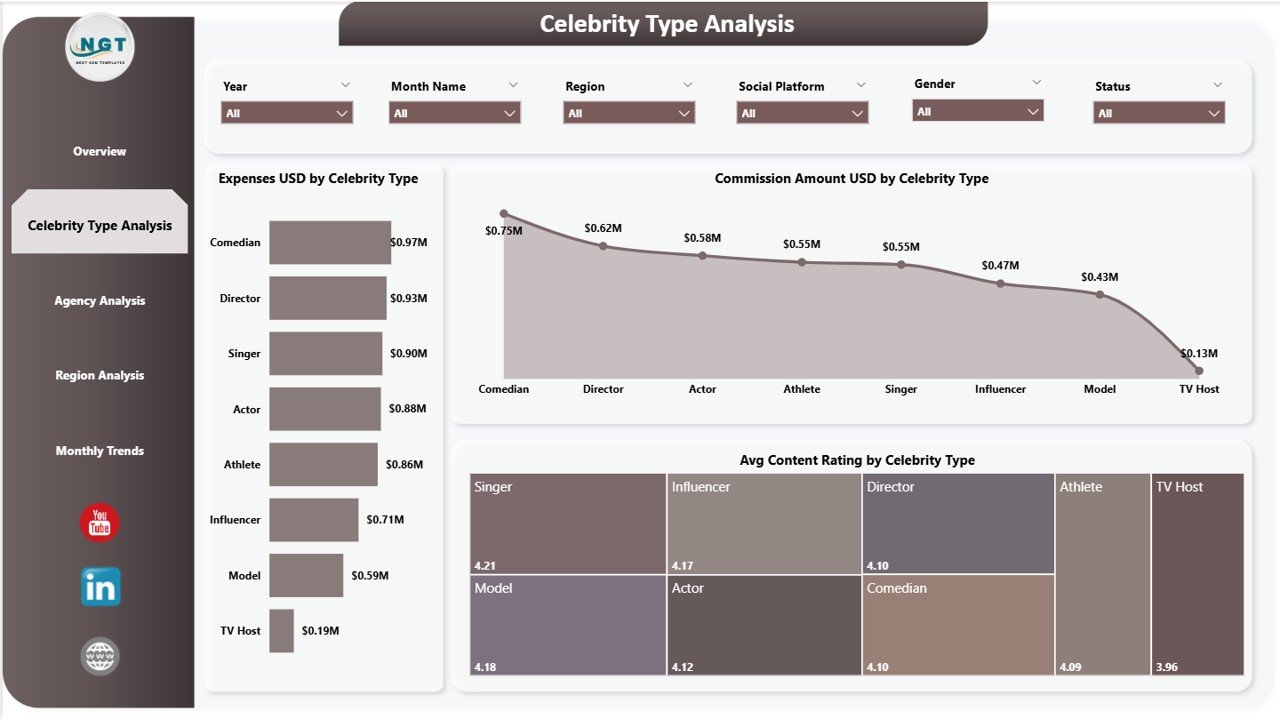
The Celebrity Type Analysis Page helps agencies evaluate campaign performance across different celebrity categories.
Users can filter the analysis using slicers to focus on specific segments.
Charts Included in Celebrity Type Analysis
This page contains three important charts:
-
Expenses USD by Celebrity Type – Displays campaign expenses associated with each celebrity category
-
Commission Amount USD by Celebrity Type – Shows agency commission earnings by celebrity type
-
Average Content Rating by Celebrity Type – Highlights the performance quality of content created by different celebrity groups
Because of this analysis, agencies can identify which celebrity types deliver the highest engagement and return on investment.
3. Agency Analysis – How Do Different Agencies Perform?
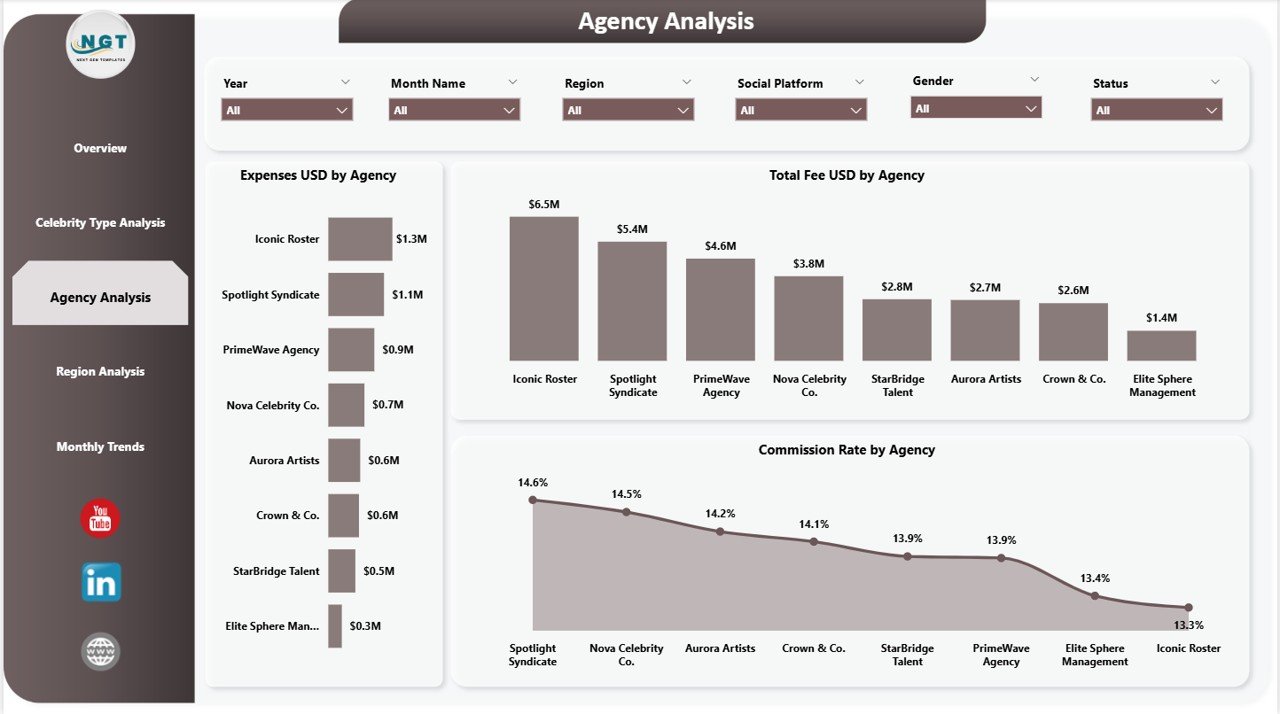
Celebrity marketing often involves multiple agencies managing campaigns for different clients.
The Agency Analysis Page evaluates financial performance and commission earnings across agencies.
This page includes slicers that allow users to filter campaigns by agency, celebrity type, or region.
Charts Included in Agency Analysis
The dashboard contains three charts:
-
Expenses USD by Agency – Shows how much each agency spends on campaigns
-
Total Fee USD by Agency – Displays total fees paid through each agency
-
Commission Rate by Agency – Highlights commission percentages earned by agencies
Therefore, organizations can easily compare agency performance and evaluate partnership effectiveness.
Click to Purchases Celebrity Management Dashboard in Power BI
4. Region Analysis – How Does Campaign Performance Vary by Region?
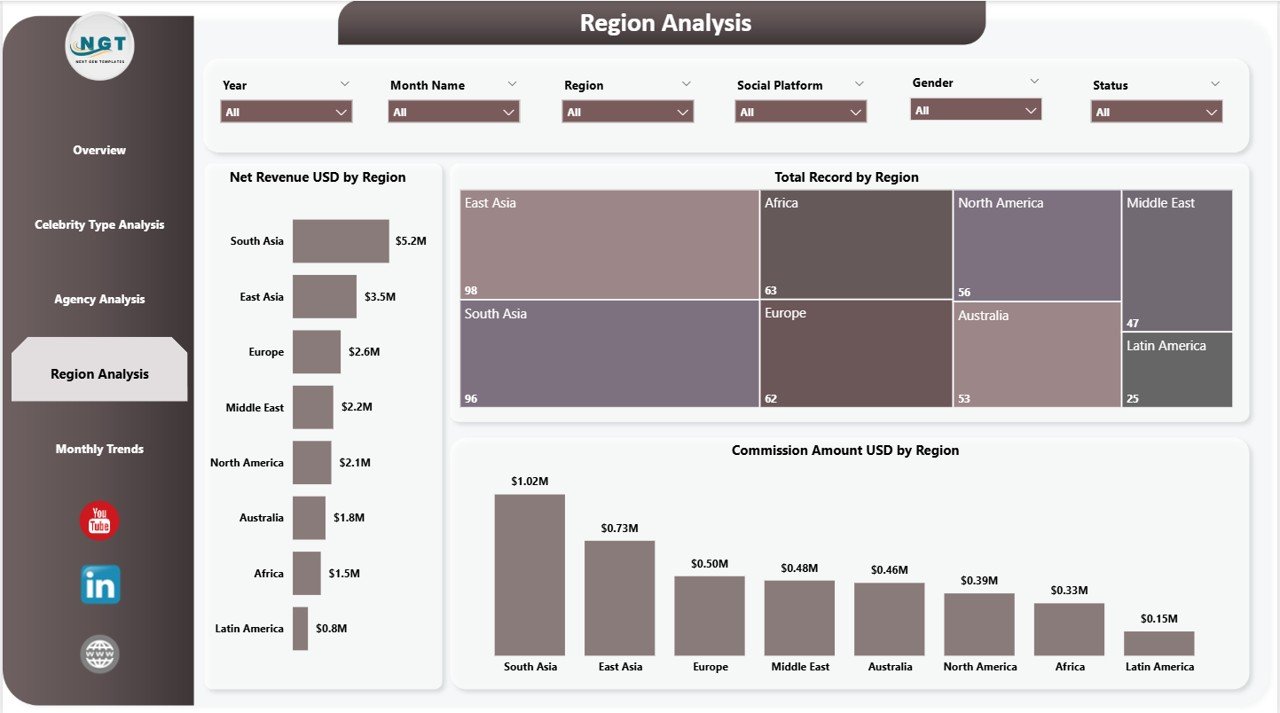
Celebrity campaigns often target different markets across the world. Audience engagement, revenue, and campaign performance may vary significantly across regions.
The Region Analysis Page helps users analyze these regional differences.
Charts Included in Region Analysis
This page includes three charts:
-
Net Revenue USD by Region – Displays revenue generated from campaigns in different regions
-
Total Record by Region – Shows the number of campaigns executed in each region
-
Commission Amount USD by Region – Displays commission earnings generated by regional campaigns
Because of this regional analysis, marketing teams can identify high-performing markets and allocate resources accordingly.
Click to Purchases Celebrity Management Dashboard in Power BI
5. Monthly Trends – How Do Campaign Metrics Change Over Time?
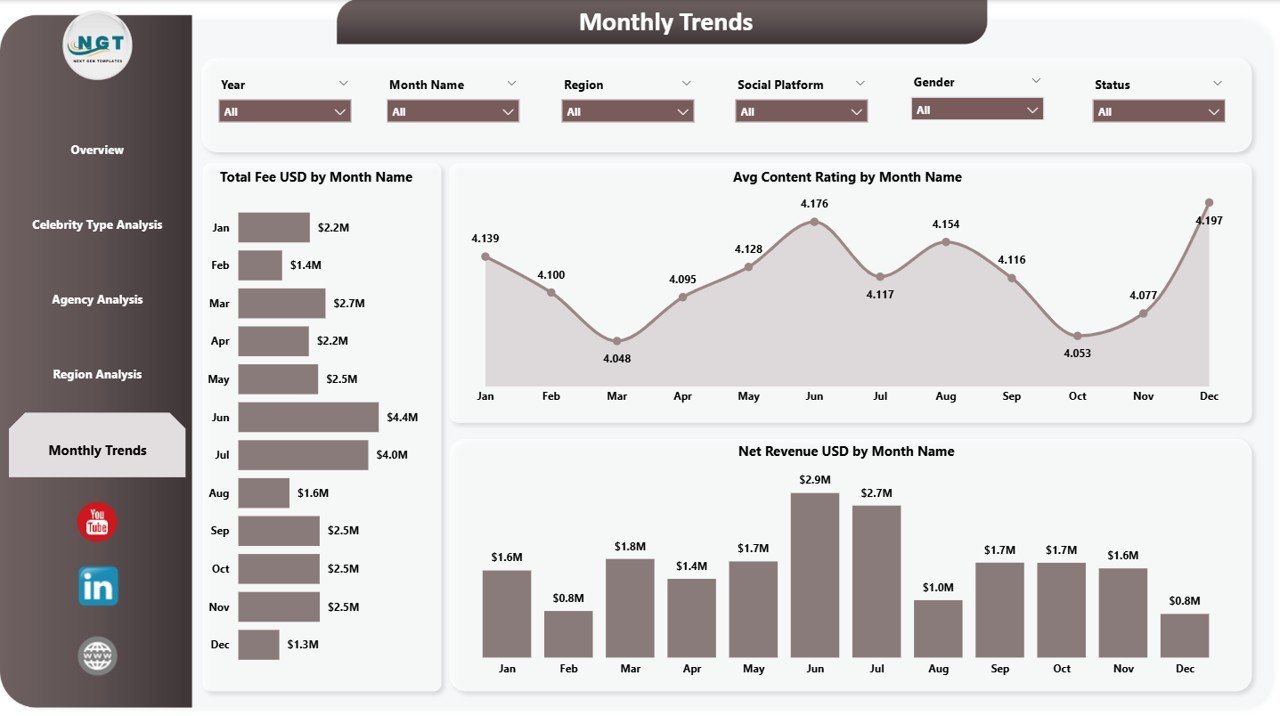
Campaign performance does not remain constant throughout the year. Therefore, tracking monthly trends becomes extremely important.
The Monthly Trends Page helps organizations understand how revenue, engagement, and campaign ratings evolve over time.
Charts Included in Monthly Trends
This section includes three charts:
-
Total Fee USD by Month Name – Tracks celebrity payments across months
-
Average Content Rating by Month Name – Displays monthly content performance ratings
-
Net Revenue USD by Month Name – Shows revenue trends across campaigns
With this analysis, agencies can identify seasonal campaign patterns and optimize marketing schedules.
Advantages of the Celebrity Management Dashboard in Power BI
Organizations gain several advantages when they use this dashboard.
1. Centralized Celebrity Campaign Monitoring
The dashboard allows agencies to manage all celebrity campaign data in one centralized system.
2. Improved Financial Visibility
Managers can easily track fees, expenses, commissions, and net revenue.
3. Better Campaign Performance Insights
Engagement rate and content ratings help evaluate campaign effectiveness.
4. Agency Performance Evaluation
The dashboard highlights commission rates and revenue contributions from each agency.
5. Regional Market Insights
Marketing teams can analyze campaign performance across different geographic markets.
6. Faster Decision-Making
Interactive Power BI visuals allow users to quickly explore campaign data.
7. Easy Data Exploration
Power BI slicers allow users to filter data by celebrity type, agency, region, or platform.
Click to Purchases Celebrity Management Dashboard in Power BI
Opportunities for Improvement in Celebrity Campaign Analytics
Although this dashboard provides strong insights, organizations can further improve analytics capabilities.
Social Media Data Integration
Organizations can connect the dashboard with:
-
Instagram analytics
-
YouTube engagement data
-
TikTok campaign performance
-
Twitter engagement metrics
Predictive Campaign Analytics
Teams can also add forecasting models to predict campaign revenue and engagement performance.
Audience Demographic Analysis
Adding demographic insights can help agencies understand audience preferences better.
Click to Purchases Celebrity Management Dashboard in Power BI
Best Practices for Using the Celebrity Management Dashboard in Power BI
Organizations should follow several best practices to maximize the effectiveness of this dashboard.
Maintain Accurate Data
Always ensure that campaign data remains accurate and consistent.
Update Campaign Data Regularly
Teams should update campaign records frequently to keep reports up to date.
Standardize Celebrity Categories
Organizations should use consistent celebrity type categories across campaigns.
Monitor Engagement Metrics
Regularly review engagement rate charts to identify successful campaigns.
Evaluate Agency Partnerships
Agencies that deliver higher ROI should receive more collaboration opportunities.
Train Team Members
Employees should understand how to use Power BI filters, visuals, and dashboards effectively.
Why Power BI is Ideal for Celebrity Management Analytics
Power BI offers several advantages for celebrity campaign analytics.
These include:
-
Interactive visual dashboards
-
Real-time analytics
-
Powerful filtering and drill-down capabilities
-
Automated data refresh
-
Integration with multiple data sources
Because of these features, Power BI helps agencies transform complex campaign data into easy-to-understand insights.
Conclusion
Celebrity marketing has become one of the most powerful promotional strategies for brands and agencies. However, managing multiple celebrity contracts, agencies, expenses, commissions, and engagement metrics requires a robust analytical system.
The Celebrity Management Dashboard in Power BI provides a powerful solution by transforming raw campaign data into interactive visual insights. With multiple analytical pages covering overview performance, celebrity type analysis, agency performance, regional insights, and monthly trends, this dashboard allows agencies to monitor campaigns effectively.
As a result, marketing teams can improve decision-making, optimize campaign investments, and maximize celebrity partnership performance.
Therefore, agencies and marketing professionals who manage influencer or celebrity campaigns should strongly consider using the Celebrity Management Dashboard in Power BI to enhance campaign analytics and strategic planning.
Click to Purchases Celebrity Management Dashboard in Power BI
Frequently Asked Questions (FAQs)
What is a Celebrity Management Dashboard in Power BI?
A Celebrity Management Dashboard in Power BI is an analytical reporting tool that tracks celebrity campaign performance, expenses, commissions, engagement metrics, and revenue.
Who should use this dashboard?
This dashboard is useful for:
-
Celebrity management agencies
-
Influencer marketing teams
-
Entertainment companies
-
Digital marketing agencies
-
Brand marketing teams
What data is required for the dashboard?
Typical data includes:
-
Celebrity name
-
Agency
-
Contract type
-
Campaign fee
-
Expenses
-
Commission rate
-
Engagement metrics
-
Campaign region
Can Power BI integrate social media data?
Yes. Power BI can connect to various data sources such as social media platforms, marketing tools, and databases.
Is this dashboard customizable?
Yes. Since the dashboard is built in Power BI, organizations can customize visuals, metrics, and filters according to their needs.
Click to Purchases Celebrity Management Dashboard in Power BI
How does this dashboard help marketing teams?
The dashboard helps teams track campaign performance, monitor expenses, evaluate engagement, and optimize marketing strategies using data-driven insights.
Visit our YouTube channel to learn step-by-step video tutorials